

discuss@lists.openscad.org

OpenSCAD general discussion Mailing-list

View all threads

Is it possible to make the x y z indicator the smae size as the axes numbers

JB
Jordan Brown
Tue, Nov 10, 2026 1:40 AM

On 11/9/2026 5:07 PM, Bob Roos via Discuss wrote:

The larger size will help.  Personally I would like it just a bit
bigger, but that is a big improvement.  I can tell the difference
between X and Y (Z was easy)

I'm glad it works for you.  (I think switching the style of the Y is a
big improvement.)  I just merged it into the mainline, so it should show
up in nightlies in a day or two.

We could perhaps look at making it bigger, but very much bigger (like
your original suggestion of the same size as the axis numbers) would
start to make it take up a lot more of the screen, and I think there
would (reasonably) be some complaints.

I don't really want to add a preference for it, but maybe we'll end up
there.

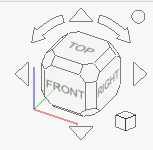
There's been some requests for something more like FreeCAD's navigation
cube, which also lets you select different views.  I'm not opposed to
such a thing in general (though I would oppose it at the moment, because
we want to get a release out), but I can't say that it interests me
enough to work on it.  It would definitely need to be an option, because
that thing is huge, and actually isn't as good for conveying where the
axes are.

On 11/9/2026 5:07 PM, Bob Roos via Discuss wrote: > > The larger size will help.  Personally I would like it just a bit > bigger, but that is a big improvement.  I can tell the difference > between X and Y (Z was easy) > I'm glad it works for you.  (I think switching the style of the Y is a big improvement.)  I just merged it into the mainline, so it should show up in nightlies in a day or two. We could perhaps look at making it bigger, but very much bigger (like your original suggestion of the same size as the axis numbers) would start to make it take up a lot more of the screen, and I think there would (reasonably) be some complaints. I don't really want to add a preference for it, but maybe we'll end up there. There's been some requests for something more like FreeCAD's navigation cube, which also lets you select different views.  I'm not opposed to such a thing in general (though I would oppose it at the moment, because we want to get a release out), but I can't say that it interests me enough to work on it.  It would definitely need to be an option, because that thing is huge, and actually isn't as good for conveying where the axes are.
MM
Michael Marx (spin)
Tue, Nov 10, 2026 5:48 AM

I don't have a high-res screen available ATM (with OpenSCAD), but years ago I ran OpenSCAD at 100% at  'Ultrasharp' 116 PPI,
the user interface was tiny and problematic, I had to scale to 150%. That was Windows-7, I understand later versions handle hi-res better.

I see HiDPI is now ~218 PPI and a quick search I see some toward 300PPI.

The axis marker should be easily usable on a HiDPI monitor.

Anyone got a ASUS ProArt Display 8K PA32KCX Professional Monitor – 32", 8K UHD (7680 x 4320) 275 PPI? (AUD$ 5-digits)
Which is the highest PPI Google found.


From: Jordan Brown via Discuss [mailto:discuss@lists.openscad.org]
Sent: Tuesday, November 10, 2026 12:41 PM
To: OpenSCAD general discussion Mailing-list
Cc: Bob Roos; Jordan Brown
Subject: [OpenSCAD] Re: Is it possible to make the x y z indicator the same size as theaxes numbers

On 11/9/2026 5:07 PM, Bob Roos via Discuss wrote:

The larger size will help.  Personally I would like it just a bit bigger, but that is a big improvement.  I can tell the difference between X and Y (Z was easy)

I'm glad it works for you.  (I think switching the style of the Y is a big improvement.)  I just merged it into the mainline, so it should show up in nightlies in a day or two.

We could perhaps look at making it bigger, but very much bigger (like your original suggestion of the same size as the axis numbers) would start to make it take up a lot more of the screen, and I think there would (reasonably) be some complaints.

I don't really want to add a preference for it, but maybe we'll end up there.

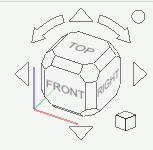
There's been some requests for something more like FreeCAD's navigation cube, which also lets you select different views.  I'm not opposed to such a thing in general (though I would oppose it at the moment, because we want to get a release out), but I can't say that it interests me enough to work on it.  It would definitely need to be an option, because that thing is huge, and actually isn't as good for conveying where the axes are.

I don't have a high-res screen available ATM (with OpenSCAD), but years ago I ran OpenSCAD at 100% at 'Ultrasharp' 116 PPI, the user interface was tiny and problematic, I had to scale to 150%. That was Windows-7, I understand later versions handle hi-res better. I see HiDPI is now ~218 PPI and a quick search I see some toward 300PPI. The axis marker should be easily usable on a HiDPI monitor. Anyone got a ASUS ProArt Display 8K PA32KCX Professional Monitor – 32", 8K UHD (7680 x 4320) 275 PPI? (AUD$ 5-digits) Which is the highest PPI Google found. _____ From: Jordan Brown via Discuss [mailto:discuss@lists.openscad.org] Sent: Tuesday, November 10, 2026 12:41 PM To: OpenSCAD general discussion Mailing-list Cc: Bob Roos; Jordan Brown Subject: [OpenSCAD] Re: Is it possible to make the x y z indicator the same size as theaxes numbers On 11/9/2026 5:07 PM, Bob Roos via Discuss wrote: The larger size will help. Personally I would like it just a bit bigger, but that is a big improvement. I can tell the difference between X and Y (Z was easy) I'm glad it works for you. (I think switching the style of the Y is a big improvement.) I just merged it into the mainline, so it should show up in nightlies in a day or two. We could perhaps look at making it bigger, but very much bigger (like your original suggestion of the same size as the axis numbers) would start to make it take up a lot more of the screen, and I think there would (reasonably) be some complaints. I don't really want to add a preference for it, but maybe we'll end up there. There's been some requests for something more like FreeCAD's navigation cube, which also lets you select different views. I'm not opposed to such a thing in general (though I would oppose it at the moment, because we want to get a release out), but I can't say that it interests me enough to work on it. It would definitely need to be an option, because that thing is huge, and actually isn't as good for conveying where the axes are.
JB
Jordan Brown
Tue, Nov 10, 2026 6:46 AM

On 11/10/2026 12:48 AM, Michael Marx (spin) via Discuss wrote:

I don't have a high-res screen available ATM (with OpenSCAD), but
years ago I ran OpenSCAD at 100% at  'Ultrasharp' 116 PPI,
the user interface was tiny and problematic, I had to scale to 150%.
That was Windows-7, I understand later versions handle hi-res better.

I see HiDPI is now ~218 PPI and a quick search I see some toward 300PPI.

The axis marker should be easily usable on a HiDPI monitor.

Anyone got a ASUS ProArt Display 8K PA32KCX Professional Monitor –
32", 8K UHD (7680 x 4320) 275 PPI? (AUD$ 5-digits)
Which is the highest PPI Google found.

There are two questions there, that might really be the same:

  • Do we deal well with high-density displays by default?
  • Do we deal well with OS-level scaling?
    o For extra credit, do we handle it well when the scaling changes
    while we're running?

I'm happy to do those experiments and have those discussions, but I
don't think focusing on this one UI widget is the right approach there.

On 11/10/2026 12:48 AM, Michael Marx (spin) via Discuss wrote: > > I don't have a high-res screen available ATM (with OpenSCAD), but > years ago I ran OpenSCAD at 100% at  'Ultrasharp' 116 PPI, > the user interface was tiny and problematic, I had to scale to 150%. > That was Windows-7, I understand later versions handle hi-res better. > > I see HiDPI is now ~218 PPI and a quick search I see some toward 300PPI. > > The axis marker should be easily usable on a HiDPI monitor. > > Anyone got a ASUS ProArt Display 8K PA32KCX Professional Monitor – > 32", 8K UHD (7680 x 4320) 275 PPI? (AUD$ 5-digits) > Which is the highest PPI Google found. > There are two questions there, that might really be the same: * Do we deal well with high-density displays by default? * Do we deal well with OS-level scaling? o For extra credit, do we handle it well when the scaling changes while we're running? I'm happy to do those experiments and have those discussions, but I don't think focusing on this one UI widget is the right approach there.
RV
Roel Vanhout
Tue, Nov 10, 2026 9:35 AM

On Tue, Nov 10, 2026 at 2:40 AM Jordan Brown via Discuss
discuss@lists.openscad.org wrote:

There's been some requests for something more like FreeCAD's navigation cube, which also lets you select different views.
I'm not opposed to such a thing in general (though I would oppose it at the moment, because we want to get a release out),
but I can't say that it interests me enough to work on it.  It would definitely need to be an option, because that thing is huge,
and actually isn't as good for conveying where the axes are.

I have a patch for adding one, but I've been holding off until the new
release is done before opening a discussion about that. I find myself
using it a lot. It could use some tweaking probably, so I have a
temporary development panel where you can change all the parameters
the cube uses to fine tune it. In due time...

cheers

On Tue, Nov 10, 2026 at 2:40 AM Jordan Brown via Discuss <discuss@lists.openscad.org> wrote: > There's been some requests for something more like FreeCAD's navigation cube, which also lets you select different views. > I'm not opposed to such a thing in general (though I would oppose it at the moment, because we want to get a release out), > but I can't say that it interests me enough to work on it. It would definitely need to be an option, because that thing is huge, > and actually isn't as good for conveying where the axes are. I have a patch for adding one, but I've been holding off until the new release is done before opening a discussion about that. I find myself using it a lot. It could use some tweaking probably, so I have a temporary development panel where you can change all the parameters the cube uses to fine tune it. In due time... cheers