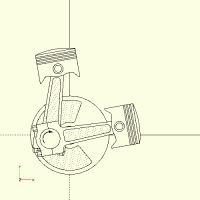
OpenSCAD prints for fun and profit

When I need good quality images I use the command line to make then twice
as big as I need on each axis and then use ImageMagik to resample them down
to the size I want. I then get antialiased images.
On Sat, 1 Nov 2025 at 03:16, Caddiy via Discuss discuss@lists.openscad.org
wrote:
Jordan Brown wrote:
Can you share the underlying .SCAD program privately? I'll see what I can
think of in terms of creating higher-resolution images from it.
Sorry, can’t find your address. Please send me an e-mail with the address
to which you want me to send the program.
OpenSCAD mailing list
To unsubscribe send an email to discuss-leave@lists.openscad.org

On Oct 31, 2025, at 8:15 PM, Caddiy via Discuss discuss@lists.openscad.org wrote:
Sorry, can’t find your address. Please send me an e-mail with the address to which you want me to send the program.
 Should be on every message that I send, but in case it is for some
 reason hidden: openscad@jordan.maileater.net.

On 10/31/25 22:22, Caddiy via Discuss wrote:
3D printing seems to be quite a science! I have often wondered whether it would be possible to make some of my designs in 3D, but I wonder if it is possible to get adequate resolution for bearings and other moving parts, and how to ensure they do not stick or sieze up completely? There is a maker space with 3D printers in the next big town that should be worth a visit.
I've done some harmonic drives on my printers, using crosman bb's for
the bearing balls, not as smooth as real bearings but tolerable, but
ran into two problems.
I needed far higher output speeds than obtainable due to the harmonics
lowest ratio of around 50/1. The eccentricity of lower ratios limited
the life despite making them from the more flexible PETG. For what I
wanted to do, an A or B axis on my milling machines, I combined a 3NM
stepper/servo and an ebay rvs worm drive with a 5/1 ratio. I can run
it, synchronized to an arc-second, at 600 rpms on a 42 volt supply.
Cheers, Gene Heskett, CET.
"There are four boxes to be used in defense of liberty:
soap, ballot, jury, and ammo. Please use in that order."
-Ed Howdershelt (Author, 1940)
If we desire respect for the law, we must first make the law respectable.
- Louis D. Brandeis
Don't poison our oceans, interdict drugs at the src.

I too antialias by scaling down oversized images in docsgen, for generating the BOSL2 wiki. Only downside is the half sized axis reference arrow in the corner.
-Revar
On Nov 1, 2025, at 6:36 AM, nop head via Discuss <discuss@lists.openscad.org> wrote:
When I need good quality images I use the command line to make then twice as big as I need on each axis and then use ImageMagik to resample them down to the size I want. I then get antialiased images.
On Sat, 1 Nov 2025 at 03:16, Caddiy via Discuss <discuss@lists.openscad.org> wrote:
Jordan Brown wrote:
Can you share the underlying .SCAD program privately? I'll see what I can think of in terms of creating higher-resolution images from it.
Sorry, can’t find your address. Please send me an e-mail with the address to which you want me to send the program.
_______________________________________________
OpenSCAD mailing list
To unsubscribe send an email to discuss-leave@lists.openscad.org_______________________________________________
OpenSCAD mailing list
To unsubscribe send an email to discuss-leave@lists.openscad.org

On Sat, Nov 01, 2025 at 12:14:59PM -0700, Revar Desmera via Discuss wrote:
I too antialias by scaling down oversized images in docsgen, for
generating the BOSL2 wiki. Only downside is the half sized axis
reference arrow in the corner.
Downsizing larger exported images, is a workaround that should not be
necessary.
It works in a pinch, but the todo list should one of these days be
populated with something that does this automatically.
I acknowledge that doing the antialiasing on the screen is resource
intensive, and has some disadvantages while debugging designs.
But for image export I think people should be able to choose a
higher-quality image than just the same as a screenshot.
Roger.
--
** R.E.Wolff@BitWizard.nl ** https://www.BitWizard.nl/ ** +31-15-2049110 **
** Verl. Spiegelmakerstraat 37 2645 LZ Delfgauw, The Netherlands.
** KVK: 27239233 **
f equals m times a. When your f is steady, and your m is going down
your a** is going up. -- Chris Hadfield about flying up the space shuttle.
** 'a' for accelleration.
On 11/1/2025 12:35 PM, Rogier Wolff via Discuss wrote:
But for image export I think people should be able to choose a
higher-quality image than just the same as a screenshot.
#4902 https://github.com/openscad/openscad/issues/4902 Have resolution
option for "Export as Image"
All it takes is somebody with the appropriate expertise, with the time
and interest to do it.
(I'm personally marginal on the expertise - I'm not sure I could do it,
but I'm not sure I couldn't - but I don' t have the time, and the only
reason I might have the interest is altruism; it wouldn't help anything
that I really want to do.)

Jordan Brown wrote:
Should be on every message that I send, but in case it is for some reason hidden: openscad@jordan.maileater.net.
Oh. Is that private and not the forum, sorry, mailing list?
I just need to check what modules are missing and copy them from my library.
Jordan Brown wrote:
#4902 https://github.com/openscad/openscad/issues/4902 Have resolution
option for "Export as Image"
I’m glad there are others too who would like to have something better than a screenshot.
All it takes is somebody with the appropriate expertise, with the time
and interest to do it.
(I'm personally marginal on the expertise - I'm not sure I could do it,
but I'm not sure I couldn't - but I don' t have the time, and the only
reason I might have the interest is altruism; it wouldn't help anything
that I really want to do.)
As a sweetener, I will send you the code for the animated engine, as requested.
For me it’s not urgent. There are so many programs that produce high quality prints that I thought getting OpenSCAD to do the same would not be too difficult for someone with the appropriate expertise.
How about a new program: OpenSCADdraw for armchair engineers? With animation, of course. I have already made a start!
On 11/1/2025 4:44 PM, Caddiy via Discuss wrote:
Jordan Brown wrote:
Should be on every message that I send, but in case it is for some
reason hidden: openscad@jordan.maileater.net.
Oh. Is that private and not the forum, sorry, mailing list?
Yes. (The mailing list is discuss@lists.openscad.org.) I assign unique
addresses to each organization or topic that I work on, to make filing
and spam management easier.
How about a new program: OpenSCADdraw for armchair engineers? With
animation, of course. I have already made a start!
I have not-infrequently wanted OpenSCAD-style programming in a drawing
program like Inkscape or CorelDraw. (CorelDraw sort of used to have it,
but they made that a "professional" feature. Inkscape allows Python
plug-ins, but if I understand them correctly they process the underlying
XML rather than letting you say high level things like "draw line".)
As I suspected, render-and-export-to-SVG yields non-jaggy results, but
only has the outline. (Enclosed.)
Previewing at a large size works, depending on how large your screen
is. Enclosed please find a 3840x1988 image that prints pretty well, at
somewhere in the range of 300-400 dots per inch, in the range of early
consumer laser printers but not up to modern 1000dpi standards.
Although many monitors are not capable of that kind of resolution, it
isn't much of an upgrade - I did it on a 4K TV that I paid $200 for at
Costco. (A 43" 4K TV as your monitor is game-changing.)
The command line can yield arbitrary-size images; enclosed please find
one at 11000x8500, which would in theory be 1000dpi on a US Letter page
(depending on the tool used to print it and the printer).
Here's the command line that generated that image:
"\Program Files\OpenSCAD-2025.10.21"\openscad -o 4T-engine-11k.png
--imgsize 11000,8500 --projection o --camera 25,0,300,25,0,0 "4T
engine JBrown.scad"
... but see my private mail for what kinds of things you need to do to
be able to use that command.
Note that I keep several OpenSCAD installs at any one time, which is why
the Program Files path is not for a stock OpenSCAD install. For stock
OpenSCAD it would be "\Program Files\OpenSCAD\openscad".
Net: you can get high-quality files (that you can then print using some
other tool). It would be good if there was a GUI way to do that
arbitrary-size preview, but there isn't.
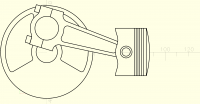
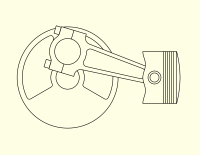
Oh look! It’s sprouted a second piston!
Dance of the cranky connecting rods.
It’s not immediately obvious from the animation, but a 90° V-engine has good balance.