
M
macdarren
Mon, Jan 18, 2021 8:51 PM
Using a Macbook Pro / Catalina
I decided to try the nightly build this morning...but when I started it up
the graphic display area was slowly rotating. I thought maybe that was just
some new look for strart up but would stop when I rendered something. But
it did not, my model just slowly rotates...I have never done any animation
in scad but I found the menu choice to 'animate' but it was
unchecked...checking and unchecking doesn't stop the rotation.
I looked around in the preference but didn't see anything that seemed like
it would help.
I moved back to my previous release candidate version and it rotates now
too.
I downloaded the latest RC6...nope still rotating.
I can't stop it (though it stops when scad looses screen focus)
I can't use scad like this, not only does it make viewing models difficult
but it so slows down my system as to
make it unusable.
Any suggestions...I have tried reboots and obviously reinstalled but it is
like something is stuck.
TIA
Darren
--
Sent from: http://forum.openscad.org/
Using a Macbook Pro / Catalina
I decided to try the nightly build this morning...but when I started it up
the graphic display area was slowly rotating. I thought maybe that was just
some new look for strart up but would stop when I rendered something. But
it did not, my model just slowly rotates...I have never done any animation
in scad but I found the menu choice to 'animate' but it was
unchecked...checking and unchecking doesn't stop the rotation.
I looked around in the preference but didn't see anything that seemed like
it would help.
I moved back to my previous release candidate version and it rotates now
too.
I downloaded the latest RC6...nope still rotating.
I can't stop it (though it stops when scad looses screen focus)
I can't use scad like this, not only does it make viewing models difficult
but it so slows down my system as to
make it unusable.
Any suggestions...I have tried reboots and obviously reinstalled but it is
like something is stuck.
TIA
Darren
--
Sent from: http://forum.openscad.org/

TP
Torsten Paul
Mon, Jan 18, 2021 8:56 PM
Disable all input device drivers
Edit->Preferences->Axes
or configure in a way that it's not triggering the
rotation.
ciao,
Torsten.
Disable all input device drivers
Edit->Preferences->Axes
or configure in a way that it's not triggering the
rotation.
ciao,
Torsten.

J
jon
Mon, Jan 18, 2021 8:56 PM
Darren:
Perhaps your pointing device is stuck, either physically or
programmatically. Have you tried unplugging/plugging your mouse/tablet
and/or re-booting? This has happened to me, although rarely.
Jon
On 1/18/2021 3:51 PM, macdarren via Discuss wrote:
Using a Macbook Pro / Catalina
I decided to try the nightly build this morning...but when I started it up
the graphic display area was slowly rotating. I thought maybe that was just
some new look for strart up but would stop when I rendered something. But
it did not, my model just slowly rotates...I have never done any animation
in scad but I found the menu choice to 'animate' but it was
unchecked...checking and unchecking doesn't stop the rotation.
I looked around in the preference but didn't see anything that seemed like
it would help.
I moved back to my previous release candidate version and it rotates now
too.
I downloaded the latest RC6...nope still rotating.
I can't stop it (though it stops when scad looses screen focus)
I can't use scad like this, not only does it make viewing models difficult
but it so slows down my system as to
make it unusable.
Any suggestions...I have tried reboots and obviously reinstalled but it is
like something is stuck.
TIA
Darren
Darren:
Perhaps your pointing device is stuck, either physically or
programmatically. Have you tried unplugging/plugging your mouse/tablet
and/or re-booting? This has happened to me, although rarely.
Jon
On 1/18/2021 3:51 PM, macdarren via Discuss wrote:
> Using a Macbook Pro / Catalina
>
> I decided to try the nightly build this morning...but when I started it up
> the graphic display area was slowly rotating. I thought maybe that was just
> some new look for strart up but would stop when I rendered something. But
> it did not, my model just slowly rotates...I have never done any animation
> in scad but I found the menu choice to 'animate' but it was
> unchecked...checking and unchecking doesn't stop the rotation.
> I looked around in the preference but didn't see anything that seemed like
> it would help.
>
> I moved back to my previous release candidate version and it rotates now
> too.
> I downloaded the latest RC6...nope still rotating.
> I can't stop it (though it stops when scad looses screen focus)
>
> I can't use scad like this, not only does it make viewing models difficult
> but it so slows down my system as to
> make it unusable.
>
> Any suggestions...I have tried reboots and obviously reinstalled but it is
> like something is stuck.
>
> TIA
> Darren
>
M
macdarren
Mon, Jan 18, 2021 9:30 PM
Solution found...possible nightly build bug.
Logging in as a different user and launching RC version of scad demonstrated
that it was something specific to my regular account. Removing scad prefs
in my user account stopped the rotation (lost all my recents and color
setting but nothing critical.)
So I can only conclude that maybe the nightly build corrupted something in
my prefs.
--
Sent from: http://forum.openscad.org/
Solution found...possible nightly build bug.
Logging in as a different user and launching RC version of scad demonstrated
that it was something specific to my regular account. Removing scad prefs
in my user account stopped the rotation (lost all my recents and color
setting but nothing critical.)
So I can only conclude that maybe the nightly build corrupted something in
my prefs.
--
Sent from: http://forum.openscad.org/

PR
Peter Ragosch
Tue, Jan 19, 2021 4:57 PM
The openSCAD Snap Version 2021.01.17 doesn't follow links in
/home/<user> on Manjaro.
Who is responsible for the snap? Where should i report this bug?
Detailed information about this OpenSCAD Version:
OpenSCAD Version: 2021.01.17
System information: Linux 5.10.7-3-MANJARO #1 SMP PREEMPT Fri Jan 15 21:11:34 UTC 2021 x86_64 Ubuntu Core 16 4 CPUs 31.27 GB RAM
User Agent: OpenSCAD/2021.01.17 (Linux x86_64; Ubuntu Core 16)
Compiler: GCC "5.4.0 20160609" 64bit
MinGW build: No
Debug build: No
Boost version: 1_58
Eigen version: 3.2.92
CGAL version, kernels: 4.14.3, Cartesian<Gmpq>, Extended_cartesian<Gmpq>, Epeck
OpenCSG version: OpenCSG 1.4.2
Qt version: 5.5.1
QScintilla version: 2.9.1
InputDrivers:
GLib version: 2.48.2
lodepng version: 20180910
libzip version: 1.0.1
fontconfig version: 2.11.94
freetype version: 2.6.1
harfbuzz version: 1.0.1
cairo version: 1.14.6
lib3mf version: 1.8.1
Features: input-driver-dbus, lazy-union
Application Path: /snap/openscad-nightly/2346/usr/bin
Documents Path: /home/peter/snap/openscad-nightly/2346/.local/share
User Documents Path: /home/peter/snap/openscad-nightly/2346
Resource Path: /snap/openscad-nightly/2346/usr/share/openscad-nightly
User Library Path: /home/peter/snap/openscad-nightly/2346/.local/share/OpenSCAD/libraries
User Config Path: /home/peter/snap/openscad-nightly/2346/.config/OpenSCAD
Backup Path: /home/peter/snap/openscad-nightly/2346/.local/share/OpenSCAD/backups
OPENSCADPATH: <not set>
OpenSCAD library path:
/home/peter/snap/openscad-nightly/2346/.local/share/OpenSCAD/libraries
/snap/openscad-nightly/2346/usr/share/openscad-nightly/libraries
Kind regards
Peter
The openSCAD Snap Version 2021.01.17 doesn't follow links in
/home/<user> on Manjaro.
Who is responsible for the snap? Where should i report this bug?
Detailed information about this OpenSCAD Version:
OpenSCAD Version: 2021.01.17
System information: Linux 5.10.7-3-MANJARO #1 SMP PREEMPT Fri Jan 15 21:11:34 UTC 2021 x86_64 Ubuntu Core 16 4 CPUs 31.27 GB RAM
User Agent: OpenSCAD/2021.01.17 (Linux x86_64; Ubuntu Core 16)
Compiler: GCC "5.4.0 20160609" 64bit
MinGW build: No
Debug build: No
Boost version: 1_58
Eigen version: 3.2.92
CGAL version, kernels: 4.14.3, Cartesian<Gmpq>, Extended_cartesian<Gmpq>, Epeck
OpenCSG version: OpenCSG 1.4.2
Qt version: 5.5.1
QScintilla version: 2.9.1
InputDrivers:
GLib version: 2.48.2
lodepng version: 20180910
libzip version: 1.0.1
fontconfig version: 2.11.94
freetype version: 2.6.1
harfbuzz version: 1.0.1
cairo version: 1.14.6
lib3mf version: 1.8.1
Features: input-driver-dbus, lazy-union
Application Path: /snap/openscad-nightly/2346/usr/bin
Documents Path: /home/peter/snap/openscad-nightly/2346/.local/share
User Documents Path: /home/peter/snap/openscad-nightly/2346
Resource Path: /snap/openscad-nightly/2346/usr/share/openscad-nightly
User Library Path: /home/peter/snap/openscad-nightly/2346/.local/share/OpenSCAD/libraries
User Config Path: /home/peter/snap/openscad-nightly/2346/.config/OpenSCAD
Backup Path: /home/peter/snap/openscad-nightly/2346/.local/share/OpenSCAD/backups
OPENSCADPATH: <not set>
OpenSCAD library path:
/home/peter/snap/openscad-nightly/2346/.local/share/OpenSCAD/libraries
/snap/openscad-nightly/2346/usr/share/openscad-nightly/libraries
Kind regards
Peter
TP
Torsten Paul
Tue, Jan 19, 2021 5:13 PM
On 19.01.21 17:57, Peter Ragosch wrote:
The openSCAD Snap Version 2021.01.17 doesn't follow links in
/home/<user> on Manjaro.
Who is responsible for the snap? Where should i report this bug?
I'm not sure this is a bug. Snap packages are encapsulated
by design which likely causes those links to point into
places that are not visible to the application packaged.
I need to check the documentation to find an official
statement about handling of links.
I suppose the OpenSCAD github repo would be the correct
place to report or request things.
ciao,
Torsten.
On 19.01.21 17:57, Peter Ragosch wrote:
> The openSCAD Snap Version 2021.01.17 doesn't follow links in
> /home/<user> on Manjaro.
>
> Who is responsible for the snap? Where should i report this bug?
I'm not sure this is a bug. Snap packages are encapsulated
by design which likely causes those links to point into
places that are not visible to the application packaged.
I need to check the documentation to find an official
statement about handling of links.
I suppose the OpenSCAD github repo would be the correct
place to report or request things.
ciao,
Torsten.

M
MichaelAtOz
Wed, Jan 20, 2021 2:09 AM
Works for me.
I presume we're talking about Help/Documentation etc.
OpenSCAD Version: 2021.01.17
System information: Linux 4.9.0-12-amd64 #1 SMP Debian 4.9.210-1 (2020-01-20) x86_64 Ubuntu Core 16
8 CPUs 31.32 GB RAM
User Agent: OpenSCAD/2021.01.17 (Linux x86_64; Ubuntu Core 16)
Compiler: GCC "5.4.0 20160609" 64bit
MinGW build: No
Debug build: No
Boost version: 1_58
Eigen version: 3.2.92
CGAL version, kernels: 4.14.3, Cartesian<Gmpq>, Extended_cartesian<Gmpq>, Epeck
OpenCSG version: OpenCSG 1.4.2
Qt version: 5.5.1
QScintilla version: 2.9.1
InputDrivers:
GLib version: 2.48.2
lodepng version: 20180910
libzip version: 1.0.1
fontconfig version: 2.11.94
freetype version: 2.6.1
harfbuzz version: 1.0.1
cairo version: 1.14.6
lib3mf version: 1.8.1
Features: input-driver-dbus, lazy-union
Application Path: /snap/openscad-nightly/2346/usr/bin
-----Original Message-----
Sent: Wed, 20 Jan 2021 04:13
Subject: Re: [OpenSCAD] Version 2021.01.17 (Snap) can't follow links
On 19.01.21 17:57, Peter Ragosch wrote:
The openSCAD Snap Version 2021.01.17 doesn't follow links in
Who is responsible for the snap? Where should i report this bug?
I'm not sure this is a bug. Snap packages are encapsulated
by design which likely causes those links to point into
places that are not visible to the application packaged.
I need to check the documentation to find an official
statement about handling of links.
I suppose the OpenSCAD github repo would be the correct
place to report or request things.
Works for me.
I presume we're talking about Help/Documentation etc.
OpenSCAD Version: 2021.01.17
System information: Linux 4.9.0-12-amd64 #1 SMP Debian 4.9.210-1 (2020-01-20) x86_64 Ubuntu Core 16
8 CPUs 31.32 GB RAM
User Agent: OpenSCAD/2021.01.17 (Linux x86_64; Ubuntu Core 16)
Compiler: GCC "5.4.0 20160609" 64bit
MinGW build: No
Debug build: No
Boost version: 1_58
Eigen version: 3.2.92
CGAL version, kernels: 4.14.3, Cartesian<Gmpq>, Extended_cartesian<Gmpq>, Epeck
OpenCSG version: OpenCSG 1.4.2
Qt version: 5.5.1
QScintilla version: 2.9.1
InputDrivers:
GLib version: 2.48.2
lodepng version: 20180910
libzip version: 1.0.1
fontconfig version: 2.11.94
freetype version: 2.6.1
harfbuzz version: 1.0.1
cairo version: 1.14.6
lib3mf version: 1.8.1
Features: input-driver-dbus, lazy-union
Application Path: /snap/openscad-nightly/2346/usr/bin
> -----Original Message-----
> From: Discuss [mailto:discuss-bounces@lists.openscad.org] On Behalf Of Torsten Paul
> Sent: Wed, 20 Jan 2021 04:13
> To: discuss@lists.openscad.org
> Subject: Re: [OpenSCAD] Version 2021.01.17 (Snap) can't follow links
>
> On 19.01.21 17:57, Peter Ragosch wrote:
> > The openSCAD Snap Version 2021.01.17 doesn't follow links in
> > /home/<user> on Manjaro.
> >
> > Who is responsible for the snap? Where should i report this bug?
>
> I'm not sure this is a bug. Snap packages are encapsulated
> by design which likely causes those links to point into
> places that are not visible to the application packaged.
>
> I need to check the documentation to find an official
> statement about handling of links.
>
> I suppose the OpenSCAD github repo would be the correct
> place to report or request things.
>
> ciao,
> Torsten.
>
> _______________________________________________
> OpenSCAD mailing list
> Discuss@lists.openscad.org
> http://lists.openscad.org/mailman/listinfo/discuss_lists.openscad.org
--
This email has been checked for viruses by AVG.
https://www.avg.com

HL
Hans L
Wed, Jan 20, 2021 8:37 AM
I interpreted that Peter was referring to something about symbolic links,
but it could mean any number of other things, like the links to
"include" or "use" files, or links from the Console or Error Log warnings
to the original source lines...
A more detailed description of the problem would certainly help.
On Tue, Jan 19, 2021 at 8:09 PM MichaelAtOz oz.at.michael@gmail.com wrote:
Works for me.
I presume we're talking about Help/Documentation etc.
OpenSCAD Version: 2021.01.17
System information: Linux 4.9.0-12-amd64 #1 SMP Debian 4.9.210-1
(2020-01-20) x86_64 Ubuntu Core 16 8 CPUs 31.32 GB RAM
User Agent: OpenSCAD/2021.01.17 (Linux x86_64; Ubuntu Core 16)
Compiler: GCC "5.4.0 20160609" 64bit
MinGW build: No
Debug build: No
Boost version: 1_58
Eigen version: 3.2.92
CGAL version, kernels: 4.14.3, Cartesian<Gmpq>, Extended_cartesian<Gmpq>,
Epeck
OpenCSG version: OpenCSG 1.4.2
Qt version: 5.5.1
QScintilla version: 2.9.1
InputDrivers:
GLib version: 2.48.2
lodepng version: 20180910
libzip version: 1.0.1
fontconfig version: 2.11.94
freetype version: 2.6.1
harfbuzz version: 1.0.1
cairo version: 1.14.6
lib3mf version: 1.8.1
Features: input-driver-dbus, lazy-union
Application Path: /snap/openscad-nightly/2346/usr/bin
-----Original Message-----
Sent: Wed, 20 Jan 2021 04:13
Subject: Re: [OpenSCAD] Version 2021.01.17 (Snap) can't follow links
On 19.01.21 17:57, Peter Ragosch wrote:
The openSCAD Snap Version 2021.01.17 doesn't follow links in
Who is responsible for the snap? Where should i report this bug?
I'm not sure this is a bug. Snap packages are encapsulated
by design which likely causes those links to point into
places that are not visible to the application packaged.
I need to check the documentation to find an official
statement about handling of links.
I suppose the OpenSCAD github repo would be the correct
place to report or request things.
I interpreted that Peter was referring to something about symbolic links,
but it could mean any number of other things, like the links to
"include" or "use" files, or links from the Console or Error Log warnings
to the original source lines...
A more detailed description of the problem would certainly help.
On Tue, Jan 19, 2021 at 8:09 PM MichaelAtOz <oz.at.michael@gmail.com> wrote:
> Works for me.
>
> I presume we're talking about Help/Documentation etc.
>
>
>
> OpenSCAD Version: 2021.01.17
>
> System information: Linux 4.9.0-12-amd64 #1 SMP Debian 4.9.210-1
> (2020-01-20) x86_64 Ubuntu Core 16 8 CPUs 31.32 GB RAM
>
> User Agent: OpenSCAD/2021.01.17 (Linux x86_64; Ubuntu Core 16)
>
> Compiler: GCC "5.4.0 20160609" 64bit
>
> MinGW build: No
>
> Debug build: No
>
> Boost version: 1_58
>
> Eigen version: 3.2.92
>
> CGAL version, kernels: 4.14.3, Cartesian<Gmpq>, Extended_cartesian<Gmpq>,
> Epeck
>
> OpenCSG version: OpenCSG 1.4.2
>
> Qt version: 5.5.1
>
> QScintilla version: 2.9.1
>
> InputDrivers:
>
> GLib version: 2.48.2
>
> lodepng version: 20180910
>
> libzip version: 1.0.1
>
> fontconfig version: 2.11.94
>
> freetype version: 2.6.1
>
> harfbuzz version: 1.0.1
>
> cairo version: 1.14.6
>
> lib3mf version: 1.8.1
>
> Features: input-driver-dbus, lazy-union
>
> Application Path: /snap/openscad-nightly/2346/usr/bin
>
>
>
> > -----Original Message-----
>
> > From: Discuss [mailto:discuss-bounces@lists.openscad.org] On Behalf Of
> Torsten Paul
>
> > Sent: Wed, 20 Jan 2021 04:13
>
> > To: discuss@lists.openscad.org
>
> > Subject: Re: [OpenSCAD] Version 2021.01.17 (Snap) can't follow links
>
> >
>
> > On 19.01.21 17:57, Peter Ragosch wrote:
>
> > > The openSCAD Snap Version 2021.01.17 doesn't follow links in
>
> > > /home/<user> on Manjaro.
>
> > >
>
> > > Who is responsible for the snap? Where should i report this bug?
>
> >
>
> > I'm not sure this is a bug. Snap packages are encapsulated
>
> > by design which likely causes those links to point into
>
> > places that are not visible to the application packaged.
>
> >
>
> > I need to check the documentation to find an official
>
> > statement about handling of links.
>
> >
>
> > I suppose the OpenSCAD github repo would be the correct
>
> > place to report or request things.
>
> >
>
> > ciao,
>
> > Torsten.
>
> >
>
> > _______________________________________________
>
> > OpenSCAD mailing list
>
> > Discuss@lists.openscad.org
>
> > http://lists.openscad.org/mailman/listinfo/discuss_lists.openscad.org
>
>
> <http://www.avg.com/email-signature?utm_medium=email&utm_source=link&utm_campaign=sig-email&utm_content=emailclient> Virus-free.
> www.avg.com
> <http://www.avg.com/email-signature?utm_medium=email&utm_source=link&utm_campaign=sig-email&utm_content=emailclient>
> <#m_3049544508436542575_DAB4FAD8-2DD7-40BB-A1B8-4E2AA1F9FDF2>
> _______________________________________________
> OpenSCAD mailing list
> Discuss@lists.openscad.org
> http://lists.openscad.org/mailman/listinfo/discuss_lists.openscad.org
>
PR
Peter Ragosch
Wed, Jan 20, 2021 3:32 PM
Well, Hans, you are right.
I mean symbolic links to folders that belong to me but are on other
partitions. The links were created in my $HOME like this one:
/home/peter#> ln -s /data/documents Documents
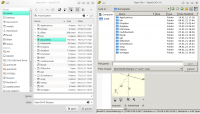
The attached picture shows the "Open File" dialog. Left of OpenSCAD
version 2019.05 (community) and right openscad-nightly 0 + git.2caad75
(snap).
The number of folders is lower on the right - all folders that should
be linked via a symbolic link are missing.
As an aside, links to the internet (help/documentation/etc.) work in
both versions.
Peter
Am Wed, 20 Jan 2021 02:37:17 -0600
schrieb Hans L thehans@gmail.com:
I interpreted that Peter was referring to something about symbolic
links, but it could mean any number of other things, like the links to
"include" or "use" files, or links from the Console or Error Log
warnings to the original source lines...
A more detailed description of the problem would certainly help.
On Tue, Jan 19, 2021 at 8:09 PM MichaelAtOz oz.at.michael@gmail.com
wrote:
Works for me.
I presume we're talking about Help/Documentation etc.
OpenSCAD Version: 2021.01.17
System information: Linux 4.9.0-12-amd64 #1 SMP Debian 4.9.210-1
(2020-01-20) x86_64 Ubuntu Core 16 8 CPUs 31.32 GB RAM
User Agent: OpenSCAD/2021.01.17 (Linux x86_64; Ubuntu Core 16)
Compiler: GCC "5.4.0 20160609" 64bit
MinGW build: No
Debug build: No
Boost version: 1_58
Eigen version: 3.2.92
CGAL version, kernels: 4.14.3, Cartesian<Gmpq>,
Extended_cartesian<Gmpq>, Epeck
OpenCSG version: OpenCSG 1.4.2
Qt version: 5.5.1
QScintilla version: 2.9.1
InputDrivers:
GLib version: 2.48.2
lodepng version: 20180910
libzip version: 1.0.1
fontconfig version: 2.11.94
freetype version: 2.6.1
harfbuzz version: 1.0.1
cairo version: 1.14.6
lib3mf version: 1.8.1
Features: input-driver-dbus, lazy-union
Application Path: /snap/openscad-nightly/2346/usr/bin
-----Original Message-----
Sent: Wed, 20 Jan 2021 04:13
Subject: Re: [OpenSCAD] Version 2021.01.17 (Snap) can't follow
links
On 19.01.21 17:57, Peter Ragosch wrote:
The openSCAD Snap Version 2021.01.17 doesn't follow links in
Who is responsible for the snap? Where should i report this bug?
I'm not sure this is a bug. Snap packages are encapsulated
by design which likely causes those links to point into
places that are not visible to the application packaged.
I need to check the documentation to find an official
statement about handling of links.
I suppose the OpenSCAD github repo would be the correct
place to report or request things.
Well, Hans, you are right.
I mean symbolic links to folders that belong to me but are on other
partitions. The links were created in my $HOME like this one:
/home/peter#> ln -s /data/documents Documents
The attached picture shows the "Open File" dialog. Left of OpenSCAD
version 2019.05 (community) and right openscad-nightly 0 + git.2caad75
(snap).
The number of folders is lower on the right - all folders that should
be linked via a symbolic link are missing.
As an aside, links to the internet (help/documentation/etc.) work in
both versions.
Peter
Am Wed, 20 Jan 2021 02:37:17 -0600
schrieb Hans L <thehans@gmail.com>:
> I interpreted that Peter was referring to something about symbolic
> links, but it could mean any number of other things, like the links to
> "include" or "use" files, or links from the Console or Error Log
> warnings to the original source lines...
>
> A more detailed description of the problem would certainly help.
>
> On Tue, Jan 19, 2021 at 8:09 PM MichaelAtOz <oz.at.michael@gmail.com>
> wrote:
>
> > Works for me.
> >
> > I presume we're talking about Help/Documentation etc.
> >
> >
> >
> > OpenSCAD Version: 2021.01.17
> >
> > System information: Linux 4.9.0-12-amd64 #1 SMP Debian 4.9.210-1
> > (2020-01-20) x86_64 Ubuntu Core 16 8 CPUs 31.32 GB RAM
> >
> > User Agent: OpenSCAD/2021.01.17 (Linux x86_64; Ubuntu Core 16)
> >
> > Compiler: GCC "5.4.0 20160609" 64bit
> >
> > MinGW build: No
> >
> > Debug build: No
> >
> > Boost version: 1_58
> >
> > Eigen version: 3.2.92
> >
> > CGAL version, kernels: 4.14.3, Cartesian<Gmpq>,
> > Extended_cartesian<Gmpq>, Epeck
> >
> > OpenCSG version: OpenCSG 1.4.2
> >
> > Qt version: 5.5.1
> >
> > QScintilla version: 2.9.1
> >
> > InputDrivers:
> >
> > GLib version: 2.48.2
> >
> > lodepng version: 20180910
> >
> > libzip version: 1.0.1
> >
> > fontconfig version: 2.11.94
> >
> > freetype version: 2.6.1
> >
> > harfbuzz version: 1.0.1
> >
> > cairo version: 1.14.6
> >
> > lib3mf version: 1.8.1
> >
> > Features: input-driver-dbus, lazy-union
> >
> > Application Path: /snap/openscad-nightly/2346/usr/bin
> >
> >
> >
> > > -----Original Message-----
> >
> > > From: Discuss [mailto:discuss-bounces@lists.openscad.org] On
> > > Behalf Of
> > Torsten Paul
> >
> > > Sent: Wed, 20 Jan 2021 04:13
> >
> > > To: discuss@lists.openscad.org
> >
> > > Subject: Re: [OpenSCAD] Version 2021.01.17 (Snap) can't follow
> > > links
> >
> > >
> >
> > > On 19.01.21 17:57, Peter Ragosch wrote:
> >
> > > > The openSCAD Snap Version 2021.01.17 doesn't follow links in
> >
> > > > /home/<user> on Manjaro.
> >
> > > >
> >
> > > > Who is responsible for the snap? Where should i report this bug?
> >
> > >
> >
> > > I'm not sure this is a bug. Snap packages are encapsulated
> >
> > > by design which likely causes those links to point into
> >
> > > places that are not visible to the application packaged.
> >
> > >
> >
> > > I need to check the documentation to find an official
> >
> > > statement about handling of links.
> >
> > >
> >
> > > I suppose the OpenSCAD github repo would be the correct
> >
> > > place to report or request things.
> >
> > >
> >
> > > ciao,
> >
> > > Torsten.
> >
> > >
> >
> > > _______________________________________________
> >
> > > OpenSCAD mailing list
> >
> > > Discuss@lists.openscad.org
> >
> > > http://lists.openscad.org/mailman/listinfo/discuss_lists.openscad.org
> >
> >
> > <http://www.avg.com/email-signature?utm_medium=email&utm_source=link&utm_campaign=sig-email&utm_content=emailclient>
> > Virus-free. www.avg.com
> > <http://www.avg.com/email-signature?utm_medium=email&utm_source=link&utm_campaign=sig-email&utm_content=emailclient>
> > <#m_3049544508436542575_DAB4FAD8-2DD7-40BB-A1B8-4E2AA1F9FDF2>
> > _______________________________________________
> > OpenSCAD mailing list
> > Discuss@lists.openscad.org
> > http://lists.openscad.org/mailman/listinfo/discuss_lists.openscad.org
> >

DM
Doug Moen
Wed, Jan 20, 2021 5:33 PM
A Snap application is sandboxed, and you can only access files in your home directory.
I have not found a way to override this behaviour, but if anyone else knows a workaround, please post.
I can't use the OpenSCAD snap due to this and other limitations.
However, the AppImage works just fine.
On Wed, Jan 20, 2021, at 10:32 AM, Peter Ragosch wrote:
Well, Hans, you are right.
I mean symbolic links to folders that belong to me but are on other
partitions. The links were created in my $HOME like this one:
/home/peter#> ln -s /data/documents Documents
The attached picture shows the "Open File" dialog. Left of OpenSCAD
version 2019.05 (community) and right openscad-nightly 0 + git.2caad75
(snap).
The number of folders is lower on the right - all folders that should
be linked via a symbolic link are missing.
As an aside, links to the internet (help/documentation/etc.) work in
both versions.
Peter
Am Wed, 20 Jan 2021 02:37:17 -0600
schrieb Hans L thehans@gmail.com:
I interpreted that Peter was referring to something about symbolic
links, but it could mean any number of other things, like the links to
"include" or "use" files, or links from the Console or Error Log
warnings to the original source lines...
A more detailed description of the problem would certainly help.
On Tue, Jan 19, 2021 at 8:09 PM MichaelAtOz oz.at.michael@gmail.com
wrote:
Works for me.
I presume we're talking about Help/Documentation etc.
OpenSCAD Version: 2021.01.17
System information: Linux 4.9.0-12-amd64 #1 SMP Debian 4.9.210-1
(2020-01-20) x86_64 Ubuntu Core 16 8 CPUs 31.32 GB RAM
User Agent: OpenSCAD/2021.01.17 (Linux x86_64; Ubuntu Core 16)
Compiler: GCC "5.4.0 20160609" 64bit
MinGW build: No
Debug build: No
Boost version: 1_58
Eigen version: 3.2.92
CGAL version, kernels: 4.14.3, Cartesian<Gmpq>,
Extended_cartesian<Gmpq>, Epeck
OpenCSG version: OpenCSG 1.4.2
Qt version: 5.5.1
QScintilla version: 2.9.1
InputDrivers:
GLib version: 2.48.2
lodepng version: 20180910
libzip version: 1.0.1
fontconfig version: 2.11.94
freetype version: 2.6.1
harfbuzz version: 1.0.1
cairo version: 1.14.6
lib3mf version: 1.8.1
Features: input-driver-dbus, lazy-union
Application Path: /snap/openscad-nightly/2346/usr/bin
-----Original Message-----
Sent: Wed, 20 Jan 2021 04:13
Subject: Re: [OpenSCAD] Version 2021.01.17 (Snap) can't follow
links
On 19.01.21 17:57, Peter Ragosch wrote:
The openSCAD Snap Version 2021.01.17 doesn't follow links in
Who is responsible for the snap? Where should i report this bug?
I'm not sure this is a bug. Snap packages are encapsulated
by design which likely causes those links to point into
places that are not visible to the application packaged.
I need to check the documentation to find an official
statement about handling of links.
I suppose the OpenSCAD github repo would be the correct
place to report or request things.
A Snap application is sandboxed, and you can only access files in your home directory.
I have not found a way to override this behaviour, but if anyone else knows a workaround, please post.
I can't use the OpenSCAD snap due to this and other limitations.
However, the AppImage works just fine.
On Wed, Jan 20, 2021, at 10:32 AM, Peter Ragosch wrote:
> Well, Hans, you are right.
>
> I mean symbolic links to folders that belong to me but are on other
> partitions. The links were created in my $HOME like this one:
>
> /home/peter#> ln -s /data/documents Documents
>
> The attached picture shows the "Open File" dialog. Left of OpenSCAD
> version 2019.05 (community) and right openscad-nightly 0 + git.2caad75
> (snap).
> The number of folders is lower on the right - all folders that should
> be linked via a symbolic link are missing.
>
> As an aside, links to the internet (help/documentation/etc.) work in
> both versions.
>
> Peter
>
> Am Wed, 20 Jan 2021 02:37:17 -0600
> schrieb Hans L <thehans@gmail.com>:
>
> > I interpreted that Peter was referring to something about symbolic
> > links, but it could mean any number of other things, like the links to
> > "include" or "use" files, or links from the Console or Error Log
> > warnings to the original source lines...
> >
> > A more detailed description of the problem would certainly help.
> >
> > On Tue, Jan 19, 2021 at 8:09 PM MichaelAtOz <oz.at.michael@gmail.com>
> > wrote:
> >
> > > Works for me.
> > >
> > > I presume we're talking about Help/Documentation etc.
> > >
> > >
> > >
> > > OpenSCAD Version: 2021.01.17
> > >
> > > System information: Linux 4.9.0-12-amd64 #1 SMP Debian 4.9.210-1
> > > (2020-01-20) x86_64 Ubuntu Core 16 8 CPUs 31.32 GB RAM
> > >
> > > User Agent: OpenSCAD/2021.01.17 (Linux x86_64; Ubuntu Core 16)
> > >
> > > Compiler: GCC "5.4.0 20160609" 64bit
> > >
> > > MinGW build: No
> > >
> > > Debug build: No
> > >
> > > Boost version: 1_58
> > >
> > > Eigen version: 3.2.92
> > >
> > > CGAL version, kernels: 4.14.3, Cartesian<Gmpq>,
> > > Extended_cartesian<Gmpq>, Epeck
> > >
> > > OpenCSG version: OpenCSG 1.4.2
> > >
> > > Qt version: 5.5.1
> > >
> > > QScintilla version: 2.9.1
> > >
> > > InputDrivers:
> > >
> > > GLib version: 2.48.2
> > >
> > > lodepng version: 20180910
> > >
> > > libzip version: 1.0.1
> > >
> > > fontconfig version: 2.11.94
> > >
> > > freetype version: 2.6.1
> > >
> > > harfbuzz version: 1.0.1
> > >
> > > cairo version: 1.14.6
> > >
> > > lib3mf version: 1.8.1
> > >
> > > Features: input-driver-dbus, lazy-union
> > >
> > > Application Path: /snap/openscad-nightly/2346/usr/bin
> > >
> > >
> > >
> > > > -----Original Message-----
> > >
> > > > From: Discuss [mailto:discuss-bounces@lists.openscad.org] On
> > > > Behalf Of
> > > Torsten Paul
> > >
> > > > Sent: Wed, 20 Jan 2021 04:13
> > >
> > > > To: discuss@lists.openscad.org
> > >
> > > > Subject: Re: [OpenSCAD] Version 2021.01.17 (Snap) can't follow
> > > > links
> > >
> > > >
> > >
> > > > On 19.01.21 17:57, Peter Ragosch wrote:
> > >
> > > > > The openSCAD Snap Version 2021.01.17 doesn't follow links in
> > >
> > > > > /home/<user> on Manjaro.
> > >
> > > > >
> > >
> > > > > Who is responsible for the snap? Where should i report this bug?
> > >
> > > >
> > >
> > > > I'm not sure this is a bug. Snap packages are encapsulated
> > >
> > > > by design which likely causes those links to point into
> > >
> > > > places that are not visible to the application packaged.
> > >
> > > >
> > >
> > > > I need to check the documentation to find an official
> > >
> > > > statement about handling of links.
> > >
> > > >
> > >
> > > > I suppose the OpenSCAD github repo would be the correct
> > >
> > > > place to report or request things.
> > >
> > > >
> > >
> > > > ciao,
> > >
> > > > Torsten.
> > >
> > > >
> > >
> > > > _______________________________________________
> > >
> > > > OpenSCAD mailing list
> > >
> > > > Discuss@lists.openscad.org
> > >
> > > > http://lists.openscad.org/mailman/listinfo/discuss_lists.openscad.org
> > >
> > >
> > > <http://www.avg.com/email-signature?utm_medium=email&utm_source=link&utm_campaign=sig-email&utm_content=emailclient>
> > > Virus-free. www.avg.com
> > > <http://www.avg.com/email-signature?utm_medium=email&utm_source=link&utm_campaign=sig-email&utm_content=emailclient>
> > > <#m_3049544508436542575_DAB4FAD8-2DD7-40BB-A1B8-4E2AA1F9FDF2>
> > > _______________________________________________
> > > OpenSCAD mailing list
> > > Discuss@lists.openscad.org
> > > http://lists.openscad.org/mailman/listinfo/discuss_lists.openscad.org
> > >
>
>
> _______________________________________________
> OpenSCAD mailing list
> Discuss@lists.openscad.org
> http://lists.openscad.org/mailman/listinfo/discuss_lists.openscad.org
>
>
> *Attachments:*
> * Screenshot_20210120_155011_Open_File_Dialog.png

