

discuss@lists.openscad.org

OpenSCAD general discussion Mailing-list

View all threads

Where do I start?

H
HHarry17
Sat, Feb 4, 2017 11:37 AM

Hi William,
Have tried to follow your advice and feel ashamed that I failed.
I tried again and again and used OpenSCAD, FreeCAD, 123D Design and
LibreCAD.
Of course I also downloaded the manuals of these programs.
In LibreCAD I could make the lines and circles thicker (1.5 mm), but when I
converted the result to an STL file it only produced a flat picture, which
means that it was not in 3D.

I still don't know how to tell the program the thickness of the wire. In my
first e-mail I gave the measurements with the two pictures: the overall
length is 42 mm (NOT 33 mm), the
upper circle is 9 mm -1.5 mm thick, the middle circle is 5 mm by 1.5 mm, the
base is 10 mm long by 1.5 mm thick and the two slanted lines are 29.5 mm
long and also 1.5 mm thick.
I would be very grateful to you if you could show (teach) me how to tackle
this problem.
Please write me some program lines in OpenSCAD so that I can 3D print this
earring......

I read the messages I received in the mailing list, I did not understand a
thing with most of them, like "Translate 3 vector axis to a camera
viewpoint" or "Read a data file in an
OpenSCAD drawing file". This is not 3D for Dummies like me..... Please help
me!?

With kind regards,

Ed Schijf
Purmerend
Netherlands

--
View this message in context: http://forum.openscad.org/Where-do-I-start-tp20272p20313.html
Sent from the OpenSCAD mailing list archive at Nabble.com.

Hi William, Have tried to follow your advice and feel ashamed that I failed. I tried again and again and used OpenSCAD, FreeCAD, 123D Design and LibreCAD. Of course I also downloaded the manuals of these programs. In LibreCAD I could make the lines and circles thicker (1.5 mm), but when I converted the result to an STL file it only produced a flat picture, which means that it was not in 3D. I still don't know how to tell the program the thickness of the wire. In my first e-mail I gave the measurements with the two pictures: the overall length is 42 mm (NOT 33 mm), the upper circle is 9 mm -1.5 mm thick, the middle circle is 5 mm by 1.5 mm, the base is 10 mm long by 1.5 mm thick and the two slanted lines are 29.5 mm long and also 1.5 mm thick. I would be very grateful to you if you could show (teach) me how to tackle this problem. Please write me some program lines in OpenSCAD so that I can 3D print this earring...... I read the messages I received in the mailing list, I did not understand a thing with most of them, like "Translate 3 vector axis to a camera viewpoint" or "Read a data file in an OpenSCAD drawing file". This is not 3D for Dummies like me..... Please help me!? With kind regards, Ed Schijf Purmerend Netherlands -- View this message in context: http://forum.openscad.org/Where-do-I-start-tp20272p20313.html Sent from the OpenSCAD mailing list archive at Nabble.com.
RP
Ronaldo Persiano
Sat, Feb 4, 2017 1:12 PM

Ed,

Maybe you should forget the customizer for a while.

Try this code:
a = 40;
r1 = 10;
r2 = 5;
translate([0,0,a])
difference(){
cylinder(r=r1,h=h1);
cylinder(r=r2,h=h1+1);
}

rotate(30)
cube([2,8,3]);

Paste it in editor window and press F6. Observe the image and study the
code that produce it comparing with the descriptions in the Manual of
translate, rotate, cube, cylinder, and difference.

That is what you will need for your model but with incorrect dimensions.
Modify it to achieve your target model.

There is many levels of discussion in this forum. Don't be scared with
them. I don't understand all discussion either.

Ronaldo

2017-02-04 9:37 GMT-02:00 HHarry17 edschijf@upcmail.nl:

Hi William,
Have tried to follow your advice and feel ashamed that I failed.
I tried again and again and used OpenSCAD, FreeCAD, 123D Design and
LibreCAD.
Of course I also downloaded the manuals of these programs.
In LibreCAD I could make the lines and circles thicker (1.5 mm), but when I
converted the result to an STL file it only produced a flat picture, which
means that it was not in 3D.

I still don't know how to tell the program the thickness of the wire. In my
first e-mail I gave the measurements with the two pictures: the overall
length is 42 mm (NOT 33 mm), the
upper circle is 9 mm -1.5 mm thick, the middle circle is 5 mm by 1.5 mm,
the
base is 10 mm long by 1.5 mm thick and the two slanted lines are 29.5 mm
long and also 1.5 mm thick.
I would be very grateful to you if you could show (teach) me how to tackle
this problem.
Please write me some program lines in OpenSCAD so that I can 3D print this
earring......

I read the messages I received in the mailing list, I did not understand a
thing with most of them, like "Translate 3 vector axis to a camera
viewpoint" or "Read a data file in an
OpenSCAD drawing file". This is not 3D for Dummies like me..... Please help
me!?

With kind regards,

Ed Schijf
Purmerend
Netherlands

--
View this message in context: http://forum.openscad.org/Where-do-I-start-
tp20272p20313.html
Sent from the OpenSCAD mailing list archive at Nabble.com.


OpenSCAD mailing list
Discuss@lists.openscad.org
http://lists.openscad.org/mailman/listinfo/discuss_lists.openscad.org
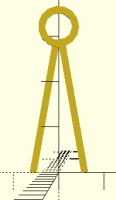
Ed, Maybe you should forget the customizer for a while. Try this code: a = 40; r1 = 10; r2 = 5; translate([0,0,a]) difference(){ cylinder(r=r1,h=h1); cylinder(r=r2,h=h1+1); } rotate(30) cube([2,8,3]); Paste it in editor window and press F6. Observe the image and study the code that produce it comparing with the descriptions in the Manual of translate, rotate, cube, cylinder, and difference. That is what you will need for your model but with incorrect dimensions. Modify it to achieve your target model. There is many levels of discussion in this forum. Don't be scared with them. I don't understand all discussion either. Ronaldo 2017-02-04 9:37 GMT-02:00 HHarry17 <edschijf@upcmail.nl>: > Hi William, > Have tried to follow your advice and feel ashamed that I failed. > I tried again and again and used OpenSCAD, FreeCAD, 123D Design and > LibreCAD. > Of course I also downloaded the manuals of these programs. > In LibreCAD I could make the lines and circles thicker (1.5 mm), but when I > converted the result to an STL file it only produced a flat picture, which > means that it was not in 3D. > > I still don't know how to tell the program the thickness of the wire. In my > first e-mail I gave the measurements with the two pictures: the overall > length is 42 mm (NOT 33 mm), the > upper circle is 9 mm -1.5 mm thick, the middle circle is 5 mm by 1.5 mm, > the > base is 10 mm long by 1.5 mm thick and the two slanted lines are 29.5 mm > long and also 1.5 mm thick. > I would be very grateful to you if you could show (teach) me how to tackle > this problem. > Please write me some program lines in OpenSCAD so that I can 3D print this > earring...... > > I read the messages I received in the mailing list, I did not understand a > thing with most of them, like "Translate 3 vector axis to a camera > viewpoint" or "Read a data file in an > OpenSCAD drawing file". This is not 3D for Dummies like me..... Please help > me!? > > With kind regards, > > Ed Schijf > Purmerend > Netherlands > > > > > -- > View this message in context: http://forum.openscad.org/Where-do-I-start- > tp20272p20313.html > Sent from the OpenSCAD mailing list archive at Nabble.com. > > _______________________________________________ > OpenSCAD mailing list > Discuss@lists.openscad.org > http://lists.openscad.org/mailman/listinfo/discuss_lists.openscad.org >
ES
Ed Schijf
Sat, Feb 4, 2017 2:06 PM

Thank you very much, Ronaldo!!!
I am going to try this and I will keep you posted!

Have a nice weekend,

Ed

Op 4/02/2017 om 14:12 schreef Ronaldo Persiano:

Ed,

Maybe you should forget the customizer for a while.

Try this code:
a = 40;
r1 = 10;
r2 = 5;
translate([0,0,a])
difference(){
cylinder(r=r1,h=h1);
cylinder(r=r2,h=h1+1);
}

rotate(30)
cube([2,8,3]);

Paste it in editor window and press F6. Observe the image and study
the code that produce it comparing with the descriptions in the Manual
of translate, rotate, cube, cylinder, and difference.

That is what you will need for your model but with incorrect
dimensions. Modify it to achieve your target model.

There is many levels of discussion in this forum. Don't be scared with
them. I don't understand all discussion either.

Ronaldo

2017-02-04 9:37 GMT-02:00 HHarry17 <edschijf@upcmail.nl
mailto:edschijf@upcmail.nl>:

 Hi William,
 Have tried to follow your advice and feel ashamed that I failed.
 I tried again and again and used OpenSCAD, FreeCAD, 123D Design and
 LibreCAD.
 Of course I also downloaded the manuals of these programs.
 In LibreCAD I could make the lines and circles thicker (1.5 mm),
 but when I
 converted the result to an STL file it only produced a flat
 picture, which
 means that it was not in 3D.

 I still don't know how to tell the program the thickness of the
 wire. In my
 first e-mail I gave the measurements with the two pictures: the
 overall
 length is 42 mm (NOT 33 mm), the
 upper circle is 9 mm -1.5 mm thick, the middle circle is 5 mm by
 1.5 mm, the
 base is 10 mm long by 1.5 mm thick and the two slanted lines are
 29.5 mm
 long and also 1.5 mm thick.
 I would be very grateful to you if you could show (teach) me how
 to tackle
 this problem.
 Please write me some program lines in OpenSCAD so that I can 3D
 print this
 earring......

 I read the messages I received in the mailing list, I did not
 understand a
 thing with most of them, like "Translate 3 vector axis to a camera
 viewpoint" or "Read a data file in an
 OpenSCAD drawing file". This is not 3D for Dummies like me.....
 Please help
 me!?

 With kind regards,

 Ed Schijf
 Purmerend
 Netherlands


 --
 View this message in context:
 http://forum.openscad.org/Where-do-I-start-tp20272p20313.html
 <http://forum.openscad.org/Where-do-I-start-tp20272p20313.html>
 Sent from the OpenSCAD mailing list archive at Nabble.com.

 _______________________________________________
 OpenSCAD mailing list
 Discuss@lists.openscad.org <mailto:Discuss@lists.openscad.org>
 http://lists.openscad.org/mailman/listinfo/discuss_lists.openscad.org
 <http://lists.openscad.org/mailman/listinfo/discuss_lists.openscad.org>

OpenSCAD mailing list
Discuss@lists.openscad.org
http://lists.openscad.org/mailman/listinfo/discuss_lists.openscad.org

Thank you very much, Ronaldo!!! I am going to try this and I will keep you posted! Have a nice weekend, Ed Op 4/02/2017 om 14:12 schreef Ronaldo Persiano: > Ed, > > Maybe you should forget the customizer for a while. > > Try this code: > a = 40; > r1 = 10; > r2 = 5; > translate([0,0,a]) > difference(){ > cylinder(r=r1,h=h1); > cylinder(r=r2,h=h1+1); > } > > rotate(30) > cube([2,8,3]); > > Paste it in editor window and press F6. Observe the image and study > the code that produce it comparing with the descriptions in the Manual > of translate, rotate, cube, cylinder, and difference. > > That is what you will need for your model but with incorrect > dimensions. Modify it to achieve your target model. > > There is many levels of discussion in this forum. Don't be scared with > them. I don't understand all discussion either. > > Ronaldo > > 2017-02-04 9:37 GMT-02:00 HHarry17 <edschijf@upcmail.nl > <mailto:edschijf@upcmail.nl>>: > > Hi William, > Have tried to follow your advice and feel ashamed that I failed. > I tried again and again and used OpenSCAD, FreeCAD, 123D Design and > LibreCAD. > Of course I also downloaded the manuals of these programs. > In LibreCAD I could make the lines and circles thicker (1.5 mm), > but when I > converted the result to an STL file it only produced a flat > picture, which > means that it was not in 3D. > > I still don't know how to tell the program the thickness of the > wire. In my > first e-mail I gave the measurements with the two pictures: the > overall > length is 42 mm (NOT 33 mm), the > upper circle is 9 mm -1.5 mm thick, the middle circle is 5 mm by > 1.5 mm, the > base is 10 mm long by 1.5 mm thick and the two slanted lines are > 29.5 mm > long and also 1.5 mm thick. > I would be very grateful to you if you could show (teach) me how > to tackle > this problem. > Please write me some program lines in OpenSCAD so that I can 3D > print this > earring...... > > I read the messages I received in the mailing list, I did not > understand a > thing with most of them, like "Translate 3 vector axis to a camera > viewpoint" or "Read a data file in an > OpenSCAD drawing file". This is not 3D for Dummies like me..... > Please help > me!? > > With kind regards, > > Ed Schijf > Purmerend > Netherlands > > > > > -- > View this message in context: > http://forum.openscad.org/Where-do-I-start-tp20272p20313.html > <http://forum.openscad.org/Where-do-I-start-tp20272p20313.html> > Sent from the OpenSCAD mailing list archive at Nabble.com. > > _______________________________________________ > OpenSCAD mailing list > Discuss@lists.openscad.org <mailto:Discuss@lists.openscad.org> > http://lists.openscad.org/mailman/listinfo/discuss_lists.openscad.org > <http://lists.openscad.org/mailman/listinfo/discuss_lists.openscad.org> > > > > > _______________________________________________ > OpenSCAD mailing list > Discuss@lists.openscad.org > http://lists.openscad.org/mailman/listinfo/discuss_lists.openscad.org
RP
Ronaldo Persiano
Sat, Feb 4, 2017 2:57 PM

I have written the code and have not tested  it (I did it from a mobile).
And there is errors in it, sorry.

Replace the code by:

a = 40;
r1 = 10;
r2 = 5;
h1 = 3;
translate([0,a,0])
difference(){
cylinder(r=r1,h=h1);
cylinder(r=r2,h=h1+1);
}

rotate(30)
cube([2,30,3]);

2017-02-04 12:06 GMT-02:00 Ed Schijf edschijf@upcmail.nl:

Thank you very much, Ronaldo!!!
I am going to try this and I will keep you posted!

Have a nice weekend,

Ed

Op 4/02/2017 om 14:12 schreef Ronaldo Persiano:

Ed,

Maybe you should forget the customizer for a while.

Try this code:
a = 40;
r1 = 10;
r2 = 5;
translate([0,0,a])
difference(){
cylinder(r=r1,h=h1);
cylinder(r=r2,h=h1+1);
}

rotate(30)
cube([2,8,3]);

Paste it in editor window and press F6. Observe the image and study the
code that produce it comparing with the descriptions in the Manual of
translate, rotate, cube, cylinder, and difference.

That is what you will need for your model but with incorrect dimensions.
Modify it to achieve your target model.

There is many levels of discussion in this forum. Don't be scared with
them. I don't understand all discussion either.

Ronaldo

2017-02-04 9:37 GMT-02:00 HHarry17 edschijf@upcmail.nl:

Hi William,
Have tried to follow your advice and feel ashamed that I failed.
I tried again and again and used OpenSCAD, FreeCAD, 123D Design and
LibreCAD.
Of course I also downloaded the manuals of these programs.
In LibreCAD I could make the lines and circles thicker (1.5 mm), but when
I
converted the result to an STL file it only produced a flat picture, which
means that it was not in 3D.

I still don't know how to tell the program the thickness of the wire. In
my
first e-mail I gave the measurements with the two pictures: the overall
length is 42 mm (NOT 33 mm), the
upper circle is 9 mm -1.5 mm thick, the middle circle is 5 mm by 1.5 mm,
the
base is 10 mm long by 1.5 mm thick and the two slanted lines are 29.5 mm
long and also 1.5 mm thick.
I would be very grateful to you if you could show (teach) me how to tackle
this problem.
Please write me some program lines in OpenSCAD so that I can 3D print this
earring......

I read the messages I received in the mailing list, I did not understand a
thing with most of them, like "Translate 3 vector axis to a camera
viewpoint" or "Read a data file in an
OpenSCAD drawing file". This is not 3D for Dummies like me..... Please
help
me!?

With kind regards,

Ed Schijf
Purmerend
Netherlands

--
View this message in context: http://forum.openscad.org/Wher
e-do-I-start-tp20272p20313.html
Sent from the OpenSCAD mailing list archive at Nabble.com.


OpenSCAD mailing list
Discuss@lists.openscad.org
http://lists.openscad.org/mailman/listinfo/discuss_lists.openscad.org


OpenSCAD mailing listDiscuss@lists.openscad.orghttp://lists.openscad.org/mailman/listinfo/discuss_lists.openscad.org


OpenSCAD mailing list
Discuss@lists.openscad.org
http://lists.openscad.org/mailman/listinfo/discuss_lists.openscad.org

I have written the code and have not tested it (I did it from a mobile). And there is errors in it, sorry. Replace the code by: a = 40; r1 = 10; r2 = 5; h1 = 3; translate([0,a,0]) difference(){ cylinder(r=r1,h=h1); cylinder(r=r2,h=h1+1); } rotate(30) cube([2,30,3]); 2017-02-04 12:06 GMT-02:00 Ed Schijf <edschijf@upcmail.nl>: > Thank you very much, Ronaldo!!! > I am going to try this and I will keep you posted! > > Have a nice weekend, > > Ed > > Op 4/02/2017 om 14:12 schreef Ronaldo Persiano: > > Ed, > > Maybe you should forget the customizer for a while. > > Try this code: > a = 40; > r1 = 10; > r2 = 5; > translate([0,0,a]) > difference(){ > cylinder(r=r1,h=h1); > cylinder(r=r2,h=h1+1); > } > > rotate(30) > cube([2,8,3]); > > Paste it in editor window and press F6. Observe the image and study the > code that produce it comparing with the descriptions in the Manual of > translate, rotate, cube, cylinder, and difference. > > That is what you will need for your model but with incorrect dimensions. > Modify it to achieve your target model. > > There is many levels of discussion in this forum. Don't be scared with > them. I don't understand all discussion either. > > Ronaldo > > 2017-02-04 9:37 GMT-02:00 HHarry17 <edschijf@upcmail.nl>: > >> Hi William, >> Have tried to follow your advice and feel ashamed that I failed. >> I tried again and again and used OpenSCAD, FreeCAD, 123D Design and >> LibreCAD. >> Of course I also downloaded the manuals of these programs. >> In LibreCAD I could make the lines and circles thicker (1.5 mm), but when >> I >> converted the result to an STL file it only produced a flat picture, which >> means that it was not in 3D. >> >> I still don't know how to tell the program the thickness of the wire. In >> my >> first e-mail I gave the measurements with the two pictures: the overall >> length is 42 mm (NOT 33 mm), the >> upper circle is 9 mm -1.5 mm thick, the middle circle is 5 mm by 1.5 mm, >> the >> base is 10 mm long by 1.5 mm thick and the two slanted lines are 29.5 mm >> long and also 1.5 mm thick. >> I would be very grateful to you if you could show (teach) me how to tackle >> this problem. >> Please write me some program lines in OpenSCAD so that I can 3D print this >> earring...... >> >> I read the messages I received in the mailing list, I did not understand a >> thing with most of them, like "Translate 3 vector axis to a camera >> viewpoint" or "Read a data file in an >> OpenSCAD drawing file". This is not 3D for Dummies like me..... Please >> help >> me!? >> >> With kind regards, >> >> Ed Schijf >> Purmerend >> Netherlands >> >> >> >> >> -- >> View this message in context: http://forum.openscad.org/Wher >> e-do-I-start-tp20272p20313.html >> Sent from the OpenSCAD mailing list archive at Nabble.com. >> >> _______________________________________________ >> OpenSCAD mailing list >> Discuss@lists.openscad.org >> http://lists.openscad.org/mailman/listinfo/discuss_lists.openscad.org >> > > > > _______________________________________________ > OpenSCAD mailing listDiscuss@lists.openscad.orghttp://lists.openscad.org/mailman/listinfo/discuss_lists.openscad.org > > > > _______________________________________________ > OpenSCAD mailing list > Discuss@lists.openscad.org > http://lists.openscad.org/mailman/listinfo/discuss_lists.openscad.org > >
ES
Ed Schijf
Sat, Feb 4, 2017 4:07 PM

You are great, Ronaldo,

I already found that h1 was missing.
I will experiment with the various parameters, because I see a little
bit of progress now!!

Thanks again, Ed

Op 4/02/2017 om 15:57 schreef Ronaldo Persiano:

I have written the code and have not tested  it (I did it from a
mobile). And there is errors in it, sorry.

Replace the code by:

a = 40;
r1 = 10;
r2 = 5;
h1 = 3;
translate([0,a,0])
difference(){
cylinder(r=r1,h=h1);
cylinder(r=r2,h=h1+1);
}

rotate(30)
cube([2,30,3]);

2017-02-04 12:06 GMT-02:00 Ed Schijf <edschijf@upcmail.nl
mailto:edschijf@upcmail.nl>:

 Thank you very much, Ronaldo!!!
 I am going to try this and I will keep you posted!

 Have a nice weekend,

 Ed

 Op 4/02/2017 om 14:12 schreef Ronaldo Persiano:
 Ed,

 Maybe you should forget the customizer for a while.

 Try this code:
 a = 40;
 r1 = 10;
 r2 = 5;
 translate([0,0,a])
    difference(){
       cylinder(r=r1,h=h1);
       cylinder(r=r2,h=h1+1);
    }

 rotate(30)
    cube([2,8,3]);

 Paste it in editor window and press F6. Observe the image and
 study the code that produce it comparing with the descriptions in
 the Manual of translate, rotate, cube, cylinder, and difference.

 That is what you will need for your model but with incorrect
 dimensions. Modify it to achieve your target model.

 There is many levels of discussion in this forum. Don't be scared
 with them. I don't understand all discussion either.

 Ronaldo

 2017-02-04 9:37 GMT-02:00 HHarry17 <edschijf@upcmail.nl
 <mailto:edschijf@upcmail.nl>>:

     Hi William,
     Have tried to follow your advice and feel ashamed that I failed.
     I tried again and again and used OpenSCAD, FreeCAD, 123D
     Design and
     LibreCAD.
     Of course I also downloaded the manuals of these programs.
     In LibreCAD I could make the lines and circles thicker (1.5
     mm), but when I
     converted the result to an STL file it only produced a flat
     picture, which
     means that it was not in 3D.

     I still don't know how to tell the program the thickness of
     the wire. In my
     first e-mail I gave the measurements with the two pictures:
     the overall
     length is 42 mm (NOT 33 mm), the
     upper circle is 9 mm -1.5 mm thick, the middle circle is 5 mm
     by 1.5 mm, the
     base is 10 mm long by 1.5 mm thick and the two slanted lines
     are 29.5 mm
     long and also 1.5 mm thick.
     I would be very grateful to you if you could show (teach) me
     how to tackle
     this problem.
     Please write me some program lines in OpenSCAD so that I can
     3D print this
     earring......

     I read the messages I received in the mailing list, I did not
     understand a
     thing with most of them, like "Translate 3 vector axis to a
     camera
     viewpoint" or "Read a data file in an
     OpenSCAD drawing file". This is not 3D for Dummies like
     me..... Please help
     me!?

     With kind regards,

     Ed Schijf
     Purmerend
     Netherlands


     --
     View this message in context:
     http://forum.openscad.org/Where-do-I-start-tp20272p20313.html
     <http://forum.openscad.org/Where-do-I-start-tp20272p20313.html>
     Sent from the OpenSCAD mailing list archive at Nabble.com.

     _______________________________________________
     OpenSCAD mailing list
     Discuss@lists.openscad.org <mailto:Discuss@lists.openscad.org>
     http://lists.openscad.org/mailman/listinfo/discuss_lists.openscad.org
     <http://lists.openscad.org/mailman/listinfo/discuss_lists.openscad.org>


 _______________________________________________
 OpenSCAD mailing list
 Discuss@lists.openscad.org <mailto:Discuss@lists.openscad.org>
 http://lists.openscad.org/mailman/listinfo/discuss_lists.openscad.org
 <http://lists.openscad.org/mailman/listinfo/discuss_lists.openscad.org>
 _______________________________________________ OpenSCAD mailing
 list Discuss@lists.openscad.org
 <mailto:Discuss@lists.openscad.org>
 http://lists.openscad.org/mailman/listinfo/discuss_lists.openscad.org
 <http://lists.openscad.org/mailman/listinfo/discuss_lists.openscad.org>

OpenSCAD mailing list
Discuss@lists.openscad.org
http://lists.openscad.org/mailman/listinfo/discuss_lists.openscad.org

You are great, Ronaldo, I already found that h1 was missing. I will experiment with the various parameters, because I see a little bit of progress now!! Thanks again, Ed Op 4/02/2017 om 15:57 schreef Ronaldo Persiano: > I have written the code and have not tested it (I did it from a > mobile). And there is errors in it, sorry. > > Replace the code by: > > a = 40; > r1 = 10; > r2 = 5; > h1 = 3; > translate([0,a,0]) > difference(){ > cylinder(r=r1,h=h1); > cylinder(r=r2,h=h1+1); > } > > rotate(30) > cube([2,30,3]); > > > 2017-02-04 12:06 GMT-02:00 Ed Schijf <edschijf@upcmail.nl > <mailto:edschijf@upcmail.nl>>: > > Thank you very much, Ronaldo!!! > I am going to try this and I will keep you posted! > > Have a nice weekend, > > Ed > > Op 4/02/2017 om 14:12 schreef Ronaldo Persiano: >> Ed, >> >> Maybe you should forget the customizer for a while. >> >> Try this code: >> a = 40; >> r1 = 10; >> r2 = 5; >> translate([0,0,a]) >> difference(){ >> cylinder(r=r1,h=h1); >> cylinder(r=r2,h=h1+1); >> } >> >> rotate(30) >> cube([2,8,3]); >> >> Paste it in editor window and press F6. Observe the image and >> study the code that produce it comparing with the descriptions in >> the Manual of translate, rotate, cube, cylinder, and difference. >> >> That is what you will need for your model but with incorrect >> dimensions. Modify it to achieve your target model. >> >> There is many levels of discussion in this forum. Don't be scared >> with them. I don't understand all discussion either. >> >> Ronaldo >> >> 2017-02-04 9:37 GMT-02:00 HHarry17 <edschijf@upcmail.nl >> <mailto:edschijf@upcmail.nl>>: >> >> Hi William, >> Have tried to follow your advice and feel ashamed that I failed. >> I tried again and again and used OpenSCAD, FreeCAD, 123D >> Design and >> LibreCAD. >> Of course I also downloaded the manuals of these programs. >> In LibreCAD I could make the lines and circles thicker (1.5 >> mm), but when I >> converted the result to an STL file it only produced a flat >> picture, which >> means that it was not in 3D. >> >> I still don't know how to tell the program the thickness of >> the wire. In my >> first e-mail I gave the measurements with the two pictures: >> the overall >> length is 42 mm (NOT 33 mm), the >> upper circle is 9 mm -1.5 mm thick, the middle circle is 5 mm >> by 1.5 mm, the >> base is 10 mm long by 1.5 mm thick and the two slanted lines >> are 29.5 mm >> long and also 1.5 mm thick. >> I would be very grateful to you if you could show (teach) me >> how to tackle >> this problem. >> Please write me some program lines in OpenSCAD so that I can >> 3D print this >> earring...... >> >> I read the messages I received in the mailing list, I did not >> understand a >> thing with most of them, like "Translate 3 vector axis to a >> camera >> viewpoint" or "Read a data file in an >> OpenSCAD drawing file". This is not 3D for Dummies like >> me..... Please help >> me!? >> >> With kind regards, >> >> Ed Schijf >> Purmerend >> Netherlands >> >> >> >> >> -- >> View this message in context: >> http://forum.openscad.org/Where-do-I-start-tp20272p20313.html >> <http://forum.openscad.org/Where-do-I-start-tp20272p20313.html> >> Sent from the OpenSCAD mailing list archive at Nabble.com. >> >> _______________________________________________ >> OpenSCAD mailing list >> Discuss@lists.openscad.org <mailto:Discuss@lists.openscad.org> >> http://lists.openscad.org/mailman/listinfo/discuss_lists.openscad.org >> <http://lists.openscad.org/mailman/listinfo/discuss_lists.openscad.org> >> >> >> >> >> _______________________________________________ >> OpenSCAD mailing list >> Discuss@lists.openscad.org <mailto:Discuss@lists.openscad.org> >> http://lists.openscad.org/mailman/listinfo/discuss_lists.openscad.org >> <http://lists.openscad.org/mailman/listinfo/discuss_lists.openscad.org> > _______________________________________________ OpenSCAD mailing > list Discuss@lists.openscad.org > <mailto:Discuss@lists.openscad.org> > http://lists.openscad.org/mailman/listinfo/discuss_lists.openscad.org > <http://lists.openscad.org/mailman/listinfo/discuss_lists.openscad.org> > > > _______________________________________________ > OpenSCAD mailing list > Discuss@lists.openscad.org > http://lists.openscad.org/mailman/listinfo/discuss_lists.openscad.org
ES
Ed Schijf
Sat, Feb 4, 2017 7:00 PM

Hi Ronaldo,

Sorry to bother you again...
After experimenting I got this result:

a = 32;
r1 = 4.5;
r2 = 3;
h1 = 1.5;
translate([0,a,0])
difference(){
cylinder(r=r1,h=h1);
cylinder(r=r2,h=h1+1);
}

translate([5,0,1.5])
rotate(10)
cube([1.5,29.5,1.5]);
translate([-6.5,0,-3.5])
rotate(-10)
cube([1.5,29.5,1.5]);

I begin to feel a lot better, but it is not complete yet.
The lines must touch the upper circle, now they are in front and behind it.
The bottom line must be 10 mm long x 1.5 x 1.5 wide. So, the two lines
are too far apart at the bottom.
The second circle (r1 = 2.5, r2 = 1.75) must be approx. in the middle of
the two lines.

Could you please have another look at it? Thanks again for your help!

Ed

Op 4/02/2017 om 15:57 schreef Ronaldo Persiano:

I have written the code and have not tested  it (I did it from a
mobile). And there is errors in it, sorry.

Replace the code by:

a = 40;
r1 = 10;
r2 = 5;
h1 = 3;
translate([0,a,0])
difference(){
cylinder(r=r1,h=h1);
cylinder(r=r2,h=h1+1);
}

rotate(30)
cube([2,30,3]);

2017-02-04 12:06 GMT-02:00 Ed Schijf <edschijf@upcmail.nl
mailto:edschijf@upcmail.nl>:

 Thank you very much, Ronaldo!!!
 I am going to try this and I will keep you posted!

 Have a nice weekend,

 Ed

 Op 4/02/2017 om 14:12 schreef Ronaldo Persiano:
 Ed,

 Maybe you should forget the customizer for a while.

 Try this code:
 a = 40;
 r1 = 10;
 r2 = 5;
 translate([0,0,a])
    difference(){
       cylinder(r=r1,h=h1);
       cylinder(r=r2,h=h1+1);
    }

 rotate(30)
    cube([2,8,3]);

 Paste it in editor window and press F6. Observe the image and
 study the code that produce it comparing with the descriptions in
 the Manual of translate, rotate, cube, cylinder, and difference.

 That is what you will need for your model but with incorrect
 dimensions. Modify it to achieve your target model.

 There is many levels of discussion in this forum. Don't be scared
 with them. I don't understand all discussion either.

 Ronaldo

 2017-02-04 9:37 GMT-02:00 HHarry17 <edschijf@upcmail.nl
 <mailto:edschijf@upcmail.nl>>:

     Hi William,
     Have tried to follow your advice and feel ashamed that I failed.
     I tried again and again and used OpenSCAD, FreeCAD, 123D
     Design and
     LibreCAD.
     Of course I also downloaded the manuals of these programs.
     In LibreCAD I could make the lines and circles thicker (1.5
     mm), but when I
     converted the result to an STL file it only produced a flat
     picture, which
     means that it was not in 3D.

     I still don't know how to tell the program the thickness of
     the wire. In my
     first e-mail I gave the measurements with the two pictures:
     the overall
     length is 42 mm (NOT 33 mm), the
     upper circle is 9 mm -1.5 mm thick, the middle circle is 5 mm
     by 1.5 mm, the
     base is 10 mm long by 1.5 mm thick and the two slanted lines
     are 29.5 mm
     long and also 1.5 mm thick.
     I would be very grateful to you if you could show (teach) me
     how to tackle
     this problem.
     Please write me some program lines in OpenSCAD so that I can
     3D print this
     earring......

     I read the messages I received in the mailing list, I did not
     understand a
     thing with most of them, like "Translate 3 vector axis to a
     camera
     viewpoint" or "Read a data file in an
     OpenSCAD drawing file". This is not 3D for Dummies like
     me..... Please help
     me!?

     With kind regards,

     Ed Schijf
     Purmerend
     Netherlands


     --
     View this message in context:
     http://forum.openscad.org/Where-do-I-start-tp20272p20313.html
     <http://forum.openscad.org/Where-do-I-start-tp20272p20313.html>
     Sent from the OpenSCAD mailing list archive at Nabble.com.

     _______________________________________________
     OpenSCAD mailing list
     Discuss@lists.openscad.org <mailto:Discuss@lists.openscad.org>
     http://lists.openscad.org/mailman/listinfo/discuss_lists.openscad.org
     <http://lists.openscad.org/mailman/listinfo/discuss_lists.openscad.org>


 _______________________________________________
 OpenSCAD mailing list
 Discuss@lists.openscad.org <mailto:Discuss@lists.openscad.org>
 http://lists.openscad.org/mailman/listinfo/discuss_lists.openscad.org
 <http://lists.openscad.org/mailman/listinfo/discuss_lists.openscad.org>
 _______________________________________________ OpenSCAD mailing
 list Discuss@lists.openscad.org
 <mailto:Discuss@lists.openscad.org>
 http://lists.openscad.org/mailman/listinfo/discuss_lists.openscad.org
 <http://lists.openscad.org/mailman/listinfo/discuss_lists.openscad.org>

OpenSCAD mailing list
Discuss@lists.openscad.org
http://lists.openscad.org/mailman/listinfo/discuss_lists.openscad.org

Hi Ronaldo, Sorry to bother you again... After experimenting I got this result: a = 32; r1 = 4.5; r2 = 3; h1 = 1.5; translate([0,a,0]) difference(){ cylinder(r=r1,h=h1); cylinder(r=r2,h=h1+1); } translate([5,0,1.5]) rotate(10) cube([1.5,29.5,1.5]); translate([-6.5,0,-3.5]) rotate(-10) cube([1.5,29.5,1.5]); I begin to feel a lot better, but it is not complete yet. The lines must touch the upper circle, now they are in front and behind it. The bottom line must be 10 mm long x 1.5 x 1.5 wide. So, the two lines are too far apart at the bottom. The second circle (r1 = 2.5, r2 = 1.75) must be approx. in the middle of the two lines. Could you please have another look at it? Thanks again for your help! Ed Op 4/02/2017 om 15:57 schreef Ronaldo Persiano: > I have written the code and have not tested it (I did it from a > mobile). And there is errors in it, sorry. > > Replace the code by: > > a = 40; > r1 = 10; > r2 = 5; > h1 = 3; > translate([0,a,0]) > difference(){ > cylinder(r=r1,h=h1); > cylinder(r=r2,h=h1+1); > } > > rotate(30) > cube([2,30,3]); > > > 2017-02-04 12:06 GMT-02:00 Ed Schijf <edschijf@upcmail.nl > <mailto:edschijf@upcmail.nl>>: > > Thank you very much, Ronaldo!!! > I am going to try this and I will keep you posted! > > Have a nice weekend, > > Ed > > Op 4/02/2017 om 14:12 schreef Ronaldo Persiano: >> Ed, >> >> Maybe you should forget the customizer for a while. >> >> Try this code: >> a = 40; >> r1 = 10; >> r2 = 5; >> translate([0,0,a]) >> difference(){ >> cylinder(r=r1,h=h1); >> cylinder(r=r2,h=h1+1); >> } >> >> rotate(30) >> cube([2,8,3]); >> >> Paste it in editor window and press F6. Observe the image and >> study the code that produce it comparing with the descriptions in >> the Manual of translate, rotate, cube, cylinder, and difference. >> >> That is what you will need for your model but with incorrect >> dimensions. Modify it to achieve your target model. >> >> There is many levels of discussion in this forum. Don't be scared >> with them. I don't understand all discussion either. >> >> Ronaldo >> >> 2017-02-04 9:37 GMT-02:00 HHarry17 <edschijf@upcmail.nl >> <mailto:edschijf@upcmail.nl>>: >> >> Hi William, >> Have tried to follow your advice and feel ashamed that I failed. >> I tried again and again and used OpenSCAD, FreeCAD, 123D >> Design and >> LibreCAD. >> Of course I also downloaded the manuals of these programs. >> In LibreCAD I could make the lines and circles thicker (1.5 >> mm), but when I >> converted the result to an STL file it only produced a flat >> picture, which >> means that it was not in 3D. >> >> I still don't know how to tell the program the thickness of >> the wire. In my >> first e-mail I gave the measurements with the two pictures: >> the overall >> length is 42 mm (NOT 33 mm), the >> upper circle is 9 mm -1.5 mm thick, the middle circle is 5 mm >> by 1.5 mm, the >> base is 10 mm long by 1.5 mm thick and the two slanted lines >> are 29.5 mm >> long and also 1.5 mm thick. >> I would be very grateful to you if you could show (teach) me >> how to tackle >> this problem. >> Please write me some program lines in OpenSCAD so that I can >> 3D print this >> earring...... >> >> I read the messages I received in the mailing list, I did not >> understand a >> thing with most of them, like "Translate 3 vector axis to a >> camera >> viewpoint" or "Read a data file in an >> OpenSCAD drawing file". This is not 3D for Dummies like >> me..... Please help >> me!? >> >> With kind regards, >> >> Ed Schijf >> Purmerend >> Netherlands >> >> >> >> >> -- >> View this message in context: >> http://forum.openscad.org/Where-do-I-start-tp20272p20313.html >> <http://forum.openscad.org/Where-do-I-start-tp20272p20313.html> >> Sent from the OpenSCAD mailing list archive at Nabble.com. >> >> _______________________________________________ >> OpenSCAD mailing list >> Discuss@lists.openscad.org <mailto:Discuss@lists.openscad.org> >> http://lists.openscad.org/mailman/listinfo/discuss_lists.openscad.org >> <http://lists.openscad.org/mailman/listinfo/discuss_lists.openscad.org> >> >> >> >> >> _______________________________________________ >> OpenSCAD mailing list >> Discuss@lists.openscad.org <mailto:Discuss@lists.openscad.org> >> http://lists.openscad.org/mailman/listinfo/discuss_lists.openscad.org >> <http://lists.openscad.org/mailman/listinfo/discuss_lists.openscad.org> > _______________________________________________ OpenSCAD mailing > list Discuss@lists.openscad.org > <mailto:Discuss@lists.openscad.org> > http://lists.openscad.org/mailman/listinfo/discuss_lists.openscad.org > <http://lists.openscad.org/mailman/listinfo/discuss_lists.openscad.org> > > > _______________________________________________ > OpenSCAD mailing list > Discuss@lists.openscad.org > http://lists.openscad.org/mailman/listinfo/discuss_lists.openscad.org
RP
Ronaldo Persiano
Sat, Feb 4, 2017 7:39 PM

The translate() move things around. translate(tx,ty,tz) moves tx units
along x axis, ty units along y axis and tz along the z axis. Your cube
translations are not according to the ring translation. Move the cubes up
and down to correct.

The translate() move things around. translate(tx,ty,tz) moves tx units along x axis, ty units along y axis and tz along the z axis. Your cube translations are not according to the ring translation. Move the cubes up and down to correct.
RP
Ronaldo Persiano
Sat, Feb 4, 2017 7:51 PM

Or try this:

translate([base/2-thick,0,0])
rotate(angle)
cube([thick,29.5,h1]);
translate([-base/2,0,0])
rotate(-angle)
cube([thick,29.5,h1]);

with appropriate values.

2017-02-04 17:39 GMT-02:00 Ronaldo Persiano rcmpersiano@gmail.com:

The translate() move things around. translate(tx,ty,tz) moves tx units
along x axis, ty units along y axis and tz along the z axis. Your cube
translations are not according to the ring translation. Move the cubes up
and down to correct.

Or try this: translate([base/2-thick,0,0]) rotate(angle) cube([thick,29.5,h1]); translate([-base/2,0,0]) rotate(-angle) cube([thick,29.5,h1]); with appropriate values. 2017-02-04 17:39 GMT-02:00 Ronaldo Persiano <rcmpersiano@gmail.com>: > The translate() move things around. translate(tx,ty,tz) moves tx units > along x axis, ty units along y axis and tz along the z axis. Your cube > translations are not according to the ring translation. Move the cubes up > and down to correct. >
WA
William Adams
Sun, Feb 5, 2017 10:18 PM

Fiddled with your file for a bit and got this:

a = 32;
r1 = 4.5;
r2 = 3;
h1 = 1.5;
translate([0,a,0])
difference(){
cylinder(r=r1,h=h1);
translate([0,0,-1])
cylinder(r=r2,h=h1+2);
}
translate([5,0,0])
rotate(10)
cube([1.5,29.5,1.5]);
translate([-6.5,0,0])
rotate(-10)
cube([1.5,29.5,1.5]);

which seemed to be what you want, and would compile to an STL and 3D print
okay.

William

On Sat, Feb 4, 2017 at 2:51 PM, Ronaldo Persiano rcmpersiano@gmail.com
wrote:

Or try this:

translate([base/2-thick,0,0])
rotate(angle)
cube([thick,29.5,h1]);
translate([-base/2,0,0])
rotate(-angle)
cube([thick,29.5,h1]);

with appropriate values.

2017-02-04 17:39 GMT-02:00 Ronaldo Persiano rcmpersiano@gmail.com:

The translate() move things around. translate(tx,ty,tz) moves tx units
along x axis, ty units along y axis and tz along the z axis. Your cube
translations are not according to the ring translation. Move the cubes up
and down to correct.

Fiddled with your file for a bit and got this: a = 32; r1 = 4.5; r2 = 3; h1 = 1.5; translate([0,a,0]) difference(){ cylinder(r=r1,h=h1); translate([0,0,-1]) cylinder(r=r2,h=h1+2); } translate([5,0,0]) rotate(10) cube([1.5,29.5,1.5]); translate([-6.5,0,0]) rotate(-10) cube([1.5,29.5,1.5]); which seemed to be what you want, and would compile to an STL and 3D print okay. William On Sat, Feb 4, 2017 at 2:51 PM, Ronaldo Persiano <rcmpersiano@gmail.com> wrote: > Or try this: > > translate([base/2-thick,0,0]) > rotate(angle) > cube([thick,29.5,h1]); > translate([-base/2,0,0]) > rotate(-angle) > cube([thick,29.5,h1]); > > with appropriate values. > > 2017-02-04 17:39 GMT-02:00 Ronaldo Persiano <rcmpersiano@gmail.com>: > >> The translate() move things around. translate(tx,ty,tz) moves tx units >> along x axis, ty units along y axis and tz along the z axis. Your cube >> translations are not according to the ring translation. Move the cubes up >> and down to correct. >> > > > _______________________________________________ > OpenSCAD mailing list > Discuss@lists.openscad.org > http://lists.openscad.org/mailman/listinfo/discuss_lists.openscad.org > >
ES
Ed Schijf
Mon, Feb 6, 2017 11:29 AM

Hi William,

Thank you for your answer.
I also got a lot of help from Ronaldo Persiano in the meantime and I am
happy with the 3D result.

Ed

Op 5/02/2017 om 23:18 schreef William Adams:

Fiddled with your file for a bit and got this:

a = 32;
r1 = 4.5;
r2 = 3;
h1 = 1.5;
translate([0,a,0])
difference(){
cylinder(r=r1,h=h1);
translate([0,0,-1])
cylinder(r=r2,h=h1+2);
}
translate([5,0,0])
rotate(10)
cube([1.5,29.5,1.5]);
translate([-6.5,0,0])
rotate(-10)
cube([1.5,29.5,1.5]);

which seemed to be what you want, and would compile to an STL and 3D
print okay.

William


OpenSCAD mailing list
Discuss@lists.openscad.org
http://lists.openscad.org/mailman/listinfo/discuss_lists.openscad.org

Hi William, Thank you for your answer. I also got a lot of help from Ronaldo Persiano in the meantime and I am happy with the 3D result. Ed Op 5/02/2017 om 23:18 schreef William Adams: > Fiddled with your file for a bit and got this: > > a = 32; > r1 = 4.5; > r2 = 3; > h1 = 1.5; > translate([0,a,0]) > difference(){ > cylinder(r=r1,h=h1); > translate([0,0,-1]) > cylinder(r=r2,h=h1+2); > } > translate([5,0,0]) > rotate(10) > cube([1.5,29.5,1.5]); > translate([-6.5,0,0]) > rotate(-10) > cube([1.5,29.5,1.5]); > > which seemed to be what you want, and would compile to an STL and 3D > print okay. > > William > _______________________________________________ > OpenSCAD mailing list > Discuss@lists.openscad.org > http://lists.openscad.org/mailman/listinfo/discuss_lists.openscad.org