

discuss@lists.openscad.org

OpenSCAD general discussion Mailing-list

View all threads

Light source and default camera position different on command line

NH
nop head
Wed, Sep 5, 2018 10:20 AM

The default camera position is different in the GUI compared with the
command line. I can move the camera but when viewed from the same place in
the GUI the lighting is different. It seems to be higher up in the GUI. Why
are they different?
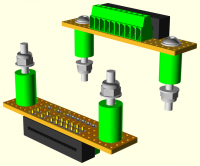
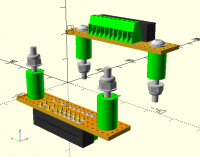
The default camera position is different in the GUI compared with the command line. I can move the camera but when viewed from the same place in the GUI the lighting is different. It seems to be higher up in the GUI. Why are they different?
MK
Marius Kintel
Wed, Sep 5, 2018 1:16 PM

Possibly an oversight.
The cmd-line output was created primarily for regression testing purposes against itself, and the camera and 3D scene management hasn’t received a lot of love, as writing this in low-level OpenGL feels wrong and we haven’t found time to choose and tinker with an appropriate higher-level framework.

-Marius

On Sep 5, 2018, at 6:20 AM, nop head nop.head@gmail.com wrote:

The default camera position is different in the GUI compared with the command line. I can move the camera but when viewed from the same place in the GUI the lighting is different. It seems to be higher up in the GUI. Why are they different?

<veroboard.png>
<veroboard_gui.png>


OpenSCAD mailing list
Discuss@lists.openscad.org
http://lists.openscad.org/mailman/listinfo/discuss_lists.openscad.org

Possibly an oversight. The cmd-line output was created primarily for regression testing purposes against itself, and the camera and 3D scene management hasn’t received a lot of love, as writing this in low-level OpenGL feels wrong and we haven’t found time to choose and tinker with an appropriate higher-level framework. -Marius > On Sep 5, 2018, at 6:20 AM, nop head <nop.head@gmail.com> wrote: > > The default camera position is different in the GUI compared with the command line. I can move the camera but when viewed from the same place in the GUI the lighting is different. It seems to be higher up in the GUI. Why are they different? > > <veroboard.png> > <veroboard_gui.png> > > > _______________________________________________ > OpenSCAD mailing list > Discuss@lists.openscad.org > http://lists.openscad.org/mailman/listinfo/discuss_lists.openscad.org
NH
nop head
Thu, Sep 6, 2018 3:21 PM

Seems like the GUI should be changed to match the command line. The command
line looks towards the first quadrant (x+,y+) the GUI default is towards
the third quadrant (x-, y+) which seems like a mistake.

On 5 September 2018 at 14:16, Marius Kintel marius@kintel.net wrote:

Possibly an oversight.
The cmd-line output was created primarily for regression testing purposes
against itself, and the camera and 3D scene management hasn’t received a
lot of love, as writing this in low-level OpenGL feels wrong and we haven’t
found time to choose and tinker with an appropriate higher-level framework.

-Marius

On Sep 5, 2018, at 6:20 AM, nop head nop.head@gmail.com wrote:

The default camera position is different in the GUI compared with the

command line. I can move the camera but when viewed from the same place in
the GUI the lighting is different. It seems to be higher up in the GUI. Why
are they different?

Seems like the GUI should be changed to match the command line. The command line looks towards the first quadrant (x+,y+) the GUI default is towards the third quadrant (x-, y+) which seems like a mistake. On 5 September 2018 at 14:16, Marius Kintel <marius@kintel.net> wrote: > Possibly an oversight. > The cmd-line output was created primarily for regression testing purposes > against itself, and the camera and 3D scene management hasn’t received a > lot of love, as writing this in low-level OpenGL feels wrong and we haven’t > found time to choose and tinker with an appropriate higher-level framework. > > -Marius > > > > On Sep 5, 2018, at 6:20 AM, nop head <nop.head@gmail.com> wrote: > > > > The default camera position is different in the GUI compared with the > command line. I can move the camera but when viewed from the same place in > the GUI the lighting is different. It seems to be higher up in the GUI. Why > are they different? > > > > <veroboard.png> > > <veroboard_gui.png> > > > > > > _______________________________________________ > > OpenSCAD mailing list > > Discuss@lists.openscad.org > > http://lists.openscad.org/mailman/listinfo/discuss_lists.openscad.org > > > _______________________________________________ > OpenSCAD mailing list > Discuss@lists.openscad.org > http://lists.openscad.org/mailman/listinfo/discuss_lists.openscad.org >
NH
nop head
Thu, Sep 6, 2018 3:25 PM

Sorry that should say second quadrant, not third.

On 6 September 2018 at 16:21, nop head nop.head@gmail.com wrote:

Seems like the GUI should be changed to match the command line. The
command line looks towards the first quadrant (x+,y+) the GUI default is
towards the third quadrant (x-, y+) which seems like a mistake.

On 5 September 2018 at 14:16, Marius Kintel marius@kintel.net wrote:

Possibly an oversight.
The cmd-line output was created primarily for regression testing purposes
against itself, and the camera and 3D scene management hasn’t received a
lot of love, as writing this in low-level OpenGL feels wrong and we haven’t
found time to choose and tinker with an appropriate higher-level framework.

-Marius

On Sep 5, 2018, at 6:20 AM, nop head nop.head@gmail.com wrote:

The default camera position is different in the GUI compared with the

command line. I can move the camera but when viewed from the same place in
the GUI the lighting is different. It seems to be higher up in the GUI. Why
are they different?

Sorry that should say second quadrant, not third. On 6 September 2018 at 16:21, nop head <nop.head@gmail.com> wrote: > Seems like the GUI should be changed to match the command line. The > command line looks towards the first quadrant (x+,y+) the GUI default is > towards the third quadrant (x-, y+) which seems like a mistake. > > On 5 September 2018 at 14:16, Marius Kintel <marius@kintel.net> wrote: > >> Possibly an oversight. >> The cmd-line output was created primarily for regression testing purposes >> against itself, and the camera and 3D scene management hasn’t received a >> lot of love, as writing this in low-level OpenGL feels wrong and we haven’t >> found time to choose and tinker with an appropriate higher-level framework. >> >> -Marius >> >> >> > On Sep 5, 2018, at 6:20 AM, nop head <nop.head@gmail.com> wrote: >> > >> > The default camera position is different in the GUI compared with the >> command line. I can move the camera but when viewed from the same place in >> the GUI the lighting is different. It seems to be higher up in the GUI. Why >> are they different? >> > >> > <veroboard.png> >> > <veroboard_gui.png> >> > >> > >> > _______________________________________________ >> > OpenSCAD mailing list >> > Discuss@lists.openscad.org >> > http://lists.openscad.org/mailman/listinfo/discuss_lists.openscad.org >> >> >> _______________________________________________ >> OpenSCAD mailing list >> Discuss@lists.openscad.org >> http://lists.openscad.org/mailman/listinfo/discuss_lists.openscad.org >> > >
NH
nop head
Thu, Sep 6, 2018 3:48 PM

Also it is very close, 140 but the constructor uses 500 which seems a bit
far but of course it depends on what size objects people work on. Perhaps
reset view should also do view all?

On 6 September 2018 at 16:25, nop head nop.head@gmail.com wrote:

Sorry that should say second quadrant, not third.

On 6 September 2018 at 16:21, nop head nop.head@gmail.com wrote:

Seems like the GUI should be changed to match the command line. The
command line looks towards the first quadrant (x+,y+) the GUI default is
towards the third quadrant (x-, y+) which seems like a mistake.

On 5 September 2018 at 14:16, Marius Kintel marius@kintel.net wrote:

Possibly an oversight.
The cmd-line output was created primarily for regression testing
purposes against itself, and the camera and 3D scene management hasn’t
received a lot of love, as writing this in low-level OpenGL feels wrong and
we haven’t found time to choose and tinker with an appropriate higher-level
framework.

-Marius

On Sep 5, 2018, at 6:20 AM, nop head nop.head@gmail.com wrote:

The default camera position is different in the GUI compared with the

command line. I can move the camera but when viewed from the same place in
the GUI the lighting is different. It seems to be higher up in the GUI. Why
are they different?

Also it is very close, 140 but the constructor uses 500 which seems a bit far but of course it depends on what size objects people work on. Perhaps reset view should also do view all? On 6 September 2018 at 16:25, nop head <nop.head@gmail.com> wrote: > Sorry that should say second quadrant, not third. > > On 6 September 2018 at 16:21, nop head <nop.head@gmail.com> wrote: > >> Seems like the GUI should be changed to match the command line. The >> command line looks towards the first quadrant (x+,y+) the GUI default is >> towards the third quadrant (x-, y+) which seems like a mistake. >> >> On 5 September 2018 at 14:16, Marius Kintel <marius@kintel.net> wrote: >> >>> Possibly an oversight. >>> The cmd-line output was created primarily for regression testing >>> purposes against itself, and the camera and 3D scene management hasn’t >>> received a lot of love, as writing this in low-level OpenGL feels wrong and >>> we haven’t found time to choose and tinker with an appropriate higher-level >>> framework. >>> >>> -Marius >>> >>> >>> > On Sep 5, 2018, at 6:20 AM, nop head <nop.head@gmail.com> wrote: >>> > >>> > The default camera position is different in the GUI compared with the >>> command line. I can move the camera but when viewed from the same place in >>> the GUI the lighting is different. It seems to be higher up in the GUI. Why >>> are they different? >>> > >>> > <veroboard.png> >>> > <veroboard_gui.png> >>> > >>> > >>> > _______________________________________________ >>> > OpenSCAD mailing list >>> > Discuss@lists.openscad.org >>> > http://lists.openscad.org/mailman/listinfo/discuss_lists.openscad.org >>> >>> >>> _______________________________________________ >>> OpenSCAD mailing list >>> Discuss@lists.openscad.org >>> http://lists.openscad.org/mailman/listinfo/discuss_lists.openscad.org >>> >> >> >
NH
nop head
Thu, Sep 6, 2018 4:43 PM

What I don't understand is why the lighting is different. The light comes
from above in the GUI but it seems to be below on the command line.

The lighting seems to be setup here:
https://github.com/openscad/openscad/blob/c6a485651fa29f1a878ea454558192492f7467ec/src/GLView.cc#L345
and that is called in OffScreewView here:
https://github.com/openscad/openscad/blob/c6a485651fa29f1a878ea454558192492f7467ec/src/OffscreenView.cc#L14

On 6 September 2018 at 16:48, nop head nop.head@gmail.com wrote:

Also it is very close, 140 but the constructor uses 500 which seems a bit
far but of course it depends on what size objects people work on. Perhaps
reset view should also do view all?

On 6 September 2018 at 16:25, nop head nop.head@gmail.com wrote:

Sorry that should say second quadrant, not third.

On 6 September 2018 at 16:21, nop head nop.head@gmail.com wrote:

Seems like the GUI should be changed to match the command line. The
command line looks towards the first quadrant (x+,y+) the GUI default is
towards the third quadrant (x-, y+) which seems like a mistake.

On 5 September 2018 at 14:16, Marius Kintel marius@kintel.net wrote:

Possibly an oversight.
The cmd-line output was created primarily for regression testing
purposes against itself, and the camera and 3D scene management hasn’t
received a lot of love, as writing this in low-level OpenGL feels wrong and
we haven’t found time to choose and tinker with an appropriate higher-level
framework.

-Marius

On Sep 5, 2018, at 6:20 AM, nop head nop.head@gmail.com wrote:

The default camera position is different in the GUI compared with the

command line. I can move the camera but when viewed from the same place in
the GUI the lighting is different. It seems to be higher up in the GUI. Why
are they different?

What I don't understand is why the lighting is different. The light comes from above in the GUI but it seems to be below on the command line. The lighting seems to be setup here: https://github.com/openscad/openscad/blob/c6a485651fa29f1a878ea454558192492f7467ec/src/GLView.cc#L345 and that is called in OffScreewView here: https://github.com/openscad/openscad/blob/c6a485651fa29f1a878ea454558192492f7467ec/src/OffscreenView.cc#L14 On 6 September 2018 at 16:48, nop head <nop.head@gmail.com> wrote: > Also it is very close, 140 but the constructor uses 500 which seems a bit > far but of course it depends on what size objects people work on. Perhaps > reset view should also do view all? > > On 6 September 2018 at 16:25, nop head <nop.head@gmail.com> wrote: > >> Sorry that should say second quadrant, not third. >> >> On 6 September 2018 at 16:21, nop head <nop.head@gmail.com> wrote: >> >>> Seems like the GUI should be changed to match the command line. The >>> command line looks towards the first quadrant (x+,y+) the GUI default is >>> towards the third quadrant (x-, y+) which seems like a mistake. >>> >>> On 5 September 2018 at 14:16, Marius Kintel <marius@kintel.net> wrote: >>> >>>> Possibly an oversight. >>>> The cmd-line output was created primarily for regression testing >>>> purposes against itself, and the camera and 3D scene management hasn’t >>>> received a lot of love, as writing this in low-level OpenGL feels wrong and >>>> we haven’t found time to choose and tinker with an appropriate higher-level >>>> framework. >>>> >>>> -Marius >>>> >>>> >>>> > On Sep 5, 2018, at 6:20 AM, nop head <nop.head@gmail.com> wrote: >>>> > >>>> > The default camera position is different in the GUI compared with the >>>> command line. I can move the camera but when viewed from the same place in >>>> the GUI the lighting is different. It seems to be higher up in the GUI. Why >>>> are they different? >>>> > >>>> > <veroboard.png> >>>> > <veroboard_gui.png> >>>> > >>>> > >>>> > _______________________________________________ >>>> > OpenSCAD mailing list >>>> > Discuss@lists.openscad.org >>>> > http://lists.openscad.org/mailman/listinfo/discuss_lists.openscad.org >>>> >>>> >>>> _______________________________________________ >>>> OpenSCAD mailing list >>>> Discuss@lists.openscad.org >>>> http://lists.openscad.org/mailman/listinfo/discuss_lists.openscad.org >>>> >>> >>> >> >
NH
nop head
Thu, Sep 6, 2018 5:58 PM

It seems to be a difference between the vector camera mode and the gimbal
camera mode. If I set the command line to use the gimbal camera with same
viewing angle as the vector camera default then I get the same view but lit
from above as it is in the GUI.

Why would a gimbal camera pointed in the same direction, at the same
distance have different lighting?

On 6 September 2018 at 17:43, nop head nop.head@gmail.com wrote:

What I don't understand is why the lighting is different. The light comes
from above in the GUI but it seems to be below on the command line.

The lighting seems to be setup here: https://github.com/openscad/
openscad/blob/c6a485651fa29f1a878ea454558192492f7467ec/src/GLView.cc#L345
and that is called in OffScreewView here: https://github.com/openscad/
openscad/blob/c6a485651fa29f1a878ea454558192492f7467ec/src/OffscreenView.
cc#L14

On 6 September 2018 at 16:48, nop head nop.head@gmail.com wrote:

Also it is very close, 140 but the constructor uses 500 which seems a bit
far but of course it depends on what size objects people work on. Perhaps
reset view should also do view all?

On 6 September 2018 at 16:25, nop head nop.head@gmail.com wrote:

Sorry that should say second quadrant, not third.

On 6 September 2018 at 16:21, nop head nop.head@gmail.com wrote:

Seems like the GUI should be changed to match the command line. The
command line looks towards the first quadrant (x+,y+) the GUI default is
towards the third quadrant (x-, y+) which seems like a mistake.

On 5 September 2018 at 14:16, Marius Kintel marius@kintel.net wrote:

Possibly an oversight.
The cmd-line output was created primarily for regression testing
purposes against itself, and the camera and 3D scene management hasn’t
received a lot of love, as writing this in low-level OpenGL feels wrong and
we haven’t found time to choose and tinker with an appropriate higher-level
framework.

-Marius

On Sep 5, 2018, at 6:20 AM, nop head nop.head@gmail.com wrote:

The default camera position is different in the GUI compared with

the command line. I can move the camera but when viewed from the same place
in the GUI the lighting is different. It seems to be higher up in the GUI.
Why are they different?

<veroboard.png>
<veroboard_gui.png>


OpenSCAD mailing list
Discuss@lists.openscad.org
http://lists.openscad.org/mailman/listinfo/discuss_lists.ope

It seems to be a difference between the vector camera mode and the gimbal camera mode. If I set the command line to use the gimbal camera with same viewing angle as the vector camera default then I get the same view but lit from above as it is in the GUI. Why would a gimbal camera pointed in the same direction, at the same distance have different lighting? On 6 September 2018 at 17:43, nop head <nop.head@gmail.com> wrote: > What I don't understand is why the lighting is different. The light comes > from above in the GUI but it seems to be below on the command line. > > The lighting seems to be setup here: https://github.com/openscad/ > openscad/blob/c6a485651fa29f1a878ea454558192492f7467ec/src/GLView.cc#L345 > and that is called in OffScreewView here: https://github.com/openscad/ > openscad/blob/c6a485651fa29f1a878ea454558192492f7467ec/src/OffscreenView. > cc#L14 > > On 6 September 2018 at 16:48, nop head <nop.head@gmail.com> wrote: > >> Also it is very close, 140 but the constructor uses 500 which seems a bit >> far but of course it depends on what size objects people work on. Perhaps >> reset view should also do view all? >> >> On 6 September 2018 at 16:25, nop head <nop.head@gmail.com> wrote: >> >>> Sorry that should say second quadrant, not third. >>> >>> On 6 September 2018 at 16:21, nop head <nop.head@gmail.com> wrote: >>> >>>> Seems like the GUI should be changed to match the command line. The >>>> command line looks towards the first quadrant (x+,y+) the GUI default is >>>> towards the third quadrant (x-, y+) which seems like a mistake. >>>> >>>> On 5 September 2018 at 14:16, Marius Kintel <marius@kintel.net> wrote: >>>> >>>>> Possibly an oversight. >>>>> The cmd-line output was created primarily for regression testing >>>>> purposes against itself, and the camera and 3D scene management hasn’t >>>>> received a lot of love, as writing this in low-level OpenGL feels wrong and >>>>> we haven’t found time to choose and tinker with an appropriate higher-level >>>>> framework. >>>>> >>>>> -Marius >>>>> >>>>> >>>>> > On Sep 5, 2018, at 6:20 AM, nop head <nop.head@gmail.com> wrote: >>>>> > >>>>> > The default camera position is different in the GUI compared with >>>>> the command line. I can move the camera but when viewed from the same place >>>>> in the GUI the lighting is different. It seems to be higher up in the GUI. >>>>> Why are they different? >>>>> > >>>>> > <veroboard.png> >>>>> > <veroboard_gui.png> >>>>> > >>>>> > >>>>> > _______________________________________________ >>>>> > OpenSCAD mailing list >>>>> > Discuss@lists.openscad.org >>>>> > http://lists.openscad.org/mailman/listinfo/discuss_lists.ope >>>>> nscad.org >>>>> >>>>> >>>>> _______________________________________________ >>>>> OpenSCAD mailing list >>>>> Discuss@lists.openscad.org >>>>> http://lists.openscad.org/mailman/listinfo/discuss_lists.openscad.org >>>>> >>>> >>>> >>> >> >
MK
Marius Kintel
Mon, Sep 10, 2018 4:40 AM

On Sep 6, 2018, at 1:58 PM, nop head nop.head@gmail.com wrote:

Why would a gimbal camera pointed in the same direction, at the same distance have different lighting?

I still don’t think this was intentional, so cleaning up and unifying the lighting for the different camera models would be a good step forward.

-Marius

> On Sep 6, 2018, at 1:58 PM, nop head <nop.head@gmail.com> wrote: > > Why would a gimbal camera pointed in the same direction, at the same distance have different lighting? > I still don’t think this was intentional, so cleaning up and unifying the lighting for the different camera models would be a good step forward. -Marius
NH
nop head
Mon, Sep 10, 2018 12:47 PM

But the lighting code is already the same for both cameras. I don't
understand why it comes out different. Are the lighting positions relative
to the world or the camera?

On 10 September 2018 at 05:40, Marius Kintel marius@kintel.net wrote:

On Sep 6, 2018, at 1:58 PM, nop head nop.head@gmail.com wrote:

Why would a gimbal camera pointed in the same direction, at the same

distance have different lighting?

I still don’t think this was intentional, so cleaning up and unifying the
lighting for the different camera models would be a good step forward.

-Marius


OpenSCAD mailing list
Discuss@lists.openscad.org
http://lists.openscad.org/mailman/listinfo/discuss_lists.openscad.org

But the lighting code is already the same for both cameras. I don't understand why it comes out different. Are the lighting positions relative to the world or the camera? On 10 September 2018 at 05:40, Marius Kintel <marius@kintel.net> wrote: > > On Sep 6, 2018, at 1:58 PM, nop head <nop.head@gmail.com> wrote: > > > > Why would a gimbal camera pointed in the same direction, at the same > distance have different lighting? > > > I still don’t think this was intentional, so cleaning up and unifying the > lighting for the different camera models would be a good step forward. > > -Marius > > > _______________________________________________ > OpenSCAD mailing list > Discuss@lists.openscad.org > http://lists.openscad.org/mailman/listinfo/discuss_lists.openscad.org >
MK
Marius Kintel
Sat, Sep 15, 2018 2:20 AM

On Sep 10, 2018, at 8:47 AM, nop head nop.head@gmail.com wrote:

But the lighting code is already the same for both cameras. I don't understand why it comes out different. Are the lighting positions relative to the world or the camera?

The two cameras have slightly different ways of managing OpenGL matrices (https://github.com/openscad/openscad/blob/master/src/GLView.cc#L91):

  • The gimbal camera sets up the camera parameters in GL_PROJECTION mode, then resets the MODELVIEW matrix and rotates the scene
  • The vector camera set up the camera projection in GL_PROJECTION mode, then does a gluLookat().

Without looking at this in great detail, I’d guess that the gimbal mode is messing with stuff it shouldn’t do with the PROJECTION matrix, causing the lights to have different relative directions in gimbal and vector modes.

Setting up OpenGL cameras and lights using these low-level functions can be tricky and is error prone...

-Marius

> On Sep 10, 2018, at 8:47 AM, nop head <nop.head@gmail.com> wrote: > > But the lighting code is already the same for both cameras. I don't understand why it comes out different. Are the lighting positions relative to the world or the camera? > The two cameras have slightly different ways of managing OpenGL matrices (https://github.com/openscad/openscad/blob/master/src/GLView.cc#L91): * The gimbal camera sets up the camera parameters in GL_PROJECTION mode, then resets the MODELVIEW matrix and rotates the scene * The vector camera set up the camera projection in GL_PROJECTION mode, then does a gluLookat(). Without looking at this in great detail, I’d guess that the gimbal mode is messing with stuff it shouldn’t do with the PROJECTION matrix, causing the lights to have different relative directions in gimbal and vector modes. Setting up OpenGL cameras and lights using these low-level functions can be tricky and is error prone... -Marius