

a matter of speed....

I have been using scad for some time now...and my computer is getting
older...
I do many models with threads and other features that just take a long time
to render.
I spend about 25% of my design time trying to either work out speed ups to
rendering or adding switches to enable high speed vs high detail render
options to my designs....
Preview is often not really an option...it still takes time and often
results in objects I can't smoothly rotate or that have what I might call
artifacts that make tight tolerances hard to see. And since scad has no way
to actually query objects so I could perhaps use software inspection I have
to rely on human visual verification.
I am okay with that but the rub is it takes too long to fix and re-render
things.
So thinking about computer replacement...the way to speed these days seems
to be threading and multiple CPUs and also offloading certain things to
GPUs. So what is the best way to go for a new machine...just get the
fastest possible clock rate for the CPU (am maybe forgoing newer cpu in
favor or older higher clock rate?..seem I can just ignore core
count....since it seems scad is single threaded...or is there a GPU that
might help? Is there any advantages in the various CPU families ... Xeon
server class vs i7/i9 CPUs? How to I select a machine optimized for Scad,
which is now the only application I find holding me up when working....
Is there any option or future thought to multi-thread SCAD?
--
Sent from: http://forum.openscad.org/

On 7/15/2019 4:05 PM, macdarren via Discuss wrote:
And since scad has no way
to actually query objects so I could perhaps use software inspection I have
to rely on human visual verification.
One trick that I used when I needed to ensure that two parts didn't
accidentally overlap was to have a mode that would intersect them. If
the intersection wasn't empty, that would mean there was a problem.
If you need to check that there is only a minimal gap, you might
difference both parts from the hull of the two parts, so that only the
gaps remain in the model.

You get what you paid for. lol
On 7/15/19, Jordan Brown openscad@jordan.maileater.net wrote:
On 7/15/2019 4:05 PM, macdarren via Discuss wrote:
And since scad has no way
to actually query objects so I could perhaps use software inspection I
have
to rely on human visual verification.
One trick that I used when I needed to ensure that two parts didn't
accidentally overlap was to have a mode that would intersect them. If
the intersection wasn't empty, that would mean there was a problem.
If you need to check that there is only a minimal gap, you might
difference both parts from the hull of the two parts, so that only the
gaps remain in the model.

discuss wrote
So what is the best way to go for a new machine...just get the
fastest possible clock rate for the CPU (am maybe forgoing newer cpu in
favor or older higher clock rate?..seem I can just ignore core
count....since it seems scad is single threaded...or is there a GPU that
might help? Is there any advantages in the various CPU families ... Xeon
server class vs i7/i9 CPUs? How to I select a machine optimized for Scad,
which is now the only application I find holding me up when working....
Is there any option or future thought to multi-thread SCAD?
There is a multi-thread test build*, needs plenty of testing, nobody has
worked out away to formally test for thread conflict yet. So I just throw
workload at it, hasn't produced any broken STLs yet, [except where I broke
it :| ].
Trouble is the final union of all objects is still a single CGAL call and
takes a long time.
So because of that you want the best single thread CPU, but you also want a
number of them to speed-up the initial phase.
I don't have experience with Xeon, but architecturally they are the same,
but tend to have larger cache but less GHz, if buying new generations I
don't think it matters much, go for more GHz.
I've been procrastinating on a Threadripper 2950X 16-Core (3.5/4.4 boost
GHz) , but just saw the AMD Ryzen 9 3900X w 12core/24 thread 3.8/4.6 boost
GHz...
(I note the 2950X is reduced or out of stock in some places, this can hint
that something is coming...)
GPU doesn't help much. AFAIK there are no developments to utilise GPU
features.
- see https://github.com/openscad/openscad/pull/2399
For Windows/64 see:
https://circleci.com/gh/openscad/openscad/2806?utm_campaign=vcs-integration-link&utm_medium=referral&utm_source=github-build-link#artifacts
I'm not sure where to get it for Linux.
Admin - email* me if you need anything, or if I've done something stupid...
- click on my MichaelAtOz label, there is a link to email me.
Unless specifically shown otherwise above, my contribution is in the Public Domain; to the extent possible under law, I have waived all copyright and related or neighbouring rights to this work. Obviously inclusion of works of previous authors is not included in the above.
The TPP is no simple “trade agreement.” Fight it! http://www.ourfairdeal.org/ time is running out!
Sent from: http://forum.openscad.org/
MichaelAtOz wrote
I'm not sure where to get it for Linux.
https://circleci.com/gh/openscad/openscad/2804?utm_campaign=vcs-integration-link&utm_medium=referral&utm_source=github-build-link#artifacts
Has the appimage, worked for me.
Admin - email* me if you need anything, or if I've done something stupid...
- click on my MichaelAtOz label, there is a link to email me.
Unless specifically shown otherwise above, my contribution is in the Public Domain; to the extent possible under law, I have waived all copyright and related or neighbouring rights to this work. Obviously inclusion of works of previous authors is not included in the above.
The TPP is no simple “trade agreement.” Fight it! http://www.ourfairdeal.org/ time is running out!
Sent from: http://forum.openscad.org/

If preview doesn't work for you because "it often results in objects I can't rotate smoothly", then a new GPU should help.
The GPU isn't used for rendering. What does speed up rendering is a large CPU cache and fast RAM. For example, see this old forum thread, where benchmarks are used to prove this: http://forum.openscad.org/OpenSCAD-performance-numbers-td4707.html
Multiple cores helps, but I think this is model dependent, since I don't think that multiple cores helps with the final top level union.
Lots of RAM is a good thing, it allows you to render larger models.
Doug Moen
On Mon, Jul 15, 2019, at 7:06 PM, macdarren via Discuss wrote:
I have been using scad for some time now...and my computer is getting
older...
I do many models with threads and other features that just take a long time
to render.
I spend about 25% of my design time trying to either work out speed ups to
rendering or adding switches to enable high speed vs high detail render
options to my designs....
Preview is often not really an option...it still takes time and often
results in objects I can't smoothly rotate or that have what I might call
artifacts that make tight tolerances hard to see. And since scad has no way
to actually query objects so I could perhaps use software inspection I have
to rely on human visual verification.
I am okay with that but the rub is it takes too long to fix and re-render
things.
So thinking about computer replacement...the way to speed these days seems
to be threading and multiple CPUs and also offloading certain things to
GPUs. So what is the best way to go for a new machine...just get the
fastest possible clock rate for the CPU (am maybe forgoing newer cpu in
favor or older higher clock rate?..seem I can just ignore core
count....since it seems scad is single threaded...or is there a GPU that
might help? Is there any advantages in the various CPU families ... Xeon
server class vs i7/i9 CPUs? How to I select a machine optimized for Scad,
which is now the only application I find holding me up when working....
Is there any option or future thought to multi-thread SCAD?
--
Sent from: http://forum.openscad.org/
OpenSCAD mailing list
Discuss@lists.openscad.org
http://lists.openscad.org/mailman/listinfo/discuss_lists.openscad.org

Preview slows down if you have 3D intersections and differences. 3D unions
are fast.
I make a my previews fast making almost everything out of 2D
linear_extrusions and rotate_extrusions unioned together. If I do need a 3D
difference or intersection I factor that bit out and wrap it in render().
That is slow on the first preview but gets rid or any flickering artefacts
and keeps the pan and zoom frame rate high. Also as long as the vertex
count inside the rendered operation is small it doesn't take long.
Typically only a small part of my object gets rendered.
hull() is also fast unless you have an implicit union inside it. I avoid
that by repetition instead of loops and shared translations or rotations.
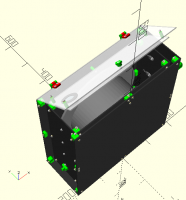
A complex assembly like this takes 11 seconds to render the first time, 2
seconds for a simple change like moving the door with customiser. It pans
and zooms fluidly and there are no z-fighting artefacts.
[image: image.png]
On Tue, 16 Jul 2019 at 13:19, Doug Moen doug@moens.org wrote:
If preview doesn't work for you because "it often results in objects I
can't rotate smoothly", then a new GPU should help.
The GPU isn't used for rendering. What does speed up rendering is a large
CPU cache and fast RAM. For example, see this old forum thread, where
benchmarks are used to prove this:
http://forum.openscad.org/OpenSCAD-performance-numbers-td4707.html
Multiple cores helps, but I think this is model dependent, since I don't
think that multiple cores helps with the final top level union.
Lots of RAM is a good thing, it allows you to render larger models.
Doug Moen
On Mon, Jul 15, 2019, at 7:06 PM, macdarren via Discuss wrote:
I have been using scad for some time now...and my computer is getting
older...
I do many models with threads and other features that just take a long
time
to render.
I spend about 25% of my design time trying to either work out speed ups
to
rendering or adding switches to enable high speed vs high detail render
options to my designs....
Preview is often not really an option...it still takes time and often
results in objects I can't smoothly rotate or that have what I might call
artifacts that make tight tolerances hard to see. And since scad has no
way
to actually query objects so I could perhaps use software inspection I
have
to rely on human visual verification.
I am okay with that but the rub is it takes too long to fix and re-render
things.
So thinking about computer replacement...the way to speed these days
seems
to be threading and multiple CPUs and also offloading certain things to
GPUs. So what is the best way to go for a new machine...just get the
fastest possible clock rate for the CPU (am maybe forgoing newer cpu in
favor or older higher clock rate?..seem I can just ignore core
count....since it seems scad is single threaded...or is there a GPU that
might help? Is there any advantages in the various CPU families ... Xeon
server class vs i7/i9 CPUs? How to I select a machine optimized for
Scad,
which is now the only application I find holding me up when working....
Is there any option or future thought to multi-thread SCAD?
--
Sent from: http://forum.openscad.org/
OpenSCAD mailing list
Discuss@lists.openscad.org
http://lists.openscad.org/mailman/listinfo/discuss_lists.openscad.org
Thanks for all the suggestions....I will add the info to my bag of tricks to
speed up rendering/preview...that will probably help more than hardware
updates...but does still add to design time.
I did try the Linux multicore app image and it did result in a nice if not
incredible improvement....any chance a MacOS build is floating around? I
don't think I have the skills to build it myself.
TIA
--
Sent from: http://forum.openscad.org/

On 16.07.2019 14:18, Doug Moen wrote:
The GPU isn't used for rendering. What does speed up rendering is a large CPU cache and fast RAM. For example, see this old forum thread, where benchmarks are used to prove this: http://forum.openscad.org/OpenSCAD-performance-numbers-td4707.html
Multiple cores helps, but I think this is model dependent, since I don't think that multiple cores helps with the final top level union.
Lots of RAM is a good thing, it allows you to render larger models.
Doug Moen
I tried the bracelet example in that link on my Kubuntu 18.04.2 LTS
machine with 32 GB RAM & 4 CPUs, running openscad_nightly 2019.03.31
For some reason openscad_nightly is rather limited as it can only read
files under ~ (i.e. /home/username). It can't even see my second disk
where I usually have things like this.
That aside, the bracelet example from the old thread ran in 15 seconds
on my machine. The old 2013 thread reported times of several minutes.
The model created seems fine although it looks like OpenSCAD reports the
wrong number of faces generated, it reports 7816 faces but the real
number seems to be 8400 faces/4200 vertices.
https://gist.github.com/arnholm/cf42fa8000bf253bada605c2ae8d71ac
At the bottom of the gist I recreated the same example using AngelCAD
(v1.3-01) which does multi-threaded processing. With a bit of tweaking
it also creates 8400 faces/4200 vertices in 1.51 sec, i.e. 10x faster.
This is a small model, so the top level union issue is not really
apparent. It is true that if multi-threading is done per boolean
operation, the final operation will run on once CPU only and will not
benefit from multiple cores.
Carsten Arnholm

When I make parts that are slow, I include a parameter "fast". If false
(default), it draws the part properly, if true, it draws a simpler variant,
for example, a solid cylinder instead of a thread.
That way, I can spend some time getting the part perfect, but hen I start
putting things together, and the part isn't really interesting, I go with
the faster version. Then, when everything is done, I can set all fast=false,
and get the final result in its full glory, eventually after a long
rendering time.
It makes work fast and efficient, and also promotes proper modularization.
--
Sent from: http://forum.openscad.org/