

discuss@lists.openscad.org

OpenSCAD general discussion Mailing-list

View all threads

two bugs

J
jon
Thu, May 14, 2015 3:40 PM

If you compile the following code with F5 you will get a part of a mold
that I am designing.  You will have to revise the "import" code so that
it can see the STL that I have attached.

Bug 1: if you align the visualization as shown in the screen shot, there
is a "ghost" that is sometimes visible.  This can be confusing and
distracting: is it really there or not?

Bug 2: if you now compile with F6, the mold disappears and a triangular
solid appears.  The "difference" has vanished.  So, the mold is
effectively useless.

Jon

===

th = 10;
rch = 0.1;
maxX = 47.1/2;
maxY = 28.3/2;
minX = -maxX;
minY = -maxY;
maxXth = maxX + th;
maxYth = maxY + th;
minXth = minX - th;
minYth = minY - th;

module Lock() {
translate([minX, minY, 0])
import ("d:/stl files/enigma lock for mold.stl");
}

BotM1();

module P1() {
polygon(points=[[0, 0], [minXth, minYth], [minXth, maxYth]],
paths=[[0, 1, 2]]);
}

module BotM1() {
difference() {
translate([0, 0, -th])
linear_extrude(10.3 + th - rch)
P1();
Lock();
}
}
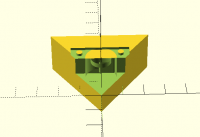
If you compile the following code with F5 you will get a part of a mold that I am designing. You will have to revise the "import" code so that it can see the STL that I have attached. Bug 1: if you align the visualization as shown in the screen shot, there is a "ghost" that is sometimes visible. This can be confusing and distracting: is it really there or not? Bug 2: if you now compile with F6, the mold disappears and a triangular solid appears. The "difference" has vanished. So, the mold is effectively useless. Jon === th = 10; rch = 0.1; maxX = 47.1/2; maxY = 28.3/2; minX = -maxX; minY = -maxY; maxXth = maxX + th; maxYth = maxY + th; minXth = minX - th; minYth = minY - th; module Lock() { translate([minX, minY, 0]) import ("d:/stl files/enigma lock for mold.stl"); } BotM1(); module P1() { polygon(points=[[0, 0], [minXth, minYth], [minXth, maxYth]], paths=[[0, 1, 2]]); } module BotM1() { difference() { translate([0, 0, -th]) linear_extrude(10.3 + th - rch) P1(); Lock(); } }
MK
Marius Kintel
Thu, May 14, 2015 4:21 PM

On May 14, 2015, at 11:40 AM, jon jon@jonbondy.com wrote:

Bug 1: if you align the visualization as shown in the screen shot, there is a "ghost" that is sometimes visible.  This can be confusing and distracting: is it really there or not?

Add ‘convexity=3’ as a parameter to import(). This is to tell OpenSCAD that your imported geometry is has high depth complexity.

Bug 2: if you now compile with F6, the mold disappears and a triangular solid appears.  The "difference" has vanished.  So, the mold is effectively useless.

This is because your imported STL has degenerate features not supported by OpenSCAD. Typically, this means you have “zero area triangles” - triangles where we can’t deduce a normal vector. Our geometry engine (CGAL) doesn’t support this. It’s a known issue and pretty annoying indeed.
See https://github.com/openscad/openscad/issues/945 and https://github.com/openscad/openscad/issues/1042

-Marius

On May 14, 2015, at 11:40 AM, jon <jon@jonbondy.com> wrote: > Bug 1: if you align the visualization as shown in the screen shot, there is a "ghost" that is sometimes visible. This can be confusing and distracting: is it really there or not? > Add ‘convexity=3’ as a parameter to import(). This is to tell OpenSCAD that your imported geometry is has high depth complexity. > Bug 2: if you now compile with F6, the mold disappears and a triangular solid appears. The "difference" has vanished. So, the mold is effectively useless. > This is because your imported STL has degenerate features not supported by OpenSCAD. Typically, this means you have “zero area triangles” - triangles where we can’t deduce a normal vector. Our geometry engine (CGAL) doesn’t support this. It’s a known issue and pretty annoying indeed. See https://github.com/openscad/openscad/issues/945 and https://github.com/openscad/openscad/issues/1042 -Marius
NH
nop head
Thu, May 14, 2015 4:29 PM

The first problem is fixed by setting convexity in the import.

The second problem is:

ERROR: CGAL error in CGAL_Nef_polyhedron3(): CGAL ERROR: assertion
violation! Expr: pe_prev->is_border() ||
!internal::Plane_constructor::get_plane(pe_prev->facet(),pe_prev->facet()->plane()).is_degenerate()
File:
/data/OpenSCAD/libraries-mingw32-master/mxe/usr/i686-w64-mingw32.static/include/CGAL/Nef_3/polyhedron_3_to_nef_3.h
Line: 293

On 14 May 2015 at 16:40, jon jon@jonbondy.com wrote:

If you compile the following code with F5 you will get a part of a mold
that I am designing.  You will have to revise the "import" code so that it
can see the STL that I have attached.

Bug 1: if you align the visualization as shown in the screen shot, there
is a "ghost" that is sometimes visible.  This can be confusing and
distracting: is it really there or not?

Bug 2: if you now compile with F6, the mold disappears and a triangular
solid appears.  The "difference" has vanished.  So, the mold is effectively
useless.

Jon

===

th = 10;
rch = 0.1;
maxX = 47.1/2;
maxY = 28.3/2;
minX = -maxX;
minY = -maxY;
maxXth = maxX + th;
maxYth = maxY + th;
minXth = minX - th;
minYth = minY - th;

module Lock() {
translate([minX, minY, 0])
import ("d:/stl files/enigma lock for mold.stl");
}

BotM1();

module P1() {
polygon(points=[[0, 0], [minXth, minYth], [minXth, maxYth]],
paths=[[0, 1, 2]]);
}

module BotM1() {
difference() {
translate([0, 0, -th])
linear_extrude(10.3 + th - rch)
P1();
Lock();
}
}


OpenSCAD mailing list
Discuss@lists.openscad.org
http://lists.openscad.org/mailman/listinfo/discuss_lists.openscad.org

The first problem is fixed by setting convexity in the import. The second problem is: ERROR: CGAL error in CGAL_Nef_polyhedron3(): CGAL ERROR: assertion violation! Expr: pe_prev->is_border() || !internal::Plane_constructor::get_plane(pe_prev->facet(),pe_prev->facet()->plane()).is_degenerate() File: /data/OpenSCAD/libraries-mingw32-master/mxe/usr/i686-w64-mingw32.static/include/CGAL/Nef_3/polyhedron_3_to_nef_3.h Line: 293 On 14 May 2015 at 16:40, jon <jon@jonbondy.com> wrote: > If you compile the following code with F5 you will get a part of a mold > that I am designing. You will have to revise the "import" code so that it > can see the STL that I have attached. > > Bug 1: if you align the visualization as shown in the screen shot, there > is a "ghost" that is sometimes visible. This can be confusing and > distracting: is it really there or not? > > Bug 2: if you now compile with F6, the mold disappears and a triangular > solid appears. The "difference" has vanished. So, the mold is effectively > useless. > > Jon > > === > > th = 10; > rch = 0.1; > maxX = 47.1/2; > maxY = 28.3/2; > minX = -maxX; > minY = -maxY; > maxXth = maxX + th; > maxYth = maxY + th; > minXth = minX - th; > minYth = minY - th; > > module Lock() { > translate([minX, minY, 0]) > import ("d:/stl files/enigma lock for mold.stl"); > } > > > BotM1(); > > module P1() { > polygon(points=[[0, 0], [minXth, minYth], [minXth, maxYth]], > paths=[[0, 1, 2]]); > } > > module BotM1() { > difference() { > translate([0, 0, -th]) > linear_extrude(10.3 + th - rch) > P1(); > Lock(); > } > } > > > > _______________________________________________ > OpenSCAD mailing list > Discuss@lists.openscad.org > http://lists.openscad.org/mailman/listinfo/discuss_lists.openscad.org > >
J
jon
Thu, May 14, 2015 4:35 PM

Thanks (and to nop head).

The STL was created by SketchUp.  Is there some way to "fix" the STL?
NetFabb Basic claims the STL is OK.

Jon

On 5/14/2015 12:21 PM, Marius Kintel wrote:

On May 14, 2015, at 11:40 AM, jon jon@jonbondy.com wrote:

Bug 1: if you align the visualization as shown in the screen shot, there is a "ghost" that is sometimes visible.  This can be confusing and distracting: is it really there or not?

Add ‘convexity=3’ as a parameter to import(). This is to tell OpenSCAD that your imported geometry is has high depth complexity.

Bug 2: if you now compile with F6, the mold disappears and a triangular solid appears.  The "difference" has vanished.  So, the mold is effectively useless.

This is because your imported STL has degenerate features not supported by OpenSCAD. Typically, this means you have “zero area triangles” - triangles where we can’t deduce a normal vector. Our geometry engine (CGAL) doesn’t support this. It’s a known issue and pretty annoying indeed.
See https://github.com/openscad/openscad/issues/945 and https://github.com/openscad/openscad/issues/1042

-Marius


OpenSCAD mailing list
Discuss@lists.openscad.org
http://lists.openscad.org/mailman/listinfo/discuss_lists.openscad.org


No virus found in this message.
Checked by AVG - www.avg.com
Version: 2015.0.5863 / Virus Database: 4342/9775 - Release Date: 05/14/15

Thanks (and to nop head). The STL was created by SketchUp. Is there some way to "fix" the STL? NetFabb Basic claims the STL is OK. Jon On 5/14/2015 12:21 PM, Marius Kintel wrote: > On May 14, 2015, at 11:40 AM, jon <jon@jonbondy.com> wrote: > >> Bug 1: if you align the visualization as shown in the screen shot, there is a "ghost" that is sometimes visible. This can be confusing and distracting: is it really there or not? >> > Add ‘convexity=3’ as a parameter to import(). This is to tell OpenSCAD that your imported geometry is has high depth complexity. > >> Bug 2: if you now compile with F6, the mold disappears and a triangular solid appears. The "difference" has vanished. So, the mold is effectively useless. >> > This is because your imported STL has degenerate features not supported by OpenSCAD. Typically, this means you have “zero area triangles” - triangles where we can’t deduce a normal vector. Our geometry engine (CGAL) doesn’t support this. It’s a known issue and pretty annoying indeed. > See https://github.com/openscad/openscad/issues/945 and https://github.com/openscad/openscad/issues/1042 > > -Marius > > > _______________________________________________ > OpenSCAD mailing list > Discuss@lists.openscad.org > http://lists.openscad.org/mailman/listinfo/discuss_lists.openscad.org > > > > ----- > No virus found in this message. > Checked by AVG - www.avg.com > Version: 2015.0.5863 / Virus Database: 4342/9775 - Release Date: 05/14/15 > > >
TP
Torsten Paul
Thu, May 14, 2015 4:50 PM

On 05/14/2015 06:35 PM, jon wrote:

The STL was created by SketchUp.  Is there some way to "fix" the STL? NetFabb Basic claims the STL is OK.

On 05/14/2015 06:35 PM, jon wrote: > The STL was created by SketchUp. Is there some way to "fix" the STL? NetFabb Basic claims the STL is OK. > You could try meshlab: https://github.com/openscad/openscad/wiki/Frequently-Asked-Questions#why-is-my-imported-stl-file-only-showing-up-with-f5-but-not-f6 ciao, Torsten.
J
jon
Thu, May 14, 2015 6:20 PM

I gave up and re-invented the STL in OpenSCAD.  The lesson?  Never use
anything other than OpenSCAD!

On 5/14/2015 12:50 PM, Torsten Paul wrote:

On 05/14/2015 06:35 PM, jon wrote:

The STL was created by SketchUp.  Is there some way to "fix" the STL?
NetFabb Basic claims the STL is OK.

I gave up and re-invented the STL in OpenSCAD. The lesson? Never use anything other than OpenSCAD! On 5/14/2015 12:50 PM, Torsten Paul wrote: > On 05/14/2015 06:35 PM, jon wrote: >> The STL was created by SketchUp. Is there some way to "fix" the STL? >> NetFabb Basic claims the STL is OK. >> > You could try meshlab: > > https://github.com/openscad/openscad/wiki/Frequently-Asked-Questions#why-is-my-imported-stl-file-only-showing-up-with-f5-but-not-f6 > > > ciao, > Torsten.
RB
Robert Bielik
Fri, May 15, 2015 6:07 AM

Hi all,

New to OpenSCAD, fantastic tool! However I miss a modulo operator, or
have I missed it ? :)

Regards
/Robert

Hi all, New to OpenSCAD, fantastic tool! However I miss a modulo operator, or have I missed it ? :) Regards /Robert
CL
Chow Loong Jin
Fri, May 15, 2015 6:43 AM

On Fri, May 15, 2015 at 08:07:03AM +0200, Robert Bielik wrote:

Hi all,

New to OpenSCAD, fantastic tool! However I miss a modulo operator, or have I
missed it ? :)

You mean arithmetic modulo? That's %.

--
Kind regards,
Loong Jin

On Fri, May 15, 2015 at 08:07:03AM +0200, Robert Bielik wrote: > Hi all, > > New to OpenSCAD, fantastic tool! However I miss a modulo operator, or have I > missed it ? :) You mean arithmetic modulo? That's %. -- Kind regards, Loong Jin
DM
doug moen
Fri, May 15, 2015 10:56 AM

Be warned that if you are looking for the modulus function as it is
normally defined in mathematics
(eg, as defined here: http://mathworld.wolfram.com/Mod.html)
then a % m is only equal to a mod m when the arguments are non-negative.

0 % 3 == 0    0 mod 3 == 0
1 % 3 == 1    1 mod 3 == 1
2 % 3 == 2    2 mod 3 == 2
3 % 3 == 0    3 mod 3 == 0

If the first argument is negative, you won't get the expected result.

-1 % 3 == -1  -1 mod 3 == 2

You can define the mod function like this (with correct behaviour for
negative arguments):

function mod(a,m) = a - m*floor(a/m);

On 15 May 2015 at 02:43, Chow Loong Jin hyperair@debian.org wrote:

On Fri, May 15, 2015 at 08:07:03AM +0200, Robert Bielik wrote:

Hi all,

New to OpenSCAD, fantastic tool! However I miss a modulo operator, or

have I

missed it ? :)

You mean arithmetic modulo? That's %.

--
Kind regards,
Loong Jin


OpenSCAD mailing list
Discuss@lists.openscad.org
http://lists.openscad.org/mailman/listinfo/discuss_lists.openscad.org

Be warned that if you are looking for the modulus function as it is normally defined in mathematics (eg, as defined here: http://mathworld.wolfram.com/Mod.html) then a % m is only equal to a mod m when the arguments are non-negative. 0 % 3 == 0 0 mod 3 == 0 1 % 3 == 1 1 mod 3 == 1 2 % 3 == 2 2 mod 3 == 2 3 % 3 == 0 3 mod 3 == 0 If the first argument is negative, you won't get the expected result. -1 % 3 == -1 -1 mod 3 == 2 You can define the mod function like this (with correct behaviour for negative arguments): function mod(a,m) = a - m*floor(a/m); On 15 May 2015 at 02:43, Chow Loong Jin <hyperair@debian.org> wrote: > On Fri, May 15, 2015 at 08:07:03AM +0200, Robert Bielik wrote: > > Hi all, > > > > New to OpenSCAD, fantastic tool! However I miss a modulo operator, or > have I > > missed it ? :) > > You mean arithmetic modulo? That's %. > > -- > Kind regards, > Loong Jin > > _______________________________________________ > OpenSCAD mailing list > Discuss@lists.openscad.org > http://lists.openscad.org/mailman/listinfo/discuss_lists.openscad.org > >
RB
Robert Bielik
Fri, May 15, 2015 12:37 PM

Thanks guys, the reason I asked was because I have a for(i = [0 : 5])
and offset = i % 2 and I think it didn't work but now that I wrote that
out loud, I think
I know the problem :)

Regards
/Robert

doug moen skrev den 2015-05-15 12:56:

Be warned that if you are looking for the modulus function as it is
normally defined in mathematics
(eg, as defined here: http://mathworld.wolfram.com/Mod.html)
then a % m is only equal to a mod m when the arguments are non-negative.

0 % 3 == 0    0 mod 3 == 0
1 % 3 == 1    1 mod 3 == 1
2 % 3 == 2    2 mod 3 == 2
3 % 3 == 0    3 mod 3 == 0

If the first argument is negative, you won't get the expected result.

-1 % 3 == -1  -1 mod 3 == 2

You can define the mod function like this (with correct behaviour for
negative arguments):

function mod(a,m) = a - m*floor(a/m);

On 15 May 2015 at 02:43, Chow Loong Jin <hyperair@debian.org
mailto:hyperair@debian.org> wrote:

 On Fri, May 15, 2015 at 08:07:03AM +0200, Robert Bielik wrote:

Hi all,

New to OpenSCAD, fantastic tool! However I miss a modulo

 operator, or have I

missed it ? :)

 You mean arithmetic modulo? That's %.

 --
 Kind regards,
 Loong Jin

 _______________________________________________
 OpenSCAD mailing list
 Discuss@lists.openscad.org <mailto:Discuss@lists.openscad.org>
 http://lists.openscad.org/mailman/listinfo/discuss_lists.openscad.org

OpenSCAD mailing list
Discuss@lists.openscad.org
http://lists.openscad.org/mailman/listinfo/discuss_lists.openscad.org

Thanks guys, the reason I asked was because I have a for(i = [0 : 5]) and offset = i % 2 and I think it didn't work but now that I wrote that out loud, I think I know the problem :) Regards /Robert doug moen skrev den 2015-05-15 12:56: > Be warned that if you are looking for the modulus function as it is > normally defined in mathematics > (eg, as defined here: http://mathworld.wolfram.com/Mod.html) > then a % m is only equal to a mod m when the arguments are non-negative. > > 0 % 3 == 0 0 mod 3 == 0 > 1 % 3 == 1 1 mod 3 == 1 > 2 % 3 == 2 2 mod 3 == 2 > 3 % 3 == 0 3 mod 3 == 0 > > If the first argument is negative, you won't get the expected result. > > -1 % 3 == -1 -1 mod 3 == 2 > > You can define the mod function like this (with correct behaviour for > negative arguments): > > function mod(a,m) = a - m*floor(a/m); > > > > On 15 May 2015 at 02:43, Chow Loong Jin <hyperair@debian.org > <mailto:hyperair@debian.org>> wrote: > > On Fri, May 15, 2015 at 08:07:03AM +0200, Robert Bielik wrote: > > Hi all, > > > > New to OpenSCAD, fantastic tool! However I miss a modulo > operator, or have I > > missed it ? :) > > You mean arithmetic modulo? That's %. > > -- > Kind regards, > Loong Jin > > _______________________________________________ > OpenSCAD mailing list > Discuss@lists.openscad.org <mailto:Discuss@lists.openscad.org> > http://lists.openscad.org/mailman/listinfo/discuss_lists.openscad.org > > > > > _______________________________________________ > OpenSCAD mailing list > Discuss@lists.openscad.org > http://lists.openscad.org/mailman/listinfo/discuss_lists.openscad.org