

discuss@lists.openscad.org

OpenSCAD general discussion Mailing-list

View all threads

weird rotate around 2 axis

S
s3030150
Tue, Apr 5, 2016 9:05 PM

Hello,

I'm new to OpenSCAD and I have a little problem with Rotate. rotating around
2 axis does not work properly for me. see the source in screenshots please.
I typed all objects manually to prevent any mistake in modules

here is what I want to achieve
http://forum.openscad.org/file/n16972/openscad2.png

here is what I get
http://forum.openscad.org/file/n16972/openscad.png

the difference is in the style how I use the rotate function.

rotate(a=45,v=[1,1,0]) - this rotates object improperly
rotate([45,45,0]) - this rotates object improperly
rotate(a=1,v=[45,45,0]) - this rotates object properly but i cannot use it
because the X and Y angles are not the same in my project

could please somebody explain the difference in these three examples? maybe
they are totally different or should not be used like this. thank you!

--
View this message in context: http://forum.openscad.org/weird-rotate-around-2-axis-tp16972.html
Sent from the OpenSCAD mailing list archive at Nabble.com.

Hello, I'm new to OpenSCAD and I have a little problem with Rotate. rotating around 2 axis does not work properly for me. see the source in screenshots please. I typed all objects manually to prevent any mistake in modules here is what I want to achieve <http://forum.openscad.org/file/n16972/openscad2.png> here is what I get <http://forum.openscad.org/file/n16972/openscad.png> the difference is in the style how I use the rotate function. rotate(a=45,v=[1,1,0]) - this rotates object improperly rotate([45,45,0]) - this rotates object improperly rotate(a=1,v=[45,45,0]) - this rotates object properly but i cannot use it because the X and Y angles are not the same in my project could please somebody explain the difference in these three examples? maybe they are totally different or should not be used like this. thank you! -- View this message in context: http://forum.openscad.org/weird-rotate-around-2-axis-tp16972.html Sent from the OpenSCAD mailing list archive at Nabble.com.
YA
Yona Appletree
Tue, Apr 5, 2016 10:00 PM

Hello and welcome to using OpenSCAD!

Rotation is a pain point for many newcomers and it can certainly be
unintuitive. I don't have time to go too far into the details, and there
are many tutorials online, but here's a little food for thought:

You can think of the standard rotate([rx,ry,rz]) command as expanding to
rotate([0,0,rz]) rotate([0,ry,0]) rotate([rx,0,0]).

The order of rotation matters. The rotate command first rotates around
X, then Y, then Z. If you want the rotations in a different order, use
multiple rotate commands.

Try playing around with this to see what I mean:
rx = 20;
ry = 30;
rz = 50;
color("white") rotate([0,0,rz]) rotate([0,ry,0]) rotate([rx,0,0])
translate([20,0,0]) cube(2, true);
color("blue") rotate([rx,ry,rz]) translate([20,0,0]) cube(2, true);
color("red") rotate([rz,ry,rx]) translate([20,0,0]) cube(2, true);

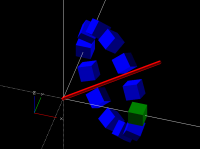
The reason your rotate(a=45,v=[1,1,0]) example works is because you are
specifically rotating around the axis defined by x=1,y=1,z=0.
To help visualize this, try the following:

// The axis of rotation
v = [10,10,0];

// Do the rotation
for(t=[0:30:359])
rotate(t, v) translate([10,0,0]) color(t==0?"green":"blue") cube(2,
true);

// Visualize the plane
color("red") hull() {
sphere(.25);
translate(v) sphere(.25, true);
}

It should look like this:

Note: My understanding of all this isn't perfect, so forgive me if I've
made a mistake here. If anyone else has corrections, please chime in :)

~ Yona

s3030150 mailto:s3030150@icloud.com
April 5, 2016 at 14:05
Hello,

I'm new to OpenSCAD and I have a little problem with Rotate. rotating
around
2 axis does not work properly for me. see the source in screenshots
please.
I typed all objects manually to prevent any mistake in modules

here is what I want to achieve
http://forum.openscad.org/file/n16972/openscad2.png

here is what I get
http://forum.openscad.org/file/n16972/openscad.png

the difference is in the style how I use the rotate function.

rotate(a=45,v=[1,1,0]) - this rotates object improperly
rotate([45,45,0]) - this rotates object improperly
rotate(a=1,v=[45,45,0]) - this rotates object properly but i cannot use it
because the X and Y angles are not the same in my project

could please somebody explain the difference in these three examples?
maybe
they are totally different or should not be used like this. thank you!

--
View this message in context:
http://forum.openscad.org/weird-rotate-around-2-axis-tp16972.html
Sent from the OpenSCAD mailing list archive at Nabble.com.


OpenSCAD mailing list
Discuss@lists.openscad.org
http://lists.openscad.org/mailman/listinfo/discuss_lists.openscad.org

Hello and welcome to using OpenSCAD! Rotation is a pain point for many newcomers and it can certainly be unintuitive. I don't have time to go too far into the details, and there are many tutorials online, but here's a little food for thought: You can think of the standard rotate([rx,ry,rz]) command as expanding to rotate([0,0,rz]) rotate([0,ry,0]) rotate([rx,0,0]). The order of rotation matters. The rotate command first rotates around X, then Y, then Z. If you want the rotations in a different order, use multiple rotate commands. Try playing around with this to see what I mean: rx = 20; ry = 30; rz = 50; color("white") rotate([0,0,rz]) rotate([0,ry,0]) rotate([rx,0,0]) translate([20,0,0]) cube(2, true); color("blue") rotate([rx,ry,rz]) translate([20,0,0]) cube(2, true); color("red") rotate([rz,ry,rx]) translate([20,0,0]) cube(2, true); The reason your rotate(a=45,v=[1,1,0]) example works is because you are specifically rotating around the axis defined by x=1,y=1,z=0. To help visualize this, try the following: // The axis of rotation v = [10,10,0]; // Do the rotation for(t=[0:30:359]) rotate(t, v) translate([10,0,0]) color(t==0?"green":"blue") cube(2, true); // Visualize the plane color("red") hull() { sphere(.25); translate(v) sphere(.25, true); } It should look like this: Note: My understanding of all this isn't perfect, so forgive me if I've made a mistake here. If anyone else has corrections, please chime in :) ~ Yona > s3030150 <mailto:s3030150@icloud.com> > April 5, 2016 at 14:05 > Hello, > > I'm new to OpenSCAD and I have a little problem with Rotate. rotating > around > 2 axis does not work properly for me. see the source in screenshots > please. > I typed all objects manually to prevent any mistake in modules > > here is what I want to achieve > <http://forum.openscad.org/file/n16972/openscad2.png> > > here is what I get > <http://forum.openscad.org/file/n16972/openscad.png> > > > the difference is in the style how I use the rotate function. > > rotate(a=45,v=[1,1,0]) - this rotates object improperly > rotate([45,45,0]) - this rotates object improperly > rotate(a=1,v=[45,45,0]) - this rotates object properly but i cannot use it > because the X and Y angles are not the same in my project > > could please somebody explain the difference in these three examples? > maybe > they are totally different or should not be used like this. thank you! > > > > > -- > View this message in context: > http://forum.openscad.org/weird-rotate-around-2-axis-tp16972.html > Sent from the OpenSCAD mailing list archive at Nabble.com. > > _______________________________________________ > OpenSCAD mailing list > Discuss@lists.openscad.org > http://lists.openscad.org/mailman/listinfo/discuss_lists.openscad.org
S
s3030150
Wed, Apr 6, 2016 7:11 AM

Hi Hypher,

thanks for the explanation, now I finally got it. So I need to create axis
by defining a vector and then tilt the object on the surface defined by
0,0,0 and the new axis.

this is what helped to explain
The reason your rotate(a=45,v=[1,1,0]) example works is because you are
specifically rotating around the axis defined by x=1,y=1,z=0.

BIG THANKS!!!

--
View this message in context: http://forum.openscad.org/weird-rotate-around-2-axis-tp16972p16979.html
Sent from the OpenSCAD mailing list archive at Nabble.com.

Hi Hypher, thanks for the explanation, now I finally got it. So I need to create axis by defining a vector and then tilt the object on the surface defined by 0,0,0 and the new axis. this is what helped to explain *The reason your rotate(a=45,v=[1,1,0]) example works is because you are specifically rotating around the axis defined by x=1,y=1,z=0.* BIG THANKS!!! -- View this message in context: http://forum.openscad.org/weird-rotate-around-2-axis-tp16972p16979.html Sent from the OpenSCAD mailing list archive at Nabble.com.
R
runsun
Sat, Apr 9, 2016 4:13 PM

s3030150 wrote

rotate(a=45,v=[1,1,0]) - this rotates object improperly
rotate([45,45,0]) - this rotates object improperly
rotate(a=1,v=[45,45,0]) - this rotates object properly but i cannot use it
because the X and Y angles are not the same in my project

v is the axis of rotation, so the following v settings are the same:

v= [1,1,0]
v= [45,45,0]
v= [100,100,0]

They all mean a line on the xy plane, from [0,0,0] and divides xy plane by
equal halves. It'd be 45-degree to the x-axis and 45-degree to y.

So your first style is basically the same as the 3rd one, except they rotate
by different angles --- rotate the 3rd one 45 times would be the same as
rotate the 1st one once.

The second one rotates about x by 45, then rotate about y by 45.


$  Runsun Pan, PhD $ libs: doctest , faces ( git ), offline doc ( git ), runscad.py( 1 , 2 , git ), synwrite( 1 , 2 );  $ tips: hash( 1 , 2 ), matrix( 1 , 2 ),sweep( 1 , 2 ), var( 1 , 2 ), lerp , animation ( gif , prodVid ), precision( 1 , 2 ), xl-control , type , rounded polygon , chfont , tailRecur ( 2 )

--
View this message in context: http://forum.openscad.org/weird-rotate-around-2-axis-tp16972p17006.html
Sent from the OpenSCAD mailing list archive at Nabble.com.

s3030150 wrote > rotate(a=45,v=[1,1,0]) - this rotates object improperly > rotate([45,45,0]) - this rotates object improperly > rotate(a=1,v=[45,45,0]) - this rotates object properly but i cannot use it > because the X and Y angles are not the same in my project v is the axis of rotation, so the following v settings are the same: v= [1,1,0] v= [45,45,0] v= [100,100,0] They all mean a line on the xy plane, from [0,0,0] and divides xy plane by equal halves. It'd be 45-degree to the x-axis and 45-degree to y. So your first style is basically the same as the 3rd one, except they rotate by different angles --- rotate the 3rd one 45 times would be the same as rotate the 1st one once. The second one rotates about x by 45, then rotate about y by 45. ----- $ Runsun Pan, PhD $ libs: doctest , faces ( git ), offline doc ( git ), runscad.py( 1 , 2 , git ), synwrite( 1 , 2 ); $ tips: hash( 1 , 2 ), matrix( 1 , 2 ),sweep( 1 , 2 ), var( 1 , 2 ), lerp , animation ( gif , prodVid ), precision( 1 , 2 ), xl-control , type , rounded polygon , chfont , tailRecur ( 2 ) -- View this message in context: http://forum.openscad.org/weird-rotate-around-2-axis-tp16972p17006.html Sent from the OpenSCAD mailing list archive at Nabble.com.
DM
doug moen
Sat, Apr 9, 2016 5:18 PM

I now have a better understanding of rotate() after reading this thread,
and doing some research.

If you compose two rotations, the result is always another rotation.
http://www.mathoman.com/en/index.php/1537-axis-and-angle-of-the-composition-of-two-rotations

As Hypher has pointed out, the order in which you compose rotations
matters. Composition is not commutative.

As far as I can tell,
rotate([x,y,z])
specifies a rotation about some arbitrary axis by (in a way) specifying the
x, y and z components of the rotation. But it's not as clean as that,
because there are lots of different ways to specify a 3D rotation using 3
angles, and none of them are intuitive to me. Also, the order in which the
x,y,z rotations are applied is significant: the 3 numbers aren't orthogonal
in the way that Euclidean [x,y,z] coordinates are orthogonal. So this
interface is quite arbitrary.

The Euler theorum states that you can describe any 3D rotation using 3
angles, which are called Euler angles.
http://mathworld.wolfram.com/EulerAngles.html

There are apparently many different conventions for specifying Euler
angles. I found a Python package that gives you a choice between 24
different conventions.

In summary, the rotate([x,y,z]) interface is tricky to understand. I
haven't worked through the math to come up with a way to predict what the
resulting axis of rotation is.

On 9 April 2016 at 12:13, runsun runsun@gmail.com wrote:

s3030150 wrote

rotate(a=45,v=[1,1,0]) - this rotates object improperly
rotate([45,45,0]) - this rotates object improperly
rotate(a=1,v=[45,45,0]) - this rotates object properly but i cannot use

it

because the X and Y angles are not the same in my project

v is the axis of rotation, so the following v settings are the same:

v= [1,1,0]
v= [45,45,0]
v= [100,100,0]

They all mean a line on the xy plane, from [0,0,0] and divides xy plane by
equal halves. It'd be 45-degree to the x-axis and 45-degree to y.

So your first style is basically the same as the 3rd one, except they
rotate
by different angles --- rotate the 3rd one 45 times would be the same as
rotate the 1st one once.

The second one rotates about x by 45, then rotate about y by 45.


$  Runsun Pan, PhD $ libs: doctest , faces ( git ), offline doc ( git ),
runscad.py( 1 , 2 , git ), synwrite( 1 , 2 );  $ tips: hash( 1 , 2 ),
matrix( 1 , 2 ),sweep( 1 , 2 ), var( 1 , 2 ), lerp , animation ( gif ,
prodVid ), precision( 1 , 2 ), xl-control , type , rounded polygon , chfont
, tailRecur ( 2 )

--
View this message in context:
http://forum.openscad.org/weird-rotate-around-2-axis-tp16972p17006.html
Sent from the OpenSCAD mailing list archive at Nabble.com.


OpenSCAD mailing list
Discuss@lists.openscad.org
http://lists.openscad.org/mailman/listinfo/discuss_lists.openscad.org

I now have a better understanding of rotate() after reading this thread, and doing some research. If you compose two rotations, the result is always another rotation. http://www.mathoman.com/en/index.php/1537-axis-and-angle-of-the-composition-of-two-rotations As Hypher has pointed out, the order in which you compose rotations matters. Composition is not commutative. As far as I can tell, rotate([x,y,z]) specifies a rotation about some arbitrary axis by (in a way) specifying the x, y and z components of the rotation. But it's not as clean as that, because there are lots of different ways to specify a 3D rotation using 3 angles, and none of them are intuitive to me. Also, the order in which the x,y,z rotations are applied is significant: the 3 numbers aren't orthogonal in the way that Euclidean [x,y,z] coordinates are orthogonal. So this interface is quite arbitrary. The Euler theorum states that you can describe any 3D rotation using 3 angles, which are called Euler angles. http://mathworld.wolfram.com/EulerAngles.html There are apparently many different conventions for specifying Euler angles. I found a Python package that gives you a choice between 24 different conventions. In summary, the rotate([x,y,z]) interface is tricky to understand. I haven't worked through the math to come up with a way to predict what the resulting axis of rotation is. On 9 April 2016 at 12:13, runsun <runsun@gmail.com> wrote: > s3030150 wrote > > rotate(a=45,v=[1,1,0]) - this rotates object improperly > > rotate([45,45,0]) - this rotates object improperly > > rotate(a=1,v=[45,45,0]) - this rotates object properly but i cannot use > it > > because the X and Y angles are not the same in my project > > v is the axis of rotation, so the following v settings are the same: > > v= [1,1,0] > v= [45,45,0] > v= [100,100,0] > > They all mean a line on the xy plane, from [0,0,0] and divides xy plane by > equal halves. It'd be 45-degree to the x-axis and 45-degree to y. > > So your first style is basically the same as the 3rd one, except they > rotate > by different angles --- rotate the 3rd one 45 times would be the same as > rotate the 1st one once. > > The second one rotates about x by 45, then rotate about y by 45. > > > > ----- > > $ Runsun Pan, PhD $ libs: doctest , faces ( git ), offline doc ( git ), > runscad.py( 1 , 2 , git ), synwrite( 1 , 2 ); $ tips: hash( 1 , 2 ), > matrix( 1 , 2 ),sweep( 1 , 2 ), var( 1 , 2 ), lerp , animation ( gif , > prodVid ), precision( 1 , 2 ), xl-control , type , rounded polygon , chfont > , tailRecur ( 2 ) > > > > > -- > View this message in context: > http://forum.openscad.org/weird-rotate-around-2-axis-tp16972p17006.html > Sent from the OpenSCAD mailing list archive at Nabble.com. > > _______________________________________________ > OpenSCAD mailing list > Discuss@lists.openscad.org > http://lists.openscad.org/mailman/listinfo/discuss_lists.openscad.org > > >
CA
Carsten Arnholm
Sat, Apr 9, 2016 6:17 PM

On 09. april 2016 19:18, doug moen wrote:

In summary, the rotate([x,y,z]) interface is tricky to understand. I
haven't worked through the math to come up with a way to predict what
the resulting axis of rotation is.

In my opinion the interface is not usable if you consider the values
angles around the global axes as you explained. the only practical way
to use it is to apply one value at a time and leave the others zero.

To rotate e.g. 30 degrees around Y followed by 60 degrees around X, you
need to do
rotate([60,0,0]) rotate([0,30,0]) cube([10,20,30]);

The above is not at all the same as
rotate([60,30,0]) cube([10,20,30]);

For this reason I introduced a different interface in AngelScript CSG
where there are rotate_x(angle), rotate_y(angle), rotate_z(angle) operators.

There is however, one scenario where the OpenSCAD rotate syntax makes a
lot of sense: when you rotate around some arbitrary axis. For example to
rotate 60 degrees around the axis [x,y]=[1,1]

rotate(a=60,v=[1,1]) cube([10,20,30]);

This format makes sense and can be extended to 3d, but in practice I
guess it isn't much used.

Carsten Arnholm

On 09. april 2016 19:18, doug moen wrote: > In summary, the rotate([x,y,z]) interface is tricky to understand. I > haven't worked through the math to come up with a way to predict what > the resulting axis of rotation is. In my opinion the interface is not usable if you consider the values angles around the global axes as you explained. the only practical way to use it is to apply one value at a time and leave the others zero. To rotate e.g. 30 degrees around Y followed by 60 degrees around X, you need to do rotate([60,0,0]) rotate([0,30,0]) cube([10,20,30]); The above is not at all the same as rotate([60,30,0]) cube([10,20,30]); For this reason I introduced a different interface in AngelScript CSG where there are rotate_x(angle), rotate_y(angle), rotate_z(angle) operators. There is however, one scenario where the OpenSCAD rotate syntax makes a lot of sense: when you rotate around some arbitrary axis. For example to rotate 60 degrees around the axis [x,y]=[1,1] rotate(a=60,v=[1,1]) cube([10,20,30]); This format makes sense and can be extended to 3d, but in practice I guess it isn't much used. Carsten Arnholm
LB
L Boyd
Sat, Apr 9, 2016 7:19 PM

When using rotate with x,y & z angles,  OpenSCAD first rotates about the x
axis.
The result is then rotated about the y axis.
Finally, this result is rotated about the z axis.

for example:
rotate([60,30,0]) cube([10,20,30]); is equivalent to:

rotate([0,30,0])  rotate([60,0,0])  cube([10,20,30]);
which is equivalent to:

rotate([0,30,0]) { rotate([60,0,0]) { cube([10,20,30]); }}
since the rotate nearest to cube is performed first.


Larry

View this message in context: http://forum.openscad.org/weird-rotate-around-2-axis-tp16972p17010.html
Sent from the OpenSCAD mailing list archive at Nabble.com.

When using rotate with x,y & z angles, OpenSCAD first rotates about the x axis. The result is then rotated about the y axis. Finally, this result is rotated about the z axis. for example: rotate([60,30,0]) cube([10,20,30]); is equivalent to: rotate([0,30,0]) rotate([60,0,0]) cube([10,20,30]); which is equivalent to: rotate([0,30,0]) { rotate([60,0,0]) { cube([10,20,30]); }} since the rotate nearest to cube is performed first. ----- Larry -- View this message in context: http://forum.openscad.org/weird-rotate-around-2-axis-tp16972p17010.html Sent from the OpenSCAD mailing list archive at Nabble.com.
NH
nop head
Sat, Apr 9, 2016 7:21 PM

In my opinion the interface is not usable if you consider the values

angles around the global axes as you explained. the only practical way to
use it is to apply one value at a time and leave the others zero.

In my experience most objects get rotated by +/-90 or 180 around one of
more of the global axes, so I can always pick and order that is x,y,z and
use a single rotate([x, y, z]). Nearly always one of those is 0. It is rare
that I need to split it into two rotates because I want a different order.

On 9 April 2016 at 19:17, Carsten Arnholm arnholm@arnholm.org wrote:

On 09. april 2016 19:18, doug moen wrote:

In summary, the rotate([x,y,z]) interface is tricky to understand. I
haven't worked through the math to come up with a way to predict what
the resulting axis of rotation is.

In my opinion the interface is not usable if you consider the values
angles around the global axes as you explained. the only practical way to
use it is to apply one value at a time and leave the others zero.

To rotate e.g. 30 degrees around Y followed by 60 degrees around X, you
need to do
rotate([60,0,0]) rotate([0,30,0]) cube([10,20,30]);

The above is not at all the same as
rotate([60,30,0]) cube([10,20,30]);

For this reason I introduced a different interface in AngelScript CSG
where there are rotate_x(angle), rotate_y(angle), rotate_z(angle) operators.

There is however, one scenario where the OpenSCAD rotate syntax makes a
lot of sense: when you rotate around some arbitrary axis. For example to
rotate 60 degrees around the axis [x,y]=[1,1]

rotate(a=60,v=[1,1]) cube([10,20,30]);

This format makes sense and can be extended to 3d, but in practice I guess
it isn't much used.

Carsten Arnholm


OpenSCAD mailing list
Discuss@lists.openscad.org
http://lists.openscad.org/mailman/listinfo/discuss_lists.openscad.org

>In my opinion the interface is not usable if you consider the values angles around the global axes as you explained. the only practical way to use it is to apply one value at a time and leave the others zero. In my experience most objects get rotated by +/-90 or 180 around one of more of the global axes, so I can always pick and order that is x,y,z and use a single rotate([x, y, z]). Nearly always one of those is 0. It is rare that I need to split it into two rotates because I want a different order. On 9 April 2016 at 19:17, Carsten Arnholm <arnholm@arnholm.org> wrote: > On 09. april 2016 19:18, doug moen wrote: > >> In summary, the rotate([x,y,z]) interface is tricky to understand. I >> haven't worked through the math to come up with a way to predict what >> the resulting axis of rotation is. >> > > In my opinion the interface is not usable if you consider the values > angles around the global axes as you explained. the only practical way to > use it is to apply one value at a time and leave the others zero. > > To rotate e.g. 30 degrees around Y followed by 60 degrees around X, you > need to do > rotate([60,0,0]) rotate([0,30,0]) cube([10,20,30]); > > The above is not at all the same as > rotate([60,30,0]) cube([10,20,30]); > > For this reason I introduced a different interface in AngelScript CSG > where there are rotate_x(angle), rotate_y(angle), rotate_z(angle) operators. > > There is however, one scenario where the OpenSCAD rotate syntax makes a > lot of sense: when you rotate around some arbitrary axis. For example to > rotate 60 degrees around the axis [x,y]=[1,1] > > rotate(a=60,v=[1,1]) cube([10,20,30]); > > This format makes sense and can be extended to 3d, but in practice I guess > it isn't much used. > > Carsten Arnholm > > > _______________________________________________ > OpenSCAD mailing list > Discuss@lists.openscad.org > http://lists.openscad.org/mailman/listinfo/discuss_lists.openscad.org >
DM
doug moen
Sat, Apr 9, 2016 8:05 PM

Carsten said:

In my opinion the interface is not usable if you consider the values angles
around the global axes as you explained. the only practical way to use it

is

to apply one value at a time and leave the others zero.

For this reason I introduced a different interface in AngelScript CSG where
there are rotate_x(angle), rotate_y(angle), rotate_z(angle) operators.

If you define the basis vectors
X = [1,0,0];
Y = [0,1,0];
Z = [0,0,1];
then
rotate([a,0,0]) is rotate(a,X)
rotate([0,a,0]) is rotate(a,Y)
rotate([0,0,a]) is rotate(a,Z)

That's a more flexible alternative to rotate_x(), rotate_y(), rotate_z().

The same arguments would work with mirror(), which takes a vector argument:
mirror(X) -- reflect through the origin along the X axis
mirror(Y)
mirror(Z)

On 9 April 2016 at 14:17, Carsten Arnholm arnholm@arnholm.org wrote:

On 09. april 2016 19:18, doug moen wrote:

In summary, the rotate([x,y,z]) interface is tricky to understand. I
haven't worked through the math to come up with a way to predict what
the resulting axis of rotation is.

In my opinion the interface is not usable if you consider the values
angles around the global axes as you explained. the only practical way to
use it is to apply one value at a time and leave the others zero.

To rotate e.g. 30 degrees around Y followed by 60 degrees around X, you
need to do
rotate([60,0,0]) rotate([0,30,0]) cube([10,20,30]);

The above is not at all the same as
rotate([60,30,0]) cube([10,20,30]);

For this reason I introduced a different interface in AngelScript CSG
where there are rotate_x(angle), rotate_y(angle), rotate_z(angle) operators.

There is however, one scenario where the OpenSCAD rotate syntax makes a
lot of sense: when you rotate around some arbitrary axis. For example to
rotate 60 degrees around the axis [x,y]=[1,1]

rotate(a=60,v=[1,1]) cube([10,20,30]);

This format makes sense and can be extended to 3d, but in practice I guess
it isn't much used.

Carsten Arnholm


OpenSCAD mailing list
Discuss@lists.openscad.org
http://lists.openscad.org/mailman/listinfo/discuss_lists.openscad.org

Carsten said: >In my opinion the interface is not usable if you consider the values angles >around the global axes as you explained. the only practical way to use it is >to apply one value at a time and leave the others zero. > >For this reason I introduced a different interface in AngelScript CSG where >there are rotate_x(angle), rotate_y(angle), rotate_z(angle) operators. If you define the basis vectors X = [1,0,0]; Y = [0,1,0]; Z = [0,0,1]; then rotate([a,0,0]) is rotate(a,X) rotate([0,a,0]) is rotate(a,Y) rotate([0,0,a]) is rotate(a,Z) That's a more flexible alternative to rotate_x(), rotate_y(), rotate_z(). The same arguments would work with mirror(), which takes a vector argument: mirror(X) -- reflect through the origin along the X axis mirror(Y) mirror(Z) On 9 April 2016 at 14:17, Carsten Arnholm <arnholm@arnholm.org> wrote: > On 09. april 2016 19:18, doug moen wrote: > >> In summary, the rotate([x,y,z]) interface is tricky to understand. I >> haven't worked through the math to come up with a way to predict what >> the resulting axis of rotation is. >> > > In my opinion the interface is not usable if you consider the values > angles around the global axes as you explained. the only practical way to > use it is to apply one value at a time and leave the others zero. > > To rotate e.g. 30 degrees around Y followed by 60 degrees around X, you > need to do > rotate([60,0,0]) rotate([0,30,0]) cube([10,20,30]); > > The above is not at all the same as > rotate([60,30,0]) cube([10,20,30]); > > For this reason I introduced a different interface in AngelScript CSG > where there are rotate_x(angle), rotate_y(angle), rotate_z(angle) operators. > > There is however, one scenario where the OpenSCAD rotate syntax makes a > lot of sense: when you rotate around some arbitrary axis. For example to > rotate 60 degrees around the axis [x,y]=[1,1] > > rotate(a=60,v=[1,1]) cube([10,20,30]); > > This format makes sense and can be extended to 3d, but in practice I guess > it isn't much used. > > Carsten Arnholm > > > _______________________________________________ > OpenSCAD mailing list > Discuss@lists.openscad.org > http://lists.openscad.org/mailman/listinfo/discuss_lists.openscad.org > > >
CA
Carsten Arnholm
Sat, Apr 9, 2016 8:18 PM

On 09. april 2016 22:05, doug moen wrote:

The same arguments would work with mirror(), which takes a vector argument:
mirror(X) -- reflect through the origin along the X axis
mirror(Y)
mirror(Z)

I don't think so.

Regarding mirror transformations, the more interesting thing is that it
unnecessarily restricted to perform mirroring only through the origin.
Mirroring through an arbitrary point is useful.

Carsten Arnholm

On 09. april 2016 22:05, doug moen wrote: > The same arguments would work with mirror(), which takes a vector argument: > mirror(X) -- reflect through the origin along the X axis > mirror(Y) > mirror(Z) I don't think so. Regarding mirror transformations, the more interesting thing is that it unnecessarily restricted to perform mirroring only through the origin. Mirroring through an arbitrary point is useful. Carsten Arnholm