

discuss@lists.openscad.org

OpenSCAD general discussion Mailing-list

View all threads

Wild idea: Attachment nodes

T
Troberg
Wed, Nov 8, 2017 11:17 AM

This will be a familiar concept to everyone who has played Kerbal Space
Program.

The idea is to have an object type that is "attachment node", which has a
name, a position and an orientation. This could then be used to connect to
an attachment node on another object.

So, for example (pseudo-ish code...):

That would make a thispart and a thatpart, and place thatpart so that
thisconnector lines up with thatconnector.

It's not an everyday thing, but once you have complex constructions with
many parts, especially if they are moving, it could help a lot. I'm
currently doing a construction where things swing around, and getting all
the trigonometry right in multiple steps of swinging does not make for neat
code.

Another example would be, say, a hinge with screw holes. Each screw hole
would be an attachment node, and each screw would have an attachment node.
That way, when you use the hinge (which might reside in an included file),
you don't need to know exaclty where the screw holes are, you just need the
name of the attachment nodes.

Another example is that you often stack parts in some way. This would make
for less
translate([-widthbase/2-widthedge-widthfeet,0,heightbase+heightpart1+heightpart2+heightpart3]),
as it would allow using previous parts as a position reference.

I realize that the syntax, as written in the example, wouldn't work with
multiple nodes, but I think it's enough to illustrate the idea.

--
Sent from: http://forum.openscad.org/

This will be a familiar concept to everyone who has played Kerbal Space Program. The idea is to have an object type that is "attachment node", which has a name, a position and an orientation. This could then be used to connect to an attachment node on another object. So, for example (pseudo-ish code...): That would make a thispart and a thatpart, and place thatpart so that thisconnector lines up with thatconnector. It's not an everyday thing, but once you have complex constructions with many parts, especially if they are moving, it could help a lot. I'm currently doing a construction where things swing around, and getting all the trigonometry right in multiple steps of swinging does not make for neat code. Another example would be, say, a hinge with screw holes. Each screw hole would be an attachment node, and each screw would have an attachment node. That way, when you use the hinge (which might reside in an included file), you don't need to know exaclty where the screw holes are, you just need the name of the attachment nodes. Another example is that you often stack parts in some way. This would make for less translate([-widthbase/2-widthedge-widthfeet,0,heightbase+heightpart1+heightpart2+heightpart3]), as it would allow using previous parts as a position reference. I realize that the syntax, as written in the example, wouldn't work with multiple nodes, but I think it's enough to illustrate the idea. -- Sent from: http://forum.openscad.org/
DM
doug moen
Wed, Nov 8, 2017 3:04 PM

The pseudocode for your example is missing from your post.
However, the idea sounds almost identical to Piotr's Oct 15 post, "Wish:
named transformable points".
In your version, an "attachment node" has an orientation, which is missing
from Piotr's proposal.

You should read the "Named transformable points" thread, because Nophead
explains how to write attachable modules in OpenSCAD, without the need for
language extensions.
http://forum.openscad.org/Wish-named-transformable-points-td22375.html

On 8 November 2017 at 06:17, Troberg troberg.anders@gmail.com wrote:

This will be a familiar concept to everyone who has played Kerbal Space
Program.

The idea is to have an object type that is "attachment node", which has a
name, a position and an orientation. This could then be used to connect to
an attachment node on another object.

So, for example (pseudo-ish code...):

That would make a thispart and a thatpart, and place thatpart so that
thisconnector lines up with thatconnector.

It's not an everyday thing, but once you have complex constructions with
many parts, especially if they are moving, it could help a lot. I'm
currently doing a construction where things swing around, and getting all
the trigonometry right in multiple steps of swinging does not make for neat
code.

Another example would be, say, a hinge with screw holes. Each screw hole
would be an attachment node, and each screw would have an attachment node.
That way, when you use the hinge (which might reside in an included file),
you don't need to know exaclty where the screw holes are, you just need the
name of the attachment nodes.

Another example is that you often stack parts in some way. This would make
for less
translate([-widthbase/2-widthedge-widthfeet,0,heightbase+heightpart1+
heightpart2+heightpart3]),
as it would allow using previous parts as a position reference.

I realize that the syntax, as written in the example, wouldn't work with
multiple nodes, but I think it's enough to illustrate the idea.

--
Sent from: http://forum.openscad.org/


OpenSCAD mailing list
Discuss@lists.openscad.org
http://lists.openscad.org/mailman/listinfo/discuss_lists.openscad.org

The pseudocode for your example is missing from your post. However, the idea sounds almost identical to Piotr's Oct 15 post, "Wish: named transformable points". In your version, an "attachment node" has an orientation, which is missing from Piotr's proposal. You should read the "Named transformable points" thread, because Nophead explains how to write attachable modules in OpenSCAD, without the need for language extensions. http://forum.openscad.org/Wish-named-transformable-points-td22375.html On 8 November 2017 at 06:17, Troberg <troberg.anders@gmail.com> wrote: > This will be a familiar concept to everyone who has played Kerbal Space > Program. > > The idea is to have an object type that is "attachment node", which has a > name, a position and an orientation. This could then be used to connect to > an attachment node on another object. > > So, for example (pseudo-ish code...): > > > > That would make a thispart and a thatpart, and place thatpart so that > thisconnector lines up with thatconnector. > > It's not an everyday thing, but once you have complex constructions with > many parts, especially if they are moving, it could help a lot. I'm > currently doing a construction where things swing around, and getting all > the trigonometry right in multiple steps of swinging does not make for neat > code. > > Another example would be, say, a hinge with screw holes. Each screw hole > would be an attachment node, and each screw would have an attachment node. > That way, when you use the hinge (which might reside in an included file), > you don't need to know exaclty where the screw holes are, you just need the > name of the attachment nodes. > > Another example is that you often stack parts in some way. This would make > for less > translate([-widthbase/2-widthedge-widthfeet,0,heightbase+heightpart1+ > heightpart2+heightpart3]), > as it would allow using previous parts as a position reference. > > I realize that the syntax, as written in the example, wouldn't work with > multiple nodes, but I think it's enough to illustrate the idea. > > > > -- > Sent from: http://forum.openscad.org/ > > _______________________________________________ > OpenSCAD mailing list > Discuss@lists.openscad.org > http://lists.openscad.org/mailman/listinfo/discuss_lists.openscad.org >
T
Troberg
Wed, Nov 8, 2017 3:35 PM

I'll check that.

Don't know what happened to the code. I included it with the raw text tag.

If the other thread isn't what I was looking for, I'll rewrite the code.

--
Sent from: http://forum.openscad.org/

I'll check that. Don't know what happened to the code. I included it with the raw text tag. If the other thread isn't what I was looking for, I'll rewrite the code. -- Sent from: http://forum.openscad.org/
NH
nop head
Wed, Nov 8, 2017 6:17 PM

This seems to be a common request but it isn't needed the way I use
OpenSCAD.

That way, when you use the hinge (which might reside in an included file),

you don't need to know exaclty where the screw holes are, you just need the
name of the attachment nodes.

I do exactly what you want using modules. Here is a hanged door where the
hinge code lives in another file.

module door() {
render_sheet(PMMA6) difference() {
sheet(PMMA6, door_width, door_height, 3);

    for(z =[-1, 1])
        translate([-door_width / 2, z * door_height / 2])
            door_hinge_hole_positions(z)
                drill(screw_pilot_hole(door_hinge_screw()));
}

}

module door_assembly() {
for(z =[-1, 1])
translate([-door_width / 2, -depth / 2 - sheet_thickness(DiBond),
door_z + z * door_height / 2])
door_hinge_assembly(z > 0, sheet_thickness(DiBond));

translate([0, -depth / 2 - sheet_thickness(DiBond) +

door_hinge_pin_y(), door_z])
rotate([90, 0, 0])
door();
}

door_hinge_hole_positions(z) is a module that positions its children at the
hinge hole positions. It looks like this

module door_hinge_hole_positions(dir = 0) {
hole_pitch = width - 10;

for(side = [-1, 1])
    translate([width / 2 + side * hole_pitch / 2, -dir * width / 2

-side * hole_pitch / 2])
children();
}

It is defined in the hinge file and used to drill the holes in the printed
plastic hinges and place the screws. It is used in the file that makes the
door to drill the holes in the Acrylic part. There is no need for named
connection points. I just use a module to represent them.


So it meets your objective by allowing the screw positions to be
represented with a name and referenced from another module.

All my connectivity between parts is handled like this.

On 8 November 2017 at 15:35, Troberg troberg.anders@gmail.com wrote:

I'll check that.

Don't know what happened to the code. I included it with the raw text tag.

If the other thread isn't what I was looking for, I'll rewrite the code.

--
Sent from: http://forum.openscad.org/


OpenSCAD mailing list
Discuss@lists.openscad.org
http://lists.openscad.org/mailman/listinfo/discuss_lists.openscad.org
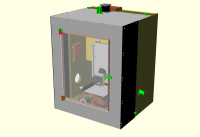

This seems to be a common request but it isn't needed the way I use OpenSCAD. That way, when you use the hinge (which might reside in an included file), > you don't need to know exaclty where the screw holes are, you just need the > name of the attachment nodes. > I do exactly what you want using modules. Here is a hanged door where the hinge code lives in another file. module door() { render_sheet(PMMA6) difference() { sheet(PMMA6, door_width, door_height, 3); for(z =[-1, 1]) translate([-door_width / 2, z * door_height / 2]) door_hinge_hole_positions(z) drill(screw_pilot_hole(door_hinge_screw())); } } module door_assembly() { for(z =[-1, 1]) translate([-door_width / 2, -depth / 2 - sheet_thickness(DiBond), door_z + z * door_height / 2]) door_hinge_assembly(z > 0, sheet_thickness(DiBond)); translate([0, -depth / 2 - sheet_thickness(DiBond) + door_hinge_pin_y(), door_z]) rotate([90, 0, 0]) door(); } door_hinge_hole_positions(z) is a module that positions its children at the hinge hole positions. It looks like this module door_hinge_hole_positions(dir = 0) { hole_pitch = width - 10; for(side = [-1, 1]) translate([width / 2 + side * hole_pitch / 2, -dir * width / 2 -side * hole_pitch / 2]) children(); } It is defined in the hinge file and used to drill the holes in the printed plastic hinges and place the screws. It is used in the file that makes the door to drill the holes in the Acrylic part. There is no need for named connection points. I just use a module to represent them. ​ So it meets your objective by allowing the screw positions to be represented with a name and referenced from another module. All my connectivity between parts is handled like this. On 8 November 2017 at 15:35, Troberg <troberg.anders@gmail.com> wrote: > I'll check that. > > Don't know what happened to the code. I included it with the raw text tag. > > If the other thread isn't what I was looking for, I'll rewrite the code. > > > > -- > Sent from: http://forum.openscad.org/ > > _______________________________________________ > OpenSCAD mailing list > Discuss@lists.openscad.org > http://lists.openscad.org/mailman/listinfo/discuss_lists.openscad.org >
M
MichaelAtOz
Thu, Nov 9, 2017 4:32 AM

raw doesn't make it to the mailing-list. 'integration' issues...
I must get around to removing it from the drop-down...

Nophead, re the door etc, do you use OpenSCAD output to do your drilling
with a eg CNC?


Admin - PM me if you need anything, or if I've done something stupid...

Unless specifically shown otherwise above, my contribution is in the Public Domain; to the extent possible under law, I have waived all copyright and related or neighbouring rights to this work. Obviously inclusion of works of previous authors is not included in the above.

The TPP is no simple “trade agreement.”  Fight it! http://www.ourfairdeal.org/  time is running out!

Sent from: http://forum.openscad.org/

raw doesn't make it to the mailing-list. 'integration' issues... I must get around to removing it from the drop-down... Nophead, re the door etc, do you use OpenSCAD output to do your drilling with a eg CNC? ----- Admin - PM me if you need anything, or if I've done something stupid... Unless specifically shown otherwise above, my contribution is in the Public Domain; to the extent possible under law, I have waived all copyright and related or neighbouring rights to this work. Obviously inclusion of works of previous authors is not included in the above. The TPP is no simple “trade agreement.” Fight it! http://www.ourfairdeal.org/ time is running out! -- Sent from: http://forum.openscad.org/
M
MichaelAtOz
Thu, Nov 9, 2017 5:48 AM

MichaelAtOz wrote

raw doesn't make it to the mailing-list. 'integration' issues...
I must get around to removing it from the drop-down...

http://forum.openscad.org/file/t359/nabble_raw.png

Interim 'fix'


Admin - PM me if you need anything, or if I've done something stupid...

Unless specifically shown otherwise above, my contribution is in the Public Domain; to the extent possible under law, I have waived all copyright and related or neighbouring rights to this work. Obviously inclusion of works of previous authors is not included in the above.

The TPP is no simple “trade agreement.”  Fight it! http://www.ourfairdeal.org/  time is running out!

Sent from: http://forum.openscad.org/

MichaelAtOz wrote > raw doesn't make it to the mailing-list. 'integration' issues... > I must get around to removing it from the drop-down... <http://forum.openscad.org/file/t359/nabble_raw.png> Interim 'fix' ----- Admin - PM me if you need anything, or if I've done something stupid... Unless specifically shown otherwise above, my contribution is in the Public Domain; to the extent possible under law, I have waived all copyright and related or neighbouring rights to this work. Obviously inclusion of works of previous authors is not included in the above. The TPP is no simple “trade agreement.” Fight it! http://www.ourfairdeal.org/ time is running out! -- Sent from: http://forum.openscad.org/
NH
nop head
Thu, Nov 9, 2017 9:33 AM

Yes I project the door to 2D and export it as a DXF and can use my CNC
router to drill the holes. If I ever receive the Glowforge I ordered two
years ago I will be able to laser cut them. That actual door was made many
years ago by hand for another machine. I modelled it retrospectively and
transplanted it onto HydraRaptor.

On 9 November 2017 at 05:48, MichaelAtOz oz.at.michael@gmail.com wrote:

MichaelAtOz wrote

raw doesn't make it to the mailing-list. 'integration' issues...
I must get around to removing it from the drop-down...

http://forum.openscad.org/file/t359/nabble_raw.png

Interim 'fix'


Admin - PM me if you need anything, or if I've done something stupid...

Unless specifically shown otherwise above, my contribution is in the
Public Domain; to the extent possible under law, I have waived all
copyright and related or neighbouring rights to this work. Obviously
inclusion of works of previous authors is not included in the above.

The TPP is no simple “trade agreement.”  Fight it!
http://www.ourfairdeal.org/  time is running out!

Sent from: http://forum.openscad.org/


OpenSCAD mailing list
Discuss@lists.openscad.org
http://lists.openscad.org/mailman/listinfo/discuss_lists.openscad.org

Yes I project the door to 2D and export it as a DXF and can use my CNC router to drill the holes. If I ever receive the Glowforge I ordered two years ago I will be able to laser cut them. That actual door was made many years ago by hand for another machine. I modelled it retrospectively and transplanted it onto HydraRaptor. On 9 November 2017 at 05:48, MichaelAtOz <oz.at.michael@gmail.com> wrote: > MichaelAtOz wrote > > raw doesn't make it to the mailing-list. 'integration' issues... > > I must get around to removing it from the drop-down... > > <http://forum.openscad.org/file/t359/nabble_raw.png> > > Interim 'fix' > > > > ----- > Admin - PM me if you need anything, or if I've done something stupid... > > Unless specifically shown otherwise above, my contribution is in the > Public Domain; to the extent possible under law, I have waived all > copyright and related or neighbouring rights to this work. Obviously > inclusion of works of previous authors is not included in the above. > > The TPP is no simple “trade agreement.” Fight it! > http://www.ourfairdeal.org/ time is running out! > -- > Sent from: http://forum.openscad.org/ > > _______________________________________________ > OpenSCAD mailing list > Discuss@lists.openscad.org > http://lists.openscad.org/mailman/listinfo/discuss_lists.openscad.org >
R
rmi
Fri, Nov 10, 2017 10:17 AM

take a look at

https://github.com/OskarLinde/scad-utils/blob/master/transformations.scad
https://github.com/OskarLinde/scad-utils/blob/master/linalg.scad

It provides all the operations needed to create matrices that can be used
with multmatrix to do actual object transformations and further mathematical
operations as well.

eg. translation_part(M) returns only translation, but not rotation applied.

(from the top of my head,might not work)

M = translation([10, 10, 0]) rotation(axis = [45, 45, 0])

difference() {
multmatrix(M) cube([5, 5, 5], center = true);
multmatrix(translation_part(M)) cylinder(r = 1, h = 6, center = true)
}

would give a rotated cube, but the hole will always be in Z direction, the
same as

translate(...) difference() {
rotate(..) cube([5, 5, 5], center = true);
cylinder(r = 1, h = 6, center = true)
}

A more advanced example is connecting two coordinate systems. Below the
transformation of some_part is defined by M and the hole will be in the
center of some_part at Z = 5 in the direction of Z.

difference() {
multmatrix(M) some_part();
T = translation_part(M);
translate(T[0], T[1], 5]) cylinder(r = 1, h = 6)
}

In other words, it gives you all possible degrees of freedom when connecting
two coordinate systems.

--
Sent from: http://forum.openscad.org/

take a look at https://github.com/OskarLinde/scad-utils/blob/master/transformations.scad https://github.com/OskarLinde/scad-utils/blob/master/linalg.scad It provides all the operations needed to create matrices that can be used with multmatrix to do actual object transformations and further mathematical operations as well. eg. translation_part(M) returns only translation, but not rotation applied. (from the top of my head,might not work) M = translation([10, 10, 0]) rotation(axis = [45, 45, 0]) difference() { multmatrix(M) cube([5, 5, 5], center = true); multmatrix(translation_part(M)) cylinder(r = 1, h = 6, center = true) } would give a rotated cube, but the hole will always be in Z direction, the same as translate(...) difference() { rotate(..) cube([5, 5, 5], center = true); cylinder(r = 1, h = 6, center = true) } A more advanced example is connecting two coordinate systems. Below the transformation of some_part is defined by M and the hole will be in the center of some_part at Z = 5 in the direction of Z. difference() { multmatrix(M) some_part(); T = translation_part(M); translate(T[0], T[1], 5]) cylinder(r = 1, h = 6) } In other words, it gives you all possible degrees of freedom when connecting two coordinate systems. -- Sent from: http://forum.openscad.org/