

Bug in Animate ?

I have been having trouble using the animate feature in OpenSCAD to dump
picture files. It largely numbers the output files consecutively, however
there is the occasional gap, e.g. it will jump from "frame00127.png" to
"frame00129.png" missing out "frame00128.png". The behaviour appears in
part to depend on what step value is used but is not consistent...!?If you
animate the following, on my system it generally leaves out frame00128, 384,
640 & 896.Complete steps in this order:1) Select Animate2) Set Steps to
11283) Set FPS to 204) Select Dump Pictures5) Wait for a complete cycle and
check outputcolor("black") text(str("$t = ",$t));translate([0,-20,0])
color("black") text(str("$t * 1128 = ",$t1128));translate([0,-40,0])
color("black") text(str("Filename: frame00000 + ",round($t1128)));Can
anyone confirm this behaviour or am I doing something wrong?Thanks.
--
View this message in context: http://forum.openscad.org/Bug-in-Animate-tp13528.html
Sent from the OpenSCAD mailing list archive at Nabble.com.

I tested on Windows 7 prof with OpenSCAD http://www.openscad.org version
2015.03-1
I#m missing 128 and 384 but not 640 and 896.
2015-08-16 21:26 GMT+02:00 Trygon db5765@outlook.com:
I have been having trouble using the animate feature in OpenSCAD to dump
picture files. It largely numbers the output files consecutively, however
there is the occasional gap, e.g. it will jump from "frame00127.png" to
"frame00129.png" missing out "frame00128.png". The behaviour appears in
part to depend on what step value is used but is not consistent...!? If you
animate the following, on my system it generally leaves out frame00128,
384, 640 & 896. Complete steps in this order: 1) Select Animate 2) Set
Steps to 1128 3) Set FPS to 20 4) Select Dump Pictures 5) Wait for a
complete cycle and check output color("black") text(str("$t = ",$t));
translate([0,-20,0]) color("black") text(str("$t * 1128 = ",$t1128));
translate([0,-40,0]) color("black") text(str("Filename: frame00000 +
",round($t1128))); Can anyone confirm this behaviour or am I doing
something wrong? Thanks.
View this message in context: Bug in Animate ?
http://forum.openscad.org/Bug-in-Animate-tp13528.html
Sent from the OpenSCAD mailing list archive http://forum.openscad.org/
at Nabble.com.
OpenSCAD mailing list
Discuss@lists.openscad.org
http://lists.openscad.org/mailman/listinfo/discuss_lists.openscad.org
--
stempeldergeschichte@googlemail.com karsten@rohrbach.de
P.S. Falls meine E-Mail kürzer ausfällt als Dir angenehm ist:
Ich probiere gerade aus kurze Antworten statt gar keine Antworten zu
schreiben.
Wenn Du gerne mehr lesen möchtest, dann lass es mich bitte wissen.
P.S. In case my e-mail is shorter than you enjoy:
I am currently trying short replies instead of no replies at all.
Please let me know, if you like to read more.
Enjoy!
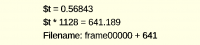
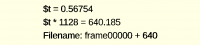
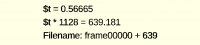
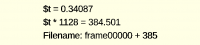
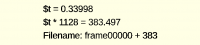
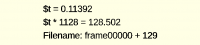
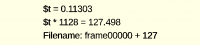

My theory is that "frame00128.png" is missing because either "frame00127.png"
or "frame00129.png" are used twice.
After looking at the source code, I guess this a fixable bug in OpenSCAD,
which is caused by the imprecise way that $t is computed and referenced at
each iteration. $t is represented internally as a 6 digit decimal character
string; it is incremented like this:
                    double s = this->e_fsteps->text().toDouble();
                    double t = this->e_tval->text().toDouble() + 1/s;
                    QString txt;
                    txt.sprintf("%.5f", t >= 1.0 ? 0.0 : t);
                    this->e_tval->setText(txt);
and referenced like this:
this->top_ctx.set_variable("$t",
ValuePtr(this->e_tval->text().toDouble()));
and
            QString filename;
            double s = this->e_fsteps->text().toDouble();
            double t = this->e_tval->text().toDouble();
            filename.sprintf("frame%05d.png", int(round(s*t)));
            img.save(filename, "PNG");
There is a lot of roundoff error occurring at each step, due to this code.
I think the problem would go away if the iteration count were stored
internally as an integer, and if $t were computed at each step as
iteration_count/fsteps.
Doug.
On 16 August 2015 at 15:26, Trygon db5765@outlook.com wrote:
I have been having trouble using the animate feature in OpenSCAD to dump
picture files. It largely numbers the output files consecutively, however
there is the occasional gap, e.g. it will jump from "frame00127.png" to
"frame00129.png" missing out "frame00128.png". The behaviour appears in
part to depend on what step value is used but is not consistent...!? If you
animate the following, on my system it generally leaves out frame00128,
384, 640 & 896. Complete steps in this order: 1) Select Animate 2) Set
Steps to 1128 3) Set FPS to 20 4) Select Dump Pictures 5) Wait for a
complete cycle and check output color("black") text(str("$t = ",$t));
translate([0,-20,0]) color("black") text(str("$t * 1128 = ",$t1128));
translate([0,-40,0]) color("black") text(str("Filename: frame00000 +
",round($t1128))); Can anyone confirm this behaviour or am I doing
something wrong? Thanks.
View this message in context: Bug in Animate ?
http://forum.openscad.org/Bug-in-Animate-tp13528.html
Sent from the OpenSCAD mailing list archive http://forum.openscad.org/
at Nabble.com.
OpenSCAD mailing list
Discuss@lists.openscad.org
http://lists.openscad.org/mailman/listinfo/discuss_lists.openscad.org
Thanks for your comments, glad it is not just me. Hopefully someone can fix
this, it does not sound too difficult.
In my opinion it would also be useful if the Dump Pictures control were a
button rather than a tick box. When the button is pressed $t would be set to
0, a complete cycle of output would be completed $t: 0/Steps ->
(Steps-1)/Steps, then the button would reset to unpressed.
--
View this message in context: http://forum.openscad.org/Bug-in-Animate-tp13528p13531.html
Sent from the OpenSCAD mailing list archive at Nabble.com.
On a side note, when I first tried your code, I cound not find the exported
files.
Only after a save the files apeared in the same folder as the save of the
file.
2015-08-17 8:23 GMT+02:00 Trygon db5765@outlook.com:
Thanks for your comments, glad it is not just me. Hopefully someone can fix
this, it does not sound too difficult.
In my opinion it would also be useful if the Dump Pictures control were a
button rather than a tick box. When the button is pressed $t would be set
to
0, a complete cycle of output would be completed $t: 0/Steps ->
(Steps-1)/Steps, then the button would reset to unpressed.
--
View this message in context:
http://forum.openscad.org/Bug-in-Animate-tp13528p13531.html
Sent from the OpenSCAD mailing list archive at Nabble.com.
OpenSCAD mailing list
Discuss@lists.openscad.org
http://lists.openscad.org/mailman/listinfo/discuss_lists.openscad.org
--
stempeldergeschichte@googlemail.com karsten@rohrbach.de
P.S. Falls meine E-Mail kürzer ausfällt als Dir angenehm ist:
Ich probiere gerade aus kurze Antworten statt gar keine Antworten zu
schreiben.
Wenn Du gerne mehr lesen möchtest, dann lass es mich bitte wissen.
P.S. In case my e-mail is shorter than you enjoy:
I am currently trying short replies instead of no replies at all.
Please let me know, if you like to read more.
Enjoy!
I have used the OpenSCAD command line interface to provide a temporary
solution. It is a bit slow but works OK. Note $vpr, $vpt & $vpd have no
effect.
OpenSCAD:
// initialise command line variables & calculate $t
$frame=0;
$frames=1;
$t=$frame/$frames;
text(str("frame ",$frame," of ",$frames));
translate([0,-20,0]) text(str("$t=",$t));
DOS batch file "AnimateSCAD.bat" (tested under Win7):
@ECHO OFF
REM AnimateSCAD.bat - Trygon 17Aug2015
REM Usage: AnimateSCAD SCADfilename number_of_frames
REM Generates sequentially numbered png files starting at "frame1000.png"
REM Deletes any existing frame png's before starting
setlocal ENABLEDELAYEDEXPANSION
IF "%~1"=="" GOTO error1
IF NOT EXIST "%~1.scad" GOTO error2
IF EXIST frame*.png DEL frame*.png
REM test if command line argument #2 exists
IF "%~2"=="" (
SET /A m=1
ECHO Number of frames not specified, defaulting to 1
) ELSE (
SET /A m=%~2
ECHO Number of frames !m!
)
SET /A n=0
:loop
SET /A f=n+1000
ECHO Frame !n! of !m!
"c:\Program Files\OpenSCAD\openscad" -D $frame="!n!" -D $frames="!m!" -o
frame!f!.png^
--imgsize=1280,684 --projection=p --camera=0,0,0,0,0,0,400 "%~1.scad"
SET /A n=n+1
IF !n! GEQ !m! GOTO end
IF !n! EQU 9000 GOTO error3
GOTO loop
:error1
ECHO No scad file specified, execution aborted.
ECHO Usage: AnimateSCAD SCADfilename number_of_frames
GOTO end
:error2
ECHO Scad file "%~1.scad" does not exist, execution aborted.
GOTO end
:error3
ECHO Frame count overflow, execution stopped.
:end
endlocal
--
View this message in context: http://forum.openscad.org/Bug-in-Animate-tp13528p13533.html
Sent from the OpenSCAD mailing list archive at Nabble.com.

On 08/16/2015 11:50 PM, doug moen wrote:
There is a lot of roundoff error occurring at each step, due to this code.
I think the problem would go away if the iteration count were stored
internally as an integer, and if $t were computed at each step as
iteration_count/fsteps.
While this would probably solve the rounding issue, it will change the
behavior as currently the user can enter a specific $t value in the GUI
too. As always the big question is if that's actually used...
ciao,
Torsten.
Hi Torsten.
You said:
While this would probably solve the rounding issue, it will change the
behavior as currently the user can enter a specific $t value in the GUI
too. As always the big question is if that's actually used...
When the $t value is updated in the GUI,
the internally stored iteration count needs to be updated as well,
using this existing logic:
            QString filename;
            double s = this->e_fsteps->text().toDouble();
            double t = this->e_tval->text().toDouble();
            filename.sprintf("frame%05d.png", int(round(s*t)));
            img.save(filename, "PNG");
So the iteration count is set to int(round(s*t)).
On 17 August 2015 at 06:48, Torsten Paul Torsten.Paul@gmx.de wrote:
On 08/16/2015 11:50 PM, doug moen wrote:
There is a lot of roundoff error occurring at each step, due to this
code.
I think the problem would go away if the iteration count were stored
internally as an integer, and if $t were computed at each step as
iteration_count/fsteps.
While this would probably solve the rounding issue, it will change the
behavior as currently the user can enter a specific $t value in the GUI
too. As always the big question is if that's actually used...
ciao,
Torsten.
OpenSCAD mailing list
Discuss@lists.openscad.org
http://lists.openscad.org/mailman/listinfo/discuss_lists.openscad.org
The fact that a specific Time value can be entered, is in my opinion
confusing.
If a Steps value of 4 is used and no Time value is entered $t cycles through
0.00, 0.25, 0.50, 0.75, 0.00, 0.25, etc. as expected.
However if for example Time is set to 0.10 and Steps to 4, $t take the
following values: 0.10, 0.35, 0.60, 0.85, 0.00, 0.25, 0.50, 0.75, 0.00,
0.25, etc.. This to me is not expected.
If the facility for a user to set the the currect time step is desirable,
perhaps the user should be able to set a Step value rather than a Time
value, in conjunction with the existing Steps value, e.g. if Steps is set to
4, Step could be set to 0,1,2 or 3. Time is then calculated as Step/Steps.
--
View this message in context: http://forum.openscad.org/Bug-in-Animate-tp13528p13537.html
Sent from the OpenSCAD mailing list archive at Nabble.com.
The following program provides a detailed analysis of what actually happens
during animate at different Steps values, certainly not exciting but perhaps
useful:
echo("Cumulative shift:");
echo("+ve>0.5 gaps in frame numbering, -ve<-0.5 frames overwritten");
for(steps=[994:1007]){
dt=1/steps;
dt_5dp=round(dt100000)/100000;//round to 5 decimal places
frames_saved=ceil(1/dt_5dp);
dt_error=dt_5dp-dt;
cuml_error_time=dt_error(frames_saved-1);
cuml_error_frames=cuml_error_time/dt;
echo(str("Steps:",steps,", Cumulative shift:",cuml_error_frames,
" [frames], frames saved:",frames_saved));
}
Output:
ECHO: "Cumulative shift:"
ECHO: "+ve>0.5 gaps in frame numbering, -ve<-0.5 frames overwritten"
ECHO: "Steps:994, Cumulative shift:3.9006 [frames], frames saved:991"
ECHO: "Steps:995, Cumulative shift:4.9005 [frames], frames saved:991"
ECHO: "Steps:996, Cumulative shift:-3.996 [frames], frames saved:1000"
ECHO: "Steps:997, Cumulative shift:-2.997 [frames], frames saved:1000"
ECHO: "Steps:998, Cumulative shift:-1.998 [frames], frames saved:1000"
ECHO: "Steps:999, Cumulative shift:-0.999 [frames], frames saved:1000"
ECHO: "Steps:1000, Cumulative shift:0 [frames], frames saved:1000"
ECHO: "Steps:1001, Cumulative shift:0.999 [frames], frames saved:1000"
ECHO: "Steps:1002, Cumulative shift:1.998 [frames], frames saved:1000"
ECHO: "Steps:1003, Cumulative shift:2.997 [frames], frames saved:1000"
ECHO: "Steps:1004, Cumulative shift:3.996 [frames], frames saved:1000"
ECHO: "Steps:1005, Cumulative shift:4.995 [frames], frames saved:1000"
ECHO: "Steps:1006, Cumulative shift:-4.1006 [frames], frames saved:1011"
ECHO: "Steps:1007, Cumulative shift:-3.1007 [frames], frames saved:1011"
Taking two Steps values as examples:
- Steps=996, expected output 996 frames.
1000 frames are saved, but because of the cumulative time shift of -4
frames, 4 of these frames are overwritten by subsequent frames with the same
name. There are no obvious gaps in the output, but 4 frame files are in fact
missing.
The required time increment per step is 1/996=0.001004... but this is
effectively rounded to 5dp so it becomes 0.00100, which is smaller than the
required time increment. When step 126 is reached,
$t=0+(126-1)0.00100=0.125 so the file name is 0.125996=124.5 which becomes
"frame00125". However at the next step, 127, $t=0+(127-1)0.00100=0.126 so
the file name is 0.126996=125.496 which becomes "frame00125" again,
overwritting the previous frame.
2)Steps=1005, expected output 1005 frames.
1000 frames are saved, but because of the cumulative time shift of +5
frames, there are 5 gaps in the sequence of file names generated. These are
obvious on inspection of the output.
The required time increment per step is 1/1005=0.000995... but this is
effectively rounded to 5dp so it becomes 0.00100, which is largerer than the
required time increment. When step 100 is reached,
$t=0+(100-1)0.00100=0.099 so the file name is 0.0991005=99.495 which
becomes "frame00099". However at the next step, 101,
$t=0+(101-1)0.00100=0.1 so the file name is 0.11005=100.5 which becomes
"frame00101", so file name "frame00100" is skipped.
Wake up! ;-)
I believe, as Doug suggested, that the current step should be held as an
integer and $t calculated from this as step/steps, incrementing from 0/steps
to (steps-1)/steps.
Cheers, Trygon
--
View this message in context: http://forum.openscad.org/Bug-in-Animate-tp13528p13539.html
Sent from the OpenSCAD mailing list archive at Nabble.com.