

JB
Jordan Brown
Mon, Apr 6, 2020 5:04 PM
On 4/6/2020 12:48 AM, nop head wrote:
The behaviour is that cut faces are the colour of the subtracted object
I think that's consistent with what I said. (Remembering that the goal
here is to make sure that I understand well enough to write some new
documentation.)
but that doesn't make sense for 3D printing, so I always apply colour
after all the boolean ops, so each solid is only ever one colour.
My 3DP stuff has different faces that are different colors. I use a
magic postprocessing technology called "paint" :-)
If I want a surface to be a different colour, for example I recently
made the machined face of my stepper motor model brighter, I add a
thin object over the face.
Yeah, I was thinking about that, or about using difference or
intersection to cut away a thin slice. I haven't had to do it yet,
because mostly the objects I'm modeling are not painted and so any
difference in color reflects an underlying difference in material and
usually a geometric boundary, so using conventional objects is natural.
On 4/6/2020 12:48 AM, nop head wrote:
> The behaviour is that cut faces are the colour of the subtracted object
I think that's consistent with what I said. (Remembering that the goal
here is to make sure that I understand well enough to write some new
documentation.)
> but that doesn't make sense for 3D printing, so I always apply colour
> after all the boolean ops, so each solid is only ever one colour.
My 3DP stuff has different faces that are different colors. I use a
magic postprocessing technology called "paint" :-)
> If I want a surface to be a different colour, for example I recently
> made the machined face of my stepper motor model brighter, I add a
> thin object over the face.
Yeah, I was thinking about that, or about using difference or
intersection to cut away a thin slice. I haven't had to do it yet,
because mostly the objects I'm modeling are not painted and so any
difference in color reflects an underlying difference in material and
usually a geometric boundary, so using conventional objects is natural.
JB
Jordan Brown
Mon, Apr 6, 2020 5:13 PM
Has anyone mentioned that colour is irrelevant for STL files?
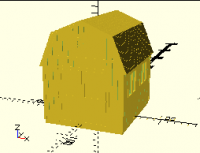
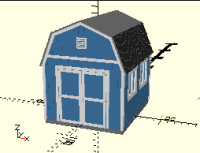
Indeed it is. But STL files are not the only form of output. Color is
good for visualization. I admit that I do most of my modeling in the
basic gold and apply color afterward, but it really does make it easier
to look at and say "yes, that looks right".
vs
On 4/6/2020 1:02 AM, arnholm@arnholm.org wrote:
> Has anyone mentioned that colour is irrelevant for STL files?
Indeed it is. But STL files are not the only form of output. Color is
good for visualization. I admit that I do most of my modeling in the
basic gold and apply color afterward, but it really does make it easier
to look at and say "yes, that looks right".
vs
DM
Doug Moen
Mon, Apr 6, 2020 9:20 PM
Has anyone mentioned that colour is irrelevant for STL files?
The more modern mesh formats allow you to specify colour information for full colour 3D printing. 3MF and OBJ allow to you specify a 2D image that is texture mapped onto the surface of a mesh. The code for texture mapping is difficult to implement, so I haven't tried that. X3D and VRML allow you to apply colour to either faces or vertices. That was much easier to implement, so I added a full colour X3D export facility to Curv (which is my post-OpenSCAD 3D modelling language), and I've used 2 different 3D printing service providers to print full colour models. Also, if you load the model into meshlab, it displays the colours.
The old technology was a full colour sandstone, printed on a Z-Corp printer, but the output was fragile and the colours a bit washed out. The new technology is the HP full colour jet fusion 3D printer. This prints full colour nylon, which is indestructible, and the colours are brighter, and it's also cheaper. You can use X3D or VRML formats with these service providers.
There's no inherent reason why OpenSCAD could not support these output formats as well, since OpenSCAD already has a means to specify and preview colour models.
On 4/6/2020 1:02 AM, arnholm@arnholm.org wrote:
> Has anyone mentioned that colour is irrelevant for STL files?
The more modern mesh formats allow you to specify colour information for full colour 3D printing. 3MF and OBJ allow to you specify a 2D image that is texture mapped onto the surface of a mesh. The code for texture mapping is difficult to implement, so I haven't tried that. X3D and VRML allow you to apply colour to either faces or vertices. That was much easier to implement, so I added a full colour X3D export facility to Curv (which is my post-OpenSCAD 3D modelling language), and I've used 2 different 3D printing service providers to print full colour models. Also, if you load the model into meshlab, it displays the colours.
The old technology was a full colour sandstone, printed on a Z-Corp printer, but the output was fragile and the colours a bit washed out. The new technology is the HP full colour jet fusion 3D printer. This prints full colour nylon, which is indestructible, and the colours are brighter, and it's also cheaper. You can use X3D or VRML formats with these service providers.
There's no inherent reason why OpenSCAD could not support these output formats as well, since OpenSCAD already has a means to specify and preview colour models.
RW
Ron Wheeler
Mon, Apr 6, 2020 10:20 PM
Color will be more important for 3D printing as the availability of 4
color printing becomes more common.
There is a $1200 3D printer that appears to be able to print thousands
of colors using CMYK.
Like the old days when printing on paper moved from spot colors to CMYK.
Ron
On 2020-04-06 5:20 p.m., Doug Moen wrote:
Has anyone mentioned that colour is irrelevant for STL files?
The more modern mesh formats allow you to specify colour information
for full colour 3D printing. 3MF and OBJ allow to you specify a 2D
image that is texture mapped onto the surface of a mesh. The code for
texture mapping is difficult to implement, so I haven't tried that.
X3D and VRML allow you to apply colour to either faces or vertices.
That was much easier to implement, so I added a full colour X3D export
facility to Curv (which is my post-OpenSCAD 3D modelling language),
and I've used 2 different 3D printing service providers to print full
colour models. Also, if you load the model into meshlab, it displays
the colours.
The old technology was a full colour sandstone, printed on a Z-Corp
printer, but the output was fragile and the colours a bit washed out.
The new technology is the HP full colour jet fusion 3D printer. This
prints full colour nylon, which is indestructible, and the colours are
brighter, and it's also cheaper. You can use X3D or VRML formats with
these service providers.
There's no inherent reason why OpenSCAD could not support these output
formats as well, since OpenSCAD already has a means to specify and
preview colour models.
OpenSCAD mailing list
Discuss@lists.openscad.org
http://lists.openscad.org/mailman/listinfo/discuss_lists.openscad.org
Color will be more important for 3D printing as the availability of 4
color printing becomes more common.
There is a $1200 3D printer that appears to be able to print thousands
of colors using CMYK.
Like the old days when printing on paper moved from spot colors to CMYK.
Ron
On 2020-04-06 5:20 p.m., Doug Moen wrote:
> On 4/6/2020 1:02 AM, arnholm@arnholm.org <mailto:arnholm@arnholm.org>
> wrote:
>> Has anyone mentioned that colour is irrelevant for STL files?
>
> The more modern mesh formats allow you to specify colour information
> for full colour 3D printing. 3MF and OBJ allow to you specify a 2D
> image that is texture mapped onto the surface of a mesh. The code for
> texture mapping is difficult to implement, so I haven't tried that.
> X3D and VRML allow you to apply colour to either faces or vertices.
> That was much easier to implement, so I added a full colour X3D export
> facility to Curv (which is my post-OpenSCAD 3D modelling language),
> and I've used 2 different 3D printing service providers to print full
> colour models. Also, if you load the model into meshlab, it displays
> the colours.
>
> The old technology was a full colour sandstone, printed on a Z-Corp
> printer, but the output was fragile and the colours a bit washed out.
> The new technology is the HP full colour jet fusion 3D printer. This
> prints full colour nylon, which is indestructible, and the colours are
> brighter, and it's also cheaper. You can use X3D or VRML formats with
> these service providers.
>
> There's no inherent reason why OpenSCAD could not support these output
> formats as well, since OpenSCAD already has a means to specify and
> preview colour models.
>
> _______________________________________________
> OpenSCAD mailing list
> Discuss@lists.openscad.org
> http://lists.openscad.org/mailman/listinfo/discuss_lists.openscad.org
--
Ron Wheeler
Artifact Software
438-345-3369
rwheeler@artifact-software.com
JB
Jordan Brown
Mon, Apr 6, 2020 11:47 PM
On 4/6/2020 2:20 PM, Doug Moen wrote:
There's no inherent reason why OpenSCAD could not support these output
formats as well, since OpenSCAD already has a means to specify and
preview colour models.
Well, kind of... and this ties into my questions about the definition of
the behavior of color and boolean operators, and the reason that Torsten
doesn't want to nail them down.
For rendering, you only need to color the faces.
For printing, you need to color the volume. If you union two shapes of
different colors, you need to define what color the overlapping volume
gets. For intersection, the color of the whole thing is in question.
Difference is the only easy one, since the negative objects don't yield
any volume of their own. Minkowski? Hull?
I'm not saying that the definitions need to be tricky - maybe it's
"first wins" - but the current face-centric behavior isn't enough, and
probably isn't even compatible.
BTW, I thought that with coloring faces union was easy, but I was wrong:
I forgot the case of shared faces.
On 4/6/2020 2:20 PM, Doug Moen wrote:
> There's no inherent reason why OpenSCAD could not support these output
> formats as well, since OpenSCAD already has a means to specify and
> preview colour models.
Well, kind of... and this ties into my questions about the definition of
the behavior of color and boolean operators, and the reason that Torsten
doesn't want to nail them down.
For rendering, you only need to color the faces.
For printing, you need to color the volume. If you union two shapes of
different colors, you need to define what color the overlapping volume
gets. For intersection, the color of the whole thing is in question.
Difference is the only easy one, since the negative objects don't yield
any volume of their own. Minkowski? Hull?
I'm not saying that the definitions need to be tricky - maybe it's
"first wins" - but the current face-centric behavior isn't enough, and
probably isn't even compatible.
---
BTW, I thought that with coloring faces union was easy, but I was wrong:
I forgot the case of shared faces.
DM
Doug Moen
Tue, Apr 7, 2020 12:26 AM
On Mon, Apr 6, 2020, at 11:47 PM, Jordan Brown wrote:
On 4/6/2020 2:20 PM, Doug Moen wrote:
There's no inherent reason why OpenSCAD could not support these output formats as well, since OpenSCAD already has a means to specify and preview colour models.
Well, kind of... and this ties into my questions about the definition of the behavior of color and boolean operators, and the reason that Torsten doesn't want to nail them down.
For rendering, you only need to color the faces.
For printing, you need to color the volume. If you union two shapes of different colors, you need to define what color the overlapping volume gets. For intersection, the color of the whole thing is in question. Difference is the only easy one, since the negative objects don't yield any volume of their own. Minkowski? Hull?
I'm not saying that the definitions need to be tricky - maybe it's "first wins" - but the current face-centric behavior isn't enough, and probably isn't even compatible.
If you are building colour support properly and correctly for a 3D printing CAD program, then I agree you should be colouring volumes. That's what I did in Curv*. And I've submitted a proposal on how to do this in OpenSCAD. But it's a big architectural change.
My point is that there is already a bunch of OpenSCAD code in the wild where people use the existing color command to colour faces. And users have created some pretty elaborate coloured models. For example, see Nop Head's work. If we decide to change how face colouring works, then all this existing code will break. I don't think we want to do that.
What this existing OpenSCAD code is doing is colouring faces (without any regard to volumes). As I pointed out, there are already mesh file formats that let you directly specify face colours. And there is already support for printing these files in full colour on existing 3D printers. So it would be possible to export colour to an X3D or VRML file using OpenSCAD's existing face colouring model. And then you could take existing colour OpenSCAD models found on the internet, and print them in colour, without rewriting the code to use a brand new volume colouring system.
Doug Moen.
*How volume colouring works in Curv:
The union operator uses "painters algorithm": each successive shape in the union overwrites the colours of previous shapes in areas where they overlap. It makes perfect intuitive sense in 2D, and 3D works the same way.
The intersection operator preserves the colours in the first shape. The second shape, and any shapes after that, specify what to subtract from the first shape.
I tried other designs, but this is what ended up being the most useful and natural.
On Mon, Apr 6, 2020, at 11:47 PM, Jordan Brown wrote:
> On 4/6/2020 2:20 PM, Doug Moen wrote:
>> There's no inherent reason why OpenSCAD could not support these output formats as well, since OpenSCAD already has a means to specify and preview colour models.
>
> Well, kind of... and this ties into my questions about the definition of the behavior of color and boolean operators, and the reason that Torsten doesn't want to nail them down.
>
> For rendering, you only need to color the faces.
>
> For printing, you need to color the volume. If you union two shapes of different colors, you need to define what color the overlapping volume gets. For intersection, the color of the whole thing is in question. Difference is the only easy one, since the negative objects don't yield any volume of their own. Minkowski? Hull?
>
> I'm not saying that the definitions need to be tricky - maybe it's "first wins" - but the current face-centric behavior isn't enough, and probably isn't even compatible.
If you are building colour support properly and correctly for a 3D printing CAD program, then I agree you should be colouring volumes. That's what I did in Curv*. And I've submitted a proposal on how to do this in OpenSCAD. But it's a big architectural change.
My point is that there is already a bunch of OpenSCAD code in the wild where people use the existing `color` command to colour faces. And users have created some pretty elaborate coloured models. For example, see Nop Head's work. If we decide to change how face colouring works, then all this existing code will break. I don't think we want to do that.
What this existing OpenSCAD code is doing is colouring faces (without any regard to volumes). As I pointed out, there are already mesh file formats that let you directly specify face colours. And there is already support for printing these files in full colour on existing 3D printers. So it would be possible to export colour to an X3D or VRML file using OpenSCAD's existing face colouring model. And then you could take existing colour OpenSCAD models found on the internet, and print them in colour, without rewriting the code to use a brand new volume colouring system.
Doug Moen.
*How volume colouring works in Curv:
The union operator uses "painters algorithm": each successive shape in the union overwrites the colours of previous shapes in areas where they overlap. It makes perfect intuitive sense in 2D, and 3D works the same way.
The intersection operator preserves the colours in the first shape. The second shape, and any shapes after that, specify what to subtract from the first shape.
I tried other designs, but this is what ended up being the most useful and natural.
JB
Jordan Brown
Tue, Apr 7, 2020 12:42 AM
On 4/6/2020 5:26 PM, Doug Moen wrote:
My point is that there is already a bunch of OpenSCAD code in the wild
where people use the existing color command to colour faces. And
users have created some pretty elaborate coloured models. For example,
see Nop Head's work. If we decide to change how face colouring works,
then all this existing code will break. I don't think we want to do that.
We surely want to avoid it if practical. We might need a way to specify
which of two behaviors you want.
What this existing OpenSCAD code is doing is colouring faces (without
any regard to volumes). As I pointed out, there are already mesh file
formats that let you directly specify face colours. And there is
already support for printing these files in full colour on existing 3D
printers. So it would be possible to export colour to an X3D or VRML
file using OpenSCAD's existing face colouring model. And then you
could take existing colour OpenSCAD models found on the internet, and
print them in colour, without rewriting the code to use a brand new
volume colouring system.
So if you have a cube with different colors on each of its faces, what
does this existing tool chain do?
(That's a serious question: I want to document color behavior, but I
don't want to document it in a way that causes problems for full-color
printing in the future.)
On 4/6/2020 5:26 PM, Doug Moen wrote:
> My point is that there is already a bunch of OpenSCAD code in the wild
> where people use the existing `color` command to colour faces. And
> users have created some pretty elaborate coloured models. For example,
> see Nop Head's work. If we decide to change how face colouring works,
> then all this existing code will break. I don't think we want to do that.
We surely want to avoid it if practical. We might need a way to specify
which of two behaviors you want.
> What this existing OpenSCAD code is doing is colouring faces (without
> any regard to volumes). As I pointed out, there are already mesh file
> formats that let you directly specify face colours. And there is
> already support for printing these files in full colour on existing 3D
> printers. So it would be possible to export colour to an X3D or VRML
> file using OpenSCAD's existing face colouring model. And then you
> could take existing colour OpenSCAD models found on the internet, and
> print them in colour, without rewriting the code to use a brand new
> volume colouring system.
So if you have a cube with different colors on each of its faces, what
does this existing tool chain do?
(That's a serious question: I want to document color behavior, but I
don't want to document it in a way that causes problems for full-color
printing in the future.)
DM
Doug Moen
Tue, Apr 7, 2020 1:00 AM
On Tue, Apr 7, 2020, at 12:42 AM, Jordan Brown wrote:
What this existing OpenSCAD code is doing is colouring faces (without any regard to volumes). As I pointed out, there are already mesh file formats that let you directly specify face colours. And there is already support for printing these files in full colour on existing 3D printers. So it would be possible to export colour to an X3D or VRML file using OpenSCAD's existing face colouring model. And then you could take existing colour OpenSCAD models found on the internet, and print them in colour, without rewriting the code to use a brand new volume colouring system.
So if you have a cube with different colors on each of its faces, what does this existing tool chain do?
(That's a serious question: I want to document color behavior, but I don't want to document it in a way that causes problems for full-color printing in the future.)
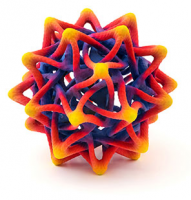
When you 3D print a mesh file that specifies surface colouring only (not volume colouring), then the slicing software arbitrarily figures out a way to apply colour so that the surface of the object looks the way you specified. You have no control over how colour is applied to material in the interior of the printed object, you are only controlling surface colour. As a corollary, this only works well for opaque materials.
When I do this, I typically create models with up to a million faces, so that I can create smooth colour gradients and other kinds of imagery on the surface of the model.
The following image gives an idea of what I'm talking about:
On Tue, Apr 7, 2020, at 12:42 AM, Jordan Brown wrote:
>
>> What this existing OpenSCAD code is doing is colouring faces (without any regard to volumes). As I pointed out, there are already mesh file formats that let you directly specify face colours. And there is already support for printing these files in full colour on existing 3D printers. So it would be possible to export colour to an X3D or VRML file using OpenSCAD's existing face colouring model. And then you could take existing colour OpenSCAD models found on the internet, and print them in colour, without rewriting the code to use a brand new volume colouring system.
>
> So if you have a cube with different colors on each of its faces, what does this existing tool chain do?
>
> (That's a serious question: I want to document color behavior, but I don't want to document it in a way that causes problems for full-color printing in the future.)
>
When you 3D print a mesh file that specifies surface colouring only (not volume colouring), then the slicing software arbitrarily figures out a way to apply colour so that the surface of the object looks the way you specified. You have no control over how colour is applied to material in the interior of the printed object, you are only controlling surface colour. As a corollary, this only works well for opaque materials.
When I do this, I typically create models with up to a million faces, so that I can create smooth colour gradients and other kinds of imagery on the surface of the model.
The following image gives an idea of what I'm talking about:
RW
Ron Wheeler
Tue, Apr 7, 2020 1:17 AM
There are lots of examples where software has defined previously
undefined behavior and made developers change their applications.
That is what Release Notes are for.
It is more forgivable to define some behavior that was not previously
defined than it is to change a previously documented behavior.
You can look at almost any mature, successful software project and find
a release that caused some grief for early adopters by changing
previously documented functionality.
Search "Java deprecated" if you doubt this.
The main thing is to make the software better so that the grief to
existing users who have "imagined" a spec where none existed or followed
a path that needs to be abandoned, is worthwhile in terms of the long
term value of the project. If you can provide a script conversion to
help upgrade existing designs, that is really helpfull.
Ron
On 2020-04-06 8:26 p.m., Doug Moen wrote:
On Mon, Apr 6, 2020, at 11:47 PM, Jordan Brown wrote:
On 4/6/2020 2:20 PM, Doug Moen wrote:
There's no inherent reason why OpenSCAD could not support these
output formats as well, since OpenSCAD already has a means to
specify and preview colour models.
Well, kind of... and this ties into my questions about the definition
of the behavior of color and boolean operators, and the reason that
Torsten doesn't want to nail them down.
For rendering, you only need to color the faces.
For printing, you need to color the volume. If you union two shapes
of different colors, you need to define what color the overlapping
volume gets. For intersection, the color of the whole thing is in
question. Difference is the only easy one, since the negative
objects don't yield any volume of their own. Minkowski? Hull?
I'm not saying that the definitions need to be tricky - maybe it's
"first wins" - but the current face-centric behavior isn't enough,
and probably isn't even compatible.
If you are building colour support properly and correctly for a 3D
printing CAD program, then I agree you should be colouring volumes.
That's what I did in Curv*. And I've submitted a proposal on how to do
this in OpenSCAD. But it's a big architectural change.
My point is that there is already a bunch of OpenSCAD code in the wild
where people use the existing color command to colour faces. And
users have created some pretty elaborate coloured models. For example,
see Nop Head's work. If we decide to change how face colouring works,
then all this existing code will break. I don't think we want to do that.
What this existing OpenSCAD code is doing is colouring faces (without
any regard to volumes). As I pointed out, there are already mesh file
formats that let you directly specify face colours. And there is
already support for printing these files in full colour on existing 3D
printers. So it would be possible to export colour to an X3D or VRML
file using OpenSCAD's existing face colouring model. And then you
could take existing colour OpenSCAD models found on the internet, and
print them in colour, without rewriting the code to use a brand new
volume colouring system.
Doug Moen.
*How volume colouring works in Curv:
The union operator uses "painters algorithm": each successive shape in
the union overwrites the colours of previous shapes in areas where
they overlap. It makes perfect intuitive sense in 2D, and 3D works the
same way.
The intersection operator preserves the colours in the first shape.
The second shape, and any shapes after that, specify what to subtract
from the first shape.
I tried other designs, but this is what ended up being the most useful
and natural.
OpenSCAD mailing list
Discuss@lists.openscad.org
http://lists.openscad.org/mailman/listinfo/discuss_lists.openscad.org
There are lots of examples where software has defined previously
undefined behavior and made developers change their applications.
That is what Release Notes are for.
It is more forgivable to define some behavior that was not previously
defined than it is to change a previously documented behavior.
You can look at almost any mature, successful software project and find
a release that caused some grief for early adopters by changing
previously documented functionality.
Search "Java deprecated" if you doubt this.
The main thing is to make the software better so that the grief to
existing users who have "imagined" a spec where none existed or followed
a path that needs to be abandoned, is worthwhile in terms of the long
term value of the project. If you can provide a script conversion to
help upgrade existing designs, that is really helpfull.
Ron
On 2020-04-06 8:26 p.m., Doug Moen wrote:
> On Mon, Apr 6, 2020, at 11:47 PM, Jordan Brown wrote:
>> On 4/6/2020 2:20 PM, Doug Moen wrote:
>>> There's no inherent reason why OpenSCAD could not support these
>>> output formats as well, since OpenSCAD already has a means to
>>> specify and preview colour models.
>>
>> Well, kind of... and this ties into my questions about the definition
>> of the behavior of color and boolean operators, and the reason that
>> Torsten doesn't want to nail them down.
>>
>> For rendering, you only need to color the faces.
>>
>> For printing, you need to color the volume. If you union two shapes
>> of different colors, you need to define what color the overlapping
>> volume gets. For intersection, the color of the whole thing is in
>> question. Difference is the only easy one, since the negative
>> objects don't yield any volume of their own. Minkowski? Hull?
>>
>> I'm not saying that the definitions need to be tricky - maybe it's
>> "first wins" - but the current face-centric behavior isn't enough,
>> and probably isn't even compatible.
>
> If you are building colour support properly and correctly for a 3D
> printing CAD program, then I agree you should be colouring volumes.
> That's what I did in Curv*. And I've submitted a proposal on how to do
> this in OpenSCAD. But it's a big architectural change.
>
> My point is that there is already a bunch of OpenSCAD code in the wild
> where people use the existing `color` command to colour faces. And
> users have created some pretty elaborate coloured models. For example,
> see Nop Head's work. If we decide to change how face colouring works,
> then all this existing code will break. I don't think we want to do that.
>
> What this existing OpenSCAD code is doing is colouring faces (without
> any regard to volumes). As I pointed out, there are already mesh file
> formats that let you directly specify face colours. And there is
> already support for printing these files in full colour on existing 3D
> printers. So it would be possible to export colour to an X3D or VRML
> file using OpenSCAD's existing face colouring model. And then you
> could take existing colour OpenSCAD models found on the internet, and
> print them in colour, without rewriting the code to use a brand new
> volume colouring system.
>
> Doug Moen.
>
> *How volume colouring works in Curv:
>
> The union operator uses "painters algorithm": each successive shape in
> the union overwrites the colours of previous shapes in areas where
> they overlap. It makes perfect intuitive sense in 2D, and 3D works the
> same way.
>
> The intersection operator preserves the colours in the first shape.
> The second shape, and any shapes after that, specify what to subtract
> from the first shape.
>
> I tried other designs, but this is what ended up being the most useful
> and natural.
>
> _______________________________________________
> OpenSCAD mailing list
> Discuss@lists.openscad.org
> http://lists.openscad.org/mailman/listinfo/discuss_lists.openscad.org
--
Ron Wheeler
Artifact Software
438-345-3369
rwheeler@artifact-software.com
A
adrianv
Tue, Apr 7, 2020 1:42 AM
OpenSCAD mailing list-2 wrote
There are lots of examples where software has defined previously
undefined behavior and made developers change their applications.
That is what Release Notes are for.
It is more forgivable to define some behavior that was not previously
defined than it is to change a previously documented behavior.
You can look at almost any mature, successful software project and find
a release that caused some grief for early adopters by changing
previously documented functionality.
Yeah, well, we had four years between the current release and the last one,
I believe? So the software isn't exactly in a rapid state of change.
Also the "manual" is a wiki that anybody can write to, not exactly a
specification. This is a little different than the situation with Java or
Python. And I think a larger fraction of OpenSCAD's behavior is not
described in the manual. So it's unclear whether one should assume that
observed behavior will stay the same or that it might change, but in at
least some cases (e.g. this question of colors) you have to write code that
makes use of the existing behavior because....that's what OpenSCAD does.
If you don't document existing behavior then if it does change later,
someone with a some broken code will have no clue how to fix it because they
won't have any reference that indicates what the old behavior was.
--
Sent from: http://forum.openscad.org/
OpenSCAD mailing list-2 wrote
> There are lots of examples where software has defined previously
> undefined behavior and made developers change their applications.
>
> That is what Release Notes are for.
>
> It is more forgivable to define some behavior that was not previously
> defined than it is to change a previously documented behavior.
> You can look at almost any mature, successful software project and find
> a release that caused some grief for early adopters by changing
> previously documented functionality.
Yeah, well, we had four years between the current release and the last one,
I believe? So the software isn't exactly in a rapid state of change.
Also the "manual" is a wiki that anybody can write to, not exactly a
specification. This is a little different than the situation with Java or
Python. And I think a larger fraction of OpenSCAD's behavior is not
described in the manual. So it's unclear whether one should assume that
observed behavior will stay the same or that it might change, but in at
least some cases (e.g. this question of colors) you have to write code that
makes use of the existing behavior because....that's what OpenSCAD does.
If you don't document existing behavior then if it does change later,
someone with a some broken code will have no clue how to fix it because they
won't have any reference that indicates what the old behavior was.
--
Sent from: http://forum.openscad.org/