

discuss@lists.openscad.org

OpenSCAD general discussion Mailing-list

View all threads

OpenSCAD 2015.02 Release Candidate 3

MK
Marius Kintel
Sun, Feb 22, 2015 12:38 AM

Hi all,

Thanks for testing out first two Release Candidates. We’ve some remaining issues (see below).

Please consider the current master branch and snapshot binaries >= 2015.02.20 the third Release Candidate of OpenSCAD 2015.02.

As usual, we’re planning to give it a week or so for testing before making a release, unless significant enough bugs or regressions surface, in which case the whole process will have to rinse and repeat until we’re content.

Please give it a spin and pour your complaints here or on the github issue tracker.
This is most likely the last attempt before making it a proper release.

Thanks,

-Marius

o #1221: Very close vertices weren’t merged correctly, causing thin surfaces to be created
o #1215: Fix some non-manifold tessellation results
o #1210: Fix crash in
o #1205: Show axes and scale markers as default
o Visual tuning of the editor margin

Hi all, Thanks for testing out first two Release Candidates. We’ve some remaining issues (see below). Please consider the current master branch and snapshot binaries >= 2015.02.20 the third Release Candidate of OpenSCAD 2015.02. As usual, we’re planning to give it a week or so for testing before making a release, unless significant enough bugs or regressions surface, in which case the whole process will have to rinse and repeat until we’re content. Please give it a spin and pour your complaints here or on the github issue tracker. This is most likely the last attempt before making it a proper release. Thanks, -Marius o #1221: Very close vertices weren’t merged correctly, causing thin surfaces to be created o #1215: Fix some non-manifold tessellation results o #1210: Fix crash in o #1205: Show axes and scale markers as default o Visual tuning of the editor margin
O
Oskar
Sun, Feb 22, 2015 4:57 PM

I had a chance to give it a quick spin on Mac. The few issues I encountered
in the order from 'limits usability' to 'don't care':

/Oskar

--
View this message in context: http://forum.openscad.org/OpenSCAD-2015-02-Release-Candidate-3-tp11683p11697.html
Sent from the OpenSCAD mailing list archive at Nabble.com.

I had a chance to give it a quick spin on Mac. The few issues I encountered in the order from 'limits usability' to 'don't care': * Double clicking on a part of an object no longer centers the view on that point. * Scale markers below 1 mm have floating point rounding issues. See: <http://forum.openscad.org/file/n11697/markers.png> * Icons look like crap on high resolution (Retina) displays: <http://forum.openscad.org/file/n11697/icons.png> /Oskar -- View this message in context: http://forum.openscad.org/OpenSCAD-2015-02-Release-Candidate-3-tp11683p11697.html Sent from the OpenSCAD mailing list archive at Nabble.com.
MK
Marius Kintel
Sun, Feb 22, 2015 5:12 PM

Hi Oskar,

Thanks for testing!

  • Double clicking on a part of an object no longer centers the view on that
    point.

When did this last work? I’ve never used this feature and I cannot find any version of OpenSCAD where it works as you describe..

Fixed in master.

I know. Look at the built-in Qt (X) icon below, which is equally crappy. This is a long-standing Qt issue.
The fix will most probably be to draw the icons in SVG and hook them into Qt that way. Would probably require Qt 5.4.x.
It’s out of scope for the upcoming release, but will be handled shortly after.

-Marius

Hi Oskar, Thanks for testing! > * Double clicking on a part of an object no longer centers the view on that > point. When did this last work? I’ve never used this feature and I cannot find any version of OpenSCAD where it works as you describe.. > * Scale markers below 1 mm have floating point rounding issues. See: > <http://forum.openscad.org/file/n11697/markers.png> Fixed in master. > * Icons look like crap on high resolution (Retina) displays: > <http://forum.openscad.org/file/n11697/icons.png> > I know. Look at the built-in Qt (X) icon below, which is equally crappy. This is a long-standing Qt issue. The fix will most probably be to draw the icons in SVG and hook them into Qt that way. Would probably require Qt 5.4.x. It’s out of scope for the upcoming release, but will be handled shortly after. -Marius
PF
Peter Falke
Sun, Feb 22, 2015 5:27 PM

Maybe the scale markers would be easier to read, when the underscore used
for a dot would be replaced by small square.

2015-02-22 18:12 GMT+01:00 Marius Kintel marius@kintel.net:

Hi Oskar,

Thanks for testing!

  • Double clicking on a part of an object no longer centers the view on

that

point.

When did this last work? I’ve never used this feature and I cannot find
any version of OpenSCAD where it works as you describe..

Fixed in master.

I know. Look at the built-in Qt (X) icon below, which is equally crappy.
This is a long-standing Qt issue.
The fix will most probably be to draw the icons in SVG and hook them into
Qt that way. Would probably require Qt 5.4.x.
It’s out of scope for the upcoming release, but will be handled shortly
after.

-Marius


OpenSCAD mailing list
Discuss@lists.openscad.org
http://lists.openscad.org/mailman/listinfo/discuss_lists.openscad.org

--
stempeldergeschichte@googlemail.com karsten@rohrbach.de

P.S. Falls meine E-Mail kürzer ausfällt als Dir angenehm ist:
Ich probiere gerade aus kurze Antworten statt gar keine Antworten zu
schreiben.
Wenn Du gerne mehr lesen möchtest, dann lass es mich bitte wissen.

P.S. In case my e-mail is shorter than you enjoy:
I am currently trying short replies instead of no replies at all.
Please let me know, if you like to read more.

Enjoy!

Maybe the scale markers would be easier to read, when the underscore used for a dot would be replaced by small square. 2015-02-22 18:12 GMT+01:00 Marius Kintel <marius@kintel.net>: > Hi Oskar, > > Thanks for testing! > > > * Double clicking on a part of an object no longer centers the view on > that > > point. > When did this last work? I’ve never used this feature and I cannot find > any version of OpenSCAD where it works as you describe.. > > > * Scale markers below 1 mm have floating point rounding issues. See: > > <http://forum.openscad.org/file/n11697/markers.png> > > Fixed in master. > > > * Icons look like crap on high resolution (Retina) displays: > > <http://forum.openscad.org/file/n11697/icons.png> > > > I know. Look at the built-in Qt (X) icon below, which is equally crappy. > This is a long-standing Qt issue. > The fix will most probably be to draw the icons in SVG and hook them into > Qt that way. Would probably require Qt 5.4.x. > It’s out of scope for the upcoming release, but will be handled shortly > after. > > -Marius > > > _______________________________________________ > OpenSCAD mailing list > Discuss@lists.openscad.org > http://lists.openscad.org/mailman/listinfo/discuss_lists.openscad.org > -- stempeldergeschichte@googlemail.com <karsten@rohrbach.de> P.S. Falls meine E-Mail kürzer ausfällt als Dir angenehm ist: Ich probiere gerade aus kurze Antworten statt gar keine Antworten zu schreiben. Wenn Du gerne mehr lesen möchtest, dann lass es mich bitte wissen. P.S. In case my e-mail is shorter than you enjoy: I am currently trying short replies instead of no replies at all. Please let me know, if you like to read more. Enjoy!
O
Oskar
Sun, Feb 22, 2015 5:28 PM

Hi Oskar,

Thanks for testing!

  • Double clicking on a part of an object no longer centers the view on
    that
    point.

When did this last work? I’ve never used this feature and I cannot find any
version of OpenSCAD where it works as you describe..

It has worked (for me) since #865 was merged. I have no idea when the
regression occurred.

--
View this message in context: http://forum.openscad.org/OpenSCAD-2015-02-Release-Candidate-3-tp11683p11701.html
Sent from the OpenSCAD mailing list archive at Nabble.com.

Hi Oskar, Thanks for testing! > * Double clicking on a part of an object no longer centers the view on > that > point. When did this last work? I’ve never used this feature and I cannot find any version of OpenSCAD where it works as you describe.. It has worked (for me) since #865 was merged. I have no idea when the regression occurred. -- View this message in context: http://forum.openscad.org/OpenSCAD-2015-02-Release-Candidate-3-tp11683p11701.html Sent from the OpenSCAD mailing list archive at Nabble.com.
MK
Marius Kintel
Sun, Feb 22, 2015 6:19 PM

On Feb 22, 2015, at 12:28 PM, Oskar oskar.linde+openscad@gmail.com wrote:

It has worked (for me) since #865 was merged. I have no idea when the
regression occurred.

Fixed in master. The picking didn’t work on retina displays.

-Marius

On Feb 22, 2015, at 12:28 PM, Oskar <oskar.linde+openscad@gmail.com> wrote: > > It has worked (for me) since #865 was merged. I have no idea when the > regression occurred. > Fixed in master. The picking didn’t work on retina displays. -Marius
NH
nop head
Tue, Feb 24, 2015 3:50 PM

In a simple single file project I have no syntax error highlighting with
either editor. Has this been removed?

Also the font size seems to be much bigger in the Syntilla editor. Does the
simple editor not use the settings in the preferences?

On 22 February 2015 at 18:19, Marius Kintel marius@kintel.net wrote:

On Feb 22, 2015, at 12:28 PM, Oskar oskar.linde+openscad@gmail.com
wrote:

It has worked (for me) since #865 was merged. I have no idea when the
regression occurred.

Fixed in master. The picking didn't work on retina displays.

-Marius


OpenSCAD mailing list
Discuss@lists.openscad.org
http://lists.openscad.org/mailman/listinfo/discuss_lists.openscad.org

In a simple single file project I have no syntax error highlighting with either editor. Has this been removed? Also the font size seems to be much bigger in the Syntilla editor. Does the simple editor not use the settings in the preferences? On 22 February 2015 at 18:19, Marius Kintel <marius@kintel.net> wrote: > On Feb 22, 2015, at 12:28 PM, Oskar <oskar.linde+openscad@gmail.com> > wrote: > > > > It has worked (for me) since #865 was merged. I have no idea when the > > regression occurred. > > > Fixed in master. The picking didn't work on retina displays. > > -Marius > > > _______________________________________________ > OpenSCAD mailing list > Discuss@lists.openscad.org > http://lists.openscad.org/mailman/listinfo/discuss_lists.openscad.org >
MK
Marius Kintel
Wed, Feb 25, 2015 4:33 PM

On Feb 24, 2015, at 10:50 AM, nop head nop.head@gmail.com wrote:

In a simple single file project I have no syntax error highlighting with either editor. Has this been removed?

How does it look for you?
I would get this type of highlighting:

Also the font size seems to be much bigger in the Syntilla editor. Does the simple editor not use the settings in the preferences?

I just fixed two bugs:
o The legacy editor didn’t respond to preferences
o The scintilla editor didn’t handle the line number font correctly, causing excessive spacing for small fonts

-Marius
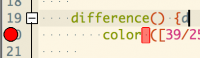
On Feb 24, 2015, at 10:50 AM, nop head <nop.head@gmail.com> wrote: > In a simple single file project I have no syntax error highlighting with either editor. Has this been removed? > How does it look for you? I would get this type of highlighting: > Also the font size seems to be much bigger in the Syntilla editor. Does the simple editor not use the settings in the preferences? > I just fixed two bugs: o The legacy editor didn’t respond to preferences o The scintilla editor didn’t handle the line number font correctly, causing excessive spacing for small fonts -Marius
NH
nop head
Wed, Feb 25, 2015 4:58 PM

If I press F5 I get error highlighting as you show. It doesn't work with
auto reload from an external editor.

On 25 February 2015 at 16:33, Marius Kintel marius@kintel.net wrote:

On Feb 24, 2015, at 10:50 AM, nop head nop.head@gmail.com wrote:

In a simple single file project I have no syntax error highlighting with
either editor. Has this been removed?

How does it look for you?
I would get this type of highlighting:

Also the font size seems to be much bigger in the Syntilla editor. Does
the simple editor not use the settings in the preferences?

I just fixed two bugs:
o The legacy editor didn't respond to preferences
o The scintilla editor didn't handle the line number font correctly,
causing excessive spacing for small fonts

-Marius


OpenSCAD mailing list
Discuss@lists.openscad.org
http://lists.openscad.org/mailman/listinfo/discuss_lists.openscad.org
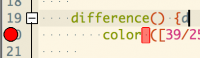
If I press F5 I get error highlighting as you show. It doesn't work with auto reload from an external editor. On 25 February 2015 at 16:33, Marius Kintel <marius@kintel.net> wrote: > On Feb 24, 2015, at 10:50 AM, nop head <nop.head@gmail.com> wrote: > > In a simple single file project I have no syntax error highlighting with > either editor. Has this been removed? > > How does it look for you? > I would get this type of highlighting: > > > Also the font size seems to be much bigger in the Syntilla editor. Does > the simple editor not use the settings in the preferences? > > I just fixed two bugs: > o The legacy editor didn't respond to preferences > o The scintilla editor didn't handle the line number font correctly, > causing excessive spacing for small fonts > > -Marius > > > _______________________________________________ > OpenSCAD mailing list > Discuss@lists.openscad.org > http://lists.openscad.org/mailman/listinfo/discuss_lists.openscad.org > >
MK
Marius Kintel
Wed, Feb 25, 2015 5:27 PM

On Feb 25, 2015, at 11:58 AM, nop head nop.head@gmail.com wrote:

If I press F5 I get error highlighting as you show. It doesn't work with auto reload from an external editor.

Thx.
This behavior is due to the fix for https://github.com/openscad/openscad/issues/406
It’s still unknown why that didn’t work. Could be an issue with Qt.
I don’t dare to touch this unless I can make sure #406 doesn’t resurface.

-Marius

On Feb 25, 2015, at 11:58 AM, nop head <nop.head@gmail.com> wrote: > If I press F5 I get error highlighting as you show. It doesn't work with auto reload from an external editor. > Thx. This behavior is due to the fix for https://github.com/openscad/openscad/issues/406 It’s still unknown why that didn’t work. Could be an issue with Qt. I don’t dare to touch this unless I can make sure #406 doesn’t resurface. -Marius