

discuss@lists.openscad.org

OpenSCAD general discussion Mailing-list

View all threads

compiling

JH
jos hendriks
Tue, Mar 19, 2019 10:07 PM

This is my first contribution to the list. I started just with openscad
and I am completely new to 3d design. Here is the first problem I run
into that I could not fix:

This is my code:

union(){translate([0,0,0.1])polyhedron(points=[[1, 0,0], [0.05,
-0.0866025,0], [-0.5, -0.866025,0], [-0.1, 0,0],
[-0.5,0.866025,0],[0.05,
0.0866025,0],[0,0,0.1]],faces=[[5,4,3,2,1,0],[0,1,6],[0,5,6],[1,2,6],[2,3,6],[4,6,1],[4,5,6]]);
cylinder($fn=100,h=.1,r=1);         }

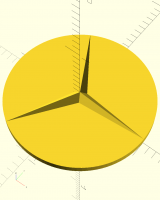
It is the Mercedes Benz logo:

compiling and creating a .stl file only give half of the design, only
the disk.

console:

Compiling design (CSG Tree generation)...

Rendering Polygon Mesh using CGAL...

Geometries in cache: 3

Geometry cache size in bytes: 16008

CGAL Polyhedrons in cache: 2

CGAL cache size in bytes: 538784

Total rendering time: 0 hours, 0 minutes, 0 seconds

Top level object is a 3D object:

Simple: yes

Vertices: 200

Halfedges: 600

Edges: 300

Halffacets: 204

Facets: 102

Volumes: 2

Rendering finished.

What to do?
This is my first contribution to the list. I started just with openscad and I am completely new to 3d design. Here is the first problem I run into that I could not fix: This is my code: union(){translate([0,0,0.1])polyhedron(points=[[1, 0,0], [0.05, -0.0866025,0], [-0.5, -0.866025,0], [-0.1, 0,0], [-0.5,0.866025,0],[0.05, 0.0866025,0],[0,0,0.1]],faces=[[5,4,3,2,1,0],[0,1,6],[0,5,6],[1,2,6],[2,3,6],[4,6,1],[4,5,6]]); cylinder($fn=100,h=.1,r=1);         } It is the Mercedes Benz logo: compiling and creating a .stl file only give half of the design, only the disk. console: Compiling design (CSG Tree generation)... Rendering Polygon Mesh using CGAL... Geometries in cache: 3 Geometry cache size in bytes: 16008 CGAL Polyhedrons in cache: 2 CGAL cache size in bytes: 538784 Total rendering time: 0 hours, 0 minutes, 0 seconds Top level object is a 3D object: Simple: yes Vertices: 200 Halfedges: 600 Edges: 300 Halffacets: 204 Facets: 102 Volumes: 2 Rendering finished. What to do?
A
adrianv
Tue, Mar 19, 2019 11:05 PM

I took a look at your program and one of the faces is incorrect (wrong
vertex) and one is counterclockwise.  Fixing these defects:

translate([0,0,0.1])
polyhedron(points=[[1, 0,0],              //0
[0.05, -0.0866025,0],  //1
[-0.5, -0.866025,0],  //2
[-0.1, 0,0],          //3
[-0.5,0.866025,0],    //4
[0.05,0.0866025,0],    //5
[0,0,0.1]],            //6
faces=[[5,4,3,2,1,0],
[0,1,6],
[6,5,0],
[1,2,6],
[2,3,6],
[4,6,3],
[4,5,6]]);
cylinder($fn=100,h=.1,r=1);

This works.  Now you might also consider trying to avoid polyhedron as much
as possible because it is laborious to get it right, at least by hand.
Here's another approach using the BOSL library, with a simpler polyhedron.
The library is here:  https://github.com/revarbat/BOSL/

use<lib/BOSL/transforms.scad>

up(0.1)
zrot_copies(count=3)
polyhedron(points = [[0,.0911,0],[1,0,0],[0,-.0911,0],[0,0,.1]],
faces = [[0,1,2], [1,2,3], [0,1,3], [0,3,2]]);
cylinder($fn=100,h=.1,r=1);

--
Sent from: http://forum.openscad.org/

I took a look at your program and one of the faces is incorrect (wrong vertex) and one is counterclockwise. Fixing these defects: translate([0,0,0.1]) polyhedron(points=[[1, 0,0], //0 [0.05, -0.0866025,0], //1 [-0.5, -0.866025,0], //2 [-0.1, 0,0], //3 [-0.5,0.866025,0], //4 [0.05,0.0866025,0], //5 [0,0,0.1]], //6 faces=[[5,4,3,2,1,0], [0,1,6], [6,5,0], [1,2,6], [2,3,6], [4,6,3], [4,5,6]]); cylinder($fn=100,h=.1,r=1); This works. Now you might also consider trying to avoid polyhedron as much as possible because it is laborious to get it right, at least by hand. Here's another approach using the BOSL library, with a simpler polyhedron. The library is here: https://github.com/revarbat/BOSL/ use<lib/BOSL/transforms.scad> up(0.1) zrot_copies(count=3) polyhedron(points = [[0,.0911,0],[1,0,0],[0,-.0911,0],[0,0,.1]], faces = [[0,1,2], [1,2,3], [0,1,3], [0,3,2]]); cylinder($fn=100,h=.1,r=1); -- Sent from: http://forum.openscad.org/
RD
Revar Desmera
Wed, Mar 20, 2019 6:38 AM

This can be done fairly easily without polyhedron.  Something like:

cylinder(h=0.1, r=1, $fn=100);
translate([0,0,0.1]) {
for (a=[0:120:240]) {
rotate(a) {
hull() {
cylinder(h=0.1, r1=0.1, r2=0, center=false, $fn=24);
translate([1,0,0]) cube(0.0001, center=true);
}
}
}
}

  • Revar

On Mar 19, 2019, at 4:05 PM, adrianv avm4@cornell.edu wrote:

I took a look at your program and one of the faces is incorrect (wrong
vertex) and one is counterclockwise.  Fixing these defects:

translate([0,0,0.1])
polyhedron(points=[[1, 0,0],              //0
[0.05, -0.0866025,0],  //1
[-0.5, -0.866025,0],  //2
[-0.1, 0,0],          //3
[-0.5,0.866025,0],    //4
[0.05,0.0866025,0],    //5
[0,0,0.1]],            //6
faces=[[5,4,3,2,1,0],
[0,1,6],
[6,5,0],
[1,2,6],
[2,3,6],
[4,6,3],
[4,5,6]]);
cylinder($fn=100,h=.1,r=1);

This works.  Now you might also consider trying to avoid polyhedron as much
as possible because it is laborious to get it right, at least by hand.
Here's another approach using the BOSL library, with a simpler polyhedron.
The library is here:  https://github.com/revarbat/BOSL/

use<lib/BOSL/transforms.scad>

up(0.1)
zrot_copies(count=3)
polyhedron(points = [[0,.0911,0],[1,0,0],[0,-.0911,0],[0,0,.1]],
faces = [[0,1,2], [1,2,3], [0,1,3], [0,3,2]]);
cylinder($fn=100,h=.1,r=1);

--
Sent from: http://forum.openscad.org/


OpenSCAD mailing list
Discuss@lists.openscad.org
http://lists.openscad.org/mailman/listinfo/discuss_lists.openscad.org

This can be done fairly easily without polyhedron. Something like: cylinder(h=0.1, r=1, $fn=100); translate([0,0,0.1]) { for (a=[0:120:240]) { rotate(a) { hull() { cylinder(h=0.1, r1=0.1, r2=0, center=false, $fn=24); translate([1,0,0]) cube(0.0001, center=true); } } } } - Revar > On Mar 19, 2019, at 4:05 PM, adrianv <avm4@cornell.edu> wrote: > > I took a look at your program and one of the faces is incorrect (wrong > vertex) and one is counterclockwise. Fixing these defects: > > translate([0,0,0.1]) > polyhedron(points=[[1, 0,0], //0 > [0.05, -0.0866025,0], //1 > [-0.5, -0.866025,0], //2 > [-0.1, 0,0], //3 > [-0.5,0.866025,0], //4 > [0.05,0.0866025,0], //5 > [0,0,0.1]], //6 > faces=[[5,4,3,2,1,0], > [0,1,6], > [6,5,0], > [1,2,6], > [2,3,6], > [4,6,3], > [4,5,6]]); > cylinder($fn=100,h=.1,r=1); > > This works. Now you might also consider trying to avoid polyhedron as much > as possible because it is laborious to get it right, at least by hand. > Here's another approach using the BOSL library, with a simpler polyhedron. > The library is here: https://github.com/revarbat/BOSL/ > > use<lib/BOSL/transforms.scad> > > up(0.1) > zrot_copies(count=3) > polyhedron(points = [[0,.0911,0],[1,0,0],[0,-.0911,0],[0,0,.1]], > faces = [[0,1,2], [1,2,3], [0,1,3], [0,3,2]]); > cylinder($fn=100,h=.1,r=1); > > > > > -- > Sent from: http://forum.openscad.org/ > > _______________________________________________ > OpenSCAD mailing list > Discuss@lists.openscad.org > http://lists.openscad.org/mailman/listinfo/discuss_lists.openscad.org
A
adrianv
Wed, Mar 20, 2019 12:39 PM

RevarBat wrote

This can be done fairly easily without polyhedron.  Something like:

cylinder(h=0.1, r=1, $fn=100);
translate([0,0,0.1]) {
for (a=[0:120:240]) {
rotate(a) {
hull() {
cylinder(h=0.1, r1=0.1, r2=0, center=false, $fn=24);
translate([1,0,0]) cube(0.0001, center=true);
}
}
}
}

Strictly speaking this doesn't make the right shape because the cube creates
extra facets (I assume they are from the cube.)  I looked at the STL file
resulting from just the three tetrahedra (no cylinder base) and this
solution makes an 823 line STL file.  I did come up with a different way to
make it exactly without polyhedron and the STL file is only 73 lines long,
so at least fewer extra facets.  It looks like there are 10 facets, which
seems minimal if facets have to be triangles.

cylinder(h=0.1, r=1, $fn=100);
translate([0,0,.1])
for (a=[0:120:240])
rotate(a)
linear_extrude(height=.1, scale=0) polygon([[0,-.0911], [1,0],
[0,.0911]]);

I I was going to compare with the result of using polyhedron to see if it
produces a different result, but I can't create the STL file.  I discovered
that under Windows with 2019.01-RC3 when I try to render the following,
OpenSCAD crashes:

for (a=[0:120:240])
rotate(a)
polyhedron(points = [[0,.0911,0],[1,0,0],[0,-.0911,0],[0,0,.1]],
faces = [[0,1,2], [1,2,3], [0,1,3], [0,3,2]]);

--
Sent from: http://forum.openscad.org/

RevarBat wrote > This can be done fairly easily without polyhedron. Something like: > > cylinder(h=0.1, r=1, $fn=100); > translate([0,0,0.1]) { > for (a=[0:120:240]) { > rotate(a) { > hull() { > cylinder(h=0.1, r1=0.1, r2=0, center=false, $fn=24); > translate([1,0,0]) cube(0.0001, center=true); > } > } > } > } Strictly speaking this doesn't make the right shape because the cube creates extra facets (I assume they are from the cube.) I looked at the STL file resulting from just the three tetrahedra (no cylinder base) and this solution makes an 823 line STL file. I did come up with a different way to make it exactly without polyhedron and the STL file is only 73 lines long, so at least fewer extra facets. It looks like there are 10 facets, which seems minimal if facets have to be triangles. cylinder(h=0.1, r=1, $fn=100); translate([0,0,.1]) for (a=[0:120:240]) rotate(a) linear_extrude(height=.1, scale=0) polygon([[0,-.0911], [1,0], [0,.0911]]); I I was going to compare with the result of using polyhedron to see if it produces a different result, but I can't create the STL file. I discovered that under Windows with 2019.01-RC3 when I try to render the following, OpenSCAD crashes: for (a=[0:120:240]) rotate(a) polyhedron(points = [[0,.0911,0],[1,0,0],[0,-.0911,0],[0,0,.1]], faces = [[0,1,2], [1,2,3], [0,1,3], [0,3,2]]); -- Sent from: http://forum.openscad.org/
A
adrianv
Wed, Mar 20, 2019 2:33 PM

adrianv wrote

I discovered that under Windows with 2019.01-RC3 when I try to render the
following, OpenSCAD crashes:

for (a=[0:120:240])
rotate(a)
polyhedron(points = [[0,.0911,0],[1,0,0],[0,-.0911,0],[0,0,.1]],
faces = [[0,1,2], [1,2,3], [0,1,3], [0,3,2]]);

Well, OpenSCAD shouldn't crash, but it turns out I have the bottom face
reversed.  So it needs to be:

for (a=[0:120:240])
rotate(a)
polyhedron(points = [[0,.0911,0],[1,0,0],[0,-.0911,0],[0,0,.1]],
faces = [[2,1,0], [1,2,3], [0,1,3], [0,3,2]]);

which just seems to be a further example of why you should avoid direct use
of polyhedron() whenever you can.  Or you can use this handy hull() function
(not the same as the hull module that is built in) to construct the face
list for you from the vertex list.

https://github.com/openscad/scad-utils/blob/master/hull.scad

use<hull.scad>
points = [[0,.0911,0],[1,0,0],[0,-.0911,0],[0,0,.1]];
faces = hull(points);
for (a=[0,120,240])
rotate(a)
polyhedron(points = points, faces=faces);

--
Sent from: http://forum.openscad.org/

adrianv wrote > I discovered that under Windows with 2019.01-RC3 when I try to render the > following, OpenSCAD crashes: > > for (a=[0:120:240]) > rotate(a) > polyhedron(points = [[0,.0911,0],[1,0,0],[0,-.0911,0],[0,0,.1]], > faces = [[0,1,2], [1,2,3], [0,1,3], [0,3,2]]); Well, OpenSCAD shouldn't crash, but it turns out I have the bottom face reversed. So it needs to be: for (a=[0:120:240]) rotate(a) polyhedron(points = [[0,.0911,0],[1,0,0],[0,-.0911,0],[0,0,.1]], faces = [[2,1,0], [1,2,3], [0,1,3], [0,3,2]]); which just seems to be a further example of why you should avoid direct use of polyhedron() whenever you can. Or you can use this handy hull() function (not the same as the hull module that is built in) to construct the face list for you from the vertex list. https://github.com/openscad/scad-utils/blob/master/hull.scad use<hull.scad> points = [[0,.0911,0],[1,0,0],[0,-.0911,0],[0,0,.1]]; faces = hull(points); for (a=[0,120,240]) rotate(a) polyhedron(points = points, faces=faces); -- Sent from: http://forum.openscad.org/
P
Parkinbot
Wed, Mar 20, 2019 2:42 PM

adrianv wrote

Well, OpenSCAD shouldn't crash,

You are right. OpenSCAD shouldn't crash whatever fancy code you feed into
it. It also crashes the new RC4 and other dev versions of OpenSCAD 2018 down
to 2017.
If you want to create a bug report, please do it here:
https://github.com/openscad/openscad/issues

--
Sent from: http://forum.openscad.org/

adrianv wrote > Well, OpenSCAD shouldn't crash, You are right. OpenSCAD shouldn't crash whatever fancy code you feed into it. It also crashes the new RC4 and other dev versions of OpenSCAD 2018 down to 2017. If you want to create a bug report, please do it here: https://github.com/openscad/openscad/issues -- Sent from: http://forum.openscad.org/
P
Parkinbot
Wed, Mar 20, 2019 3:04 PM

RevarBat wrote

This can be done fairly easily without polyhedron.  Something like:

I would have done it like this:

p= [[1, 0], [0.05, -0.0866025], [-0.5, -0.866025], [-0.1, 0],
[-0.5,0.866025],[0.05, 0.0866025]];
linear_extrude(0.1, scale=0) polygon (p);

--
Sent from: http://forum.openscad.org/

RevarBat wrote > This can be done fairly easily without polyhedron. Something like: I would have done it like this: p= [[1, 0], [0.05, -0.0866025], [-0.5, -0.866025], [-0.1, 0], [-0.5,0.866025],[0.05, 0.0866025]]; linear_extrude(0.1, scale=0) polygon (p); -- Sent from: http://forum.openscad.org/
A
adrianv
Wed, Mar 20, 2019 3:22 PM

Parkinbot wrote

RevarBat wrote

This can be done fairly easily without polyhedron.  Something like:

I would have done it like this:

p= [[1, 0], [0.05, -0.0866025], [-0.5, -0.866025], [-0.1, 0],
[-0.5,0.866025],[0.05, 0.0866025]];
linear_extrude(0.1, scale=0) polygon (p);

That is a nice solution.  For some reason it didn't occur to me to do it all
together.

When I went to make a bug report I concluded that issue 2847 already
captured this bug.  Maybe I should add to that issue?

--
Sent from: http://forum.openscad.org/

Parkinbot wrote > RevarBat wrote >> This can be done fairly easily without polyhedron. Something like: > > I would have done it like this: > > p= [[1, 0], [0.05, -0.0866025], [-0.5, -0.866025], [-0.1, 0], > [-0.5,0.866025],[0.05, 0.0866025]]; > linear_extrude(0.1, scale=0) polygon (p); That is a nice solution. For some reason it didn't occur to me to do it all together. When I went to make a bug report I concluded that issue 2847 already captured this bug. Maybe I should add to that issue? -- Sent from: http://forum.openscad.org/
RD
Revar Desmera
Wed, Mar 20, 2019 6:45 PM

Very elegant! Let's make all the typo-prone numbers go away as well, while shortening it up..

p = [for (a=[0:120:240]) each [[cos(a),sin(a)], [cos(a+60),sin(a+60)]/10]];
linear_extrude(0.1, scale=0) polygon(p);

  • Revar

On Mar 20, 2019, at 8:04 AM, Parkinbot rudolf@digitaldocument.de wrote:

RevarBat wrote

This can be done fairly easily without polyhedron.  Something like:

I would have done it like this:

p= [[1, 0], [0.05, -0.0866025], [-0.5, -0.866025], [-0.1, 0],
[-0.5,0.866025],[0.05, 0.0866025]];
linear_extrude(0.1, scale=0) polygon (p);

--
Sent from: http://forum.openscad.org/


OpenSCAD mailing list
Discuss@lists.openscad.org
http://lists.openscad.org/mailman/listinfo/discuss_lists.openscad.org

Very elegant! Let's make all the typo-prone numbers go away as well, while shortening it up.. p = [for (a=[0:120:240]) each [[cos(a),sin(a)], [cos(a+60),sin(a+60)]/10]]; linear_extrude(0.1, scale=0) polygon(p); - Revar > On Mar 20, 2019, at 8:04 AM, Parkinbot <rudolf@digitaldocument.de> wrote: > > RevarBat wrote >> This can be done fairly easily without polyhedron. Something like: > > I would have done it like this: > > p= [[1, 0], [0.05, -0.0866025], [-0.5, -0.866025], [-0.1, 0], > [-0.5,0.866025],[0.05, 0.0866025]]; > linear_extrude(0.1, scale=0) polygon (p); > > > > -- > Sent from: http://forum.openscad.org/ > > _______________________________________________ > OpenSCAD mailing list > Discuss@lists.openscad.org > http://lists.openscad.org/mailman/listinfo/discuss_lists.openscad.org