discuss@lists.openscad.org

OpenSCAD general discussion Mailing-list

View all threads

Re: Fwd: Fwd: OFF TOPIC - usability/mutability- to be, or not to be!

RW
Raymond West
Tue, Nov 25, 2025 8:42 PM

Hi William,

The interface is any text editor. I can show a shape to a simple viewer
which allows me to visually select points, and using the terminal, I can
input those values, which can be used to add features at points that I
cannot define mathematically, unless I see the object. There are plenty
of examples where that feature could be useful. For example, a few years
ago, I mentioned on this group a method of measuring distances in
openscad which involved making guesses at the location and gradually
working towards the point I was aiming for (I think the example was
based on an stl of Arnie's head). This viewer will allow selection of
points, much more quickly, but it needs improving, to allow points to be
moved for different viewing angles. this whole process could be smoothed
out, but I do not yet need that.

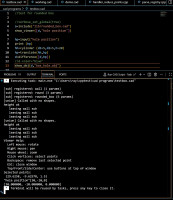
Anyway, the show_viewertest jpg, shows my code (the coloured text at the
top), the bottom white text is the terminal window. The show_viewer can
post text (questions) like "select three points on a line", and I click
on the points I want. I have it so it returns the points to the
terminal, under "selected points". The cad program then asks for input,
so I  copy the values I want, or adjust them, (one point in the example)
then in this example the code puts a hole in that position.
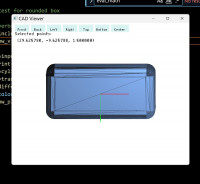
The rounded box.jpg, is a screen shot of the viewer. The terminal gives
some help, but more detailed help will be available. The text is a small
bit-mapped library, not very clear, but good enough.

This graphics type stuff is tricky to deal with in this AI, since it
cannot 'see' the results. But it gets there in the end, if you poke it
hard enough.

At the moment, the mouse only selects existing points, so for example,
it will not select the centre of the base of the box.

I've got 66 functions annotated so far.  Some detail is not very
consistent, which I may go through, like height or h, d1 and d2, but not
d, and so on. I should have beaten up co_pilot a bit more...

In case it is not clear, I have used co-pilot to write all the Cpp code.
I've told it what to do, in very broad details, originally asking it
about manifold, and so on, and it writes the files. I simply compile,
feed back the error messages, rinse and repeat. This has given me a
parametric cad program, which I can alter and adjust whichever way I
wish, instead of pestering the openscad guys to make changes that would
possibly break their system, and produce something that maybe nobody
else will want. The cpp code (the .exe) parses my code, which I have
kept pretty well unrestricted wrt format, syntax, etc. I dislike typing,
so I use short variable names in my examples, but camelback/whatever
works too. I decided on one statement per line, but if needed {} allows
multi lines.

I sort of wrote an earlier version using Python, but as I mentioned,
Python does not use the boolean functions of manifold. Creating shapes
without using manifold, or some other fdp system, will give broken/non
watertight objects.

Best wishes,

Ray

On 25/11/2025 14:37, William F. Adams via Discuss wrote:

A screen grab showing your current UI, or a sketch showing what you
want for it to be would be quite helpful.

For my part, I've crashed and burned or run into limitations on pretty
much everything I've tried until I got to Open/PythonSCAD (needed
Python for "real" variables to track machine position in:
https://github.com/WillAdams/gcodepreview), though I did make it
through the tutorial for Dune 3D pretty much in one take w/o
difficulty, which is a real testament to its UI/UX and I'd recommend
folks who have any interested in GUI 3D CAD at least look at it.

That said, I'm currently listening to/watching:

https://www.youtube.com/playlist?list=PLUilfM8GEmrS3yRLygdFOGJjRZHOzLnkM

and I'm really regretting buying a Plasticity Studio license rather
than Moment of Inspiration 3D.

I really wish that there was a visual programming language suited to
3-dimensional work which clicked with me (yeah, arguably, I should've
bought Rhinoceros 3D and used Grasshopper, or stayed in bed w/
Autodesk and used Autolisp) --- that said, BlockSCAD is surprisingly
useful, and I'm very glad of:

https://github.com/derkork/openscad-graph-editor

William


OpenSCAD mailing list
To unsubscribe send an email to discuss-leave@lists.openscad.org
Hi William, The interface is any text editor. I can show a shape to a simple viewer which allows me to visually select points, and using the terminal, I can input those values, which can be used to add features at points that I cannot define mathematically, unless I see the object. There are plenty of examples where that feature could be useful. For example, a few years ago, I mentioned on this group a method of measuring distances in openscad which involved making guesses at the location and gradually working towards the point I was aiming for (I think the example was based on an stl of Arnie's head). This viewer will allow selection of points, much more quickly, but it needs improving, to allow points to be moved for different viewing angles. this whole process could be smoothed out, but I do not yet need that. Anyway, the show_viewertest jpg, shows my code (the coloured text at the top), the bottom white text is the terminal window. The show_viewer can post text (questions) like "select three points on a line", and I click on the points I want. I have it so it returns the points to the terminal, under "selected points". The cad program then asks for input, so I  copy the values I want, or adjust them, (one point in the example) then in this example the code puts a hole in that position. The rounded box.jpg, is a screen shot of the viewer. The terminal gives some help, but more detailed help will be available. The text is a small bit-mapped library, not very clear, but good enough. This graphics type stuff is tricky to deal with in this AI, since it cannot 'see' the results. But it gets there in the end, if you poke it hard enough. At the moment, the mouse only selects existing points, so for example, it will not select the centre of the base of the box. I've got 66 functions annotated so far.  Some detail is not very consistent, which I may go through, like height or h, d1 and d2, but not d, and so on. I should have beaten up co_pilot a bit more... In case it is not clear, I have used co-pilot to write all the Cpp code. I've told it what to do, in very broad details, originally asking it about manifold, and so on, and it writes the files. I simply compile, feed back the error messages, rinse and repeat. This has given me a parametric cad program, which I can alter and adjust whichever way I wish, instead of pestering the openscad guys to make changes that would possibly break their system, and produce something that maybe nobody else will want. The cpp code (the .exe) parses my code, which I have kept pretty well unrestricted wrt format, syntax, etc. I dislike typing, so I use short variable names in my examples, but camelback/whatever works too. I decided on one statement per line, but if needed {} allows multi lines. I sort of wrote an earlier version using Python, but as I mentioned, Python does not use the boolean functions of manifold. Creating shapes without using manifold, or some other fdp system, will give broken/non watertight objects. Best wishes, Ray On 25/11/2025 14:37, William F. Adams via Discuss wrote: > A screen grab showing your current UI, or a sketch showing what you > want for it to be would be quite helpful. > > For my part, I've crashed and burned or run into limitations on pretty > much everything I've tried until I got to Open/PythonSCAD (needed > Python for "real" variables to track machine position in: > https://github.com/WillAdams/gcodepreview), though I did make it > through the tutorial for Dune 3D pretty much in one take w/o > difficulty, which is a real testament to its UI/UX and I'd recommend > folks who have any interested in GUI 3D CAD at least look at it. > > That said, I'm currently listening to/watching: > > https://www.youtube.com/playlist?list=PLUilfM8GEmrS3yRLygdFOGJjRZHOzLnkM > > and I'm really regretting buying a Plasticity Studio license rather > than Moment of Inspiration 3D. > > I really wish that there was a visual programming language suited to > 3-dimensional work which clicked with me (yeah, arguably, I should've > bought Rhinoceros 3D and used Grasshopper, or stayed in bed w/ > Autodesk and used Autolisp) --- that said, BlockSCAD is surprisingly > useful, and I'm very glad of: > > https://github.com/derkork/openscad-graph-editor > > William > > > _______________________________________________ > OpenSCAD mailing list > To unsubscribe send an email to discuss-leave@lists.openscad.org