


discuss@lists.openscad.org

OpenSCAD general discussion Mailing-list

View all threads

Viewpoint.

RW
Rogier Wolff
Sat, Sep 9, 2017 10:37 AM

Hi,

In the old days, I could manipulate the viewpoint so that the object
was viewed from whatever position I liked. This has become impossible
a while ago. I've only recently found a way to describe the current
restriction.

Enable the "show axes". Now, I dare you to manipulate the viewpoint
such that the Z axis points left-to-right.

(Sometimes I'm building an object that has its internal Z-axis
left-to-right in my final assembly, so I want to preview it pointing
in the right direction).

I could rotate the object I'm building but then the "helping" axes no
longer tell me what is X, Y and Z in the coordinates that I like to
think in for this object....

I'm using stock-ubuntu version 2015.03-1 probably from an older ubuntu
version as well.

I understand the desirability of the current situation with some
invariant (it doesn't matter how I drag the viewpoint from A to B, the
result is always the same). But the old situation allowed me to view
my work from any angle I wanted and that is, as far as I can see no
longer possible.

Can I re-enable the old behaviour?

Roger. 

--
** R.E.Wolff@BitWizard.nl ** http://www.BitWizard.nl/ ** +31-15-2600998 **
**    Delftechpark 26 2628 XH  Delft, The Netherlands. KVK: 27239233    **
-- BitWizard writes Linux device drivers for any device you may have! --
The plan was simple, like my brother-in-law Phil. But unlike
Phil, this plan just might work.

Hi, In the old days, I could manipulate the viewpoint so that the object was viewed from whatever position I liked. This has become impossible a while ago. I've only recently found a way to describe the current restriction. Enable the "show axes". Now, I dare you to manipulate the viewpoint such that the Z axis points left-to-right. (Sometimes I'm building an object that has its internal Z-axis left-to-right in my final assembly, so I want to preview it pointing in the right direction). I could rotate the object I'm building but then the "helping" axes no longer tell me what is X, Y and Z in the coordinates that I like to think in for this object.... I'm using stock-ubuntu version 2015.03-1 probably from an older ubuntu version as well. I understand the desirability of the current situation with some invariant (it doesn't matter how I drag the viewpoint from A to B, the result is always the same). But the old situation allowed me to view my work from any angle I wanted and that is, as far as I can see no longer possible. Can I re-enable the old behaviour? Roger. -- ** R.E.Wolff@BitWizard.nl ** http://www.BitWizard.nl/ ** +31-15-2600998 ** ** Delftechpark 26 2628 XH Delft, The Netherlands. KVK: 27239233 ** *-- BitWizard writes Linux device drivers for any device you may have! --* The plan was simple, like my brother-in-law Phil. But unlike Phil, this plan just might work.
NH
nop head
Sat, Sep 9, 2017 11:08 AM

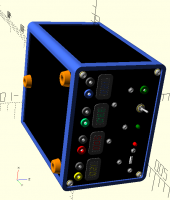
I can do it with the current version:


I used a combination of left click drag and shift left click drag.

On 9 September 2017 at 11:37, Rogier Wolff R.E.Wolff@bitwizard.nl wrote:

Hi,

In the old days, I could manipulate the viewpoint so that the object
was viewed from whatever position I liked. This has become impossible
a while ago. I've only recently found a way to describe the current
restriction.

Enable the "show axes". Now, I dare you to manipulate the viewpoint
such that the Z axis points left-to-right.

(Sometimes I'm building an object that has its internal Z-axis
left-to-right in my final assembly, so I want to preview it pointing
in the right direction).

I could rotate the object I'm building but then the "helping" axes no
longer tell me what is X, Y and Z in the coordinates that I like to
think in for this object....

I'm using stock-ubuntu version 2015.03-1 probably from an older ubuntu
version as well.

I understand the desirability of the current situation with some
invariant (it doesn't matter how I drag the viewpoint from A to B, the
result is always the same). But the old situation allowed me to view
my work from any angle I wanted and that is, as far as I can see no
longer possible.

Can I re-enable the old behaviour?

     Roger.

--
** R.E.Wolff@BitWizard.nl ** http://www.BitWizard.nl/ ** +31-15-2600998 **
**    Delftechpark 26 2628 XH  Delft, The Netherlands. KVK: 27239233    **
-- BitWizard writes Linux device drivers for any device you may have! --
The plan was simple, like my brother-in-law Phil. But unlike
Phil, this plan just might work.


OpenSCAD mailing list
Discuss@lists.openscad.org
http://lists.openscad.org/mailman/listinfo/discuss_lists.openscad.org
I can do it with the current version: ​ I used a combination of left click drag and shift left click drag. On 9 September 2017 at 11:37, Rogier Wolff <R.E.Wolff@bitwizard.nl> wrote: > Hi, > > In the old days, I could manipulate the viewpoint so that the object > was viewed from whatever position I liked. This has become impossible > a while ago. I've only recently found a way to describe the current > restriction. > > Enable the "show axes". Now, I dare you to manipulate the viewpoint > such that the Z axis points left-to-right. > > (Sometimes I'm building an object that has its internal Z-axis > left-to-right in my final assembly, so I want to preview it pointing > in the right direction). > > I could rotate the object I'm building but then the "helping" axes no > longer tell me what is X, Y and Z in the coordinates that I like to > think in for this object.... > > > I'm using stock-ubuntu version 2015.03-1 probably from an older ubuntu > version as well. > > I understand the desirability of the current situation with some > invariant (it doesn't matter how I drag the viewpoint from A to B, the > result is always the same). But the old situation allowed me to view > my work from any angle I wanted and that is, as far as I can see no > longer possible. > > Can I re-enable the old behaviour? > > Roger. > > -- > ** R.E.Wolff@BitWizard.nl ** http://www.BitWizard.nl/ ** +31-15-2600998 ** > ** Delftechpark 26 2628 XH Delft, The Netherlands. KVK: 27239233 ** > *-- BitWizard writes Linux device drivers for any device you may have! --* > The plan was simple, like my brother-in-law Phil. But unlike > Phil, this plan just might work. > > _______________________________________________ > OpenSCAD mailing list > Discuss@lists.openscad.org > http://lists.openscad.org/mailman/listinfo/discuss_lists.openscad.org >