

How to make a cylinder perpendicular to a sloping face

adrianv wrote
Here's an example:
include<BOSL2/std.scad>
prismoid(size1=[50,30], size2=[20,20], h=20, shift=[15,5])
attach(LEFT)cyl(h=10,r=3);
And the result:
<http://forum.openscad.org/file/t2477/attach.png>
Interesting. Thank you very much.
I can see how it works, but it also seems to me that it starts to lose the
ease-of-use advantage that Openscad has over Freecad or SolveSpace. The
library introduces a whole lot of additional stuff that must be learned and
with which it is easy to make a small mistake.
...R
--
Sent from: http://forum.openscad.org/

On 9/5/2019 3:16 PM, nop head wrote:
I think the idea that you should use trig every time you want to
position an object is absurd.
Well for me trig is trivial but I have no idea what that BSOL code
does, or how it works. I would have to look it up but I know what
atan2 does.
Yeah, that's pretty much my attitude too. I know the trig, more or
less; I'd have to learn the library. It means I reinvent wheels, but
sometimes reinventing a wheel is easier than trying to understand how
somebody else's wheel works.
You can make it a little simpler (in some ways) by embedding the
rotation and translation in the "parent" object and applying them to
children. In a couple of cases I've had models with "faceplates" on
which there are controls; the design I've used is to accept a child that
contains objects that are to be placed on the faceplate. The child
objects - knobs and whatnot - are laid out as if they were on a
horizontal surface at z=0; the parent rotates and translates them into
the right place.
That's basically the "attachment" model that some libraries support, but
without any attempt at generalizing.
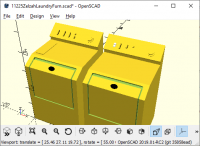
On these models of a washing machine and a drier, the control panel
(with the buttons and knobs) and the detergent door (on top of the
washer) are done this way. Partly it makes it easier to think about the
layout, but also the basic box for the two is the same module; it's only
those two add-ons that are specific.
I don't remember why one of the controls on the drier is white.
I've used similar strategies for positioning handles on cabinets,
separating the design of the handle from the positioning (and
duplication!) on the cabinet.
More than you wanted to know.

Personally I find it's much easier to make a small (or large) mistake by
trying to position objects myself using translate and rotate operations and
doing trig. And much harder to debug the mistake. And harder generally to
change the model when I want to change it. But it's obviously a matter of
opinion. Yes, using a library does require the additional effort of
learning to use the library. Many vocal people on this forum do not
believe that this effort will be repaid. I personally disagree.
Out of curiosity, how might your original query be answered with a method
that does not require learning something new? How could a mechanism allow
you to position a cylinder on the sloped side of an object without
complicating OpenSCAD? I am not able to imagine a mechanism that could do
this that wouldn't require learning a bunch of new commands for managing
that position.
Robin2 wrote
Interesting. Thank you very much.
I can see how it works, but it also seems to me that it starts to lose the
ease-of-use advantage that Openscad has over Freecad or SolveSpace. The
library introduces a whole lot of additional stuff that must be learned
and
with which it is easy to make a small mistake.
--
Sent from: http://forum.openscad.org/
adrianv wrote
Out of curiosity, how might your original query be answered with a method
that does not require learning something new?
--
Sent from: http://forum.openscad.org/
OpenSCAD mailing list
Discuss@.openscad
I agree completely. I had just been hoping that there was a simpler Openscad
solution that I was not aware of - especially as it seems so much an
integral capability of Freecad and SolveSpace
...R
--
Sent from: http://forum.openscad.org/
Basically what you're describing below is heading towards the attachment
functionality implemented in the various libraries. You can of course write
it all yourself, which saves you the trouble of learning to use the library,
I guess. The notion that everybody should write their own personal
libraries has some proponents in this forum, I think because people believe
it will be easier to write their own code than learn how to use libraries
written by others.
jim_klesseg wrote:
In your original case of placing a feature perpendicular to the face of an
extruded polygon, one way is to work it backwards.
Orient your polygon so that it is on the xy plane, and your segment (soon
to be face) is on the x axis, and then extrude in the z axis for your
extrusion and then make your other object extend out in the "y" direction.
Then manipulate the new combined object as needed to get the face where
you want it.
I guess it would be relatively simple to make a module that took an n
sided polygon and allowed you to place one of "n" objects perpendicular
to a face. you would still need to know where you want them in z and y,
which could be more vector inputs to the module.
--
Sent from: http://forum.openscad.org/
adrianv wrote
The notion that everybody should write their own personal
libraries has some proponents in this forum, I think because people
believe
it will be easier to write their own code than learn how to use libraries
written by others.
I have had both good and bad experiences with libraries (unrelated to
Openscad). Unfortunately people who write OpenSource code seem very unlikely
also to support the code with good documentation. I have wasted a lot of
time trying (and failing) to figure something out probably because I had a
mistaken image of what the library was intended to do. The more complex the
library the greater is the need for documentation.
In replying to another Thread here it occurred to me that a solution to my
problem is to attach the cylinder (or whatever) to the face when the object
is created. At that stage it should be possible to orient the face so that
it is in the Z=0 plane with its origin at X=0 Y=0 and one side aligned with
the Y axis. In that situation the position and dimensions are fully defined
and anything of interest can be placed on it. When those objects are
combined the whole thing can be moved and rotated to any other position.
I'm working on a Python program that writes Openscad code (to save all the
typing) and it should be straightforward to get it to do the calculations I
need for the above.
...R
--
Sent from: http://forum.openscad.org/

I think you are going to rotate by angle made between the vector normal to
the surface of the face you want, and the z axis.
So you have surface S, defined by points s1, s2, s3 (or s4) - you take the
arithmetic mean of these points, and that is the position of the center of
the surface. Add the center vector to the objects position to put in the
right place, and then use trig to to figure out which angle you want. The
normal vector is what is called the "orthogonal projection" of surface S,
and can be calculated from the position vectors of the points.
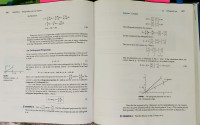
The attached image is from my Linear Algebra textbook from college, by far
the most used one since graduating.
On Tue, Sep 10, 2019 at 4:09 AM Robin2 robin@nbleopard.com wrote:
adrianv wrote
The notion that everybody should write their own personal
libraries has some proponents in this forum, I think because people
believe
it will be easier to write their own code than learn how to use libraries
written by others.
I have had both good and bad experiences with libraries (unrelated to
Openscad). Unfortunately people who write OpenSource code seem very
unlikely
also to support the code with good documentation. I have wasted a lot of
time trying (and failing) to figure something out probably because I had a
mistaken image of what the library was intended to do. The more complex the
library the greater is the need for documentation.
In replying to another Thread here it occurred to me that a solution to my
problem is to attach the cylinder (or whatever) to the face when the object
is created. At that stage it should be possible to orient the face so that
it is in the Z=0 plane with its origin at X=0 Y=0 and one side aligned
with
the Y axis. In that situation the position and dimensions are fully defined
and anything of interest can be placed on it. When those objects are
combined the whole thing can be moved and rotated to any other position.
I'm working on a Python program that writes Openscad code (to save all the
typing) and it should be straightforward to get it to do the calculations I
need for the above.
...R
--
Sent from: http://forum.openscad.org/
OpenSCAD mailing list
Discuss@lists.openscad.org
http://lists.openscad.org/mailman/listinfo/discuss_lists.openscad.org
Robin2 wrote
adrianv wrote
The notion that everybody should write their own personal
libraries has some proponents in this forum, I think because people
believe
it will be easier to write their own code than learn how to use libraries
written by others.
I have had both good and bad experiences with libraries (unrelated to
Openscad). Unfortunately people who write OpenSource code seem very
unlikely
also to support the code with good documentation. I have wasted a lot of
time trying (and failing) to figure something out probably because I had a
mistaken image of what the library was intended to do. The more complex
the
library the greater is the need for documentation.
I agree that documentation is important. You do realize that popular
computer languages like C++ and Python would be useless without their
extensive libraries. Almost everything you do in one of those languages is
calling a library. Do you find these standard open source libraries to be
mediocre? Inadequately documented?
I suggest that before you complain about the state of the documentation you
should actually examine the documentation. I have suggested three relevant
libraries. All of them are at least somewhat documented:
https://github.com/revarbat/BOSL2/wiki/attachments.scad
https://github.com/davidson16807/relativity.scad/wiki
http://www.iearobotics.com/blog/2012/09/10/enhancing-openscad-with-the-attach-library/
--
Sent from: http://forum.openscad.org/

I have this same "position object on a face" code; here is my solution that I
use in my own code (only works for slopes in one direction:
http://forum.openscad.org/file/t486/onFace.png
// --------------------------------------------------------------
module onFace(height1, height2, depth, x = 0, y = 0, z_adj=0)
{
// Given Parameters of a sloped face defined in (x,y) and rising in Z,
place children on sloped face
// height1 = height of front edge
// height2 = height of rear edge
// length = length of between front and rear
// x = offset positioning in x (optional)
// y = offset positioning in x (optional)
// z_adj = fudge factor
// { ... } = children to be positioned
slope = (height2 - height1) / depth;
face_angle = (slope != 0 ? (atan (slope)) : 0);

// Optional Printing of calculated angle
//echo ("module onFace(): Face Angle=", face_angle);

translate ([0, 0, z_adj])
{
    translate ([x, cos(face_angle) * y, height1 + sin(face_angle) * y])
        rotate ([face_angle, 0, 0]) children();

} // end translate
} // end onFace()
// --------------- Sample Code ---------------------
h = 40;
d = 30;
w = 20;
// Make thing
rotate ([90, 0, 90]) linear_extrude (w) polygon (points=[[0, 0], [d, h], [d,
0]]);
// Place items on face
onFace (height1=0, height2 = h, x=w/2, y=15, depth = d) cylinder (d=10,
h=20);
onFace (height1=0, height2 = h, x=w/2, y=35, depth = d) cube (5);
--
Sent from: http://forum.openscad.org/

On 9/10/19 3:13 AM, Robin2 wrote:
I have had both good and bad experiences with libraries (unrelated to
Openscad). Unfortunately people who write OpenSource code seem very unlikely
also to support the code with good documentation. I have wasted a lot of
time trying (and failing) to figure something out probably because I had a
mistaken image of what the library was intended to do. The more complex the
library the greater is the need for documentation.
This also speaks to the complexity of libraries people tend to write for
OpenSCAD, which I think is related to lack of traction for any given
package manager.
Because there's no commonly accepted package manager, everyone's pet
library tends to start from zero and then grows in scope to become
something worth sharing. Consequently, every library includes (and
should document) a lot of fairly fundamental constructs, each with their
own quirks and limitations. Nobody "builds on the shoulders of giants,"
so to speak, and they only ever get built so high.
Further, the lack of a canonical, versioned package manager makes
everyone hesitant to make breaking changes to the libraries - which
keeps other contributors from helping take the sharp edges off.
Combined, it all makes for bigger libraries that are harder to document
well - while needing the documentation more.