

discuss@lists.openscad.org

OpenSCAD general discussion Mailing-list

View all threads

color alpha channel bug

JD
John David
Wed, Feb 25, 2026 6:57 PM

I have a project where I set the alpha channel (via color("#RRGGBBAA")),
but later the alpha channel is reset to its default value of 0xFF.  I see
that this is related to at least one known problem going back 14+
years ago.  Are there any known tricks to work around this?

Also to note, this is happening incorrectly even in preview, I saw a note
that it sometimes works incorrectly in rendering.

Thanks in advance.

EBo --

I have a project where I set the alpha channel (via color("#RRGGBBAA")), but later the alpha channel is reset to its default value of 0xFF. I see that this is related to at least one known problem going back 14+ years ago. Are there any known tricks to work around this? Also to note, this is happening incorrectly even in preview, I saw a note that it sometimes works incorrectly in rendering. Thanks in advance. EBo --
JB
Jordan Brown
Wed, Feb 25, 2026 7:22 PM

On 2/25/2026 10:57 AM, John David via Discuss wrote:

I have a project where I set the alpha channel (via
color("#RRGGBBAA")), but later the alpha channel is reset to its
default value of 0xFF.  I see that this is related to at least one
known problem going back 14+ years ago.  Are there any known tricks to
work around this?

Also to note, this is happening incorrectly even in preview, I saw a
note that it sometimes works incorrectly in rendering.

It wouldn't surprise me at all if there was misbehavior, but I don't
think this will be actionable without an example.

One known misbehavior is that, unlike everything else in geometry
handling, order matters when you're dealing with transparency.  Worse,
there are cases where you cannot make it work.  Ref issue #1390
https://github.com/openscad/openscad/issues/1390.

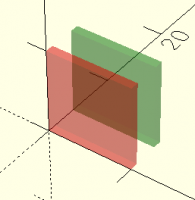
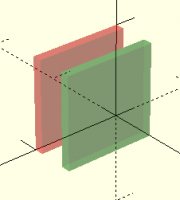
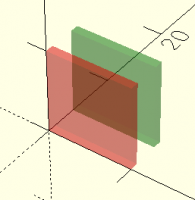
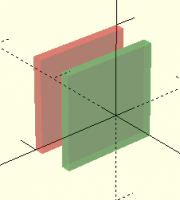
translate([0,4,0]) color("green", alpha=0.3) cube([10,1,10]);
color("red", alpha=0.3) cube([10,1,10]);

if you look at it from -Y, you see:
Image

but if you look at it from +Y, you see:
Image

Note that in the first the green is visible behind the red, but in the
second the red is not at all visible behind the green.
On 2/25/2026 10:57 AM, John David via Discuss wrote: > I have a project where I set the alpha channel (via > color("#RRGGBBAA")), but later the alpha channel is reset to its > default value of 0xFF.  I see that this is related to at least one > known problem going back 14+ years ago.  Are there any known tricks to > work around this? > > Also to note, this is happening incorrectly even in preview, I saw a > note that it sometimes works incorrectly in rendering. It wouldn't surprise me at all if there was misbehavior, but I don't think this will be actionable without an example. One known misbehavior is that, unlike everything else in geometry handling, order matters when you're dealing with transparency.  Worse, there are cases where you cannot make it work.  Ref issue #1390 <https://github.com/openscad/openscad/issues/1390>. translate([0,4,0]) color("green", alpha=0.3) cube([10,1,10]); color("red", alpha=0.3) cube([10,1,10]); if you look at it from -Y, you see: Image but if you look at it from +Y, you see: Image Note that in the first the green is visible behind the red, but in the second the red is not at all visible behind the green.
JB
Jordan Brown
Wed, Feb 25, 2026 7:32 PM

[ Sigh.  Copying an image from Edge to Thunderbird did not copy the
image; it copied a link to the image... that didn't work. Let's try again. ]

On 2/25/2026 10:57 AM, John David via Discuss wrote:

I have a project where I set the alpha channel (via
color("#RRGGBBAA")), but later the alpha channel is reset to its
default value of 0xFF.  I see that this is related to at least one
known problem going back 14+ years ago.  Are there any known tricks to
work around this?

Also to note, this is happening incorrectly even in preview, I saw a
note that it sometimes works incorrectly in rendering.

It wouldn't surprise me at all if there was misbehavior, but I don't
think this will be actionable without an example.

One known misbehavior is that, unlike everything else in geometry
handling, order matters when you're dealing with transparency.  Worse,
there are cases where you cannot make it work.  Ref issue #1390
https://github.com/openscad/openscad/issues/1390.

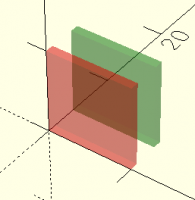
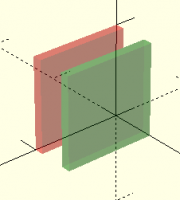
translate([0,4,0]) color("green", alpha=0.3) cube([10,1,10]);
color("red", alpha=0.3) cube([10,1,10]);

if you look at it from -Y, you see:

but if you look at it from +Y, you see:

Note that in the first the green is visible behind the red, but in the
second the red is not at all visible behind the green.
[ Sigh.  Copying an image from Edge to Thunderbird did not copy the image; it copied a link to the image... that didn't work. Let's try again. ] On 2/25/2026 10:57 AM, John David via Discuss wrote: > I have a project where I set the alpha channel (via > color("#RRGGBBAA")), but later the alpha channel is reset to its > default value of 0xFF.  I see that this is related to at least one > known problem going back 14+ years ago.  Are there any known tricks to > work around this? > > Also to note, this is happening incorrectly even in preview, I saw a > note that it sometimes works incorrectly in rendering. It wouldn't surprise me at all if there was misbehavior, but I don't think this will be actionable without an example. One known misbehavior is that, unlike everything else in geometry handling, order matters when you're dealing with transparency.  Worse, there are cases where you cannot make it work.  Ref issue #1390 <https://github.com/openscad/openscad/issues/1390>. translate([0,4,0]) color("green", alpha=0.3) cube([10,1,10]); color("red", alpha=0.3) cube([10,1,10]); if you look at it from -Y, you see: but if you look at it from +Y, you see: Note that in the first the green is visible behind the red, but in the second the red is not at all visible behind the green.
JD
John David
Wed, Feb 25, 2026 8:30 PM

Sorry for not providing and example, and your example points out something
I did eventually find.  Here are some of the details:

  • model.color("RRGGBB",alpha=0.3) works.  But model.color("RRGGBBAA") does
    not.  The alpha channel is overwritten.  I have found the issue and have a
    fix

I tracked down the problem to line 2358 of pyfunctions.cc.  Here is a
snippet:

Vector4d col(0, 0, 0, alpha);
if (!python_vectorval(color, 3, 4, &col[0], &col[1], &col[2], &col[3])) {
node->color.setRgba(float(col[0]), float(col[1]), float(col[2]),
float(col[3]));
} else if (PyUnicode_Check(color)) {
PyObject *value = PyUnicode_AsEncodedString(color, "utf-8", "~");
char *colorname = PyBytes_AS_STRING(value);
const auto color = OpenSCAD::parse_color(colorname);
if (color) {
node->color = *color;
node->color.setAlpha(alpha); // This is the problematic line of code.
} else {
PyErr_SetString(PyExc_TypeError, "Cannot parse color");
return NULL;
}
...

I was able to fix the problem by adding "if (1.0 != alpha)" before
the node->color.setAlpha(alpha);  It turns out that the call to
python_color_core had already properly parsed the color as RRGGBBAA, and
appropriately deals with RRGGBB, RGBA, and RGB as well.  The only time you
need to overwrite the alpha is when it is passed in via a second argument,
ie: model.color(str, alpha=something).

If it would not be outright rejected, I'll post an issue on GitHub and
request a PR to fix it.  The question is if the developers would accept it.

EBo --

On Wed, Feb 25, 2026 at 2:32 PM Jordan Brown openscad@jordan.maileater.net
wrote:

[ Sigh.  Copying an image from Edge to Thunderbird did not copy the image;
it copied a link to the image... that didn't work. Let's try again. ]

On 2/25/2026 10:57 AM, John David via Discuss wrote:

I have a project where I set the alpha channel (via color("#RRGGBBAA")),
but later the alpha channel is reset to its default value of 0xFF.  I see
that this is related to at least one known problem going back 14+
years ago.  Are there any known tricks to work around this?

Also to note, this is happening incorrectly even in preview, I saw a note
that it sometimes works incorrectly in rendering.

It wouldn't surprise me at all if there was misbehavior, but I don't think
this will be actionable without an example.

One known misbehavior is that, unlike everything else in geometry
handling, order matters when you're dealing with transparency.  Worse,
there are cases where you cannot make it work.  Ref issue #1390
https://github.com/openscad/openscad/issues/1390.

translate([0,4,0]) color("green", alpha=0.3) cube([10,1,10]);
color("red", alpha=0.3) cube([10,1,10]);

if you look at it from -Y, you see:

but if you look at it from +Y, you see:

Note that in the first the green is visible behind the red, but in the
second the red is not at all visible behind the green.
Sorry for not providing and example, and your example points out something I did eventually find. Here are some of the details: * model.color("RRGGBB",alpha=0.3) works. But model.color("RRGGBBAA") does not. The alpha channel is overwritten. I have found the issue and have a fix I tracked down the problem to line 2358 of pyfunctions.cc. Here is a snippet: Vector4d col(0, 0, 0, alpha); if (!python_vectorval(color, 3, 4, &col[0], &col[1], &col[2], &col[3])) { node->color.setRgba(float(col[0]), float(col[1]), float(col[2]), float(col[3])); } else if (PyUnicode_Check(color)) { PyObject *value = PyUnicode_AsEncodedString(color, "utf-8", "~"); char *colorname = PyBytes_AS_STRING(value); const auto color = OpenSCAD::parse_color(colorname); if (color) { node->color = *color; node->color.setAlpha(alpha); // This is the problematic line of code. } else { PyErr_SetString(PyExc_TypeError, "Cannot parse color"); return NULL; } ... I was able to fix the problem by adding "if (1.0 != alpha)" before the node->color.setAlpha(alpha); It turns out that the call to python_color_core had already properly parsed the color as RRGGBBAA, and appropriately deals with RRGGBB, RGBA, and RGB as well. The only time you need to overwrite the alpha is when it is passed in via a second argument, ie: model.color(str, alpha=something). If it would not be outright rejected, I'll post an issue on GitHub and request a PR to fix it. The question is if the developers would accept it. EBo -- On Wed, Feb 25, 2026 at 2:32 PM Jordan Brown <openscad@jordan.maileater.net> wrote: > [ Sigh. Copying an image from Edge to Thunderbird did not copy the image; > it copied a link to the image... that didn't work. Let's try again. ] > > On 2/25/2026 10:57 AM, John David via Discuss wrote: > > I have a project where I set the alpha channel (via color("#RRGGBBAA")), > but later the alpha channel is reset to its default value of 0xFF. I see > that this is related to at least one known problem going back 14+ > years ago. Are there any known tricks to work around this? > > Also to note, this is happening incorrectly even in preview, I saw a note > that it sometimes works incorrectly in rendering. > > > It wouldn't surprise me at all if there was misbehavior, but I don't think > this will be actionable without an example. > > One known misbehavior is that, unlike everything else in geometry > handling, order matters when you're dealing with transparency. Worse, > there are cases where you cannot make it work. Ref issue #1390 > <https://github.com/openscad/openscad/issues/1390>. > > translate([0,4,0]) color("green", alpha=0.3) cube([10,1,10]); > color("red", alpha=0.3) cube([10,1,10]); > > if you look at it from -Y, you see: > > > > but if you look at it from +Y, you see: > > > > Note that in the first the green is visible behind the red, but in the > second the red is not at all visible behind the green. >
JD
John David
Wed, Feb 25, 2026 8:33 PM

I do not know if my fix above solves what you show as the ordering problem
(which apparently has been known for over 14 years).  It only solves the
problem of losing the alpha channel when parsing colors by hex value of
#RRGGBBAA.

On Wed, Feb 25, 2026 at 3:30 PM John David ebo.2112@gmail.com wrote:

Sorry for not providing and example, and your example points out something
I did eventually find.  Here are some of the details:

  • model.color("RRGGBB",alpha=0.3) works.  But model.color("RRGGBBAA") does
    not.  The alpha channel is overwritten.  I have found the issue and have a
    fix

I tracked down the problem to line 2358 of pyfunctions.cc.  Here is a
snippet:

Vector4d col(0, 0, 0, alpha);
if (!python_vectorval(color, 3, 4, &col[0], &col[1], &col[2], &col[3])) {
node->color.setRgba(float(col[0]), float(col[1]), float(col[2]),
float(col[3]));
} else if (PyUnicode_Check(color)) {
PyObject *value = PyUnicode_AsEncodedString(color, "utf-8", "~");
char *colorname = PyBytes_AS_STRING(value);
const auto color = OpenSCAD::parse_color(colorname);
if (color) {
node->color = *color;
node->color.setAlpha(alpha); // This is the problematic line of code.
} else {
PyErr_SetString(PyExc_TypeError, "Cannot parse color");
return NULL;
}
...

I was able to fix the problem by adding "if (1.0 != alpha)" before
the node->color.setAlpha(alpha);  It turns out that the call to
python_color_core had already properly parsed the color as RRGGBBAA, and
appropriately deals with RRGGBB, RGBA, and RGB as well.  The only time you
need to overwrite the alpha is when it is passed in via a second argument,
ie: model.color(str, alpha=something).

If it would not be outright rejected, I'll post an issue on GitHub and
request a PR to fix it.  The question is if the developers would accept it.

EBo --

On Wed, Feb 25, 2026 at 2:32 PM Jordan Brown <
openscad@jordan.maileater.net> wrote:

[ Sigh.  Copying an image from Edge to Thunderbird did not copy the
image; it copied a link to the image... that didn't work. Let's try again. ]

On 2/25/2026 10:57 AM, John David via Discuss wrote:

I have a project where I set the alpha channel (via color("#RRGGBBAA")),
but later the alpha channel is reset to its default value of 0xFF.  I see
that this is related to at least one known problem going back 14+
years ago.  Are there any known tricks to work around this?

Also to note, this is happening incorrectly even in preview, I saw a note
that it sometimes works incorrectly in rendering.

It wouldn't surprise me at all if there was misbehavior, but I don't
think this will be actionable without an example.

One known misbehavior is that, unlike everything else in geometry
handling, order matters when you're dealing with transparency.  Worse,
there are cases where you cannot make it work.  Ref issue #1390
https://github.com/openscad/openscad/issues/1390.

translate([0,4,0]) color("green", alpha=0.3) cube([10,1,10]);
color("red", alpha=0.3) cube([10,1,10]);

if you look at it from -Y, you see:

but if you look at it from +Y, you see:

Note that in the first the green is visible behind the red, but in the
second the red is not at all visible behind the green.

I do not know if my fix above solves what you show as the ordering problem (which apparently has been known for over 14 years). It only solves the problem of losing the alpha channel when parsing colors by hex value of #RRGGBBAA. On Wed, Feb 25, 2026 at 3:30 PM John David <ebo.2112@gmail.com> wrote: > Sorry for not providing and example, and your example points out something > I did eventually find. Here are some of the details: > > * model.color("RRGGBB",alpha=0.3) works. But model.color("RRGGBBAA") does > not. The alpha channel is overwritten. I have found the issue and have a > fix > > I tracked down the problem to line 2358 of pyfunctions.cc. Here is a > snippet: > > Vector4d col(0, 0, 0, alpha); > if (!python_vectorval(color, 3, 4, &col[0], &col[1], &col[2], &col[3])) { > node->color.setRgba(float(col[0]), float(col[1]), float(col[2]), > float(col[3])); > } else if (PyUnicode_Check(color)) { > PyObject *value = PyUnicode_AsEncodedString(color, "utf-8", "~"); > char *colorname = PyBytes_AS_STRING(value); > const auto color = OpenSCAD::parse_color(colorname); > if (color) { > node->color = *color; > node->color.setAlpha(alpha); // This is the problematic line of code. > } else { > PyErr_SetString(PyExc_TypeError, "Cannot parse color"); > return NULL; > } > ... > > I was able to fix the problem by adding "if (1.0 != alpha)" before > the node->color.setAlpha(alpha); It turns out that the call to > python_color_core had already properly parsed the color as RRGGBBAA, and > appropriately deals with RRGGBB, RGBA, and RGB as well. The only time you > need to overwrite the alpha is when it is passed in via a second argument, > ie: model.color(str, alpha=something). > > If it would not be outright rejected, I'll post an issue on GitHub and > request a PR to fix it. The question is if the developers would accept it. > > > EBo -- > > On Wed, Feb 25, 2026 at 2:32 PM Jordan Brown < > openscad@jordan.maileater.net> wrote: > >> [ Sigh. Copying an image from Edge to Thunderbird did not copy the >> image; it copied a link to the image... that didn't work. Let's try again. ] >> >> On 2/25/2026 10:57 AM, John David via Discuss wrote: >> >> I have a project where I set the alpha channel (via color("#RRGGBBAA")), >> but later the alpha channel is reset to its default value of 0xFF. I see >> that this is related to at least one known problem going back 14+ >> years ago. Are there any known tricks to work around this? >> >> Also to note, this is happening incorrectly even in preview, I saw a note >> that it sometimes works incorrectly in rendering. >> >> >> It wouldn't surprise me at all if there was misbehavior, but I don't >> think this will be actionable without an example. >> >> One known misbehavior is that, unlike everything else in geometry >> handling, order matters when you're dealing with transparency. Worse, >> there are cases where you cannot make it work. Ref issue #1390 >> <https://github.com/openscad/openscad/issues/1390>. >> >> translate([0,4,0]) color("green", alpha=0.3) cube([10,1,10]); >> color("red", alpha=0.3) cube([10,1,10]); >> >> if you look at it from -Y, you see: >> >> >> >> but if you look at it from +Y, you see: >> >> >> >> Note that in the first the green is visible behind the red, but in the >> second the red is not at all visible behind the green. >> >
JB
Jordan Brown
Wed, Feb 25, 2026 9:55 PM

On 2/25/2026 12:33 PM, John David wrote:

I do not know if my fix above solves what you show as the ordering
problem (which apparently has been known for over 14 years).  It only
solves the problem of losing the alpha channel when parsing colors by
hex value of #RRGGBBAA.

To be clear:  the new problem that you're describing applies only to
PythonSCAD, not to old-school OpenSCAD.

And yes, the other has been known for a long time... that doesn't mean
it's easy to fix, or that it's important to fix for the core OpenSCAD
audience.

On 2/25/2026 12:33 PM, John David wrote: > I do not know if my fix above solves what you show as the ordering > problem (which apparently has been known for over 14 years).  It only > solves the problem of losing the alpha channel when parsing colors by > hex value of #RRGGBBAA. > To be clear:  the new problem that you're describing applies only to PythonSCAD, not to old-school OpenSCAD. And yes, the other has been known for a long time... that doesn't mean it's easy to fix, or that it's important to fix for the core OpenSCAD audience.
JD
John David
Wed, Feb 25, 2026 10:04 PM

Sorry.  I thought it applied to both PythonSCAD and OpenSCAD.  I'll
double-check.  I'll do a PR on PythonSCAD then.  Sorry for the noise.

On Wed, Feb 25, 2026 at 4:55 PM Jordan Brown openscad@jordan.maileater.net
wrote:

On 2/25/2026 12:33 PM, John David wrote:

I do not know if my fix above solves what you show as the ordering problem
(which apparently has been known for over 14 years).  It only solves the
problem of losing the alpha channel when parsing colors by hex value of
#RRGGBBAA.

To be clear:  the new problem that you're describing applies only to
PythonSCAD, not to old-school OpenSCAD.

And yes, the other has been known for a long time... that doesn't mean
it's easy to fix, or that it's important to fix for the core OpenSCAD
audience.

Sorry. I thought it applied to both PythonSCAD and OpenSCAD. I'll double-check. I'll do a PR on PythonSCAD then. Sorry for the noise. On Wed, Feb 25, 2026 at 4:55 PM Jordan Brown <openscad@jordan.maileater.net> wrote: > On 2/25/2026 12:33 PM, John David wrote: > > I do not know if my fix above solves what you show as the ordering problem > (which apparently has been known for over 14 years). It only solves the > problem of losing the alpha channel when parsing colors by hex value of > #RRGGBBAA. > > > To be clear: the new problem that you're describing applies only to > PythonSCAD, not to old-school OpenSCAD. > > And yes, the other has been known for a long time... that doesn't mean > it's easy to fix, or that it's important to fix for the core OpenSCAD > audience. > >
JD
John David
Wed, Feb 25, 2026 10:16 PM

I just verified that the issue is in the old-school OpenSCAD version as
well, but I reported the line number from the PythonSCAD version of the
code.  Sorry about that.

Take a look at line 999 in ./src/python/pyfunctions.cc from a clean git
clone of openscad.  Here is the relevant code snippet:

...
PyObject *value = PyUnicode_AsEncodedString(color, "utf-8", "~");
char *colorname = PyBytes_AS_STRING(value);
const auto color = OpenSCAD::parse_color(colorname);
if (color) {
node->color = *color;
node->color.setAlpha(alpha);
} else {
...

The call to parse_color takes in a string "#RRGGBBAA" and parses it
correctly.  alpha is set from the call to export("#RRGGBBAA",[alpha=1.0]).
The default for alpha=1.0 which overwrites the colors alpha channel
always.  The fix was to simply add "if (1.0!=alpha)" before the setAlpha
call.

EBo --

On Wed, Feb 25, 2026 at 5:04 PM John David ebo.2112@gmail.com wrote:

Sorry.  I thought it applied to both PythonSCAD and OpenSCAD.  I'll
double-check.  I'll do a PR on PythonSCAD then.  Sorry for the noise.

On Wed, Feb 25, 2026 at 4:55 PM Jordan Brown <
openscad@jordan.maileater.net> wrote:

On 2/25/2026 12:33 PM, John David wrote:

I do not know if my fix above solves what you show as the ordering
problem (which apparently has been known for over 14 years).  It only
solves the problem of losing the alpha channel when parsing colors by hex
value of #RRGGBBAA.

To be clear:  the new problem that you're describing applies only to
PythonSCAD, not to old-school OpenSCAD.

And yes, the other has been known for a long time... that doesn't mean
it's easy to fix, or that it's important to fix for the core OpenSCAD
audience.

I just verified that the issue is in the old-school OpenSCAD version as well, but I reported the line number from the PythonSCAD version of the code. Sorry about that. Take a look at line 999 in ./src/python/pyfunctions.cc from a clean git clone of openscad. Here is the relevant code snippet: ... PyObject *value = PyUnicode_AsEncodedString(color, "utf-8", "~"); char *colorname = PyBytes_AS_STRING(value); const auto color = OpenSCAD::parse_color(colorname); if (color) { node->color = *color; node->color.setAlpha(alpha); } else { ... The call to parse_color takes in a string "#RRGGBBAA" and parses it correctly. alpha is set from the call to export("#RRGGBBAA",[alpha=1.0]). The default for alpha=1.0 which overwrites the colors alpha channel always. The fix was to simply add "if (1.0!=alpha)" before the setAlpha call. EBo -- On Wed, Feb 25, 2026 at 5:04 PM John David <ebo.2112@gmail.com> wrote: > Sorry. I thought it applied to both PythonSCAD and OpenSCAD. I'll > double-check. I'll do a PR on PythonSCAD then. Sorry for the noise. > > On Wed, Feb 25, 2026 at 4:55 PM Jordan Brown < > openscad@jordan.maileater.net> wrote: > >> On 2/25/2026 12:33 PM, John David wrote: >> >> I do not know if my fix above solves what you show as the ordering >> problem (which apparently has been known for over 14 years). It only >> solves the problem of losing the alpha channel when parsing colors by hex >> value of #RRGGBBAA. >> >> >> To be clear: the new problem that you're describing applies only to >> PythonSCAD, not to old-school OpenSCAD. >> >> And yes, the other has been known for a long time... that doesn't mean >> it's easy to fix, or that it's important to fix for the core OpenSCAD >> audience. >> >>
JB
Jordan Brown
Wed, Feb 25, 2026 11:22 PM

On 2/25/2026 2:16 PM, John David wrote:

I just verified that the issue is in the old-school OpenSCAD version
as well, but I reported the line number from the PythonSCAD version of
the code.  Sorry about that.

Sorry, I was unclear on my terminology.

I meant that it applies only to programs written in Python (no matter
which distribution they are running on), and not to programs written in
OpenSCAD-language.

In OpenSCAD-language:

color("#FF000080") cube(10);

correctly produces a transparent red cube.

On 2/25/2026 2:16 PM, John David wrote: > I just verified that the issue is in the old-school OpenSCAD version > as well, but I reported the line number from the PythonSCAD version of > the code.  Sorry about that. > Sorry, I was unclear on my terminology. I meant that it applies only to programs written in Python (no matter which distribution they are running on), and not to programs written in OpenSCAD-language. In OpenSCAD-language: color("#FF000080") cube(10); correctly produces a transparent red cube.
JD
John David
Thu, Feb 26, 2026 12:40 AM

Ahhh... OK.  I agree that it is python only, but the bug is in both source
trees.

I guess I will go ahead and post a PR for the OpenSCAD specific fix and
just try to move it forward.

BTW, what I am using it for is part of Guenther's and my work on developing
a *SCAD to laser cutter gcode path.  At this point, we have it very close
to working, and I can do things like make some part, preview, render, and
export to gcode.  Guenther also fixed something in PythonSCAD which allows
us to do a model.export(filename) directly in the PythonSCAD script, and it
will generate the gcode when you run preview.  At the moment I am tracking
down a bug exposed in a special case I have on a project where I have
multiple materials (3mm plywood, and 0.75" pine) that are parametrically
used in a single OpenSCAD script so I can visualize how the parts fit
together, but I would like to generate the 3mmply.gcode separate from the
0.75"pine.gcode for cutting on the laser cutter...

Once I get a first pass running in PythonSCAD, I would like to back port it
to OpenSCAD. That said, I need to get it fully working on at least one of
the platforms.

EBo --

Ahhh... OK. I agree that it is python only, but the bug is in both source trees. I guess I will go ahead and post a PR for the OpenSCAD specific fix and just try to move it forward. BTW, what I am using it for is part of Guenther's and my work on developing a *SCAD to laser cutter gcode path. At this point, we have it very close to working, and I can do things like make some part, preview, render, and export to gcode. Guenther also fixed something in PythonSCAD which allows us to do a model.export(filename) directly in the PythonSCAD script, and it will generate the gcode when you run preview. At the moment I am tracking down a bug exposed in a special case I have on a project where I have multiple materials (3mm plywood, and 0.75" pine) that are parametrically used in a single OpenSCAD script so I can visualize how the parts fit together, but I would like to generate the 3mmply.gcode separate from the 0.75"pine.gcode for cutting on the laser cutter... Once I get a first pass running in PythonSCAD, I would like to back port it to OpenSCAD. That said, I need to get it fully working on at least one of the platforms. EBo --