enabling/disabling code

I sometimes run an OpenSCAD program in more than one mode, to create
more than one variant of an object.
Sometimes I can do something like this
// variant 1
rotate(...)
  translate(...)

      cube(...);
// variant 2
*rotate(...)
  translate(...)

      cube(...);
and use a leading "*" to control which code section I want to be
active. This is annoying, but tolerable, if the number or such code
sections is small.
But sometimes it looks like this:
rotate(...)
// translate(...) // variant 1
  translate(...)        // variant 2

      cube(...);
and I end up commenting out a single line. This approach is much more
error prone and annoying
Am I missing a language feature that would help in the 2nd case? In the
1st case I know I can use if() statements, but sometimes that makes the
code more obscure.
Thanks!
Jon

rotate(...)
translate(condition ? [ ... ] : [ ... ])
cube();
On Sun, 6 Sep 2020 at 20:11, jon jon@jonbondy.com wrote:
I sometimes run an OpenSCAD program in more than one mode, to create
more than one variant of an object.
Sometimes I can do something like this
// variant 1
rotate(...)
translate(...)
cube(...);
// variant 2
*rotate(...)
translate(...)
cube(...);
and use a leading "*" to control which code section I want to be
active. This is annoying, but tolerable, if the number or such code
sections is small.
But sometimes it looks like this:
rotate(...)
// translate(...) // variant 1
translate(...) // variant 2
cube(...);
and I end up commenting out a single line. This approach is much more
error prone and annoying
Am I missing a language feature that would help in the 2nd case? In the
1st case I know I can use if() statements, but sometimes that makes the
code more obscure.
Thanks!
Jon
OpenSCAD mailing list
Discuss@lists.openscad.org
http://lists.openscad.org/mailman/listinfo/discuss_lists.openscad.org
Thanks! That is a big help if you have 2 versions!
On 9/6/2020 4:28 PM, nop head wrote:
rotate(...)
translate(condition ? [ ... ] : [ ... ])
cube();
On Sun, 6 Sep 2020 at 20:11, jon <jon@jonbondy.com
mailto:jon@jonbondy.com> wrote:
 I sometimes run an OpenSCAD program in more than one mode, to create
 more than one variant of an object.

 Sometimes I can do something like this

 // variant 1

 rotate(...)

      translate(...)

          cube(...);

 // variant 2

 *rotate(...)

      translate(...)

          cube(...);

 and use a leading "*" to control which code section I want to be
 active.  This is annoying, but tolerable, if the number or such code
 sections is small.


 But sometimes it looks like this:

 rotate(...)

 //    translate(...)        // variant 1

      translate(...)        // variant 2

          cube(...);

 and I end up commenting out a single line.  This approach is much
 more
 error prone and annoying


 Am I missing a language feature that would help in the 2nd case?
 In the
 1st case I know I can use if() statements, but sometimes that
 makes the
 code more obscure.

 Thanks!

 Jon


 _______________________________________________
 OpenSCAD mailing list
 Discuss@lists.openscad.org <mailto:Discuss@lists.openscad.org>
 http://lists.openscad.org/mailman/listinfo/discuss_lists.openscad.org
OpenSCAD mailing list
Discuss@lists.openscad.org
http://lists.openscad.org/mailman/listinfo/discuss_lists.openscad.org

You can extend it to as many conditions as you want, to:
rotate(...)
translate(
condition ?
[ ... ]
: condition2 ?
[ ... ]
:
[...]
)
cube();
On Sun, 6 Sep 2020, 18:38 jon, jon@jonbondy.com wrote:
Thanks! That is a big help if you have 2 versions!
On 9/6/2020 4:28 PM, nop head wrote:
rotate(...)
translate(condition ? [ ... ] : [ ... ])
cube();
On Sun, 6 Sep 2020 at 20:11, jon jon@jonbondy.com wrote:
I sometimes run an OpenSCAD program in more than one mode, to create
more than one variant of an object.
Sometimes I can do something like this
// variant 1
rotate(...)
  translate(...)

      cube(...);
// variant 2
*rotate(...)
  translate(...)

      cube(...);
and use a leading "*" to control which code section I want to be
active. This is annoying, but tolerable, if the number or such code
sections is small.
But sometimes it looks like this:
rotate(...)
// translate(...) // variant 1
  translate(...)        // variant 2

      cube(...);
and I end up commenting out a single line. This approach is much more
error prone and annoying
Am I missing a language feature that would help in the 2nd case? In the
1st case I know I can use if() statements, but sometimes that makes the
code more obscure.
Thanks!
Jon
OpenSCAD mailing list
Discuss@lists.openscad.org
http://lists.openscad.org/mailman/listinfo/discuss_lists.openscad.org
OpenSCAD mailing listDiscuss@lists.openscad.orghttp://lists.openscad.org/mailman/listinfo/discuss_lists.openscad.org
OpenSCAD mailing list
Discuss@lists.openscad.org
http://lists.openscad.org/mailman/listinfo/discuss_lists.openscad.org

I have multiple designs like this where I need to enable/disable sometimes complex sets of features.
My current method is to set a variable to 1 (true) or 2 (false) and scale the feature by this number:
is_version_1 = 1;
            scale([is_version_1, is_version_1, is_version_1])

                            {

                            …

                            }
This is very easy to do and can be done inline in lots of code just by multiplying the feature – this is very useful where dimensions vary between versions:
is_version_1 = 1;
is_version_2 =0;
is_version_2 = 0;
            translate([is_version_1*50+ is_version_2*60+ is_version_3*70, 0,0])

                            {

                            …

                            }
I’m not sure I understand nop head’s ‘condition’ – will look this up, it might be the correct way to do what I’m hacking here – but it works well.
Alex Gibson
admg consulting
edumaker limited
· Project management
· Operations & Process improvement
· 3D Printing
From: Discuss [mailto:discuss-bounces@lists.openscad.org] On Behalf Of nop head
Sent: 06 September 2020 21:28
To: OpenSCAD general discussion
Subject: Re: [OpenSCAD] enabling/disabling code
rotate(...)
  translate(condition ? [ ... ] : [ ... ])

       cube();
On Sun, 6 Sep 2020 at 20:11, jon jon@jonbondy.com wrote:
I sometimes run an OpenSCAD program in more than one mode, to create
more than one variant of an object.
Sometimes I can do something like this
// variant 1
rotate(...)
 translate(...)

     cube(...);
// variant 2
*rotate(...)
 translate(...)

     cube(...);
and use a leading "*" to control which code section I want to be
active. This is annoying, but tolerable, if the number or such code
sections is small.
But sometimes it looks like this:
rotate(...)
// translate(...) // variant 1
 translate(...)        // variant 2

     cube(...);
and I end up commenting out a single line. This approach is much more
error prone and annoying
Am I missing a language feature that would help in the 2nd case? In the
1st case I know I can use if() statements, but sometimes that makes the
code more obscure.
Thanks!
Jon
OpenSCAD mailing list
Discuss@lists.openscad.org
http://lists.openscad.org/mailman/listinfo/discuss_lists.openscad.org
Virus-free. http://www.avg.com/email-signature?utm_medium=email&utm_source=link&utm_campaign=sig-email&utm_content=emailclient www.avg.com

Rather than embed the variants in the code, create a group of named variables (to be used as constants) at the beginning of your program. Create a duplicate group of variables of the same names but with different values for another configuration, and a third, and so on. You can enable a particular set of values by commenting out the sets not to be used.
I have a program that produces 3D-printed fastener test blocks, each block with a number of holes to test sizes for M6 or 10-32. I think it has 10 configurations so far.
On Sep 6, 2020, at 4:00 PM, Alex Gibson alex@alexgibson.net wrote:
I have multiple designs like this where I need to enable/disable sometimes complex sets of features.
My current method is to set a variable to 1 (true) or 2 (false) and scale the feature by this number:
is_version_1 = 1;
             scale([is_version_1, is_version_1, is_version_1])
                             {
                             …
                             }
This is very easy to do and can be done inline in lots of code just by multiplying the feature – this is very useful where dimensions vary between versions:
is_version_1 = 1;
is_version_2 =0;
is_version_2 = 0;
             translate([is_version_1*50+ is_version_2*60+ is_version_3*70, 0,0])
                             {
                             …
                             }
I’m not sure I understand nop head’s ‘condition’ – will look this up, it might be the correct way to do what I’m hacking here – but it works well.
Alex Gibson
admg consulting
edumaker limited
· Project management
· Operations & Process improvement
· 3D Printing
From: Discuss [mailto:discuss-bounces@lists.openscad.org] On Behalf Of nop head
Sent: 06 September 2020 21:28
To: OpenSCAD general discussion
Subject: Re: [OpenSCAD] enabling/disabling code
rotate(...)
translate(condition ? [ ... ] : [ ... ])
cube();
On Sun, 6 Sep 2020 at 20:11, jon jon@jonbondy.com wrote:
I sometimes run an OpenSCAD program in more than one mode, to create
more than one variant of an object.
Sometimes I can do something like this
// variant 1
rotate(...)
  translate(...)

      cube(...);
// variant 2
*rotate(...)
  translate(...)

      cube(...);
and use a leading "*" to control which code section I want to be
active. This is annoying, but tolerable, if the number or such code
sections is small.
But sometimes it looks like this:
rotate(...)
// translate(...) // variant 1
  translate(...)        // variant 2

      cube(...);
and I end up commenting out a single line. This approach is much more
error prone and annoying
Am I missing a language feature that would help in the 2nd case? In the
1st case I know I can use if() statements, but sometimes that makes the
code more obscure.
Thanks!
Jon
OpenSCAD mailing list
Discuss@lists.openscad.org
http://lists.openscad.org/mailman/listinfo/discuss_lists.openscad.org
Virus-free. www.avg.com
OpenSCAD mailing list
Discuss@lists.openscad.org
http://lists.openscad.org/mailman/listinfo/discuss_lists.openscad.org

For the case of translating or rotating differently, I would think in
terms of setting a variable to the desired translation.
// Pick one of these two somehow.
origin = [0,0,0];
// origin = [100,100,100];

rotate(...)
    translate(origin)
        cube(...);
For the problem of selecting individual components out of a model, I
have had two approaches:
One was where I had an object that was built out of multiple individual
printed components. I wanted to be able to display it either assembled
(for design) or pluck out an individual component (for printing).
I used these modules:
module ifpart(p) {
    if (is_undef($part) || $part == p) {
        children();
    }
}

module ifpartonly(p) {
    if (!is_undef($part) && $part == p) {
        children();
    }
}

module ifpartall() {
    if (is_undef($part)) {
        children();
    }
}
Setting $part would let you select a particular component, and then
inside the model
ifpart("a") { ... part A ... }
Executes if part A is selected, or if everything is selected.
ifpartonly("a") { ... }
Executes if part A is explicitly selected.  (For instance, for
printing a component that occurs multiple times in the full model.)
ifpartall() { ... }
Executes if everything is selected.  (Complementary to ifpartonly(),
for the repetitions of a component that need to be displayed in the
full assembly.)
A related set was intended for managing multiple models in a single file:
module contents(d=100) {
    nx = ceil(sqrt($children));
    ny = ceil($children/nx);
    for (xi=[0:nx-1], yi=[0:ny-1]) {
        i = xi + yi*nx;
        if (i < $children) {
            $content_origin=[xi*d, yi*d];
            children(i);
        }
    }
}

module item(name, png=true, stl=true, distance, xrot, zrot, z) {
    if (!is_undef($content_inventory)) {
        _distance = default(distance, 150);
        _zrot = default(zrot, 30);
        _xrot = default(xrot, 60);
        _z = default(z, 15);
        camera = is_undef(distance) && is_undef(zrot) && is_undef(z) && is_undef(xrot)
            ? "--viewall"
            : str("--camera 0,0,", _z, ",", _xrot, ",0,", _zrot, ",", _distance);
        if ($content_inventory == "all")
            echo("PART", name);
        else if ($content_inventory == "png" && png)
            echo("PART", name, camera);
        else if ($content_inventory == "stl" && stl)
            echo("PART", name);
    } else {
        if (is_undef($content_selected)) {
            translate($content_origin)
                children();
        } else if ($content_selected == name) {
                children();
        }
    }
}
This is used like so:
contents() {
    item("piano") rotate(180) piano();
    item("console") dining_console();
    item("chair1") drchair();
    item("chair2") drchair2();
    item("silverwarechest", distance=120) silverwarechest();
    item("pianobench") pianobench();
    item("pianobench_top", png=false) pianobench($part="top");
    item("pianobench_leg", png=false) pianobench($part="leg");
    item("table") drtable();
    item("table_frame", png=false) drtable($part="frame");
    item("table_center", png=false) drtable($part="center");
    item("table_top", png=false) drtable($part="top");
    item("table_leaves", png=false) drtable_leaves();
    item("bookshelves") bookshelves();
}
Note that the default is to render all of the components, spread in a
grid, but you can ask for an inventory (with no rendering) or that only
a particular component be rendered, or an inventory of those components
that I want a PNG for, or that I want an STL for.
and I have a script that runs OpenSCAD in batch mode with various
settings, first to get the list of parts and then to render STL and PNG
files for each:
#! /bin/sh

case $# in
0|1)
    echo "usage: $0 outdir file.scad ..." >&2
    exit 1
    ;;
esac

d="$1"
shift

function parts()
{
    openscad -D "\$content_inventory=\"$2\"" -o junk.stl "$1" 2>&1 |
        tr -d '\r' |
        sed -n -e 's/^ECHO: "PART", "\(.*\)"$/\1/p' |
        sed 's/", "/ /g'
}

for i; do
    base=$(basename "$i" .scad)
    parts $i png |
        while read part camera; do
            def="\$content_selected=\"$part\""
            printf "%s %s png...\n" "$base" "$part"
            openscad -D "$def" $camera -o "$d/$base.$part.png" "$i"
        done
    parts $i stl |
        while read part; do
            def="\$content_selected=\"$part\""
            printf "%s %s stl...\n" "$base" "$part"
            openscad -D "$def" -o "$d/$base.$part.stl" "$i"
        done
done
I could probably have solved both problems with a single set of
modules... but I didn't.
While I'm mentioning it, for the "assembled or printable" question, one
scheme that I played with that was kind of fun was to have an animation
that would switch between assembled form and printable form.
// Given a value and a table of value/position pairs, interpolate a
// position for that value.
// It seems like lookup() should do this sort of vector interpolation
// on its own, but it doesn't seem to.
function xyzinterp(v, table) =
    let (x= [for (i=[0:len(table)-1]) [table[i][0], table[i][1][0]]])
    let (y= [for (i=[0:len(table)-1]) [table[i][0], table[i][1][1]]])
    let (z= [for (i=[0:len(table)-1]) [table[i][0], table[i][1][2]]])
        [lookup(v, x), lookup(v, y), lookup(v,z)];

// Given a table of animation time values (from zero to one) and
// positions for each of those time values, translate the children
// to the appropriate position.
module atranslate(table) {
    translate(xyzinterp($t, table)) children();
}

// Given a table of animation time values (from zero to one) and
// rotations for each of those time values, rotate the children
// to the appropriate position.
module arotate(table) {
    rotate(xyzinterp($t, table)) children();
}

// Given a start point and an end point, translate the children
// from the start to the end and back in each animation cycle.
// Pause briefly at the start and end.
module a2translate(p1, p2) {
    atranslate([[0.05, p1], [0.45, p2], [0.55, p2], [0.95, p1]]) children();
}

// Given a start rotation and an end rotation, rotate the children
// from the start to the end and back in each animation cycle.
// Pause briefly at the start and end.
module a2rotate(p1, p2) {
    arotate([[0.05, p1], [0.45, p2], [0.55, p2], [0.95, p1]]) children();
}
Like so:
a2translate([0,0,0], [0,0,0])
    cube(10);
a2translate([5,5,10], [20,0,10])
    a2rotate([0,0,0], [180,0,0])
    cylinder(h=10, d1=5, d2=10);
a2translate([5,5,20], [32,0,0])
    cylinder(h=10, d1=10, d2=5);
There you can set $t to 0 to get one form, and to 0.5 to get the other form.
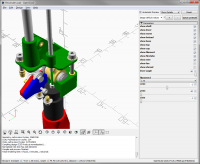
I use the customiser to control which parts of my model to display, i.e. to
customise its pose, rather than its intended use: to vary model parameters.
I just test the variables it sets with if or use them to translate and
rotate.
[image: image.png]
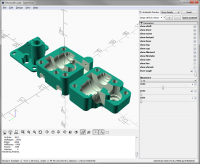
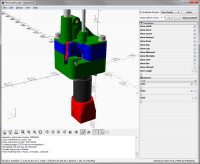
In this case I also can cross section the parts with sliders to see inside.
[image: image.png]
And I use $preview to switch between the assembly view with F5 and the laid
out for printing view with F6
[image: image.png]
On Tue, 8 Sep 2020 at 21:03, Jordan Brown openscad@jordan.maileater.net
wrote:
For the case of translating or rotating differently, I would think in
terms of setting a variable to the desired translation.
// Pick one of these two somehow.
origin = [0,0,0];
// origin = [100,100,100];
rotate(...)
translate(origin)
cube(...);
For the problem of selecting individual components out of a model, I have
had two approaches:
One was where I had an object that was built out of multiple individual
printed components. I wanted to be able to display it either assembled
(for design) or pluck out an individual component (for printing).
I used these modules:
module ifpart(p) {
if (is_undef($part) || $part == p) {
children();
}
}
module ifpartonly(p) {
if (!is_undef($part) && $part == p) {
children();
}
}
module ifpartall() {
if (is_undef($part)) {
children();
}
}
Setting $part would let you select a particular component, and then
inside the model
ifpart("a") { ... part A ... }
Executes if part A is selected, or if everything is selected.
ifpartonly("a") { ... }
Executes if part A is explicitly selected. (For instance, for printing a
component that occurs multiple times in the full model.)
ifpartall() { ... }
Executes if everything is selected. (Complementary to ifpartonly(), for
the repetitions of a component that need to be displayed in the full
assembly.)
A related set was intended for managing multiple models in a single file:
module contents(d=100) {
nx = ceil(sqrt($children));
ny = ceil($children/nx);
for (xi=[0:nx-1], yi=[0:ny-1]) {
i = xi + yinx;
if (i < $children) {
$content_origin=[xid, yi*d];
children(i);
}
}
}
module item(name, png=true, stl=true, distance, xrot, zrot, z) {
if (!is_undef($content_inventory)) {
_distance = default(distance, 150);
_zrot = default(zrot, 30);
_xrot = default(xrot, 60);
_z = default(z, 15);
camera = is_undef(distance) && is_undef(zrot) && is_undef(z) && is_undef(xrot)
? "--viewall"
: str("--camera 0,0,", _z, ",", _xrot, ",0,", _zrot, ",", _distance);
if ($content_inventory == "all")
echo("PART", name);
else if ($content_inventory == "png" && png)
echo("PART", name, camera);
else if ($content_inventory == "stl" && stl)
echo("PART", name);
} else {
if (is_undef($content_selected)) {
translate($content_origin)
children();
} else if ($content_selected == name) {
children();
}
}
}
This is used like so:
contents() {
item("piano") rotate(180) piano();
item("console") dining_console();
item("chair1") drchair();
item("chair2") drchair2();
item("silverwarechest", distance=120) silverwarechest();
item("pianobench") pianobench();
item("pianobench_top", png=false) pianobench($part="top");
item("pianobench_leg", png=false) pianobench($part="leg");
item("table") drtable();
item("table_frame", png=false) drtable($part="frame");
item("table_center", png=false) drtable($part="center");
item("table_top", png=false) drtable($part="top");
item("table_leaves", png=false) drtable_leaves();
item("bookshelves") bookshelves();
}
Note that the default is to render all of the components, spread in a
grid, but you can ask for an inventory (with no rendering) or that only a
particular component be rendered, or an inventory of those components that
I want a PNG for, or that I want an STL for.
and I have a script that runs OpenSCAD in batch mode with various
settings, first to get the list of parts and then to render STL and PNG
files for each:
#! /bin/sh
case $# in
0|1)
echo "usage: $0 outdir file.scad ..." >&2
exit 1
;;
esac
d="$1"
shift
function parts()
{
openscad -D "$content_inventory="$2"" -o junk.stl "$1" 2>&1 |
tr -d '\r' |
sed -n -e 's/^ECHO: "PART", "(.*)"$/\1/p' |
sed 's/", "/ /g'
}
for i; do
base=$(basename "$i" .scad)
parts $i png |
while read part camera; do
def="$content_selected="$part""
printf "%s %s png...\n" "$base" "$part"
openscad -D "$def" $camera -o "$d/$base.$part.png" "$i"
done
parts $i stl |
while read part; do
def="$content_selected="$part""
printf "%s %s stl...\n" "$base" "$part"
openscad -D "$def" -o "$d/$base.$part.stl" "$i"
done
done
I could probably have solved both problems with a single set of modules...
but I didn't.
While I'm mentioning it, for the "assembled or printable" question, one
scheme that I played with that was kind of fun was to have an animation
that would switch between assembled form and printable form.
// Given a value and a table of value/position pairs, interpolate a
// position for that value.
// It seems like lookup() should do this sort of vector interpolation
// on its own, but it doesn't seem to.
function xyzinterp(v, table) =
let (x= [for (i=[0:len(table)-1]) [table[i][0], table[i][1][0]]])
let (y= [for (i=[0:len(table)-1]) [table[i][0], table[i][1][1]]])
let (z= [for (i=[0:len(table)-1]) [table[i][0], table[i][1][2]]])
[lookup(v, x), lookup(v, y), lookup(v,z)];
// Given a table of animation time values (from zero to one) and
// positions for each of those time values, translate the children
// to the appropriate position.
module atranslate(table) {
translate(xyzinterp($t, table)) children();
}
// Given a table of animation time values (from zero to one) and
// rotations for each of those time values, rotate the children
// to the appropriate position.
module arotate(table) {
rotate(xyzinterp($t, table)) children();
}
// Given a start point and an end point, translate the children
// from the start to the end and back in each animation cycle.
// Pause briefly at the start and end.
module a2translate(p1, p2) {
atranslate([[0.05, p1], [0.45, p2], [0.55, p2], [0.95, p1]]) children();
}
// Given a start rotation and an end rotation, rotate the children
// from the start to the end and back in each animation cycle.
// Pause briefly at the start and end.
module a2rotate(p1, p2) {
arotate([[0.05, p1], [0.45, p2], [0.55, p2], [0.95, p1]]) children();
}
Like so:
a2translate([0,0,0], [0,0,0])
cube(10);
a2translate([5,5,10], [20,0,10])
a2rotate([0,0,0], [180,0,0])
cylinder(h=10, d1=5, d2=10);
a2translate([5,5,20], [32,0,0])
cylinder(h=10, d1=10, d2=5);
There you can set $t to 0 to get one form, and to 0.5 to get the other
form.
OpenSCAD mailing list
Discuss@lists.openscad.org
http://lists.openscad.org/mailman/listinfo/discuss_lists.openscad.org