DS
Dan Shriver
Sat, Jul 6, 2019 10:50 PM
So I'm wondering if my general approach to a problem is bad.
To simplify I'm trying to make an arched structure where the arches change
form.
The first shape I'm trying to make is to have the archway itself form an
ogee arch (you can roughly think of it as wishbone shaped thing).
So what I did was to do this:
difference() {
hollowHalf()
mirror([1,0,0]) {
solidHalf()
}
mirror([1,0,0]) {
hollowHalf()
}
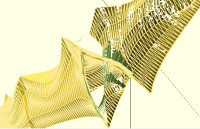
Either that approach is invalid, or there is some other problem going on.
[image: image.png]
The thing that puzzles me is I'd think it would work from a geometric point
of view (I know the interior walls would be wrong but the exterior I would
think should be fine)
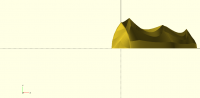
If in OpenScad I just render the hollowHalf() and then click
[image: image.png]
It looks like the last archway is centered versus the y and z axies to me
(+z is coming straight at the viewer, +y is going up, +x is to the right).
That suggests to me that after they were joined they should overlap with no
gap
[image: image.png]
alternately I was thinking two differences might give both a correct
interior and exterior view
difference() {
hollowHalf();
mirror([1,0,0]) {
solidHalf();
}
}
difference() {
mirror([1,0,0]) {
hollowHalf();
}
solidHalf()
}
is the logic wrong?
So I'm wondering if my general approach to a problem is bad.
To simplify I'm trying to make an arched structure where the arches change
form.
The first shape I'm trying to make is to have the archway itself form an
ogee arch (you can roughly think of it as wishbone shaped thing).
So what I did was to do this:
difference() {
hollowHalf()
mirror([1,0,0]) {
solidHalf()
}
mirror([1,0,0]) {
hollowHalf()
}
Either that approach is invalid, or there is some other problem going on.
[image: image.png]
The thing that puzzles me is I'd think it would work from a geometric point
of view (I know the interior walls would be wrong but the exterior I would
think should be fine)
If in OpenScad I just render the hollowHalf() and then click
[image: image.png]
It looks like the last archway is centered versus the y and z axies to me
(+z is coming straight at the viewer, +y is going up, +x is to the right).
That suggests to me that after they were joined they should overlap with no
gap
[image: image.png]
alternately I was thinking two differences might give both a correct
interior and exterior view
difference() {
hollowHalf();
mirror([1,0,0]) {
solidHalf();
}
}
difference() {
mirror([1,0,0]) {
hollowHalf();
}
solidHalf()
}
is the logic wrong?

M
MichaelAtOz
Sun, Jul 7, 2019 6:12 AM
So I'm wondering if my general approach to a problem is bad.
difference() {
hollowHalf()
mirror([1,0,0]) {
solidHalf()
}
mirror([1,0,0]) {
hollowHalf()
}
What is hollowHalf & solidHalf?
As a general rule your should try to check what each component looks like
before doing bigger pictures, so use the '!' modifier* in the above, first
on 'hollowHalf()', then on 'mirror()[1,0,0]) solidHalf()' the on
'mirror([1,0,0]) hollowHalf()'. Then remove '!' and use '#' on
'mirror()[1,0,0]) solidHalf()'.
I can't see how mirror() can work here? Mirror will put the object in an
opposite plane which will not overlap so there is nothing to difference().
Try:
// ball - sphere in the positive quadrant
module ball(s=10, c="black") color(c) translate([s,s,s]) sphere(s, $fn=s*3);
ball(10,"blue");
mirror([1,0,0]) ball(10,"red");
Isn't the solid=false, 'wishbone' already hollow?
I'm not seeing what type of structure you want.
My end goal is to make six passageways that interconnect with arches2().
Is that 6 passages each of which is an arches2()? [perhaps with different
inputs?]
How are they arranged?
Perhaps there is a picture on google resembling what you want?
Admin - email* me if you need anything, or if I've done something stupid...
- click on my MichaelAtOz label, there is a link to email me.
Unless specifically shown otherwise above, my contribution is in the Public Domain; to the extent possible under law, I have waived all copyright and related or neighbouring rights to this work. Obviously inclusion of works of previous authors is not included in the above.
The TPP is no simple “trade agreement.” Fight it! http://www.ourfairdeal.org/ time is running out!
Sent from: http://forum.openscad.org/
DanS wrote
> So I'm wondering if my general approach to a problem is bad.
>
> difference() {
> hollowHalf()
> mirror([1,0,0]) {
> solidHalf()
> }
> mirror([1,0,0]) {
> hollowHalf()
> }
What is hollowHalf & solidHalf?
As a general rule your should try to check what each component looks like
before doing bigger pictures, so use the '!' modifier* in the above, first
on 'hollowHalf()', then on 'mirror()[1,0,0]) solidHalf()' the on
'mirror([1,0,0]) hollowHalf()'. Then remove '!' and use '#' on
'mirror()[1,0,0]) solidHalf()'.
* see https://en.wikibooks.org/wiki/OpenSCAD_User_Manual/Modifier_Characters
I can't see how mirror() can work here? Mirror will put the object in an
opposite plane which will not overlap so there is nothing to difference().
Try:
// ball - sphere in the positive quadrant
module ball(s=10, c="black") color(c) translate([s,s,s]) sphere(s, $fn=s*3);
ball(10,"blue");
mirror([1,0,0]) ball(10,"red");
Isn't the solid=false, 'wishbone' already hollow?
I'm not seeing what type of structure you want.
> My end goal is to make six passageways that interconnect with arches2().
Is that 6 passages each of which is an arches2()? [perhaps with different
inputs?]
How are they arranged?
Perhaps there is a picture on google resembling what you want?
-----
Admin - email* me if you need anything, or if I've done something stupid...
* click on my MichaelAtOz label, there is a link to email me.
Unless specifically shown otherwise above, my contribution is in the Public Domain; to the extent possible under law, I have waived all copyright and related or neighbouring rights to this work. Obviously inclusion of works of previous authors is not included in the above.
The TPP is no simple “trade agreement.” Fight it! http://www.ourfairdeal.org/ time is running out!
--
Sent from: http://forum.openscad.org/

P
Parkinbot
Sun, Jul 7, 2019 11:52 AM
So I'm wondering if my general approach to a problem is bad.
To simplify I'm trying to make an arched structure where the arches change
form.
So the best approach is to form a sequence of (morphing) polygons that
neither self intersect nor mutually intersect, skin this sequence and test
it by unioning a cube. This is what you seem to do, but only half way down.
As long as you do not skin a cross section with holes, it is straight
forward to generate polygons describing the full crossection. To exploit
symmetries, better reuse/modify a precalculated point sequence respectively
by means of list comprehension in order to compose full shaped polygons. I
think in your case this is feasible and preferable.
While the use of Boolean ops after skinning is allowed - despite being quite
slow-, you must take care to
- produce proper manifolds as operands - which you don't seem to check
properly (see other thread).
- avoid operands using the same (or very close) points or partial identity.
OpenSCAD can have representation problems with very close vertices.
Another hint: Try to break down complexity. Do proper testing of each
component - especially when you use polyhedron (which is called during
skin), because OpenSCADs F5 and F6 don't give semantically equivalent
output. F5 displays anything even non-valid manifolds. F12 can indicate
orientation problems, but not each and everything.
--
Sent from: http://forum.openscad.org/
DanS wrote
> So I'm wondering if my general approach to a problem is bad.
> To simplify I'm trying to make an arched structure where the arches change
> form.
So the best approach is to form a sequence of (morphing) polygons that
neither self intersect nor mutually intersect, skin this sequence and test
it by unioning a cube. This is what you seem to do, but only half way down.
As long as you do not skin a cross section with holes, it is straight
forward to generate polygons describing the full crossection. To exploit
symmetries, better reuse/modify a precalculated point sequence respectively
by means of list comprehension in order to compose full shaped polygons. I
think in your case this is feasible and preferable.
While the use of Boolean ops after skinning is allowed - despite being quite
slow-, you must take care to
1) produce proper manifolds as operands - which you don't seem to check
properly (see other thread).
2) avoid operands using the same (or very close) points or partial identity.
OpenSCAD can have representation problems with very close vertices.
Another hint: Try to break down complexity. Do proper testing of each
component - especially when you use polyhedron (which is called during
skin), because OpenSCADs F5 and F6 don't give semantically equivalent
output. F5 displays anything even non-valid manifolds. F12 can indicate
orientation problems, but not each and everything.
--
Sent from: http://forum.openscad.org/

A
arnholm@arnholm.org
Sun, Jul 7, 2019 1:37 PM
On 2019-07-07 13:52, Parkinbot wrote:
OpenSCAD can have representation problems with very close vertices.
OpenSCAD/CGAL is said to use 'fractional numbers', supposedly without
data loss, at the price of slow execution and high memory use. However,
the statement "OpenSCAD can have representation problems with very close
vertices" is a characteristic for a system representing vertex
coordinates using ordinary floating point numbers (single or double
precision). If what you say is true, it may seem users are paying a
price (slow execution and high memory use) for something (lossless
computations) that isn't available?
Carsten Arnholm
On 2019-07-07 13:52, Parkinbot wrote:
> OpenSCAD can have representation problems with very close vertices.
OpenSCAD/CGAL is said to use 'fractional numbers', supposedly without
data loss, at the price of slow execution and high memory use. However,
the statement "OpenSCAD can have representation problems with very close
vertices" is a characteristic for a system representing vertex
coordinates using ordinary floating point numbers (single or double
precision). If what you say is true, it may seem users are paying a
price (slow execution and high memory use) for something (lossless
computations) that isn't available?
Carsten Arnholm

NH
nop head
Sun, Jul 7, 2019 1:44 PM
Yes that is true because the user side of OpenSCAD uses floating point and
even snaps to a grid, so all the precision of CGAL is lost. CGAL can make
manifold geometry and then OpenSCAD breaks it by snapping to a grid and
gives it back the CGAL, which then barfs.
That said representing geometry with rational numbers is doomed because as
son as you rotate something all the coordinates become irrational.
On Sun, 7 Jul 2019 at 14:38, arnholm@arnholm.org wrote:
On 2019-07-07 13:52, Parkinbot wrote:
OpenSCAD can have representation problems with very close vertices.
OpenSCAD/CGAL is said to use 'fractional numbers', supposedly without
data loss, at the price of slow execution and high memory use. However,
the statement "OpenSCAD can have representation problems with very close
vertices" is a characteristic for a system representing vertex
coordinates using ordinary floating point numbers (single or double
precision). If what you say is true, it may seem users are paying a
price (slow execution and high memory use) for something (lossless
computations) that isn't available?
Carsten Arnholm
OpenSCAD mailing list
Discuss@lists.openscad.org
http://lists.openscad.org/mailman/listinfo/discuss_lists.openscad.org
Yes that is true because the user side of OpenSCAD uses floating point and
even snaps to a grid, so all the precision of CGAL is lost. CGAL can make
manifold geometry and then OpenSCAD breaks it by snapping to a grid and
gives it back the CGAL, which then barfs.
That said representing geometry with rational numbers is doomed because as
son as you rotate something all the coordinates become irrational.
On Sun, 7 Jul 2019 at 14:38, <arnholm@arnholm.org> wrote:
> On 2019-07-07 13:52, Parkinbot wrote:
> > OpenSCAD can have representation problems with very close vertices.
>
> OpenSCAD/CGAL is said to use 'fractional numbers', supposedly without
> data loss, at the price of slow execution and high memory use. However,
> the statement "OpenSCAD can have representation problems with very close
> vertices" is a characteristic for a system representing vertex
> coordinates using ordinary floating point numbers (single or double
> precision). If what you say is true, it may seem users are paying a
> price (slow execution and high memory use) for something (lossless
> computations) that isn't available?
>
> Carsten Arnholm
>
> _______________________________________________
> OpenSCAD mailing list
> Discuss@lists.openscad.org
> http://lists.openscad.org/mailman/listinfo/discuss_lists.openscad.org
>

RW
Rogier Wolff
Sun, Jul 7, 2019 2:11 PM
On Sun, Jul 07, 2019 at 02:44:03PM +0100, nop head wrote:
That said representing geometry with rational numbers is doomed because as
son as you rotate something all the coordinates become irrational.
Technically ALMOST correct.
None of the coordinates become irrational if you rotate by 90 degrees.
One of the coordinates becomes irration if you rotate by +/-30+-n*90 degrees.
In all other cases
All of the coordinates become irrational
Just kidding. (but true, or have I missed a case?)
Yup! I've missed a case! Lots of them: If you rotate (0,13) by atan
(5/12) you get a rational result (integer even). In this case the
rotation angle is irrational.
I personally don't like the "invisible" snap-to-grid. Would it be an
idea to make it more explicit: All coordinates are integer multiples
of the grid, but the user-units are settable to a multiple of the
grid. The default being something like a million.
So when I specify [1,0], internally that's represented as [1000000,0]
and when I rotate that by 45 degrees that becomes [707107,707107]
exactly. Predictable, verifyable, etc.
You can compare this with the "scale" variable in "bc".
"bc" Does arbitrary precision integer math. But when you set scale=100,
the "user interface" remains the same (7713 is still 1001), but
internally numbers are multiplied by 10^100 before being used and divided by
10^100 before being printed (and after being multiplied). This results in
a 100 digit approximation to pi if you type
scale=100
4a(1)
Roger.
--
** R.E.Wolff@BitWizard.nl ** https://www.BitWizard.nl/ ** +31-15-2049110 **
** Delftechpark 11 2628 XJ Delft, The Netherlands. KVK: 27239233 **
The plan was simple, like my brother-in-law Phil. But unlike
Phil, this plan just might work.
On Sun, Jul 07, 2019 at 02:44:03PM +0100, nop head wrote:
> That said representing geometry with rational numbers is doomed because as
> son as you rotate something all the coordinates become irrational.
Technically ALMOST correct.
None of the coordinates become irrational if you rotate by 90 degrees.
One of the coordinates becomes irration if you rotate by +/-30+-n*90 degrees.
In all other cases
> All of the coordinates become irrational
Just kidding. (but true, or have I missed a case?)
Yup! I've missed a case! Lots of them: If you rotate (0,13) by atan
(5/12) you get a rational result (integer even). In this case the
rotation angle is irrational.
I personally don't like the "invisible" snap-to-grid. Would it be an
idea to make it more explicit: All coordinates are integer multiples
of the grid, but the user-units are settable to a multiple of the
grid. The default being something like a million.
So when I specify [1,0], internally that's represented as [1000000,0]
and when I rotate that by 45 degrees that becomes [707107,707107]
exactly. Predictable, verifyable, etc.
You can compare this with the "scale" variable in "bc".
"bc" Does arbitrary precision integer math. But when you set scale=100,
the "user interface" remains the same (77*13 is still 1001), but
internally numbers are multiplied by 10^100 before being used and divided by
10^100 before being printed (and after being multiplied). This results in
a 100 digit approximation to pi if you type
scale=100
4*a(1)
Roger.
--
** R.E.Wolff@BitWizard.nl ** https://www.BitWizard.nl/ ** +31-15-2049110 **
** Delftechpark 11 2628 XJ Delft, The Netherlands. KVK: 27239233 **
The plan was simple, like my brother-in-law Phil. But unlike
Phil, this plan just might work.
NH
nop head
Sun, Jul 7, 2019 3:05 PM
Coordinates are pairs or triples of numbers so "One of the coordinates
becomes irrational if you rotate by +/-30+-n*90 degrees. " doesn't make
sense. One of the ordinates will be rational but the other not, so the
coordinate can't be represented exactly by rationals.
All integer degree angles are irrational because they are converted to
radians. The exceptions are just multiples of 90 because they are special
cases in the OpenSCAD trig functions.
Yes rotating by atan of a rational would give a rational rotation in
theory, but it is done in floating point and converted from radians to
degrees and back again, so it would be lucky to yield integers. Your
example does seem to but rotating by atan(12/5) is slightly off.
I think OpenSCAD snaps to a grid to avoid CGALs infinite precision
precision rationals exploding. The problem is if you limit the precision in
any way you risk near vertices becoming coincident and that requires the
mesh to be repaired before being fed back to CGAL. I had a go at removing
degenerate triangles but in some cases truncation and snapping can create
self intersections and that is harder to fix.
On Sun, 7 Jul 2019 at 15:12, Rogier Wolff R.E.Wolff@bitwizard.nl wrote:
On Sun, Jul 07, 2019 at 02:44:03PM +0100, nop head wrote:
That said representing geometry with rational numbers is doomed because
son as you rotate something all the coordinates become irrational.
Technically ALMOST correct.
None of the coordinates become irrational if you rotate by 90 degrees.
One of the coordinates becomes irration if you rotate by +/-30+-n*90
degrees.
In all other cases
All of the coordinates become irrational
Just kidding. (but true, or have I missed a case?)
Yup! I've missed a case! Lots of them: If you rotate (0,13) by atan
(5/12) you get a rational result (integer even). In this case the
rotation angle is irrational.
I personally don't like the "invisible" snap-to-grid. Would it be an
idea to make it more explicit: All coordinates are integer multiples
of the grid, but the user-units are settable to a multiple of the
grid. The default being something like a million.
So when I specify [1,0], internally that's represented as [1000000,0]
and when I rotate that by 45 degrees that becomes [707107,707107]
exactly. Predictable, verifyable, etc.
You can compare this with the "scale" variable in "bc".
"bc" Does arbitrary precision integer math. But when you set scale=100,
the "user interface" remains the same (7713 is still 1001), but
internally numbers are multiplied by 10^100 before being used and divided
by
10^100 before being printed (and after being multiplied). This results in
a 100 digit approximation to pi if you type
scale=100
4a(1)
Roger.
--
** R.E.Wolff@BitWizard.nl ** https://www.BitWizard.nl/ ** +31-15-2049110
**
** Delftechpark 11 2628 XJ Delft, The Netherlands. KVK: 27239233 **
The plan was simple, like my brother-in-law Phil. But unlike
Phil, this plan just might work.
OpenSCAD mailing list
Discuss@lists.openscad.org
http://lists.openscad.org/mailman/listinfo/discuss_lists.openscad.org
Coordinates are pairs or triples of numbers so "One of the coordinates
becomes irrational if you rotate by +/-30+-n*90 degrees. " doesn't make
sense. One of the ordinates will be rational but the other not, so the
coordinate can't be represented exactly by rationals.
All integer degree angles are irrational because they are converted to
radians. The exceptions are just multiples of 90 because they are special
cases in the OpenSCAD trig functions.
Yes rotating by atan of a rational would give a rational rotation in
theory, but it is done in floating point and converted from radians to
degrees and back again, so it would be lucky to yield integers. Your
example does seem to but rotating by atan(12/5) is slightly off.
I think OpenSCAD snaps to a grid to avoid CGALs infinite precision
precision rationals exploding. The problem is if you limit the precision in
any way you risk near vertices becoming coincident and that requires the
mesh to be repaired before being fed back to CGAL. I had a go at removing
degenerate triangles but in some cases truncation and snapping can create
self intersections and that is harder to fix.
On Sun, 7 Jul 2019 at 15:12, Rogier Wolff <R.E.Wolff@bitwizard.nl> wrote:
> On Sun, Jul 07, 2019 at 02:44:03PM +0100, nop head wrote:
> > That said representing geometry with rational numbers is doomed because
> as
> > son as you rotate something all the coordinates become irrational.
>
> Technically ALMOST correct.
> None of the coordinates become irrational if you rotate by 90 degrees.
> One of the coordinates becomes irration if you rotate by +/-30+-n*90
> degrees.
> In all other cases
> > All of the coordinates become irrational
>
> Just kidding. (but true, or have I missed a case?)
>
> Yup! I've missed a case! Lots of them: If you rotate (0,13) by atan
> (5/12) you get a rational result (integer even). In this case the
> rotation angle is irrational.
>
>
> I personally don't like the "invisible" snap-to-grid. Would it be an
> idea to make it more explicit: All coordinates are integer multiples
> of the grid, but the user-units are settable to a multiple of the
> grid. The default being something like a million.
>
> So when I specify [1,0], internally that's represented as [1000000,0]
> and when I rotate that by 45 degrees that becomes [707107,707107]
> exactly. Predictable, verifyable, etc.
>
> You can compare this with the "scale" variable in "bc".
>
> "bc" Does arbitrary precision integer math. But when you set scale=100,
> the "user interface" remains the same (77*13 is still 1001), but
> internally numbers are multiplied by 10^100 before being used and divided
> by
> 10^100 before being printed (and after being multiplied). This results in
> a 100 digit approximation to pi if you type
> scale=100
> 4*a(1)
>
> Roger.
>
> --
> ** R.E.Wolff@BitWizard.nl ** https://www.BitWizard.nl/ ** +31-15-2049110
> **
> ** Delftechpark 11 2628 XJ Delft, The Netherlands. KVK: 27239233 **
> The plan was simple, like my brother-in-law Phil. But unlike
> Phil, this plan just might work.
>
> _______________________________________________
> OpenSCAD mailing list
> Discuss@lists.openscad.org
> http://lists.openscad.org/mailman/listinfo/discuss_lists.openscad.org
>
DS
Dan Shriver
Sun, Jul 7, 2019 3:42 PM
So, I'm not sure how I should be doing things.
What I'm hearing is:
-floating point numbers are bad (sure I get that, but I think, under normal
circumstances my values should be far enough apart so two points don't end
up in the same space even with rounding errors); AND rounding floating
point numbers to some (1/2)^n is pointless
-behind the scenes stuff snaps to a grid (not sure how I change the
settings on this), maybe this is why the rounding is pointless since it is
doing rounding
-doing rotations is inherently bad
So what is a better way to do what I want to do?
On Sun, Jul 7, 2019 at 11:07 AM nop head nop.head@gmail.com wrote:
Coordinates are pairs or triples of numbers so "One of the coordinates
becomes irrational if you rotate by +/-30+-n*90 degrees. " doesn't make
sense. One of the ordinates will be rational but the other not, so the
coordinate can't be represented exactly by rationals.
All integer degree angles are irrational because they are converted to
radians. The exceptions are just multiples of 90 because they are special
cases in the OpenSCAD trig functions.
Yes rotating by atan of a rational would give a rational rotation in
theory, but it is done in floating point and converted from radians to
degrees and back again, so it would be lucky to yield integers. Your
example does seem to but rotating by atan(12/5) is slightly off.
I think OpenSCAD snaps to a grid to avoid CGALs infinite precision
precision rationals exploding. The problem is if you limit the precision in
any way you risk near vertices becoming coincident and that requires the
mesh to be repaired before being fed back to CGAL. I had a go at removing
degenerate triangles but in some cases truncation and snapping can create
self intersections and that is harder to fix.
On Sun, 7 Jul 2019 at 15:12, Rogier Wolff R.E.Wolff@bitwizard.nl wrote:
On Sun, Jul 07, 2019 at 02:44:03PM +0100, nop head wrote:
That said representing geometry with rational numbers is doomed because
son as you rotate something all the coordinates become irrational.
Technically ALMOST correct.
None of the coordinates become irrational if you rotate by 90 degrees.
One of the coordinates becomes irration if you rotate by +/-30+-n*90
degrees.
In all other cases
All of the coordinates become irrational
Just kidding. (but true, or have I missed a case?)
Yup! I've missed a case! Lots of them: If you rotate (0,13) by atan
(5/12) you get a rational result (integer even). In this case the
rotation angle is irrational.
I personally don't like the "invisible" snap-to-grid. Would it be an
idea to make it more explicit: All coordinates are integer multiples
of the grid, but the user-units are settable to a multiple of the
grid. The default being something like a million.
So when I specify [1,0], internally that's represented as [1000000,0]
and when I rotate that by 45 degrees that becomes [707107,707107]
exactly. Predictable, verifyable, etc.
You can compare this with the "scale" variable in "bc".
"bc" Does arbitrary precision integer math. But when you set scale=100,
the "user interface" remains the same (7713 is still 1001), but
internally numbers are multiplied by 10^100 before being used and divided
by
10^100 before being printed (and after being multiplied). This results in
a 100 digit approximation to pi if you type
scale=100
4a(1)
Roger.
--
** R.E.Wolff@BitWizard.nl ** https://www.BitWizard.nl/ ** +31-15-2049110
**
** Delftechpark 11 2628 XJ Delft, The Netherlands. KVK: 27239233
**
The plan was simple, like my brother-in-law Phil. But unlike
Phil, this plan just might work.
OpenSCAD mailing list
Discuss@lists.openscad.org
http://lists.openscad.org/mailman/listinfo/discuss_lists.openscad.org
So, I'm not sure how I should be doing things.
What I'm hearing is:
-floating point numbers are bad (sure I get that, but I think, under normal
circumstances my values should be far enough apart so two points don't end
up in the same space even with rounding errors); AND rounding floating
point numbers to some (1/2)^n is pointless
-behind the scenes stuff snaps to a grid (not sure how I change the
settings on this), maybe this is why the rounding is pointless since it is
doing rounding
-doing rotations is inherently bad
So what is a better way to do what I want to do?
On Sun, Jul 7, 2019 at 11:07 AM nop head <nop.head@gmail.com> wrote:
> Coordinates are pairs or triples of numbers so "One of the coordinates
> becomes irrational if you rotate by +/-30+-n*90 degrees. " doesn't make
> sense. One of the ordinates will be rational but the other not, so the
> coordinate can't be represented exactly by rationals.
>
> All integer degree angles are irrational because they are converted to
> radians. The exceptions are just multiples of 90 because they are special
> cases in the OpenSCAD trig functions.
>
> Yes rotating by atan of a rational would give a rational rotation in
> theory, but it is done in floating point and converted from radians to
> degrees and back again, so it would be lucky to yield integers. Your
> example does seem to but rotating by atan(12/5) is slightly off.
>
> I think OpenSCAD snaps to a grid to avoid CGALs infinite precision
> precision rationals exploding. The problem is if you limit the precision in
> any way you risk near vertices becoming coincident and that requires the
> mesh to be repaired before being fed back to CGAL. I had a go at removing
> degenerate triangles but in some cases truncation and snapping can create
> self intersections and that is harder to fix.
>
>
>
> On Sun, 7 Jul 2019 at 15:12, Rogier Wolff <R.E.Wolff@bitwizard.nl> wrote:
>
>> On Sun, Jul 07, 2019 at 02:44:03PM +0100, nop head wrote:
>> > That said representing geometry with rational numbers is doomed because
>> as
>> > son as you rotate something all the coordinates become irrational.
>>
>> Technically ALMOST correct.
>> None of the coordinates become irrational if you rotate by 90 degrees.
>> One of the coordinates becomes irration if you rotate by +/-30+-n*90
>> degrees.
>> In all other cases
>> > All of the coordinates become irrational
>>
>> Just kidding. (but true, or have I missed a case?)
>>
>> Yup! I've missed a case! Lots of them: If you rotate (0,13) by atan
>> (5/12) you get a rational result (integer even). In this case the
>> rotation angle is irrational.
>>
>>
>> I personally don't like the "invisible" snap-to-grid. Would it be an
>> idea to make it more explicit: All coordinates are integer multiples
>> of the grid, but the user-units are settable to a multiple of the
>> grid. The default being something like a million.
>>
>> So when I specify [1,0], internally that's represented as [1000000,0]
>> and when I rotate that by 45 degrees that becomes [707107,707107]
>> exactly. Predictable, verifyable, etc.
>>
>> You can compare this with the "scale" variable in "bc".
>>
>> "bc" Does arbitrary precision integer math. But when you set scale=100,
>> the "user interface" remains the same (77*13 is still 1001), but
>> internally numbers are multiplied by 10^100 before being used and divided
>> by
>> 10^100 before being printed (and after being multiplied). This results in
>> a 100 digit approximation to pi if you type
>> scale=100
>> 4*a(1)
>>
>> Roger.
>>
>> --
>> ** R.E.Wolff@BitWizard.nl ** https://www.BitWizard.nl/ ** +31-15-2049110
>> **
>> ** Delftechpark 11 2628 XJ Delft, The Netherlands. KVK: 27239233
>> **
>> The plan was simple, like my brother-in-law Phil. But unlike
>> Phil, this plan just might work.
>>
>> _______________________________________________
>> OpenSCAD mailing list
>> Discuss@lists.openscad.org
>> http://lists.openscad.org/mailman/listinfo/discuss_lists.openscad.org
>>
> _______________________________________________
> OpenSCAD mailing list
> Discuss@lists.openscad.org
> http://lists.openscad.org/mailman/listinfo/discuss_lists.openscad.org
>
RW
Rogier Wolff
Sun, Jul 7, 2019 3:57 PM
On Sun, Jul 07, 2019 at 04:05:30PM +0100, nop head wrote:
Coordinates are pairs or triples of numbers so "One of the coordinates
becomes irrational if you rotate by +/-30+-n*90 degrees. " doesn't make
sense. One of the ordinates will be rational but the other not, so the
coordinate can't be represented exactly by rationals.
Elaborating on my joke-corner-case of rotating by 30 degrees, the
point [2,0] becomes [sqrt(3), 1] Add an extra zero to do this if you
want this to happen in 3D. I maintain that one of the two-or-three
coordinates becomes irrational. Yes that makes the whole POINT
unrepresentable by rationals.
All this is irrelevant: Many rotations, including those by 30 degrees
will yield points not-precisely-representable by rationals.
All integer degree angles are irrational because they are converted to
radians. The exceptions are just multiples of 90 because they are special
cases in the OpenSCAD trig functions.
Yes rotating by atan of a rational would give a rational rotation in
theory, but it is done in floating point and converted from radians to
degrees and back again, so it would be lucky to yield integers. Your
example does seem to but rotating by atan(12/5) is slightly off.
rotating [0,13] by atan (12/5) should yield the point
[12,5]. Something with Pythagoras. For rationals on the X-axis, you
still get a rational destination point. But for any non-X-axis point
you still go off-rational-grid. I think. Where does 12,1 end up?
Rotate that vector back to the X axis and the point on the X-axis is
irrational (0, sqrt (145)), so when you rotate that by the atan (12/5)
you get something like [5/13sqrt(145), 12/13sqrt(145)] which remains
irrational.
Still, all this is of no practical use: Most cases people will design
things with irrational coordinates, so we have to do something about:
I think OpenSCAD snaps to a grid to avoid CGALs infinite precision
precision rationals exploding. The problem is if you limit the precision in
any way you risk near vertices becoming coincident and that requires the
mesh to be repaired before being fed back to CGAL. I had a go at removing
degenerate triangles but in some cases truncation and snapping can create
self intersections and that is harder to fix.
When my suggestion of a user-configurable scaled-integer-grid is
implemented, the user has a crude way of controlling things. And it
offers extra functionality. If you know ALL your coordinates are a
multiple of 1 micron, you can set the scale of 1mm to 1000. If you are
designing a model of the death star, then setting it to 1 may be more
appropriate. The current "hidden" grid is not appropriate if you are
say designing say a model of a few atoms. Like when IBM used their new
SFM to move a few atoms into spelling IBM in a 5-atom high font.
It may not be too long from now when someone in a lab somewhere uses
openscad to design a 3D structure that might be manipulated into
existence with such tools. With the current hidden grid, that's going
to lead to surprises. Make it user-visible and when things go wrong,
that guy didn't read the manual. Case closed. Design software for
the future.
I suspect that the ATA and SD card spec guys consider their strategy
"job security". Each time we really hit the limits of the previous
standard they tack on a bunch of bits with a "well within my lifetime"
expiration date. Moore's law is pretty predictable. 5 extra address
bits expire in 10 years.
Setting the default scale to 1 million would mean the grid is 1 nm:
about ten atoms. A slight nudge is needed to design atom-scale objects
and that's acceptable.
This "there is a grid deep down below somewhere..." leads to
unpredictable behaviour. And that's not good.
Roger.
On Sun, Jul 07, 2019 at 02:44:03PM +0100, nop head wrote:
That said representing geometry with rational numbers is doomed because
son as you rotate something all the coordinates become irrational.
Technically ALMOST correct.
None of the coordinates become irrational if you rotate by 90 degrees.
One of the coordinates becomes irration if you rotate by +/-30+-n*90
degrees.
In all other cases
All of the coordinates become irrational
Just kidding. (but true, or have I missed a case?)
Yup! I've missed a case! Lots of them: If you rotate (0,13) by atan
(5/12) you get a rational result (integer even). In this case the
rotation angle is irrational.
I personally don't like the "invisible" snap-to-grid. Would it be an
idea to make it more explicit: All coordinates are integer multiples
of the grid, but the user-units are settable to a multiple of the
grid. The default being something like a million.
So when I specify [1,0], internally that's represented as [1000000,0]
and when I rotate that by 45 degrees that becomes [707107,707107]
exactly. Predictable, verifyable, etc.
You can compare this with the "scale" variable in "bc".
"bc" Does arbitrary precision integer math. But when you set scale=100,
the "user interface" remains the same (7713 is still 1001), but
internally numbers are multiplied by 10^100 before being used and divided
by
10^100 before being printed (and after being multiplied). This results in
a 100 digit approximation to pi if you type
scale=100
4a(1)
Roger.
--
** R.E.Wolff@BitWizard.nl ** https://www.BitWizard.nl/ ** +31-15-2049110
**
** Delftechpark 11 2628 XJ Delft, The Netherlands. KVK: 27239233 **
The plan was simple, like my brother-in-law Phil. But unlike
Phil, this plan just might work.
OpenSCAD mailing list
Discuss@lists.openscad.org
http://lists.openscad.org/mailman/listinfo/discuss_lists.openscad.org
--
** R.E.Wolff@BitWizard.nl ** https://www.BitWizard.nl/ ** +31-15-2049110 **
** Delftechpark 11 2628 XJ Delft, The Netherlands. KVK: 27239233 **
The plan was simple, like my brother-in-law Phil. But unlike
Phil, this plan just might work.
On Sun, Jul 07, 2019 at 04:05:30PM +0100, nop head wrote:
> Coordinates are pairs or triples of numbers so "One of the coordinates
> becomes irrational if you rotate by +/-30+-n*90 degrees. " doesn't make
> sense. One of the ordinates will be rational but the other not, so the
> coordinate can't be represented exactly by rationals.
Elaborating on my joke-corner-case of rotating by 30 degrees, the
point [2,0] becomes [sqrt(3), 1] Add an extra zero to do this if you
want this to happen in 3D. I maintain that one of the two-or-three
coordinates becomes irrational. Yes that makes the whole POINT
unrepresentable by rationals.
All this is irrelevant: Many rotations, including those by 30 degrees
will yield points not-precisely-representable by rationals.
> All integer degree angles are irrational because they are converted to
> radians. The exceptions are just multiples of 90 because they are special
> cases in the OpenSCAD trig functions.
Right. Good.
> Yes rotating by atan of a rational would give a rational rotation in
> theory, but it is done in floating point and converted from radians to
> degrees and back again, so it would be lucky to yield integers. Your
> example does seem to but rotating by atan(12/5) is slightly off.
rotating [0,13] by atan (12/5) should yield the point
[12,5]. Something with Pythagoras. For rationals on the X-axis, you
still get a rational destination point. But for any non-X-axis point
you still go off-rational-grid. I think. Where does 12,1 end up?
Rotate that vector back to the X axis and the point on the X-axis is
irrational (0, sqrt (145)), so when you rotate that by the atan (12/5)
you get something like [5/13*sqrt(145), 12/13*sqrt(145)] which remains
irrational.
Still, all this is of no practical use: Most cases people will design
things with irrational coordinates, so we have to do something about:
> I think OpenSCAD snaps to a grid to avoid CGALs infinite precision
> precision rationals exploding. The problem is if you limit the precision in
> any way you risk near vertices becoming coincident and that requires the
> mesh to be repaired before being fed back to CGAL. I had a go at removing
> degenerate triangles but in some cases truncation and snapping can create
> self intersections and that is harder to fix.
When my suggestion of a user-configurable scaled-integer-grid is
implemented, the user has a crude way of controlling things. And it
offers extra functionality. If you know ALL your coordinates are a
multiple of 1 micron, you can set the scale of 1mm to 1000. If you are
designing a model of the death star, then setting it to 1 may be more
appropriate. The current "hidden" grid is not appropriate if you are
say designing say a model of a few atoms. Like when IBM used their new
SFM to move a few atoms into spelling IBM in a 5-atom high font.
It may not be too long from now when someone in a lab somewhere uses
openscad to design a 3D structure that might be manipulated into
existence with such tools. With the current hidden grid, that's going
to lead to surprises. Make it user-visible and when things go wrong,
that guy didn't read the manual. Case closed. Design software for
the future.
I suspect that the ATA and SD card spec guys consider their strategy
"job security". Each time we really hit the limits of the previous
standard they tack on a bunch of bits with a "well within my lifetime"
expiration date. Moore's law is pretty predictable. 5 extra address
bits expire in 10 years.
Setting the default scale to 1 million would mean the grid is 1 nm:
about ten atoms. A slight nudge is needed to design atom-scale objects
and that's acceptable.
This "there is a grid deep down below somewhere..." leads to
unpredictable behaviour. And that's not good.
Roger.
>
>
> On Sun, 7 Jul 2019 at 15:12, Rogier Wolff <R.E.Wolff@bitwizard.nl> wrote:
>
> > On Sun, Jul 07, 2019 at 02:44:03PM +0100, nop head wrote:
> > > That said representing geometry with rational numbers is doomed because
> > as
> > > son as you rotate something all the coordinates become irrational.
> >
> > Technically ALMOST correct.
> > None of the coordinates become irrational if you rotate by 90 degrees.
> > One of the coordinates becomes irration if you rotate by +/-30+-n*90
> > degrees.
> > In all other cases
> > > All of the coordinates become irrational
> >
> > Just kidding. (but true, or have I missed a case?)
> >
> > Yup! I've missed a case! Lots of them: If you rotate (0,13) by atan
> > (5/12) you get a rational result (integer even). In this case the
> > rotation angle is irrational.
> >
> >
> > I personally don't like the "invisible" snap-to-grid. Would it be an
> > idea to make it more explicit: All coordinates are integer multiples
> > of the grid, but the user-units are settable to a multiple of the
> > grid. The default being something like a million.
> >
> > So when I specify [1,0], internally that's represented as [1000000,0]
> > and when I rotate that by 45 degrees that becomes [707107,707107]
> > exactly. Predictable, verifyable, etc.
> >
> > You can compare this with the "scale" variable in "bc".
> >
> > "bc" Does arbitrary precision integer math. But when you set scale=100,
> > the "user interface" remains the same (77*13 is still 1001), but
> > internally numbers are multiplied by 10^100 before being used and divided
> > by
> > 10^100 before being printed (and after being multiplied). This results in
> > a 100 digit approximation to pi if you type
> > scale=100
> > 4*a(1)
> >
> > Roger.
> >
> > --
> > ** R.E.Wolff@BitWizard.nl ** https://www.BitWizard.nl/ ** +31-15-2049110
> > **
> > ** Delftechpark 11 2628 XJ Delft, The Netherlands. KVK: 27239233 **
> > The plan was simple, like my brother-in-law Phil. But unlike
> > Phil, this plan just might work.
> >
> > _______________________________________________
> > OpenSCAD mailing list
> > Discuss@lists.openscad.org
> > http://lists.openscad.org/mailman/listinfo/discuss_lists.openscad.org
> >
> _______________________________________________
> OpenSCAD mailing list
> Discuss@lists.openscad.org
> http://lists.openscad.org/mailman/listinfo/discuss_lists.openscad.org
--
** R.E.Wolff@BitWizard.nl ** https://www.BitWizard.nl/ ** +31-15-2049110 **
** Delftechpark 11 2628 XJ Delft, The Netherlands. KVK: 27239233 **
The plan was simple, like my brother-in-law Phil. But unlike
Phil, this plan just might work.
NH
nop head
Sun, Jul 7, 2019 4:15 PM
So, I'm not sure how I should be doing things.
What I'm hearing is:
-floating point numbers are bad (sure I get that, but I think, under
normal circumstances my values should be far enough apart so two points
don't end up in the same space even with rounding errors); AND rounding
floating point numbers to some (1/2)^n is pointless
-behind the scenes stuff snaps to a grid (not sure how I change the
settings on this), maybe this is why the rounding is pointless since it is
doing rounding
-doing rotations is inherently bad
So what is a better way to do what I want to do?
On Sun, Jul 7, 2019 at 11:07 AM nop head nop.head@gmail.com wrote:
Coordinates are pairs or triples of numbers so "One of the coordinates
becomes irrational if you rotate by +/-30+-n*90 degrees. " doesn't make
sense. One of the ordinates will be rational but the other not, so the
coordinate can't be represented exactly by rationals.
All integer degree angles are irrational because they are converted to
radians. The exceptions are just multiples of 90 because they are special
cases in the OpenSCAD trig functions.
Yes rotating by atan of a rational would give a rational rotation in
theory, but it is done in floating point and converted from radians to
degrees and back again, so it would be lucky to yield integers. Your
example does seem to but rotating by atan(12/5) is slightly off.
I think OpenSCAD snaps to a grid to avoid CGALs infinite precision
precision rationals exploding. The problem is if you limit the precision in
any way you risk near vertices becoming coincident and that requires the
mesh to be repaired before being fed back to CGAL. I had a go at removing
degenerate triangles but in some cases truncation and snapping can create
self intersections and that is harder to fix.
On Sun, 7 Jul 2019 at 15:12, Rogier Wolff R.E.Wolff@bitwizard.nl wrote:
On Sun, Jul 07, 2019 at 02:44:03PM +0100, nop head wrote:
That said representing geometry with rational numbers is doomed
son as you rotate something all the coordinates become irrational.
Technically ALMOST correct.
None of the coordinates become irrational if you rotate by 90 degrees.
One of the coordinates becomes irration if you rotate by +/-30+-n*90
degrees.
In all other cases
All of the coordinates become irrational
Just kidding. (but true, or have I missed a case?)
Yup! I've missed a case! Lots of them: If you rotate (0,13) by atan
(5/12) you get a rational result (integer even). In this case the
rotation angle is irrational.
I personally don't like the "invisible" snap-to-grid. Would it be an
idea to make it more explicit: All coordinates are integer multiples
of the grid, but the user-units are settable to a multiple of the
grid. The default being something like a million.
So when I specify [1,0], internally that's represented as [1000000,0]
and when I rotate that by 45 degrees that becomes [707107,707107]
exactly. Predictable, verifyable, etc.
You can compare this with the "scale" variable in "bc".
"bc" Does arbitrary precision integer math. But when you set scale=100,
the "user interface" remains the same (7713 is still 1001), but
internally numbers are multiplied by 10^100 before being used and
divided by
10^100 before being printed (and after being multiplied). This results in
a 100 digit approximation to pi if you type
scale=100
4a(1)
Roger.
--
** R.E.Wolff@BitWizard.nl ** https://www.BitWizard.nl/ **
+31-15-2049110 **
** Delftechpark 11 2628 XJ Delft, The Netherlands. KVK: 27239233
**
The plan was simple, like my brother-in-law Phil. But unlike
Phil, this plan just might work.
OpenSCAD mailing list
Discuss@lists.openscad.org
http://lists.openscad.org/mailman/listinfo/discuss_lists.openscad.org
I avoid floating point problems by never relying on values being exact
unless they are integers and by avoiding very close vertices that might get
merged. See
https://github.com/nophead/NopSCADlib/commit/9cb0b78bb76fde29c71e499c336aae10f67c4b5b
for
an example.
On Sun, 7 Jul 2019 at 16:43, Dan Shriver <tabbydan@gmail.com> wrote:
> So, I'm not sure how I should be doing things.
>
> What I'm hearing is:
> -floating point numbers are bad (sure I get that, but I think, under
> normal circumstances my values should be far enough apart so two points
> don't end up in the same space even with rounding errors); AND rounding
> floating point numbers to some (1/2)^n is pointless
> -behind the scenes stuff snaps to a grid (not sure how I change the
> settings on this), maybe this is why the rounding is pointless since it is
> doing rounding
> -doing rotations is inherently bad
>
> So what is a better way to do what I want to do?
>
> On Sun, Jul 7, 2019 at 11:07 AM nop head <nop.head@gmail.com> wrote:
>
>> Coordinates are pairs or triples of numbers so "One of the coordinates
>> becomes irrational if you rotate by +/-30+-n*90 degrees. " doesn't make
>> sense. One of the ordinates will be rational but the other not, so the
>> coordinate can't be represented exactly by rationals.
>>
>> All integer degree angles are irrational because they are converted to
>> radians. The exceptions are just multiples of 90 because they are special
>> cases in the OpenSCAD trig functions.
>>
>> Yes rotating by atan of a rational would give a rational rotation in
>> theory, but it is done in floating point and converted from radians to
>> degrees and back again, so it would be lucky to yield integers. Your
>> example does seem to but rotating by atan(12/5) is slightly off.
>>
>> I think OpenSCAD snaps to a grid to avoid CGALs infinite precision
>> precision rationals exploding. The problem is if you limit the precision in
>> any way you risk near vertices becoming coincident and that requires the
>> mesh to be repaired before being fed back to CGAL. I had a go at removing
>> degenerate triangles but in some cases truncation and snapping can create
>> self intersections and that is harder to fix.
>>
>>
>>
>> On Sun, 7 Jul 2019 at 15:12, Rogier Wolff <R.E.Wolff@bitwizard.nl> wrote:
>>
>>> On Sun, Jul 07, 2019 at 02:44:03PM +0100, nop head wrote:
>>> > That said representing geometry with rational numbers is doomed
>>> because as
>>> > son as you rotate something all the coordinates become irrational.
>>>
>>> Technically ALMOST correct.
>>> None of the coordinates become irrational if you rotate by 90 degrees.
>>> One of the coordinates becomes irration if you rotate by +/-30+-n*90
>>> degrees.
>>> In all other cases
>>> > All of the coordinates become irrational
>>>
>>> Just kidding. (but true, or have I missed a case?)
>>>
>>> Yup! I've missed a case! Lots of them: If you rotate (0,13) by atan
>>> (5/12) you get a rational result (integer even). In this case the
>>> rotation angle is irrational.
>>>
>>>
>>> I personally don't like the "invisible" snap-to-grid. Would it be an
>>> idea to make it more explicit: All coordinates are integer multiples
>>> of the grid, but the user-units are settable to a multiple of the
>>> grid. The default being something like a million.
>>>
>>> So when I specify [1,0], internally that's represented as [1000000,0]
>>> and when I rotate that by 45 degrees that becomes [707107,707107]
>>> exactly. Predictable, verifyable, etc.
>>>
>>> You can compare this with the "scale" variable in "bc".
>>>
>>> "bc" Does arbitrary precision integer math. But when you set scale=100,
>>> the "user interface" remains the same (77*13 is still 1001), but
>>> internally numbers are multiplied by 10^100 before being used and
>>> divided by
>>> 10^100 before being printed (and after being multiplied). This results in
>>> a 100 digit approximation to pi if you type
>>> scale=100
>>> 4*a(1)
>>>
>>> Roger.
>>>
>>> --
>>> ** R.E.Wolff@BitWizard.nl ** https://www.BitWizard.nl/ **
>>> +31-15-2049110 **
>>> ** Delftechpark 11 2628 XJ Delft, The Netherlands. KVK: 27239233
>>> **
>>> The plan was simple, like my brother-in-law Phil. But unlike
>>> Phil, this plan just might work.
>>>
>>> _______________________________________________
>>> OpenSCAD mailing list
>>> Discuss@lists.openscad.org
>>> http://lists.openscad.org/mailman/listinfo/discuss_lists.openscad.org
>>>
>> _______________________________________________
>> OpenSCAD mailing list
>> Discuss@lists.openscad.org
>> http://lists.openscad.org/mailman/listinfo/discuss_lists.openscad.org
>>
> _______________________________________________
> OpenSCAD mailing list
> Discuss@lists.openscad.org
> http://lists.openscad.org/mailman/listinfo/discuss_lists.openscad.org
>