


discuss@lists.openscad.org

OpenSCAD general discussion Mailing-list

View all threads

Rounded Polygon

RW
Rogier Wolff
Thu, Mar 14, 2019 9:46 AM

Hi,

I now have a bezier patch in 3d: <see attachment>

Roger. 

--
** R.E.Wolff@BitWizard.nl ** https://www.BitWizard.nl/ ** +31-15-2049110 **
**    Delftechpark 11 2628 XJ  Delft, The Netherlands.  KVK: 27239233    **
The plan was simple, like my brother-in-law Phil. But unlike
Phil, this plan just might work.
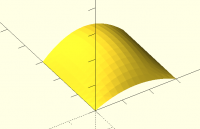
Hi, I now have a bezier patch in 3d: <see attachment> Roger. -- ** R.E.Wolff@BitWizard.nl ** https://www.BitWizard.nl/ ** +31-15-2049110 ** ** Delftechpark 11 2628 XJ Delft, The Netherlands. KVK: 27239233 ** The plan was simple, like my brother-in-law Phil. But unlike Phil, this plan just might work.
RP
Ronaldo Persiano
Thu, Mar 14, 2019 6:52 PM

adrianv avm4@cornell.edu wrote:

I'm a little puzzled.  Maybe you are using the word degree differently than
I think?  I was thinking a degree 3 Bezier is a cubic polynomial and has 4
control points.  It can be set to zero curvature at both ends but has only
one degree of freedom, which just controls the size of the curve.  That
isn't enough.  It appears to me that degree 4, with 5 control points, is
sufficient.  Yes, you do need to put p2 on the vertex.  This doesn't seem
to
cause any undesirable restriction, and it is definitely possible to satisfy
the zero curvature condition.  One parameter remains that controls the
degree of curvature, as I noted in my previous message.  Having fewer
parameters is often better than more, so I'm not sure about what the value
of more degrees of freedom is of going to the case with 6 control points
(which is a 5th degree polynomial).  I did experiment a bit with your code
and you can get some rather sharp cornered results.  It seemed like r1
usually had little effect.

You are right regarding the degrees. I wrongly said 5 instead of 4 and 6
instead of 5. A degree n Bezier curve has n+1 control points.

However I disagree that you could meet the zero curvature constraint at
both end with degree 3 curves. To have a zero curvature at the beginning of
the arc, the first 3 control points should co-linear. The same is true for
the ending point. If we require zero curvature at both ends all four
control points should be co-linear and the arc reduces to a straight
segment.

Degree 4 is in fact the minimal degree for zero curvature at both ends for
a non-straight line Bezier arc. However degree 5 solution give us not only
more degrees of freedom but a better arc shape as will see bellow. Degree 4
solution produces an arc with a greater curvature variation and a more
pointed arc. Degree 5 shape is able to produce arcs that resemble circular
arcs.

I have revised my codes in order to generate alternatively both solutions.
The two missed functions and line() module are defined as before.

q = [ [0,0], [30,0], [30,30], [0,30] ];

color("blue")  roundedPoly(q, 20, 4, 1/3);
color("yellow") roundedPoly(q, 20, 4, 2/3);
color("red")    roundedPoly(q, 20, 4,  1);

translate([35,0,0]) {
color("blue")  roundedPoly(q, 20, 5, 1/3, 17/32);
color("yellow") roundedPoly(q, 20, 5, 2/3, 17/32);
color("red")    roundedPoly(q, 20, 5,  1, 17/32);
color("green")  translate([15,15,-1]) circle(15);
}

module roundedPoly(p, n=20, degree=4, r=1/4, r0=2/3, r1=17/32)
{
assert(len(p)>2, "polygonal has less than 3 points");
assert(r>0 && r<=1, "r out of range");
assert(r0>0 && r<=1, "r0 out of range");
assert(degree==4 || degree==5, "degree should be 4 or 5");
assert(degree==5 || (r1>0 && r1<=1), "r1 out of range");
l = len(p);
q = [for(i=[0:l-1])
let( p0 = (1-r/2)p[i] + rp[(i+l-1)%l]/2 ,
p1 = p[i],
p2 = (1-r/2)p[i] + rp[(i+1)%l]/2 )
each BZeroCurvature(p0,p1,p2,n,degree,r0,r1) ];
line(q, closed=true,w=0.2);
}

// a Bezier arc of degree 4 or 5 from p0 to p2, tangent to
// [p0,p1] at p0, tangent to [p1,p2) at p2 and
// with zero curvature at p0 and p2
// n  - # of points in the arc
// r0 - form factor in the interval [0,1]
// r1 - form factor in the interval [0,1] (for degree=5 only)
function BZeroCurvature(p0,p1,p2,n=20,degree=4,r0=2/3,r1=1/2) =
assert(r0>0 && r0<=1, "r0 out of range")
assert(degree==4 || degree==5, "degree should be 4 or 5")
assert(degree==5 || (r1>0 && r1<=1), "r1 out of range")
let( r1 = degree==4 ? 1 : r1,
p  = [ p0,
p0 + r0*(p1-p0)r1,
each degree==4 ?
[p1] :
[p0 + r0
(p1-p0), p2 + r0*(p1-p2)],
p2 + r0*(p1-p2)*r1,
p2 ] )
BezierCurve(p,n);

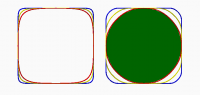
And got the following image:

[image: roundedPoly2.PNG]

At left we have the arcs of degree 4 and at right the degree 5 alternative
for similar form factors. With r=1, which means that the straight lines
between arcs reduce to a point, drawn here with red lines, the degree 4
solution keeps the middle point of each arc much nearer to the polygon
vertex. With degree 5 on the other hand it is possible to get a good
approximation of a circular arc with r1~= 17/32, a value I got empirically.
adrianv <avm4@cornell.edu> wrote: > I'm a little puzzled. Maybe you are using the word degree differently than > I think? I was thinking a degree 3 Bezier is a cubic polynomial and has 4 > control points. It can be set to zero curvature at both ends but has only > one degree of freedom, which just controls the size of the curve. That > isn't enough. It appears to me that degree 4, with 5 control points, is > sufficient. Yes, you do need to put p2 on the vertex. This doesn't seem > to > cause any undesirable restriction, and it is definitely possible to satisfy > the zero curvature condition. One parameter remains that controls the > degree of curvature, as I noted in my previous message. Having fewer > parameters is often better than more, so I'm not sure about what the value > of more degrees of freedom is of going to the case with 6 control points > (which is a 5th degree polynomial). I did experiment a bit with your code > and you can get some rather sharp cornered results. It seemed like r1 > usually had little effect. > You are right regarding the degrees. I wrongly said 5 instead of 4 and 6 instead of 5. A degree n Bezier curve has n+1 control points. However I disagree that you could meet the zero curvature constraint at both end with degree 3 curves. To have a zero curvature at the beginning of the arc, the first 3 control points should co-linear. The same is true for the ending point. If we require zero curvature at both ends all four control points should be co-linear and the arc reduces to a straight segment. Degree 4 is in fact the minimal degree for zero curvature at both ends for a non-straight line Bezier arc. However degree 5 solution give us not only more degrees of freedom but a better arc shape as will see bellow. Degree 4 solution produces an arc with a greater curvature variation and a more pointed arc. Degree 5 shape is able to produce arcs that resemble circular arcs. I have revised my codes in order to generate alternatively both solutions. The two missed functions and line() module are defined as before. q = [ [0,0], [30,0], [30,30], [0,30] ]; color("blue") roundedPoly(q, 20, 4, 1/3); color("yellow") roundedPoly(q, 20, 4, 2/3); color("red") roundedPoly(q, 20, 4, 1); translate([35,0,0]) { color("blue") roundedPoly(q, 20, 5, 1/3, 17/32); color("yellow") roundedPoly(q, 20, 5, 2/3, 17/32); color("red") roundedPoly(q, 20, 5, 1, 17/32); color("green") translate([15,15,-1]) circle(15); } module roundedPoly(p, n=20, degree=4, r=1/4, r0=2/3, r1=17/32) { assert(len(p)>2, "polygonal has less than 3 points"); assert(r>0 && r<=1, "r out of range"); assert(r0>0 && r<=1, "r0 out of range"); assert(degree==4 || degree==5, "degree should be 4 or 5"); assert(degree==5 || (r1>0 && r1<=1), "r1 out of range"); l = len(p); q = [for(i=[0:l-1]) let( p0 = (1-r/2)*p[i] + r*p[(i+l-1)%l]/2 , p1 = p[i], p2 = (1-r/2)*p[i] + r*p[(i+1)%l]/2 ) each BZeroCurvature(p0,p1,p2,n,degree,r0,r1) ]; line(q, closed=true,w=0.2); } // a Bezier arc of degree 4 or 5 from p0 to p2, tangent to // [p0,p1] at p0, tangent to [p1,p2) at p2 and // with zero curvature at p0 and p2 // n - # of points in the arc // r0 - form factor in the interval [0,1] // r1 - form factor in the interval [0,1] (for degree=5 only) function BZeroCurvature(p0,p1,p2,n=20,degree=4,r0=2/3,r1=1/2) = assert(r0>0 && r0<=1, "r0 out of range") assert(degree==4 || degree==5, "degree should be 4 or 5") assert(degree==5 || (r1>0 && r1<=1), "r1 out of range") let( r1 = degree==4 ? 1 : r1, p = [ p0, p0 + r0*(p1-p0)*r1, each degree==4 ? [p1] : [p0 + r0*(p1-p0), p2 + r0*(p1-p2)], p2 + r0*(p1-p2)*r1, p2 ] ) BezierCurve(p,n); And got the following image: [image: roundedPoly2.PNG] At left we have the arcs of degree 4 and at right the degree 5 alternative for similar form factors. With r=1, which means that the straight lines between arcs reduce to a point, drawn here with red lines, the degree 4 solution keeps the middle point of each arc much nearer to the polygon vertex. With degree 5 on the other hand it is possible to get a good approximation of a circular arc with r1~= 17/32, a value I got empirically.
HL
Hans L
Thu, Mar 14, 2019 7:27 PM

I played around a little bit with Bezier curves in OpenSCAD before, and its
fairly trivial to write a recursive bezier curve function that can handle
arbitrary curve orders.  They are also agnostic to the dimension of points
2D/3D(or higher dimension?)

Here are the functions I have used:

// return point along curve at position "t" in range [0,1]
// use ctlPts[index] as the first control point
// Bezier curve has order == n
function BezierPoint(ctlPts, t, index, n) =
let (
l = len(ctlPts),
end = index+n
)
//assert(end < l)
(n > 0) ?
BezierPoint([
for (i = [index:end])
let (p1 = ctlPts[i], p2 = ctlPts[i+1]) p1 + t * (p2 - p1)
], t, 0, n-1) :
ctlPts[0];

function flatten(l) = [ for (a = l) for (b = a) b ];

// n sets the order of the Bezier curves that will be stitched together
// if no parameter n is given, points will be generated for a single curve
of order == len(ctlPts) - 1
function BezierPath(ctlPts, index, n) =
let (
l1 = $fn > 3 ? $fn-1 : 200,
index = index == undef ? 0 : index,
l2 = len(ctlPts),
n = (n == undef || n > l2-1) ? l2 - 1 : n
)
//assert(n > 0)
flatten([for (segment = [index:1:l2-1-n])
[for (i = [0:l1] ) BezierPoint(ctlPts, i / l1, index+segment*n, n)]
]);

On Thu, Mar 14, 2019 at 1:53 PM Ronaldo Persiano rcmpersiano@gmail.com
wrote:

adrianv avm4@cornell.edu wrote:

I'm a little puzzled.  Maybe you are using the word degree differently
than
I think?  I was thinking a degree 3 Bezier is a cubic polynomial and has 4
control points.  It can be set to zero curvature at both ends but has only
one degree of freedom, which just controls the size of the curve.  That
isn't enough.  It appears to me that degree 4, with 5 control points, is
sufficient.  Yes, you do need to put p2 on the vertex.  This doesn't seem
to
cause any undesirable restriction, and it is definitely possible to
satisfy
the zero curvature condition.  One parameter remains that controls the
degree of curvature, as I noted in my previous message.  Having fewer
parameters is often better than more, so I'm not sure about what the value
of more degrees of freedom is of going to the case with 6 control points
(which is a 5th degree polynomial).  I did experiment a bit with your code
and you can get some rather sharp cornered results.  It seemed like r1
usually had little effect.

You are right regarding the degrees. I wrongly said 5 instead of 4 and 6
instead of 5. A degree n Bezier curve has n+1 control points.

However I disagree that you could meet the zero curvature constraint at
both end with degree 3 curves. To have a zero curvature at the beginning of
the arc, the first 3 control points should co-linear. The same is true for
the ending point. If we require zero curvature at both ends all four
control points should be co-linear and the arc reduces to a straight
segment.

Degree 4 is in fact the minimal degree for zero curvature at both ends for
a non-straight line Bezier arc. However degree 5 solution give us not only
more degrees of freedom but a better arc shape as will see bellow. Degree 4
solution produces an arc with a greater curvature variation and a more
pointed arc. Degree 5 shape is able to produce arcs that resemble circular
arcs.

I have revised my codes in order to generate alternatively both solutions.
The two missed functions and line() module are defined as before.

q = [ [0,0], [30,0], [30,30], [0,30] ];

color("blue")  roundedPoly(q, 20, 4, 1/3);
color("yellow") roundedPoly(q, 20, 4, 2/3);
color("red")    roundedPoly(q, 20, 4,  1);

translate([35,0,0]) {
color("blue")  roundedPoly(q, 20, 5, 1/3, 17/32);
color("yellow") roundedPoly(q, 20, 5, 2/3, 17/32);
color("red")    roundedPoly(q, 20, 5,  1, 17/32);
color("green")  translate([15,15,-1]) circle(15);
}

module roundedPoly(p, n=20, degree=4, r=1/4, r0=2/3, r1=17/32)
{
assert(len(p)>2, "polygonal has less than 3 points");
assert(r>0 && r<=1, "r out of range");
assert(r0>0 && r<=1, "r0 out of range");
assert(degree==4 || degree==5, "degree should be 4 or 5");
assert(degree==5 || (r1>0 && r1<=1), "r1 out of range");
l = len(p);
q = [for(i=[0:l-1])
let( p0 = (1-r/2)p[i] + rp[(i+l-1)%l]/2 ,
p1 = p[i],
p2 = (1-r/2)p[i] + rp[(i+1)%l]/2 )
each BZeroCurvature(p0,p1,p2,n,degree,r0,r1) ];
line(q, closed=true,w=0.2);
}

// a Bezier arc of degree 4 or 5 from p0 to p2, tangent to
// [p0,p1] at p0, tangent to [p1,p2) at p2 and
// with zero curvature at p0 and p2
// n  - # of points in the arc
// r0 - form factor in the interval [0,1]
// r1 - form factor in the interval [0,1] (for degree=5 only)
function BZeroCurvature(p0,p1,p2,n=20,degree=4,r0=2/3,r1=1/2) =
assert(r0>0 && r0<=1, "r0 out of range")
assert(degree==4 || degree==5, "degree should be 4 or 5")
assert(degree==5 || (r1>0 && r1<=1), "r1 out of range")
let( r1 = degree==4 ? 1 : r1,
p  = [ p0,
p0 + r0*(p1-p0)r1,
each degree==4 ?
[p1] :
[p0 + r0
(p1-p0), p2 + r0*(p1-p2)],
p2 + r0*(p1-p2)*r1,
p2 ] )
BezierCurve(p,n);

And got the following image:

[image: roundedPoly2.PNG]

At left we have the arcs of degree 4 and at right the degree 5 alternative
for similar form factors. With r=1, which means that the straight lines
between arcs reduce to a point, drawn here with red lines, the degree 4
solution keeps the middle point of each arc much nearer to the polygon
vertex. With degree 5 on the other hand it is possible to get a good
approximation of a circular arc with r1~= 17/32, a value I got empirically.


OpenSCAD mailing list
Discuss@lists.openscad.org
http://lists.openscad.org/mailman/listinfo/discuss_lists.openscad.org
I played around a little bit with Bezier curves in OpenSCAD before, and its fairly trivial to write a recursive bezier curve function that can handle arbitrary curve orders. They are also agnostic to the dimension of points 2D/3D(or higher dimension?) Here are the functions I have used: // return point along curve at position "t" in range [0,1] // use ctlPts[index] as the first control point // Bezier curve has order == n function BezierPoint(ctlPts, t, index, n) = let ( l = len(ctlPts), end = index+n ) //assert(end < l) (n > 0) ? BezierPoint([ for (i = [index:end]) let (p1 = ctlPts[i], p2 = ctlPts[i+1]) p1 + t * (p2 - p1) ], t, 0, n-1) : ctlPts[0]; function flatten(l) = [ for (a = l) for (b = a) b ]; // n sets the order of the Bezier curves that will be stitched together // if no parameter n is given, points will be generated for a single curve of order == len(ctlPts) - 1 function BezierPath(ctlPts, index, n) = let ( l1 = $fn > 3 ? $fn-1 : 200, index = index == undef ? 0 : index, l2 = len(ctlPts), n = (n == undef || n > l2-1) ? l2 - 1 : n ) //assert(n > 0) flatten([for (segment = [index:1:l2-1-n]) [for (i = [0:l1] ) BezierPoint(ctlPts, i / l1, index+segment*n, n)] ]); On Thu, Mar 14, 2019 at 1:53 PM Ronaldo Persiano <rcmpersiano@gmail.com> wrote: > > > adrianv <avm4@cornell.edu> wrote: > >> I'm a little puzzled. Maybe you are using the word degree differently >> than >> I think? I was thinking a degree 3 Bezier is a cubic polynomial and has 4 >> control points. It can be set to zero curvature at both ends but has only >> one degree of freedom, which just controls the size of the curve. That >> isn't enough. It appears to me that degree 4, with 5 control points, is >> sufficient. Yes, you do need to put p2 on the vertex. This doesn't seem >> to >> cause any undesirable restriction, and it is definitely possible to >> satisfy >> the zero curvature condition. One parameter remains that controls the >> degree of curvature, as I noted in my previous message. Having fewer >> parameters is often better than more, so I'm not sure about what the value >> of more degrees of freedom is of going to the case with 6 control points >> (which is a 5th degree polynomial). I did experiment a bit with your code >> and you can get some rather sharp cornered results. It seemed like r1 >> usually had little effect. >> > > You are right regarding the degrees. I wrongly said 5 instead of 4 and 6 > instead of 5. A degree n Bezier curve has n+1 control points. > > However I disagree that you could meet the zero curvature constraint at > both end with degree 3 curves. To have a zero curvature at the beginning of > the arc, the first 3 control points should co-linear. The same is true for > the ending point. If we require zero curvature at both ends all four > control points should be co-linear and the arc reduces to a straight > segment. > > Degree 4 is in fact the minimal degree for zero curvature at both ends for > a non-straight line Bezier arc. However degree 5 solution give us not only > more degrees of freedom but a better arc shape as will see bellow. Degree 4 > solution produces an arc with a greater curvature variation and a more > pointed arc. Degree 5 shape is able to produce arcs that resemble circular > arcs. > > I have revised my codes in order to generate alternatively both solutions. > The two missed functions and line() module are defined as before. > > q = [ [0,0], [30,0], [30,30], [0,30] ]; > > color("blue") roundedPoly(q, 20, 4, 1/3); > color("yellow") roundedPoly(q, 20, 4, 2/3); > color("red") roundedPoly(q, 20, 4, 1); > > translate([35,0,0]) { > color("blue") roundedPoly(q, 20, 5, 1/3, 17/32); > color("yellow") roundedPoly(q, 20, 5, 2/3, 17/32); > color("red") roundedPoly(q, 20, 5, 1, 17/32); > color("green") translate([15,15,-1]) circle(15); > } > > module roundedPoly(p, n=20, degree=4, r=1/4, r0=2/3, r1=17/32) > { > assert(len(p)>2, "polygonal has less than 3 points"); > assert(r>0 && r<=1, "r out of range"); > assert(r0>0 && r<=1, "r0 out of range"); > assert(degree==4 || degree==5, "degree should be 4 or 5"); > assert(degree==5 || (r1>0 && r1<=1), "r1 out of range"); > l = len(p); > q = [for(i=[0:l-1]) > let( p0 = (1-r/2)*p[i] + r*p[(i+l-1)%l]/2 , > p1 = p[i], > p2 = (1-r/2)*p[i] + r*p[(i+1)%l]/2 ) > each BZeroCurvature(p0,p1,p2,n,degree,r0,r1) ]; > line(q, closed=true,w=0.2); > } > > // a Bezier arc of degree 4 or 5 from p0 to p2, tangent to > // [p0,p1] at p0, tangent to [p1,p2) at p2 and > // with zero curvature at p0 and p2 > // n - # of points in the arc > // r0 - form factor in the interval [0,1] > // r1 - form factor in the interval [0,1] (for degree=5 only) > function BZeroCurvature(p0,p1,p2,n=20,degree=4,r0=2/3,r1=1/2) = > assert(r0>0 && r0<=1, "r0 out of range") > assert(degree==4 || degree==5, "degree should be 4 or 5") > assert(degree==5 || (r1>0 && r1<=1), "r1 out of range") > let( r1 = degree==4 ? 1 : r1, > p = [ p0, > p0 + r0*(p1-p0)*r1, > each degree==4 ? > [p1] : > [p0 + r0*(p1-p0), p2 + r0*(p1-p2)], > p2 + r0*(p1-p2)*r1, > p2 ] ) > BezierCurve(p,n); > > > And got the following image: > > [image: roundedPoly2.PNG] > > At left we have the arcs of degree 4 and at right the degree 5 alternative > for similar form factors. With r=1, which means that the straight lines > between arcs reduce to a point, drawn here with red lines, the degree 4 > solution keeps the middle point of each arc much nearer to the polygon > vertex. With degree 5 on the other hand it is possible to get a good > approximation of a circular arc with r1~= 17/32, a value I got empirically. > > _______________________________________________ > OpenSCAD mailing list > Discuss@lists.openscad.org > http://lists.openscad.org/mailman/listinfo/discuss_lists.openscad.org >
A
adrianv
Thu, Mar 14, 2019 10:02 PM

Ronaldo wrote

adrianv <

avm4@

> wrote:

However I disagree that you could meet the zero curvature constraint at
both end with degree 3 curves. To have a zero curvature at the beginning
of
the arc, the first 3 control points should co-linear. The same is true for
the ending point. If we require zero curvature at both ends all four
control points should be co-linear and the arc reduces to a straight
segment.

No it doesn't.  I posted graphs a few messages back showing zero curvature
order 3 beziers, and I had directly verified that the curvature was indeed
zero by calculating the derivatives both symbolically and numerically, so I
am reasonably sure it was correct.  With p0=p3 set to the endpoints of the
arc you then set p1=p2 equal to the point of the corner.  You achieve the
co-linearity condition in a degenerate fashion, since p1 and p2 are on both
lines.

Degree 4 is in fact the minimal degree for zero curvature at both ends for
a non-straight line Bezier arc. However degree 5 solution give us not only
more degrees of freedom but a better arc shape as will see bellow. Degree
4
solution produces an arc with a greater curvature variation and a more
pointed arc. Degree 5 shape is able to produce arcs that resemble circular
arcs.

It appears that your degree 4 code can also generate a nearly circular arc:
just set r1 very small, like .01 and you get something visually
indistinguishable from a circle.  In fact, it looks very similar to your
empirically determined 17/32 value.  I wonder what are the parameters for
the order 5 bezier that reduce it to the order 4.

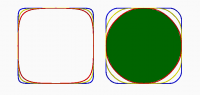
On the left is order 4 with r1=0.01 and on the right, order 5 with r1=17/32.

http://forum.openscad.org/file/t2477/round2.png

--
Sent from: http://forum.openscad.org/

Ronaldo wrote > adrianv &lt; > avm4@ > &gt; wrote: > > > However I disagree that you could meet the zero curvature constraint at > both end with degree 3 curves. To have a zero curvature at the beginning > of > the arc, the first 3 control points should co-linear. The same is true for > the ending point. If we require zero curvature at both ends all four > control points should be co-linear and the arc reduces to a straight > segment. No it doesn't. I posted graphs a few messages back showing zero curvature order 3 beziers, and I had directly verified that the curvature was indeed zero by calculating the derivatives both symbolically and numerically, so I am reasonably sure it was correct. With p0=p3 set to the endpoints of the arc you then set p1=p2 equal to the point of the corner. You achieve the co-linearity condition in a degenerate fashion, since p1 and p2 are on both lines. > Degree 4 is in fact the minimal degree for zero curvature at both ends for > a non-straight line Bezier arc. However degree 5 solution give us not only > more degrees of freedom but a better arc shape as will see bellow. Degree > 4 > solution produces an arc with a greater curvature variation and a more > pointed arc. Degree 5 shape is able to produce arcs that resemble circular > arcs. It appears that your degree 4 code can also generate a nearly circular arc: just set r1 very small, like .01 and you get something visually indistinguishable from a circle. In fact, it looks very similar to your empirically determined 17/32 value. I wonder what are the parameters for the order 5 bezier that reduce it to the order 4. On the left is order 4 with r1=0.01 and on the right, order 5 with r1=17/32. <http://forum.openscad.org/file/t2477/round2.png> -- Sent from: http://forum.openscad.org/
HL
Hans L
Thu, Mar 14, 2019 11:07 PM

Well I'm a bit embarrassed after playing with the Bezier code I previously
posted(hadn't messed with it in a while).  I realized it had some bugs and
some inefficiencies.
I fixed it up a bit and included a more complete example with example of
various orders along random path, and a classic circle approximation.

Posting gist this time in case I need to update it again, but I believe the
code is correct now :
https://gist.github.com/thehans/2da9f7c608f4a689456e714eaa2189e6

On Thu, Mar 14, 2019 at 5:03 PM adrianv avm4@cornell.edu wrote:

Ronaldo wrote

adrianv <

avm4@

> wrote:

However I disagree that you could meet the zero curvature constraint at
both end with degree 3 curves. To have a zero curvature at the beginning
of
the arc, the first 3 control points should co-linear. The same is true

for

the ending point. If we require zero curvature at both ends all four
control points should be co-linear and the arc reduces to a straight
segment.

No it doesn't.  I posted graphs a few messages back showing zero curvature
order 3 beziers, and I had directly verified that the curvature was indeed
zero by calculating the derivatives both symbolically and numerically, so I
am reasonably sure it was correct.  With p0=p3 set to the endpoints of the
arc you then set p1=p2 equal to the point of the corner.  You achieve the
co-linearity condition in a degenerate fashion, since p1 and p2 are on both
lines.

Degree 4 is in fact the minimal degree for zero curvature at both ends

for

a non-straight line Bezier arc. However degree 5 solution give us not

only

more degrees of freedom but a better arc shape as will see bellow. Degree
4
solution produces an arc with a greater curvature variation and a more
pointed arc. Degree 5 shape is able to produce arcs that resemble

circular

arcs.

It appears that your degree 4 code can also generate a nearly circular arc:
just set r1 very small, like .01 and you get something visually
indistinguishable from a circle.  In fact, it looks very similar to your
empirically determined 17/32 value.  I wonder what are the parameters for
the order 5 bezier that reduce it to the order 4.

On the left is order 4 with r1=0.01 and on the right, order 5 with
r1=17/32.

http://forum.openscad.org/file/t2477/round2.png

--
Sent from: http://forum.openscad.org/


OpenSCAD mailing list
Discuss@lists.openscad.org
http://lists.openscad.org/mailman/listinfo/discuss_lists.openscad.org

Well I'm a bit embarrassed after playing with the Bezier code I previously posted(hadn't messed with it in a while). I realized it had some bugs and some inefficiencies. I fixed it up a bit and included a more complete example with example of various orders along random path, and a classic circle approximation. Posting gist this time in case I need to update it again, but I believe the code is correct now : https://gist.github.com/thehans/2da9f7c608f4a689456e714eaa2189e6 On Thu, Mar 14, 2019 at 5:03 PM adrianv <avm4@cornell.edu> wrote: > Ronaldo wrote > > adrianv &lt; > > > avm4@ > > > &gt; wrote: > > > > > > However I disagree that you could meet the zero curvature constraint at > > both end with degree 3 curves. To have a zero curvature at the beginning > > of > > the arc, the first 3 control points should co-linear. The same is true > for > > the ending point. If we require zero curvature at both ends all four > > control points should be co-linear and the arc reduces to a straight > > segment. > > No it doesn't. I posted graphs a few messages back showing zero curvature > order 3 beziers, and I had directly verified that the curvature was indeed > zero by calculating the derivatives both symbolically and numerically, so I > am reasonably sure it was correct. With p0=p3 set to the endpoints of the > arc you then set p1=p2 equal to the point of the corner. You achieve the > co-linearity condition in a degenerate fashion, since p1 and p2 are on both > lines. > > > > Degree 4 is in fact the minimal degree for zero curvature at both ends > for > > a non-straight line Bezier arc. However degree 5 solution give us not > only > > more degrees of freedom but a better arc shape as will see bellow. Degree > > 4 > > solution produces an arc with a greater curvature variation and a more > > pointed arc. Degree 5 shape is able to produce arcs that resemble > circular > > arcs. > > It appears that your degree 4 code can also generate a nearly circular arc: > just set r1 very small, like .01 and you get something visually > indistinguishable from a circle. In fact, it looks very similar to your > empirically determined 17/32 value. I wonder what are the parameters for > the order 5 bezier that reduce it to the order 4. > > On the left is order 4 with r1=0.01 and on the right, order 5 with > r1=17/32. > > <http://forum.openscad.org/file/t2477/round2.png> > > > > > > -- > Sent from: http://forum.openscad.org/ > > _______________________________________________ > OpenSCAD mailing list > Discuss@lists.openscad.org > http://lists.openscad.org/mailman/listinfo/discuss_lists.openscad.org >
RP
Ronaldo Persiano
Fri, Mar 15, 2019 3:14 AM

No it doesn't.  I posted graphs a few messages back showing zero curvature
order 3 beziers, and I had directly verified that the curvature was indeed
zero by calculating the derivatives both symbolically and numerically, so I
am reasonably sure it was correct.  With p0=p3 set to the endpoints of the
arc you then set p1=p2 equal to the point of the corner.  You achieve the
co-linearity condition in a degenerate fashion, since p1 and p2 are on both
lines.

You are right. Putting both intermediate control points at the corner will
meet the conditions of zero curvature at the two ends of a degree 3 Bezier
arc. I could not imagine that solution before. And certainly this is a very
constrained alternative.

It appears that your degree 4 code can also generate a nearly circular arc:
just set r1 very small, like .01 and you get something visually
indistinguishable from a circle.  In fact, it looks very similar to your
empirically determined 17/32 value.  I wonder what are the parameters for
the order 5 bezier that reduce it to the order 4.

I have confirmed your statement about the approximation of circular arcs by
degree 4 curves. It seems even better than the degree 5 arc with r0=17/32.

I have applied the degree elevation formulas to deduce algebraically the
conditions r0 and r1 should satisfy in order the degree 4 and degree 5
curves be equal. From my math exercise, we should have:

degree 5 with  r0 = 3/5  and r1=0 will be equivalent to
degree 4 with r0=0

I also found that r0 may be set to 0 for degree 4 and r1 may be set to 0
for degree 5 but r0 should not be 0 for degree 5 because the arc degenerate
into a line segment. I have changed the assert conditions in the my
functions accordingly.

I agree that rounding corners with degree 4 Bezier arcs give us enough
flexibility and there is no point to use greater degree. In my functions,
the parameter r of roundedPoly() controls how much the corner is rounded
like your proposed d parameter. That parameter sets the end points
relatively to the polygon edge length instead of an absolute value. The
problem with this solution is that the arc will not be symmetrical when the
two edges meeting a corner have different length. But the alternative of a
absolute value d requires a validation to avoid that two arcs rounding the
two corners of an edge intercept.

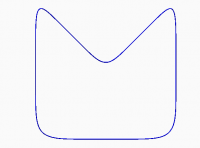
Finally, I have checked that my code works well even with not convex
polygons as can be seen in the image.

> > No it doesn't. I posted graphs a few messages back showing zero curvature > order 3 beziers, and I had directly verified that the curvature was indeed > zero by calculating the derivatives both symbolically and numerically, so I > am reasonably sure it was correct. With p0=p3 set to the endpoints of the > arc you then set p1=p2 equal to the point of the corner. You achieve the > co-linearity condition in a degenerate fashion, since p1 and p2 are on both > lines. You are right. Putting both intermediate control points at the corner will meet the conditions of zero curvature at the two ends of a degree 3 Bezier arc. I could not imagine that solution before. And certainly this is a very constrained alternative. > It appears that your degree 4 code can also generate a nearly circular arc: > just set r1 very small, like .01 and you get something visually > indistinguishable from a circle. In fact, it looks very similar to your > empirically determined 17/32 value. I wonder what are the parameters for > the order 5 bezier that reduce it to the order 4. > I have confirmed your statement about the approximation of circular arcs by degree 4 curves. It seems even better than the degree 5 arc with r0=17/32. I have applied the degree elevation formulas to deduce algebraically the conditions r0 and r1 should satisfy in order the degree 4 and degree 5 curves be equal. From my math exercise, we should have: degree 5 with r0 = 3/5 and r1=0 will be equivalent to degree 4 with r0=0 I also found that r0 may be set to 0 for degree 4 and r1 may be set to 0 for degree 5 but r0 should not be 0 for degree 5 because the arc degenerate into a line segment. I have changed the assert conditions in the my functions accordingly. I agree that rounding corners with degree 4 Bezier arcs give us enough flexibility and there is no point to use greater degree. In my functions, the parameter r of roundedPoly() controls how much the corner is rounded like your proposed d parameter. That parameter sets the end points relatively to the polygon edge length instead of an absolute value. The problem with this solution is that the arc will not be symmetrical when the two edges meeting a corner have different length. But the alternative of a absolute value d requires a validation to avoid that two arcs rounding the two corners of an edge intercept. Finally, I have checked that my code works well even with not convex polygons as can be seen in the image.
NH
nop head
Fri, Mar 15, 2019 8:11 AM

Going back to the apple article I don't think the change in shade is
anything to do with curvature. Reflected light is related to the surface
angle and that doesn't change discontinuously. It's rate of change does but
I don't see how that would affect reflected light. It looks like the left
corner is lit from both sides and the right corner is lit from right side
only.

On Fri, 15 Mar 2019 at 03:15, Ronaldo Persiano rcmpersiano@gmail.com
wrote:

No it doesn't.  I posted graphs a few messages back showing zero curvature

order 3 beziers, and I had directly verified that the curvature was indeed
zero by calculating the derivatives both symbolically and numerically, so
I
am reasonably sure it was correct.  With p0=p3 set to the endpoints of
the
arc you then set p1=p2 equal to the point of the corner.  You achieve the
co-linearity condition in a degenerate fashion, since p1 and p2 are on
both
lines.

You are right. Putting both intermediate control points at the corner will
meet the conditions of zero curvature at the two ends of a degree 3 Bezier
arc. I could not imagine that solution before. And certainly this is a very
constrained alternative.

It appears that your degree 4 code can also generate a nearly circular
arc:
just set r1 very small, like .01 and you get something visually
indistinguishable from a circle.  In fact, it looks very similar to your
empirically determined 17/32 value.  I wonder what are the parameters for
the order 5 bezier that reduce it to the order 4.

I have confirmed your statement about the approximation of circular arcs
by degree 4 curves. It seems even better than the degree 5 arc with
r0=17/32.

I have applied the degree elevation formulas to deduce algebraically the
conditions r0 and r1 should satisfy in order the degree 4 and degree 5
curves be equal. From my math exercise, we should have:

degree 5 with  r0 = 3/5  and r1=0 will be equivalent to
degree 4 with r0=0

I also found that r0 may be set to 0 for degree 4 and r1 may be set to 0
for degree 5 but r0 should not be 0 for degree 5 because the arc degenerate
into a line segment. I have changed the assert conditions in the my
functions accordingly.

I agree that rounding corners with degree 4 Bezier arcs give us enough
flexibility and there is no point to use greater degree. In my functions,
the parameter r of roundedPoly() controls how much the corner is rounded
like your proposed d parameter. That parameter sets the end points
relatively to the polygon edge length instead of an absolute value. The
problem with this solution is that the arc will not be symmetrical when the
two edges meeting a corner have different length. But the alternative of a
absolute value d requires a validation to avoid that two arcs rounding the
two corners of an edge intercept.

Finally, I have checked that my code works well even with not convex
polygons as can be seen in the image.


OpenSCAD mailing list
Discuss@lists.openscad.org
http://lists.openscad.org/mailman/listinfo/discuss_lists.openscad.org

Going back to the apple article I don't think the change in shade is anything to do with curvature. Reflected light is related to the surface angle and that doesn't change discontinuously. It's rate of change does but I don't see how that would affect reflected light. It looks like the left corner is lit from both sides and the right corner is lit from right side only. On Fri, 15 Mar 2019 at 03:15, Ronaldo Persiano <rcmpersiano@gmail.com> wrote: > No it doesn't. I posted graphs a few messages back showing zero curvature >> order 3 beziers, and I had directly verified that the curvature was indeed >> zero by calculating the derivatives both symbolically and numerically, so >> I >> am reasonably sure it was correct. With p0=p3 set to the endpoints of >> the >> arc you then set p1=p2 equal to the point of the corner. You achieve the >> co-linearity condition in a degenerate fashion, since p1 and p2 are on >> both >> lines. > > > You are right. Putting both intermediate control points at the corner will > meet the conditions of zero curvature at the two ends of a degree 3 Bezier > arc. I could not imagine that solution before. And certainly this is a very > constrained alternative. > > >> It appears that your degree 4 code can also generate a nearly circular >> arc: >> just set r1 very small, like .01 and you get something visually >> indistinguishable from a circle. In fact, it looks very similar to your >> empirically determined 17/32 value. I wonder what are the parameters for >> the order 5 bezier that reduce it to the order 4. >> > > I have confirmed your statement about the approximation of circular arcs > by degree 4 curves. It seems even better than the degree 5 arc with > r0=17/32. > > I have applied the degree elevation formulas to deduce algebraically the > conditions r0 and r1 should satisfy in order the degree 4 and degree 5 > curves be equal. From my math exercise, we should have: > > degree 5 with r0 = 3/5 and r1=0 will be equivalent to > degree 4 with r0=0 > > > I also found that r0 may be set to 0 for degree 4 and r1 may be set to 0 > for degree 5 but r0 should not be 0 for degree 5 because the arc degenerate > into a line segment. I have changed the assert conditions in the my > functions accordingly. > > I agree that rounding corners with degree 4 Bezier arcs give us enough > flexibility and there is no point to use greater degree. In my functions, > the parameter r of roundedPoly() controls how much the corner is rounded > like your proposed d parameter. That parameter sets the end points > relatively to the polygon edge length instead of an absolute value. The > problem with this solution is that the arc will not be symmetrical when the > two edges meeting a corner have different length. But the alternative of a > absolute value d requires a validation to avoid that two arcs rounding the > two corners of an edge intercept. > > Finally, I have checked that my code works well even with not convex > polygons as can be seen in the image. > _______________________________________________ > OpenSCAD mailing list > Discuss@lists.openscad.org > http://lists.openscad.org/mailman/listinfo/discuss_lists.openscad.org >
RP
Ronaldo Persiano
Fri, Mar 15, 2019 2:07 PM

I understand your point because I am also unable to perceive visually
curvature discontinuities. But people from visual arts have training eye to
perceive it. However, even for people like us it may be noticible on
shinning and reflecting surfaces.

The following YouTube video gives an idea of the effect of different kinds
of continuity.

https://youtu.be/ryVe0aTTfrc

It was clearer to me the effect of the various kinds of continuity with the
stripe view. Designers from automobile industry are very concerned with the
effect of shadows and light reflexions on the surface of their models.

Besides, curvature continuity is a requeriment on the design of a road
track. Any discontinuity on the track is prone to an accident because a
sudden wheel turn is needed to keep the vehicle on track when you cross the
discontinuity.

I understand your point because I am also unable to perceive visually curvature discontinuities. But people from visual arts have training eye to perceive it. However, even for people like us it may be noticible on shinning and reflecting surfaces. The following YouTube video gives an idea of the effect of different kinds of continuity. https://youtu.be/ryVe0aTTfrc It was clearer to me the effect of the various kinds of continuity with the stripe view. Designers from automobile industry are very concerned with the effect of shadows and light reflexions on the surface of their models. Besides, curvature continuity is a requeriment on the design of a road track. Any discontinuity on the track is prone to an accident because a sudden wheel turn is needed to keep the vehicle on track when you cross the discontinuity. >
P
Parkinbot
Fri, Mar 15, 2019 3:01 PM

nophead wrote

Going back to the apple article I don't think the change in shade is
anything to do with curvature. Reflected light is related to the surface
angle and that doesn't change discontinuously. It's rate of change does
but
I don't see how that would affect reflected light. It looks like the left
corner is lit from both sides and the right corner is lit from right side
only.

You wouldn't see it on completely mat or reflected surface. But on brushed
or structured surfaces a lot of additional effects accumulate. Neverless,
DIY-people like most of us in this forum, me including, with a "function
first" attitude usually have only a poor understanding of surface erotics.
Only after having read "Zen And The Art Of Motorcycle Maintenance" I could
develop a first poor understandig about what kind of gears seem to purr
within Apple customer brains.

In Open Source based 3D printing, where 90% of the prints are done with
layers >= 0.2 mm and nozzles >= 0.4mm there is no point in trying to
optimize curvatures to C3 or more.

--
Sent from: http://forum.openscad.org/

nophead wrote > Going back to the apple article I don't think the change in shade is > anything to do with curvature. Reflected light is related to the surface > angle and that doesn't change discontinuously. It's rate of change does > but > I don't see how that would affect reflected light. It looks like the left > corner is lit from both sides and the right corner is lit from right side > only. You wouldn't see it on completely mat or reflected surface. But on brushed or structured surfaces a lot of additional effects accumulate. Neverless, DIY-people like most of us in this forum, me including, with a "function first" attitude usually have only a poor understanding of surface erotics. Only after having read "Zen And The Art Of Motorcycle Maintenance" I could develop a first poor understandig about what kind of gears seem to purr within Apple customer brains. In Open Source based 3D printing, where 90% of the prints are done with layers >= 0.2 mm and nozzles >= 0.4mm there is no point in trying to optimize curvatures to C3 or more. -- Sent from: http://forum.openscad.org/
G
Gadgetmind
Fri, Mar 15, 2019 4:39 PM

On 15/03/2019 14:07, Ronaldo Persiano wrote:

Besides, curvature continuity is a requeriment on the design of a road
track. Any discontinuity on the track is prone to an accident because
a sudden wheel turn is needed to keep the vehicle on track when you
cross the discontinuity.

Railways used to be designed with straight and curves, and it made them
uncomfortable and restricted speeds, and ditto "loop the loop" on roller
coasters as the sudden changes in acceleration (high jerk) caused neck
injuries.

Then along came what I still call clothoid curves, but wikipedia prefers
Euler Spirals.

https://en.wikipedia.org/wiki/Euler_spiral

They are used to link straights to circles on railways, rollercoasters,
and much more.

https://en.wikipedia.org/wiki/Track_transition_curve

On 15/03/2019 14:07, Ronaldo Persiano wrote: > Besides, curvature continuity is a requeriment on the design of a road > track. Any discontinuity on the track is prone to an accident because > a sudden wheel turn is needed to keep the vehicle on track when you > cross the discontinuity. Railways used to be designed with straight and curves, and it made them uncomfortable and restricted speeds, and ditto "loop the loop" on roller coasters as the sudden changes in acceleration (high jerk) caused neck injuries. Then along came what I still call clothoid curves, but wikipedia prefers Euler Spirals. https://en.wikipedia.org/wiki/Euler_spiral They are used to link straights to circles on railways, rollercoasters, and much more. https://en.wikipedia.org/wiki/Track_transition_curve