

Re: [OpenSCAD] Parting Line?

You can use projection to have the system find the widest parts along an
axis. This can be used to make a two part mold.
However AFAIK this projection can't be used as e.g. a series of points to go
into a further polygon operation.
In fact I don't think it can be examined in any way... but someone else may
know an approach ?
--
View this message in context: http://forum.openscad.org/Parting-Line-tp13715p13721.html
Sent from the OpenSCAD mailing list archive at Nabble.com.

Is this what you want to do?
http://forum.openscad.org/file/n13723/PartingLine.png
And you want to do this automatically?
Note: there is not always a solution to your problem.
---- Code ____
r1=30;
r2=20;
x1=90;
z1=30;
rc=10;
rp=2;
module sphere1(r1=r1){
sphere(r1);
color("red")
rotate_extrude()translate([r1,0,0])circle(rp);
}
sphere1();
translate([x1,0,z1])sphere1();
hull(){
sphere(rc);
translate([x1,0,z1])sphere(rc);
}
color("red"){
hull(){
translate([0,-rc,0])sphere(rp);
translate([x1,0,z1])translate([0,-rc,0])sphere(rp);
}
hull(){
translate([0,+rc,0])sphere(rp);
translate([x1,0,z1])translate([0,+rc,0])sphere(rp);
}
}
--
View this message in context: http://forum.openscad.org/Parting-Line-tp13715p13723.html
Sent from the OpenSCAD mailing list archive at Nabble.com.
I wonder if you could take that, use projection() (not the cut version) and
then extrude that shape back up and difference the entire thing. Just an
idea - will try later...
--
View this message in context: http://forum.openscad.org/Parting-Line-tp13715p13726.html
Sent from the OpenSCAD mailing list archive at Nabble.com.

Neon22 wrote
You can use projection to have the system find the widest parts along an
axis.
Unfortunately this results in a plane. I need a non-planar surface as the
result. That then needs to be turned into a solid to subtract from the
original object.
--
View this message in context: http://forum.openscad.org/Parting-Line-tp13715p13727.html
Sent from the OpenSCAD mailing list archive at Nabble.com.
Peter Falke wrote
Is this what you want to do?
And you want to do this automatically?
Note: there is not always a solution to your problem.
That is similar to what I want but that is not it. How would you generate a
parting line for this?
---- Code ____
hull() {
sphere(10);
translate([15,0,10]) sphere(10);
}
hull() {
translate([15,0,10]) sphere(10);
translate([45,0,0]) sphere(10);
}
--
View this message in context: http://forum.openscad.org/Parting-Line-tp13715p13728.html
Sent from the OpenSCAD mailing list archive at Nabble.com.
When you set
r1=10;
r2=10;
in my code your getting pretty close.
But do you want to do this automatically for arbitrary .stl's, or do you
want to do it with simple shapes, as in the example.
And one more thing to consider: what do you want to do with this "parting
line".
In my example it is a 3d shape.
My geues you want it to cut your molde in two (or more) parts.
2015-09-07 18:43 GMT+02:00 Dan dan.beavers@acm.org:
Peter Falke wrote
Is this what you want to do?
And you want to do this automatically?
Note: there is not always a solution to your problem.
That is similar to what I want but that is not it. How would you generate
a
parting line for this?
---- Code ____
hull() {
sphere(10);
translate([15,0,10]) sphere(10);
}
hull() {
translate([15,0,10]) sphere(10);
translate([45,0,0]) sphere(10);
}
--
View this message in context:
http://forum.openscad.org/Parting-Line-tp13715p13728.html
Sent from the OpenSCAD mailing list archive at Nabble.com.
OpenSCAD mailing list
Discuss@lists.openscad.org
http://lists.openscad.org/mailman/listinfo/discuss_lists.openscad.org
--
stempeldergeschichte@googlemail.com karsten@rohrbach.de
P.S. Falls meine E-Mail kürzer ausfällt als Dir angenehm ist:
Ich probiere gerade aus kurze Antworten statt gar keine Antworten zu
schreiben.
Wenn Du gerne mehr lesen möchtest, dann lass es mich bitte wissen.
P.S. In case my e-mail is shorter than you enjoy:
I am currently trying short replies instead of no replies at all.
Please let me know, if you like to read more.
Enjoy!
Here is a quick and dirty way to do it with arbitrarry shapes.
(This cound be impruved by using the 2d commands for growing and shrinking
2d-shapes)
eps=0.999;
module shape(){
hull() {
sphere(10);
translate([15,0,10]) sphere(10);
}
hull() {
translate([15,0,10]) sphere(10);
translate([45,0,0]) sphere(10);
}
}
module proj(){projection()shape();}
scale([2-eps,2-eps,1])color("red")
intersection(){
translate([0,0,-50])linear_extrude(convexity=6)
difference(){
proj();
scale([eps,eps])proj();
}
shape();
}
shape();
2015-09-07 21:23 GMT+02:00 Peter Falke stempeldergeschichte@googlemail.com
:
When you set
r1=10;
r2=10;
in my code your getting pretty close.
But do you want to do this automatically for arbitrary .stl's, or do you
want to do it with simple shapes, as in the example.
And one more thing to consider: what do you want to do with this "parting
line".
In my example it is a 3d shape.
My geues you want it to cut your molde in two (or more) parts.
2015-09-07 18:43 GMT+02:00 Dan dan.beavers@acm.org:
Peter Falke wrote
Is this what you want to do?
And you want to do this automatically?
Note: there is not always a solution to your problem.
That is similar to what I want but that is not it. How would you
generate a
parting line for this?
---- Code ____
hull() {
sphere(10);
translate([15,0,10]) sphere(10);
}
hull() {
translate([15,0,10]) sphere(10);
translate([45,0,0]) sphere(10);
}
--
View this message in context:
http://forum.openscad.org/Parting-Line-tp13715p13728.html
Sent from the OpenSCAD mailing list archive at Nabble.com.
OpenSCAD mailing list
Discuss@lists.openscad.org
http://lists.openscad.org/mailman/listinfo/discuss_lists.openscad.org
--
stempeldergeschichte@googlemail.com karsten@rohrbach.de
P.S. Falls meine E-Mail kürzer ausfällt als Dir angenehm ist:
Ich probiere gerade aus kurze Antworten statt gar keine Antworten zu
schreiben.
Wenn Du gerne mehr lesen möchtest, dann lass es mich bitte wissen.
P.S. In case my e-mail is shorter than you enjoy:
I am currently trying short replies instead of no replies at all.
Please let me know, if you like to read more.
Enjoy!
--
stempeldergeschichte@googlemail.com karsten@rohrbach.de
P.S. Falls meine E-Mail kürzer ausfällt als Dir angenehm ist:
Ich probiere gerade aus kurze Antworten statt gar keine Antworten zu
schreiben.
Wenn Du gerne mehr lesen möchtest, dann lass es mich bitte wissen.
P.S. In case my e-mail is shorter than you enjoy:
I am currently trying short replies instead of no replies at all.
Please let me know, if you like to read more.
Enjoy!
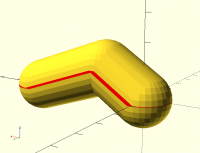
Peter Falke wrote
Here is a quick and dirty way to do it with arbitrarry shapes.
(This cound be impruved by using the 2d commands for growing and shrinking
2d-shapes)
That is getting closer. I just need the red part to be a line (no dimension
in the z axis) and then extrude that into a surface along the xy directions,
then extrude a solid in the z direction and subtract the object from the
solid. The other half of the mold is created from extruding in the -z
direction. It needs to be a line because there can't be any gaps between
the z and -z parts.
--
View this message in context: http://forum.openscad.org/Parting-Line-tp13715p13734.html
Sent from the OpenSCAD mailing list archive at Nabble.com.
Yes, I was afraid that that is what you needed.
2015-09-07 23:04 GMT+02:00 Dan dan.beavers@acm.org:
Peter Falke wrote
Here is a quick and dirty way to do it with arbitrarry shapes.
(This cound be impruved by using the 2d commands for growing and
shrinking
2d-shapes)
That is getting closer. I just need the red part to be a line (no
dimension
in the z axis) and then extrude that into a surface along the xy
directions,
then extrude a solid in the z direction and subtract the object from the
solid. The other half of the mold is created from extruding in the -z
direction. It needs to be a line because there can't be any gaps between
the z and -z parts.
--
View this message in context:
http://forum.openscad.org/Parting-Line-tp13715p13734.html
Sent from the OpenSCAD mailing list archive at Nabble.com.
OpenSCAD mailing list
Discuss@lists.openscad.org
http://lists.openscad.org/mailman/listinfo/discuss_lists.openscad.org
--
stempeldergeschichte@googlemail.com karsten@rohrbach.de
P.S. Falls meine E-Mail kürzer ausfällt als Dir angenehm ist:
Ich probiere gerade aus kurze Antworten statt gar keine Antworten zu
schreiben.
Wenn Du gerne mehr lesen möchtest, dann lass es mich bitte wissen.
P.S. In case my e-mail is shorter than you enjoy:
I am currently trying short replies instead of no replies at all.
Please let me know, if you like to read more.
Enjoy!
Peter Falke wrote
When you set
r1=10;
r2=10;
in my code your getting pretty close.
But do you want to do this automatically for arbitrary .stl's, or do you
want to do it with simple shapes, as in the example.
And one more thing to consider: what do you want to do with this "parting
line".
In my example it is a 3d shape.
My geues you want it to cut your molde in two (or more) parts.
You can change the radius of the middle sphere to a different number from
the start and end spheres to be more representative. (see below)
The object I ultimately want to mold is from an .stl file not simple
geometric shapes. If you created a cube around the .stl, subtract the .stl
from the cube, and then split the cube in two along the parting line that
would be my solution.
---Code---
module shape(){
hull() {
sphere(10);
translate([15,0,10]) sphere(5);
}
hull() {
translate([15,0,10]) sphere(5);
translate([45,0,0]) sphere(10);
}
}
--
View this message in context: http://forum.openscad.org/Parting-Line-tp13715p13736.html
Sent from the OpenSCAD mailing list archive at Nabble.com.