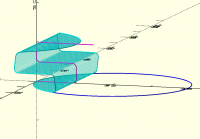
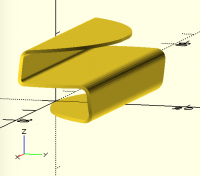
folding

Very nice (and useful) bit of code!
Jon
On 11/25/2025 4:54 PM, Bob Carlson via Discuss wrote:
 On Nov 25, 2025, at 11:38, Jordan Brown via Discuss
 <discuss@lists.openscad.org> wrote:

 However, before I figure out the answer... if you truly mean a 2D
 object, you're getting into a weird area:  2D objects that are not
 on the Z=0 plane. OpenSCAD will do such operations, and will
 display something sensible, but after that there isn't much that
 you can do with them.  As 2D objects, you can only export them to
 2D formats, which *won't be all that useful no matter what it
 does*.  (And I think what it will do is project back down to Z=0.)
I politely disagree. I will occasionally design a 2D shape as a point
list, then extrude. If the end result is something other than a
vertical extrusion, I find I waste a lot of time positioning the
result the way I want it. BOSL2s orient and spin seem straight forward
but are not intuitive, at least for me. I end up doing a lot of guess
and check. So I came up with this library module. Most of the time I
use it in the X=0 or Y=0 planes, but it works anywhere I believe.
include <BOSL2/std.scad>
module linear_extrude3d(path, h) {
d0 = assert(is_coplanar(path),
"Path Is Not Coplanar (from linear_extrude3d)");
r = polygon_normal(path);
c = centroid(path);
move([c.x, c.y, c.z])
rot(from=UP, to=r)
linear_extrude(h)
polygon(
path2d(
apply(rot(from=r, to=UP),
apply(move([-c.x, -c.y, -c.z]), path)
)
)
);
}
path = [[0, 0, 0], [0, 3, 4], [0, 3, 0]];
linear_extrude3d(path, 10);
p0 = apply(move([4, -5, 2]), path);
linear_extrude3d(p0, 10);
p1 = apply(rot(from=RIGHT, to=UP +RIGHT +FRONT), p0);
linear_extrude3d(p1, 10);
OpenSCAD mailing list
To unsubscribe send an email todiscuss-leave@lists.openscad.org
--
This email has been checked for viruses by AVG antivirus software.
www.avg.com

Here's the basic building block that I would start with:
// Folds along the Y axis, leaving stuff in -X on the XY plane
// and folding stuff in +X up.
// Object to be folded must fit inside a "big" cube centered at the origin.
module foldy(angle, big=[1000,1000,10]) {
    intersection() {
        translate([-big.x/2, -big.y/2, -big.z/2])
            cube([big.x/2, big.y, big.z]);
        children();
    }
    rotate([0,-angle,0]) intersection() {
        translate([0, -big.y/2, -big.z/2])
            cube([big.x/2, big.y, big.z]);
        children();
    }
}

foldy(30) {
    cube([20,20,1], center=true);
}
That folds along one specific line - the Y axis - but can be generalized
by translating and rotating the object into place, and then rotating and
translating it back to its original location.
translate([5,5,0]) rotate(45) {
    foldy(30) {
        rotate(-45) translate([-5,-5,0])
            cube([20,20,1], center=true);
    }
}
But, as nophead points out, you probably really want some kind of
radiusing at the corner, and that makes it significantly more
complicated to do in a general way.
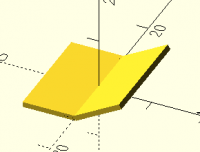
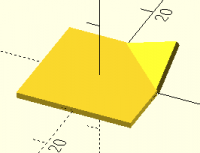

move(c)
rot(from = UP, to = r)
linear_extrude(h)
polygon(
    path2d(
        apply(rot(from=r, to=UP) *
              move(-c),
              path
        )
    )
);
This works and looks nicer, but the intuitive way to remove the apply did not work. What would be the syntax of that?
The explanation about spin explains a lot. I agree with you.
-Bob
On Nov 25, 2025, at 15:06, Adrian Mariano via Discuss discuss@lists.openscad.org wrote:
Note that you can tidy your code a bit (at least I think it's tidier) by writing apply(rot(from=r, to=UP)*move(-c), path) for example. You also don't have to use apply as all the transformations can also directly operate on a path. Setting orient is basically the same as rot(from=UP, to=orient_direction). But spin gets wonky because Revar made it spin around the anchor point, not the object center. This seems wrong to me.
Also I don't think Jordan was saying that 2d objects in 3 dimensions are fundamentally useless. Rather he meant specifically that OpenSCAD 2d geometry is not useful if it's not on the XY plane. You used a point list to work around this limitation.
On Tue, Nov 25, 2025 at 4:55 PM Bob Carlson via Discuss <discuss@lists.openscad.org mailto:discuss@lists.openscad.org> wrote:
On Nov 25, 2025, at 11:38, Jordan Brown via Discuss <discuss@lists.openscad.org mailto:discuss@lists.openscad.org> wrote:
However, before I figure out the answer... if you truly mean a 2D object, you're getting into a weird area: 2D objects that are not on the Z=0 plane. OpenSCAD will do such operations, and will display something sensible, but after that there isn't much that you can do with them. As 2D objects, you can only export them to 2D formats, which won't be all that useful no matter what it does. (And I think what it will do is project back down to Z=0.)
I politely disagree. I will occasionally design a 2D shape as a point list, then extrude. If the end result is something other than a vertical extrusion, I find I waste a lot of time positioning the result the way I want it. BOSL2s orient and spin seem straight forward but are not intuitive, at least for me. I end up doing a lot of guess and check. So I came up with this library module. Most of the time I use it in the X=0 or Y=0 planes, but it works anywhere I believe.
include <BOSL2/std.scad>
module linear_extrude3d(path, h) {
d0 = assert(is_coplanar(path),
"Path Is Not Coplanar (from linear_extrude3d)");
r = polygon_normal(path);
c = centroid(path);
 move([c.x, c.y, c.z])
 rot(from = UP, to = r)
 linear_extrude(h)
 polygon(
     path2d(
         apply(rot(from=r, to=UP),
             apply(move([-c.x, -c.y, -c.z]), path)
         )
     )
 );
}
path = [[0, 0, 0], [0, 3, 4], [0, 3, 0]];
linear_extrude3d(path, 10);
p0 = apply(move([4, -5, 2]), path);
linear_extrude3d(p0, 10);
p1 = apply(rot(from = RIGHT, to = UP + RIGHT + FRONT), p0);
linear_extrude3d(p1, 10);
OpenSCAD mailing list
To unsubscribe send an email to discuss-leave@lists.openscad.org mailto:discuss-leave@lists.openscad.org_______________________________________________
OpenSCAD mailing list
To unsubscribe send an email to discuss-leave@lists.openscad.org

On Nov 25, 2025, at 2:06 PM, Adrian Mariano via Discuss discuss@lists.openscad.org wrote:
But spin gets wonky because Revar made it spin around the anchor point, not the object center. This seems wrong to me.
In my defense, applying spin first on a sphere, cylinder, or circle is almost (but not completely, due to $fn) pointless.

Is this what you want to do?
[image: Screenshot 2025-11-27 at 7.30.59 AM.png]
[image: Screenshot 2025-11-27 at 7.31.35 AM.png]
[image: Screenshot 2025-11-27 at 7.32.10 AM.png]
On Wed, 26 Nov 2025 at 02:07, jon jonbondy.com via Discuss <
discuss@lists.openscad.org> wrote:
Jordan:
Thanks for helping me think about this.
Once I sent the "2D" message, I realized that I really wanted to do it
with 3D objects, but thin ones. Conceptually 2D, but actually 3D.
This is what I came up with to make the fold. Crude and ugly, but my
customer needs glasses, so all is good.
I can imagine a general library to do things like this, but I am sure
that there are people on this list who are more sophisticated than I am
eps = 0.01;
slop = 0.2;
$fa = 3;
$fs = 0.2;
inches = 25.4;
// ball diameters
bd25 = 25.3 + slop;
an = 27; // angle from vertical to surface of bowl
ct = 4; // circle thickness
cd = 130 - 6; // circle diameter
cr = cd/2; // circle radius
cwa = 52; // fold angle for circle wings
ca = 67; // angle between the wings
ca2 = ca/2; // half angle between wings
module Circle(d2Fac)
// d2Fac is 1 for regular cylinder, 0.8 for sharp edges for the wings
cylinder(h = ct, d1 = cd, d2 = d2Fac*cd);
module Vee() {
// the vee
difference() {
// the circle
translate([0, cr, 0])
Circle(1);
// trim off where the wings will be
translate([0, 0, -eps])
rotate([0, 0, -ca2])
cube([200, 200, ct + 2eps]);
translate([0, 0, -eps])
rotate([0, 0, 90 + ca2])
cube([200, 200, ct + 2eps]);
}
// flap
// rotated back into place
rotate([0, 0, -ca2])
// rotated up in the air
rotate([0, -cwa, 0])
// rotated so fold is along Y axis
rotate([0, 0, ca2])
// the flap
intersection() {
translate([0, cr, 0])
Circle(0.8);
translate([0, 0, -eps])
rotate([0, 0, -ca2])
cube([200, 200, ct + 2*eps]);
}
}
Vee();
On 11/25/2025 1:38 PM, Jordan Brown wrote:
On 11/23/2025 12:21 PM, Jon Bondy via Discuss wrote:
Does anyone know of a library that will take a 2D object and fold it
at a specified angle along a specified line?
I think I could do it (intersecting with two appropriately-positioned
big cubes, and appropriately rotating the results of one).
However, before I figure out the answer... if you truly mean a 2D
object, you're getting into a weird area: 2D objects that are not on
the Z=0 plane. OpenSCAD will do such operations, and will display
something sensible, but after that there isn't much that you can do
with them. As 2D objects, you can only export them to 2D formats,
which won't be all that useful no matter what it does. (And I think
what it will do is project back down to Z=0.)
So what are you really trying do to? If you're just trying to
visualize the results, I can work it out for you. If it's something
more than that, then we'd need to talk about the details.
Also note: folding one 2D object is more or less straightforward.
But folding it again is much less straightforward, as the big cubes
for subsequent folds start intersecting with unintended parts of the
model.
OpenSCAD mailing list
To unsubscribe send an email to discuss-leave@lists.openscad.org
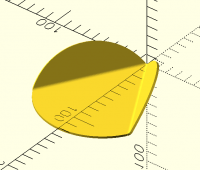
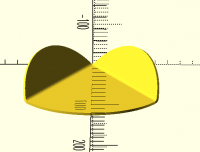
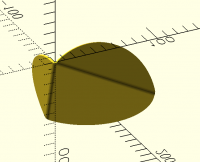
Yes. I'm done with the project. I'm almost finished with the production run. The parts are not perfect, but the customer has accepted them.
Jon
On 11/26/2025 9:04 PM, Sanjeev Prabhakar wrote:
Is this what you want to do?
[Screenshot 2025-11-27 at 7.30.59 AM.png]
[Screenshot 2025-11-27 at 7.31.35 AM.png]
[Screenshot 2025-11-27 at 7.32.10 AM.png]
On Wed, 26 Nov 2025 at 02:07, jon jonbondy.comhttps://urldefense.proofpoint.com/v2/url?u=http-3A__jonbondy.com&d=DwMFaQ&c=euGZstcaTDllvimEN8b7jXrwqOf-v5A_CdpgnVfiiMM&r=AsrE-c7ZR7B2Kyr3qgfvvppkCEBVsNmwEMndcrRSuOI&m=AFmbQr_PWLHcIpF7wMAtRuDvt5Gi3kpYte1HnHcJ_Usu7eMFmdT-BBGhtvMJMN--&s=OMbLmQ6wKqNLfx90UUeBPCTgVU42ypdXcVYYD2ggqVQ&e= via Discuss <discuss@lists.openscad.orgmailto:discuss@lists.openscad.org> wrote:
Jordan:
Thanks for helping me think about this.
Once I sent the "2D" message, I realized that I really wanted to do it
with 3D objects, but thin ones. Conceptually 2D, but actually 3D.
This is what I came up with to make the fold. Crude and ugly, but my
customer needs glasses, so all is good.
I can imagine a general library to do things like this, but I am sure
that there are people on this list who are more sophisticated than I am
eps = 0.01;
slop = 0.2;
$fa = 3;
$fs = 0.2;
inches = 25.4;
// ball diameters
bd25 = 25.3 + slop;
an = 27; // angle from vertical to surface of bowl
ct = 4; // circle thickness
cd = 130 - 6; // circle diameter
cr = cd/2; // circle radius
cwa = 52; // fold angle for circle wings
ca = 67; // angle between the wings
ca2 = ca/2; // half angle between wings
module Circle(d2Fac)
// d2Fac is 1 for regular cylinder, 0.8 for sharp edges for the wings
cylinder(h = ct, d1 = cd, d2 = d2Fac*cd);
module Vee() {
// the vee
difference() {
// the circle
translate([0, cr, 0])
Circle(1);
// trim off where the wings will be
translate([0, 0, -eps])
rotate([0, 0, -ca2])
cube([200, 200, ct + 2eps]);
translate([0, 0, -eps])
rotate([0, 0, 90 + ca2])
cube([200, 200, ct + 2eps]);
}
// flap
// rotated back into place
rotate([0, 0, -ca2])
// rotated up in the air
rotate([0, -cwa, 0])
// rotated so fold is along Y axis
rotate([0, 0, ca2])
// the flap
intersection() {
translate([0, cr, 0])
Circle(0.8);
translate([0, 0, -eps])
rotate([0, 0, -ca2])
cube([200, 200, ct + 2*eps]);
}
}
Vee();
On 11/25/2025 1:38 PM, Jordan Brown wrote:
On 11/23/2025 12:21 PM, Jon Bondy via Discuss wrote:
Does anyone know of a library that will take a 2D object and fold it
at a specified angle along a specified line?
I think I could do it (intersecting with two appropriately-positioned
big cubes, and appropriately rotating the results of one).
However, before I figure out the answer... if you truly mean a 2D
object, you're getting into a weird area: 2D objects that are not on
the Z=0 plane. OpenSCAD will do such operations, and will display
something sensible, but after that there isn't much that you can do
with them. As 2D objects, you can only export them to 2D formats,
which won't be all that useful no matter what it does. (And I think
what it will do is project back down to Z=0.)
So what are you really trying do to? If you're just trying to
visualize the results, I can work it out for you. If it's something
more than that, then we'd need to talk about the details.
Also note: folding one 2D object is more or less straightforward.
But folding it again is much less straightforward, as the big cubes
for subsequent folds start intersecting with unintended parts of the
model.
OpenSCAD mailing list
To unsubscribe send an email to discuss-leave@lists.openscad.orgmailto:discuss-leave@lists.openscad.org
OK just in case you want to download the model i made:
Here is the python code:
from openscad4 import *
a=translate_2d([0,60.01],circle(60,s=300))
a1=h_lines_sec(a,200)
a1=[ equidistant_path(p,200) for p in a1]
l1=rot2d(60,[[0,0],[150,0]])
p0=[0,60]
p1=line_section_ip(flip(l1),a)[0]
d=vsint1(l1,p0)
l2=cr3dt([[0,0,0],[0,90,0,3],rot('x60',[0,100,0])],10)
b=[wrap_around(p,l2) for p in a1]
b1=axis_rot_1(c23(b),[0,0,1],c23(p1),-60)
b2=[wrap_around(p,l2) for p in b1]
s1=axis_rot_1(b2,[0,0,1],c23(p1),60)
s1=axis_rot_1(s1,line_as_axis(c23(l1)),[0,0,0],-60)
s2=surface_offset(s1,2)
sol=solid_from_2surfaces(s1,s2)
sol1=axis_rot_1(sol,[0,0,1],c23(p0),-120)
fo(f'''
{swp(sol1)}
''')
download the scad file from here:
https://github.com/sprabhakar2006/openSCAD/blob/main/fold_ex.scad
I have created a small video to show how the wrap_around function works.
Maybe of some interest to few here
https://youtu.be/u6sR2XT00i8?si=nouTHK2pWwhjt_VI
On Thu, 27 Nov 2025 at 12:49, Sanjeev Prabhakar sprabhakar2006@gmail.com
wrote:
OK just in case you want to download the model i made:
Here is the python code:
from openscad4 import *
a=translate_2d([0,60.01],circle(60,s=300))
a1=h_lines_sec(a,200)
a1=[ equidistant_path(p,200) for p in a1]
l1=rot2d(60,[[0,0],[150,0]])
p0=[0,60]
p1=line_section_ip(flip(l1),a)[0]
d=vsint1(l1,p0)
l2=cr3dt([[0,0,0],[0,90,0,3],rot('x60',[0,100,0])],10)
b=[wrap_around(p,l2) for p in a1]
b1=axis_rot_1(c23(b),[0,0,1],c23(p1),-60)
b2=[wrap_around(p,l2) for p in b1]
s1=axis_rot_1(b2,[0,0,1],c23(p1),60)
s1=axis_rot_1(s1,line_as_axis(c23(l1)),[0,0,0],-60)
s2=surface_offset(s1,2)
sol=solid_from_2surfaces(s1,s2)
sol1=axis_rot_1(sol,[0,0,1],c23(p0),-120)
fo(f'''
{swp(sol1)}
''')
download the scad file from here:
https://github.com/sprabhakar2006/openSCAD/blob/main/fold_ex.scad
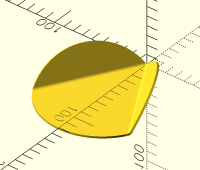
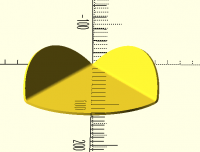
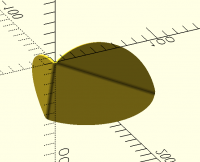
This example is slightly more interesting:
[image: Screenshot 2025-11-29 at 6.43.56 AM.png]
[image: Screenshot 2025-11-29 at 6.44.51 AM.png]
On Thu, 27 Nov 2025 at 20:47, Sanjeev Prabhakar sprabhakar2006@gmail.com
wrote:
I have created a small video to show how the wrap_around function works.
Maybe of some interest to few here
https://youtu.be/u6sR2XT00i8?si=nouTHK2pWwhjt_VI
On Thu, 27 Nov 2025 at 12:49, Sanjeev Prabhakar sprabhakar2006@gmail.com
wrote:
OK just in case you want to download the model i made:
Here is the python code:
from openscad4 import *
a=translate_2d([0,60.01],circle(60,s=300))
a1=h_lines_sec(a,200)
a1=[ equidistant_path(p,200) for p in a1]
l1=rot2d(60,[[0,0],[150,0]])
p0=[0,60]
p1=line_section_ip(flip(l1),a)[0]
d=vsint1(l1,p0)
l2=cr3dt([[0,0,0],[0,90,0,3],rot('x60',[0,100,0])],10)
b=[wrap_around(p,l2) for p in a1]
b1=axis_rot_1(c23(b),[0,0,1],c23(p1),-60)
b2=[wrap_around(p,l2) for p in b1]
s1=axis_rot_1(b2,[0,0,1],c23(p1),60)
s1=axis_rot_1(s1,line_as_axis(c23(l1)),[0,0,0],-60)
s2=surface_offset(s1,2)
sol=solid_from_2surfaces(s1,s2)
sol1=axis_rot_1(sol,[0,0,1],c23(p0),-120)
fo(f'''
{swp(sol1)}
''')
download the scad file from here:
https://github.com/sprabhakar2006/openSCAD/blob/main/fold_ex.scad