

2D preview convexity issue

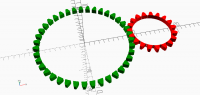
When I display these 2D gear teeth with F5 they have convexity issues.
[image: image.png]
They are just polygons with the convexity set to the number of teeth with a
circle subtracted.
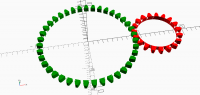
If I linear extrude them they display correctly in 3D.
[image: image.png]
It looks like the 2D display doesn't take convexity into account, or
polygon ignores convexity.
If I linear extrude the polygon and then subtract a cylinder then I have to
set convexity in the linear extrude. Should it get the value from the
polygon? I.e. what is the point in setting it in a polygon?

It looks like the 2D display doesn't take convexity into account, or
polygon ignores convexity.
If I linear extrude the polygon and then subtract a cylinder then I have
to set convexity in the linear extrude. Should it get the value from the
polygon? I.e. what is the point in setting it in a polygon?
Due to the way preview deals with 2D objects, given them a unit height, it
makes sense to have a convexity argument in polygon. If it worked, for
sure. But what is the meaning of a convexity parameter to 2D figures? Why
do 2D objects have a height in preview? Why may 2D objects be rotated
around an axis other than Z axis in preview? F6 will show a very
different animal for any of that.
As it is now, we can preview even the difference between a square and a
cube. Render will complain about the mix of 2D and 3D objects. That is a
lot confusing for beginners and useless for experienced users. I understand
that 2D objects may be a trouble to Z-buffer but a negligible height should
solve that. And the mixing of 2D and 3D objects should be caught by preview.
Yes 2D preview is a bit of bodge but convexity makes sense in 2D just the
same as in 3D but it doesn't seem to work in 2D preview and isn't
propagated to 3D. Surely if you linear_extrude a 2D object with convexity
n, the 3D object should have the same convexity, unless it is twisted, in
which case it could be more I think, but not less, so it could become the
default for linear_extrude.
Convexity is only needed for OpenCSG, which only works in 3D. So if polygon
has a convexity parameter the only thing it could be used for is displaying
it in 3D. Either when it gets converted to 3D by linear_extrude, or by the
implicit extrude to 1mm for 2D preview. It seems to not work for either, so
why does polygon have a convexity parameter?
On Sun, 5 Jul 2020 at 21:54, Ronaldo Persiano rcmpersiano@gmail.com wrote:
It looks like the 2D display doesn't take convexity into account, or
polygon ignores convexity.
If I linear extrude the polygon and then subtract a cylinder then I have
to set convexity in the linear extrude. Should it get the value from the
polygon? I.e. what is the point in setting it in a polygon?
Due to the way preview deals with 2D objects, given them a unit height, it
makes sense to have a convexity argument in polygon. If it worked, for
sure. But what is the meaning of a convexity parameter to 2D figures? Why
do 2D objects have a height in preview? Why may 2D objects be rotated
around an axis other than Z axis in preview? F6 will show a very
different animal for any of that.
As it is now, we can preview even the difference between a square and a
cube. Render will complain about the mix of 2D and 3D objects. That is a
lot confusing for beginners and useless for experienced users. I understand
that 2D objects may be a trouble to Z-buffer but a negligible height should
solve that. And the mixing of 2D and 3D objects should be caught by preview.
OpenSCAD mailing list
Discuss@lists.openscad.org
http://lists.openscad.org/mailman/listinfo/discuss_lists.openscad.org

Convexity doesn't make sense in 2D. It is only needed because the OpenCSG
preview doesn't actually display 2D things as 2D.
This would be less of an issue if OpenCSG previews of 2D objects weren't so
thick. 1mm is simple, and seemed to be ok when printer resolution was more
restricted, and designs with lots of ~1mm features were less common.
Assuming there's still no way to make truly 2D previews work, I've been
wondering if it's time to step down the thickness of these previews to .1
or .01mm. It would also be helpful if the default color for previews of 2D
objects was different, so that it would be easier to tell when you're
mixing 2D and 3D objects (especially with the feature in the beta version
that lets you identify a feature in the code by clicking on it in the
preview).
On July 5, 2020 at 14:07:39, nop head (nop.head@gmail.com) wrote:
Yes 2D preview is a bit of bodge but convexity makes sense in 2D just the
same as in 3D but it doesn't seem to work in 2D preview and isn't
propagated to 3D. Surely if you linear_extrude a 2D object with convexity
n, the 3D object should have the same convexity, unless it is twisted, in
which case it could be more I think, but not less, so it could become the
default for linear_extrude.
Convexity is only needed for OpenCSG, which only works in 3D. So if polygon
has a convexity parameter the only thing it could be used for is displaying
it in 3D. Either when it gets converted to 3D by linear_extrude, or by the
implicit extrude to 1mm for 2D preview. It seems to not work for either, so
why does polygon have a convexity parameter?
On Sun, 5 Jul 2020 at 21:54, Ronaldo Persiano rcmpersiano@gmail.com wrote:
It looks like the 2D display doesn't take convexity into account, or
polygon ignores convexity.
If I linear extrude the polygon and then subtract a cylinder then I have
to set convexity in the linear extrude. Should it get the value from the
polygon? I.e. what is the point in setting it in a polygon?
Due to the way preview deals with 2D objects, given them a unit height, it
makes sense to have a convexity argument in polygon. If it worked, for
sure. But what is the meaning of a convexity parameter to 2D figures? Why
do 2D objects have a height in preview? Why may 2D objects be rotated
around an axis other than Z axis in preview? F6 will show a very
different animal for any of that.
As it is now, we can preview even the difference between a square and a
cube. Render will complain about the mix of 2D and 3D objects. That is a
lot confusing for beginners and useless for experienced users. I understand
that 2D objects may be a trouble to Z-buffer but a negligible height should
solve that. And the mixing of 2D and 3D objects should be caught by preview.
OpenSCAD mailing list
Discuss@lists.openscad.org
http://lists.openscad.org/mailman/listinfo/discuss_lists.openscad.org

On Sun, Jul 05, 2020 at 07:13:28PM +0100, nop head wrote:
When I display these 2D gear teeth with F5 they have convexity issues.
[image: image.png]
They are just polygons with the convexity set to the number of teeth with a
circle subtracted.
The convexity is the maximum number of times a straight line CAN enter
and exit the object. With convexity = number of teeth you've got a
pretty good margin. some thought would reduce that number
significantly. (A straight line can at most hit the teeth on one side,
so number of teeth/2 is still plenty)
Roger.
--
** R.E.Wolff@BitWizard.nl ** https://www.BitWizard.nl/ ** +31-15-2049110 **
** Delftechpark 11 2628 XJ Delft, The Netherlands. KVK: 27239233 **
The plan was simple, like my brother-in-law Phil. But unlike
Phil, this plan just might work.
True, I realised that after posting. The odd thing is setting it to 100 is
no problem. People warn it will slow down but I have never noticed that.
Even setting it to 10000 doesn't cause a noticeable slow down in an
animation! What does making it bigger actually do?
On Mon, 6 Jul 2020 at 12:44, Rogier Wolff R.E.Wolff@bitwizard.nl wrote:
On Sun, Jul 05, 2020 at 07:13:28PM +0100, nop head wrote:
When I display these 2D gear teeth with F5 they have convexity issues.
[image: image.png]
They are just polygons with the convexity set to the number of teeth
with a
circle subtracted.
The convexity is the maximum number of times a straight line CAN enter
and exit the object. With convexity = number of teeth you've got a
pretty good margin. some thought would reduce that number
significantly. (A straight line can at most hit the teeth on one side,
so number of teeth/2 is still plenty)
Roger.
--
** R.E.Wolff@BitWizard.nl ** https://www.BitWizard.nl/ ** +31-15-2049110
**
** Delftechpark 11 2628 XJ Delft, The Netherlands. KVK: 27239233 **
The plan was simple, like my brother-in-law Phil. But unlike
Phil, this plan just might work.
OpenSCAD mailing list
Discuss@lists.openscad.org
http://lists.openscad.org/mailman/listinfo/discuss_lists.openscad.org
On Mon, Jul 06, 2020 at 12:48:54PM +0100, nop head wrote:
True, I realised that after posting. The odd thing is setting it to 100 is
no problem. People warn it will slow down but I have never noticed that.
Even setting it to 10000 doesn't cause a noticeable slow down in an
animation! What does making it bigger actually do?
I think it is a hint to the rendering pipeline that once you've
determined that a "visionray" has intersected the object X times then
you can stop looking for intersections. Maybe your rendering hardware
doesn't need that hint because it uses different algorithms.
Roger.
--
** R.E.Wolff@BitWizard.nl ** https://www.BitWizard.nl/ ** +31-15-2049110 **
** Delftechpark 11 2628 XJ Delft, The Netherlands. KVK: 27239233 **
The plan was simple, like my brother-in-law Phil. But unlike
Phil, this plan just might work.
It needs to be at least 2 to make it display correctly, which makes no
sense to me.
On Mon, 6 Jul 2020 at 12:59, Rogier Wolff R.E.Wolff@bitwizard.nl wrote:
On Mon, Jul 06, 2020 at 12:48:54PM +0100, nop head wrote:
True, I realised that after posting. The odd thing is setting it to 100
is
no problem. People warn it will slow down but I have never noticed that.
Even setting it to 10000 doesn't cause a noticeable slow down in an
animation! What does making it bigger actually do?
I think it is a hint to the rendering pipeline that once you've
determined that a "visionray" has intersected the object X times then
you can stop looking for intersections. Maybe your rendering hardware
doesn't need that hint because it uses different algorithms.
Roger.
--
** R.E.Wolff@BitWizard.nl ** https://www.BitWizard.nl/ ** +31-15-2049110
**
** Delftechpark 11 2628 XJ Delft, The Netherlands. KVK: 27239233 **
The plan was simple, like my brother-in-law Phil. But unlike
Phil, this plan just might work.
OpenSCAD mailing list
Discuss@lists.openscad.org
http://lists.openscad.org/mailman/listinfo/discuss_lists.openscad.org

Any convex polyhedron will have a convexity of two, one surface going in
and one going out
On Mon, 6 Jul 2020, 08:05 nop head, nop.head@gmail.com wrote:
It needs to be at least 2 to make it display correctly, which makes no
sense to me.
On Mon, 6 Jul 2020 at 12:59, Rogier Wolff R.E.Wolff@bitwizard.nl wrote:
On Mon, Jul 06, 2020 at 12:48:54PM +0100, nop head wrote:
True, I realised that after posting. The odd thing is setting it to 100
is
no problem. People warn it will slow down but I have never noticed that.
Even setting it to 10000 doesn't cause a noticeable slow down in an
animation! What does making it bigger actually do?
I think it is a hint to the rendering pipeline that once you've
determined that a "visionray" has intersected the object X times then
you can stop looking for intersections. Maybe your rendering hardware
doesn't need that hint because it uses different algorithms.
Roger.
--
** R.E.Wolff@BitWizard.nl ** https://www.BitWizard.nl/ ** +31-15-2049110
**
** Delftechpark 11 2628 XJ Delft, The Netherlands. KVK: 27239233
**
The plan was simple, like my brother-in-law Phil. But unlike
Phil, this plan just might work.
OpenSCAD mailing list
Discuss@lists.openscad.org
http://lists.openscad.org/mailman/listinfo/discuss_lists.openscad.org
Well there seems to be some confusion in the documentation. I think it is
actually half the number of crossings, or the number of crossings of front
faces and not back faces.
Also with linear extrude it doesn't matter at all if it is the top level,
it only matters if you do subsequent CGS ops on the result.
On Mon, 6 Jul 2020 at 13:19, A. Craig West acraigwest@gmail.com wrote:
Any convex polyhedron will have a convexity of two, one surface going in
and one going out
On Mon, 6 Jul 2020, 08:05 nop head, nop.head@gmail.com wrote:
It needs to be at least 2 to make it display correctly, which makes no
sense to me.
On Mon, 6 Jul 2020 at 12:59, Rogier Wolff R.E.Wolff@bitwizard.nl wrote:
On Mon, Jul 06, 2020 at 12:48:54PM +0100, nop head wrote:
True, I realised that after posting. The odd thing is setting it to
100 is
no problem. People warn it will slow down but I have never noticed
that.
Even setting it to 10000 doesn't cause a noticeable slow down in an
animation! What does making it bigger actually do?
I think it is a hint to the rendering pipeline that once you've
determined that a "visionray" has intersected the object X times then
you can stop looking for intersections. Maybe your rendering hardware
doesn't need that hint because it uses different algorithms.
Roger.
--
** R.E.Wolff@BitWizard.nl ** https://www.BitWizard.nl/ **
+31-15-2049110 **
** Delftechpark 11 2628 XJ Delft, The Netherlands. KVK: 27239233
**
The plan was simple, like my brother-in-law Phil. But unlike
Phil, this plan just might work.
OpenSCAD mailing list
Discuss@lists.openscad.org
http://lists.openscad.org/mailman/listinfo/discuss_lists.openscad.org