

RW
Ray West
Sun, Aug 16, 2020 11:34 AM
The free version is fine for wood, with the correct cutter. I use it for
all the stuff I do with panel type stl files. There are ways of
overcoming the apparent lack of roughing with the free version. It has
quite a nice tool profile set up. But, like most things, It'll take a
bit of effort before you are happy with the results, so if you are
interested be prepared for breaking a few tools, damaging the machine
bed, ruining material on the way.
a small oomph machine is fine, just take lighter cuts, and do work
suited to the machine, like milling pcb's, model making and so on.
On 16/08/2020 05:39, Jordan Brown wrote:
Playing with DeskProto.
Pretty cool, though it seems like the Free edition is too limited for
real use, because it doesn't have the multi-layer "Roughing" process.
If you ask it to cut an STL, it tries to do it in one shot, which only
works if it's really thin or your machine has a lot of oomph.[*]
[*] "oomph" is a technical term.
But the "entry" edition might be OK, and a $250 the hobbyist version
of the multi-axis edition is competitive with the other paid desktop
CNC programs. (It's still more than I really want to spend.)
How much I want to spend is largely driven by projects - it's not that
$250 is a huge amount in an absolute sense, but so far my CNC has all
been in the nature of "so what's CNC like?" rather than having any
actual projects that I want to do.
The free version is fine for wood, with the correct cutter. I use it for
all the stuff I do with panel type stl files. There are ways of
overcoming the apparent lack of roughing with the free version. It has
quite a nice tool profile set up. But, like most things, It'll take a
bit of effort before you are happy with the results, so if you are
interested be prepared for breaking a few tools, damaging the machine
bed, ruining material on the way.
a small oomph machine is fine, just take lighter cuts, and do work
suited to the machine, like milling pcb's, model making and so on.
On 16/08/2020 05:39, Jordan Brown wrote:
> Playing with DeskProto.
>
> Pretty cool, though it seems like the Free edition is too limited for
> real use, because it doesn't have the multi-layer "Roughing" process.
> If you ask it to cut an STL, it tries to do it in one shot, which only
> works if it's really thin or your machine has a lot of oomph.[*]
>
> [*] "oomph" is a technical term.
>
> But the "entry" edition might be OK, and a $250 the hobbyist version
> of the multi-axis edition is competitive with the other paid desktop
> CNC programs. (It's still more than I really want to spend.)
>
> How much I want to spend is largely driven by projects - it's not that
> $250 is a huge amount in an absolute sense, but so far my CNC has all
> been in the nature of "so what's CNC like?" rather than having any
> actual projects that I want to do.
RW
Ray West
Sun, Aug 16, 2020 1:32 PM
Oh, and if sign making may be a thing for you, then the guy at
http://www.scorchworks.com/ has some very useful software, written in
Python, so you can fiddle with it yourself. I've attached an image of a
lump of wood, gcode generated by scorche's software, and cut with a 60
deg trend router bit (dragon.jpg) and the other .jpg gcode was
generated by the free desk proto, using the tapered cutter I referred to
earlier, with 0.25mm radius ball end, using about 0.35mm stepover- it
took a while. but unlike 3d printing, it rarely fails in the middle of a
job. A lighter machine would use a smaller cutter, and may need two or
more passes. You can fake that by offsetting the z axis, or run it with
a larger diameter tool before doing the final cut. You need to try it
and see. A useful source of free stl files for this sort of thing is
sketchfab, a number of museum artefacts are being digitised. You may
need to pass them through meshlab, to straighten them out, and find the
errors.
For less 'arty' stuff, then I often write the raw g.code, over the years
I've written code to programmatically generate flanges, hole patterns,
whatever, or import dxf to deskcnc. Other than machine set up, there are
only a few commands you need to know. You can try deskcnc for 30 days or
so for free. I may be able to offer a licence key at a reduced price,
(the price in 2014 was 135.00 gbp, with v2 controller and cables
230.00gbp) I could contact the author, if requested. (there is a free
dos version, somewhere, but that is way beyond its sell by date), but it
comes into its own with its specific cnc controller.
On 16/08/2020 12:34, Ray West wrote:
The free version is fine for wood, with the correct cutter. I use it
for all the stuff I do with panel type stl files. There are ways of
overcoming the apparent lack of roughing with the free version. It has
quite a nice tool profile set up. But, like most things, It'll take a
bit of effort before you are happy with the results, so if you are
interested be prepared for breaking a few tools, damaging the machine
bed, ruining material on the way.
a small oomph machine is fine, just take lighter cuts, and do work
suited to the machine, like milling pcb's, model making and so on.
On 16/08/2020 05:39, Jordan Brown wrote:
Playing with DeskProto.
Pretty cool, though it seems like the Free edition is too limited for
real use, because it doesn't have the multi-layer "Roughing"
process. If you ask it to cut an STL, it tries to do it in one shot,
which only works if it's really thin or your machine has a lot of
oomph.[*]
[*] "oomph" is a technical term.
But the "entry" edition might be OK, and a $250 the hobbyist version
of the multi-axis edition is competitive with the other paid desktop
CNC programs. (It's still more than I really want to spend.)
How much I want to spend is largely driven by projects - it's not
that $250 is a huge amount in an absolute sense, but so far my CNC
has all been in the nature of "so what's CNC like?" rather than
having any actual projects that I want to do.
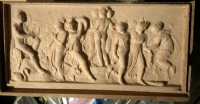
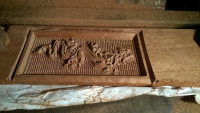
Oh, and if sign making may be a thing for you, then the guy at
http://www.scorchworks.com/ has some very useful software, written in
Python, so you can fiddle with it yourself. I've attached an image of a
lump of wood, gcode generated by scorche's software, and cut with a 60
deg trend router bit (dragon.jpg) and the other .jpg gcode was
generated by the free desk proto, using the tapered cutter I referred to
earlier, with 0.25mm radius ball end, using about 0.35mm stepover- it
took a while. but unlike 3d printing, it rarely fails in the middle of a
job. A lighter machine would use a smaller cutter, and may need two or
more passes. You can fake that by offsetting the z axis, or run it with
a larger diameter tool before doing the final cut. You need to try it
and see. A useful source of free stl files for this sort of thing is
sketchfab, a number of museum artefacts are being digitised. You may
need to pass them through meshlab, to straighten them out, and find the
errors.
For less 'arty' stuff, then I often write the raw g.code, over the years
I've written code to programmatically generate flanges, hole patterns,
whatever, or import dxf to deskcnc. Other than machine set up, there are
only a few commands you need to know. You can try deskcnc for 30 days or
so for free. I may be able to offer a licence key at a reduced price,
(the price in 2014 was 135.00 gbp, with v2 controller and cables
230.00gbp) I could contact the author, if requested. (there is a free
dos version, somewhere, but that is way beyond its sell by date), but it
comes into its own with its specific cnc controller.
On 16/08/2020 12:34, Ray West wrote:
>
> The free version is fine for wood, with the correct cutter. I use it
> for all the stuff I do with panel type stl files. There are ways of
> overcoming the apparent lack of roughing with the free version. It has
> quite a nice tool profile set up. But, like most things, It'll take a
> bit of effort before you are happy with the results, so if you are
> interested be prepared for breaking a few tools, damaging the machine
> bed, ruining material on the way.
>
> a small oomph machine is fine, just take lighter cuts, and do work
> suited to the machine, like milling pcb's, model making and so on.
>
> On 16/08/2020 05:39, Jordan Brown wrote:
>> Playing with DeskProto.
>>
>> Pretty cool, though it seems like the Free edition is too limited for
>> real use, because it doesn't have the multi-layer "Roughing"
>> process. If you ask it to cut an STL, it tries to do it in one shot,
>> which only works if it's really thin or your machine has a lot of
>> oomph.[*]
>>
>> [*] "oomph" is a technical term.
>>
>> But the "entry" edition might be OK, and a $250 the hobbyist version
>> of the multi-axis edition is competitive with the other paid desktop
>> CNC programs. (It's still more than I really want to spend.)
>>
>> How much I want to spend is largely driven by projects - it's not
>> that $250 is a huge amount in an absolute sense, but so far my CNC
>> has all been in the nature of "so what's CNC like?" rather than
>> having any actual projects that I want to do.
>
> _______________________________________________
> OpenSCAD mailing list
> Discuss@lists.openscad.org
> http://lists.openscad.org/mailman/listinfo/discuss_lists.openscad.org
WF
William F. Adams
Sun, Aug 16, 2020 4:58 PM
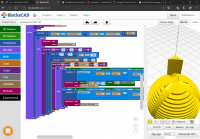
Well, the longitudinal hemisphere cuts work:
Except performance begins to really bog down.
I'll try switching to my MacBook and OpenSCAD to finish this off --- is there any prospect of performance in OpenSCAD improving?
William
Well, the longitudinal hemisphere cuts work:
Except performance begins to really bog down.
I'll try switching to my MacBook and OpenSCAD to finish this off --- is there any prospect of performance in OpenSCAD improving?
William