

discuss@lists.openscad.org

OpenSCAD general discussion Mailing-list

View all threads

volumetric color

JB
Jordan Brown
Sat, Jan 3, 2026 1:30 AM

On 1/2/2026 4:31 PM, Jordan Brown via Discuss wrote:

That face/fill split seems to yield a fairly understandable set of
behaviors, and in particular I think it meets the requirement that I
set at the top:  if you're using only fill colors you don't have to
think about face colors, and if you're using only face colors you
don't have to think about fill colors.

So, how might we bind this to the language?  How would you specify face
colors and fill colors?

First, pretty obviously, color() sets the face colors.  It has to, to
get the right behavior on difference and intersection.

But does it set the fill color?  I think the answer has to be no, to get
the right behavior in this case:

difference() {
    color("blue") cube(10);
    sphere(10);
}

If color() set the fill color, then the fill color of the cube is blue
and thus the fill color of the result is blue, and the face color of the
cut-away portion is negative-undefined, and with a negative-undefined
face and a blue fill, the result is displayed as blue... while today's
behavior is green.

So that seems to tell us that color(c) sets the face color and does not
set the fill color.  So how do you set the fill color?

I've come up with two basic ideas for that.

First, and simplest in some ways:  add a "fill" parameter to color(). 
(And, for symmetry, probably add "faces" as an alias for the existing "c".)

But that doesn't answer a related and also-important question:  how do
you say "this shape should be made out of water-soluble material"?  Or,
a bit more exotic:  how do you say "this shape is a 'modifier' with
semantics to be applied by the slicer"?  Or "this shape is different
from the other shapes and the user might want to change its slicer
treatment; label it and make it readily separable"?

Perhaps part() would mark shapes as somehow separate from other shapes
(and perhaps, or perhaps not, can be combined with other
similarly-marked shapes).

part(color=...) would set the fill color.  part(material=...) would set
the material.  Perhaps part(plane=...) would set what plane of existence
the part is on, so that it doesn't interact with parts on other planes
of existence.  And, finally, part(somethingelse=...) would set some
other similar property, to be defined later.

Note:  I don't think part() needs to have a way to set face color,
because face color is intrinsically incompatible with being a separate
part.  A cube with six face colors is still inseparable, at least at
this point in the pipeline.  But if we wanted to allow for it, the
parameter to part() could be "fill" rather than "color".

I guess I end up on the side of part(), though the fact that it's not
color() bugs me.

On 1/2/2026 4:31 PM, Jordan Brown via Discuss wrote: > That face/fill split seems to yield a fairly understandable set of > behaviors, and in particular I think it meets the requirement that I > set at the top:  if you're using only fill colors you don't have to > think about face colors, and if you're using only face colors you > don't have to think about fill colors. So, how might we bind this to the language?  How would you specify face colors and fill colors? First, pretty obviously, color() sets the face colors.  It has to, to get the right behavior on difference and intersection. But does it set the fill color?  I think the answer has to be no, to get the right behavior in this case: difference() { color("blue") cube(10); sphere(10); } If color() set the fill color, then the fill color of the cube is blue and thus the fill color of the result is blue, and the face color of the cut-away portion is negative-undefined, and with a negative-undefined face and a blue fill, the result is displayed as blue... while today's behavior is green. So that seems to tell us that color(c) sets the face color and does not set the fill color.  So how *do* you set the fill color? I've come up with two basic ideas for that. First, and simplest in some ways:  add a "fill" parameter to color().  (And, for symmetry, probably add "faces" as an alias for the existing "c".) But that doesn't answer a related and also-important question:  how do you say "this shape should be made out of water-soluble material"?  Or, a bit more exotic:  how do you say "this shape is a 'modifier' with semantics to be applied by the slicer"?  Or "this shape is different from the other shapes and the user might want to change its slicer treatment; label it and make it readily separable"? Perhaps part() would mark shapes as somehow separate from other shapes (and perhaps, or perhaps not, can be combined with other similarly-marked shapes). part(color=...) would set the fill color.  part(material=...) would set the material.  Perhaps part(plane=...) would set what plane of existence the part is on, so that it doesn't interact with parts on other planes of existence.  And, finally, part(somethingelse=...) would set some other similar property, to be defined later. Note:  I don't think part() needs to have a way to set face color, because face color is intrinsically incompatible with being a separate part.  A cube with six face colors is still inseparable, at least at this point in the pipeline.  But if we wanted to allow for it, the parameter to part() could be "fill" rather than "color". I guess I end up on the side of part(), though the fact that it's not color() bugs me.
JB
Jordan Brown
Sat, Jan 3, 2026 1:54 AM

And if all of the discussion of face color versus volumetric / fill
color isn't complex enough... what about transparency?

First, mostly, I don't care.  If you thought that existing OpenSCAD
color semantics are weird, take a careful look at existing transparency
semantics.  I would not rely on transparency for anything more than a
visualization hint.

That said, the existing "alpha" transparency only seems applicable to
face coloring.  If you wanted to express the transparency of a solid,
you'd need something more like "transmission per unit depth".  And note
that it's multiplicative; for a material with 90% transmission through
one unit of thickness, two units would be 81% transmission, three units
would be ~73% transmission, and so on.  That's a very different concept
and if we ever felt the need to support it I wouldn't have a problem
with it being totally separate - probably another parameter on part().

Because of the fact that existing transparency support interacts more or
less straightforwardly with default colors, I expect that it would
factor in straightforwardly to the sequence that I described
previously:  when displaying, you would apply the alpha value to the
final display color (which is itself face color if any, else fill color
if any, else default color).

And if all of the discussion of face color versus volumetric / fill color isn't complex enough... what about transparency? First, mostly, I don't care.  If you thought that existing OpenSCAD color semantics are weird, take a careful look at existing transparency semantics.  I would not rely on transparency for anything more than a visualization hint. That said, the existing "alpha" transparency only seems applicable to face coloring.  If you wanted to express the transparency of a solid, you'd need something more like "transmission per unit depth".  And note that it's multiplicative; for a material with 90% transmission through one unit of thickness, two units would be 81% transmission, three units would be ~73% transmission, and so on.  That's a very different concept and if we ever felt the need to support it I wouldn't have a problem with it being totally separate - probably another parameter on part(). Because of the fact that existing transparency support interacts more or less straightforwardly with default colors, I expect that it would factor in straightforwardly to the sequence that I described previously:  when displaying, you would apply the alpha value to the final display color (which is itself face color if any, else fill color if any, else default color).
RW
Raymond West
Sat, Jan 3, 2026 12:36 PM

from the manifold header file

 * In addition to storing geometric data, a Manifold can also store an
arbitrary
 * number of vertex properties. These could be anything, e.g. normals, UV
 * coordinates, colors, etc, but this library is completely agnostic. All
 * properties are merely float values indexed by channel number. It is
up to the
 * user to associate channel numbers with meaning.

whatever openscad does, color is probably not built on that.

If you have tris with different colored vertices, then it could give
gradient colors across the tri, or a single average color, if you design
it that way. If you want a solid color than all vertex color should be
the same. That means if you want separate face colors you need duplicate
vertices in the shape.

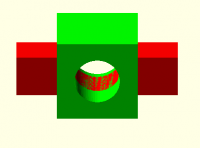
When an object is differenced, (Note the red and green objects are not
unioned in this example, they are imagined as two objects in the same 3d
space) then the cut faces take the vertices from the main object, giving
the impression of a solid colored object. My earlier post of 30/12/2025
showed the result of that, (image below the ply file that I attached
back then, can be viewed with color, in meshlab.)

if the objects were booleaned in any way, the result would be a new
object, and as an object it would need it's own color assigned.

The argument is complicated, if half the time we are thinking in 2d, but
the physical world is 3d (and analogue). fdm color printing is in 3d,
and so is a film of paint. So, face color really needs a separate
colored solid object for each face, which is perfectly feasible using
manifold.

.

On
 03/01/2026 00:31, Jordan Brown via Discuss wrote:

On 1/2/2026 1:58 PM, Cory Cross via Discuss wrote:

Now, when Jordan's thinking volumetric color, I believe he's thinking
the faces shown in the viewport should reflect the volumetric color.

Yes.  Let's state that as requirements:

  • You should be able to "think" in volumetric color, and have
    everything work simply; you should never have to consider face color.
  • If you're "thinking" in face color, everything should be as it is
    today.
  • If you're trying to mix the two, shrug, the result just needs to
    be understandable and non-stupid.

Terminological nit:  you're using "meshes" when I think you mean
"volumes".  Meshes are by definition collections of faces.

I'm having a hard time wrapping my head around the definitions you've
given.  That's not to say that they are wrong, just that they aren't
"clicking" in my head.

I wonder whether it would be helpful to take a lesson from 2D drawing
programs, and consider there to be "face color" and "fill color", with
the possibility that either of those might be "undefined".

Let me try restating the rules with that basis.  (I'm not sure this is
different from what you said.)

What is visible in the UI is the face color, if defined, else the fill
color, and if there's no fill color, the default color (yellow).

Union:

  • Face colors are unchanged.
  • Fill colors are unchanged, with A winning for overlaps.
  • Coincident faces:  A wins (because it's an overlap).

Visually, unions are the same for face coloring and fill coloring.

Difference:

  • Existing faces of A are unchanged.
  • Existing fill of A is unchanged.
  • Newly created faces get the face color from B, if any.
  • Coincident faces:  A wins (because they are existing faces of A).

Note that this means that if B has no face color, newly created faces
have no face color and so will be displayed as the fill color of A, if
any.

Intersection:

  • Existing faces of A are unchanged.
  • Existing fill of A is unchanged.
  • Newly created faces get the face color from B, if any.
  • Coincident faces:  A wins (because they are existing faces of A).

Again, this means that if B has no face color, newly created faces
will have no face color and so will be displayed as the fill color of
A, if any.

In this scheme, I think there's an overall rule that if the inputs
have no face colors, the outputs must not have face colors either. 
(If the operation can introduce face colors where there were none
before, that will unexpectedly influence downstream operations.)

But... are there settings for those various things that yield
compatible behavior in the various default-color cases?  I don't think so.

Consider the simple case:

 difference() {
      cube(10);
      sphere(10);
 }

The "outside", where the cube's original faces remain, is displayed as
yellow.  The "inside", where the sphere was scooped out, is displayed
as green.  So where did the green come from?

  • It's not the face color of the sphere moved over into the face
    color of the result, because that's yellow (if it's anything).
  • It's not face coloring of the result at all, because that would
    then change the behavior of downstream operations. C-(A-B), where
    C has a fill color but no face color defined, should display as
    that fill color but would get some faces colored green.
  • It's not a simple "undefined", because that's the color of the
    cube's original faces, yellow.

It seems like it needs to be a "negative undefined".  When we get done
with all of the operations, if you have a face that has no color, on a
volume that has no fill color, if it's positive undefined it's
displayed as yellow and if it's negative undefined then it's displayed
as green.  (And, except for the "fill color" part, I think that's what
the previewer already does.)

So I think that expands the rules for difference to:

  • Existing faces of A are unchanged.
  • Existing fill of A is unchanged.
  • Newly created faces get the face color from B, if any, else they
    get negative undefined.

I think the rule for intersection is largely unchanged from above, but
explicitly preserving the undefined state of B's faces:

  • Existing faces of A are unchanged.
  • Existing fill of A is unchanged.
  • Newly created faces get the face color from B, including its
    undefined-ness.  That is, if B's face has a color, the result gets
    that color, else if B's face is negative-undefined, the result is
    negative-undefined, else the result is positive-undefined.

Perhaps more generally, the "default colors" are not colors at all. 
Rather, they are the presentation of the lack of color, with a hint
of how the face came to be created.  A shape to which no color has
been applied has neither face colors nor a fill color.  Notably, a
"default color" should not be included in any export.

That face/fill split seems to yield a fairly understandable set of
behaviors, and in particular I think it meets the requirement that I
set at the top:  if you're using only fill colors you don't have to
think about face colors, and if you're using only face colors you
don't have to think about fill colors.


OpenSCAD mailing list
To unsubscribe send an email todiscuss-leave@lists.openscad.org
from the manifold header file  * In addition to storing geometric data, a Manifold can also store an arbitrary  * number of vertex properties. These could be anything, e.g. normals, UV  * coordinates, colors, etc, but this library is completely agnostic. All  * properties are merely float values indexed by channel number. It is up to the  * user to associate channel numbers with meaning. whatever openscad does, color is probably not built on that. If you have tris with different colored vertices, then it could give gradient colors across the tri, or a single average color, if you design it that way. If you want a solid color than all vertex color should be the same. That means if you want separate face colors you need duplicate vertices in the shape. When an object is differenced, (Note the red and green objects are not unioned in this example, they are imagined as two objects in the same 3d space) then the cut faces take the vertices from the main object, giving the impression of a solid colored object. My earlier post of 30/12/2025 showed the result of that, (image below the ply file that I attached back then, can be viewed with color, in meshlab.) if the objects were booleaned in any way, the result would be a new object, and as an object it would need it's own color assigned. The argument is complicated, if half the time we are thinking in 2d, but the physical world is 3d (and analogue). fdm color printing is in 3d, and so is a film of paint. So, face color really needs a separate colored solid object for each face, which is perfectly feasible using manifold. . On  03/01/2026 00:31, Jordan Brown via Discuss wrote: > On 1/2/2026 1:58 PM, Cory Cross via Discuss wrote: >> Now, when Jordan's thinking volumetric color, I believe he's thinking >> the faces shown in the viewport should reflect the volumetric color. > > Yes.  Let's state that as requirements: > > * You should be able to "think" in volumetric color, and have > everything work simply; you should never have to consider face color. > * If you're "thinking" in face color, everything should be as it is > today. > * If you're trying to mix the two, shrug, the result just needs to > be understandable and non-stupid. > > Terminological nit:  you're using "meshes" when I think you mean > "volumes".  Meshes are by definition collections of faces. > > I'm having a hard time wrapping my head around the definitions you've > given.  That's not to say that they are wrong, just that they aren't > "clicking" in my head. > > I wonder whether it would be helpful to take a lesson from 2D drawing > programs, and consider there to be "face color" and "fill color", with > the possibility that either of those might be "undefined". > > Let me try restating the rules with that basis.  (I'm not sure this is > different from what you said.) > > What is visible in the UI is the face color, if defined, else the fill > color, and if there's no fill color, the default color (yellow). > > Union: > > * Face colors are unchanged. > * Fill colors are unchanged, with A winning for overlaps. > * Coincident faces:  A wins (because it's an overlap). > > Visually, unions are the same for face coloring and fill coloring. > > > Difference: > > * Existing faces of A are unchanged. > * Existing fill of A is unchanged. > * Newly created faces get the face color from B, if any. > * Coincident faces:  A wins (because they are existing faces of A). > > Note that this means that if B has no face color, newly created faces > have no face color and so will be displayed as the fill color of A, if > any. > > > Intersection: > > * Existing faces of A are unchanged. > * Existing fill of A is unchanged. > * Newly created faces get the face color from B, if any. > * Coincident faces:  A wins (because they are existing faces of A). > > Again, this means that if B has no face color, newly created faces > will have no face color and so will be displayed as the fill color of > A, if any. > > In this scheme, I think there's an overall rule that if the inputs > have no face colors, the outputs must not have face colors either.  > (If the operation can introduce face colors where there were none > before, that will unexpectedly influence downstream operations.) > > > But... are there settings for those various things that yield > compatible behavior in the various default-color cases?  I don't think so. > > Consider the simple case: > > difference() { > cube(10); > sphere(10); > } > > The "outside", where the cube's original faces remain, is displayed as > yellow.  The "inside", where the sphere was scooped out, is displayed > as green.  So where did the green come from? > > * It's not the face color of the sphere moved over into the face > color of the result, because that's yellow (if it's anything). > * It's not face coloring of the result at all, because that would > then change the behavior of downstream operations. C-(A-B), where > C has a fill color but no face color defined, should display as > that fill color but would get some faces colored green. > * It's not a simple "undefined", because that's the color of the > cube's original faces, yellow. > > It seems like it needs to be a "negative undefined".  When we get done > with all of the operations, if you have a face that has no color, on a > volume that has no fill color, if it's positive undefined it's > displayed as yellow and if it's negative undefined then it's displayed > as green.  (And, except for the "fill color" part, I think that's what > the previewer already does.) > > So I think that expands the rules for difference to: > > * Existing faces of A are unchanged. > * Existing fill of A is unchanged. > * Newly created faces get the face color from B, if any, else they > get negative undefined. > > I think the rule for intersection is largely unchanged from above, but > explicitly preserving the undefined state of B's faces: > > * Existing faces of A are unchanged. > * Existing fill of A is unchanged. > * Newly created faces get the face color from B, including its > undefined-ness.  That is, if B's face has a color, the result gets > that color, else if B's face is negative-undefined, the result is > negative-undefined, else the result is positive-undefined. > > Perhaps more generally, the "default colors" are not colors at all.  > Rather, they are the *presentation* of the lack of color, with a hint > of how the face came to be created.  A shape to which no color has > been applied has neither face colors nor a fill color.  Notably, a > "default color" should not be included in any export. > > > > That face/fill split seems to yield a fairly understandable set of > behaviors, and in particular I think it meets the requirement that I > set at the top:  if you're using only fill colors you don't have to > think about face colors, and if you're using only face colors you > don't have to think about fill colors. > > > _______________________________________________ > OpenSCAD mailing list > To unsubscribe send an email todiscuss-leave@lists.openscad.org

CC
Cory Cross
Sat, Jan 3, 2026 5:34 PM

On 1/2/26 5:30 PM, Jordan Brown via Discuss wrote:

How would you specify face colors and fill colors?

First, pretty obviously, color() sets the face colors.  It has to, to
get the right behavior on difference and intersection.

But does it set the fill color?  I think the answer has to be no, to
get the right behavior in this case:

I agree, any existing invocation of color must not set volumetric
("fill") color.

First, and simplest in some ways:  add a "fill" parameter to color().
(And, for symmetry, probably add "faces" as an alias for the existing
"c".)

It's an option.

But that doesn't answer a related and also-important question: how do
you say "this shape should be made out of water-soluble material"?

You don't. That's not a property of the model itself.

Or, a bit more exotic:  how do you say "this shape is a 'modifier'
with semantics to be applied by the slicer"?

Well, now you got me. I'd prefer you just apply a color -- "silver" lets
say -- and let your slicer map that to a modifier, but I don't think you
can, it needs to be built differently in the 3mf.

Or "this shape is different from the other shapes and the user might
want to change its slicer treatment; label it and make it readily
separable"?

Give it a different color. Multiple colors can be mapped to the same
filament.

Perhaps part() would mark shapes as somehow separate from other shapes
(and perhaps, or perhaps not, can be combined with other
similarly-marked shapes).

part(color=...) would set the fill color.  part(material=...) would
set the material.

I've always been using "volumetric color" as a term to identify the
material. In 3mf, for example, a mesh's material is just an index to an
array where you can define all sorts of stuff.

You also can't(?) have a material with settable color that also varies;
so the same "material" with a different color is... a different
material. So you only need one. Slicers allow remapping if need be.

Note: I don't think part() needs to have a way to set face color,
because face color is intrinsically incompatible with being a separate
part.  A cube with six face colors is still inseparable, at least at
this point in the pipeline.  But if we wanted to allow for it, the
parameter to part() could be "fill" rather than "color".

I don't think it should either.

  • Cory
On 1/2/26 5:30 PM, Jordan Brown via Discuss wrote: > How would you specify face colors and fill colors? > > First, pretty obviously, color() sets the face colors.  It has to, to > get the right behavior on difference and intersection. > > But does it set the fill color?  I think the answer has to be no, to > get the right behavior in this case: I agree, any existing invocation of `color` must not set volumetric ("fill") color. > First, and simplest in some ways:  add a "fill" parameter to color(). > (And, for symmetry, probably add "faces" as an alias for the existing > "c".) It's an option. > But that doesn't answer a related and also-important question: how do > you say "this shape should be made out of water-soluble material"? You don't. That's not a property of the model itself. > Or, a bit more exotic:  how do you say "this shape is a 'modifier' > with semantics to be applied by the slicer"? Well, now you got me. I'd prefer you just apply a color -- "silver" lets say -- and let your slicer map that to a modifier, but I don't think you can, it needs to be built differently in the 3mf. > Or "this shape is different from the other shapes and the user might > want to change its slicer treatment; label it and make it readily > separable"? Give it a different color. Multiple colors can be mapped to the same filament. > Perhaps part() would mark shapes as somehow separate from other shapes > (and perhaps, or perhaps not, can be combined with other > similarly-marked shapes). > > part(color=...) would set the fill color.  part(material=...) would > set the material. I've always been using "volumetric color" as a term to identify the material. In 3mf, for example, a mesh's material is just an index to an array where you can define all sorts of stuff. You also can't(?) have a material with settable color that also varies; so the same "material" with a different color is... a different material. So you only need one. Slicers allow remapping if need be. > Note: I don't think part() needs to have a way to set face color, > because face color is intrinsically incompatible with being a separate > part.  A cube with six face colors is still inseparable, at least at > this point in the pipeline.  But if we wanted to allow for it, the > parameter to part() could be "fill" rather than "color". I don't think it should either. - Cory
CC
Cory Cross
Sat, Jan 3, 2026 5:36 PM

On 1/3/26 4:36 AM, Raymond West via Discuss wrote:

from the manifold header file

 * In addition to storing geometric data, a Manifold can also store an
arbitrary
 * number of vertex properties. These could be anything, e.g. normals, UV
 * coordinates, colors, etc, but this library is completely agnostic. All
 * properties are merely float values indexed by channel number. It is
up to the
 * user to associate channel numbers with meaning.

whatever openscad does, color is probably not built on that.

Please read
https://github.com/elalish/manifold/discussions/1479#discussioncomment-15384231

It covers both what OpenSCAD already does, and the ways Manifold can
represent color.

On 1/3/26 4:36 AM, Raymond West via Discuss wrote: > > from the manifold header file > > >  * In addition to storing geometric data, a Manifold can also store an > arbitrary >  * number of vertex properties. These could be anything, e.g. normals, UV >  * coordinates, colors, etc, but this library is completely agnostic. All >  * properties are merely float values indexed by channel number. It is > up to the >  * user to associate channel numbers with meaning. > > whatever openscad does, color is probably not built on that. > Please read https://github.com/elalish/manifold/discussions/1479#discussioncomment-15384231 It covers both what OpenSCAD already does, and the ways Manifold can represent color.
JB
Jordan Brown
Sat, Jan 3, 2026 6:01 PM

On 1/3/2026 4:36 AM, Raymond West via Discuss wrote:

[ gradient colors ]

Yes, I occasionally think about those and about UV mapping
https://en.wikipedia.org/wiki/UV_mapping.  But they are pretty deep in
the weeds for us.

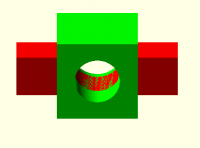
When an object is differenced, (Note the red and green objects are not
unioned in this example, they are imagined as two objects in the same
3d space) then the cut faces take the vertices from the main object,
giving the impression of a solid colored object. My earlier post of
30/12/2025 showed the result of that, (image below the ply file that I
attached back then, can be viewed with color, in meshlab.)

What's the OpenSCAD source for that model?

Absent lazy union, OpenSCAD is simply incapable of putting two objects
into the universe without unioning them.  It doesn't have a way to say
that.  In a preview there may be artifacts like this, but they are
preview issues and do not represent the geometry.

The argument is complicated, if half the time we are thinking in 2d,
but the physical world is 3d (and analogue). fdm color printing is in
3d, and so is a film of paint. So, face color really needs a separate
colored solid object for each face, which is perfectly feasible using
manifold.

Yes, if you want to "paint" a surface you can add a thin object to it -
just as happens with real paint.

Cory's argument is that if that's your goal, the slicer is in a better
position to do it than the design tool is, because the slicer has more
of a clue how opaque the material is and thus how much of it you need.
On 1/3/2026 4:36 AM, Raymond West via Discuss wrote: > [ gradient colors ] Yes, I occasionally think about those and about UV mapping <https://en.wikipedia.org/wiki/UV_mapping>.  But they are pretty deep in the weeds for us. > When an object is differenced, (Note the red and green objects are not > unioned in this example, they are imagined as two objects in the same > 3d space) then the cut faces take the vertices from the main object, > giving the impression of a solid colored object. My earlier post of > 30/12/2025 showed the result of that, (image below the ply file that I > attached back then, can be viewed with color, in meshlab.) > What's the OpenSCAD source for that model? Absent lazy union, OpenSCAD is simply incapable of putting two objects into the universe without unioning them.  It doesn't have a way to say that.  In a preview there may be artifacts like this, but they are preview issues and do not represent the geometry. > The argument is complicated, if half the time we are thinking in 2d, > but the physical world is 3d (and analogue). fdm color printing is in > 3d, and so is a film of paint. So, face color really needs a separate > colored solid object for each face, which is perfectly feasible using > manifold. Yes, if you want to "paint" a surface you can add a thin object to it - just as happens with real paint. Cory's argument is that if that's your goal, the slicer is in a better position to do it than the design tool is, because the slicer has more of a clue how opaque the material is and thus how much of it you need.
CC
Cory Cross
Sat, Jan 3, 2026 6:10 PM

On 1/2/26 4:31 PM, Jordan Brown via Discuss wrote:

On 1/2/2026 1:58 PM, Cory Cross via Discuss wrote:

Now, when Jordan's thinking volumetric color, I believe he's thinking
the faces shown in the viewport should reflect the volumetric color.

Yes.  Let's state that as requirements:

  • You should be able to "think" in volumetric color, and have
    everything work simply; you should never have to consider face color.
  • If you're "thinking" in face color, everything should be as it is
    today.
  • If you're trying to mix the two, shrug, the result just needs to
    be understandable and non-stupid.

I'm okay with that.

Terminological nit:  you're using "meshes" when I think you mean
"volumes".  Meshes are by definition collections of faces.

Do you mean because a volumetric color can have multiple disjoint meshes?

I'm having a hard time wrapping my head around the definitions you've
given.  That's not to say that they are wrong, just that they aren't
"clicking" in my head.

I wonder whether it would be helpful to take a lesson from 2D drawing
programs, and consider there to be "face color" and "fill color", with
the possibility that either of those might be "undefined".

That's confusing to me because "fill color" is "face color" in 2d
drawing programs.

Let me try restating the rules with that basis.  (I'm not sure this is
different from what you said.)

I tried to define was "what should happen with faces with your
volumetric POC".

What is visible in the UI is the face color, if defined, else the fill
color, and if there's no fill color, the default color (yellow).

Union:

  • Face colors are unchanged.
  • Fill colors are unchanged, with A winning for overlaps.
  • Coincident faces:  A wins (because it's an overlap).

What makes this complicated is handling the overlapping cases. You can
eliminate this with the rule I posted, where it's solely defined with a
non-overlapping union() + difference() + intersection().

I think coincident faces are a little more complicated:

  1. Their interior is to the same side: it's handled by which wins the
    volume.
  2. Their interior is to opposite sides: both faces continue to exist
    separately unless volumetric ("fill") color is the same on both sides;
    then they are removed where that condition holds.

Visually, unions are the same for face coloring and fill coloring.

Except when you both in the same program.

Difference:

  • Existing faces of A are unchanged.

Some can be deleted or divided.

  • Existing fill of A is unchanged.

Some can be made smaller or disappear entirely.

  • Newly created faces get the face color from B, if any.

I suggested to make it work differently. If B has face color use it;
otherwise use the fill color, because the "space" previously occupied by
the face was formerly the "fill" of A, so it would make sense that it's
taken the color of the fill -- not necessarily in a computer graphics
sense, but in a real-world sense. If I cut open a (red) gala apple or a
(green) granny smith apple, the interior of both is white and I would
expect that face to now be white.

OTOH, the rule for final rendering of face color view should be, for
each face:

  1. If not uncolored, the face color.
  2. If the volumetric ("fill") color is not uncolored, use that color.
  3. Otherwise get the color from settings.

So the face could be left uncolored and often get the same outcome.
Where it matters is you then using it in further operations, like
cutting with a previously cut object:

g_cut = {{ difference() { vol_color("red") cube(); vol_color("blue")
sphere(); } }} // g_cut has mostly uncolored faces, except the faces
from the sphere, which are red.
g2_cut = {{ difference() { vol_color("green") cube(2): show(g_cut); } }}
// g2_cut has fill of green, and most faces uncolored except some are
red and some are green!?

Actually, I'm just going to stop here. Despite the cutting action being
intuitive (to me), I think the example makes it obvious it's dumb.

So I agree with your suggestion, face color should only get color from
other faces during evaluation.

  • Coincident faces:  A wins (because they are existing faces of A).

I don't think that's the best reasoning; faces have no thickness so a
face alone cannot remove another face. Thus coincidence is irrelevant.

Note that this means that if B has no face color, newly created faces
have no face color and so will be displayed as the fill color of A, if
any.

Important word being displayed.

Intersection:

  • Existing faces of A are unchanged.

Except the ones deleted or fragmented.

  • Existing fill of A is unchanged.

Except what is removed.

  • Newly created faces get the face color from B, if any.

No faces are completely new, they're at least fragments of previous faces.
I believe it's better to combine this with the first statement and say:
Every face comes from some or all of an existing face of either A or B;
face color is preserved from before.

  • Coincident faces:  A wins (because they are existing faces of A).

Again, this means that if B has no face color, newly created faces
will have no face color and so will be displayed as the fill color of
A, if any.

Emphasis on displayed.

In this scheme, I think there's an overall rule that if the inputs
have no face colors, the outputs must not have face colors either. 
(If the operation can introduce face colors where there were none
before, that will unexpectedly influence downstream operations.)

I think I understand the motivation for writing this, but there's always
a face color, we just call some of them positive or negative uncolor.

I think your parenthetical remark is more important: operations should
not introduce face colors.

But... are there settings for those various things that yield
compatible behavior in the various default-color cases?  I don't think so.

Consider the simple case:

 difference() {
      cube(10);
      sphere(10);
 }

The "outside", where the cube's original faces remain, is displayed as
yellow.  The "inside", where the sphere was scooped out, is displayed
as green.  So where did the green come from?

  • It's not the face color of the sphere moved over into the face
    color of the result, because that's yellow (if it's anything).

It's positive uncolor.

  • It's not face coloring of the result at all, because that would
    then change the behavior of downstream operations. C-(A-B), where
    C has a fill color but no face color defined, should display as
    that fill color but would get some faces colored green.

C is the left operand; it's lack of face colors do not affect whether
any newly-created faces get negative color.

  • It's not a simple "undefined", because that's the color of the
    cube's original faces, yellow.

It seems like it needs to be a "negative undefined".  When we get done
with all of the operations, if you have a face that has no color, on a
volume that has no fill color, if it's positive undefined it's
displayed as yellow and if it's negative undefined then it's displayed
as green.  (And, except for the "fill color" part, I think that's what
the previewer already does.)

We wrote this in the spec as "positive uncolor" and "negative uncolor".

So I think that expands the rules for difference to:

  • Existing faces of A are unchanged.
  • Existing fill of A is unchanged.
  • Newly created faces get the face color from B, if any, else they
    get negative undefined.

Other than difference not being useful if A is unchanged :-P, then I'm
okay with this. So copying and updating my previous definitions:

difference() { vol(); face(); } -- all new faces take from the face
color of the removing face, except when it's positive uncolor, then it
gets negative uncolor. If all meshes of a volumetric color are
contained within the right-hand operand, that volumetric color is gone.

difference() { vol(); other_vol(); } -- Like intersection, volumetric
color is ignored for the right-hand operand. Thus this is actually the
previous case.

difference() { face(); vol(); } -- this is also the first case, with a
single mesh of volumetric uncolor ("fill color" == "uncolor")

Perhaps more generally, the "default colors" are not colors at all. 
Rather, they are the presentation of the lack of color, with a hint
of how the face came to be created.  A shape to which no color has
been applied has neither face colors nor a fill color.  Notably, a
"default color" should not be included in any export.

Yes, that's consistent with the spec.

That face/fill split seems to yield a fairly understandable set of
behaviors, and in particular I think it meets the requirement that I
set at the top:  if you're using only fill colors you don't have to
think about face colors, and if you're using only face colors you
don't have to think about fill colors.

Sounds good.

  • Cory
On 1/2/26 4:31 PM, Jordan Brown via Discuss wrote: > On 1/2/2026 1:58 PM, Cory Cross via Discuss wrote: >> Now, when Jordan's thinking volumetric color, I believe he's thinking >> the faces shown in the viewport should reflect the volumetric color. > > Yes.  Let's state that as requirements: > > * You should be able to "think" in volumetric color, and have > everything work simply; you should never have to consider face color. > * If you're "thinking" in face color, everything should be as it is > today. > * If you're trying to mix the two, shrug, the result just needs to > be understandable and non-stupid. > I'm okay with that. > Terminological nit:  you're using "meshes" when I think you mean > "volumes".  Meshes are by definition collections of faces. Do you mean because a volumetric color can have multiple disjoint meshes? > I'm having a hard time wrapping my head around the definitions you've > given.  That's not to say that they are wrong, just that they aren't > "clicking" in my head. > > I wonder whether it would be helpful to take a lesson from 2D drawing > programs, and consider there to be "face color" and "fill color", with > the possibility that either of those might be "undefined". That's confusing to me because "fill color" *is* "face color" in 2d drawing programs. > Let me try restating the rules with that basis.  (I'm not sure this is > different from what you said.) I tried to define was "what should happen with faces with your volumetric POC". > What is visible in the UI is the face color, if defined, else the fill > color, and if there's no fill color, the default color (yellow). > > Union: > > * Face colors are unchanged. > * Fill colors are unchanged, with A winning for overlaps. > * Coincident faces:  A wins (because it's an overlap). > What makes this complicated is handling the overlapping cases. You can eliminate this with the rule I posted, where it's solely defined with a non-overlapping union() + difference() + intersection(). I think coincident faces are a little more complicated: 1. Their interior is to the same side: it's handled by which wins the volume. 2. Their interior is to opposite sides: both faces continue to exist separately unless volumetric ("fill") color is the same on both sides; then they are removed where that condition holds. > Visually, unions are the same for face coloring and fill coloring. > Except when you both in the same program. > Difference: > > * Existing faces of A are unchanged. > Some can be deleted or divided. > > * Existing fill of A is unchanged. > Some can be made smaller or disappear entirely. > > * Newly created faces get the face color from B, if any. > I suggested to make it work differently. If B has face color use it; otherwise use the fill color, because the "space" previously occupied by the face was formerly the "fill" of A, so it would make sense that it's taken the color of the fill -- not necessarily in a computer graphics sense, but in a real-world sense. If I cut open a (red) gala apple or a (green) granny smith apple, the interior of both is white and I would expect that face to now be white. OTOH, the rule for final rendering of face color view should be, for each face: 1. If not uncolored, the face color. 2. If the volumetric ("fill") color is not uncolored, use that color. 3. Otherwise get the color from settings. So the face could be left uncolored and often get the same outcome. Where it matters is you then using it in further operations, like cutting with a previously cut object: g_cut = {{ difference() { vol_color("red") cube(); vol_color("blue") sphere(); } }} // g_cut has mostly uncolored faces, except the faces from the sphere, which are red. g2_cut = {{ difference() { vol_color("green") cube(2): show(g_cut); } }} // g2_cut has fill of green, and most faces uncolored except some are red and some are green!? Actually, I'm just going to stop here. Despite the cutting action being intuitive (to me), I think the example makes it obvious it's dumb. So I agree with your suggestion, face color should only get color from other faces during evaluation. > * Coincident faces:  A wins (because they are existing faces of A). > I don't think that's the best reasoning; faces have no thickness so a face alone cannot remove another face. Thus coincidence is irrelevant. > Note that this means that if B has no face color, newly created faces > have no face color and so will be displayed as the fill color of A, if > any. > Important word being *displayed*. > Intersection: > > * Existing faces of A are unchanged. > Except the ones deleted or fragmented. > > * Existing fill of A is unchanged. > Except what is removed. > > * Newly created faces get the face color from B, if any. > No faces are completely new, they're at least *fragments* of previous faces. I believe it's better to combine this with the first statement and say: Every face comes from some or all of an existing face of either A or B; face color is preserved from before. > * Coincident faces:  A wins (because they are existing faces of A). > > Again, this means that if B has no face color, newly created faces > will have no face color and so will be displayed as the fill color of > A, if any. > Emphasis on *displayed*. > In this scheme, I think there's an overall rule that if the inputs > have no face colors, the outputs must not have face colors either.  > (If the operation can introduce face colors where there were none > before, that will unexpectedly influence downstream operations.) > I think I understand the motivation for writing this, but there's always a face color, we just call some of them positive or negative uncolor. I think your parenthetical remark is more important: operations should not introduce face colors. > But... are there settings for those various things that yield > compatible behavior in the various default-color cases?  I don't think so. > > Consider the simple case: > > difference() { > cube(10); > sphere(10); > } > > The "outside", where the cube's original faces remain, is displayed as > yellow.  The "inside", where the sphere was scooped out, is displayed > as green.  So where did the green come from? > > * It's not the face color of the sphere moved over into the face > color of the result, because that's yellow (if it's anything). > It's positive uncolor. > > * It's not face coloring of the result at all, because that would > then change the behavior of downstream operations. C-(A-B), where > C has a fill color but no face color defined, should display as > that fill color but would get some faces colored green. > C is the left operand; it's lack of face colors do not affect whether any newly-created faces get negative color. > * It's not a simple "undefined", because that's the color of the > cube's original faces, yellow. > > It seems like it needs to be a "negative undefined".  When we get done > with all of the operations, if you have a face that has no color, on a > volume that has no fill color, if it's positive undefined it's > displayed as yellow and if it's negative undefined then it's displayed > as green.  (And, except for the "fill color" part, I think that's what > the previewer already does.) > We wrote this in the spec as "positive uncolor" and "negative uncolor". > So I think that expands the rules for difference to: > > * Existing faces of A are unchanged. > * Existing fill of A is unchanged. > * Newly created faces get the face color from B, if any, else they > get negative undefined. > Other than difference not being useful if A is unchanged :-P, then I'm okay with this. So copying and updating my previous definitions: difference() { vol(); face(); } -- all new faces take from the face color of the removing face, except when it's positive uncolor, then it gets negative uncolor. If all meshes of a volumetric color are *contained* within the right-hand operand, that volumetric color is gone. difference() { vol(); other_vol(); } -- Like intersection, volumetric color is ignored for the right-hand operand. Thus this is actually the previous case. difference() { face(); vol(); } -- this is also the first case, with a single mesh of volumetric uncolor ("fill color" == "uncolor") > Perhaps more generally, the "default colors" are not colors at all.  > Rather, they are the *presentation* of the lack of color, with a hint > of how the face came to be created.  A shape to which no color has > been applied has neither face colors nor a fill color.  Notably, a > "default color" should not be included in any export. > Yes, that's consistent with the spec. > That face/fill split seems to yield a fairly understandable set of > behaviors, and in particular I think it meets the requirement that I > set at the top:  if you're using only fill colors you don't have to > think about face colors, and if you're using only face colors you > don't have to think about fill colors. Sounds good. - Cory
JB
Jordan Brown
Sat, Jan 3, 2026 6:57 PM

On 1/3/2026 9:34 AM, Cory Cross via Discuss wrote:

But that doesn't answer a related and also-important question: how do
you say "this shape should be made out of water-soluble material"?

First, to be clear, I meant "this shape should be made out of
water-soluble material, while the rest of the model should be made out
of ordinary material".

You don't. That's not a property of the model itself. 

Why not?  Because my particular example (water-soluble material) is for
support, and that's not part of the model?  OK, "this shape should be
made out of flexible material". (Versus the rest of the model being
inflexible.)

Or, a bit more exotic:  how do you say "this shape is a 'modifier'
with semantics to be applied by the slicer"?

Well, now you got me. I'd prefer you just apply a color -- "silver"
lets say -- and let your slicer map that to a modifier, but I don't
think you can, it needs to be built differently in the 3mf. 

I suspect that would work, because the "silver" probably isn't
represented in the file as anything more than a label, at least as far
as the slicer is concerned, and you can apply whatever semantics you
like there.  But ... it's a hack.

I've always been using "volumetric color" as a term to identify the
material. In 3mf, for example, a mesh's material is just an index to
an array where you can define all sorts of stuff.

You also can't(?) have a material with settable color that also
varies; so the same "material" with a different color is... a
different material. So you only need one. Slicers allow remapping if
need be. 

Practically speaking you're right, of course.  Color and material are
just about the same thing.

But that's a limitation of today's print technology.  I'd prefer to
model the ideal result, rather than encode other characteristics in "color".

As a simple example, that could be done with today's printers, if we
encoded color and material into the output file the slicer could say
"for this model, you need to put silver PLA on extruder 1 and red TPU on
extruder 2".  (Much as some paper printers will try to keep track of the
paper size and type loaded, and prompt you when the job requires a
different paper.)

On a multi-head printer - note that Prusa is supposed to be introducing
an 8-head version of the Core One+ this year - you might reasonably keep
a number of colors and materials "stock", mounted all the time.  The
more that the slicer and the printer can know about materials and
colors, and the more that we can represent them in the model, the more
that stuff like that can be just "render and print".

On 1/3/2026 9:34 AM, Cory Cross via Discuss wrote: >> But that doesn't answer a related and also-important question: how do >> you say "this shape should be made out of water-soluble material"? First, to be clear, I meant "this shape should be made out of water-soluble material, while the rest of the model should be made out of ordinary material". > You don't. That's not a property of the model itself.  Why not?  Because my particular example (water-soluble material) is for support, and that's not part of the model?  OK, "this shape should be made out of flexible material". (Versus the rest of the model being inflexible.) >> Or, a bit more exotic:  how do you say "this shape is a 'modifier' >> with semantics to be applied by the slicer"? > Well, now you got me. I'd prefer you just apply a color -- "silver" > lets say -- and let your slicer map that to a modifier, but I don't > think you can, it needs to be built differently in the 3mf.  I suspect that would work, because the "silver" probably isn't represented in the file as anything more than a label, at least as far as the slicer is concerned, and you can apply whatever semantics you like there.  But ... it's a hack. > I've always been using "volumetric color" as a term to identify the > material. In 3mf, for example, a mesh's material is just an index to > an array where you can define all sorts of stuff. > > You also can't(?) have a material with settable color that also > varies; so the same "material" with a different color is... a > different material. So you only need one. Slicers allow remapping if > need be.  Practically speaking you're right, of course.  Color and material are just about the same thing. But that's a limitation of today's print technology.  I'd prefer to model the ideal result, rather than encode other characteristics in "color". As a simple example, that could be done with today's printers, if we encoded color and material into the output file the slicer could say "for this model, you need to put silver PLA on extruder 1 and red TPU on extruder 2".  (Much as some paper printers will try to keep track of the paper size and type loaded, and prompt you when the job requires a different paper.) On a multi-head printer - note that Prusa is supposed to be introducing an 8-head version of the Core One+ this year - you might reasonably keep a number of colors and materials "stock", mounted all the time.  The more that the slicer and the printer can know about materials and colors, and the more that we can represent them in the model, the more that stuff like that can be just "render and print".
CC
Cory Cross
Sat, Jan 3, 2026 8:01 PM

I think I understand now. We're moving past the discussion of how volumetric "color" interacts with CSG operations into the discussion of "how to define what a volumetric color is". But also, since faces can get volumetric color, you also should be able to apply all the same properties of "color" to faces and volume. For me, if I have a red TPU and a red PETG in the same print, then one is FF0000 and the other is FF1010. In program that's module tpu() color("#FF1010");.

Say I want a surface of TPU on part of the model, but without caring about thickness. I do:

volume_color_petg() union () {
tpu() cube();
sphere();
}

With what I use, I simply map every RGB to material. Sometimes I just use red and blue, but they're green and white. I treat RGB as an index to material that just happens to show up as a visual color in the viewport.

If we add part, we either need to augment color or allow part to apply to faces.

Or, we echo what 3mf does (because they thought a lot about this already) and we define our materials by name once, then reference that name in color and volume_color (or equivalent i.e args to color for volume or a different name).

Another reason to reference by name is libraries, like BOSL2, are already built around taking a single value as a color. They might work with an object, but they definitely work with strings. So if we add another character besides # to the color namespace, we minimize the code needed for libraries to update. This is stupid, probably, but color("+m+redtpu") applies the redtpu "part" to the volume of children, color("+f+redtpu") to faces, and, now you'll see why I set it to "m" before, color("+v+redtpu") for vertices!

And why vertices? As Emmett wrote, computer graphics primarily use vertex coloring and he should not have even added face coloring in 3mf spec. So if we think OpenSCAD should ever be used for computer graphics, then it probably should support vertex coloring (see tetrahedron puzzle example at manifoldcad.org). But also you could have a printer with dyes so you literally could have the same material and color gradient interpreted. Or, heck, why not a blend of two different materials!

  • Cory

On January 3, 2026 10:57:19 AM PST, Jordan Brown via Discuss discuss@lists.openscad.org wrote:

On 1/3/2026 9:34 AM, Cory Cross via Discuss wrote:

But that doesn't answer a related and also-important question: how do
you say "this shape should be made out of water-soluble material"?

First, to be clear, I meant "this shape should be made out of
water-soluble material, while the rest of the model should be made out
of ordinary material".

You don't. That's not a property of the model itself. 

Why not?  Because my particular example (water-soluble material) is for
support, and that's not part of the model?  OK, "this shape should be
made out of flexible material". (Versus the rest of the model being
inflexible.)

Or, a bit more exotic:  how do you say "this shape is a 'modifier'
with semantics to be applied by the slicer"?
Well, now you got me. I'd prefer you just apply a color -- "silver"
lets say -- and let your slicer map that to a modifier, but I don't
think you can, it needs to be built differently in the 3mf. 

I suspect that would work, because the "silver" probably isn't
represented in the file as anything more than a label, at least as far
as the slicer is concerned, and you can apply whatever semantics you
like there.  But ... it's a hack.

I've always been using "volumetric color" as a term to identify the
material. In 3mf, for example, a mesh's material is just an index to
an array where you can define all sorts of stuff.

You also can't(?) have a material with settable color that also
varies; so the same "material" with a different color is... a
different material. So you only need one. Slicers allow remapping if
need be. 

Practically speaking you're right, of course.  Color and material are
just about the same thing.

But that's a limitation of today's print technology.  I'd prefer to
model the ideal result, rather than encode other characteristics in "color".

As a simple example, that could be done with today's printers, if we
encoded color and material into the output file the slicer could say
"for this model, you need to put silver PLA on extruder 1 and red TPU on
extruder 2".  (Much as some paper printers will try to keep track of the
paper size and type loaded, and prompt you when the job requires a
different paper.)

On a multi-head printer - note that Prusa is supposed to be introducing
an 8-head version of the Core One+ this year - you might reasonably keep
a number of colors and materials "stock", mounted all the time.  The
more that the slicer and the printer can know about materials and
colors, and the more that we can represent them in the model, the more
that stuff like that can be just "render and print".

I think I understand now. We're moving past the discussion of how volumetric "color" interacts with CSG operations into the discussion of "how to define what a volumetric color is". But also, since faces can get volumetric color, you also should be able to apply all the same properties of "color" to faces and volume. For me, if I have a red TPU and a red PETG in the same print, then one is FF0000 and the other is FF1010. In program that's `module tpu() color("#FF1010");`. Say I want a surface of TPU on part of the model, but without caring about thickness. I do: volume_color_petg() union () { tpu() cube(); sphere(); } With what I use, I simply map every RGB to material. Sometimes I just use red and blue, but they're green and white. I treat RGB as an index to material that just happens to show up as a visual color in the viewport. If we add `part`, we either need to augment `color` or allow `part` to apply to faces. Or, we echo what 3mf does (because they thought a lot about this already) and we define our materials by name once, then reference that name in `color` and `volume_color` (or equivalent i.e args to color for volume or a different name). Another reason to reference by name is libraries, like BOSL2, are already built around taking a single value as a color. They might work with an object, but they definitely work with strings. So if we add another character besides # to the color namespace, we minimize the code needed for libraries to update. This is stupid, probably, but color("+m+redtpu") applies the redtpu "part" to the volume of children, color("+f+redtpu") to faces, and, now you'll see why I set it to "m" before, color("+v+redtpu") for vertices! And why vertices? As Emmett wrote, computer graphics primarily use vertex coloring and he should not have even added face coloring in 3mf spec. So if we think OpenSCAD should ever be used for computer graphics, then it probably should support vertex coloring (see tetrahedron puzzle example at manifoldcad.org). But also you could have a printer with dyes so you literally could have the same material and color gradient interpreted. Or, heck, why not a blend of two different materials! - Cory On January 3, 2026 10:57:19 AM PST, Jordan Brown via Discuss <discuss@lists.openscad.org> wrote: >On 1/3/2026 9:34 AM, Cory Cross via Discuss wrote: >>> But that doesn't answer a related and also-important question: how do >>> you say "this shape should be made out of water-soluble material"? > >First, to be clear, I meant "this shape should be made out of >water-soluble material, while the rest of the model should be made out >of ordinary material". > >> You don't. That's not a property of the model itself.  > >Why not?  Because my particular example (water-soluble material) is for >support, and that's not part of the model?  OK, "this shape should be >made out of flexible material". (Versus the rest of the model being >inflexible.) > >>> Or, a bit more exotic:  how do you say "this shape is a 'modifier' >>> with semantics to be applied by the slicer"? >> Well, now you got me. I'd prefer you just apply a color -- "silver" >> lets say -- and let your slicer map that to a modifier, but I don't >> think you can, it needs to be built differently in the 3mf.  > >I suspect that would work, because the "silver" probably isn't >represented in the file as anything more than a label, at least as far >as the slicer is concerned, and you can apply whatever semantics you >like there.  But ... it's a hack. > >> I've always been using "volumetric color" as a term to identify the >> material. In 3mf, for example, a mesh's material is just an index to >> an array where you can define all sorts of stuff. >> >> You also can't(?) have a material with settable color that also >> varies; so the same "material" with a different color is... a >> different material. So you only need one. Slicers allow remapping if >> need be.  > >Practically speaking you're right, of course.  Color and material are >just about the same thing. > >But that's a limitation of today's print technology.  I'd prefer to >model the ideal result, rather than encode other characteristics in "color". > >As a simple example, that could be done with today's printers, if we >encoded color and material into the output file the slicer could say >"for this model, you need to put silver PLA on extruder 1 and red TPU on >extruder 2".  (Much as some paper printers will try to keep track of the >paper size and type loaded, and prompt you when the job requires a >different paper.) > >On a multi-head printer - note that Prusa is supposed to be introducing >an 8-head version of the Core One+ this year - you might reasonably keep >a number of colors and materials "stock", mounted all the time.  The >more that the slicer and the printer can know about materials and >colors, and the more that we can represent them in the model, the more >that stuff like that can be just "render and print".
JB
Jordan Brown
Sat, Jan 3, 2026 8:26 PM

On 1/3/2026 10:10 AM, Cory Cross via Discuss wrote:

Terminological nit:  you're using "meshes" when I think you mean
"volumes".  Meshes are by definition collections of faces.

Do you mean because a volumetric color can have multiple disjoint meshes?

No, because a mesh is just the surface; it isn't the interior.

Meshes are collections of faces.  Collections of faces might or might
not bound solids.

Consider the common-English word: a mesh is a piece of fabric, not the
thing that the fabric encloses.

I'm having a hard time wrapping my head around the definitions you've
given.  That's not to say that they are wrong, just that they aren't
"clicking" in my head.

I wonder whether it would be helpful to take a lesson from 2D drawing
programs, and consider there to be "face color" and "fill color",
with the possibility that either of those might be "undefined".

That's confusing to me because "fill color" is "face color" in 2d
drawing programs.

That's because you're looking at your 2D drawings from a 3D perspective,
and at your 3D models from a 3D perspective.  When you're looking at a
2D drawing you're able to see both the boundary and the interior; when
you're looking at a 3D object you're only able to see the boundary.

You need to look at your 2D images from the side.  Alternatively, you
need to look at your 3D models from a 4D perspective, but that's harder.

When you look at a 2D image from the side, you see the stroke color, if
any, and if there's no stroke color then you see the fill color.

Union:

  • Face colors are unchanged.
  • Fill colors are unchanged, with A winning for overlaps.
  • Coincident faces:  A wins (because it's an overlap).

What makes this complicated is handling the overlapping cases. You can
eliminate this with the rule I posted, where it's solely defined with
a non-overlapping union() + difference() + intersection().

You only need union plus difference.  You don't need the intersection.

The result of unioning A and B is union(A, difference(B,A)).

I believe you had union(difference(A,B), intersect(A,B),
difference(B,A)), with the first two retaining A's color, but when you
add that difference to that intersection you're back to A.

I think coincident faces are a little more complicated:

  1. Their interior is to the same side: it's handled by which wins the
    volume.

Yes.

  1. Their interior is to opposite sides: both faces continue to exist
    separately unless volumetric ("fill") color is the same on both sides;
    then they are removed where that condition holds.

That latter is just a special case of the fact that all same-color (and
same-material et cetera) shapes get unioned.

Visually, unions are the same for face coloring and fill coloring.

Except when you both in the same program.

I don't think so.  What's a case where they are visibly different?

Difference:

  • Existing faces of A are unchanged.

Some can be deleted or divided.

Yes.  Deleted faces are of course deleted, and divided faces retain the
color of their "parent".

We're only talking about the coloring.

  • Coincident faces:  A wins (because they are existing faces of A).

I don't think that's the best reasoning; faces have no thickness so a
face alone cannot remove another face. Thus coincidence is irrelevant.

If the parts are on opposite sides of the coincident face, that face
remains colored with the color it had in A.

Note that this means that if B has no face color, newly created faces
have no face color and so will be displayed as the fill color of A,
if any.

Important word being displayed.

Yes, indeed, important and deliberate.

  • Newly created faces get the face color from B, if any.

No faces are completely new, they're at least fragments of previous
faces.

They are always contributed by one of the input shapes, yes.  But I'm
finding it a bit more useful to think of it as starting with A, then
removing the parts that aren't in common with B.  (That mental model
explains why the fill remains A's fill.)

I believe it's better to combine this with the first statement and
say: Every face comes from some or all of an existing face of either A
or B; face color is preserved from before.

I think that means the same thing that I said.

In this scheme, I think there's an overall rule that if the inputs
have no face colors, the outputs must not have face colors either. 
(If the operation can introduce face colors where there were none
before, that will unexpectedly influence downstream operations.)

I think I understand the motivation for writing this, but there's
always a face color, we just call some of them positive or negative
uncolor.

What is the sound of no hands clapping? :-)

I think we end up with the same behavior, but I would say that "has no
color" is not a color, just as undef is not a number.  There is no RGB
triple that represents positive-undefined or negative-undefined.

We wrote this in the spec as "positive uncolor" and "negative uncolor".

I didn't happen to remember it, so I seem to have reinvented it.

So I think that expands the rules for difference to:

  • Existing faces of A are unchanged.
  • Existing fill of A is unchanged.
  • Newly created faces get the face color from B, if any, else they
    get negative undefined.

Other than difference not being useful if A is unchanged :-P, then I'm
okay with this.

Again, we're only talking about coloring.

In your terminology of vol() and face() I think you're missing that a
shape may have some faces that have colors and others that don't, that
are what you're calling uncolor.

difference() { vol(); face(); } -- all new faces take from the face
color of the removing face, except when it's positive uncolor, then it
gets negative uncolor. If all meshes of a volumetric color are
contained within the right-hand operand, that volumetric color is gone.

In any A-B, if all of A is contained in B, the result is the empty
shape.  I don't immediately see how its fill color matters at that point.

On 1/3/2026 10:10 AM, Cory Cross via Discuss wrote: >> >> Terminological nit:  you're using "meshes" when I think you mean >> "volumes".  Meshes are by definition collections of faces. > Do you mean because a volumetric color can have multiple disjoint meshes? No, because a mesh is just the surface; it isn't the interior. Meshes are collections of faces.  Collections of faces might or might not bound solids. Consider the common-English word: a mesh is a piece of fabric, not the thing that the fabric encloses. >> I'm having a hard time wrapping my head around the definitions you've >> given.  That's not to say that they are wrong, just that they aren't >> "clicking" in my head. >> >> I wonder whether it would be helpful to take a lesson from 2D drawing >> programs, and consider there to be "face color" and "fill color", >> with the possibility that either of those might be "undefined". > > That's confusing to me because "fill color" *is* "face color" in 2d > drawing programs. That's because you're looking at your 2D drawings from a 3D perspective, and at your 3D models from a 3D perspective.  When you're looking at a 2D drawing you're able to see both the boundary and the interior; when you're looking at a 3D object you're only able to see the boundary. You need to look at your 2D images from the side.  Alternatively, you need to look at your 3D models from a 4D perspective, but that's harder. When you look at a 2D image from the side, you see the stroke color, if any, and if there's no stroke color then you see the fill color. >> Union: >> >> * Face colors are unchanged. >> * Fill colors are unchanged, with A winning for overlaps. >> * Coincident faces:  A wins (because it's an overlap). >> > What makes this complicated is handling the overlapping cases. You can > eliminate this with the rule I posted, where it's solely defined with > a non-overlapping union() + difference() + intersection(). You only need union plus difference.  You don't need the intersection. The result of unioning A and B is union(A, difference(B,A)). I believe you had union(difference(A,B), intersect(A,B), difference(B,A)), with the first two retaining A's color, but when you add that difference to that intersection you're back to A. > I think coincident faces are a little more complicated: > 1. Their interior is to the same side: it's handled by which wins the > volume. Yes. > 2. Their interior is to opposite sides: both faces continue to exist > separately unless volumetric ("fill") color is the same on both sides; > then they are removed where that condition holds. That latter is just a special case of the fact that all same-color (and same-material et cetera) shapes get unioned. >> Visually, unions are the same for face coloring and fill coloring. >> > Except when you both in the same program. I don't think so.  What's a case where they are visibly different? >> Difference: >> >> * Existing faces of A are unchanged. >> > Some can be deleted or divided. Yes.  Deleted faces are of course deleted, and divided faces retain the color of their "parent". We're only talking about the coloring. >> * Coincident faces:  A wins (because they are existing faces of A). >> > I don't think that's the best reasoning; faces have no thickness so a > face alone cannot remove another face. Thus coincidence is irrelevant. If the parts are on opposite sides of the coincident face, that face remains colored with the color it had in A. >> Note that this means that if B has no face color, newly created faces >> have no face color and so will be displayed as the fill color of A, >> if any. >> > Important word being *displayed*. Yes, indeed, important and deliberate. >> * Newly created faces get the face color from B, if any. >> > No faces are completely new, they're at least *fragments* of previous > faces. They are always contributed by one of the input shapes, yes.  But I'm finding it a bit more useful to think of it as starting with A, then removing the parts that aren't in common with B.  (That mental model explains why the fill remains A's fill.) > I believe it's better to combine this with the first statement and > say: Every face comes from some or all of an existing face of either A > or B; face color is preserved from before. I think that means the same thing that I said. >> In this scheme, I think there's an overall rule that if the inputs >> have no face colors, the outputs must not have face colors either.  >> (If the operation can introduce face colors where there were none >> before, that will unexpectedly influence downstream operations.) >> > I think I understand the motivation for writing this, but there's > always a face color, we just call some of them positive or negative > uncolor. What is the sound of no hands clapping? :-) I think we end up with the same behavior, but I would say that "has no color" is not a color, just as undef is not a number.  There is no RGB triple that represents positive-undefined or negative-undefined. > We wrote this in the spec as "positive uncolor" and "negative uncolor". I didn't happen to remember it, so I seem to have reinvented it. >> So I think that expands the rules for difference to: >> >> * Existing faces of A are unchanged. >> * Existing fill of A is unchanged. >> * Newly created faces get the face color from B, if any, else they >> get negative undefined. >> > > Other than difference not being useful if A is unchanged :-P, then I'm > okay with this. Again, we're only talking about coloring. In your terminology of vol() and face() I think you're missing that a shape may have some faces that have colors and others that don't, that are what you're calling uncolor. > difference() { vol(); face(); } -- all new faces take from the face > color of the removing face, except when it's positive uncolor, then it > gets negative uncolor. If all meshes of a volumetric color are > *contained* within the right-hand operand, that volumetric color is gone. In any A-B, if all of A is contained in B, the result is the empty shape.  I don't immediately see how its fill color matters at that point.