

discuss@lists.openscad.org

OpenSCAD general discussion Mailing-list

View all threads

Inputdriver on MacOS

DA
D. A. Karp
Thu, Feb 21, 2019 7:10 PM

Thanks for your help Torsten!  So I uninstalled the 3DConnexion software and rebooted. The spacemouse is now apparently being treated as a normal mouse everywhere, including OpenSCAD: twist zooms, other gestures pan. In other words, it's not working.

In Lib & Build Info, I see "InputDrivers: HidApiInputDriver" (image attached)

So are you saying that all I should need is the latest snapshot (I have 2019.2.20) and the HIDAPI option enabled? Am I missing something?

On Feb 20, 2019, at 2:50 PM, Torsten Paul Torsten.Paul@gmx.de wrote:

I just tried with the latest snapshot version on my old MacBook
and the only change required was to enable the "HIDAPI" driver.

Could you please show the USB information of the device? Attached
image shows the info from my SpaceMouse Wireless with the dongle
connected.

It seems there are different receivers and we have some trouble
with the "Universal Receiver"

With the driver enabled and a device detected, it should show
up like in the Help->Library Info screenshot in the InputDriver
section.

Note that it's not our choice to stay away from the SDK but
the licensing of it sadly is totally incompatible with any open
source software.

ciao,
Torsten.

Thanks for your help Torsten! So I uninstalled the 3DConnexion software and rebooted. The spacemouse is now apparently being treated as a normal mouse everywhere, including OpenSCAD: twist zooms, other gestures pan. In other words, it's not working. In Lib & Build Info, I see "InputDrivers: HidApiInputDriver" (image attached) So are you saying that all I should need is the latest snapshot (I have 2019.2.20) and the HIDAPI option enabled? Am I missing something? > On Feb 20, 2019, at 2:50 PM, Torsten Paul <Torsten.Paul@gmx.de> wrote: > > I just tried with the latest snapshot version on my old MacBook > and the only change required was to enable the "HIDAPI" driver. > > Could you please show the USB information of the device? Attached > image shows the info from my SpaceMouse Wireless with the dongle > connected. > > It seems there are different receivers and we have some trouble > with the "Universal Receiver" > > With the driver enabled and a device detected, it should show > up like in the Help->Library Info screenshot in the InputDriver > section. > > Note that it's not our choice to stay away from the SDK but > the licensing of it sadly is totally incompatible with any open > source software. > > ciao, > Torsten.
DA
D. A. Karp
Thu, Feb 21, 2019 7:12 PM

Thanks, Michael. The HIDAPI driver that comes with OpenSCAD - do I need to do anything beyond enabling HIDAPI in the Axis preferences pane to activate/install the driver?

On Feb 20, 2019, at 12:59 PM, Michael Frey michael.frey@gmx.ch wrote:
For a spacemouse, you should active HIDAPI, stop the 3Dconnexion driver and restart OpenSCAD.

At least this is how it works under Windows.

The HIDAPI driver directly talks to the SpaceMouse.

If the original driver is also running, the original driver blocks OpenSCADs low level driver.

To be clear: OpenSCAD is not using an official 3Dconnexion protocol or driver. OpenSCAD has its own driver and directly talks to the 3D-Mice. Having the official driver running prevents that.

Thanks, Michael. The HIDAPI driver that comes with OpenSCAD - do I need to do anything beyond enabling HIDAPI in the Axis preferences pane to activate/install the driver? > On Feb 20, 2019, at 12:59 PM, Michael Frey <michael.frey@gmx.ch> wrote: > For a spacemouse, you should active HIDAPI, stop the 3Dconnexion driver and restart OpenSCAD. > > At least this is how it works under Windows. > > The HIDAPI driver directly talks to the SpaceMouse. > > If the original driver is also running, the original driver blocks OpenSCADs low level driver. > > To be clear: OpenSCAD is not using an official 3Dconnexion protocol or driver. OpenSCAD has its own driver and directly talks to the 3D-Mice. Having the official driver running prevents that.
TP
Torsten Paul
Thu, Feb 21, 2019 7:59 PM

On 21.02.19 20:10, D. A. Karp wrote:

So are you saying that all I should need is the latest
snapshot (I have 2019.2.20) and the HIDAPI option enabled?
Am I missing something?

It's more likely that it's an unknown receiver so the
driver does not find the device. We can check via the
USB info that should show the VENDORID and PRODUCTID.
We have a similar issue in discussion (for Windows)
with a device which calls itself "Universal Receiver".
(https://github.com/openscad/openscad/pull/2734)

Looks like the screenshots didn't make it, I think there
are some limits on attachment file size so maybe Nabble
stripped those out?

ciao,
Torsten.

On 21.02.19 20:10, D. A. Karp wrote: > So are you saying that all I should need is the latest > snapshot (I have 2019.2.20) and the HIDAPI option enabled? > Am I missing something? It's more likely that it's an unknown receiver so the driver does not find the device. We can check via the USB info that should show the VENDORID and PRODUCTID. We have a similar issue in discussion (for Windows) with a device which calls itself "Universal Receiver". (https://github.com/openscad/openscad/pull/2734) Looks like the screenshots didn't make it, I think there are some limits on attachment file size so maybe Nabble stripped those out? ciao, Torsten.
DA
D. A. Karp
Sat, Feb 23, 2019 6:31 PM

Hi Torsten,

In OpenSCAD's Library Info, it does not identify my hardware like it does on yours. And in the Hardware pane of About This Mac, the entry for my spacemouse is similar to yours, but the product ID is different. I have the Spacemouse Compact, not the wireless. Could that be the problem?

On Feb 20, 2019, at 2:50 PM, Torsten Paul wrote:

I just tried with the latest snapshot version on my old MacBook
and the only change required was to enable the "HIDAPI" driver.

Could you please show the USB information of the device? Attached
image shows the info from my SpaceMouse Wireless with the dongle
connected.

It seems there are different receivers and we have some trouble
with the "Universal Receiver"

With the driver enabled and a device detected, it should show
up like in the Help->Library Info screenshot in the InputDriver
section.

Note that it's not our choice to stay away from the SDK but
the licensing of it sadly is totally incompatible with any open
source software.

ciao,
Torsten.
<hidapi-openscad-info.png><hidapi-usb-info.png>_______________________________________________
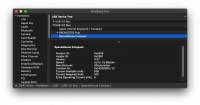
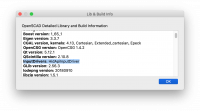
Hi Torsten, In OpenSCAD's Library Info, it does not identify my hardware like it does on yours. And in the Hardware pane of About This Mac, the entry for my spacemouse is similar to yours, but the product ID is different. I have the Spacemouse Compact, not the wireless. Could that be the problem? > On Feb 20, 2019, at 2:50 PM, Torsten Paul wrote: > > I just tried with the latest snapshot version on my old MacBook > and the only change required was to enable the "HIDAPI" driver. > > Could you please show the USB information of the device? Attached > image shows the info from my SpaceMouse Wireless with the dongle > connected. > > It seems there are different receivers and we have some trouble > with the "Universal Receiver" > > With the driver enabled and a device detected, it should show > up like in the Help->Library Info screenshot in the InputDriver > section. > > Note that it's not our choice to stay away from the SDK but > the licensing of it sadly is totally incompatible with any open > source software. > > ciao, > Torsten. > <hidapi-openscad-info.png><hidapi-usb-info.png>_______________________________________________
TP
Torsten Paul
Sat, Feb 23, 2019 6:43 PM

On 23.02.19 19:31, D. A. Karp wrote:

I have the Spacemouse Compact, not the wireless. Could that
be the problem?

Yes, we did not have that device yet. I've added it to the list
hoping it will use the same data as the other devices.
We'll need to check with a new snapshot if it works now. If not,
I have to get the debug stuff in shape for official inclusion
so we can track what's going on...

ciao,
Torsten.

On 23.02.19 19:31, D. A. Karp wrote: > I have the Spacemouse Compact, not the wireless. Could that > be the problem? Yes, we did not have that device yet. I've added it to the list hoping it will use the same data as the other devices. We'll need to check with a new snapshot if it works now. If not, I have to get the debug stuff in shape for official inclusion so we can track what's going on... ciao, Torsten.
DA
D. A. Karp
Sat, Feb 23, 2019 7:03 PM

Is there anything I can do now to help test it, or should I just wait for the next snapshot?

On Feb 23, 2019, at 10:43 AM, Torsten Paul wrote:

Yes, we did not have that device yet. I've added it to the list
hoping it will use the same data as the other devices.
We'll need to check with a new snapshot if it works now. If not,
I have to get the debug stuff in shape for official inclusion
so we can track what's going on...

ciao,
Torsten.

Is there anything I can do now to help test it, or should I just wait for the next snapshot? > On Feb 23, 2019, at 10:43 AM, Torsten Paul wrote: > > Yes, we did not have that device yet. I've added it to the list > hoping it will use the same data as the other devices. > We'll need to check with a new snapshot if it works now. If not, > I have to get the debug stuff in shape for official inclusion > so we can track what's going on... > > ciao, > Torsten. > >
MK
Marius Kintel
Sat, Feb 23, 2019 7:09 PM

On Feb 23, 2019, at 14:03, D. A. Karp daaron@gmail.com wrote:

Is there anything I can do now to help test it, or should I just wait for the next snapshot?

I'll build one today and let you know.

-Marius

On Feb 23, 2019, at 14:03, D. A. Karp <daaron@gmail.com> wrote: > > Is there anything I can do now to help test it, or should I just wait for the next snapshot? > I'll build one today and let you know. -Marius
MK
Marius Kintel
Sat, Feb 23, 2019 8:25 PM

Try the latest snapshot: 2019.02.23

-Marius

Try the latest snapshot: 2019.02.23 -Marius
DA
D. A. Karp
Sun, Feb 24, 2019 12:02 AM

Thanks, Marius. Just tried 2019.02.23 - it now recognizes the Spacemouse (see screenshot) but I get no response whatsoever when I move the mouse. Anything else I can try?

On Feb 23, 2019, at 12:25 PM, Marius Kintel marius@kintel.net wrote:

Try the latest snapshot: 2019.02.23

-Marius


OpenSCAD mailing list
Discuss@lists.openscad.org
http://lists.openscad.org/mailman/listinfo/discuss_lists.openscad.org
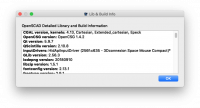
Thanks, Marius. Just tried 2019.02.23 - it now recognizes the Spacemouse (see screenshot) but I get no response whatsoever when I move the mouse. Anything else I can try? > On Feb 23, 2019, at 12:25 PM, Marius Kintel <marius@kintel.net> wrote: > > Try the latest snapshot: 2019.02.23 > > -Marius > > > _______________________________________________ > OpenSCAD mailing list > Discuss@lists.openscad.org > http://lists.openscad.org/mailman/listinfo/discuss_lists.openscad.org
TP
Torsten Paul
Sun, Feb 24, 2019 12:12 AM

On 24.02.19 01:02, D. A. Karp wrote:

Thanks, Marius. Just tried 2019.02.23 - it now recognizes the Spacemouse
(see screenshot) but I get no response whatsoever when I move the
mouse. Anything else I can try?

Aww, that means it's sending data different from the other known
devices.

I'll get the tracing code into shape for actually shipping it, so
far it was only meant for some special testing...
So please hold on for a bit, there should be a version shortly that
(hopefully) dumps the info about the device into a file so we can
see how to support this device.

ciao,
Torsten.

On 24.02.19 01:02, D. A. Karp wrote: > Thanks, Marius. Just tried 2019.02.23 - it now recognizes the Spacemouse > (see screenshot) but I get no response whatsoever when I move the > mouse. Anything else I can try? Aww, that means it's sending data different from the other known devices. I'll get the tracing code into shape for actually shipping it, so far it was only meant for some special testing... So please hold on for a bit, there should be a version shortly that (hopefully) dumps the info about the device into a file so we can see how to support this device. ciao, Torsten.