

Strange behaviour of linear_extrude()

The scale transform has no origin. It is simply an operation which scales
each vertex of the object by the constant scale factor. It has the
effect of moving everything towards the origin when the scale is less than
1 simply because smaller numbers are nearer the origin as well as being
nearer to each other.
Like rotate (which rotates around origin), you could do a translate before
and after to change the origin.
On Thu, 13 Feb 2020 at 22:05, lar3ry lar3ry@sasktel.net wrote:
nophead wrote
Scale simply scales all dimensions. So an object away from the origin,
both
gets smaller and closer to the origin. What would you expect it to do?
I certainly didn't expect it to scale toward the global origin. In the
manual, both examples of linear_extrude with a scale parameter do have a
'center=true' parameter, but I had no idea that the position of the thing
being extruded REQUIRED that, in order to scale toward the center of the
figure being extruded.
Anyway, now I know. Thank you and acwest.
--
Sent from: http://forum.openscad.org/
OpenSCAD mailing list
Discuss@lists.openscad.org
http://lists.openscad.org/mailman/listinfo/discuss_lists.openscad.org

"The scale transform has no origin" .... "Like rotate...you could do a
translate...to change the origin".
Hmmmm. I think that like rotate, the scale transform does have an origin.
There is a distinguished point that doesn't change under the operation, just
like rotate. And just like rotate, you can move it around by translating
before you scale, which changes the distinguished point that is fixed under
the transformation.
nophead wrote
The scale transform has no origin. It is simply an operation which scales
each vertex of the object by the constant scale factor. It has the
effect of moving everything towards the origin when the scale is less than
1 simply because smaller numbers are nearer the origin as well as being
nearer to each other.
Like rotate (which rotates around origin), you could do a translate before
and after to change the origin.
On Thu, 13 Feb 2020 at 22:05, lar3ry <
lar3ry@
> wrote:
nophead wrote
Scale simply scales all dimensions. So an object away from the origin,
both
gets smaller and closer to the origin. What would you expect it to do?
I certainly didn't expect it to scale toward the global origin. In the
manual, both examples of linear_extrude with a scale parameter do have a
'center=true' parameter, but I had no idea that the position of the thing
being extruded REQUIRED that, in order to scale toward the center of the
figure being extruded.
Anyway, now I know. Thank you and acwest.
--
Sent from: http://forum.openscad.org/
OpenSCAD mailing list
Discuss@.openscad
Discuss@.openscad
--
Sent from: http://forum.openscad.org/

On 2/13/2020 2:04 PM, lar3ry wrote:
I certainly didn't expect it to scale toward the global origin.
"Global origin" is an interesting concept. As the human running the
program and looking at the preview, it looks like there's a global
origin, a "one true [0,0,0]", where the crosshairs intersect, but while
you're designing it's best to completely ignore that concept.
Any given object has an origin, a [0,0,0] for that object. When you
then translate that object, its [0,0,0] goes somewhere else, and the
new object, the translated one, has its own [0,0,0].
If you have the sequence
cube(10);
translate([10,0,0]) {
    cube(10);
    translate([10,0,0]) {
        cube(10);
    }
}
Each cube is at its own [0,0,0]. Each translate takes that coordinate
system, and moves it to a different position in the "parent" coordinate
system.
The same is true for rotation and scaling. Each object is defined in
terms of its coordinate system, but as you transform it the
transformed objects are with respect to different coordinate systems.
Linear extrude doesn't extrude towards or away from any "global
origin". Like any of the other transformations, it operates relative to
the origin of its child. That's true whether its child is a square
centered around [0,0] or a square centered around [10,0]... it operates
relative to [0,0]. Again, that's its child's [0,0], not any kind of
global [0,0]. The object resulting from the linear_extrude might then
be translated far away from what's displayed as [0,0,0], but that
doesn't affect the processing of the extrusion itself.
I'm not explaining this very well. The concept is, I think, quite
simple, but sometimes it hurts your brain.
I think that is just a philosophical way of looking at it. The fact remains
that the scale transform simply multiples each coordinate of its child by a
constant. The fact that 0 is the only number that doesn't change under that
transform is just how multiplication works.
On Thu, 13 Feb 2020 at 23:40, Jordan Brown openscad@jordan.maileater.net
wrote:
On 2/13/2020 2:04 PM, lar3ry wrote:
I certainly didn't expect it to scale toward the global origin.
"Global origin" is an interesting concept. As the human running the
program and looking at the preview, it looks like there's a global origin,
a "one true [0,0,0]", where the crosshairs intersect, but while you're
designing it's best to completely ignore that concept.
Any given object has an origin, a [0,0,0] for that object. When you
then translate that object, its [0,0,0] goes somewhere else, and the new
object, the translated one, has its own [0,0,0].
If you have the sequence
 cube(10);
 translate([10,0,0]) {
     cube(10);
     translate([10,0,0]) {
         cube(10);
     }
 }
Each cube is at its own [0,0,0]. Each translate takes that coordinate
system, and moves it to a different position in the "parent" coordinate
system.
The same is true for rotation and scaling. Each object is defined in
terms of its coordinate system, but as you transform it the transformed
objects are with respect to different coordinate systems.
Linear extrude doesn't extrude towards or away from any "global origin".
Like any of the other transformations, it operates relative to the origin
of its child. That's true whether its child is a square centered around
[0,0] or a square centered around [10,0]... it operates relative to [0,0].
Again, that's its child's [0,0], not any kind of global [0,0]. The object
resulting from the linear_extrude might then be translated far away from
what's displayed as [0,0,0], but that doesn't affect the processing of the
extrusion itself.
I'm not explaining this very well. The concept is, I think, quite simple,
but sometimes it hurts your brain.
OpenSCAD mailing list
Discuss@lists.openscad.org
http://lists.openscad.org/mailman/listinfo/discuss_lists.openscad.org

JordanBrown wrote
On 2/13/2020 2:04 PM, lar3ry wrote:
I certainly didn't expect it to scale toward the global origin.
"Global origin" is an interesting concept. As the human running the
program and looking at the preview, it looks like there's a global
origin, a "one true [0,0,0]", where the crosshairs intersect, but while
you're designing it's best to completely ignore that concept.
Any given object has an origin, a [0,0,0] for that object. When you
then translate that object, its [0,0,0] goes somewhere else, and the
new object, the translated one, has its own [0,0,0].
If you have the sequence
cube(10);
translate([10,0,0]) {
cube(10);
translate([10,0,0]) {
cube(10);
}
}
Each cube is at its own [0,0,0]. Each translate takes that coordinate
system, and moves it to a different position in the "parent" coordinate
system.
The same is true for rotation and scaling. Each object is defined in
terms of its coordinate system, but as you transform it the
transformed objects are with respect to different coordinate systems.
Linear extrude doesn't extrude towards or away from any "global
origin". Like any of the other transformations, it operates relative to
the origin of its child. That's true whether its child is a square
centered around [0,0] or a square centered around [10,0]... it operates
relative to [0,0]. Again, that's its child's [0,0], not any kind of
global [0,0]. The object resulting from the linear_extrude might then
be translated far away from what's displayed as [0,0,0], but that
doesn't affect the processing of the extrusion itself.
I'm not explaining this very well. The concept is, I think, quite
simple, but sometimes it hurts your brain.
Actually, I think I do get it. I just tried something that probably made me
understand where you are coming from.
translate([20,20,0])
linear_extrude(20, scale = .5)
circle(10);
translate([30,30,0])
linear_extrude(20, scale = .5)
square(10);
The circle worked fine in this case, exactly as I would expect, but the
square did not, and if I understand what you are saying, it is because the
origin of the circle is the centre of it, while the origin of the square is
the lower left. So the the scale worked toward the origin in both cases.
Well, even if I still have it wrong, at least it's something that will keep
me from scratching my head for a few hours the next time this comes up.
Thanks Jordan!
--
Sent from: http://forum.openscad.org/

The really strange behavior of linear_extrude has not been considered here
yet. As many people has said, the scale in linear_extrude is taken relative
to the origin and that is true even for non-uniform scales. The same
happens with the twist which is essentially a continuous rotation along the
straight up path: the intermediate sections are rotations about the origin.
All that seems natural to me.
What is strange to me is the behavior when both a non-uniform scale and
twist are used in the same linear_extrude. As the picture bellow shows, the
intermediate sections of the linear_extrude of a square with non-uniform
scale and twist will not be a rectangle as might be expected. In the
picture, the intermediate sections (obtained by cutting the shapes at some
level) are displayed in yellow.
[image: linear_extrude_cases.PNG]
Top view:
[image: linear_extrude_top_view.PNG]
In the top view, the lower line has a scale and no twist, the second just
twist and, in the third, both are set. I would expect that the intermediate
sections in the third line be rotations of the scaled base square, and so,
it would be a rectangle. However, it is the scale of the rotated base
square. This order of applying the transforms deforms the shape in an
unexpected unreasonable way. That seems a bad choice and should be
considered a bug to be corrected.
I have written a code in user's space to linear extrude a polygon expressed
by its vertices that applies the rotation after the scale and published it
in another thread (
http://forum.openscad.org/Weird-intersection-results-tp28232p28253.html).
h = 5; // linear_extrude height
a = 180; // twist angle
s = [1,0.3]; // scale
cut = 2/3; // height level cut
tower(1,0,[0,0,0]); // at the origin
intersection() {
union(){
translate([5, 5,0])  triplet(s,0);

translate([5,15,0])  triplet(1,a);

translate([5,25,0])  triplet(s,a);
}
color("yellow")
cube([1000,1000,2*h*cut],center=true);
}
module axis()
color("red")
translate([-0.1,-0.1,0])

  cube([0.2,0.2,10.1]);
module tower(s,t,c) {
linear_extrude(h, scale=s, twist=t, slices=100, convexity=4)
translate(c)

  square(3,center=true);
axis();
}
module triplet(s=1,t=0)
{
translate([ 0,0,0]) tower(s,t,[0,0,0]);
translate([10,0,0]) tower(s,t,[1.5,1.5,0]);
translate([20,0,0]) tower(s,t,[2,2,0]);
}
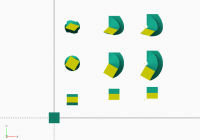
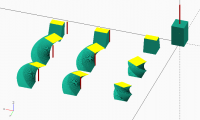

Does this variability give us more power, albeit at the expense of
needing to understand a more complex tool?
Jon
On 2/14/2020 9:05 AM, Ronaldo Persiano wrote:
The really strange behavior of linear_extrude has not been considered
here yet. As many people has said, the scale in linear_extrude is
taken relative to the origin and that is true even for non-uniform
scales. The same happens with the twist which is essentially a
continuous rotation along the straight up path: the intermediate
sections are rotations about the origin. All that seems natural to
me. ... ... ...
On 2/14/2020 6:30 AM, jon wrote:
Does this variability give us more power, albeit at the expense of
needing to understand a more complex tool?
No. It appears that linear_extrude does the rotate first, and then the
scale, and so as Ronaldo says distorts the shape. If you wanted
scale-first, as I agree seems the more obvious result, I don't think
there's any way to get it.
Unfortunately, I doubt it can be "fixed", because rotate-first isn't
wrong, just unexpected. Somebody might have designed around that
behavior. But there could be a parameter to switch the order.

Ronaldo,
you are right. This seems like a strange behaviour, and obviously comes
from a wrong application order of the transformations.
linear_extrude(height = 100, twist = 310, scale = [1, .2])
translate([30, 0, 0])square(20, center = true);
The following sweep() shows in which order the implementation of
linear_extrude() does its transformations:
sweep(linear_extrude(height = 100, twist = 310, scale = [1, .2]));
function linear_extrude(height, twist, scale, slices) =
[for (i=[0:slices])
let(dh= height/slices) // calc height per slice
let(ds= ([1,1]-scale)/slices) // calc scale per slice
S(1-ds[0]i, 1-ds[1]i, 1, // scale
Rz(-twist/slicesi, // rotate
Tz(idh, Tx(30, square(20))))) //
];
and you expect it to do this (scale and rotation interchanged):
color("red")sweep(linear_extrude1(height = 100, twist = 310, scale = [1,
.2]));
function linear_extrude1(height, twist, scale, slices) =
[for (i=[0:slices])
let(dh= height/slices) // calc height per slice
let(ds= ([1,1]-scale)/slices) // calc scale per slice
Rz(-twist/slices*i, // rotate
S(1-ds[0]*i, 1-ds[1]i, 1, // scale
Tz(idh, Tx(30, rev(square(20)))))) //
];
but if you look at the red object in the result, you will see, that the
rotation is not scaled as you might want. And I am afraid you can't have
both ... unless you compute and add a skew operation that compensates for
the unwanted skew.
http://forum.openscad.org/file/t887/linear_extrude.png
--
Sent from: http://forum.openscad.org/
Parkinbot,
Your first code seems to be equivalent to my extrude_up module that
operates on polygons given by points. That is what I would expect that
linear_extrude to be: simply the twist of a straight up extrusion, scaled
or not. I don't want to scale a rotation (except eventually with a uniform
scale; so no skew). It makes no sense to me. I don't see any use of that to
model anything.
Try a very twisted extrusion:
linear_extrude(height = 100, twist = 10*310, scale = [1,.2])
translate([30,0]) square(20);
That shape is not conical, nor cylindrical. It seems a very strange hat
when hulled! Ouch!
Em sáb., 15 de fev. de 2020 às 18:32, Parkinbot rudolf@digitaldocument.de
escreveu:
Ronaldo,
you are right. This seems like a strange behaviour, and obviously comes
from a wrong application order of the transformations.
linear_extrude(height = 100, twist = 310, scale = [1, .2])
translate([30, 0, 0])square(20, center = true);
The following sweep() shows in which order the implementation of
linear_extrude() does its transformations:
sweep(linear_extrude(height = 100, twist = 310, scale = [1, .2]));
function linear_extrude(height, twist, scale, slices) =
[for (i=[0:slices])
let(dh= height/slices) // calc height per slice
let(ds= ([1,1]-scale)/slices) // calc scale per slice
S(1-ds[0]i, 1-ds[1]i, 1, // scale
Rz(-twist/slicesi, // rotate
Tz(idh, Tx(30, square(20))))) //
];
and you expect it to do this (scale and rotation interchanged):
color("red")sweep(linear_extrude1(height = 100, twist = 310, scale = [1,
.2]));
function linear_extrude1(height, twist, scale, slices) =
[for (i=[0:slices])
let(dh= height/slices) // calc height per slice
let(ds= ([1,1]-scale)/slices) // calc scale per slice
Rz(-twist/slices*i, // rotate
S(1-ds[0]*i, 1-ds[1]i, 1, // scale
Tz(idh, Tx(30, rev(square(20)))))) //
];
but if you look at the red object in the result, you will see, that the
rotation is not scaled as you might want. And I am afraid you can't have
both ... unless you compute and add a skew operation that compensates for
the unwanted skew.
http://forum.openscad.org/file/t887/linear_extrude.png
--
Sent from: http://forum.openscad.org/
OpenSCAD mailing list
Discuss@lists.openscad.org
http://lists.openscad.org/mailman/listinfo/discuss_lists.openscad.org