

Is OpenSCAD generating corrupt STL files?

I published this design on Thingiverse: https://www.thingiverse.com/thing:4582540/comments
The design includes both source code and an STL.
At least two users reported that the STL did not slice properly in Prusa Slicer.
It sliced fine in Cura.
Is this a problem with Prusa Slicer? Or is OpenSCAD screwing something up in the STL?
I don't have Prusa Slicer to test with, and I would not be able to recognize an error in the STL file.

I can confirm that it errors out with Prusa Slicer but Simplify3D has no problem with it. Meshmixer doesn't find any errors either.
Prusa Slicer makes a good section of the model disappear!
I don't have the OpenSCAD skills to make suggestions how to adjust your code to remove the Prusa failure.
On Friday, September 25, 2020, 12:57:27 PM EDT, Douglas Peale <douglas_peale@comcast.net> wrote:
I published this design on Thingiverse: https://www.thingiverse.com/thing:4582540/comments
The design includes both source code and an STL.
At least two users reported that the STL did not slice properly in Prusa Slicer.
It sliced fine in Cura.
Is this a problem with Prusa Slicer? Or is OpenSCAD screwing something up in the STL?
I don't have Prusa Slicer to test with, and I would not be able to recognize an error in the STL file.
OpenSCAD mailing list
Discuss@lists.openscad.org
http://lists.openscad.org/mailman/listinfo/discuss_lists.openscad.org


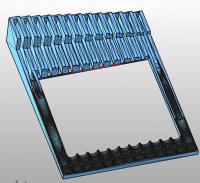
The STL has degenerate triangles and self intersections according to
NetFabb studio.
[image: image.png]
Something in the design must generate vertices too close together for
OpenSCAD.
On Fri, 25 Sep 2020 at 18:13, fred via Discuss discuss@lists.openscad.org
wrote:
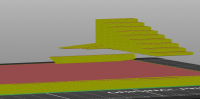
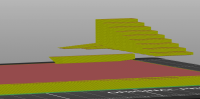
I can confirm that it errors out with Prusa Slicer but Simplify3D has no
problem with it. Meshmixer doesn't find any errors either.
[image: Inline image]
[image: Inline image]
Prusa Slicer makes a good section of the model disappear!
I don't have the OpenSCAD skills to make suggestions how to adjust your
code to remove the Prusa failure.
On Friday, September 25, 2020, 12:57:27 PM EDT, Douglas Peale <
douglas_peale@comcast.net> wrote:
I published this design on Thingiverse:
https://www.thingiverse.com/thing:4582540/comments
The design includes both source code and an STL.
At least two users reported that the STL did not slice properly in Prusa
Slicer.
It sliced fine in Cura.
Is this a problem with Prusa Slicer? Or is OpenSCAD screwing something up
in the STL?
I don't have Prusa Slicer to test with, and I would not be able to
recognize an error in the STL file.
OpenSCAD mailing list
Discuss@lists.openscad.org
http://lists.openscad.org/mailman/listinfo/discuss_lists.openscad.org
OpenSCAD mailing list
Discuss@lists.openscad.org
http://lists.openscad.org/mailman/listinfo/discuss_lists.openscad.org


I don't know the reason (it's really broken without reason) but after
Rendering in OpenSCAD I exported it as AMF, this can be imported in
PrusaSlicer and it works.
Am Fr., 25. Sept. 2020 um 18:57 Uhr schrieb Douglas Peale <
Douglas_Peale@comcast.net>:
I published this design on Thingiverse:
https://www.thingiverse.com/thing:4582540/comments
The design includes both source code and an STL.
At least two users reported that the STL did not slice properly in Prusa
Slicer.
It sliced fine in Cura.
Is this a problem with Prusa Slicer? Or is OpenSCAD screwing something up
in the STL?
I don't have Prusa Slicer to test with, and I would not be able to
recognize an error in the STL file.
OpenSCAD mailing list
Discuss@lists.openscad.org
http://lists.openscad.org/mailman/listinfo/discuss_lists.openscad.org

On 2020-09-25 18:56, Douglas Peale wrote:
I published this design on Thingiverse:
https://www.thingiverse.com/thing:4582540/comments
The design includes both source code and an STL.
At least two users reported that the STL did not slice properly in
Prusa Slicer.
It sliced fine in Cura.
Is this a problem with Prusa Slicer? Or is OpenSCAD screwing something
up in the STL?
I don't have Prusa Slicer to test with, and I would not be able to
recognize an error in the STL file.
I ran the STL through AngelCADs polyfix application, it reports several
zero area faces, one duplicated face and one nonmanifold face (=face
with at least one free edge). After a couple of iterations it seems to
be fixed though.
$ polyfix Spade_Bit_Rack.stl
Parameters:
input_file = Spade_Bit_Rack.stl
polyhedron 0 ================= volume=75230.9, dtol=0.01, atol=1e-06,
maxiter=10
iteration 0: vertices=43296 faces=14432
warning: 31 zero area faces.
warning: nonmanifold edges: uc(1)=43296
merged 36208 vertices
removed 256 collapsed or zero area faces
removed 1 duplicate face
removed 1 nonmanifold face
total changes=36466
no warnings
iteration 1: vertices=7088 faces=14174
removed 1 unused vertex
merged 14 vertices
removed 28 collapsed or zero area faces
total changes=43
no warnings
iteration 2: vertices=7073 faces=14146
total changes=0
no warnings
Summary:
polyhedron 0: vertices=7073 faces=14146 : no warnings
Writing: Spade_Bit_Rack_1.stl
... polyfix finished, time used: 0d 00h 00m 01s
Another thing I tried was using OpenSCAD to convert your .scad file to
.csg and then read that into my experimental .csg interpreter. It
reports that at least one of your polygons has wrong winding order:
...Warning: 1st polygon2d contour staring at (0.000000,-1.000000) has
wrong winding order
I'm not sure what the polygon point winding order policy is in OpenSCAD
(whether it automatically reverses wrong-winded polygons or not), but
wrong winding order can get one into trouble. The documentation at
https://en.wikibooks.org/wiki/OpenSCAD_User_Manual/Using_the_2D_Subsystem#polygon
does not explain proper winding order clearly, but the examples show CCW
winding order for the outer contour.
Regards
Carsten Arnholm