JB
Jordan Brown
Thu, Aug 16, 2018 8:39 PM
On 8/16/2018 12:02 PM, Carsten Arnholm wrote:
On 16. aug. 2018 18:14, Jordan Brown wrote:
It seems "obvious" that a 3" sphere unioned with a negative 2"
sphere is a hollow sphere.
Result = S3 + -S2 = S3 - S2
I.e. a "union with a negative" is the same as difference. Negative
objects are not required.
When people talk about "negative objects", I think they mean an object
that, when unioned with another object, cuts into it. It's like the
negative object is made of antimatter, so when you juxtapose it with
normal matter the normal matter is annihilated.
Consider, for instance, Troberg's "hole with crosshairs". It's an
object, of sorts, with a negative component (the hole) and a positive
component (the crosshairs). If you unioned it with a cube, you'd drill
a hole through the cube, except for crosshairs.
I'm reminded of portable holes
https://en.wikipedia.org/wiki/Portable_hole.
Without getting into how it would actually work (again, remember that
my original comment was that I didn't see how it could work), you
would have something like so:
union () {
    hole_with_crosshairs();
    cube(...);
}

module hole_with_crosshairs() {
    // hole
    negative() cylinder(...);
    // crosshairs
    cube(...);
    cube(...);
}
... but I don't think there's a definition that will really work in the
general case.
[ Various combinations involving difference() }
Standard stuff.
Sure. But that's not the question.
On 8/16/2018 12:02 PM, Carsten Arnholm wrote:
> On 16. aug. 2018 18:14, Jordan Brown wrote:
> > It seems "obvious" that a 3" sphere unioned with a negative 2"
> > sphere is a hollow sphere.
>
> Result = S3 + -S2 = S3 - S2
>
> I.e. a "union with a negative" is the same as difference. Negative
> objects are not required.
When people talk about "negative objects", I think they mean an object
that, when *unioned* with another object, cuts into it. It's like the
negative object is made of antimatter, so when you juxtapose it with
normal matter the normal matter is annihilated.
Consider, for instance, Troberg's "hole with crosshairs". It's an
object, of sorts, with a negative component (the hole) and a positive
component (the crosshairs). If you unioned it with a cube, you'd drill
a hole through the cube, except for crosshairs.
I'm reminded of portable holes
<https://en.wikipedia.org/wiki/Portable_hole>.
Without getting into how it would *actually* work (again, remember that
my original comment was that I didn't see how it *could* work), you
would have something like so:
union () {
hole_with_crosshairs();
cube(...);
}
module hole_with_crosshairs() {
// hole
negative() cylinder(...);
// crosshairs
cube(...);
cube(...);
}
... but I don't think there's a definition that will really work in the
general case.
> [ Various combinations involving difference() }
>
> Standard stuff.
Sure. But that's not the question.

NH
nop head
Thu, Aug 16, 2018 11:41 PM
This is how I would do it:
$fn=60;
crosshairs = true;
module crosshairs()
{
for(i = [0:90:360])
rotate([0, 0, i])
translate([0, 0, 75])
cube([20, 1, 50], center = true);
}
module hole()
{
difference() {
cylinder(100, d=50);
    if(crosshairs)
        crosshairs();
}
}
projection()
{
union()
{
difference()
{
cube([1000, 1000, 50]);
        for (h = [1:5])
            translate([100*h, 100, -50])
                hole();
    }
}
No need for negative objects or repetition. One could also do:
crosshairs = !$preview;
To get them just when rendering.
On 16 August 2018 at 20:58, Trevor Orr fractorr@gmail.com wrote:
This is what I came up with. This is just test code to see if it was what
I want and it is, I just need to figure out how to incorporate this into my
project code.
$fn=60;
module hole()
{
cylinder(100, d=50);
}
module crosshairs()
{
for(i = [0:90:360])
rotate([0, 0, i])
translate([0, 0, 75])
cube([20, 1, 50], center = true);
}
projection()
{
union()
{
difference()
{
cube([1000, 1000, 50]);
         for (h = [1:5])
             translate([100*h, 100, -50])
                 hole();
     }

     for (h = [1:5])
         translate([100*h, 100, -50])
             crosshairs();
}
}
On Thu, Aug 16, 2018 at 2:31 AM nop head nop.head@gmail.com wrote:
Then, first call it in the difference() to make the hole, then call it
again
outside with the same parameters, but with crosshairs=true to draw the
crosshair.
When crosshairs is true you could make hole draw the difference between a
cylinder and a cross. That way you don't need to call it twice.
On 16 August 2018 at 06:10, Troberg troberg.anders@gmail.com wrote:
I's make my own cylinder module. I'd probably call it hole, just for code
clarity. Then, I'd add a parameter crosshairs, and if false, it just does
the cylinder as normal, if true, it instead does the crosshairs (and
anything else I might want, such as printed dimensions).
Then, first call it in the difference() to make the hole, then call it
again
outside with the same parameters, but with crosshairs=true to draw the
crosshair.
This kind of stuff is pretty common, and it would be much easier if
OpenSCAD
handled "negative objects", because then, the hole could be negative and
the
crosshair positive, so you could add them in one operation. But, it
doesn't,
so we need a workaround.
--
Sent from: http://forum.openscad.org/
OpenSCAD mailing list
Discuss@lists.openscad.org
http://lists.openscad.org/mailman/listinfo/discuss_lists.openscad.org
This is how I would do it:
$fn=60;
crosshairs = true;
module crosshairs()
{
for(i = [0:90:360])
rotate([0, 0, i])
translate([0, 0, 75])
cube([20, 1, 50], center = true);
}
module hole()
{
difference() {
cylinder(100, d=50);
     if(crosshairs)
         crosshairs();
 }
}
projection()
{
union()
{
difference()
{
cube([1000, 1000, 50]);
         for (h = [1:5])
             translate([100*h, 100, -50])
                 hole();
     }
}
No need for negative objects or repetition. One could also do:
crosshairs = !$preview;
To get them just when rendering.
On 16 August 2018 at 20:58, Trevor Orr <fractorr@gmail.com> wrote:
> This is what I came up with. This is just test code to see if it was what
> I want and it is, I just need to figure out how to incorporate this into my
> project code.
>
>
> $fn=60;
>
> module hole()
> {
> cylinder(100, d=50);
> }
>
> module crosshairs()
> {
> for(i = [0:90:360])
> rotate([0, 0, i])
> translate([0, 0, 75])
> cube([20, 1, 50], center = true);
> }
>
> projection()
> {
> union()
> {
> difference()
> {
> cube([1000, 1000, 50]);
>
> for (h = [1:5])
> translate([100*h, 100, -50])
> hole();
> }
>
> for (h = [1:5])
> translate([100*h, 100, -50])
> crosshairs();
> }
> }
>
>
> On Thu, Aug 16, 2018 at 2:31 AM nop head <nop.head@gmail.com> wrote:
>
>> Then, first call it in the difference() to make the hole, then call it
>>> again
>>> outside with the same parameters, but with crosshairs=true to draw the
>>> crosshair.
>>>
>>
>> When crosshairs is true you could make hole draw the difference between a
>> cylinder and a cross. That way you don't need to call it twice.
>>
>> On 16 August 2018 at 06:10, Troberg <troberg.anders@gmail.com> wrote:
>>
>>> I's make my own cylinder module. I'd probably call it hole, just for code
>>> clarity. Then, I'd add a parameter crosshairs, and if false, it just does
>>> the cylinder as normal, if true, it instead does the crosshairs (and
>>> anything else I might want, such as printed dimensions).
>>>
>>> Then, first call it in the difference() to make the hole, then call it
>>> again
>>> outside with the same parameters, but with crosshairs=true to draw the
>>> crosshair.
>>>
>>> This kind of stuff is pretty common, and it would be much easier if
>>> OpenSCAD
>>> handled "negative objects", because then, the hole could be negative and
>>> the
>>> crosshair positive, so you could add them in one operation. But, it
>>> doesn't,
>>> so we need a workaround.
>>>
>>>
>>>
>>> --
>>> Sent from: http://forum.openscad.org/
>>>
>>> _______________________________________________
>>> OpenSCAD mailing list
>>> Discuss@lists.openscad.org
>>> http://lists.openscad.org/mailman/listinfo/discuss_lists.openscad.org
>>>
>>
>> _______________________________________________
>> OpenSCAD mailing list
>> Discuss@lists.openscad.org
>> http://lists.openscad.org/mailman/listinfo/discuss_lists.openscad.org
>>
>
> _______________________________________________
> OpenSCAD mailing list
> Discuss@lists.openscad.org
> http://lists.openscad.org/mailman/listinfo/discuss_lists.openscad.org
>
>

TO
Trevor Orr
Fri, Aug 17, 2018 12:05 AM
That looks like it would probably work better in my project than what I cam
up with.
On Thu, Aug 16, 2018 at 4:42 PM nop head nop.head@gmail.com wrote:
This is how I would do it:
$fn=60;
crosshairs = true;
module crosshairs()
{
for(i = [0:90:360])
rotate([0, 0, i])
translate([0, 0, 75])
cube([20, 1, 50], center = true);
}
module hole()
{
difference() {
cylinder(100, d=50);
if(crosshairs)
crosshairs();
}
}
projection()
{
union()
{
difference()
{
cube([1000, 1000, 50]);
for (h = [1:5])
translate([100*h, 100, -50])
hole();
}
}
No need for negative objects or repetition. One could also do:
crosshairs = !$preview;
To get them just when rendering.
On 16 August 2018 at 20:58, Trevor Orr fractorr@gmail.com wrote:
This is what I came up with. This is just test code to see if it was
what I want and it is, I just need to figure out how to incorporate this
into my project code.
$fn=60;
module hole()
{
cylinder(100, d=50);
}
module crosshairs()
{
for(i = [0:90:360])
rotate([0, 0, i])
translate([0, 0, 75])
cube([20, 1, 50], center = true);
}
projection()
{
union()
{
difference()
{
cube([1000, 1000, 50]);
         for (h = [1:5])
             translate([100*h, 100, -50])
                 hole();
     }

     for (h = [1:5])
         translate([100*h, 100, -50])
             crosshairs();
}
}
On Thu, Aug 16, 2018 at 2:31 AM nop head nop.head@gmail.com wrote:
Then, first call it in the difference() to make the hole, then call it
again
outside with the same parameters, but with crosshairs=true to draw the
crosshair.
When crosshairs is true you could make hole draw the difference between
a cylinder and a cross. That way you don't need to call it twice.
On 16 August 2018 at 06:10, Troberg troberg.anders@gmail.com wrote:
I's make my own cylinder module. I'd probably call it hole, just for
code
clarity. Then, I'd add a parameter crosshairs, and if false, it just
does
the cylinder as normal, if true, it instead does the crosshairs (and
anything else I might want, such as printed dimensions).
Then, first call it in the difference() to make the hole, then call it
again
outside with the same parameters, but with crosshairs=true to draw the
crosshair.
This kind of stuff is pretty common, and it would be much easier if
OpenSCAD
handled "negative objects", because then, the hole could be negative
and the
crosshair positive, so you could add them in one operation. But, it
doesn't,
so we need a workaround.
--
Sent from: http://forum.openscad.org/
OpenSCAD mailing list
Discuss@lists.openscad.org
http://lists.openscad.org/mailman/listinfo/discuss_lists.openscad.org
That looks like it would probably work better in my project than what I cam
up with.
On Thu, Aug 16, 2018 at 4:42 PM nop head <nop.head@gmail.com> wrote:
> This is how I would do it:
>
> $fn=60;
>
> crosshairs = true;
>
> module crosshairs()
> {
> for(i = [0:90:360])
> rotate([0, 0, i])
> translate([0, 0, 75])
> cube([20, 1, 50], center = true);
> }
>
> module hole()
> {
> difference() {
> cylinder(100, d=50);
>
> if(crosshairs)
> crosshairs();
> }
> }
>
>
> projection()
> {
> union()
> {
> difference()
> {
> cube([1000, 1000, 50]);
>
> for (h = [1:5])
> translate([100*h, 100, -50])
> hole();
> }
> }
>
> No need for negative objects or repetition. One could also do:
>
> crosshairs = !$preview;
>
> To get them just when rendering.
>
> On 16 August 2018 at 20:58, Trevor Orr <fractorr@gmail.com> wrote:
>
>> This is what I came up with. This is just test code to see if it was
>> what I want and it is, I just need to figure out how to incorporate this
>> into my project code.
>>
>>
>> $fn=60;
>>
>> module hole()
>> {
>> cylinder(100, d=50);
>> }
>>
>> module crosshairs()
>> {
>> for(i = [0:90:360])
>> rotate([0, 0, i])
>> translate([0, 0, 75])
>> cube([20, 1, 50], center = true);
>> }
>>
>> projection()
>> {
>> union()
>> {
>> difference()
>> {
>> cube([1000, 1000, 50]);
>>
>> for (h = [1:5])
>> translate([100*h, 100, -50])
>> hole();
>> }
>>
>> for (h = [1:5])
>> translate([100*h, 100, -50])
>> crosshairs();
>> }
>> }
>>
>>
>> On Thu, Aug 16, 2018 at 2:31 AM nop head <nop.head@gmail.com> wrote:
>>
>>> Then, first call it in the difference() to make the hole, then call it
>>>> again
>>>> outside with the same parameters, but with crosshairs=true to draw the
>>>> crosshair.
>>>>
>>>
>>> When crosshairs is true you could make hole draw the difference between
>>> a cylinder and a cross. That way you don't need to call it twice.
>>>
>>> On 16 August 2018 at 06:10, Troberg <troberg.anders@gmail.com> wrote:
>>>
>>>> I's make my own cylinder module. I'd probably call it hole, just for
>>>> code
>>>> clarity. Then, I'd add a parameter crosshairs, and if false, it just
>>>> does
>>>> the cylinder as normal, if true, it instead does the crosshairs (and
>>>> anything else I might want, such as printed dimensions).
>>>>
>>>> Then, first call it in the difference() to make the hole, then call it
>>>> again
>>>> outside with the same parameters, but with crosshairs=true to draw the
>>>> crosshair.
>>>>
>>>> This kind of stuff is pretty common, and it would be much easier if
>>>> OpenSCAD
>>>> handled "negative objects", because then, the hole could be negative
>>>> and the
>>>> crosshair positive, so you could add them in one operation. But, it
>>>> doesn't,
>>>> so we need a workaround.
>>>>
>>>>
>>>>
>>>> --
>>>> Sent from: http://forum.openscad.org/
>>>>
>>>> _______________________________________________
>>>> OpenSCAD mailing list
>>>> Discuss@lists.openscad.org
>>>> http://lists.openscad.org/mailman/listinfo/discuss_lists.openscad.org
>>>>
>>>
>>> _______________________________________________
>>> OpenSCAD mailing list
>>> Discuss@lists.openscad.org
>>> http://lists.openscad.org/mailman/listinfo/discuss_lists.openscad.org
>>>
>>
>> _______________________________________________
>> OpenSCAD mailing list
>> Discuss@lists.openscad.org
>> http://lists.openscad.org/mailman/listinfo/discuss_lists.openscad.org
>>
>>
> _______________________________________________
> OpenSCAD mailing list
> Discuss@lists.openscad.org
> http://lists.openscad.org/mailman/listinfo/discuss_lists.openscad.org
>

T
Troberg
Fri, Aug 17, 2018 4:43 AM
When crosshairs is true you could make hole draw the difference between a
cylinder and a cross. That way you don't need to call it twice.
Of course, why didn't I think of that, it's the neatest solution!
--
Sent from: http://forum.openscad.org/
> When crosshairs is true you could make hole draw the difference between a
cylinder and a cross. That way you don't need to call it twice.
Of course, why didn't I think of that, it's the neatest solution!
--
Sent from: http://forum.openscad.org/
T
Troberg
Fri, Aug 17, 2018 4:49 AM
When people talk about "negative objects", I think they mean an object
that, when unioned with another object, cuts into it. It's like the
negative object is made of antimatter, so when you juxtapose it with normal
matter the normal matter is annihilated.
Consider, for instance, Troberg's "hole with crosshairs". It's an object,
of sorts, with a negative component (the hole) and a positive component
(the crosshairs). If you unioned it with a cube, you'd drill a hole
through the cube, except for crosshairs.
Yep, pretty much.
In this case, there are simple workarounds, but in my constructions, I often
make complex parts, with bolts that fit into holes in other complex parts.
Sometimes, it's a lot of math to make the holes line up properly with the
bolts, so it would be nice if the bolt could "bring its own hole", so to
speak. There are probably plenty of other examples, one is mentioned in the
tutorial section, about holes in a PCB.
--
Sent from: http://forum.openscad.org/
> When people talk about "negative objects", I think they mean an object
that, when *unioned* with another object, cuts into it. It's like the
negative object is made of antimatter, so when you juxtapose it with normal
matter the normal matter is annihilated.
> Consider, for instance, Troberg's "hole with crosshairs". It's an object,
> of sorts, with a negative component (the hole) and a positive component
> (the crosshairs). If you unioned it with a cube, you'd drill a hole
> through the cube, except for crosshairs.
Yep, pretty much.
In this case, there are simple workarounds, but in my constructions, I often
make complex parts, with bolts that fit into holes in other complex parts.
Sometimes, it's a lot of math to make the holes line up properly with the
bolts, so it would be nice if the bolt could "bring its own hole", so to
speak. There are probably plenty of other examples, one is mentioned in the
tutorial section, about holes in a PCB.
--
Sent from: http://forum.openscad.org/
NH
nop head
Fri, Aug 17, 2018 8:13 AM
The way I handle that is to make a module that places its children where
the holes are, relative to the PCB. I use that to make the holes in the
PCB, the mounting pillars in my case and the fasteners by calling it with
the appropriate children. I never repeat complex calculations. I always put
them in a module or a function or a variable.
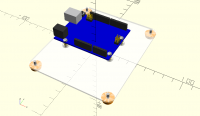
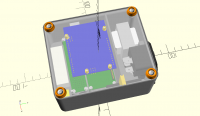
Here is a little example:
module base_additions() {
translate([arduino_x, -arduino_y])
pcb_screw_positions(arduino) {
insert_boss(arduino_insert, case_height - arduino_z);
        insert_boss(arduino_insert, case_height - arduino_z - 2, 2);
    }
}
module base_holes() {
}
module base_stl() printed_case_base() { base_additions(); base_holes(); }
module arduino_assembly() {
pcb(arduino);
pcb_screw_positions(arduino) {
    insert(arduino_insert);

    translate([0, 0, pcb_thickness(arduino)])
        screw(arduino_screw, arduino_screw_length);
}
}
module base_assembly() {
assembly("base_assembly");
feet_positions() vflip() {
    color(pp4_colour) render()
        foot_stl();

    translate([0, 0, foot_thickness(foot)])
        screw_and_washer(base_screw, base_screw_length);
}
translate([arduino_x, -arduino_y, case_height - arduino_z])
    arduino_assembly();

color(pp2_colour, 0.5) render() base_stl();

end("base_assembly");
}
On 17 August 2018 at 05:49, Troberg troberg.anders@gmail.com wrote:
When people talk about "negative objects", I think they mean an object
that, when unioned with another object, cuts into it. It's like the
negative object is made of antimatter, so when you juxtapose it with normal
matter the normal matter is annihilated.
Consider, for instance, Troberg's "hole with crosshairs". It's an
of sorts, with a negative component (the hole) and a positive component
(the crosshairs). If you unioned it with a cube, you'd drill a hole
through the cube, except for crosshairs.
Yep, pretty much.
In this case, there are simple workarounds, but in my constructions, I
often
make complex parts, with bolts that fit into holes in other complex parts.
Sometimes, it's a lot of math to make the holes line up properly with the
bolts, so it would be nice if the bolt could "bring its own hole", so to
speak. There are probably plenty of other examples, one is mentioned in the
tutorial section, about holes in a PCB.
--
Sent from: http://forum.openscad.org/
OpenSCAD mailing list
Discuss@lists.openscad.org
http://lists.openscad.org/mailman/listinfo/discuss_lists.openscad.org
The way I handle that is to make a module that places its children where
the holes are, relative to the PCB. I use that to make the holes in the
PCB, the mounting pillars in my case and the fasteners by calling it with
the appropriate children. I never repeat complex calculations. I always put
them in a module or a function or a variable.
Here is a little example:
module base_additions() {
translate([arduino_x, -arduino_y])
pcb_screw_positions(arduino) {
insert_boss(arduino_insert, case_height - arduino_z);
insert_boss(arduino_insert, case_height - arduino_z - 2, 2);
}
}
module base_holes() {
}
module base_stl() printed_case_base() { base_additions(); base_holes(); }
module arduino_assembly() {
pcb(arduino);
pcb_screw_positions(arduino) {
insert(arduino_insert);
translate([0, 0, pcb_thickness(arduino)])
screw(arduino_screw, arduino_screw_length);
}
}
module base_assembly() {
assembly("base_assembly");
feet_positions() vflip() {
color(pp4_colour) render()
foot_stl();
translate([0, 0, foot_thickness(foot)])
screw_and_washer(base_screw, base_screw_length);
}
translate([arduino_x, -arduino_y, case_height - arduino_z])
arduino_assembly();
color(pp2_colour, 0.5) render() base_stl();
end("base_assembly");
}
On 17 August 2018 at 05:49, Troberg <troberg.anders@gmail.com> wrote:
> > When people talk about "negative objects", I think they mean an object
> that, when *unioned* with another object, cuts into it. It's like the
> negative object is made of antimatter, so when you juxtapose it with normal
> matter the normal matter is annihilated.
>
> > Consider, for instance, Troberg's "hole with crosshairs". It's an
> object,
> > of sorts, with a negative component (the hole) and a positive component
> > (the crosshairs). If you unioned it with a cube, you'd drill a hole
> > through the cube, except for crosshairs.
>
> Yep, pretty much.
>
> In this case, there are simple workarounds, but in my constructions, I
> often
> make complex parts, with bolts that fit into holes in other complex parts.
> Sometimes, it's a lot of math to make the holes line up properly with the
> bolts, so it would be nice if the bolt could "bring its own hole", so to
> speak. There are probably plenty of other examples, one is mentioned in the
> tutorial section, about holes in a PCB.
>
>
>
> --
> Sent from: http://forum.openscad.org/
>
> _______________________________________________
> OpenSCAD mailing list
> Discuss@lists.openscad.org
> http://lists.openscad.org/mailman/listinfo/discuss_lists.openscad.org
>
T
Troberg
Fri, Aug 17, 2018 8:26 AM
The way I handle that is to make a module that places its children where
the holes are, relative to the PCB. I use that to make the holes in the PCB,
the mounting pillars in my case and the fasteners by calling it with the
appropriate children. I never repeat complex calculations. I always put them
in a module or a function or a variable.
Yeah, that's pretty much what I try to do, but when the parts are complex,
made out of several sub-parts and rotated at strange angles, and then needs
to match up with a similar complex part, it can be hard to re-use the same
calculation.
For example, in many cases, I "drill" the holes at an early stage of the
creation of the complex part, before rotations and translations. Then, I
need to match that with a bolt in another part, that, for practical reasons,
also is put into an early stage of that part. That's where things get messy.
Now, I do admit that my constructions, with moving/rotating/folding parts
are a bit more complex than the average. I also don't design for 3D
printing, I design for building out of metal, wood, plastic and other
materials, so, where possible, I try to match the building process to make
it easier to get step by step stages. So, my needs may be a bit special.
--
Sent from: http://forum.openscad.org/
> The way I handle that is to make a module that places its children where
the holes are, relative to the PCB. I use that to make the holes in the PCB,
the mounting pillars in my case and the fasteners by calling it with the
appropriate children. I never repeat complex calculations. I always put them
in a module or a function or a variable.
Yeah, that's pretty much what I try to do, but when the parts are complex,
made out of several sub-parts and rotated at strange angles, and then needs
to match up with a similar complex part, it can be hard to re-use the same
calculation.
For example, in many cases, I "drill" the holes at an early stage of the
creation of the complex part, before rotations and translations. Then, I
need to match that with a bolt in another part, that, for practical reasons,
also is put into an early stage of that part. That's where things get messy.
Now, I do admit that my constructions, with moving/rotating/folding parts
are a bit more complex than the average. I also don't design for 3D
printing, I design for building out of metal, wood, plastic and other
materials, so, where possible, I try to match the building process to make
it easier to get step by step stages. So, my needs may be a bit special.
--
Sent from: http://forum.openscad.org/
NH
nop head
Fri, Aug 17, 2018 9:51 AM
I always place holes and fasteners relative to their object. If the object
is positioned in a complex way I simply make a module to position any child
there. Then I can use that to place the object and its fasteners and holes.
It doesn't really matter how complex the positioning is, it can be made by
composing several relative positioning modules. The example above places
fasteners relative to the PCB and places the PCB into the base assembly.
The base assembly is translated and rotated into its place in the box by
the main assembly. It doesn't matter how complex the positioning is, I only
express each part of it once in a reusable module.
I also make boxes from CNC routed DiBond and acrylic with printed parts to
join six sheets and a hinged door, which can't be too different from your
uses. In that case I have an assembly module for each sheet laying flat
with the parts and fasteners on them. Then the box assembly module
translates and rotates those sheets assemblies into place and all the parts
and fasteners come with them. So their final positions are quite complex
but I never need to express that directly. To make a view of the box
unfolded or exploded or simply with the door open is trivial because each
sub assembly is placed relative to its parent. A complex final position is
always made from the composition of simpler positioning modules. The finale
position of a screw might be a very complex expression indeed but if I
needed to position say an arrow to point it out it would just be a matter
of composing a few already existing positing modules to get there.
I never feel the need for negative objects and I never have to repeat
complex expressions. How would a screw object make it own hole? The screw
is added to an assembly. The hole is subtracted from a printed part or a
sheet. I don't see how that can be one operation but its position can be
one module that is reused to place fasteners and drill holes.
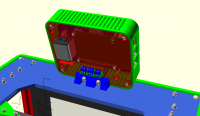
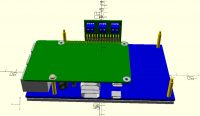
The screws in this tilted display assembly have a very complicated position
in the final assembly because the RPI is stacked on the back of a LCD
display. For aesthetic reasons the display is in the centre of the tilted
box. Its PCB is offset from the display. It has mounting pillars with
positions specified relative to the PCB, one of which goes through the RPI
which is upside down.
So I have code like this to line them up by mating one pair of screw holes:
pcb_offset = [display_pcb_offset(display).x, display_pcb_offset(display).y];
mating_hole = 2;
rpi_hole = pcb_coord(rpi, pcb_holes(rpi)[1]);
lcd_hole = pcb_coord(pcb, pcb_holes(pcb)[mating_hole]) + pcb_offset;
rpi_offset = [lcd_hole.x - rpi_hole.x,
lcd_hole.y + rpi_hole.y];
But no matter how ugly it is I only ever need to write it once.
On 17 August 2018 at 09:26, Troberg troberg.anders@gmail.com wrote:
The way I handle that is to make a module that places its children where
the holes are, relative to the PCB. I use that to make the holes in the
PCB,
the mounting pillars in my case and the fasteners by calling it with the
appropriate children. I never repeat complex calculations. I always put
them
in a module or a function or a variable.
Yeah, that's pretty much what I try to do, but when the parts are complex,
made out of several sub-parts and rotated at strange angles, and then needs
to match up with a similar complex part, it can be hard to re-use the same
calculation.
For example, in many cases, I "drill" the holes at an early stage of the
creation of the complex part, before rotations and translations. Then, I
need to match that with a bolt in another part, that, for practical
reasons,
also is put into an early stage of that part. That's where things get
messy.
Now, I do admit that my constructions, with moving/rotating/folding parts
are a bit more complex than the average. I also don't design for 3D
printing, I design for building out of metal, wood, plastic and other
materials, so, where possible, I try to match the building process to make
it easier to get step by step stages. So, my needs may be a bit special.
--
Sent from: http://forum.openscad.org/
OpenSCAD mailing list
Discuss@lists.openscad.org
http://lists.openscad.org/mailman/listinfo/discuss_lists.openscad.org
I always place holes and fasteners relative to their object. If the object
is positioned in a complex way I simply make a module to position any child
there. Then I can use that to place the object and its fasteners and holes.
It doesn't really matter how complex the positioning is, it can be made by
composing several relative positioning modules. The example above places
fasteners relative to the PCB and places the PCB into the base assembly.
The base assembly is translated and rotated into its place in the box by
the main assembly. It doesn't matter how complex the positioning is, I only
express each part of it once in a reusable module.
I also make boxes from CNC routed DiBond and acrylic with printed parts to
join six sheets and a hinged door, which can't be too different from your
uses. In that case I have an assembly module for each sheet laying flat
with the parts and fasteners on them. Then the box assembly module
translates and rotates those sheets assemblies into place and all the parts
and fasteners come with them. So their final positions are quite complex
but I never need to express that directly. To make a view of the box
unfolded or exploded or simply with the door open is trivial because each
sub assembly is placed relative to its parent. A complex final position is
always made from the composition of simpler positioning modules. The finale
position of a screw might be a very complex expression indeed but if I
needed to position say an arrow to point it out it would just be a matter
of composing a few already existing positing modules to get there.
I never feel the need for negative objects and I never have to repeat
complex expressions. How would a screw object make it own hole? The screw
is added to an assembly. The hole is subtracted from a printed part or a
sheet. I don't see how that can be one operation but its position can be
one module that is reused to place fasteners and drill holes.
The screws in this tilted display assembly have a very complicated position
in the final assembly because the RPI is stacked on the back of a LCD
display. For aesthetic reasons the display is in the centre of the tilted
box. Its PCB is offset from the display. It has mounting pillars with
positions specified relative to the PCB, one of which goes through the RPI
which is upside down.
So I have code like this to line them up by mating one pair of screw holes:
pcb_offset = [display_pcb_offset(display).x, display_pcb_offset(display).y];
mating_hole = 2;
rpi_hole = pcb_coord(rpi, pcb_holes(rpi)[1]);
lcd_hole = pcb_coord(pcb, pcb_holes(pcb)[mating_hole]) + pcb_offset;
rpi_offset = [lcd_hole.x - rpi_hole.x,
lcd_hole.y + rpi_hole.y];
But no matter how ugly it is I only ever need to write it once.
On 17 August 2018 at 09:26, Troberg <troberg.anders@gmail.com> wrote:
> > The way I handle that is to make a module that places its children where
> the holes are, relative to the PCB. I use that to make the holes in the
> PCB,
> the mounting pillars in my case and the fasteners by calling it with the
> appropriate children. I never repeat complex calculations. I always put
> them
> in a module or a function or a variable.
>
> Yeah, that's pretty much what I try to do, but when the parts are complex,
> made out of several sub-parts and rotated at strange angles, and then needs
> to match up with a similar complex part, it can be hard to re-use the same
> calculation.
>
> For example, in many cases, I "drill" the holes at an early stage of the
> creation of the complex part, before rotations and translations. Then, I
> need to match that with a bolt in another part, that, for practical
> reasons,
> also is put into an early stage of that part. That's where things get
> messy.
>
> Now, I do admit that my constructions, with moving/rotating/folding parts
> are a bit more complex than the average. I also don't design for 3D
> printing, I design for building out of metal, wood, plastic and other
> materials, so, where possible, I try to match the building process to make
> it easier to get step by step stages. So, my needs may be a bit special.
>
>
>
> --
> Sent from: http://forum.openscad.org/
>
> _______________________________________________
> OpenSCAD mailing list
> Discuss@lists.openscad.org
> http://lists.openscad.org/mailman/listinfo/discuss_lists.openscad.org
>