
RW
Raymond West
Thu, Dec 16, 2021 12:24 PM
AngelCad will open a dxf 2d file, converts it to 3d and then it can
process the script to produce an stl file. But you can find its csg file
which can then be opened by openscad. It will probably be converted to a
polyhedron. Fwiw, Angelcad can often process openscad files to stl far
quicker than using openscad.
On 16/12/2021 11:33, gene heskett wrote:
Theres what looks like a usefull involute gear generator that outputs
in .dxf
format on thingiverse. Is there a conversion method?
Thank you.
Cheers, Gene Heskett.
AngelCad will open a dxf 2d file, converts it to 3d and then it can
process the script to produce an stl file. But you can find its csg file
which can then be opened by openscad. It will probably be converted to a
polyhedron. Fwiw, Angelcad can often process openscad files to stl far
quicker than using openscad.
On 16/12/2021 11:33, gene heskett wrote:
> Theres what looks like a usefull involute gear generator that outputs
> in .dxf
> format on thingiverse. Is there a conversion method?
>
> Thank you.
>
> Cheers, Gene Heskett.

GH
gene heskett
Thu, Dec 16, 2021 1:54 PM
On Thursday, December 16, 2021 7:24:30 AM EST Raymond West wrote:
AngelCad will open a dxf 2d file, converts it to 3d and then it can
process the script to produce an stl file. But you can find its csg file
which can then be opened by openscad. It will probably be converted to a
polyhedron. Fwiw, Angelcad can often process openscad files to stl far
quicker than using openscad.
I've dl'd it too. Might have to ask about it later.
Thanks Raymond.
Cheers, Gene Heskett.
"There are four boxes to be used in defense of liberty:
soap, ballot, jury, and ammo. Please use in that order."
-Ed Howdershelt (Author, 1940)
If we desire respect for the law, we must first make the law respectable.
On Thursday, December 16, 2021 7:24:30 AM EST Raymond West wrote:
> AngelCad will open a dxf 2d file, converts it to 3d and then it can
> process the script to produce an stl file. But you can find its csg file
> which can then be opened by openscad. It will probably be converted to a
> polyhedron. Fwiw, Angelcad can often process openscad files to stl far
> quicker than using openscad.
I've dl'd it too. Might have to ask about it later.
Thanks Raymond.
Cheers, Gene Heskett.
--
"There are four boxes to be used in defense of liberty:
soap, ballot, jury, and ammo. Please use in that order."
-Ed Howdershelt (Author, 1940)
If we desire respect for the law, we must first make the law respectable.
- Louis D. Brandeis
Genes Web page <http://geneslinuxbox.net:6309/gene>

NH
nop head
Thu, Dec 16, 2021 2:11 PM
It should be simply: linear_extrude(thickness) import("gear.dxf"); if it is
a 2D dxf file.
No need for other programs.
On Thu, 16 Dec 2021 at 13:54, gene heskett gheskett@shentel.net wrote:
On Thursday, December 16, 2021 7:24:30 AM EST Raymond West wrote:
AngelCad will open a dxf 2d file, converts it to 3d and then it can
process the script to produce an stl file. But you can find its csg file
which can then be opened by openscad. It will probably be converted to a
polyhedron. Fwiw, Angelcad can often process openscad files to stl far
quicker than using openscad.
I've dl'd it too. Might have to ask about it later.
Thanks Raymond.
Cheers, Gene Heskett.
"There are four boxes to be used in defense of liberty:
soap, ballot, jury, and ammo. Please use in that order."
-Ed Howdershelt (Author, 1940)
If we desire respect for the law, we must first make the law respectable.
OpenSCAD mailing list
To unsubscribe send an email to discuss-leave@lists.openscad.org
It should be simply: linear_extrude(thickness) import("gear.dxf"); if it is
a 2D dxf file.
No need for other programs.
On Thu, 16 Dec 2021 at 13:54, gene heskett <gheskett@shentel.net> wrote:
> On Thursday, December 16, 2021 7:24:30 AM EST Raymond West wrote:
> > AngelCad will open a dxf 2d file, converts it to 3d and then it can
> > process the script to produce an stl file. But you can find its csg file
> > which can then be opened by openscad. It will probably be converted to a
> > polyhedron. Fwiw, Angelcad can often process openscad files to stl far
> > quicker than using openscad.
>
> I've dl'd it too. Might have to ask about it later.
>
> Thanks Raymond.
>
> Cheers, Gene Heskett.
> --
> "There are four boxes to be used in defense of liberty:
> soap, ballot, jury, and ammo. Please use in that order."
> -Ed Howdershelt (Author, 1940)
> If we desire respect for the law, we must first make the law respectable.
> - Louis D. Brandeis
> Genes Web page <http://geneslinuxbox.net:6309/gene>
>
>
> _______________________________________________
> OpenSCAD mailing list
> To unsubscribe send an email to discuss-leave@lists.openscad.org
>
RW
Raymond West
Thu, Dec 16, 2021 2:48 PM
Afak, openscad can not import dxf files with spines, and possibly other
dxf features fail, but it seems that angelcad imports them OK.
On 16/12/2021 14:11, nop head wrote:
It should be simply: linear_extrude(thickness) import("gear.dxf"); if
it is a 2D dxf file.
No need for other programs.
On Thu, 16 Dec 2021 at 13:54, gene heskett gheskett@shentel.net wrote:
On Thursday, December 16, 2021 7:24:30 AM EST Raymond West wrote:
AngelCad will open a dxf 2d file, converts it to 3d and then it can
process the script to produce an stl file. But you can find its
which can then be opened by openscad. It will probably be
polyhedron. Fwiw, Angelcad can often process openscad files to
quicker than using openscad.
 I've dl'd it too. Might have to ask about it later.

 Thanks Raymond.

 Cheers, Gene Heskett.
 --
 "There are four boxes to be used in defense of liberty:
  soap, ballot, jury, and ammo. Please use in that order."
 -Ed Howdershelt (Author, 1940)
 If we desire respect for the law, we must first make the law
 respectable.
  - Louis D. Brandeis
 Genes Web page <http://geneslinuxbox.net:6309/gene>


 _______________________________________________
 OpenSCAD mailing list
 To unsubscribe send an email to discuss-leave@lists.openscad.org
OpenSCAD mailing list
To unsubscribe send an email todiscuss-leave@lists.openscad.org
Afak, openscad can not import dxf files with spines, and possibly other
dxf features fail, but it seems that angelcad imports them OK.
On 16/12/2021 14:11, nop head wrote:
> It should be simply: linear_extrude(thickness) import("gear.dxf"); if
> it is a 2D dxf file.
>
> No need for other programs.
>
> On Thu, 16 Dec 2021 at 13:54, gene heskett <gheskett@shentel.net> wrote:
>
> On Thursday, December 16, 2021 7:24:30 AM EST Raymond West wrote:
> > AngelCad will open a dxf 2d file, converts it to 3d and then it can
> > process the script to produce an stl file. But you can find its
> csg file
> > which can then be opened by openscad. It will probably be
> converted to a
> > polyhedron. Fwiw, Angelcad can often process openscad files to
> stl far
> > quicker than using openscad.
>
> I've dl'd it too. Might have to ask about it later.
>
> Thanks Raymond.
>
> Cheers, Gene Heskett.
> --
> "There are four boxes to be used in defense of liberty:
> soap, ballot, jury, and ammo. Please use in that order."
> -Ed Howdershelt (Author, 1940)
> If we desire respect for the law, we must first make the law
> respectable.
> - Louis D. Brandeis
> Genes Web page <http://geneslinuxbox.net:6309/gene>
>
>
> _______________________________________________
> OpenSCAD mailing list
> To unsubscribe send an email to discuss-leave@lists.openscad.org
>
>
> _______________________________________________
> OpenSCAD mailing list
> To unsubscribe send an email todiscuss-leave@lists.openscad.org

CA
Carsten Arnholm
Thu, Dec 16, 2021 3:57 PM
On 16.12.2021 15:48, Raymond West wrote:
Afak, openscad can not import dxf files with spines, and possibly other
dxf features fail, but it seems that angelcad imports them OK.
A couple of options for OpenSCAD users:
- importing DXF files using features unsupported by OpenSCAD
---============================
For example, an .scad file might try to do:
linear_extrude(height=100) import("with_splines.dxf");
This will fail in OpenSCAD, but running the exact same .scad file with
AngelCAD instead will often work.
- Create valid .scad file from DXF, even if it contains features
unsupported by OpenSCAD (e.g. splines).
---===============================
In this case you can use the command line utility 'dxfread' that is
installed with AngelCAD, for example (assuming your PATH setting
includes the AngelCAD install folder);
C:\somedir> dxfread -scad with_splines.dxf
This creates a new file "with_splines.scad" containing a module
"with_splines_dxf()" which is accepted by OpenSCAD because it is just a
combination of booleans between polygons (the polygon discretization can
be modified using the -sectol option).
Change the failing code in your .scad file
from
linear_extrude(height=100) import("with_splines.dxf");
to
use <with_splines.scad>
linear_extrude(height=100) with_splines_dxf();
Then run the modified .scad file in OpenSCAD.
Carsten Arnholm
On 16.12.2021 15:48, Raymond West wrote:
> Afak, openscad can not import dxf files with spines, and possibly other
> dxf features fail, but it seems that angelcad imports them OK.
A couple of options for OpenSCAD users:
1. importing DXF files using features unsupported by OpenSCAD
=============================================================
For example, an .scad file might try to do:
linear_extrude(height=100) import("with_splines.dxf");
This will fail in OpenSCAD, but running the exact same .scad file with
AngelCAD instead will often work.
2. Create valid .scad file from DXF, even if it contains features
unsupported by OpenSCAD (e.g. splines).
================================================================
In this case you can use the command line utility 'dxfread' that is
installed with AngelCAD, for example (assuming your PATH setting
includes the AngelCAD install folder);
C:\somedir> dxfread -scad with_splines.dxf
This creates a new file "with_splines.scad" containing a module
"with_splines_dxf()" which is accepted by OpenSCAD because it is just a
combination of booleans between polygons (the polygon discretization can
be modified using the -sectol option).
Change the failing code in your .scad file
from
linear_extrude(height=100) import("with_splines.dxf");
to
use <with_splines.scad>
linear_extrude(height=100) with_splines_dxf();
Then run the modified .scad file in OpenSCAD.
Carsten Arnholm
RW
Raymond West
Thu, Dec 16, 2021 5:38 PM
On 16/12/2021 15:57, Carsten Arnholm wrote:
- Create valid .scad file from DXF, even if it contains features
unsupported by OpenSCAD (e.g. splines).
---===============================
In this case you can use the command line utility 'dxfread' that is
installed with AngelCAD, for example (assuming your PATH setting
includes the AngelCAD install folder);
C:\somedir> dxfread -scad with_splines.dxf
This creates a new file "with_splines.scad" containing a module
"with_splines_dxf()" which is accepted by OpenSCAD because it is just
a combination of booleans between polygons (the polygon discretization
can be modified using the -sectol option).
and if you want it as 2d, easy to remove the linear extrude, unlike my
suggested method that produced a polyhedron, not a polygon. In windows,
worth making a batch file - If i can remember how.
On 16/12/2021 15:57, Carsten Arnholm wrote:
>
>
> 2. Create valid .scad file from DXF, even if it contains features
> unsupported by OpenSCAD (e.g. splines).
> ================================================================
>
> In this case you can use the command line utility 'dxfread' that is
> installed with AngelCAD, for example (assuming your PATH setting
> includes the AngelCAD install folder);
>
> C:\somedir> dxfread -scad with_splines.dxf
>
> This creates a new file "with_splines.scad" containing a module
> "with_splines_dxf()" which is accepted by OpenSCAD because it is just
> a combination of booleans between polygons (the polygon discretization
> can be modified using the -sectol option).
>
>
and if you want it as 2d, easy to remove the linear extrude, unlike my
suggested method that produced a polyhedron, not a polygon. In windows,
worth making a batch file - If i can remember how.
GH
gene heskett
Thu, Dec 16, 2021 5:50 PM
On Thursday, December 16, 2021 12:38:04 PM EST Raymond West wrote:
On 16/12/2021 15:57, Carsten Arnholm wrote:
- Create valid .scad file from DXF, even if it contains features
unsupported by OpenSCAD (e.g. splines).
---===============================
In this case you can use the command line utility 'dxfread' that is
installed with AngelCAD, for example (assuming your PATH setting
includes the AngelCAD install folder);
C:\somedir> dxfread -scad with_splines.dxf
This creates a new file "with_splines.scad" containing a module
"with_splines_dxf()" which is accepted by OpenSCAD because it is just
a combination of booleans between polygons (the polygon discretization
can be modified using the -sectol option).
and if you want it as 2d, easy to remove the linear extrude, unlike my
suggested method that produced a polyhedron, not a polygon. In windows,
worth making a batch file - If i can remember how.
This place has one heck of an echo Ray.
Cheers, Gene Heskett.
"There are four boxes to be used in defense of liberty:
soap, ballot, jury, and ammo. Please use in that order."
-Ed Howdershelt (Author, 1940)
If we desire respect for the law, we must first make the law respectable.
On Thursday, December 16, 2021 12:38:04 PM EST Raymond West wrote:
> On 16/12/2021 15:57, Carsten Arnholm wrote:
> > 2. Create valid .scad file from DXF, even if it contains features
> > unsupported by OpenSCAD (e.g. splines).
> > ================================================================
> >
> > In this case you can use the command line utility 'dxfread' that is
> > installed with AngelCAD, for example (assuming your PATH setting
> > includes the AngelCAD install folder);
> >
> > C:\somedir> dxfread -scad with_splines.dxf
> >
> > This creates a new file "with_splines.scad" containing a module
> > "with_splines_dxf()" which is accepted by OpenSCAD because it is just
> > a combination of booleans between polygons (the polygon discretization
> > can be modified using the -sectol option).
>
> and if you want it as 2d, easy to remove the linear extrude, unlike my
> suggested method that produced a polyhedron, not a polygon. In windows,
> worth making a batch file - If i can remember how.
This place has one heck of an echo Ray.
Cheers, Gene Heskett.
--
"There are four boxes to be used in defense of liberty:
soap, ballot, jury, and ammo. Please use in that order."
-Ed Howdershelt (Author, 1940)
If we desire respect for the law, we must first make the law respectable.
- Louis D. Brandeis
Genes Web page <http://geneslinuxbox.net:6309/gene>
RW
Raymond West
Thu, Dec 16, 2021 7:28 PM
On 16/12/2021 15:57, Carsten Arnholm wrote:
- Create valid .scad file from DXF, even if it contains features
unsupported by OpenSCAD (e.g. splines).
---===============================
In this case you can use the command line utility 'dxfread' that is
installed with AngelCAD, for example (assuming your PATH setting
includes the AngelCAD install folder);
C:\somedir> dxfread -scad with_splines.dxf
This creates a new file "with_splines.scad" containing a module
"with_splines_dxf()" which is accepted by OpenSCAD because it is just
a combination of booleans between polygons (the polygon discretization
can be modified using the -sectol option).
and if you want it as 2d, easy to remove the linear extrude, unlike my
suggested method that produced a polyhedron, not a polygon. In windows,
worth making a batch file - If i can remember how.
Well, I've managed to hack together a simple bat file, and gone back
through the numerous dxf files I've created/accumulated over the last 30
or so years. I've not found any that I can't use the dxfread conversion
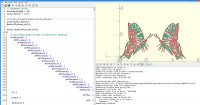
to get a useable (albeit a ton of polygons) scad file. The drawing below
also opens by importing the dxf directly to openscad, but the solids are
holes, and the holes are solids if I tried printing that, it would be a
multitude of pieces. And, the direct import does not show the code, so
there could be a restriction on the editing that could be done.
On 16/12/2021 15:57, Carsten Arnholm wrote:
>
>
> 2. Create valid .scad file from DXF, even if it contains features
> unsupported by OpenSCAD (e.g. splines).
> ================================================================
>
> In this case you can use the command line utility 'dxfread' that is
> installed with AngelCAD, for example (assuming your PATH setting
> includes the AngelCAD install folder);
>
> C:\somedir> dxfread -scad with_splines.dxf
>
> This creates a new file "with_splines.scad" containing a module
> "with_splines_dxf()" which is accepted by OpenSCAD because it is just
> a combination of booleans between polygons (the polygon discretization
> can be modified using the -sectol option).
>
>
and if you want it as 2d, easy to remove the linear extrude, unlike my
suggested method that produced a polyhedron, not a polygon. In windows,
worth making a batch file - If i can remember how.
Well, I've managed to hack together a simple bat file, and gone back
through the numerous dxf files I've created/accumulated over the last 30
or so years. I've not found any that I can't use the dxfread conversion
to get a useable (albeit a ton of polygons) scad file. The drawing below
also opens by importing the dxf directly to openscad, but the solids are
holes, and the holes are solids if I tried printing that, it would be a
multitude of pieces. And, the direct import does not show the code, so
there could be a restriction on the editing that could be done.
RW
Raymond West
Thu, Dec 16, 2021 7:53 PM
In my testing, I've found in opscad import of dxf files, The following
occurs
WARNING: Unsupported DXF Entity 'SEQEND' (1a) in "p:/docs/drawings on
hpstorage/habi3.dxf".
WARNING: Unsupported DXF Entity 'VERTEX' (6e8) in "p:/docs/drawings on
hpstorage/habi3.dxf".
WARNING: Unsupported DXF Entity 'POLYLINE' (1a) in "p:/docs/drawings on
hpstorage/habi3.dxf".
The file is not read in, but using Carsten' dxfread, for the same
habi3.dxf file it produces a perfect scad file.
In my testing, I've found in opscad import of dxf files, The following
occurs
WARNING: Unsupported DXF Entity 'SEQEND' (1a) in "p:/docs/drawings on
hpstorage/habi3.dxf".
WARNING: Unsupported DXF Entity 'VERTEX' (6e8) in "p:/docs/drawings on
hpstorage/habi3.dxf".
WARNING: Unsupported DXF Entity 'POLYLINE' (1a) in "p:/docs/drawings on
hpstorage/habi3.dxf".
The file is not read in, but using Carsten' dxfread, for the same
habi3.dxf file it produces a perfect scad file.

M
MichaelAtOz
Fri, Dec 17, 2021 6:03 AM
For example, an .scad file might try to do:
linear_extrude(height=100) import("with_splines.dxf");
This will fail in OpenSCAD, but running the exact same .scad file with
AngelCAD instead will often work.
Carsten,
Is that due to the libraries you use or you're coding better DXF handling?
-----Original Message-----
From: Carsten Arnholm [mailto:arnholm@arnholm.org]
Sent: Fri, 17 Dec 2021 02:58
To: discuss@lists.openscad.org
Subject: [OpenSCAD] Re: Fwd: Does openscad take a .dxf as input?
On 16.12.2021 15:48, Raymond West wrote:
Afak, openscad can not import dxf files with spines, and possibly other
dxf features fail, but it seems that angelcad imports them OK.
A couple of options for OpenSCAD users:
- importing DXF files using features unsupported by OpenSCAD
---============================
For example, an .scad file might try to do:
linear_extrude(height=100) import("with_splines.dxf");
This will fail in OpenSCAD, but running the exact same .scad file with
AngelCAD instead will often work.
- Create valid .scad file from DXF, even if it contains features
unsupported by OpenSCAD (e.g. splines).
---===============================
In this case you can use the command line utility 'dxfread' that is
installed with AngelCAD, for example (assuming your PATH setting
includes the AngelCAD install folder);
C:\somedir> dxfread -scad with_splines.dxf
This creates a new file "with_splines.scad" containing a module
"with_splines_dxf()" which is accepted by OpenSCAD because it is just a
combination of booleans between polygons (the polygon discretization can
be modified using the -sectol option).
Change the failing code in your .scad file
from
linear_extrude(height=100) import("with_splines.dxf");
to
use <with_splines.scad>
linear_extrude(height=100) with_splines_dxf();
Then run the modified .scad file in OpenSCAD.
Carsten Arnholm
OpenSCAD mailing list
To unsubscribe send an email to discuss-leave@lists.openscad.org
> For example, an .scad file might try to do:
> linear_extrude(height=100) import("with_splines.dxf");
>
> This will fail in OpenSCAD, but running the exact same .scad file with
> AngelCAD instead will often work.
Carsten,
Is that due to the libraries you use or you're coding better DXF handling?
> -----Original Message-----
> From: Carsten Arnholm [mailto:arnholm@arnholm.org]
> Sent: Fri, 17 Dec 2021 02:58
> To: discuss@lists.openscad.org
> Subject: [OpenSCAD] Re: Fwd: Does openscad take a .dxf as input?
>
> On 16.12.2021 15:48, Raymond West wrote:
> > Afak, openscad can not import dxf files with spines, and possibly other
> > dxf features fail, but it seems that angelcad imports them OK.
>
>
> A couple of options for OpenSCAD users:
>
> 1. importing DXF files using features unsupported by OpenSCAD
> =============================================================
>
> For example, an .scad file might try to do:
> linear_extrude(height=100) import("with_splines.dxf");
>
> This will fail in OpenSCAD, but running the exact same .scad file with
> AngelCAD instead will often work.
>
>
> 2. Create valid .scad file from DXF, even if it contains features
> unsupported by OpenSCAD (e.g. splines).
> ================================================================
>
> In this case you can use the command line utility 'dxfread' that is
> installed with AngelCAD, for example (assuming your PATH setting
> includes the AngelCAD install folder);
>
> C:\somedir> dxfread -scad with_splines.dxf
>
> This creates a new file "with_splines.scad" containing a module
> "with_splines_dxf()" which is accepted by OpenSCAD because it is just a
> combination of booleans between polygons (the polygon discretization can
> be modified using the -sectol option).
>
> Change the failing code in your .scad file
>
> from
> linear_extrude(height=100) import("with_splines.dxf");
>
> to
> use <with_splines.scad>
> linear_extrude(height=100) with_splines_dxf();
>
> Then run the modified .scad file in OpenSCAD.
>
> Carsten Arnholm
> _______________________________________________
> OpenSCAD mailing list
> To unsubscribe send an email to discuss-leave@lists.openscad.org
--
This email has been checked for viruses by AVG.
https://www.avg.com

