

discuss@lists.openscad.org

OpenSCAD general discussion Mailing-list

View all threads

Resolution Issue

J
justin_ISO
Tue, Feb 21, 2017 6:34 PM

Hello I am pretty new to OpenSCAD and CAD in general, but I am working my way
through a basic stand.

It has three sections, top, middle, and bottom, and the middle section I
have curving between the top and bottom by way of a difference call with the
middle section and a torus around it.

The issue is that no matter what I set $fn to, the middle section doesn't
smooth out. I keep getting flat faces all the way around.

Here is how I am doing it:

startDiam = 37;
endDiam = 15; //diameter at top of stand
flareHeight = 12; //height of middle section
flatHeight = 3;//height of bottom section
topHeight = 10;//height of top section

layerRes = 60;//number of layers that make up middle section

nFaces = 100;//number of faces for cylinders

deltaDiam = (startDiam - endDiam) / layerRes;//change in diameter per layer
in middle section
deltaHeight = flareHeight / layerRes;//height of a layer in the middle
section

module stand()
{
union()
{
//bottom stand
cylinder(d = startDiam, h = flatHeight , $fn = nFaces);

    //middle stand
    difference(){
        translate([0,0,flatHeight]){
            hull()
            {
                for(i = [0:layerRes]){
                    translate([0,0,deltaHeight*i]){
                        cylinder(d = startDiam - (deltaDiam* i), h =

deltaHeight, $fn = nFaces);
}
}
}
}

        translate([0,0,flatHeight + flareHeight]){
            #donut();
        }
    }
    
    //top stand
    translate([0,0,flatHeight + flareHeight + deltaHeight]){
        cylinder(d = endDiam, h = topHeight, $fn = nFaces);
    }
}

}

module donut()
{
rotate_extrude(){
translate([(startDiam/2)+1,0,0]){
circle(r = flareHeight, $fn = nFaces);
}
}
}

stand();

In the render you can see the green section is not nearly as smooth as the
top and bottom.

http://forum.openscad.org/file/n20524/JgiUOwr.png

--
View this message in context: http://forum.openscad.org/Resolution-Issue-tp20524.html
Sent from the OpenSCAD mailing list archive at Nabble.com.

Hello I am pretty new to OpenSCAD and CAD in general, but I am working my way through a basic stand. It has three sections, top, middle, and bottom, and the middle section I have curving between the top and bottom by way of a difference call with the middle section and a torus around it. The issue is that no matter what I set $fn to, the middle section doesn't smooth out. I keep getting flat faces all the way around. Here is how I am doing it: startDiam = 37; endDiam = 15; //diameter at top of stand flareHeight = 12; //height of middle section flatHeight = 3;//height of bottom section topHeight = 10;//height of top section layerRes = 60;//number of layers that make up middle section nFaces = 100;//number of faces for cylinders deltaDiam = (startDiam - endDiam) / layerRes;//change in diameter per layer in middle section deltaHeight = flareHeight / layerRes;//height of a layer in the middle section module stand() { union() { //bottom stand cylinder(d = startDiam, h = flatHeight , $fn = nFaces); //middle stand difference(){ translate([0,0,flatHeight]){ hull() { for(i = [0:layerRes]){ translate([0,0,deltaHeight*i]){ cylinder(d = startDiam - (deltaDiam* i), h = deltaHeight, $fn = nFaces); } } } } translate([0,0,flatHeight + flareHeight]){ #donut(); } } //top stand translate([0,0,flatHeight + flareHeight + deltaHeight]){ cylinder(d = endDiam, h = topHeight, $fn = nFaces); } } } module donut() { rotate_extrude(){ translate([(startDiam/2)+1,0,0]){ circle(r = flareHeight, $fn = nFaces); } } } stand(); In the render you can see the green section is not nearly as smooth as the top and bottom. <http://forum.openscad.org/file/n20524/JgiUOwr.png> -- View this message in context: http://forum.openscad.org/Resolution-Issue-tp20524.html Sent from the OpenSCAD mailing list archive at Nabble.com.
AB
Antonio Bueno
Tue, Feb 21, 2017 7:12 PM

Hello Justin.

Maybe you forgot to add $fn to your rotated extrusion?
rotate_extrude($fn = nFaces)

Also, all those 3D hull() are slow. Have you considered working in 2D and
then rotate_extrude everything?

2017-02-21 19:34 GMT+01:00 justin_ISO justin@iso-form.com:

Hello I am pretty new to OpenSCAD and CAD in general, but I am working my
way
through a basic stand.

It has three sections, top, middle, and bottom, and the middle section I
have curving between the top and bottom by way of a difference call with
the
middle section and a torus around it.

The issue is that no matter what I set $fn to, the middle section doesn't
smooth out. I keep getting flat faces all the way around.

Here is how I am doing it:

startDiam = 37;
endDiam = 15; //diameter at top of stand
flareHeight = 12; //height of middle section
flatHeight = 3;//height of bottom section
topHeight = 10;//height of top section

layerRes = 60;//number of layers that make up middle section

nFaces = 100;//number of faces for cylinders

deltaDiam = (startDiam - endDiam) / layerRes;//change in diameter per layer
in middle section
deltaHeight = flareHeight / layerRes;//height of a layer in the middle
section

module stand()
{
union()
{
//bottom stand
cylinder(d = startDiam, h = flatHeight , $fn = nFaces);

     //middle stand
     difference(){
         translate([0,0,flatHeight]){
             hull()
             {
                 for(i = [0:layerRes]){
                     translate([0,0,deltaHeight*i]){
                         cylinder(d = startDiam - (deltaDiam* i), h =

deltaHeight, $fn = nFaces);
}
}
}
}

         translate([0,0,flatHeight + flareHeight]){
             #donut();
         }
     }

     //top stand
     translate([0,0,flatHeight + flareHeight + deltaHeight]){
         cylinder(d = endDiam, h = topHeight, $fn = nFaces);
     }
 }

}

module donut()
{
rotate_extrude(){
translate([(startDiam/2)+1,0,0]){
circle(r = flareHeight, $fn = nFaces);
}
}
}

stand();

In the render you can see the green section is not nearly as smooth as the
top and bottom.

http://forum.openscad.org/file/n20524/JgiUOwr.png

--
View this message in context: http://forum.openscad.org/
Resolution-Issue-tp20524.html
Sent from the OpenSCAD mailing list archive at Nabble.com.


OpenSCAD mailing list
Discuss@lists.openscad.org
http://lists.openscad.org/mailman/listinfo/discuss_lists.openscad.org

--
Saludos,
Antonio

Hello Justin. Maybe you forgot to add $fn to your rotated extrusion? rotate_extrude($fn = nFaces) Also, all those 3D hull() are slow. Have you considered working in 2D and then rotate_extrude everything? 2017-02-21 19:34 GMT+01:00 justin_ISO <justin@iso-form.com>: > Hello I am pretty new to OpenSCAD and CAD in general, but I am working my > way > through a basic stand. > > It has three sections, top, middle, and bottom, and the middle section I > have curving between the top and bottom by way of a difference call with > the > middle section and a torus around it. > > The issue is that no matter what I set $fn to, the middle section doesn't > smooth out. I keep getting flat faces all the way around. > > Here is how I am doing it: > > startDiam = 37; > endDiam = 15; //diameter at top of stand > flareHeight = 12; //height of middle section > flatHeight = 3;//height of bottom section > topHeight = 10;//height of top section > > layerRes = 60;//number of layers that make up middle section > > nFaces = 100;//number of faces for cylinders > > deltaDiam = (startDiam - endDiam) / layerRes;//change in diameter per layer > in middle section > deltaHeight = flareHeight / layerRes;//height of a layer in the middle > section > > module stand() > { > union() > { > //bottom stand > cylinder(d = startDiam, h = flatHeight , $fn = nFaces); > > //middle stand > difference(){ > translate([0,0,flatHeight]){ > hull() > { > for(i = [0:layerRes]){ > translate([0,0,deltaHeight*i]){ > cylinder(d = startDiam - (deltaDiam* i), h = > deltaHeight, $fn = nFaces); > } > } > } > } > > translate([0,0,flatHeight + flareHeight]){ > #donut(); > } > } > > //top stand > translate([0,0,flatHeight + flareHeight + deltaHeight]){ > cylinder(d = endDiam, h = topHeight, $fn = nFaces); > } > } > } > > module donut() > { > rotate_extrude(){ > translate([(startDiam/2)+1,0,0]){ > circle(r = flareHeight, $fn = nFaces); > } > } > } > > > stand(); > > > In the render you can see the green section is not nearly as smooth as the > top and bottom. > > <http://forum.openscad.org/file/n20524/JgiUOwr.png> > > > > -- > View this message in context: http://forum.openscad.org/ > Resolution-Issue-tp20524.html > Sent from the OpenSCAD mailing list archive at Nabble.com. > > _______________________________________________ > OpenSCAD mailing list > Discuss@lists.openscad.org > http://lists.openscad.org/mailman/listinfo/discuss_lists.openscad.org > -- Saludos, Antonio
NH
nop head
Tue, Feb 21, 2017 7:16 PM

You can set $fn in the rotate_extrude to get more fragments. See
https://en.wikibooks.org/wiki/OpenSCAD_User_Manual/2D_to_3D_Extrusion#Rotate_Extrude
.

On 21 February 2017 at 18:34, justin_ISO justin@iso-form.com wrote:

Hello I am pretty new to OpenSCAD and CAD in general, but I am working my
way
through a basic stand.

It has three sections, top, middle, and bottom, and the middle section I
have curving between the top and bottom by way of a difference call with
the
middle section and a torus around it.

The issue is that no matter what I set $fn to, the middle section doesn't
smooth out. I keep getting flat faces all the way around.

Here is how I am doing it:

startDiam = 37;
endDiam = 15; //diameter at top of stand
flareHeight = 12; //height of middle section
flatHeight = 3;//height of bottom section
topHeight = 10;//height of top section

layerRes = 60;//number of layers that make up middle section

nFaces = 100;//number of faces for cylinders

deltaDiam = (startDiam - endDiam) / layerRes;//change in diameter per layer
in middle section
deltaHeight = flareHeight / layerRes;//height of a layer in the middle
section

module stand()
{
union()
{
//bottom stand
cylinder(d = startDiam, h = flatHeight , $fn = nFaces);

     //middle stand
     difference(){
         translate([0,0,flatHeight]){
             hull()
             {
                 for(i = [0:layerRes]){
                     translate([0,0,deltaHeight*i]){
                         cylinder(d = startDiam - (deltaDiam* i), h =

deltaHeight, $fn = nFaces);
}
}
}
}

         translate([0,0,flatHeight + flareHeight]){
             #donut();
         }
     }

     //top stand
     translate([0,0,flatHeight + flareHeight + deltaHeight]){
         cylinder(d = endDiam, h = topHeight, $fn = nFaces);
     }
 }

}

module donut()
{
rotate_extrude(){
translate([(startDiam/2)+1,0,0]){
circle(r = flareHeight, $fn = nFaces);
}
}
}

stand();

In the render you can see the green section is not nearly as smooth as the
top and bottom.

http://forum.openscad.org/file/n20524/JgiUOwr.png

--
View this message in context: http://forum.openscad.org/
Resolution-Issue-tp20524.html
Sent from the OpenSCAD mailing list archive at Nabble.com.


OpenSCAD mailing list
Discuss@lists.openscad.org
http://lists.openscad.org/mailman/listinfo/discuss_lists.openscad.org

You can set $fn in the rotate_extrude to get more fragments. See https://en.wikibooks.org/wiki/OpenSCAD_User_Manual/2D_to_3D_Extrusion#Rotate_Extrude . On 21 February 2017 at 18:34, justin_ISO <justin@iso-form.com> wrote: > Hello I am pretty new to OpenSCAD and CAD in general, but I am working my > way > through a basic stand. > > It has three sections, top, middle, and bottom, and the middle section I > have curving between the top and bottom by way of a difference call with > the > middle section and a torus around it. > > The issue is that no matter what I set $fn to, the middle section doesn't > smooth out. I keep getting flat faces all the way around. > > Here is how I am doing it: > > startDiam = 37; > endDiam = 15; //diameter at top of stand > flareHeight = 12; //height of middle section > flatHeight = 3;//height of bottom section > topHeight = 10;//height of top section > > layerRes = 60;//number of layers that make up middle section > > nFaces = 100;//number of faces for cylinders > > deltaDiam = (startDiam - endDiam) / layerRes;//change in diameter per layer > in middle section > deltaHeight = flareHeight / layerRes;//height of a layer in the middle > section > > module stand() > { > union() > { > //bottom stand > cylinder(d = startDiam, h = flatHeight , $fn = nFaces); > > //middle stand > difference(){ > translate([0,0,flatHeight]){ > hull() > { > for(i = [0:layerRes]){ > translate([0,0,deltaHeight*i]){ > cylinder(d = startDiam - (deltaDiam* i), h = > deltaHeight, $fn = nFaces); > } > } > } > } > > translate([0,0,flatHeight + flareHeight]){ > #donut(); > } > } > > //top stand > translate([0,0,flatHeight + flareHeight + deltaHeight]){ > cylinder(d = endDiam, h = topHeight, $fn = nFaces); > } > } > } > > module donut() > { > rotate_extrude(){ > translate([(startDiam/2)+1,0,0]){ > circle(r = flareHeight, $fn = nFaces); > } > } > } > > > stand(); > > > In the render you can see the green section is not nearly as smooth as the > top and bottom. > > <http://forum.openscad.org/file/n20524/JgiUOwr.png> > > > > -- > View this message in context: http://forum.openscad.org/ > Resolution-Issue-tp20524.html > Sent from the OpenSCAD mailing list archive at Nabble.com. > > _______________________________________________ > OpenSCAD mailing list > Discuss@lists.openscad.org > http://lists.openscad.org/mailman/listinfo/discuss_lists.openscad.org >
RP
Ronaldo Persiano
Tue, Feb 21, 2017 7:21 PM

The middle resolution is the resolution of the rotate_extrude, that you
haven't set.

Try with:

module donut()
{
rotate_extrude($fn=nFaces){
translate([(startDiam/2)+1,0,0]){
circle(r = flareHeight, $fn = nFaces);
}
}
}

Besides, you can avoid all hull and unions by defining the conic section
using linear_extrude:

    //middle stand
    difference(){
        translate([0,0,flatHeight]){
            linear_extrude(height = flareHeight+deltaHeight,

scale=endDiam/startDiam)
circle(r=startDiam/2,$fn=nFaces);
}

        translate([0,0,flatHeight + flareHeight]){
            #donut();
        }
    }

Or even using a simple cylinder instead of a cone trunk:

    difference(){
        translate([0,0,flatHeight]){
            cylinder(r=startDiam/2,h=flareHeight+deltaHeight);
        }

        translate([0,0,flatHeight + flareHeight]){
            #donut();
        }
    }

But, the best solution to your model would be to define a 2D form whose
revolution with rotate_extrude generates your full stand without any 3D
boolean operation.

The middle resolution is the resolution of the rotate_extrude, that you haven't set. Try with: module donut() { rotate_extrude($fn=nFaces){ translate([(startDiam/2)+1,0,0]){ circle(r = flareHeight, $fn = nFaces); } } } Besides, you can avoid all hull and unions by defining the conic section using linear_extrude: //middle stand difference(){ translate([0,0,flatHeight]){ linear_extrude(height = flareHeight+deltaHeight, scale=endDiam/startDiam) circle(r=startDiam/2,$fn=nFaces); } translate([0,0,flatHeight + flareHeight]){ #donut(); } } Or even using a simple cylinder instead of a cone trunk: difference(){ translate([0,0,flatHeight]){ cylinder(r=startDiam/2,h=flareHeight+deltaHeight); } translate([0,0,flatHeight + flareHeight]){ #donut(); } } But, the best solution to your model would be to define a 2D form whose revolution with rotate_extrude generates your full stand without any 3D boolean operation.
J
justin_ISO
Tue, Feb 21, 2017 7:23 PM

Thank you for the help!

I have noticed that this does take a bit longer to render, but it is beyond
my ability to draw the curve I want in 2D and extrude it.

Thanks again!

--
View this message in context: http://forum.openscad.org/Resolution-Issue-tp20524p20528.html
Sent from the OpenSCAD mailing list archive at Nabble.com.

Thank you for the help! I have noticed that this does take a bit longer to render, but it is beyond my ability to draw the curve I want in 2D and extrude it. Thanks again! -- View this message in context: http://forum.openscad.org/Resolution-Issue-tp20524p20528.html Sent from the OpenSCAD mailing list archive at Nabble.com.
RP
Ronaldo Persiano
Tue, Feb 21, 2017 7:45 PM

It is not. You have devised a very sofisticated solution. To define a 2D
shape to apply rotate_extrude, use boolean operations with 2D primitives
squares and circles correctly dimensioned and positioned. And show us what
you got.

2017-02-21 16:23 GMT-03:00 justin_ISO justin@iso-form.com:

Thank you for the help!

I have noticed that this does take a bit longer to render, but it is beyond
my ability to draw the curve I want in 2D and extrude it.

Thanks again!

--
View this message in context: http://forum.openscad.org/Resolution-Issue-
tp20524p20528.html
Sent from the OpenSCAD mailing list archive at Nabble.com.


OpenSCAD mailing list
Discuss@lists.openscad.org
http://lists.openscad.org/mailman/listinfo/discuss_lists.openscad.org

It is not. You have devised a very sofisticated solution. To define a 2D shape to apply rotate_extrude, use boolean operations with 2D primitives squares and circles correctly dimensioned and positioned. And show us what you got. 2017-02-21 16:23 GMT-03:00 justin_ISO <justin@iso-form.com>: > Thank you for the help! > > I have noticed that this does take a bit longer to render, but it is beyond > my ability to draw the curve I want in 2D and extrude it. > > Thanks again! > > > > -- > View this message in context: http://forum.openscad.org/Resolution-Issue- > tp20524p20528.html > Sent from the OpenSCAD mailing list archive at Nabble.com. > > _______________________________________________ > OpenSCAD mailing list > Discuss@lists.openscad.org > http://lists.openscad.org/mailman/listinfo/discuss_lists.openscad.org >
GF
Greg Frost
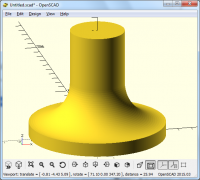
Wed, Feb 22, 2017 2:34 AM

A simple example of what is being suggested (design in 2D and rotate
extrude):

rotate_extrude($fn=360)
offset(r=-3,$fn=360)
offset(delta=3)
union()
{
square([2,8]);
square([5,1]);
}

On 22 February 2017 at 06:15, Ronaldo Persiano rcmpersiano@gmail.com
wrote:

It is not. You have devised a very sofisticated solution. To define a 2D
shape to apply rotate_extrude, use boolean operations with 2D primitives
squares and circles correctly dimensioned and positioned. And show us what
you got.

2017-02-21 16:23 GMT-03:00 justin_ISO justin@iso-form.com:

Thank you for the help!

I have noticed that this does take a bit longer to render, but it is
beyond
my ability to draw the curve I want in 2D and extrude it.

Thanks again!

--
View this message in context: http://forum.openscad.org/Reso
lution-Issue-tp20524p20528.html
Sent from the OpenSCAD mailing list archive at Nabble.com.


OpenSCAD mailing list
Discuss@lists.openscad.org
http://lists.openscad.org/mailman/listinfo/discuss_lists.openscad.org
A simple example of what is being suggested (design in 2D and rotate extrude): rotate_extrude($fn=360) offset(r=-3,$fn=360) offset(delta=3) union() { square([2,8]); square([5,1]); } On 22 February 2017 at 06:15, Ronaldo Persiano <rcmpersiano@gmail.com> wrote: > It is not. You have devised a very sofisticated solution. To define a 2D > shape to apply rotate_extrude, use boolean operations with 2D primitives > squares and circles correctly dimensioned and positioned. And show us what > you got. > > 2017-02-21 16:23 GMT-03:00 justin_ISO <justin@iso-form.com>: > >> Thank you for the help! >> >> I have noticed that this does take a bit longer to render, but it is >> beyond >> my ability to draw the curve I want in 2D and extrude it. >> >> Thanks again! >> >> >> >> -- >> View this message in context: http://forum.openscad.org/Reso >> lution-Issue-tp20524p20528.html >> Sent from the OpenSCAD mailing list archive at Nabble.com. >> >> _______________________________________________ >> OpenSCAD mailing list >> Discuss@lists.openscad.org >> http://lists.openscad.org/mailman/listinfo/discuss_lists.openscad.org >> > > > _______________________________________________ > OpenSCAD mailing list > Discuss@lists.openscad.org > http://lists.openscad.org/mailman/listinfo/discuss_lists.openscad.org > >