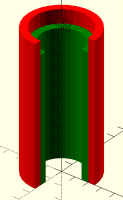
coloring parts

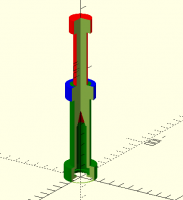
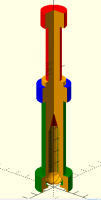
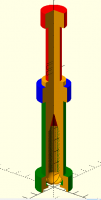
I am making an assembly for a customer consisting of 4 interlocking
parts. I colored each and then cut into the assembly with a
difference() of a cube(), expecting the colors of the parts to persist
throughout the entire part. Not so.
I don't know if this would be feasible, but the utility is obvious.
Anyone know of another way to visualize a series of parts like this?
Think of it as a complex syringe...

I think the only way is to make four separate differences and colour them.
On Sun, 7 Feb 2021 at 22:11, jon jon@jonbondy.com wrote:
I am making an assembly for a customer consisting of 4 interlocking
parts. I colored each and then cut into the assembly with a difference()
of a cube(), expecting the colors of the parts to persist throughout the
entire part. Not so.
I don't know if this would be feasible, but the utility is obvious.
Anyone know of another way to visualize a series of parts like this?
Think of it as a complex syringe...
OpenSCAD mailing list
Discuss@lists.openscad.org
http://lists.openscad.org/mailman/listinfo/discuss_lists.openscad.org
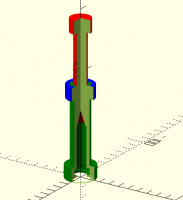
Great suggestion. But it does not work...
I have four sections like this:
color("red")
difference() {
Plunger();
translate([0, 0, -20])
cube(1000);
}
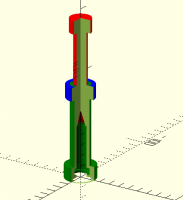
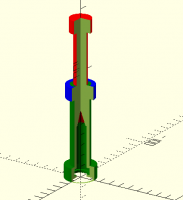
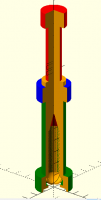
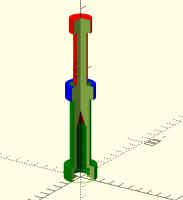
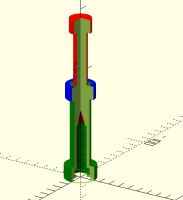
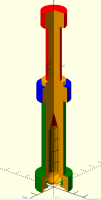
There are four objects, colored red, blue, green, and orange. The
internal color is always the color of the last object.
Puzzling
On 2/7/2021 5:12 PM, nop head wrote:
I think the only way is to make four separate differences and colour them.
On Sun, 7 Feb 2021 at 22:11, jon <jon@jonbondy.com
mailto:jon@jonbondy.com> wrote:
 I am making an assembly for a customer consisting of 4
 interlocking parts.  I colored each and then cut into the assembly
 with a difference() of a cube(), expecting the colors of the parts
 to persist throughout the entire part.  Not so.

 I don't know if this would be feasible, but the utility is obvious.

 Anyone know of another way to visualize a series of parts like
 this?  Think of it as a complex syringe...


 _______________________________________________
 OpenSCAD mailing list
 Discuss@lists.openscad.org <mailto:Discuss@lists.openscad.org>
 http://lists.openscad.org/mailman/listinfo/discuss_lists.openscad.org
 <http://lists.openscad.org/mailman/listinfo/discuss_lists.openscad.org>
OpenSCAD mailing list
Discuss@lists.openscad.org
http://lists.openscad.org/mailman/listinfo/discuss_lists.openscad.org
Do the objects all overlap each other? It should work if they don't.
On Sun, 7 Feb 2021 at 22:29, jon jon@jonbondy.com wrote:
Great suggestion. But it does not work...
I have four sections like this:
color("red")
difference() {
Plunger();
translate([0, 0, -20])
cube(1000);
}
There are four objects, colored red, blue, green, and orange. The
internal color is always the color of the last object.
Puzzling
On 2/7/2021 5:12 PM, nop head wrote:
I think the only way is to make four separate differences and colour them.
On Sun, 7 Feb 2021 at 22:11, jon jon@jonbondy.com wrote:
I am making an assembly for a customer consisting of 4 interlocking
parts. I colored each and then cut into the assembly with a difference()
of a cube(), expecting the colors of the parts to persist throughout the
entire part. Not so.
I don't know if this would be feasible, but the utility is obvious.
Anyone know of another way to visualize a series of parts like this?
Think of it as a complex syringe...
OpenSCAD mailing list
Discuss@lists.openscad.org
http://lists.openscad.org/mailman/listinfo/discuss_lists.openscad.org
OpenSCAD mailing listDiscuss@lists.openscad.orghttp://lists.openscad.org/mailman/listinfo/discuss_lists.openscad.org
Also you might want to add render around each difference to avoid z
fighting between the different coloured negative cubes.
On Sun, 7 Feb 2021 at 22:31, nop head nop.head@gmail.com wrote:
Do the objects all overlap each other? It should work if they don't.
On Sun, 7 Feb 2021 at 22:29, jon jon@jonbondy.com wrote:
Great suggestion. But it does not work...
I have four sections like this:
color("red")
difference() {
Plunger();
translate([0, 0, -20])
cube(1000);
}
There are four objects, colored red, blue, green, and orange. The
internal color is always the color of the last object.
Puzzling
On 2/7/2021 5:12 PM, nop head wrote:
I think the only way is to make four separate differences and colour them.
On Sun, 7 Feb 2021 at 22:11, jon jon@jonbondy.com wrote:
I am making an assembly for a customer consisting of 4 interlocking
parts. I colored each and then cut into the assembly with a difference()
of a cube(), expecting the colors of the parts to persist throughout the
entire part. Not so.
I don't know if this would be feasible, but the utility is obvious.
Anyone know of another way to visualize a series of parts like this?
Think of it as a complex syringe...
OpenSCAD mailing list
Discuss@lists.openscad.org
http://lists.openscad.org/mailman/listinfo/discuss_lists.openscad.org
OpenSCAD mailing listDiscuss@lists.openscad.orghttp://lists.openscad.org/mailman/listinfo/discuss_lists.openscad.org

When you have code like:
difference() {
    color(“red”) Shape1();
    color(“blue”) Shape2();
}
Then the color of the interior of Shape1() that is exposed by removing Shape2() will be colored like Shape2(). Ie, for this example, you will see a red Shape1(); exterior, with the interior parts colored blue.
If you make them both the same color, then you can get a homogeneously colored part.
- Revar
On Feb 7, 2021, at 2:10 PM, jon jon@jonbondy.com wrote:
I am making an assembly for a customer consisting of 4 interlocking parts. I colored each and then cut into the assembly with a difference() of a cube(), expecting the colors of the parts to persist throughout the entire part. Not so.
<bdmbalicpfleleoa.png>
I don't know if this would be feasible, but the utility is obvious.
Anyone know of another way to visualize a series of parts like this? Think of it as a complex syringe...
OpenSCAD mailing list
Discuss@lists.openscad.org
http://lists.openscad.org/mailman/listinfo/discuss_lists.openscad.org
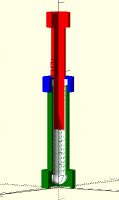
Excellent! if each object has a color() of a render() of the object,
then the colors work!
Thanks so much!
On 2/7/2021 5:37 PM, nop head wrote:
Also you might want to add render around each difference to avoid z
fighting between the different coloured negative cubes.
On Sun, 7 Feb 2021 at 22:31, nop head <nop.head@gmail.com
mailto:nop.head@gmail.com> wrote:
 Do the objects all overlap each other? It should work if they don't.

 On Sun, 7 Feb 2021 at 22:29, jon <jon@jonbondy.com
 <mailto:jon@jonbondy.com>> wrote:

     Great suggestion.  But it does not work...

     I have four sections like this:

     color("red")
         difference() {
             Plunger();
             translate([0, 0, -20])
                 cube(1000);
             }

     There are four objects, colored red, blue, green, and orange.
     The internal color is always the color of the last object.

     Puzzling


     On 2/7/2021 5:12 PM, nop head wrote:
     I think the only way is to make four separate differences and
     colour them.

     On Sun, 7 Feb 2021 at 22:11, jon <jon@jonbondy.com
     <mailto:jon@jonbondy.com>> wrote:

         I am making an assembly for a customer consisting of 4
         interlocking parts.  I colored each and then cut into the
         assembly with a difference() of a cube(), expecting the
         colors of the parts to persist throughout the entire
         part.  Not so.

         I don't know if this would be feasible, but the utility
         is obvious.

         Anyone know of another way to visualize a series of parts
         like this?  Think of it as a complex syringe...


         _______________________________________________
         OpenSCAD mailing list
         Discuss@lists.openscad.org
         <mailto:Discuss@lists.openscad.org>
         http://lists.openscad.org/mailman/listinfo/discuss_lists.openscad.org
         <http://lists.openscad.org/mailman/listinfo/discuss_lists.openscad.org>


     _______________________________________________
     OpenSCAD mailing list
     Discuss@lists.openscad.org  <mailto:Discuss@lists.openscad.org>
     http://lists.openscad.org/mailman/listinfo/discuss_lists.openscad.org  <http://lists.openscad.org/mailman/listinfo/discuss_lists.openscad.org>

RevarBat wrote
When you have code like:
 difference() {
     color(“red”) Shape1();
     color(“blue”) Shape2();
 }
Then the color of the interior of Shape1() that is exposed by removing
Shape2() will be colored like Shape2(). Ie, for this example, you will
see a red Shape1(); exterior, with the interior parts colored blue.
If you make them both the same color, then you can get a homogeneously
colored part.
To clarify, technically there is no interior colour.
ATM colour is a surface property of the faces of the object (ie the
triangles or polygons).
The colour of the faces resulting from a difference, ie the cut face, has
the colour of the negative object.
Hence, as above, cut face of Shape1() is blue.
OpenSCAD Admin - email* me if you need anything, or if I've done something stupid...
- on the Forum, click on my MichaelAtOz label, there is a link to email me.
Unless specifically shown otherwise above, my contribution is in the Public Domain; to the extent possible under law, I have waived all copyright and related or neighbouring rights to this work. Obviously inclusion of works of previous authors is not included in the above.
--
Sent from: http://forum.openscad.org/
Odd. It works for me in OpenSCAD 2021.01 (OS X):
color("red")
difference() {
cylinder(d=50,h=100);
translate([0,-1000,-500]) cube(1000);
}
- Revar
On Feb 7, 2021, at 2:29 PM, jon jon@jonbondy.com wrote:
Great suggestion. But it does not work...
<mcgpbpmffakdoboa.png>
I have four sections like this:
color("red")
difference() {
Plunger();
translate([0, 0, -20])
cube(1000);
}
There are four objects, colored red, blue, green, and orange. The internal color is always the color of the last object.
Puzzling
On 2/7/2021 5:12 PM, nop head wrote:
I think the only way is to make four separate differences and colour them.
On Sun, 7 Feb 2021 at 22:11, jon <jon@jonbondy.com mailto:jon@jonbondy.com> wrote:
I am making an assembly for a customer consisting of 4 interlocking parts. I colored each and then cut into the assembly with a difference() of a cube(), expecting the colors of the parts to persist throughout the entire part. Not so.
<bdmbalicpfleleoa.png>
I don't know if this would be feasible, but the utility is obvious.
Anyone know of another way to visualize a series of parts like this? Think of it as a complex syringe...
OpenSCAD mailing list
Discuss@lists.openscad.org mailto:Discuss@lists.openscad.org
http://lists.openscad.org/mailman/listinfo/discuss_lists.openscad.org http://lists.openscad.org/mailman/listinfo/discuss_lists.openscad.org
OpenSCAD mailing list
Discuss@lists.openscad.org mailto:Discuss@lists.openscad.org
http://lists.openscad.org/mailman/listinfo/discuss_lists.openscad.org http://lists.openscad.org/mailman/listinfo/discuss_lists.openscad.org
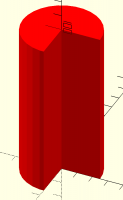
Ahhhh. I see. If the removed cube has coincident faces to the other parts, the last cube’s color wins. You can get the result you want by making the cubes very slightly offset from one another.
color("red")
difference() {
cylinder(d=50,h=100);
cylinder(d=40,h=1000, center=true);
translate([0,-1000,-500]) cube(1000);
}
color("green")
difference() {
cylinder(d=40,h=90);
cylinder(d=30,h=1000, center=true);
translate([-0.01,-1000+0.01,-500]) cube(1000);
}
- Revar
On Feb 7, 2021, at 3:20 PM, Revar Desmera revarbat@gmail.com wrote:
Odd. It works for me in OpenSCAD 2021.01 (OS X):
color("red")
difference() {
cylinder(d=50,h=100);
translate([0,-1000,-500]) cube(1000);
}
<Screen Shot 2021-02-07 at 3.18.50 PM.png>
- Revar
On Feb 7, 2021, at 2:29 PM, jon <jon@jonbondy.com mailto:jon@jonbondy.com> wrote:
Great suggestion. But it does not work...
<mcgpbpmffakdoboa.png>
I have four sections like this:
color("red")
difference() {
Plunger();
translate([0, 0, -20])
cube(1000);
}
There are four objects, colored red, blue, green, and orange. The internal color is always the color of the last object.
Puzzling
On 2/7/2021 5:12 PM, nop head wrote:
I think the only way is to make four separate differences and colour them.
On Sun, 7 Feb 2021 at 22:11, jon <jon@jonbondy.com mailto:jon@jonbondy.com> wrote:
I am making an assembly for a customer consisting of 4 interlocking parts. I colored each and then cut into the assembly with a difference() of a cube(), expecting the colors of the parts to persist throughout the entire part. Not so.
<bdmbalicpfleleoa.png>
I don't know if this would be feasible, but the utility is obvious.
Anyone know of another way to visualize a series of parts like this? Think of it as a complex syringe...
OpenSCAD mailing list
Discuss@lists.openscad.org mailto:Discuss@lists.openscad.org
http://lists.openscad.org/mailman/listinfo/discuss_lists.openscad.org http://lists.openscad.org/mailman/listinfo/discuss_lists.openscad.org
OpenSCAD mailing list
Discuss@lists.openscad.org mailto:Discuss@lists.openscad.org
http://lists.openscad.org/mailman/listinfo/discuss_lists.openscad.org http://lists.openscad.org/mailman/listinfo/discuss_lists.openscad.org