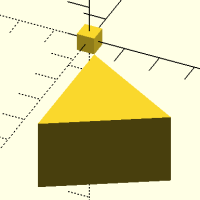
a new brick in my programming

Dear all,
I would like to use more and more the attach function in my further
future... For experiences I am developing a chest and as you can see my
first steps are really bad:
include <BOSL2/std.scad>;
// Boden
cuboid([100,40,1.8])
translate([-50+0.9, 0,50]) //BAD !!
yrot(-90)
color("red") cuboid([100,40,1.8]);
color("green")
translate([0, 0,100]) // BAD !!
cuboid([100,40,1.8]);
Even if I use variables for lenght and width... it is still BAD coding
.. Could, please do someone do my a favour in showing me how to use the
attachment functions?
My dream is that
- the red shelf is always on the left side of the yellow shelf and
- the green shelf is always the top "sitting" on the red one
many thanks
Karl

I, too, eagerly await such an attachment tutorial from someone much
smarter than me.
-
However, it is still a good idea to use variables for length, width, and
height to make future changes easier. -
Using translate() isn't inherently bad, just traditional.
-
How is it that this code works without a semicolon after the first
cuboid()?
Len, the curious

On 7/22/2026 2:22 AM, Karl Exler via Discuss wrote:
Even if I use variables for lenght and width... it is still BAD coding
.. Could, please do someone do my a favour in showing me how to use
the attachment functions?
Have you looked at the existing attachment tutorial?
https://github.com/BelfrySCAD/BOSL2/wiki/Tutorial-Attachment-Overview
I'll take a stab at rewriting your little test using attachments, but
it's bedtime now.

On Jul 22, 2026, at 10:07 AM, Leonard Martin Struttmann via Discuss discuss@lists.openscad.org wrote:
- How is it that this code works without a semicolon after the first cuboid()?
I hadn’t noticed the missing semi-colon until your post. I’m just learning BOSL2 and it’s quite involved. I’ve just started using its shapes as enhanced versions of the basic ones, but they are a lot more.
cuboid([100,40,1.8])
translate([-50+0.9, 0,50]) // BAD !!
yrot(-90)
color("red") cuboid([100,40,1.8]);
color("green")
translate([0, 0,100]) // BAD !!
cuboid([100,40,1.8]);
Here’s what I think. Without the semicolon, the lines following up to the semicolon the next cuboid are a child object of the first cuboid. The basic OpenSCAD cube (and other shapes) don’t support child object, but the BOSL2 ones do. I think this is to support the attachment syntax.
Mark
I don´t know why... but honestly it works without this semicolon..... on
the other side.... This was not the question.
There is a nice story about an Austrian ArchLord who learned for his
Geography exame only about Africa. And then the teacher asked him about
India... and he answered:
"India is a nice country... Elephants live there.. Elephants live in
Africa, too..... and then he continued with some facts about Africa...
:-)
Karl
Am 23.07.26 um 04:19 schrieb Mark Erbaugh via Discuss:
On Jul 22, 2026, at 10:07 AM, Leonard Martin Struttmann via Discuss
discuss@lists.openscad.org wrote:
3. How is it that this code works without a semicolon after the
first cuboid()?
I hadn’t noticed the missing semi-colon until your post. I’m just
learning BOSL2 and it’s quite involved. I’ve just started using its
shapes as enhanced versions of the basic ones, but they are a lot more.
cuboid([100,40,1.8]) translate([-50+0.9, 0,50]) // BAD !! yrot(-90)
color("red") cuboid([100,40,1.8]); color("green") translate([0,
0,100]) // BAD !! cuboid([100,40,1.8]);
Here’s what I think. Without the semicolon, the lines following up to
the semicolon the next cuboid are a child object of the first cuboid.
The basic OpenSCAD cube (and other shapes) don’t support child object,
but the BOSL2 ones do. I think this is to support the attachment syntax.
Mark
OpenSCAD mailing list
To unsubscribe send an email todiscuss-leave@lists.openscad.org
Karl -
Here is one version that uses attach() that appears to create the same
model. The colors aren't correct. I guess that children take on the color
of the parent.
I did not figure this out, I told ClaudeCode to do it. Claude took about
30 minutes real-time to come up with this.
Len
//===========================
include <BOSL2/std.scad>;
L = 100;
W = 40;
H = 1.8;
cuboid([L,W,H])
attach(LEFT, BOTTOM, spin=90, overlap=H)
right(L/2)
color("red")
cuboid([L,W,H])
attach(RIGHT, spin=90)
left((L-H)/2)
color("green")
cuboid([L,W,H]);

I’m on vacation with no computer so just a brief remark. This is probably
best done with align rather than attach. You should not need any movement
commands. Should not have to use spin either. And use recolor instead of
color.
As explained in the tutorial a child appears with its center on the
parent’s center if you don’t have align, position, or attach.
On Thu, Jul 23, 2026 at 07:00 Leonard Martin Struttmann via Discuss <
discuss@lists.openscad.org> wrote:
Karl -
Here is one version that uses attach() that appears to create the same
model. The colors aren't correct. I guess that children take on the color
of the parent.
I did not figure this out, I told ClaudeCode to do it. Claude took about
30 minutes real-time to come up with this.
Len
//===========================
include <BOSL2/std.scad>;
L = 100;
W = 40;
H = 1.8;
cuboid([L,W,H])
attach(LEFT, BOTTOM, spin=90, overlap=H)
right(L/2)
color("red")
cuboid([L,W,H])
attach(RIGHT, spin=90)
left((L-H)/2)
color("green")
cuboid([L,W,H]);
OpenSCAD mailing list
To unsubscribe send an email to discuss-leave@lists.openscad.org
in fact the align-function is much more convenient, though I cannot
manage the "recolor" function:
include <BOSL2/std.scad>;
gesB=120; //gesamte Breite
gesT=40; //gesamte Tiefe
S=1.8; //Stärke des Holzes
// Boden
cuboid([gesB,gesT,S], anchor=LEFT+FWD)
align(TOP,LEFT)
color("red") cuboid([S,gesT,150])
translate([0,0,-40])
recolor("green")align(RIGHT)cuboid([gesB,gesT,S]);
Do you think this is a good way of developing a chest?
yours KARL
Am 23.07.26 um 16:08 schrieb Adrian Mariano via Discuss:
I’m on vacation with no computer so just a brief remark. This is
probably best done with align rather than attach. You should not need
any movement commands. Should not have to use spin either. And use
recolor instead of color.
As explained in the tutorial a child appears with its center on the
parent’s center if you don’t have align, position, or attach.
On Thu, Jul 23, 2026 at 07:00 Leonard Martin Struttmann via Discuss
discuss@lists.openscad.org wrote:
 Karl -

 Here is one version that uses attach() that appears to create the
 same model. The colors aren't correct.  I guess that children take
 on the color of the parent.

 I did not figure this out, I told ClaudeCode to do it. Claude took
 about 30 minutes real-time to come up with this.

 Len

 //===========================
 include <BOSL2/std.scad>;

 L = 100;
 W = 40;
 H = 1.8;

 cuboid([L,W,H])
     attach(LEFT, BOTTOM, spin=90, overlap=H)
       right(L/2)
       color("red")
       cuboid([L,W,H])
         attach(RIGHT, spin=90)
           left((L-H)/2)
           color("green")
           cuboid([L,W,H]);
 _______________________________________________
 OpenSCAD mailing list
 To unsubscribe send an email to discuss-leave@lists.openscad.org
OpenSCAD mailing list
To unsubscribe send an email todiscuss-leave@lists.openscad.org
When using recolor you must not ever use color above it. Color affects
everything below it unconditionally. The top color wins.
On Thu, Jul 23, 2026 at 09:46 Karl Exler via Discuss <
discuss@lists.openscad.org> wrote:
in fact the align-function is much more convenient, though I cannot manage
the "recolor" function:
include <BOSL2/std.scad>;
gesB=120; //gesamte Breite
gesT=40; //gesamte Tiefe
S=1.8; //Stärke des Holzes
// Boden
cuboid([gesB,gesT,S], anchor=LEFT+FWD)
align(TOP,LEFT)
color("red") cuboid([S,gesT,150])
translate([0,0,-40])
recolor("green")align(RIGHT)cuboid([gesB,gesT,S]);
Do you think this is a good way of developing a chest?
yours KARL
Am 23.07.26 um 16:08 schrieb Adrian Mariano via Discuss:
I’m on vacation with no computer so just a brief remark. This is probably
best done with align rather than attach. You should not need any movement
commands. Should not have to use spin either. And use recolor instead of
color.
As explained in the tutorial a child appears with its center on the
parent’s center if you don’t have align, position, or attach.
On Thu, Jul 23, 2026 at 07:00 Leonard Martin Struttmann via Discuss <
discuss@lists.openscad.org> wrote:
Karl -
Here is one version that uses attach() that appears to create the same
model. The colors aren't correct. I guess that children take on the color
of the parent.
I did not figure this out, I told ClaudeCode to do it. Claude took about
30 minutes real-time to come up with this.
Len
//===========================
include <BOSL2/std.scad>;
L = 100;
W = 40;
H = 1.8;
cuboid([L,W,H])
attach(LEFT, BOTTOM, spin=90, overlap=H)
right(L/2)
color("red")
cuboid([L,W,H])
attach(RIGHT, spin=90)
left((L-H)/2)
color("green")
cuboid([L,W,H]);
OpenSCAD mailing list
To unsubscribe send an email to discuss-leave@lists.openscad.org
OpenSCAD mailing list
To unsubscribe send an email to discuss-leave@lists.openscad.org
OpenSCAD mailing list
To unsubscribe send an email to discuss-leave@lists.openscad.org
In a private conversation, Karl indicates that one of his points of
confusion is that setting anchor=LEFT causes the shape to move to the
right from its default centered position.
The anchor mechanism is not about moving the shape. Rather, it
specifies where on the shape should be placed on the origin.
When you say anchor=LEFT, you are saying that the middle of the left
side of the shape should be put at the origin. (It's the middle because
LEFT specifies only which point to use in the X axis, and the Y and Z
axes remain defaulted to centered.)
When you say to put the left side at the origin, yes, that moves the
shape to the right from its default centered position.
But if you think of it as where on the shape will be placed at the
origin, it makes sense.
When you say anchor=LEFT+FRONT+BOTTOM, you're saying that that corner
should be placed at the origin... which, for a cuboid, is the cube
default of putting the shape in the positive XYZ octant.
If you think of it (or a replacement mechanism that runs in the opposite
direction) as moving in that direction, you're fine... until you
actually start doing attachment. Either way will work for specifying
where this shape should go, but what about when you want to specify
where the next shape should go, relative to this one?
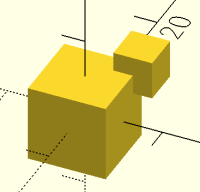
Consider this simple case:
include <BOSL2/std.scad>

cuboid(10)
     position(TOP+BACK+RIGHT)
     cuboid(5);
This says that the first cuboid is in its default centered position.
The second cuboid is positioned relative to the top-back-right corner of
the first, in its default centered position:
I'm not sure exactly how you would say that or think about it if you
tried to use a "move the shape" scheme.
The "point on the shape" scheme is also required when you start playing
with shapes that have anchors other than the basic 27 anchors. Consider
a triangular prism:
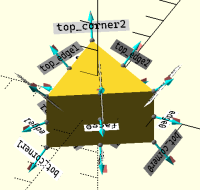
include <BOSL2/std.scad>

regular_prism(n=3, h=20, r=20) show_anchors(std=false);
Note the anchors:
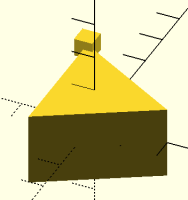
Now let's position a cube at the far top corner, the one called
"top_corner2":
include <BOSL2/std.scad>

regular_prism(n=3, h=20, r=20)
     position("top_corner2")
     cuboid(5);
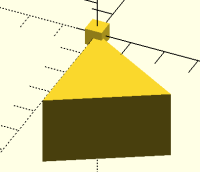
Let's reverse that; let's put that corner of a triangular prism at the
center of the cube.
include <BOSL2/std.scad>

cuboid(5)
     regular_prism(n=3, h=20, r=20, anchor="top_corner2");
And combine those to position the corner of the prism at a particular
corner of the cube:
include <BOSL2/std.scad>

cuboid(5)
     position(FRONT+BOTTOM+RIGHT)
     regular_prism(n=3, h=20, r=20, anchor="top_corner2");
Net: think of it in terms of a point on the shape - either the point on
the shape where you want the origin to be, or the point on the shape
where you want to position some other shape - which, itself, can be
positioned based on a point on it.
That pretty much covers the simple ways to position things. align()
gives you cleverer positioning that can let you think less about exactly
how everything fits together, and attach() gives you positioning and
orientation. We can go into those once you've got the basics down.