

discuss@lists.openscad.org

OpenSCAD general discussion Mailing-list

View all threads

Can you cut a 2D object into two separate parts along a line?

AB
Andy Baxter
Mon, Sep 4, 2017 9:35 AM

I am looking for a way, given a 2D object and a cut line that is known to cut the object into two parts, to generate those two parts as 2D objects in a predictable way. I would like the object to be any 2D object, and the cut line to be specified as a vector. The only way I can see of doing it at the moment is to specify the cut as a region that is known to enclose one of the parts, but this is a bit clunky for what I want. Can anyone help?

(The application is a sheet material folding module I am working on: https://github.com/highfellow/openscad-sheet-folder )

Thanks for any help with this.

Andrew Baxter

RP
Ronaldo Persiano
Mon, Sep 4, 2017 3:30 PM

I published here a few weeks ago a code to find the bounding box of a 3D
object. See
http://forum.openscad.org/Round-anything-Retrospective-rounding-filleting-module-td21794.html#a21798.
The code could be simplifed to find the bounding rectangle of a 2D shape. I
don't have my notebook available now to  test it.

Em 4 de set de 2017 10:36, "Andy Baxter" site@highfellow.org escreveu:

I am looking for a way, given a 2D object and a cut line that is known to
cut the object into two parts, to generate those two parts as 2D objects in
a predictable way. I would like the object to be any 2D object, and the cut
line to be specified as a vector. The only way I can see of doing it at the
moment is to specify the cut as a region that is known to enclose one of
the parts, but this is a bit clunky for what I want. Can anyone help?

(The application is a sheet material folding module I am working on:
https://github.com/highfellow/openscad-sheet-folder )

Thanks for any help with this.

Andrew Baxter


OpenSCAD mailing list
Discuss@lists.openscad.org
http://lists.openscad.org/mailman/listinfo/discuss_lists.openscad.org

I published here a few weeks ago a code to find the bounding box of a 3D object. See http://forum.openscad.org/Round-anything-Retrospective-rounding-filleting-module-td21794.html#a21798. The code could be simplifed to find the bounding rectangle of a 2D shape. I don't have my notebook available now to test it. Em 4 de set de 2017 10:36, "Andy Baxter" <site@highfellow.org> escreveu: > I am looking for a way, given a 2D object and a cut line that is known to > cut the object into two parts, to generate those two parts as 2D objects in > a predictable way. I would like the object to be any 2D object, and the cut > line to be specified as a vector. The only way I can see of doing it at the > moment is to specify the cut as a region that is known to enclose one of > the parts, but this is a bit clunky for what I want. Can anyone help? > > (The application is a sheet material folding module I am working on: > https://github.com/highfellow/openscad-sheet-folder ) > > > Thanks for any help with this. > > > Andrew Baxter > > > _______________________________________________ > OpenSCAD mailing list > Discuss@lists.openscad.org > http://lists.openscad.org/mailman/listinfo/discuss_lists.openscad.org > >
RP
Ronaldo Persiano
Wed, Sep 6, 2017 1:51 AM

​Andrew,

The following code may be a starting point to do what you want. For sake of
completeness I included a module ( boundingRect() ) that computes the
bounding rectangle of a 2D shape.

// the extent of the children projection on x axis
module xExtent()
hull() translate([0,1/2])
projection() rotate([90,0,0])
linear_extrude(1) children();

// the left extreme of the xExtent of children
module leftExtreme() difference() {
xExtent() children();
translate([1,0]) scale([1,1.1])xExtent() children();
}

// the lower left "point" of the children bounding rectangle
module lowerLeft() minkowski() {
leftExtreme() children(); // X
rotate(90) leftExtreme() rotate(-90) children(); // Y
}

// the positive part of the xExtent of children
module halfExtent(){
difference() {
xExtent() children();
hull(){
translate([-1/2,0]) square(1,center=true);
lowerLeft() xExtent() children();
}
}
}

// a bounding rectangle of the part of children
// that has positive ordinate x
module halfBoundRect() offset(-1/2) minkowski() {
halfExtent() children();
rotate(-90) xExtent() rotate(90) children();
}

// the bounding rectangle of children
module boundingRect() offset(-1/2) minkowski() {
xExtent() children();
rotate(-90) xExtent() rotate(90) children();
}

// a test shape
module shape() translate([2.5,0]){
rotate(0) square(10,center = true);
rotate(45) square(10,center = true);
}

%scale([1,1,0.1]) shape();
// the shape positive part
color("red")
intersection(){
shape();
halfBoundRect() shape();
}
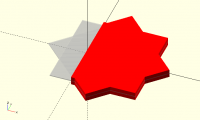
​Andrew, The following code may be a starting point to do what you want. For sake of completeness I included a module ( boundingRect() ) that computes the bounding rectangle of a 2D shape. // the extent of the children projection on x axis module xExtent() hull() translate([0,1/2]) projection() rotate([90,0,0]) linear_extrude(1) children(); // the left extreme of the xExtent of children module leftExtreme() difference() { xExtent() children(); translate([1,0]) scale([1,1.1])xExtent() children(); } // the lower left "point" of the children bounding rectangle module lowerLeft() minkowski() { leftExtreme() children(); // X rotate(90) leftExtreme() rotate(-90) children(); // Y } // the positive part of the xExtent of children module halfExtent(){ difference() { xExtent() children(); hull(){ translate([-1/2,0]) square(1,center=true); lowerLeft() xExtent() children(); } } } // a bounding rectangle of the part of children // that has positive ordinate x module halfBoundRect() offset(-1/2) minkowski() { halfExtent() children(); rotate(-90) xExtent() rotate(90) children(); } // the bounding rectangle of children module boundingRect() offset(-1/2) minkowski() { xExtent() children(); rotate(-90) xExtent() rotate(90) children(); } // a test shape module shape() translate([2.5,0]){ rotate(0) square(10,center = true); rotate(45) square(10,center = true); } %scale([1,1,0.1]) shape(); // the shape positive part color("red") intersection(){ shape(); halfBoundRect() shape(); } ​
JD
Jerry Davis
Wed, Sep 6, 2017 2:05 AM

why not use intersection with a block big enough to encompass the 2D object.

--
Extra Ham Operator: K7AZJ
Registered Linux User: 275424
Raspberry Pi and Openscad developer

The most exciting phrase to hear in science - the one that heralds new
discoveries - is not "Eureka!" but "That's funny...".
- Isaac. Asimov

On Tue, Sep 5, 2017 at 6:51 PM, Ronaldo Persiano rcmpersiano@gmail.com
wrote:

​Andrew,

The following code may be a starting point to do what you want. For sake
of completeness I included a module ( boundingRect() ) that computes the
bounding rectangle of a 2D shape.

// the extent of the children projection on x axis
module xExtent()
hull() translate([0,1/2])
projection() rotate([90,0,0])
linear_extrude(1) children();

// the left extreme of the xExtent of children
module leftExtreme() difference() {
xExtent() children();
translate([1,0]) scale([1,1.1])xExtent() children();
}

// the lower left "point" of the children bounding rectangle
module lowerLeft() minkowski() {
leftExtreme() children(); // X
rotate(90) leftExtreme() rotate(-90) children(); // Y
}

// the positive part of the xExtent of children
module halfExtent(){
difference() {
xExtent() children();
hull(){
translate([-1/2,0]) square(1,center=true);
lowerLeft() xExtent() children();
}
}
}

// a bounding rectangle of the part of children
// that has positive ordinate x
module halfBoundRect() offset(-1/2) minkowski() {
halfExtent() children();
rotate(-90) xExtent() rotate(90) children();
}

// the bounding rectangle of children
module boundingRect() offset(-1/2) minkowski() {
xExtent() children();
rotate(-90) xExtent() rotate(90) children();
}

// a test shape
module shape() translate([2.5,0]){
rotate(0) square(10,center = true);
rotate(45) square(10,center = true);
}

%scale([1,1,0.1]) shape();
// the shape positive part
color("red")
intersection(){
shape();
halfBoundRect() shape();
}


OpenSCAD mailing list
Discuss@lists.openscad.org
http://lists.openscad.org/mailman/listinfo/discuss_lists.openscad.org
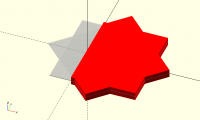
why not use intersection with a block big enough to encompass the 2D object. -- Extra Ham Operator: K7AZJ Registered Linux User: 275424 Raspberry Pi and Openscad developer *The most exciting phrase to hear in science - the one that heralds new discoveries - is not "Eureka!" but "That's funny...".*- Isaac. Asimov On Tue, Sep 5, 2017 at 6:51 PM, Ronaldo Persiano <rcmpersiano@gmail.com> wrote: > ​Andrew, > > The following code may be a starting point to do what you want. For sake > of completeness I included a module ( boundingRect() ) that computes the > bounding rectangle of a 2D shape. > > // the extent of the children projection on x axis > module xExtent() > hull() translate([0,1/2]) > projection() rotate([90,0,0]) > linear_extrude(1) children(); > > // the left extreme of the xExtent of children > module leftExtreme() difference() { > xExtent() children(); > translate([1,0]) scale([1,1.1])xExtent() children(); > } > > // the lower left "point" of the children bounding rectangle > module lowerLeft() minkowski() { > leftExtreme() children(); // X > rotate(90) leftExtreme() rotate(-90) children(); // Y > } > > // the positive part of the xExtent of children > module halfExtent(){ > difference() { > xExtent() children(); > hull(){ > translate([-1/2,0]) square(1,center=true); > lowerLeft() xExtent() children(); > } > } > } > > // a bounding rectangle of the part of children > // that has positive ordinate x > module halfBoundRect() offset(-1/2) minkowski() { > halfExtent() children(); > rotate(-90) xExtent() rotate(90) children(); > } > > // the bounding rectangle of children > module boundingRect() offset(-1/2) minkowski() { > xExtent() children(); > rotate(-90) xExtent() rotate(90) children(); > } > > // a test shape > module shape() translate([2.5,0]){ > rotate(0) square(10,center = true); > rotate(45) square(10,center = true); > } > > %scale([1,1,0.1]) shape(); > // the shape positive part > color("red") > intersection(){ > shape(); > halfBoundRect() shape(); > } > > > > ​ > > _______________________________________________ > OpenSCAD mailing list > Discuss@lists.openscad.org > http://lists.openscad.org/mailman/listinfo/discuss_lists.openscad.org > >
RP
Ronaldo Persiano
Wed, Sep 6, 2017 9:31 AM

It would be easier indeed when you know the size of the object. In my
experience, however Openscad has unpredictable behavior with very very big
and small objects.

Em 6 de set de 2017 03:06, "Jerry Davis" jdawgaz@gmail.com escreveu:

why not use intersection with a block big enough to encompass the 2D object.

It would be easier indeed when you know the size of the object. In my experience, however Openscad has unpredictable behavior with very very big and small objects. Em 6 de set de 2017 03:06, "Jerry Davis" <jdawgaz@gmail.com> escreveu: why not use intersection with a block big enough to encompass the 2D object.
H
highfellow
Thu, Sep 7, 2017 7:50 AM

Ronaldo,

Thanks for the reply. It's interesting to see how you did this, but it
doesn't really solve my problem.

I am trying to write the module in such a way that it will be useful for
folding any 2D shape that someone can produce using OpenSCAD, including ones
where the part to be folded lies inside a hollow region, or where the
extension of the fold line intersects with other parts of the shape. My own
application for it is for making boxes with a tab and slot construction, but
I want it to be useful to other people as well.

I haven't so far been able to find a generic way of doing this, but I think
what I will do is write the module in such a way that you pass the module a
fold line plus a shape to use for the intersection. This shape
would be specified either as the length of a rectangular region whose base
is the fold line, or if necessary as a more complex polygon. The fold line
wouldn't have to go exactly from one side of the shape being
folded to the other, just to intersect the part of the shape you want to
fold and not any others. This way the module will work in all cases but
still be easy to use in cases with simple geometry.

Cheers,

Andrew Baxter

--
Sent from: http://forum.openscad.org/

Ronaldo, Thanks for the reply. It's interesting to see how you did this, but it doesn't really solve my problem. I am trying to write the module in such a way that it will be useful for folding any 2D shape that someone can produce using OpenSCAD, including ones where the part to be folded lies inside a hollow region, or where the extension of the fold line intersects with other parts of the shape. My own application for it is for making boxes with a tab and slot construction, but I want it to be useful to other people as well. I haven't so far been able to find a generic way of doing this, but I think what I will do is write the module in such a way that you pass the module a fold line plus a shape to use for the intersection. This shape would be specified either as the length of a rectangular region whose base is the fold line, or if necessary as a more complex polygon. The fold line wouldn't have to go exactly from one side of the shape being folded to the other, just to intersect the part of the shape you want to fold and not any others. This way the module will work in all cases but still be easy to use in cases with simple geometry. Cheers, Andrew Baxter -- Sent from: http://forum.openscad.org/
P
Parkinbot
Thu, Sep 7, 2017 10:14 AM

Ronaldo's code was just a hint, how you do it by use of an automated
boundingbox operator. The rest would be vector calculation stuff, which is
trivial.
Here is a solution that intersects with a dumb (but parametrized) square. Is
it this what you are looking for? Otherwise, please show us a drawing of
what you mean.
// fold operator.
// A, B are two points on cutting line, rightside controls which side is
shown. maxsize controls cube size
module fold(A=[0,0], B=[1,1], rightside = true, maxsize=10000){
// construct cube from vector defined by points A, B
v = (B-A)/norm(B-A);
w = [v[1], -v[0]];
dir = rightside?1: -1;
C1 = A+maxsize/2v;
C2 = A-maxsize/2
v;
C3 = A+dirwmaxsize - maxsize/2v;
C4 = A+dir
wmaxsize + maxsize/2v;
p = [C1, C2, C3, C4];
intersection()
{
polygon(p);
union() children();
}
}

fold(A = [0, 6], B = [6, 3], rightside= true)
{
circle(10);
square(18, center = true);
}

Ronaldo's code was just a hint, how you do it by use of an automated boundingbox operator. The rest would be vector calculation stuff, which is trivial. Here is a solution that intersects with a dumb (but parametrized) square. Is it this what you are looking for? Otherwise, please show us a drawing of what you mean. > // fold operator. > // A, B are two points on cutting line, rightside controls which side is > shown. maxsize controls cube size > module fold(A=[0,0], B=[1,1], rightside = true, maxsize=10000){ > // construct cube from vector defined by points A, B > v = (B-A)/norm(B-A); > w = [v[1], -v[0]]; > dir = rightside?1: -1; > C1 = A+maxsize/2*v; > C2 = A-maxsize/2*v; > C3 = A+dir*w*maxsize - maxsize/2*v; > C4 = A+dir*w*maxsize + maxsize/2*v; > p = [C1, C2, C3, C4]; > intersection() > { > polygon(p); > union() children(); > } > } > > fold(A = [0, 6], B = [6, 3], rightside= true) > { > circle(10); > square(18, center = true); > } -- Sent from: http://forum.openscad.org/
A
andy
Sat, Sep 9, 2017 3:18 PM

Hi Parkinbot,

The problem with that code is it doesn't deal with cases where the
extension of the fold line intersects other parts of the shape that you
don't want folded. This could happen either because the perimeter of the
shape is not convex, or because the region to be folded lies inside an
internal hole in the shape. I want my module to be able to handle these
cases. I know that it would be possible to specify the part of the shape
to be folded by passing the module a polygon enclosing that part, but
this would make it complicated to use and I would like to avoid it if
possible. It would be neat to be able to specify the folds just as a
list of lines to fold along, specified as a pair of points.

I have a reasonable idea of how I want to write most of the module - see
https://github.com/highfellow/openscad-sheet-folder . I am just stuck on
how to split a 2D object into two along a line. If anyone knows how to
do this that would be great; otherwise I'll have to use a less elegant
way of specifying which part of the shape to fold.

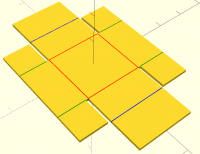
The code I have pasted below is an example of the kind of shape I want
to be able to fold. When folded along the red, green, and blue lines it
would make a simple cardboard box. (Although it really needs some tab
and slot retainers to stop it falling open again).

Cheers,

Andrew Baxter

----- code below ------

width=20;
height=10;
gap=1;
$delta=0.01;

union() {
for (x=[-1:2:1]) {
translate([x*(width/2+height+gap1.5),0,0])
square([height
2+gap+$delta,width], center=true);
}
for (y=[-1:2:1]) {
translate([0,y*(width/2+height/2+gap),0])
square([width2,height+$delta], center=true);
}
difference() {
square(width + gap
2, center=true);
for (x=[-1:2:1], y=[-1:2:1]) {
translate([x*(width/2+gap/2),y*(width/2+gap/2),0])
square(gap+$delta, center=true);
}
}
}
color("red") translate([0,0,$delta]) {
for(x=[-1:2:1]) {
thinRect([xwidth/2,-width/2],[xwidth/2,width/2]);
}
for(y=[-1:2:1]) {
thinRect([-width/2,ywidth/2],[width/2,ywidth/2]);
}
}

color("green") translate([0,0,$delta]) {
for(x=[-1:2:1],y=[-1:2:1]) {
thinRect([xwidth/2,y(width/2+gap)],[xwidth/2,y(width/2+height+gap)]);
}
}

color("blue") translate([0,0,$delta]) {
for(x=[-1:2:1]) {
thinRect([x*(width+gap/2),-width/2],[x*(width+gap/2),width/2]);
}
}

module thinRect(start=[0,0],end=[1,1],width=0.2) {
diff=start-end;
length=sqrt(diff[0]diff[0]+diff[1]diff[1]);
normal=[diff[1],-diff[0]]/length;
polygon([start-normal
width/2,end-normal
width/2,end+normalwidth/2,start+normalwidth/2]);
}

On 07/09/17 11:14, Parkinbot wrote:

Ronaldo's code was just a hint, how you do it by use of an automated
boundingbox operator. The rest would be vector calculation stuff, which is
trivial.
Here is a solution that intersects with a dumb (but parametrized) square. Is
it this what you are looking for? Otherwise, please show us a drawing of
what you mean.

Hi Parkinbot, The problem with that code is it doesn't deal with cases where the extension of the fold line intersects other parts of the shape that you don't want folded. This could happen either because the perimeter of the shape is not convex, or because the region to be folded lies inside an internal hole in the shape. I want my module to be able to handle these cases. I know that it would be possible to specify the part of the shape to be folded by passing the module a polygon enclosing that part, but this would make it complicated to use and I would like to avoid it if possible. It would be neat to be able to specify the folds just as a list of lines to fold along, specified as a pair of points. I have a reasonable idea of how I want to write most of the module - see https://github.com/highfellow/openscad-sheet-folder . I am just stuck on how to split a 2D object into two along a line. If anyone knows how to do this that would be great; otherwise I'll have to use a less elegant way of specifying which part of the shape to fold. The code I have pasted below is an example of the kind of shape I want to be able to fold. When folded along the red, green, and blue lines it would make a simple cardboard box. (Although it really needs some tab and slot retainers to stop it falling open again). Cheers, Andrew Baxter ----- code below ------ width=20; height=10; gap=1; $delta=0.01; union() { for (x=[-1:2:1]) { translate([x*(width/2+height+gap*1.5),0,0]) square([height*2+gap+$delta,width], center=true); } for (y=[-1:2:1]) { translate([0,y*(width/2+height/2+gap),0]) square([width*2,height+$delta], center=true); } difference() { square(width + gap*2, center=true); for (x=[-1:2:1], y=[-1:2:1]) { translate([x*(width/2+gap/2),y*(width/2+gap/2),0]) square(gap+$delta, center=true); } } } color("red") translate([0,0,$delta]) { for(x=[-1:2:1]) { thinRect([x*width/2,-width/2],[x*width/2,width/2]); } for(y=[-1:2:1]) { thinRect([-width/2,y*width/2],[width/2,y*width/2]); } } color("green") translate([0,0,$delta]) { for(x=[-1:2:1],y=[-1:2:1]) { thinRect([x*width/2,y*(width/2+gap)],[x*width/2,y*(width/2+height+gap)]); } } color("blue") translate([0,0,$delta]) { for(x=[-1:2:1]) { thinRect([x*(width+gap/2),-width/2],[x*(width+gap/2),width/2]); } } module thinRect(start=[0,0],end=[1,1],width=0.2) { diff=start-end; length=sqrt(diff[0]*diff[0]+diff[1]*diff[1]); normal=[diff[1],-diff[0]]/length; polygon([start-normal*width/2,end-normal*width/2,end+normal*width/2,start+normal*width/2]); } On 07/09/17 11:14, Parkinbot wrote: > Ronaldo's code was just a hint, how you do it by use of an automated > boundingbox operator. The rest would be vector calculation stuff, which is > trivial. > Here is a solution that intersects with a dumb (but parametrized) square. Is > it this what you are looking for? Otherwise, please show us a drawing of > what you mean.
RP
Ronaldo Persiano
Sat, Sep 9, 2017 4:35 PM

Andy,

That is not the same problem you state at this thread beginning. And it is
not a well defined problem. It is clear to me that the cut line is not the
only input data you need to solve the problem. But it is by no means clear
what else would be needed. If a half-space defined by a line is not
satisfactory, an input polygon seems to be the more adequate alternative.
Or are you searching for an artificial intelligence algorithm to do it?

2017-09-09 16:18 GMT+01:00 andy site@highfellow.org:

Hi Parkinbot,

The problem with that code is it doesn't deal with cases where the
extension of the fold line intersects other parts of the shape that you
don't want folded. This could happen either because the perimeter of the
shape is not convex, or because the region to be folded lies inside an
internal hole in the shape. I want my module to be able to handle these
cases. I know that it would be possible to specify the part of the shape to
be folded by passing the module a polygon enclosing that part, but this
would make it complicated to use and I would like to avoid it if possible.
It would be neat to be able to specify the folds just as a list of lines to
fold along, specified as a pair of points.

I have a reasonable idea of how I want to write most of the module - see
https://github.com/highfellow/openscad-sheet-folder . I am just stuck on
how to split a 2D object into two along a line. If anyone knows how to do
this that would be great; otherwise I'll have to use a less elegant way of
specifying which part of the shape to fold.

Andy, That is not the same problem you state at this thread beginning. And it is not a well defined problem. It is clear to me that the cut line is not the only input data you need to solve the problem. But it is by no means clear what else would be needed. If a half-space defined by a line is not satisfactory, an input polygon seems to be the more adequate alternative. Or are you searching for an artificial intelligence algorithm to do it? 2017-09-09 16:18 GMT+01:00 andy <site@highfellow.org>: > Hi Parkinbot, > > The problem with that code is it doesn't deal with cases where the > extension of the fold line intersects other parts of the shape that you > don't want folded. This could happen either because the perimeter of the > shape is not convex, or because the region to be folded lies inside an > internal hole in the shape. I want my module to be able to handle these > cases. I know that it would be possible to specify the part of the shape to > be folded by passing the module a polygon enclosing that part, but this > would make it complicated to use and I would like to avoid it if possible. > It would be neat to be able to specify the folds just as a list of lines to > fold along, specified as a pair of points. > > I have a reasonable idea of how I want to write most of the module - see > https://github.com/highfellow/openscad-sheet-folder . I am just stuck on > how to split a 2D object into two along a line. If anyone knows how to do > this that would be great; otherwise I'll have to use a less elegant way of > specifying which part of the shape to fold. > >
A
andy
Sat, Sep 9, 2017 5:21 PM

Hi Ronaldo,

Fair comment that I should have specified the problem more clearly to
start with, although I have been trying for several posts now to make it
clear what I was looking for.

I was hoping that there might be some way that I hadn't seen to solve
this problem using just OpenSCAD primitives, but if not then I will have
to use a less neat way to specify the fold lines.

Andy

On 09/09/17 17:35, Ronaldo Persiano wrote:

Andy,

That is not the same problem you state at this thread beginning. And
it is not a well defined problem. It is clear to me that the cut line
is not the only input data you need to solve the problem. But it is by
no means clear what else would be needed. If a half-space defined by a
line is not satisfactory, an input polygon seems to be the more
adequate alternative. Or are you searching for an artificial
intelligence algorithm to do it?

2017-09-09 16:18 GMT+01:00 andy <site@highfellow.org
mailto:site@highfellow.org>:

 Hi Parkinbot,

 The problem with that code is it doesn't deal with cases where the
 extension of the fold line intersects other parts of the shape
 that you don't want folded. This could happen either because the
 perimeter of the shape is not convex, or because the region to be
 folded lies inside an internal hole in the shape. I want my module
 to be able to handle these cases. I know that it would be possible
 to specify the part of the shape to be folded by passing the
 module a polygon enclosing that part, but this would make it
 complicated to use and I would like to avoid it if possible. It
 would be neat to be able to specify the folds just as a list of
 lines to fold along, specified as a pair of points.

 I have a reasonable idea of how I want to write most of the module
 - see https://github.com/highfellow/openscad-sheet-folder
 <https://github.com/highfellow/openscad-sheet-folder> . I am just
 stuck on how to split a 2D object into two along a line. If anyone
 knows how to do this that would be great; otherwise I'll have to
 use a less elegant way of specifying which part of the shape to fold.

OpenSCAD mailing list
Discuss@lists.openscad.org
http://lists.openscad.org/mailman/listinfo/discuss_lists.openscad.org

Hi Ronaldo, Fair comment that I should have specified the problem more clearly to start with, although I have been trying for several posts now to make it clear what I was looking for. I was hoping that there might be some way that I hadn't seen to solve this problem using just OpenSCAD primitives, but if not then I will have to use a less neat way to specify the fold lines. Andy On 09/09/17 17:35, Ronaldo Persiano wrote: > Andy, > > That is not the same problem you state at this thread beginning. And > it is not a well defined problem. It is clear to me that the cut line > is not the only input data you need to solve the problem. But it is by > no means clear what else would be needed. If a half-space defined by a > line is not satisfactory, an input polygon seems to be the more > adequate alternative. Or are you searching for an artificial > intelligence algorithm to do it? > > 2017-09-09 16:18 GMT+01:00 andy <site@highfellow.org > <mailto:site@highfellow.org>>: > > Hi Parkinbot, > > The problem with that code is it doesn't deal with cases where the > extension of the fold line intersects other parts of the shape > that you don't want folded. This could happen either because the > perimeter of the shape is not convex, or because the region to be > folded lies inside an internal hole in the shape. I want my module > to be able to handle these cases. I know that it would be possible > to specify the part of the shape to be folded by passing the > module a polygon enclosing that part, but this would make it > complicated to use and I would like to avoid it if possible. It > would be neat to be able to specify the folds just as a list of > lines to fold along, specified as a pair of points. > > I have a reasonable idea of how I want to write most of the module > - see https://github.com/highfellow/openscad-sheet-folder > <https://github.com/highfellow/openscad-sheet-folder> . I am just > stuck on how to split a 2D object into two along a line. If anyone > knows how to do this that would be great; otherwise I'll have to > use a less elegant way of specifying which part of the shape to fold. > > > > _______________________________________________ > OpenSCAD mailing list > Discuss@lists.openscad.org > http://lists.openscad.org/mailman/listinfo/discuss_lists.openscad.org