

suggestions?

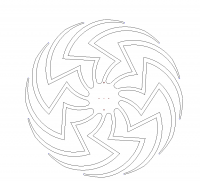
I just ordered a kit that, among other things, suggests that I cut out
the following shape (2 feet across):
(I hope the image comes through).
I want to create a 3D design which I can print which consists of one of
these arms, along with 1/12th of the central hub (in a pie shape). That
is not too difficult. But I want to do this in a way that allows me to
tinker with the arm shape somewhat easily. Any thoughts about how to
parameterize such a shape? The first part seems to be a portion of a
curve, then a straight line, and then another portion of a curve, this
time truncated by an outer circular limit.
Thanks for any ideas you might have...
Jon

You might want to take a look at this article from Caterpillar. He describes
how to create a bezier curve in OpenSCAD with four points. His algorithm
could probably be extended to make your desired shape. Here is the link:
https://openhome.cc/eGossip/OpenSCAD/BezierCurve.html
https://openhome.cc/eGossip/OpenSCAD/BezierCurve.html .
--
View this message in context: http://forum.openscad.org/suggestions-tp21482p21483.html
Sent from the OpenSCAD mailing list archive at Nabble.com.

inkscape and plugin to export to openscad:
(approx to curve)

If you have access to a CAD program that exports DXF files, the simple way
would be to create the outline in CAD and export the DXF file to OpenSCAD.
Took me about 20 minuted to create the DXF in AutoCAD.
http://forum.openscad.org/file/n21486/wheel2.jpg
--
View this message in context: http://forum.openscad.org/suggestions-tp21482p21486.html
Sent from the OpenSCAD mailing list archive at Nabble.com.

The Inkscape to OpenSCAD extension works great; I've used it many times for
simple projects. So much utility in a free program, Inkscape should be in
everybody's toolkit.
The OP suggested part of his goal is to be able to create the shape using
parameters. That solution escapes me and I was hoping to see how it would be
accomplished.
So far, the answers seem to be "one-offs" that are not managed with
parameters. I don't have a handle on the 2D drawing world, but if there's a
2D drawing program, or a 3D program with 2D capability, perhaps that's a
solution.
I've played with Solidworks enough to know that it can be configured for
parameters, but also that it's far more complex than my alleged mind can
handle, especially for a shape such as this one.
Perhaps others have an answer for the parametric drawing aspect, after which
the extrusion is a simple matter.
--
View this message in context: http://forum.openscad.org/suggestions-tp21482p21487.html
Sent from the OpenSCAD mailing list archive at Nabble.com.

On 15. mai 2017 22:43, jon wrote:
I just ordered a kit that, among other things, suggests that I cut out
the following shape (2 feet across):
(I hope the image comes through).
I want to create a 3D design which I can print which consists of one of
these arms, along with 1/12th of the central hub (in a pie shape). That
is not too difficult. But I want to do this in a way that allows me to
tinker with the arm shape somewhat easily. Any thoughts about how to
parameterize such a shape? The first part seems to be a portion of a
curve, then a straight line, and then another portion of a curve, this
time truncated by an outer circular limit.
Thanks for any ideas you might have...
As others suggest, you have to somehow turn the shape into a polygon to
extrude. To create a parametric shape, you have to either figure out how
to use the 2d primitives and booleans and assemble the shapes to create
the spider figure. E.g. the outer circular part could perhaps be formed
by subtracting a slightly offset circle from another. And so on.
Alternatively express the whole thing as spline or bezier curves. None
of this is straightforward.
If the starting point is a CAD drawing, andy iteration could be done
there and the DXF export route is easier. If the starting point is a
bitmap image then it is tempting to just convert the image into a
polygon via image analysis, there are several ways to do it as has been
suggested. There is also potrace http://potrace.sourceforge.net/
Some time ago I tried to create a similar solution that converted a
drawing into a profile. It does require a bit of image manipulation
first, but can provide decent results. Se attachment for a quick and
dirty attempt. The roughness of the edges is due to the original image.
Carsten Arnholm