

discuss@lists.openscad.org

OpenSCAD general discussion Mailing-list

View all threads

Multiple file editing in OpenSCAD

RK
ROMIT KUMAR
Tue, Jul 30, 2019 7:30 PM

Greetings everyone,
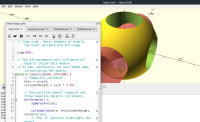
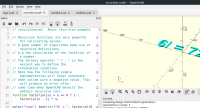
I have been working to support the feature of multiple tabbed file editing
in OpenSCAD. This feature is now merged in master branch and the
corresponding snapshot(OpenSCAD-2019.07.28) for linux and windows can be
found at https://www.openscad.org/downloads.html. Snapshot for macos will
be available soon.

I hope users find this feature useful, and let me know of any suggestion or
bug. 😀

Here's a quick peek of the gui:

[image: imgg1.png]

[image: imgg2.png]

With regards,
Romit Kumar
Greetings everyone, I have been working to support the feature of multiple tabbed file editing in OpenSCAD. This feature is now merged in master branch and the corresponding snapshot(OpenSCAD-2019.07.28) for linux and windows can be found at https://www.openscad.org/downloads.html. Snapshot for macos will be available soon. I hope users find this feature useful, and let me know of any suggestion or bug. 😀 Here's a quick peek of the gui: [image: imgg1.png] [image: imgg2.png] With regards, Romit Kumar
R
Rouzic22
Thu, Aug 1, 2019 10:10 PM

Hello, I did the test with several files. To switch from one file to another
I have to force the preview (F5) or the rendering (F6). wouldn't it be wise
to automate the preview? Good new feature! Thank you.

--
Sent from: http://forum.openscad.org/

Hello, I did the test with several files. To switch from one file to another I have to force the preview (F5) or the rendering (F6). wouldn't it be wise to automate the preview? Good new feature! Thank you. -- Sent from: http://forum.openscad.org/
RK
ROMIT KUMAR
Thu, Aug 1, 2019 11:32 PM

While this feature can be useful is some cases, I guess in general case it
is undesired. It adds preview processing overhead on every tab switch,
which may not be required in most cases.

On Fri, Aug 2, 2019 at 3:40 AM Rouzic22 jls666@orange.fr wrote:

Hello, I did the test with several files. To switch from one file to
another
I have to force the preview (F5) or the rendering (F6). wouldn't it be wise
to automate the preview? Good new feature! Thank you.

--
Sent from: http://forum.openscad.org/


OpenSCAD mailing list
Discuss@lists.openscad.org
http://lists.openscad.org/mailman/listinfo/discuss_lists.openscad.org

While this feature can be useful is some cases, I guess in general case it is undesired. It adds preview processing overhead on every tab switch, which may not be required in most cases. On Fri, Aug 2, 2019 at 3:40 AM Rouzic22 <jls666@orange.fr> wrote: > Hello, I did the test with several files. To switch from one file to > another > I have to force the preview (F5) or the rendering (F6). wouldn't it be wise > to automate the preview? Good new feature! Thank you. > > > > -- > Sent from: http://forum.openscad.org/ > > _______________________________________________ > OpenSCAD mailing list > Discuss@lists.openscad.org > http://lists.openscad.org/mailman/listinfo/discuss_lists.openscad.org >
M
MichaelAtOz
Fri, Aug 2, 2019 12:21 AM

I still can't see a good use case for my work style. As the viewing window is
disassociated with tab programs.

The only one could be having the main program and libraries on tabs.
In that case I could see for example having Auto-reload&Preview on the main
program*, so you edit a library & save, go back to the main to see the
results. That works now with multiple instances.

*That raises the question of whether that setting should be tab specific?


Admin - email* me if you need anything, or if I've done something stupid...

  • click on my MichaelAtOz label, there is a link to email me.

Unless specifically shown otherwise above, my contribution is in the Public Domain; to the extent possible under law, I have waived all copyright and related or neighbouring rights to this work. Obviously inclusion of works of previous authors is not included in the above.

The TPP is no simple “trade agreement.”  Fight it! http://www.ourfairdeal.org/  time is running out!

Sent from: http://forum.openscad.org/

I still can't see a good use case for my work style. As the viewing window is disassociated with tab programs. The only one could be having the main program and libraries on tabs. In that case I could see for example having Auto-reload&Preview on the main program*, so you edit a library & save, go back to the main to see the results. That works now with multiple instances. *That raises the question of whether that setting should be tab specific? ----- Admin - email* me if you need anything, or if I've done something stupid... * click on my MichaelAtOz label, there is a link to email me. Unless specifically shown otherwise above, my contribution is in the Public Domain; to the extent possible under law, I have waived all copyright and related or neighbouring rights to this work. Obviously inclusion of works of previous authors is not included in the above. The TPP is no simple “trade agreement.” Fight it! http://www.ourfairdeal.org/ time is running out! -- Sent from: http://forum.openscad.org/
K
korpx
Wed, Aug 14, 2019 3:26 PM

Please make a checkbox in preferences to enable/disable this feature.

--
Sent from: http://forum.openscad.org/

Please make a checkbox in preferences to enable/disable this feature. -- Sent from: http://forum.openscad.org/
TP
Torsten Paul
Wed, Aug 14, 2019 4:29 PM

On 14.08.19 17:26, korpx wrote:

Please make a checkbox in preferences to enable/disable this feature.

Why? Just use only "Open in New Window"?

ciao,
Torsten.

On 14.08.19 17:26, korpx wrote: > Please make a checkbox in preferences to enable/disable this feature. Why? Just use only "Open in New Window"? ciao, Torsten.
K
korpx
Wed, Aug 14, 2019 7:35 PM

Because it doesn't have a keyboard shortcut? And I didn't even know about
"Open in New Window"? :-)
Generally I am a fan of options especially when a default behaviour changes
but ok I'll try to adjust.

--
Sent from: http://forum.openscad.org/

Because it doesn't have a keyboard shortcut? And I didn't even know about "Open in New Window"? :-) Generally I am a fan of options especially when a default behaviour changes but ok I'll try to adjust. -- Sent from: http://forum.openscad.org/
TP
Torsten Paul
Wed, Aug 14, 2019 9:00 PM

On 14.08.19 21:35, korpx wrote:

Because it doesn't have a keyboard shortcut? And I didn't even know
about "Open in New Window"? :-)

Hmm, right. I guess we really want to have that as configuration at
some point.

Meanwhile the shortcut is pretty much CTRL+N / CTRL+O though :-).

Generally I am a fan of options especially when a default behaviour
changes but ok I'll try to adjust.

The problem is just that the settings handling becomes a huge amount
of code, so if we can somehow limit for what we add settings, that
helps.

ciao,
Torsten.

On 14.08.19 21:35, korpx wrote: > Because it doesn't have a keyboard shortcut? And I didn't even know > about "Open in New Window"? :-) Hmm, right. I guess we really want to have that as configuration at some point. Meanwhile the shortcut is pretty much CTRL+N / CTRL+O though :-). > Generally I am a fan of options especially when a default behaviour > changes but ok I'll try to adjust. The problem is just that the settings handling becomes a huge amount of code, so if we can somehow limit for what we add settings, that helps. ciao, Torsten.
JB
Jordan Brown
Thu, Aug 15, 2019 4:16 PM

On 8/14/2019 2:00 PM, Torsten Paul wrote:

On 14.08.19 21:35, korpx wrote:

Because it doesn't have a keyboard shortcut? And I didn't even know
about "Open in New Window"? :-)

Hmm, right. I guess we really want to have that as configuration at
some point.

Meanwhile the shortcut is pretty much CTRL+N / CTRL+O though :-).

I too would prefer this as a configuration option.  As-is, it's made
using multiple windows be a second-class citizen.

Generally I am a fan of options especially when a default behaviour
changes but ok I'll try to adjust.

The problem is just that the settings handling becomes a huge amount
of code, so if we can somehow limit for what we add settings, that
helps.

It's settings or menu options.  It seems likely that the implementation
size is comparable.  Menu options are in-your-face user interface
clutter, and having two variants each of the short cuts, buttons, and
Recent Files menus would be worse still.

On 8/14/2019 2:00 PM, Torsten Paul wrote: > On 14.08.19 21:35, korpx wrote: >> Because it doesn't have a keyboard shortcut? And I didn't even know >> about "Open in New Window"? :-) > Hmm, right. I guess we really want to have that as configuration at > some point. > > Meanwhile the shortcut is pretty much CTRL+N / CTRL+O though :-). I too would prefer this as a configuration option.  As-is, it's made using multiple windows be a second-class citizen. >> Generally I am a fan of options especially when a default behaviour >> changes but ok I'll try to adjust. > The problem is just that the settings handling becomes a huge amount > of code, so if we can somehow limit for what we add settings, that > helps. It's settings or menu options.  It seems likely that the implementation size is comparable.  Menu options are in-your-face user interface clutter, and having two variants each of the short cuts, buttons, and Recent Files menus would be worse still.