Tue, Nov 17, 2020 1:26 PM
This is my first post in this forum. Please, excuse me if this is not the
right place to write this.
I have been using OpenSCAD since 2008, as a tool to teach Geometry concepts
in my Mathematics courses (Industrial Design). The OpenSCAD window is
projected onto a screen from a Windows machine, configured with extended
desktop. I have to use version 2014.03 because it is the last one that
works correctly in that environment. Newer versions have some issues with
correct scaling of fonts and zooming, on the extended desktop screen (the
projected one). The text becomes illegible. It seems to have to do with the
zoom scale factor and the fact that both displays have different
resolutions.
Of course, in version 2014.03 there is no color coding nor automatic
formatting.... :o)
El mar., 17 nov. 2020 a las 2:14, Jordan Brown (<
openscad@jordan.maileater.net>) escribió:
On 11/16/2020 3:44 PM, Tim Hawkins wrote:
It does not seem to allow you to format a file, or a block, I have started
using the openscad mode in intelij so that I can get my files formated
correctly without having to do a load of manual reformatting.
Ah, reformatting, rather than just as-you-type formatting.
You can at least do block indent/outdent, but I agree you can't just throw
a block at it and say "fix this".
OpenSCAD mailing list
Discuss@lists.openscad.org
http://lists.openscad.org/mailman/listinfo/discuss_lists.openscad.org
This is my first post in this forum. Please, excuse me if this is not the
right place to write this.
I have been using OpenSCAD since 2008, as a tool to teach Geometry concepts
in my Mathematics courses (Industrial Design). The OpenSCAD window is
projected onto a screen from a Windows machine, configured with extended
desktop. I have to use version 2014.03 because it is the last one that
works correctly in that environment. Newer versions have some issues with
correct scaling of fonts and zooming, on the extended desktop screen (the
projected one). The text becomes illegible. It seems to have to do with the
zoom scale factor and the fact that both displays have different
resolutions.
Of course, in version 2014.03 there is no color coding nor automatic
formatting.... :o)
El mar., 17 nov. 2020 a las 2:14, Jordan Brown (<
openscad@jordan.maileater.net>) escribió:
> On 11/16/2020 3:44 PM, Tim Hawkins wrote:
>
> It does not seem to allow you to format a file, or a block, I have started
> using the openscad mode in intelij so that I can get my files formated
> correctly without having to do a load of manual reformatting.
>
>
> Ah, *re*formatting, rather than just as-you-type formatting.
>
> You can at least do block indent/outdent, but I agree you can't just throw
> a block at it and say "fix this".
>
> _______________________________________________
> OpenSCAD mailing list
> Discuss@lists.openscad.org
> http://lists.openscad.org/mailman/listinfo/discuss_lists.openscad.org
>

R
Rick
Tue, Nov 17, 2020 2:36 PM
I use an external editor. I do that with all my development. I don't use
it because OpenSCAD's editor is lacking, rather because it isn't required.
On Mon, Nov 16, 2020 at 4:06 AM Troberg troberg.anders@gmail.com wrote:
I haven't used SCAD in a while, but I use vim as an editor. When you
the file SCAD detects that the file is changed.
Of course you can put it in whichever window you want.
I use an external editor. I do that with all my development. I don't use
it because OpenSCAD's editor is lacking, rather because it isn't required.
On Mon, Nov 16, 2020 at 4:06 AM Troberg <troberg.anders@gmail.com> wrote:
> tsingi wrote
> > I haven't used SCAD in a while, but I use vim as an editor. When you
> save
> > the file SCAD detects that the file is changed.
> > Of course you can put it in whichever window you want.
>
> True, and I sometimes do similar things when I have programs which generate
> OpenSCAD code, but it's not really an answer here. You use an external
> editor because the internal is lacking, and the long term solution should
> be
> to fix the internal editor so more people use it (though, in my opinion,
> it's quite good enough for my use).
>
>
>
>
> --
> Sent from: http://forum.openscad.org/
>
> _______________________________________________
> OpenSCAD mailing list
> Discuss@lists.openscad.org
> http://lists.openscad.org/mailman/listinfo/discuss_lists.openscad.org
>

NH
nop head
Tue, Nov 17, 2020 2:40 PM
It probably depends on the graphics driver because I always use OpenSCAD on
two screens on Windows and it works fine for me. At the moment I have my
main screen on a Laptop at 1920x1080 and the second screen on a TV at 1600
x 900 with overscan. Apart from the fact I can't maximise it on the second
screen because of the overscan it works OK and the text is legible. It is
just a bit bigger on the TV because it is larger but has lower resolution.
I did try a slightly more modern, larger TV but the text was blurred
because it also had overscan which meant it was stretching the image. I
have a much larger brand new TV and that works as a monitor without
overscan.
On Tue, 17 Nov 2020 at 13:27, Álvaro Deibe Díaz adeibe@udc.es wrote:
This is my first post in this forum. Please, excuse me if this is not the
right place to write this.
I have been using OpenSCAD since 2008, as a tool to teach Geometry
concepts in my Mathematics courses (Industrial Design). The OpenSCAD window
is projected onto a screen from a Windows machine, configured with extended
desktop. I have to use version 2014.03 because it is the last one that
works correctly in that environment. Newer versions have some issues with
correct scaling of fonts and zooming, on the extended desktop screen (the
projected one). The text becomes illegible. It seems to have to do with the
zoom scale factor and the fact that both displays have different
resolutions.
Of course, in version 2014.03 there is no color coding nor automatic
formatting.... :o)
El mar., 17 nov. 2020 a las 2:14, Jordan Brown (<
openscad@jordan.maileater.net>) escribió:
On 11/16/2020 3:44 PM, Tim Hawkins wrote:
It does not seem to allow you to format a file, or a block, I have
started using the openscad mode in intelij so that I can get my files
formated correctly without having to do a load of manual reformatting.
Ah, reformatting, rather than just as-you-type formatting.
You can at least do block indent/outdent, but I agree you can't just
throw a block at it and say "fix this".
OpenSCAD mailing list
Discuss@lists.openscad.org
http://lists.openscad.org/mailman/listinfo/discuss_lists.openscad.org
It probably depends on the graphics driver because I always use OpenSCAD on
two screens on Windows and it works fine for me. At the moment I have my
main screen on a Laptop at 1920x1080 and the second screen on a TV at 1600
x 900 with overscan. Apart from the fact I can't maximise it on the second
screen because of the overscan it works OK and the text is legible. It is
just a bit bigger on the TV because it is larger but has lower resolution.
I did try a slightly more modern, larger TV but the text was blurred
because it also had overscan which meant it was stretching the image. I
have a much larger brand new TV and that works as a monitor without
overscan.
On Tue, 17 Nov 2020 at 13:27, Álvaro Deibe Díaz <adeibe@udc.es> wrote:
> This is my first post in this forum. Please, excuse me if this is not the
> right place to write this.
>
> I have been using OpenSCAD since 2008, as a tool to teach Geometry
> concepts in my Mathematics courses (Industrial Design). The OpenSCAD window
> is projected onto a screen from a Windows machine, configured with extended
> desktop. I have to use version 2014.03 because it is the last one that
> works correctly in that environment. Newer versions have some issues with
> correct scaling of fonts and zooming, on the extended desktop screen (the
> projected one). The text becomes illegible. It seems to have to do with the
> zoom scale factor and the fact that both displays have different
> resolutions.
>
> Of course, in version 2014.03 there is no color coding nor automatic
> formatting.... :o)
>
>
>
> El mar., 17 nov. 2020 a las 2:14, Jordan Brown (<
> openscad@jordan.maileater.net>) escribió:
>
>> On 11/16/2020 3:44 PM, Tim Hawkins wrote:
>>
>> It does not seem to allow you to format a file, or a block, I have
>> started using the openscad mode in intelij so that I can get my files
>> formated correctly without having to do a load of manual reformatting.
>>
>>
>> Ah, *re*formatting, rather than just as-you-type formatting.
>>
>> You can at least do block indent/outdent, but I agree you can't just
>> throw a block at it and say "fix this".
>>
>> _______________________________________________
>> OpenSCAD mailing list
>> Discuss@lists.openscad.org
>> http://lists.openscad.org/mailman/listinfo/discuss_lists.openscad.org
>>
> _______________________________________________
> OpenSCAD mailing list
> Discuss@lists.openscad.org
> http://lists.openscad.org/mailman/listinfo/discuss_lists.openscad.org
>
Tue, Nov 17, 2020 10:00 PM
Good point. I also think it has something to do with the graphics driver.
But, since 2015 I have tried different computers (Thinkpad T420s, Surface
Pro 3, Thinkpad X1 Tablet), different OS (Windows 7, Windows 10), with
different chipset and of course different graphics hardware, with the same
result.
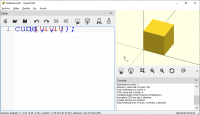
Watching the corrupted text, it appears that the text renderer draws, on
the secondary screen, a font of a size that is correct for the resolution
of the main screen but this font is spaced with the correct spacing from
the secondary screen. The letters are rendered correctly but are misplaced,
so they are stepping on each other.
I'm attaching an image showing a simple example of this behaviour, but I'm
not sure the image will get through.
[image: image.png]
El mar., 17 nov. 2020 a las 15:40, nop head (nop.head@gmail.com) escribió:
It probably depends on the graphics driver because I always use OpenSCAD
on two screens on Windows and it works fine for me. At the moment I have my
main screen on a Laptop at 1920x1080 and the second screen on a TV at 1600
x 900 with overscan. Apart from the fact I can't maximise it on the second
screen because of the overscan it works OK and the text is legible. It is
just a bit bigger on the TV because it is larger but has lower resolution.
I did try a slightly more modern, larger TV but the text was blurred
because it also had overscan which meant it was stretching the image. I
have a much larger brand new TV and that works as a monitor without
overscan.
On Tue, 17 Nov 2020 at 13:27, Álvaro Deibe Díaz adeibe@udc.es wrote:
This is my first post in this forum. Please, excuse me if this is not the
right place to write this.
I have been using OpenSCAD since 2008, as a tool to teach Geometry
concepts in my Mathematics courses (Industrial Design). The OpenSCAD window
is projected onto a screen from a Windows machine, configured with extended
desktop. I have to use version 2014.03 because it is the last one that
works correctly in that environment. Newer versions have some issues with
correct scaling of fonts and zooming, on the extended desktop screen (the
projected one). The text becomes illegible. It seems to have to do with the
zoom scale factor and the fact that both displays have different
resolutions.
Of course, in version 2014.03 there is no color coding nor automatic
formatting.... :o)
El mar., 17 nov. 2020 a las 2:14, Jordan Brown (<
openscad@jordan.maileater.net>) escribió:
On 11/16/2020 3:44 PM, Tim Hawkins wrote:
It does not seem to allow you to format a file, or a block, I have
started using the openscad mode in intelij so that I can get my files
formated correctly without having to do a load of manual reformatting.
Ah, reformatting, rather than just as-you-type formatting.
You can at least do block indent/outdent, but I agree you can't just
throw a block at it and say "fix this".
OpenSCAD mailing list
Discuss@lists.openscad.org
http://lists.openscad.org/mailman/listinfo/discuss_lists.openscad.org
Good point. I also think it has something to do with the graphics driver.
But, since 2015 I have tried different computers (Thinkpad T420s, Surface
Pro 3, Thinkpad X1 Tablet), different OS (Windows 7, Windows 10), with
different chipset and of course different graphics hardware, with the same
result.
Watching the corrupted text, it appears that the text renderer draws, on
the secondary screen, a font of a size that is correct for the resolution
of the main screen but this font is spaced with the correct spacing from
the secondary screen. The letters are rendered correctly but are misplaced,
so they are stepping on each other.
I'm attaching an image showing a simple example of this behaviour, but I'm
not sure the image will get through.
[image: image.png]
El mar., 17 nov. 2020 a las 15:40, nop head (<nop.head@gmail.com>) escribió:
> It probably depends on the graphics driver because I always use OpenSCAD
> on two screens on Windows and it works fine for me. At the moment I have my
> main screen on a Laptop at 1920x1080 and the second screen on a TV at 1600
> x 900 with overscan. Apart from the fact I can't maximise it on the second
> screen because of the overscan it works OK and the text is legible. It is
> just a bit bigger on the TV because it is larger but has lower resolution.
>
> I did try a slightly more modern, larger TV but the text was blurred
> because it also had overscan which meant it was stretching the image. I
> have a much larger brand new TV and that works as a monitor without
> overscan.
>
> On Tue, 17 Nov 2020 at 13:27, Álvaro Deibe Díaz <adeibe@udc.es> wrote:
>
>> This is my first post in this forum. Please, excuse me if this is not the
>> right place to write this.
>>
>> I have been using OpenSCAD since 2008, as a tool to teach Geometry
>> concepts in my Mathematics courses (Industrial Design). The OpenSCAD window
>> is projected onto a screen from a Windows machine, configured with extended
>> desktop. I have to use version 2014.03 because it is the last one that
>> works correctly in that environment. Newer versions have some issues with
>> correct scaling of fonts and zooming, on the extended desktop screen (the
>> projected one). The text becomes illegible. It seems to have to do with the
>> zoom scale factor and the fact that both displays have different
>> resolutions.
>>
>> Of course, in version 2014.03 there is no color coding nor automatic
>> formatting.... :o)
>>
>>
>>
>> El mar., 17 nov. 2020 a las 2:14, Jordan Brown (<
>> openscad@jordan.maileater.net>) escribió:
>>
>>> On 11/16/2020 3:44 PM, Tim Hawkins wrote:
>>>
>>> It does not seem to allow you to format a file, or a block, I have
>>> started using the openscad mode in intelij so that I can get my files
>>> formated correctly without having to do a load of manual reformatting.
>>>
>>>
>>> Ah, *re*formatting, rather than just as-you-type formatting.
>>>
>>> You can at least do block indent/outdent, but I agree you can't just
>>> throw a block at it and say "fix this".
>>>
>>> _______________________________________________
>>> OpenSCAD mailing list
>>> Discuss@lists.openscad.org
>>> http://lists.openscad.org/mailman/listinfo/discuss_lists.openscad.org
>>>
>> _______________________________________________
>> OpenSCAD mailing list
>> Discuss@lists.openscad.org
>> http://lists.openscad.org/mailman/listinfo/discuss_lists.openscad.org
>>
> _______________________________________________
> OpenSCAD mailing list
> Discuss@lists.openscad.org
> http://lists.openscad.org/mailman/listinfo/discuss_lists.openscad.org
>
NH
nop head
Tue, Nov 17, 2020 10:48 PM
That is odd. I tried changing the Windows text size setting to get big
fonts but that also works fine for me.
The only obvious difference is you are using a different language, Spanish?
(I should know because I am living in Spain at the moment!) but I have only
ever used English.
I know it shouldn't make any difference but there must be something
different if you have problems on all those platforms.
On Tue, 17 Nov 2020 at 22:01, Álvaro Deibe Díaz adeibe@udc.es wrote:
Good point. I also think it has something to do with the graphics driver.
But, since 2015 I have tried different computers (Thinkpad T420s, Surface
Pro 3, Thinkpad X1 Tablet), different OS (Windows 7, Windows 10), with
different chipset and of course different graphics hardware, with the same
result.
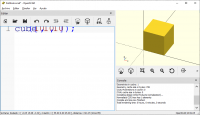
Watching the corrupted text, it appears that the text renderer draws, on
the secondary screen, a font of a size that is correct for the resolution
of the main screen but this font is spaced with the correct spacing from
the secondary screen. The letters are rendered correctly but are misplaced,
so they are stepping on each other.
I'm attaching an image showing a simple example of this behaviour, but I'm
not sure the image will get through.
[image: image.png]
El mar., 17 nov. 2020 a las 15:40, nop head (nop.head@gmail.com)
escribió:
It probably depends on the graphics driver because I always use OpenSCAD
on two screens on Windows and it works fine for me. At the moment I have my
main screen on a Laptop at 1920x1080 and the second screen on a TV at 1600
x 900 with overscan. Apart from the fact I can't maximise it on the second
screen because of the overscan it works OK and the text is legible. It is
just a bit bigger on the TV because it is larger but has lower resolution.
I did try a slightly more modern, larger TV but the text was blurred
because it also had overscan which meant it was stretching the image. I
have a much larger brand new TV and that works as a monitor without
overscan.
On Tue, 17 Nov 2020 at 13:27, Álvaro Deibe Díaz adeibe@udc.es wrote:
This is my first post in this forum. Please, excuse me if this is not
the right place to write this.
I have been using OpenSCAD since 2008, as a tool to teach Geometry
concepts in my Mathematics courses (Industrial Design). The OpenSCAD window
is projected onto a screen from a Windows machine, configured with extended
desktop. I have to use version 2014.03 because it is the last one that
works correctly in that environment. Newer versions have some issues with
correct scaling of fonts and zooming, on the extended desktop screen (the
projected one). The text becomes illegible. It seems to have to do with the
zoom scale factor and the fact that both displays have different
resolutions.
Of course, in version 2014.03 there is no color coding nor automatic
formatting.... :o)
El mar., 17 nov. 2020 a las 2:14, Jordan Brown (<
openscad@jordan.maileater.net>) escribió:
On 11/16/2020 3:44 PM, Tim Hawkins wrote:
It does not seem to allow you to format a file, or a block, I have
started using the openscad mode in intelij so that I can get my files
formated correctly without having to do a load of manual reformatting.
Ah, reformatting, rather than just as-you-type formatting.
You can at least do block indent/outdent, but I agree you can't just
throw a block at it and say "fix this".
OpenSCAD mailing list
Discuss@lists.openscad.org
http://lists.openscad.org/mailman/listinfo/discuss_lists.openscad.org
That is odd. I tried changing the Windows text size setting to get big
fonts but that also works fine for me.
The only obvious difference is you are using a different language, Spanish?
(I should know because I am living in Spain at the moment!) but I have only
ever used English.
I know it shouldn't make any difference but there must be something
different if you have problems on all those platforms.
On Tue, 17 Nov 2020 at 22:01, Álvaro Deibe Díaz <adeibe@udc.es> wrote:
> Good point. I also think it has something to do with the graphics driver.
> But, since 2015 I have tried different computers (Thinkpad T420s, Surface
> Pro 3, Thinkpad X1 Tablet), different OS (Windows 7, Windows 10), with
> different chipset and of course different graphics hardware, with the same
> result.
>
> Watching the corrupted text, it appears that the text renderer draws, on
> the secondary screen, a font of a size that is correct for the resolution
> of the main screen but this font is spaced with the correct spacing from
> the secondary screen. The letters are rendered correctly but are misplaced,
> so they are stepping on each other.
>
> I'm attaching an image showing a simple example of this behaviour, but I'm
> not sure the image will get through.
>
> [image: image.png]
>
> El mar., 17 nov. 2020 a las 15:40, nop head (<nop.head@gmail.com>)
> escribió:
>
>> It probably depends on the graphics driver because I always use OpenSCAD
>> on two screens on Windows and it works fine for me. At the moment I have my
>> main screen on a Laptop at 1920x1080 and the second screen on a TV at 1600
>> x 900 with overscan. Apart from the fact I can't maximise it on the second
>> screen because of the overscan it works OK and the text is legible. It is
>> just a bit bigger on the TV because it is larger but has lower resolution.
>>
>> I did try a slightly more modern, larger TV but the text was blurred
>> because it also had overscan which meant it was stretching the image. I
>> have a much larger brand new TV and that works as a monitor without
>> overscan.
>>
>> On Tue, 17 Nov 2020 at 13:27, Álvaro Deibe Díaz <adeibe@udc.es> wrote:
>>
>>> This is my first post in this forum. Please, excuse me if this is not
>>> the right place to write this.
>>>
>>> I have been using OpenSCAD since 2008, as a tool to teach Geometry
>>> concepts in my Mathematics courses (Industrial Design). The OpenSCAD window
>>> is projected onto a screen from a Windows machine, configured with extended
>>> desktop. I have to use version 2014.03 because it is the last one that
>>> works correctly in that environment. Newer versions have some issues with
>>> correct scaling of fonts and zooming, on the extended desktop screen (the
>>> projected one). The text becomes illegible. It seems to have to do with the
>>> zoom scale factor and the fact that both displays have different
>>> resolutions.
>>>
>>> Of course, in version 2014.03 there is no color coding nor automatic
>>> formatting.... :o)
>>>
>>>
>>>
>>> El mar., 17 nov. 2020 a las 2:14, Jordan Brown (<
>>> openscad@jordan.maileater.net>) escribió:
>>>
>>>> On 11/16/2020 3:44 PM, Tim Hawkins wrote:
>>>>
>>>> It does not seem to allow you to format a file, or a block, I have
>>>> started using the openscad mode in intelij so that I can get my files
>>>> formated correctly without having to do a load of manual reformatting.
>>>>
>>>>
>>>> Ah, *re*formatting, rather than just as-you-type formatting.
>>>>
>>>> You can at least do block indent/outdent, but I agree you can't just
>>>> throw a block at it and say "fix this".
>>>>
>>>> _______________________________________________
>>>> OpenSCAD mailing list
>>>> Discuss@lists.openscad.org
>>>> http://lists.openscad.org/mailman/listinfo/discuss_lists.openscad.org
>>>>
>>> _______________________________________________
>>> OpenSCAD mailing list
>>> Discuss@lists.openscad.org
>>> http://lists.openscad.org/mailman/listinfo/discuss_lists.openscad.org
>>>
>> _______________________________________________
>> OpenSCAD mailing list
>> Discuss@lists.openscad.org
>> http://lists.openscad.org/mailman/listinfo/discuss_lists.openscad.org
>>
> _______________________________________________
> OpenSCAD mailing list
> Discuss@lists.openscad.org
> http://lists.openscad.org/mailman/listinfo/discuss_lists.openscad.org
>

M
MichaelAtOz
Tue, Nov 17, 2020 11:26 PM
I thought I'd seen that before;
http://forum.openscad.org/Editor-text-messed-up-td21217.html
Unfortunately the root cause was not found.
But they used the Edit/Preferences/Editor/EditorType/SimpleEditor.
OpenSCAD Admin - email* me if you need anything, or if I've done something stupid...
- on the Forum, click on my MichaelAtOz label, there is a link to email me.
Unless specifically shown otherwise above, my contribution is in the Public Domain; to the extent possible under law, I have waived all copyright and related or neighbouring rights to this work. Obviously inclusion of works of previous authors is not included in the above.
--
Sent from: http://forum.openscad.org/
I thought I'd seen that before;
http://forum.openscad.org/Editor-text-messed-up-td21217.html
Unfortunately the root cause was not found.
But they used the Edit/Preferences/Editor/EditorType/SimpleEditor.
-----
OpenSCAD Admin - email* me if you need anything, or if I've done something stupid...
* on the Forum, click on my MichaelAtOz label, there is a link to email me.
Unless specifically shown otherwise above, my contribution is in the Public Domain; to the extent possible under law, I have waived all copyright and related or neighbouring rights to this work. Obviously inclusion of works of previous authors is not included in the above.
--
Sent from: http://forum.openscad.org/
M
MichaelAtOz
Tue, Nov 17, 2020 11:51 PM
This has been reported as a DPI issue;
https://github.com/openscad/openscad/issues/1624
But no solution, maybe you could play with DPI settings.
OpenSCAD Admin - email* me if you need anything, or if I've done something stupid...
- on the Forum, click on my MichaelAtOz label, there is a link to email me.
Unless specifically shown otherwise above, my contribution is in the Public Domain; to the extent possible under law, I have waived all copyright and related or neighbouring rights to this work. Obviously inclusion of works of previous authors is not included in the above.
--
Sent from: http://forum.openscad.org/
This has been reported as a DPI issue;
https://github.com/openscad/openscad/issues/1624
But no solution, maybe you could play with DPI settings.
-----
OpenSCAD Admin - email* me if you need anything, or if I've done something stupid...
* on the Forum, click on my MichaelAtOz label, there is a link to email me.
Unless specifically shown otherwise above, my contribution is in the Public Domain; to the extent possible under law, I have waived all copyright and related or neighbouring rights to this work. Obviously inclusion of works of previous authors is not included in the above.
--
Sent from: http://forum.openscad.org/
Wed, Nov 18, 2020 10:01 PM
Sure, Spanish. Ferrol (Coruña, Galicia) to be more precise... :o)
Interesting if the language could make such a difference. Strange, but
possible... but no. Just tried it. Still the same issue.
No problems with version 2014.03, though.
It seems that, as reported by MichaelAtOz, this error has been reported and
is yet to be fixed.
Thanks for your help. Much appreciated.
El mar., 17 nov. 2020 a las 23:48, nop head (nop.head@gmail.com) escribió:
That is odd. I tried changing the Windows text size setting to get big
fonts but that also works fine for me.
The only obvious difference is you are using a different language,
Spanish? (I should know because I am living in Spain at the moment!) but I
have only ever used English.
I know it shouldn't make any difference but there must be something
different if you have problems on all those platforms.
On Tue, 17 Nov 2020 at 22:01, Álvaro Deibe Díaz adeibe@udc.es wrote:
Good point. I also think it has something to do with the graphics driver.
But, since 2015 I have tried different computers (Thinkpad T420s, Surface
Pro 3, Thinkpad X1 Tablet), different OS (Windows 7, Windows 10), with
different chipset and of course different graphics hardware, with the same
result.
Watching the corrupted text, it appears that the text renderer draws, on
the secondary screen, a font of a size that is correct for the resolution
of the main screen but this font is spaced with the correct spacing from
the secondary screen. The letters are rendered correctly but are misplaced,
so they are stepping on each other.
I'm attaching an image showing a simple example of this behaviour, but
I'm not sure the image will get through.
[image: image.png]
El mar., 17 nov. 2020 a las 15:40, nop head (nop.head@gmail.com)
escribió:
It probably depends on the graphics driver because I always use OpenSCAD
on two screens on Windows and it works fine for me. At the moment I have my
main screen on a Laptop at 1920x1080 and the second screen on a TV at 1600
x 900 with overscan. Apart from the fact I can't maximise it on the second
screen because of the overscan it works OK and the text is legible. It is
just a bit bigger on the TV because it is larger but has lower resolution.
I did try a slightly more modern, larger TV but the text was blurred
because it also had overscan which meant it was stretching the image. I
have a much larger brand new TV and that works as a monitor without
overscan.
On Tue, 17 Nov 2020 at 13:27, Álvaro Deibe Díaz adeibe@udc.es wrote:
This is my first post in this forum. Please, excuse me if this is not
the right place to write this.
I have been using OpenSCAD since 2008, as a tool to teach Geometry
concepts in my Mathematics courses (Industrial Design). The OpenSCAD window
is projected onto a screen from a Windows machine, configured with extended
desktop. I have to use version 2014.03 because it is the last one that
works correctly in that environment. Newer versions have some issues with
correct scaling of fonts and zooming, on the extended desktop screen (the
projected one). The text becomes illegible. It seems to have to do with the
zoom scale factor and the fact that both displays have different
resolutions.
Of course, in version 2014.03 there is no color coding nor automatic
formatting.... :o)
El mar., 17 nov. 2020 a las 2:14, Jordan Brown (<
openscad@jordan.maileater.net>) escribió:
On 11/16/2020 3:44 PM, Tim Hawkins wrote:
It does not seem to allow you to format a file, or a block, I have
started using the openscad mode in intelij so that I can get my files
formated correctly without having to do a load of manual reformatting.
Ah, reformatting, rather than just as-you-type formatting.
You can at least do block indent/outdent, but I agree you can't just
throw a block at it and say "fix this".
OpenSCAD mailing list
Discuss@lists.openscad.org
http://lists.openscad.org/mailman/listinfo/discuss_lists.openscad.org
Sure, Spanish. Ferrol (Coruña, Galicia) to be more precise... :o)
Interesting if the language could make such a difference. Strange, but
possible... but no. Just tried it. Still the same issue.
No problems with version 2014.03, though.
It seems that, as reported by MichaelAtOz, this error has been reported and
is yet to be fixed.
Thanks for your help. Much appreciated.
El mar., 17 nov. 2020 a las 23:48, nop head (<nop.head@gmail.com>) escribió:
> That is odd. I tried changing the Windows text size setting to get big
> fonts but that also works fine for me.
>
> The only obvious difference is you are using a different language,
> Spanish? (I should know because I am living in Spain at the moment!) but I
> have only ever used English.
>
> I know it shouldn't make any difference but there must be something
> different if you have problems on all those platforms.
>
> On Tue, 17 Nov 2020 at 22:01, Álvaro Deibe Díaz <adeibe@udc.es> wrote:
>
>> Good point. I also think it has something to do with the graphics driver.
>> But, since 2015 I have tried different computers (Thinkpad T420s, Surface
>> Pro 3, Thinkpad X1 Tablet), different OS (Windows 7, Windows 10), with
>> different chipset and of course different graphics hardware, with the same
>> result.
>>
>> Watching the corrupted text, it appears that the text renderer draws, on
>> the secondary screen, a font of a size that is correct for the resolution
>> of the main screen but this font is spaced with the correct spacing from
>> the secondary screen. The letters are rendered correctly but are misplaced,
>> so they are stepping on each other.
>>
>> I'm attaching an image showing a simple example of this behaviour, but
>> I'm not sure the image will get through.
>>
>> [image: image.png]
>>
>> El mar., 17 nov. 2020 a las 15:40, nop head (<nop.head@gmail.com>)
>> escribió:
>>
>>> It probably depends on the graphics driver because I always use OpenSCAD
>>> on two screens on Windows and it works fine for me. At the moment I have my
>>> main screen on a Laptop at 1920x1080 and the second screen on a TV at 1600
>>> x 900 with overscan. Apart from the fact I can't maximise it on the second
>>> screen because of the overscan it works OK and the text is legible. It is
>>> just a bit bigger on the TV because it is larger but has lower resolution.
>>>
>>> I did try a slightly more modern, larger TV but the text was blurred
>>> because it also had overscan which meant it was stretching the image. I
>>> have a much larger brand new TV and that works as a monitor without
>>> overscan.
>>>
>>> On Tue, 17 Nov 2020 at 13:27, Álvaro Deibe Díaz <adeibe@udc.es> wrote:
>>>
>>>> This is my first post in this forum. Please, excuse me if this is not
>>>> the right place to write this.
>>>>
>>>> I have been using OpenSCAD since 2008, as a tool to teach Geometry
>>>> concepts in my Mathematics courses (Industrial Design). The OpenSCAD window
>>>> is projected onto a screen from a Windows machine, configured with extended
>>>> desktop. I have to use version 2014.03 because it is the last one that
>>>> works correctly in that environment. Newer versions have some issues with
>>>> correct scaling of fonts and zooming, on the extended desktop screen (the
>>>> projected one). The text becomes illegible. It seems to have to do with the
>>>> zoom scale factor and the fact that both displays have different
>>>> resolutions.
>>>>
>>>> Of course, in version 2014.03 there is no color coding nor automatic
>>>> formatting.... :o)
>>>>
>>>>
>>>>
>>>> El mar., 17 nov. 2020 a las 2:14, Jordan Brown (<
>>>> openscad@jordan.maileater.net>) escribió:
>>>>
>>>>> On 11/16/2020 3:44 PM, Tim Hawkins wrote:
>>>>>
>>>>> It does not seem to allow you to format a file, or a block, I have
>>>>> started using the openscad mode in intelij so that I can get my files
>>>>> formated correctly without having to do a load of manual reformatting.
>>>>>
>>>>>
>>>>> Ah, *re*formatting, rather than just as-you-type formatting.
>>>>>
>>>>> You can at least do block indent/outdent, but I agree you can't just
>>>>> throw a block at it and say "fix this".
>>>>>
>>>>> _______________________________________________
>>>>> OpenSCAD mailing list
>>>>> Discuss@lists.openscad.org
>>>>> http://lists.openscad.org/mailman/listinfo/discuss_lists.openscad.org
>>>>>
>>>> _______________________________________________
>>>> OpenSCAD mailing list
>>>> Discuss@lists.openscad.org
>>>> http://lists.openscad.org/mailman/listinfo/discuss_lists.openscad.org
>>>>
>>> _______________________________________________
>>> OpenSCAD mailing list
>>> Discuss@lists.openscad.org
>>> http://lists.openscad.org/mailman/listinfo/discuss_lists.openscad.org
>>>
>> _______________________________________________
>> OpenSCAD mailing list
>> Discuss@lists.openscad.org
>> http://lists.openscad.org/mailman/listinfo/discuss_lists.openscad.org
>>
> _______________________________________________
> OpenSCAD mailing list
> Discuss@lists.openscad.org
> http://lists.openscad.org/mailman/listinfo/discuss_lists.openscad.org
>
Wed, Nov 18, 2020 10:13 PM
Oh, I see. Looked for that error before, but missed the right words to find
it.
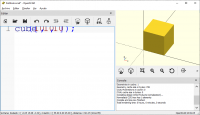
The problems I see are the same as reported. Only, in my case, the error
appears with OpenSCAD at any window position and size, not only maximized.
Only in the secondary screen. In the primary screen always looks ok.
Thanks for your help and your time.
El mié., 18 nov. 2020 a las 0:51, MichaelAtOz (oz.at.michael@gmail.com)
escribió:
Oh, I see. Looked for that error before, but missed the right words to find
it.
The problems I see are the same as reported. Only, in my case, the error
appears with OpenSCAD at any window position and size, not only maximized.
Only in the secondary screen. In the primary screen always looks ok.
Thanks for your help and your time.
El mié., 18 nov. 2020 a las 0:51, MichaelAtOz (<oz.at.michael@gmail.com>)
escribió:
> This has been reported as a DPI issue;
> https://github.com/openscad/openscad/issues/1624
> But no solution, maybe you could play with DPI settings.
>
>
>
> -----
> OpenSCAD Admin - email* me if you need anything, or if I've done
> something stupid...
>
> * on the Forum, click on my MichaelAtOz label, there is a link to email me.
>
> Unless specifically shown otherwise above, my contribution is in the
> Public Domain; to the extent possible under law, I have waived all
> copyright and related or neighbouring rights to this work. Obviously
> inclusion of works of previous authors is not included in the above.
>
> --
> Sent from: http://forum.openscad.org/
>
> _______________________________________________
> OpenSCAD mailing list
> Discuss@lists.openscad.org
> http://lists.openscad.org/mailman/listinfo/discuss_lists.openscad.org
>


