

discuss@lists.openscad.org

OpenSCAD general discussion Mailing-list

View all threads

difference() shown in preview but not rendered

Z
ZeGuigui
Wed, Feb 14, 2018 4:08 PM

Hello and thank you for accepting me on this forum/mailing list
I am new to OpenScad and 3DPrinting so I wanted to start with something
"easy"... a die!
I wrote the code and everything was nice on the preview pane. Nevertheless
when I build the object (F6) the difference disapears. Please see below:

preview https://extranet.zeguigui.com/owncloud/s/0cUF5zJTvLK77WA
(https://extranet.zeguigui.com/owncloud/s/0cUF5zJTvLK77WA)
built https://extranet.zeguigui.com/owncloud/s/aoiPI3GxcYT3HX4
(https://extranet.zeguigui.com/owncloud/s/aoiPI3GxcYT3HX4)
code https://extranet.zeguigui.com/owncloud/s/Mo9fSfy9g7tjMiD
(https://extranet.zeguigui.com/owncloud/s/Mo9fSfy9g7tjMiD)
You will need the mana font if you want to test it:
https://github.com/andrewgioia/Mana https://github.com/andrewgioia/Mana
When I switch difference() for union() on line 21 the full die face is
correctly rendered. If I remove the /planeswalker/ logo (\ue625) and add a
circle instead it works both for union() and difference()
Any idea what the problem might be? This is probably a noob question but
with openscad well... I am just a beginer
Thanks
Guillaume

--
Sent from: http://forum.openscad.org/

Hello and thank you for accepting me on this forum/mailing list I am new to OpenScad and 3DPrinting so I wanted to start with something "easy"... a die! I wrote the code and everything was nice on the preview pane. Nevertheless when I build the object (F6) the difference disapears. Please see below: preview <https://extranet.zeguigui.com/owncloud/s/0cUF5zJTvLK77WA> (https://extranet.zeguigui.com/owncloud/s/0cUF5zJTvLK77WA) built <https://extranet.zeguigui.com/owncloud/s/aoiPI3GxcYT3HX4> (https://extranet.zeguigui.com/owncloud/s/aoiPI3GxcYT3HX4) code <https://extranet.zeguigui.com/owncloud/s/Mo9fSfy9g7tjMiD> (https://extranet.zeguigui.com/owncloud/s/Mo9fSfy9g7tjMiD) You will need the mana font if you want to test it: https://github.com/andrewgioia/Mana <https://github.com/andrewgioia/Mana> When I switch difference() for union() on line 21 the full die face is correctly rendered. If I remove the /planeswalker/ logo (\ue625) and add a circle instead it works both for union() and difference() Any idea what the problem might be? This is probably a noob question but with openscad well... I am just a beginer Thanks Guillaume -- Sent from: http://forum.openscad.org/
Z
ZeGuigui
Wed, Feb 14, 2018 6:45 PM

I have done further tests and after checking the preview from multiple
orientations found that the problem is font related. \ue625 is probably not
"closed" or something similar and line extrusion creates manifolds. Using
\ue626 as an alternative works

It's sufficient for me to test 3D printing it!

--
Sent from: http://forum.openscad.org/

I have done further tests and after checking the preview from multiple orientations found that the problem is font related. \ue625 is probably not "closed" or something similar and line extrusion creates manifolds. Using \ue626 as an alternative works It's sufficient for me to test 3D printing it! -- Sent from: http://forum.openscad.org/
RP
Ronaldo Persiano
Wed, Feb 14, 2018 7:08 PM

I have no way to test your code now but it seems the trouble is the
difference() inside magic_text. If your intention is to have an outline of
the symbol \ue625 it may be simpler to do an offset()  of it instead of the
difference().

I have no way to test your code now but it seems the trouble is the difference() inside magic_text. If your intention is to have an outline of the symbol \ue625 it may be simpler to do an offset() of it instead of the difference().
MF
Michael Frey
Wed, Feb 14, 2018 7:13 PM

Am 14.02.2018 um 19:45 schrieb ZeGuigui:

I have done further tests and after checking the preview from multiple
orientations found that the problem is font related. \ue625 is probably not
"closed" or something similar and line extrusion creates manifolds. Using
\ue626 as an alternative works

I also did some tests.
Strangely, one (positive as in not used in a difference) instance of
your "shield" works.
Only when I try to have two or more of those shield I get

WARNING: Object may not be a valid 2-manifold and may need repair!

and thus errors.

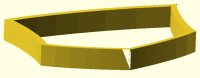
When you want to debug the font, I would start with the bottom:

With Kind regards,
Michael Frey
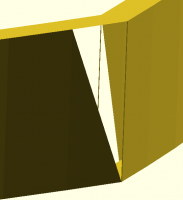
Am 14.02.2018 um 19:45 schrieb ZeGuigui: > I have done further tests and after checking the preview from multiple > orientations found that the problem is font related. \ue625 is probably not > "closed" or something similar and line extrusion creates manifolds. Using > \ue626 as an alternative works I also did some tests. Strangely, one (positive as in not used in a difference) instance of your "shield" works. Only when I try to have two or more of those shield I get WARNING: Object may not be a valid 2-manifold and may need repair! and thus errors. When you want to debug the font, I would start with the bottom: With Kind regards, Michael Frey
MF
Michael Frey
Thu, Feb 15, 2018 5:48 AM

I found the issue.
Open the font in a font editor like FontForge. It is the bottom:

The other corners aren´t exactly perfect either, but at least not self
intersecting.

Report the issue upstream to the font maintainer, fix it with FontForge
yourself - it is up to you.

I will write a note for our documentation, that OpenSCAD is sensitive to
geometric imperfections in fonts.
It is really hard to handle within OpenSCAD, as the language and UI are
to some extend just wrappers for the underlaying geometry libraries.
Those libraries expect clean geometry and it is hard to blame them for
not handling someone elses mistakes.

With Kind regards
Michael Frey
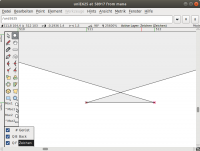
I found the issue. Open the font in a font editor like FontForge. It is the bottom: The other corners aren´t exactly perfect either, but at least not self intersecting. Report the issue upstream to the font maintainer, fix it with FontForge yourself - it is up to you. I will write a note for our documentation, that OpenSCAD is sensitive to geometric imperfections in fonts. It is really hard to handle within OpenSCAD, as the language and UI are to some extend just wrappers for the underlaying geometry libraries. Those libraries expect clean geometry and it is hard to blame them for not handling someone elses mistakes. With Kind regards Michael Frey

NH
nop head
Thu, Feb 15, 2018 10:07 AM

I think offset() is resilient to these types of error because the Clipper
library uses a very robust algorithm. I have fixed broken SVG files by
applying a very small offset.

On 15 February 2018 at 05:48, Michael Frey michael.frey@gmx.ch wrote:

I found the issue.
Open the font in a font editor like FontForge. It is the bottom:

The other corners aren´t exactly perfect either, but at least not self
intersecting.

Report the issue upstream to the font maintainer, fix it with FontForge
yourself - it is up to you.

I will write a note for our documentation, that OpenSCAD is sensitive to
geometric imperfections in fonts.
It is really hard to handle within OpenSCAD, as the language and UI are to
some extend just wrappers for the underlaying geometry libraries.
Those libraries expect clean geometry and it is hard to blame them for not
handling someone elses mistakes.

With Kind regards
Michael Frey


OpenSCAD mailing list
Discuss@lists.openscad.org
http://lists.openscad.org/mailman/listinfo/discuss_lists.openscad.org
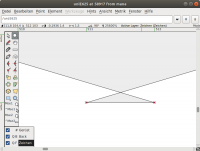
I think offset() is resilient to these types of error because the Clipper library uses a very robust algorithm. I have fixed broken SVG files by applying a very small offset. On 15 February 2018 at 05:48, Michael Frey <michael.frey@gmx.ch> wrote: > I found the issue. > Open the font in a font editor like FontForge. It is the bottom: > > > The other corners aren´t exactly perfect either, but at least not self > intersecting. > > Report the issue upstream to the font maintainer, fix it with FontForge > yourself - it is up to you. > > I will write a note for our documentation, that OpenSCAD is sensitive to > geometric imperfections in fonts. > It is really hard to handle within OpenSCAD, as the language and UI are to > some extend just wrappers for the underlaying geometry libraries. > Those libraries expect clean geometry and it is hard to blame them for not > handling someone elses mistakes. > > With Kind regards > Michael Frey > > _______________________________________________ > OpenSCAD mailing list > Discuss@lists.openscad.org > http://lists.openscad.org/mailman/listinfo/discuss_lists.openscad.org > >
Z
ZeGuigui
Thu, Feb 15, 2018 11:15 AM

I will give offset() a try. It looks like it's a better way to achieve what I
wanted to do!

Once tested I will report back here the result

--
Sent from: http://forum.openscad.org/

I will give offset() a try. It looks like it's a better way to achieve what I wanted to do! Once tested I will report back here the result -- Sent from: http://forum.openscad.org/