

P
Parkinbot
Thu, Mar 23, 2017 11:09 AM
OpenSCAD has the problem that rendering can get extremly slow whenever
Boolean operations over a large number of objects come into play. And this
is the front door for producing lattice structures - define a large object
and difference a union of a large number of smaller objects from it.
However, while this is a known major drawback of OpenSCAD, there is a
(somehow clumsy) work-around, which I use frequently to bypass this problem.
I never found out, why the discussion about this was so rudely cut by the
moderator, but you can read it up here:
http://forum.openscad.org/rendering-for-paper-assembly-manual-tp20108p20126.html
I call the approach /lazy union/, because it bypasses intersection checks
for non intersecting elements by definition (note that it can't be used for
intersecting objects). To apply it, you have to generate the objects by code
and stuff them all into a single polyhedron call. I gave some example code
for it.
But it depends on your programming skills, whether you will be able to use
it.
--
View this message in context: http://forum.openscad.org/Lattice-structure-tp21001p21004.html
Sent from the OpenSCAD mailing list archive at Nabble.com.
OpenSCAD has the problem that rendering can get extremly slow whenever
Boolean operations over a large number of objects come into play. And this
is the front door for producing lattice structures - define a large object
and difference a union of a large number of smaller objects from it.
However, while this is a known major drawback of OpenSCAD, there is a
(somehow clumsy) work-around, which I use frequently to bypass this problem.
I never found out, why the discussion about this was so rudely cut by the
moderator, but you can read it up here:
http://forum.openscad.org/rendering-for-paper-assembly-manual-tp20108p20126.html
I call the approach /lazy union/, because it bypasses intersection checks
for non intersecting elements by definition (note that it can't be used for
intersecting objects). To apply it, you have to generate the objects by code
and stuff them all into a single polyhedron call. I gave some example code
for it.
But it depends on your programming skills, whether you will be able to use
it.
--
View this message in context: http://forum.openscad.org/Lattice-structure-tp21001p21004.html
Sent from the OpenSCAD mailing list archive at Nabble.com.
R
Ronaldo
Fri, Mar 24, 2017 1:45 AM
If all your latices are extrusions as the left image latice seems to be, you
may create a 2D latice and linear_extrude it:
n = 15;
h = 11;
sx = 120;
sy = 100;
th = 1;
module latice(sx,sy,h,th,n)
linear_extrude(height=h)
difference(){
square([sx,sy]);
m = ceil(nsy/sx); echo(m);
for(i=[0:n], j=[0:2m])
translate([(i+(j%2)/2)sx/n, jsx/n/2])
rotate(45)
square(sx/n/sqrt(2)-th,center=true);
}
latice(sx,sy,h,th,n);
//translate([0,0,h]) cube([sx,sy,th]);
//translate([0,0,h+th]) latice(sx,sy,h,th,n);
If all your latices are extrusions as the left image latice seems to be, you
may create a 2D latice and linear_extrude it:
> n = 15;
> h = 11;
> sx = 120;
> sy = 100;
> th = 1;
>
> module latice(sx,sy,h,th,n)
> linear_extrude(height=h)
> difference(){
> square([sx,sy]);
> m = ceil(n*sy/sx); echo(m);
> for(i=[0:n], j=[0:2*m])
> translate([(i+(j%2)/2)*sx/n, j*sx/n/2])
> rotate(45)
> square(sx/n/sqrt(2)-th,center=true);
> }
>
> latice(sx,sy,h,th,n);
> //translate([0,0,h]) cube([sx,sy,th]);
> //translate([0,0,h+th]) latice(sx,sy,h,th,n);
The render of latice() alone is very fast. But, uncommenting the following
two lines, the render time starts to bother.
--
View this message in context: http://forum.openscad.org/Lattice-structure-tp21001p21009.html
Sent from the OpenSCAD mailing list archive at Nabble.com.
S
s.dwivedi
Fri, Mar 24, 2017 6:45 AM
this seems to work absolutely fine however I am not able to grasp the
programming bit, could you be more elaborate
from what I have understood , you define a certain latice in 2d followed by
extrusion command , can you explain afterwards ?
also can we do same with a circular mesh structure
http://forum.openscad.org/file/n21010/lattice_design_2.jpg
--
View this message in context: http://forum.openscad.org/Lattice-structure-tp21001p21010.html
Sent from the OpenSCAD mailing list archive at Nabble.com.

this seems to work absolutely fine however I am not able to grasp the
programming bit, could you be more elaborate
from what I have understood , you define a certain latice in 2d followed by
extrusion command , can you explain afterwards ?
also can we do same with a circular mesh structure
<http://forum.openscad.org/file/n21010/lattice_design_2.jpg>
--
View this message in context: http://forum.openscad.org/Lattice-structure-tp21001p21010.html
Sent from the OpenSCAD mailing list archive at Nabble.com.
M
MichaelAtOz
Fri, Mar 24, 2017 8:39 AM
I don't suppose this is part of your class work?
Admin - PM me if you need anything, or if I've done something stupid...
Unless specifically shown otherwise above, my contribution is in the Public Domain; to the extent possible under law, I have waived all copyright and related or neighbouring rights to this work. Obviously inclusion of works of previous authors is not included in the above.
The TPP is no simple “trade agreement.” Fight it! http://www.ourfairdeal.org/ time is running out!
View this message in context: http://forum.openscad.org/Lattice-structure-tp21001p21011.html
Sent from the OpenSCAD mailing list archive at Nabble.com.
I don't suppose this is part of your class work?
-----
Admin - PM me if you need anything, or if I've done something stupid...
Unless specifically shown otherwise above, my contribution is in the Public Domain; to the extent possible under law, I have waived all copyright and related or neighbouring rights to this work. Obviously inclusion of works of previous authors is not included in the above.
The TPP is no simple “trade agreement.” Fight it! http://www.ourfairdeal.org/ time is running out!
--
View this message in context: http://forum.openscad.org/Lattice-structure-tp21001p21011.html
Sent from the OpenSCAD mailing list archive at Nabble.com.
S
s.dwivedi
Fri, Mar 24, 2017 10:42 AM
this is the design I intend to develop as a scaffold system
--
View this message in context: http://forum.openscad.org/Lattice-structure-tp21001p21012.html
Sent from the OpenSCAD mailing list archive at Nabble.com.
this is the design I intend to develop as a scaffold system
--
View this message in context: http://forum.openscad.org/Lattice-structure-tp21001p21012.html
Sent from the OpenSCAD mailing list archive at Nabble.com.
P
Parkinbot
Fri, Mar 24, 2017 12:07 PM
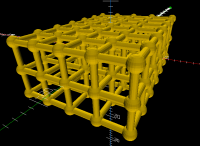
That is exactly the point. Anything beyond linear_extruding a 2d object, is
exactly where the problem starts. Try to render (F6) the following small
piece - about 6 minutes on my machine. Then just multiply any dimension sx,
sy, or sz by just 2 and watch how render time grows.
http://forum.openscad.org/file/n21013/lattice.png
$fn = 20;
n = 2; // joints per 10mm
sx = 20;
sy = 30;
sz = 10;
th = 1;
lattice();
module lattice()
{
for(x=[0:10/n:sx], y=[0:10/n:sy], z=[0:10/n:sz] )
translate([sx/2-x,sy/2-y,sz/2-z])
sphere(th);
for(x=[0:10/n:sx], z=[0:10/n:sz] ) // y bars
translate([sx/2-x,0,sz/2-z])
rotate([90, 0])
cylinder(r=th/2, h=sy, center = true);
for(y=[0:10/n:sy], z=[0:10/n:sz] ) // y bars
translate([0, sy/2-y,sz/2-z])
rotate([0, 90])
cylinder(r=th/2, h=sx, center = true);
for(x=[0:10/n:sx], y=[0:10/n:sy] ) // z bars
translate([sx/2-x, sy/2-y])
cylinder(r=th/2, h=sz, center = true);
}
That is exactly the point. Anything beyond linear_extruding a 2d object, is
exactly where the problem starts. Try to render (F6) the following small
piece - about 6 minutes on my machine. Then just multiply any dimension sx,
sy, or sz by just 2 and watch how render time grows.
<http://forum.openscad.org/file/n21013/lattice.png>
> $fn = 20;
> n = 2; // joints per 10mm
> sx = 20;
> sy = 30;
> sz = 10;
> th = 1;
>
>
> lattice();
> module lattice()
> {
>
> for(x=[0:10/n:sx], y=[0:10/n:sy], z=[0:10/n:sz] )
> translate([sx/2-x,sy/2-y,sz/2-z])
> sphere(th);
>
> for(x=[0:10/n:sx], z=[0:10/n:sz] ) // y bars
> translate([sx/2-x,0,sz/2-z])
> rotate([90, 0])
> cylinder(r=th/2, h=sy, center = true);
>
> for(y=[0:10/n:sy], z=[0:10/n:sz] ) // y bars
> translate([0, sy/2-y,sz/2-z])
> rotate([0, 90])
> cylinder(r=th/2, h=sx, center = true);
>
> for(x=[0:10/n:sx], y=[0:10/n:sy] ) // z bars
> translate([sx/2-x, sy/2-y])
> cylinder(r=th/2, h=sz, center = true);
> }
--
View this message in context: http://forum.openscad.org/Lattice-structure-tp21001p21013.html
Sent from the OpenSCAD mailing list archive at Nabble.com.
J
jon
Fri, Mar 24, 2017 12:15 PM
I am not sure what "That is exactly the point" means, Parkinbot. I
reviewed the thread, and was still unclear. A number of points were
made in the thread. Exactly what is it that your example, below,
demonstrates, please.
Jon
On 3/24/2017 8:07 AM, Parkinbot wrote:
That is exactly the point. Anything beyond linear_extruding a 2d object, is
exactly where the problem starts. Try to render (F6) the following small
piece - about 6 minutes on my machine. Then just multiply any dimension sx,
sy, or sz by just 2 and watch how render time grows.
http://forum.openscad.org/file/n21013/lattice.png
$fn = 20;
n = 2; // joints per 10mm
sx = 20;
sy = 30;
sz = 10;
th = 1;
lattice();
module lattice()
{
for(x=[0:10/n:sx], y=[0:10/n:sy], z=[0:10/n:sz] )
translate([sx/2-x,sy/2-y,sz/2-z])
sphere(th);
for(x=[0:10/n:sx], z=[0:10/n:sz] ) // y bars
translate([sx/2-x,0,sz/2-z])
rotate([90, 0])
cylinder(r=th/2, h=sy, center = true);
for(y=[0:10/n:sy], z=[0:10/n:sz] ) // y bars
translate([0, sy/2-y,sz/2-z])
rotate([0, 90])
cylinder(r=th/2, h=sx, center = true);
for(x=[0:10/n:sx], y=[0:10/n:sy] ) // z bars
translate([sx/2-x, sy/2-y])
cylinder(r=th/2, h=sz, center = true);
}
I am not sure what "That is exactly the point" means, Parkinbot. I
reviewed the thread, and was still unclear. A number of points were
made in the thread. Exactly what is it that your example, below,
demonstrates, please.
Jon
On 3/24/2017 8:07 AM, Parkinbot wrote:
> That is exactly the point. Anything beyond linear_extruding a 2d object, is
> exactly where the problem starts. Try to render (F6) the following small
> piece - about 6 minutes on my machine. Then just multiply any dimension sx,
> sy, or sz by just 2 and watch how render time grows.
> <http://forum.openscad.org/file/n21013/lattice.png>
>
>
>> $fn = 20;
>> n = 2; // joints per 10mm
>> sx = 20;
>> sy = 30;
>> sz = 10;
>> th = 1;
>>
>>
>> lattice();
>> module lattice()
>> {
>>
>> for(x=[0:10/n:sx], y=[0:10/n:sy], z=[0:10/n:sz] )
>> translate([sx/2-x,sy/2-y,sz/2-z])
>> sphere(th);
>>
>> for(x=[0:10/n:sx], z=[0:10/n:sz] ) // y bars
>> translate([sx/2-x,0,sz/2-z])
>> rotate([90, 0])
>> cylinder(r=th/2, h=sy, center = true);
>>
>> for(y=[0:10/n:sy], z=[0:10/n:sz] ) // y bars
>> translate([0, sy/2-y,sz/2-z])
>> rotate([0, 90])
>> cylinder(r=th/2, h=sx, center = true);
>>
>> for(x=[0:10/n:sx], y=[0:10/n:sy] ) // z bars
>> translate([sx/2-x, sy/2-y])
>> cylinder(r=th/2, h=sz, center = true);
>> }
>
DM
doug moen
Fri, Mar 24, 2017 2:40 PM
Parkinbot is pointing out that the "obvious" way of constructing a 3-D
lattice in OpenSCAD (unioning together the lattice elements) is likely to
be unacceptably slow, so you need to resort to other techniques.
Linear_extrude of a 2-D lattice works, as long as your lattice can be
described that way, and so far, s.dwivedi's examples are all
linear-extrudeable. The more general approach is to use polyhedron, but
that's more difficult. Once you have a big lattice, you have to be careful
not to union it with other shapes, or the performance problem reappears.
This issue (complex lattices vs boolean operations) is a limitation in the
design of OpenSCAD.
On 24 March 2017 at 08:15, jon jon@jonbondy.com wrote:
I am not sure what "That is exactly the point" means, Parkinbot. I
reviewed the thread, and was still unclear. A number of points were made
in the thread. Exactly what is it that your example, below, demonstrates,
please.
Jon
On 3/24/2017 8:07 AM, Parkinbot wrote:
That is exactly the point. Anything beyond linear_extruding a 2d object,
is
exactly where the problem starts. Try to render (F6) the following small
piece - about 6 minutes on my machine. Then just multiply any dimension
sx,
sy, or sz by just 2 and watch how render time grows.
http://forum.openscad.org/file/n21013/lattice.png
$fn = 20;
n = 2; // joints per 10mm
sx = 20;
sy = 30;
sz = 10;
th = 1;
lattice();
module lattice()
{
for(x=[0:10/n:sx], y=[0:10/n:sy], z=[0:10/n:sz] )
translate([sx/2-x,sy/2-y,sz/2-z])
sphere(th);
for(x=[0:10/n:sx], z=[0:10/n:sz] ) // y bars
translate([sx/2-x,0,sz/2-z])
rotate([90, 0])
cylinder(r=th/2, h=sy, center = true);
for(y=[0:10/n:sy], z=[0:10/n:sz] ) // y bars
translate([0, sy/2-y,sz/2-z])
rotate([0, 90])
cylinder(r=th/2, h=sx, center = true);
for(x=[0:10/n:sx], y=[0:10/n:sy] ) // z bars
translate([sx/2-x, sy/2-y])
cylinder(r=th/2, h=sz, center = true);
}
Parkinbot is pointing out that the "obvious" way of constructing a 3-D
lattice in OpenSCAD (unioning together the lattice elements) is likely to
be unacceptably slow, so you need to resort to other techniques.
Linear_extrude of a 2-D lattice works, as long as your lattice can be
described that way, and so far, s.dwivedi's examples are all
linear-extrudeable. The more general approach is to use polyhedron, but
that's more difficult. Once you have a big lattice, you have to be careful
not to union it with other shapes, or the performance problem reappears.
This issue (complex lattices vs boolean operations) is a limitation in the
design of OpenSCAD.
On 24 March 2017 at 08:15, jon <jon@jonbondy.com> wrote:
> I am not sure what "That is exactly the point" means, Parkinbot. I
> reviewed the thread, and was still unclear. A number of points were made
> in the thread. Exactly what is it that your example, below, demonstrates,
> please.
>
> Jon
>
>
>
> On 3/24/2017 8:07 AM, Parkinbot wrote:
>
>> That is exactly the point. Anything beyond linear_extruding a 2d object,
>> is
>> exactly where the problem starts. Try to render (F6) the following small
>> piece - about 6 minutes on my machine. Then just multiply any dimension
>> sx,
>> sy, or sz by just 2 and watch how render time grows.
>> <http://forum.openscad.org/file/n21013/lattice.png>
>>
>>
>> $fn = 20;
>>> n = 2; // joints per 10mm
>>> sx = 20;
>>> sy = 30;
>>> sz = 10;
>>> th = 1;
>>>
>>>
>>> lattice();
>>> module lattice()
>>> {
>>> for(x=[0:10/n:sx], y=[0:10/n:sy], z=[0:10/n:sz] )
>>> translate([sx/2-x,sy/2-y,sz/2-z])
>>> sphere(th);
>>> for(x=[0:10/n:sx], z=[0:10/n:sz] ) // y bars
>>> translate([sx/2-x,0,sz/2-z])
>>> rotate([90, 0])
>>> cylinder(r=th/2, h=sy, center = true);
>>>
>>> for(y=[0:10/n:sy], z=[0:10/n:sz] ) // y bars
>>> translate([0, sy/2-y,sz/2-z])
>>> rotate([0, 90])
>>> cylinder(r=th/2, h=sx, center = true);
>>>
>>> for(x=[0:10/n:sx], y=[0:10/n:sy] ) // z bars
>>> translate([sx/2-x, sy/2-y])
>>> cylinder(r=th/2, h=sz, center = true);
>>> }
>>>
>>
>>
>
> _______________________________________________
> OpenSCAD mailing list
> Discuss@lists.openscad.org
> http://lists.openscad.org/mailman/listinfo/discuss_lists.openscad.org
>
>
>
CA
Carsten Arnholm
Fri, Mar 24, 2017 7:40 PM
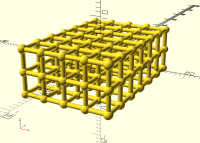
On 24. mars 2017 13:07, Parkinbot wrote:
That is exactly the point. Anything beyond linear_extruding a 2d object, is
exactly where the problem starts. Try to render (F6) the following small
piece - about 6 minutes on my machine. Then just multiply any dimension sx,
sy, or sz by just 2 and watch how render time grows.
http://forum.openscad.org/file/n21013/lattice.png
I tried your code on my new Linux machine using 2015.03-1 and found it
(F6) completed in 2 minutes and 48 seconds. I also translated your
OpenSCAD code into AngelScript and ran it through my Carve based boolean
engine on the same computer. It completed in 23 seconds, with a result
that looks similar to openSCAD.
Elsewhere, doug moen mentions that "This issue (complex lattices vs
boolean operations) is a limitation in the design of OpenSCAD."
One could argue that it is probably not so much a limitation in the
design of OpenSCAD but perhaps more a question of the characteristics of
the boolean engines (CGAL vs. Carve).
One thing I found was that creating subgroups (spheres+ybars, xbars,
zbars) was helpful in speeding things up in my code. I am guessing it is
because of bounding box checks.
As mentioned before, I am going to release my carve based engine on
github when I get around to it (need to learn git as well).
Carsten Arnholm
On 24. mars 2017 13:07, Parkinbot wrote:
> That is exactly the point. Anything beyond linear_extruding a 2d object, is
> exactly where the problem starts. Try to render (F6) the following small
> piece - about 6 minutes on my machine. Then just multiply any dimension sx,
> sy, or sz by just 2 and watch how render time grows.
> <http://forum.openscad.org/file/n21013/lattice.png>
I tried your code on my new Linux machine using 2015.03-1 and found it
(F6) completed in 2 minutes and 48 seconds. I also translated your
OpenSCAD code into AngelScript and ran it through my Carve based boolean
engine on the same computer. It completed in 23 seconds, with a result
that looks similar to openSCAD.
Elsewhere, doug moen mentions that "This issue (complex lattices vs
boolean operations) is a limitation in the design of OpenSCAD."
One could argue that it is probably not so much a limitation in the
design of OpenSCAD but perhaps more a question of the characteristics of
the boolean engines (CGAL vs. Carve).
One thing I found was that creating subgroups (spheres+ybars, xbars,
zbars) was helpful in speeding things up in my code. I am guessing it is
because of bounding box checks.
As mentioned before, I am going to release my carve based engine on
github when I get around to it (need to learn git as well).
Carsten Arnholm
R
Ronaldo
Fri, Mar 24, 2017 10:27 PM
this seems to work absolutely fine however I am not able to grasp the
programming bit, could you be more elaborate
from what I have understood , you define a certain latice in 2d followed
by extrusion command , can you explain afterwards ?
also can we do same with a circular mesh structure
In my last code, the for is responsible to generate the array of squares
corresponding to the holes of the latice. Subtracting this array from a
rectangle with the latice dimensions give us a 2D section of the latice. The
linear_extrude makes it emerge to the 3D world.
To have a latice with a shape that is no longer a rectange, it is just a
question of changing the square([sx,sy]) by another 2D polygon like a circle
for instance. You may try using
translate([sx,sy]/2) scale([sx,sy]/2) circle(1,$fn=16);
instead of square([sx,sy]) . This will give you a planar latice anyway.
If your latice has to be deformed, let's say, to a spherical shape, this
code is not useful anymore because there is no way to apply non-linear
transforms to an OpenSCAD object. In this last case, the only way I know is
to define the latice (or its holes, to be precise) as a lazzy union of
(deformed) polyhedra, as Parkinbot and doug moen pointed out.
--
View this message in context: http://forum.openscad.org/Lattice-structure-tp21001p21019.html
Sent from the OpenSCAD mailing list archive at Nabble.com.
s.dwivedi wrote
> this seems to work absolutely fine however I am not able to grasp the
> programming bit, could you be more elaborate
>
> from what I have understood , you define a certain latice in 2d followed
> by extrusion command , can you explain afterwards ?
>
> also can we do same with a circular mesh structure
In my last code, the for is responsible to generate the array of squares
corresponding to the holes of the latice. Subtracting this array from a
rectangle with the latice dimensions give us a 2D section of the latice. The
linear_extrude makes it emerge to the 3D world.
To have a latice with a shape that is no longer a rectange, it is just a
question of changing the square([sx,sy]) by another 2D polygon like a circle
for instance. You may try using
translate([sx,sy]/2) scale([sx,sy]/2) circle(1,$fn=16);
instead of square([sx,sy]) . This will give you a planar latice anyway.
If your latice has to be deformed, let's say, to a spherical shape, this
code is not useful anymore because there is no way to apply non-linear
transforms to an OpenSCAD object. In this last case, the only way I know is
to define the latice (or its holes, to be precise) as a lazzy union of
(deformed) polyhedra, as Parkinbot and doug moen pointed out.
--
View this message in context: http://forum.openscad.org/Lattice-structure-tp21001p21019.html
Sent from the OpenSCAD mailing list archive at Nabble.com.