discuss@lists.openscad.org

OpenSCAD general discussion Mailing-list

View all threads

Re: OFF TOPIC - simplify v point reductionm

RW
Raymond West
Thu, Jan 29, 2026 5:04 PM

Hi,

The query wrt manifold and slivers reminded me of some playing around I
did a few months ago, which may or may not be of interest. Manifold
'simplify' states that  it tries to reduce the number of vertices,
without destroying the overall shape. I also had had AI to produce the
code for a function  to reduce points, so I thought I would compare the
results. I found that simplify was a bit coarse or unpredictable in
generating the final shape. I think maybe finer steps may help, but is
does not seem to preserve the original shape too well.  I cannot recall
using it to remove slivers, I think it would merely make them thinner,
so I have a function to specifically remove slivers.

A sphere is generated by triangles, or segments, as is everything in
manifold. Point reduction, if all points are equally spaced, will either
remove all of them or none. I distorted (scaled) the sphere to give
unequal vertex spacing.

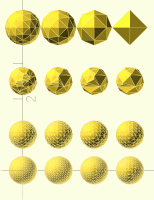
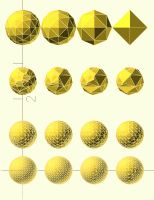
For the tests illustrated below, I started with a sphere of 50 segments,
and gradually reduced the points. The bottom two rows were with my point
reduction method, the third row was with simplify, the top row was by
reducing the number of segments in the sphere.

I've included my cad code (which is neither openscad nor python, but it
should be readable, showing  the values used), attached the openscad
result, so you can 'spin it around', and the terminal op, which gives
the number of vertices and tris for each shape.

Best wishes,

Ray

/*// Create the original sphere with 50 segments
reduce points args -
    params[0] tol
    params[1] return_broken (0/1)
    params[2] mode: 0=snap-to-root, 1=nearest-root, 2=centroid
     params[3] min_area (optional, default 0)
For “remove sphere on cube corner,” use tol ≈ sphere_radius +
small_epsilon (e.g., 5.05) so you don’t touch other cube corners.
If you see dents, try mode=2 (centroid) and a tiny min_area like 1e-6:
reduce_points(d, 5.05, 0, 2, 1e-6)
For threads, start with mode=1 (nearest-root) and small tol to preserve
crests/flanks.
*/
//verbose_set_global(true)
s0=sphere(d=0.9, segments=50)
s0=scale(s0,[0.8,0.8,1])
// Reduce points in steps
s1=reduce_points(s0, 0.05,1,2)
s2=reduce_points(s1, 0.055,1,2)
s3=reduce_points(s2, 0.06,1,2)
s4=reduce_points(s3, 0.065,1,2)
s5=reduce_points(s4, 0.07,1,2)
s6=reduce_points(s5, 0.075,1,2)
s7=reduce_points(s6, 0.08,1,2)
// Arrange spheres for visualization
s0=translate(s0, [0, 0, 0])
s1=translate(s1, [1, 0, 0])
s2=translate(s2, [2, 0, 0])
s3=translate(s3, [3, 0, 0])
s4=translate(s4, [0, 1, 0])
s5=translate(s5, [1, 1, 0])
s6=translate(s6, [2, 1, 0])
s7=translate(s7, [3, 1, 0])
// use manifold simplify to reduce points
p1=simplify(s0,.05)
p2=simplify(p1,.055)
p3=simplify(p2,.06)
p4=simplify(p3,.065)
p1=translate(p1, [0, 2.5, 0])
p2=translate(p2, [1, 2.5, 0])
p3=translate(p3, [2, 2.5, 0])
p4=translate(p4, [3, 2.5, 0])
// reduce segments
c1=sphere(d=.9,segments=14)
c2=sphere(d=.9,segments=9)
c3=sphere(d=.9,segments=5)
c4=sphere(d=.9,segments=3)
c1=translate(c1, [0, 4, 0])
c2=translate(c2, [1, 4, 0])
c3=translate(c3, [2, 4, 0])
c4=translate(c4, [3, 4, 0])
show_scad([s0,s1,s2,s3,s4,s5,s6,s7,p1,p2,p3,p4,c1,c2,c3,c4])

[show_scad] Shape 0: mesh verts=678 tris=1352 | raw_mesh verts=0 tris=0
[show_scad] Shape 1: mesh verts=619 tris=1234 | raw_mesh verts=0 tris=0
[show_scad] Shape 2: mesh verts=499 tris=994 | raw_mesh verts=0 tris=0
[show_scad] Shape 3: mesh verts=409 tris=814 | raw_mesh verts=0 tris=0
[show_scad] Shape 4: mesh verts=306 tris=608 | raw_mesh verts=0 tris=0
[show_scad] Shape 5: mesh verts=237 tris=470 | raw_mesh verts=0 tris=0
[show_scad] Shape 6: mesh verts=195 tris=386 | raw_mesh verts=0 tris=0
[show_scad] Shape 7: mesh verts=181 tris=358 | raw_mesh verts=0 tris=0
[show_scad] Shape 8: mesh verts=95 tris=186 | raw_mesh verts=0 tris=0
[show_scad] Shape 9: mesh verts=53 tris=102 | raw_mesh verts=0 tris=0
[show_scad] Shape 10: mesh verts=36 tris=68 | raw_mesh verts=0 tris=0
[show_scad] Shape 11: mesh verts=31 tris=58 | raw_mesh verts=0 tris=0
[show_scad] Shape 12: mesh verts=66 tris=128 | raw_mesh verts=0 tris=0
[show_scad] Shape 13: mesh verts=38 tris=72 | raw_mesh verts=0 tris=0
[show_scad] Shape 14: mesh verts=18 tris=32 | raw_mesh verts=0 tris=0
[show_scad] Shape 15: mesh verts=6 tris=8 | raw_mesh verts=0 tris=0
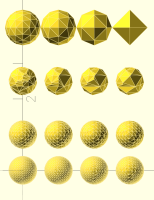
Hi, The query wrt manifold and slivers reminded me of some playing around I did a few months ago, which may or may not be of interest. Manifold 'simplify' states that  it tries to reduce the number of vertices, without destroying the overall shape. I also had had AI to produce the code for a function  to reduce points, so I thought I would compare the results. I found that simplify was a bit coarse or unpredictable in generating the final shape. I think maybe finer steps may help, but is does not seem to preserve the original shape too well.  I cannot recall using it to remove slivers, I think it would merely make them thinner, so I have a function to specifically remove slivers. A sphere is generated by triangles, or segments, as is everything in manifold. Point reduction, if all points are equally spaced, will either remove all of them or none. I distorted (scaled) the sphere to give unequal vertex spacing. For the tests illustrated below, I started with a sphere of 50 segments, and gradually reduced the points. The bottom two rows were with my point reduction method, the third row was with simplify, the top row was by reducing the number of segments in the sphere. I've included my cad code (which is neither openscad nor python, but it should be readable, showing  the values used), attached the openscad result, so you can 'spin it around', and the terminal op, which gives the number of vertices and tris for each shape. Best wishes, Ray /*// Create the original sphere with 50 segments reduce points args -     params[0] tol     params[1] return_broken (0/1)     params[2] mode: 0=snap-to-root, 1=nearest-root, 2=centroid      params[3] min_area (optional, default 0) For “remove sphere on cube corner,” use tol ≈ sphere_radius + small_epsilon (e.g., 5.05) so you don’t touch other cube corners. If you see dents, try mode=2 (centroid) and a tiny min_area like 1e-6: reduce_points(d, 5.05, 0, 2, 1e-6) For threads, start with mode=1 (nearest-root) and small tol to preserve crests/flanks. */ //verbose_set_global(true) s0=sphere(d=0.9, segments=50) s0=scale(s0,[0.8,0.8,1]) // Reduce points in steps s1=reduce_points(s0, 0.05,1,2) s2=reduce_points(s1, 0.055,1,2) s3=reduce_points(s2, 0.06,1,2) s4=reduce_points(s3, 0.065,1,2) s5=reduce_points(s4, 0.07,1,2) s6=reduce_points(s5, 0.075,1,2) s7=reduce_points(s6, 0.08,1,2) // Arrange spheres for visualization s0=translate(s0, [0, 0, 0]) s1=translate(s1, [1, 0, 0]) s2=translate(s2, [2, 0, 0]) s3=translate(s3, [3, 0, 0]) s4=translate(s4, [0, 1, 0]) s5=translate(s5, [1, 1, 0]) s6=translate(s6, [2, 1, 0]) s7=translate(s7, [3, 1, 0]) // use manifold simplify to reduce points p1=simplify(s0,.05) p2=simplify(p1,.055) p3=simplify(p2,.06) p4=simplify(p3,.065) p1=translate(p1, [0, 2.5, 0]) p2=translate(p2, [1, 2.5, 0]) p3=translate(p3, [2, 2.5, 0]) p4=translate(p4, [3, 2.5, 0]) // reduce segments c1=sphere(d=.9,segments=14) c2=sphere(d=.9,segments=9) c3=sphere(d=.9,segments=5) c4=sphere(d=.9,segments=3) c1=translate(c1, [0, 4, 0]) c2=translate(c2, [1, 4, 0]) c3=translate(c3, [2, 4, 0]) c4=translate(c4, [3, 4, 0]) show_scad([s0,s1,s2,s3,s4,s5,s6,s7,p1,p2,p3,p4,c1,c2,c3,c4]) [show_scad] Shape 0: mesh verts=678 tris=1352 | raw_mesh verts=0 tris=0 [show_scad] Shape 1: mesh verts=619 tris=1234 | raw_mesh verts=0 tris=0 [show_scad] Shape 2: mesh verts=499 tris=994 | raw_mesh verts=0 tris=0 [show_scad] Shape 3: mesh verts=409 tris=814 | raw_mesh verts=0 tris=0 [show_scad] Shape 4: mesh verts=306 tris=608 | raw_mesh verts=0 tris=0 [show_scad] Shape 5: mesh verts=237 tris=470 | raw_mesh verts=0 tris=0 [show_scad] Shape 6: mesh verts=195 tris=386 | raw_mesh verts=0 tris=0 [show_scad] Shape 7: mesh verts=181 tris=358 | raw_mesh verts=0 tris=0 [show_scad] Shape 8: mesh verts=95 tris=186 | raw_mesh verts=0 tris=0 [show_scad] Shape 9: mesh verts=53 tris=102 | raw_mesh verts=0 tris=0 [show_scad] Shape 10: mesh verts=36 tris=68 | raw_mesh verts=0 tris=0 [show_scad] Shape 11: mesh verts=31 tris=58 | raw_mesh verts=0 tris=0 [show_scad] Shape 12: mesh verts=66 tris=128 | raw_mesh verts=0 tris=0 [show_scad] Shape 13: mesh verts=38 tris=72 | raw_mesh verts=0 tris=0 [show_scad] Shape 14: mesh verts=18 tris=32 | raw_mesh verts=0 tris=0 [show_scad] Shape 15: mesh verts=6 tris=8 | raw_mesh verts=0 tris=0
P
pca006132
Thu, Jan 29, 2026 5:32 PM

What is the tolerance you are using for simplify? And manifold changed a
lot in the past few months, and simplification behavior changed.

On Fri, Jan 30, 2026, 01:04 Raymond West via Discuss <
discuss@lists.openscad.org> wrote:

Hi,

The query wrt manifold and slivers reminded me of some playing around I
did a few months ago, which may or may not be of interest. Manifold
'simplify' states that  it tries to reduce the number of vertices, without
destroying the overall shape. I also had had AI to produce the code for a
function  to reduce points, so I thought I would compare the results. I
found that simplify was a bit coarse or unpredictable in generating the
final shape. I think maybe finer steps may help, but is does not seem to
preserve the original shape too well.  I cannot recall using it to remove
slivers, I think it would merely make them thinner, so I have a function to
specifically remove slivers.

A sphere is generated by triangles, or segments, as is everything in
manifold. Point reduction, if all points are equally spaced, will either
remove all of them or none. I distorted (scaled) the sphere to give unequal
vertex spacing.

For the tests illustrated below, I started with a sphere of 50 segments,
and gradually reduced the points. The bottom two rows were with my point
reduction method, the third row was with simplify, the top row was by
reducing the number of segments in the sphere.

I've included my cad code (which is neither openscad nor python, but it
should be readable, showing  the values used), attached the openscad
result, so you can 'spin it around', and the terminal op, which gives the
number of vertices and tris for each shape.

Best wishes,

Ray

/*// Create the original sphere with 50 segments
reduce points args -
params[0] tol
params[1] return_broken (0/1)
params[2] mode: 0=snap-to-root, 1=nearest-root, 2=centroid
params[3] min_area (optional, default 0)
For “remove sphere on cube corner,” use tol ≈ sphere_radius +
small_epsilon (e.g., 5.05) so you don’t touch other cube corners.
If you see dents, try mode=2 (centroid) and a tiny min_area like 1e-6:
reduce_points(d, 5.05, 0, 2, 1e-6)
For threads, start with mode=1 (nearest-root) and small tol to preserve
crests/flanks.
*/
//verbose_set_global(true)
s0 = sphere(d=0.9, segments=50)
s0 =scale (s0,[0.8,0.8,1])
// Reduce points in steps
s1 = reduce_points(s0, 0.05,1,2)
s2 = reduce_points(s1, 0.055,1,2)
s3 = reduce_points(s2, 0.06,1,2)
s4 = reduce_points(s3, 0.065,1,2)
s5 = reduce_points(s4, 0.07,1,2)
s6 = reduce_points(s5, 0.075,1,2)
s7 = reduce_points(s6, 0.08,1,2)
// Arrange spheres for visualization
s0 = translate(s0, [0, 0, 0])
s1 = translate(s1, [1, 0, 0])
s2 = translate(s2, [2, 0, 0])
s3 = translate(s3, [3, 0, 0])
s4 = translate(s4, [0, 1, 0])
s5 = translate(s5, [1, 1, 0])
s6 = translate(s6, [2, 1, 0])
s7 = translate(s7, [3, 1, 0])
// use manifold simplify to reduce points
p1 = simplify(s0,.05)
p2 = simplify(p1,.055)
p3 = simplify(p2,.06)
p4 = simplify(p3,.065)
p1 = translate(p1, [0, 2.5, 0])
p2 = translate(p2, [1, 2.5, 0])
p3 = translate(p3, [2, 2.5, 0])
p4 = translate(p4, [3, 2.5, 0])
// reduce segments
c1 = sphere(d = .9,segments = 14)
c2 = sphere(d = .9,segments = 9)
c3 = sphere(d = .9,segments = 5)
c4 = sphere(d = .9,segments = 3)
c1 = translate(c1, [0, 4, 0])
c2 = translate(c2, [1, 4, 0])
c3 = translate(c3, [2, 4, 0])
c4 = translate(c4, [3, 4, 0])
show_scad([s0,s1,s2,s3,s4,s5,s6,s7,p1,p2,p3,p4,c1,c2,c3,c4])

[show_scad] Shape 0: mesh verts=678 tris=1352 | raw_mesh verts=0 tris=0
[show_scad] Shape 1: mesh verts=619 tris=1234 | raw_mesh verts=0 tris=0
[show_scad] Shape 2: mesh verts=499 tris=994 | raw_mesh verts=0 tris=0
[show_scad] Shape 3: mesh verts=409 tris=814 | raw_mesh verts=0 tris=0
[show_scad] Shape 4: mesh verts=306 tris=608 | raw_mesh verts=0 tris=0
[show_scad] Shape 5: mesh verts=237 tris=470 | raw_mesh verts=0 tris=0
[show_scad] Shape 6: mesh verts=195 tris=386 | raw_mesh verts=0 tris=0
[show_scad] Shape 7: mesh verts=181 tris=358 | raw_mesh verts=0 tris=0
[show_scad] Shape 8: mesh verts=95 tris=186 | raw_mesh verts=0 tris=0
[show_scad] Shape 9: mesh verts=53 tris=102 | raw_mesh verts=0 tris=0
[show_scad] Shape 10: mesh verts=36 tris=68 | raw_mesh verts=0 tris=0
[show_scad] Shape 11: mesh verts=31 tris=58 | raw_mesh verts=0 tris=0
[show_scad] Shape 12: mesh verts=66 tris=128 | raw_mesh verts=0 tris=0
[show_scad] Shape 13: mesh verts=38 tris=72 | raw_mesh verts=0 tris=0
[show_scad] Shape 14: mesh verts=18 tris=32 | raw_mesh verts=0 tris=0
[show_scad] Shape 15: mesh verts=6 tris=8 | raw_mesh verts=0 tris=0


OpenSCAD mailing list
To unsubscribe send an email to discuss-leave@lists.openscad.org
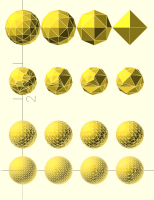
What is the tolerance you are using for simplify? And manifold changed a lot in the past few months, and simplification behavior changed. On Fri, Jan 30, 2026, 01:04 Raymond West via Discuss < discuss@lists.openscad.org> wrote: > Hi, > > The query wrt manifold and slivers reminded me of some playing around I > did a few months ago, which may or may not be of interest. Manifold > 'simplify' states that it tries to reduce the number of vertices, without > destroying the overall shape. I also had had AI to produce the code for a > function to reduce points, so I thought I would compare the results. I > found that simplify was a bit coarse or unpredictable in generating the > final shape. I think maybe finer steps may help, but is does not seem to > preserve the original shape too well. I cannot recall using it to remove > slivers, I think it would merely make them thinner, so I have a function to > specifically remove slivers. > > A sphere is generated by triangles, or segments, as is everything in > manifold. Point reduction, if all points are equally spaced, will either > remove all of them or none. I distorted (scaled) the sphere to give unequal > vertex spacing. > > For the tests illustrated below, I started with a sphere of 50 segments, > and gradually reduced the points. The bottom two rows were with my point > reduction method, the third row was with simplify, the top row was by > reducing the number of segments in the sphere. > > I've included my cad code (which is neither openscad nor python, but it > should be readable, showing the values used), attached the openscad > result, so you can 'spin it around', and the terminal op, which gives the > number of vertices and tris for each shape. > > Best wishes, > > Ray > > > > > > > /*// Create the original sphere with 50 segments > reduce points args - > params[0] tol > params[1] return_broken (0/1) > params[2] mode: 0=snap-to-root, 1=nearest-root, 2=centroid > params[3] min_area (optional, default 0) > For “remove sphere on cube corner,” use tol ≈ sphere_radius + > small_epsilon (e.g., 5.05) so you don’t touch other cube corners. > If you see dents, try mode=2 (centroid) and a tiny min_area like 1e-6: > reduce_points(d, 5.05, 0, 2, 1e-6) > For threads, start with mode=1 (nearest-root) and small tol to preserve > crests/flanks. > */ > //verbose_set_global(true) > s0 = sphere(d=0.9, segments=50) > s0 =scale (s0,[0.8,0.8,1]) > // Reduce points in steps > s1 = reduce_points(s0, 0.05,1,2) > s2 = reduce_points(s1, 0.055,1,2) > s3 = reduce_points(s2, 0.06,1,2) > s4 = reduce_points(s3, 0.065,1,2) > s5 = reduce_points(s4, 0.07,1,2) > s6 = reduce_points(s5, 0.075,1,2) > s7 = reduce_points(s6, 0.08,1,2) > // Arrange spheres for visualization > s0 = translate(s0, [0, 0, 0]) > s1 = translate(s1, [1, 0, 0]) > s2 = translate(s2, [2, 0, 0]) > s3 = translate(s3, [3, 0, 0]) > s4 = translate(s4, [0, 1, 0]) > s5 = translate(s5, [1, 1, 0]) > s6 = translate(s6, [2, 1, 0]) > s7 = translate(s7, [3, 1, 0]) > // use manifold simplify to reduce points > p1 = simplify(s0,.05) > p2 = simplify(p1,.055) > p3 = simplify(p2,.06) > p4 = simplify(p3,.065) > p1 = translate(p1, [0, 2.5, 0]) > p2 = translate(p2, [1, 2.5, 0]) > p3 = translate(p3, [2, 2.5, 0]) > p4 = translate(p4, [3, 2.5, 0]) > // reduce segments > c1 = sphere(d = .9,segments = 14) > c2 = sphere(d = .9,segments = 9) > c3 = sphere(d = .9,segments = 5) > c4 = sphere(d = .9,segments = 3) > c1 = translate(c1, [0, 4, 0]) > c2 = translate(c2, [1, 4, 0]) > c3 = translate(c3, [2, 4, 0]) > c4 = translate(c4, [3, 4, 0]) > show_scad([s0,s1,s2,s3,s4,s5,s6,s7,p1,p2,p3,p4,c1,c2,c3,c4]) > > > > [show_scad] Shape 0: mesh verts=678 tris=1352 | raw_mesh verts=0 tris=0 > [show_scad] Shape 1: mesh verts=619 tris=1234 | raw_mesh verts=0 tris=0 > [show_scad] Shape 2: mesh verts=499 tris=994 | raw_mesh verts=0 tris=0 > [show_scad] Shape 3: mesh verts=409 tris=814 | raw_mesh verts=0 tris=0 > [show_scad] Shape 4: mesh verts=306 tris=608 | raw_mesh verts=0 tris=0 > [show_scad] Shape 5: mesh verts=237 tris=470 | raw_mesh verts=0 tris=0 > [show_scad] Shape 6: mesh verts=195 tris=386 | raw_mesh verts=0 tris=0 > [show_scad] Shape 7: mesh verts=181 tris=358 | raw_mesh verts=0 tris=0 > [show_scad] Shape 8: mesh verts=95 tris=186 | raw_mesh verts=0 tris=0 > [show_scad] Shape 9: mesh verts=53 tris=102 | raw_mesh verts=0 tris=0 > [show_scad] Shape 10: mesh verts=36 tris=68 | raw_mesh verts=0 tris=0 > [show_scad] Shape 11: mesh verts=31 tris=58 | raw_mesh verts=0 tris=0 > [show_scad] Shape 12: mesh verts=66 tris=128 | raw_mesh verts=0 tris=0 > [show_scad] Shape 13: mesh verts=38 tris=72 | raw_mesh verts=0 tris=0 > [show_scad] Shape 14: mesh verts=18 tris=32 | raw_mesh verts=0 tris=0 > [show_scad] Shape 15: mesh verts=6 tris=8 | raw_mesh verts=0 tris=0 > > > > _______________________________________________ > OpenSCAD mailing list > To unsubscribe send an email to discuss-leave@lists.openscad.org
MM
Michael Marx (spintel)
Fri, Jan 30, 2026 12:27 AM

the third row was with simplify

The 3rd from the bottom-up?


From: Raymond West via Discuss [mailto:discuss@lists.openscad.org]
Sent: Friday, January 30, 2026 4:04 AM
To: OpenSCAD general discussion
Cc: Raymond West
Subject: [OpenSCAD] Re: OFF TOPIC - simplify v point reductionm

Hi,

The query wrt manifold and slivers reminded me of some playing around I did a few months ago, which may or may not be of interest. Manifold 'simplify' states that  it tries to reduce the number of vertices, without destroying the overall shape. I also had had AI to produce the code for a function  to reduce points, so I thought I would compare the results. I found that simplify was a bit coarse or unpredictable in generating the final shape. I think maybe finer steps may help, but is does not seem to preserve the original shape too well.  I cannot recall using it to remove slivers, I think it would merely make them thinner, so I have a function to specifically remove slivers.

A sphere is generated by triangles, or segments, as is everything in manifold. Point reduction, if all points are equally spaced, will either remove all of them or none. I distorted (scaled) the sphere to give unequal vertex spacing.

For the tests illustrated below, I started with a sphere of 50 segments, and gradually reduced the points. The bottom two rows were with my point reduction method, the third row was with simplify, the top row was by reducing the number of segments in the sphere.

I've included my cad code (which is neither openscad nor python, but it should be readable, showing  the values used), attached the openscad result, so you can 'spin it around', and the terminal op, which gives the number of vertices and tris for each shape.

Best wishes,

Ray

/*// Create the original sphere with 50 segments

reduce points args -

params[0] tol

params[1] return_broken (0/1)

params[2] mode: 0=snap-to-root, 1=nearest-root, 2=centroid

 params[3] min_area (optional, default 0)

For “remove sphere on cube corner,” use tol ≈ sphere_radius + small_epsilon (e.g., 5.05) so you don’t touch other cube corners.

If you see dents, try mode=2 (centroid) and a tiny min_area like 1e-6:

reduce_points(d, 5.05, 0, 2, 1e-6)

For threads, start with mode=1 (nearest-root) and small tol to preserve crests/flanks.

*/

//verbose_set_global(true)

s0 = sphere(d=0.9, segments=50)

s0 =scale (s0,[0.8,0.8,1])

// Reduce points in steps

s1 = reduce_points(s0, 0.05,1,2)

s2 = reduce_points(s1, 0.055,1,2)

s3 = reduce_points(s2, 0.06,1,2)

s4 = reduce_points(s3, 0.065,1,2)

s5 = reduce_points(s4, 0.07,1,2)

s6 = reduce_points(s5, 0.075,1,2)

s7 = reduce_points(s6, 0.08,1,2)

// Arrange spheres for visualization

s0 = translate(s0, [0, 0, 0])

s1 = translate(s1, [1, 0, 0])

s2 = translate(s2, [2, 0, 0])

s3 = translate(s3, [3, 0, 0])

s4 = translate(s4, [0, 1, 0])

s5 = translate(s5, [1, 1, 0])

s6 = translate(s6, [2, 1, 0])

s7 = translate(s7, [3, 1, 0])

// use manifold simplify to reduce points

p1 = simplify(s0,.05)

p2 = simplify(p1,.055)

p3 = simplify(p2,.06)

p4 = simplify(p3,.065)

p1 = translate(p1, [0, 2.5, 0])

p2 = translate(p2, [1, 2.5, 0])

p3 = translate(p3, [2, 2.5, 0])

p4 = translate(p4, [3, 2.5, 0])

// reduce segments

c1 = sphere(d = .9,segments = 14)

c2 = sphere(d = .9,segments = 9)

c3 = sphere(d = .9,segments = 5)

c4 = sphere(d = .9,segments = 3)

c1 = translate(c1, [0, 4, 0])

c2 = translate(c2, [1, 4, 0])

c3 = translate(c3, [2, 4, 0])

c4 = translate(c4, [3, 4, 0])

show_scad([s0,s1,s2,s3,s4,s5,s6,s7,p1,p2,p3,p4,c1,c2,c3,c4])

[show_scad] Shape 0: mesh verts=678 tris=1352 | raw_mesh verts=0 tris=0
[show_scad] Shape 1: mesh verts=619 tris=1234 | raw_mesh verts=0 tris=0
[show_scad] Shape 2: mesh verts=499 tris=994 | raw_mesh verts=0 tris=0
[show_scad] Shape 3: mesh verts=409 tris=814 | raw_mesh verts=0 tris=0
[show_scad] Shape 4: mesh verts=306 tris=608 | raw_mesh verts=0 tris=0
[show_scad] Shape 5: mesh verts=237 tris=470 | raw_mesh verts=0 tris=0
[show_scad] Shape 6: mesh verts=195 tris=386 | raw_mesh verts=0 tris=0
[show_scad] Shape 7: mesh verts=181 tris=358 | raw_mesh verts=0 tris=0
[show_scad] Shape 8: mesh verts=95 tris=186 | raw_mesh verts=0 tris=0
[show_scad] Shape 9: mesh verts=53 tris=102 | raw_mesh verts=0 tris=0
[show_scad] Shape 10: mesh verts=36 tris=68 | raw_mesh verts=0 tris=0
[show_scad] Shape 11: mesh verts=31 tris=58 | raw_mesh verts=0 tris=0
[show_scad] Shape 12: mesh verts=66 tris=128 | raw_mesh verts=0 tris=0
[show_scad] Shape 13: mesh verts=38 tris=72 | raw_mesh verts=0 tris=0
[show_scad] Shape 14: mesh verts=18 tris=32 | raw_mesh verts=0 tris=0
[show_scad] Shape 15: mesh verts=6 tris=8 | raw_mesh verts=0 tris=0
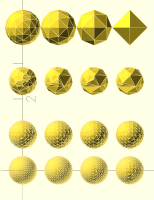
> the third row was with simplify The 3rd from the bottom-up? _____ From: Raymond West via Discuss [mailto:discuss@lists.openscad.org] Sent: Friday, January 30, 2026 4:04 AM To: OpenSCAD general discussion Cc: Raymond West Subject: [OpenSCAD] Re: OFF TOPIC - simplify v point reductionm Hi, The query wrt manifold and slivers reminded me of some playing around I did a few months ago, which may or may not be of interest. Manifold 'simplify' states that it tries to reduce the number of vertices, without destroying the overall shape. I also had had AI to produce the code for a function to reduce points, so I thought I would compare the results. I found that simplify was a bit coarse or unpredictable in generating the final shape. I think maybe finer steps may help, but is does not seem to preserve the original shape too well. I cannot recall using it to remove slivers, I think it would merely make them thinner, so I have a function to specifically remove slivers. A sphere is generated by triangles, or segments, as is everything in manifold. Point reduction, if all points are equally spaced, will either remove all of them or none. I distorted (scaled) the sphere to give unequal vertex spacing. For the tests illustrated below, I started with a sphere of 50 segments, and gradually reduced the points. The bottom two rows were with my point reduction method, the third row was with simplify, the top row was by reducing the number of segments in the sphere. I've included my cad code (which is neither openscad nor python, but it should be readable, showing the values used), attached the openscad result, so you can 'spin it around', and the terminal op, which gives the number of vertices and tris for each shape. Best wishes, Ray /*// Create the original sphere with 50 segments reduce points args - params[0] tol params[1] return_broken (0/1) params[2] mode: 0=snap-to-root, 1=nearest-root, 2=centroid params[3] min_area (optional, default 0) For “remove sphere on cube corner,” use tol ≈ sphere_radius + small_epsilon (e.g., 5.05) so you don’t touch other cube corners. If you see dents, try mode=2 (centroid) and a tiny min_area like 1e-6: reduce_points(d, 5.05, 0, 2, 1e-6) For threads, start with mode=1 (nearest-root) and small tol to preserve crests/flanks. */ //verbose_set_global(true) s0 = sphere(d=0.9, segments=50) s0 =scale (s0,[0.8,0.8,1]) // Reduce points in steps s1 = reduce_points(s0, 0.05,1,2) s2 = reduce_points(s1, 0.055,1,2) s3 = reduce_points(s2, 0.06,1,2) s4 = reduce_points(s3, 0.065,1,2) s5 = reduce_points(s4, 0.07,1,2) s6 = reduce_points(s5, 0.075,1,2) s7 = reduce_points(s6, 0.08,1,2) // Arrange spheres for visualization s0 = translate(s0, [0, 0, 0]) s1 = translate(s1, [1, 0, 0]) s2 = translate(s2, [2, 0, 0]) s3 = translate(s3, [3, 0, 0]) s4 = translate(s4, [0, 1, 0]) s5 = translate(s5, [1, 1, 0]) s6 = translate(s6, [2, 1, 0]) s7 = translate(s7, [3, 1, 0]) // use manifold simplify to reduce points p1 = simplify(s0,.05) p2 = simplify(p1,.055) p3 = simplify(p2,.06) p4 = simplify(p3,.065) p1 = translate(p1, [0, 2.5, 0]) p2 = translate(p2, [1, 2.5, 0]) p3 = translate(p3, [2, 2.5, 0]) p4 = translate(p4, [3, 2.5, 0]) // reduce segments c1 = sphere(d = .9,segments = 14) c2 = sphere(d = .9,segments = 9) c3 = sphere(d = .9,segments = 5) c4 = sphere(d = .9,segments = 3) c1 = translate(c1, [0, 4, 0]) c2 = translate(c2, [1, 4, 0]) c3 = translate(c3, [2, 4, 0]) c4 = translate(c4, [3, 4, 0]) show_scad([s0,s1,s2,s3,s4,s5,s6,s7,p1,p2,p3,p4,c1,c2,c3,c4]) [show_scad] Shape 0: mesh verts=678 tris=1352 | raw_mesh verts=0 tris=0 [show_scad] Shape 1: mesh verts=619 tris=1234 | raw_mesh verts=0 tris=0 [show_scad] Shape 2: mesh verts=499 tris=994 | raw_mesh verts=0 tris=0 [show_scad] Shape 3: mesh verts=409 tris=814 | raw_mesh verts=0 tris=0 [show_scad] Shape 4: mesh verts=306 tris=608 | raw_mesh verts=0 tris=0 [show_scad] Shape 5: mesh verts=237 tris=470 | raw_mesh verts=0 tris=0 [show_scad] Shape 6: mesh verts=195 tris=386 | raw_mesh verts=0 tris=0 [show_scad] Shape 7: mesh verts=181 tris=358 | raw_mesh verts=0 tris=0 [show_scad] Shape 8: mesh verts=95 tris=186 | raw_mesh verts=0 tris=0 [show_scad] Shape 9: mesh verts=53 tris=102 | raw_mesh verts=0 tris=0 [show_scad] Shape 10: mesh verts=36 tris=68 | raw_mesh verts=0 tris=0 [show_scad] Shape 11: mesh verts=31 tris=58 | raw_mesh verts=0 tris=0 [show_scad] Shape 12: mesh verts=66 tris=128 | raw_mesh verts=0 tris=0 [show_scad] Shape 13: mesh verts=38 tris=72 | raw_mesh verts=0 tris=0 [show_scad] Shape 14: mesh verts=18 tris=32 | raw_mesh verts=0 tris=0 [show_scad] Shape 15: mesh verts=6 tris=8 | raw_mesh verts=0 tris=0
RW
Raymond West
Fri, Jan 30, 2026 11:19 AM

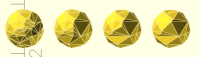
yes, these

On 30/01/2026 00:27, Michael Marx (spintel) via Discuss wrote:

the third row was with simplify

The 3rd from the bottom-up?


*From:*Raymond West via Discuss [mailto:discuss@lists.openscad.org]
Sent: Friday, January 30, 2026 4:04 AM
To: OpenSCAD general discussion
Cc: Raymond West
Subject: [OpenSCAD] Re: OFF TOPIC - simplify v point reductionm

Hi,

The query wrt manifold and slivers reminded me of some playing around
I did a few months ago, which may or may not be of interest. Manifold
'simplify' states that it tries to reduce the number of vertices,
without destroying the overall shape. I also had had AI to produce the
code for a function  to reduce points, so I thought I would compare
the results. I found that simplify was a bit coarse or unpredictable
in generating the final shape. I think maybe finer steps may help, but
is does not seem to preserve the original shape too well.  I cannot
recall using it to remove slivers, I think it would merely make them
thinner, so I have a function to specifically remove slivers.

A sphere is generated by triangles, or segments, as is everything in
manifold. Point reduction, if all points are equally spaced, will
either remove all of them or none. I distorted (scaled) the sphere to
give unequal vertex spacing.

For the tests illustrated below, I started with a sphere of 50
segments, and gradually reduced the points. The bottom two rows were
with my point reduction method, the third row was with simplify, the
top row was by reducing the number of segments in the sphere.

I've included my cad code (which is neither openscad nor python, but
it should be readable, showing  the values used), attached the
openscad result, so you can 'spin it around', and the terminal op,
which gives the number of vertices and tris for each shape.

Best wishes,

Ray

/*// Create the original sphere with 50 segments

reduce points args -

    params[0] tol

    params[1] return_broken (0/1)

    params[2] mode: 0=snap-to-root, 1=nearest-root, 2=centroid

     params[3] min_area (optional, default 0)

For “remove sphere on cube corner,” use tol ≈ sphere_radius +
small_epsilon (e.g., 5.05) so you don’t touch other cube corners.

If you see dents, try mode=2 (centroid) and a tiny min_area like 1e-6:

reduce_points(d, 5.05, 0, 2, 1e-6)

For threads, start with mode=1 (nearest-root) and small tol to
preserve crests/flanks.

*/

//verbose_set_global(true)

s0=sphere(d=0.9, segments=50)

s0=scale(s0,[0.8,0.8,1])

// Reduce points in steps

s1=reduce_points(s0, 0.05,1,2)

s2=reduce_points(s1, 0.055,1,2)

s3=reduce_points(s2, 0.06,1,2)

s4=reduce_points(s3, 0.065,1,2)

s5=reduce_points(s4, 0.07,1,2)

s6=reduce_points(s5, 0.075,1,2)

s7=reduce_points(s6, 0.08,1,2)

// Arrange spheres for visualization

s0=translate(s0, [0, 0, 0])

s1=translate(s1, [1, 0, 0])

s2=translate(s2, [2, 0, 0])

s3=translate(s3, [3, 0, 0])

s4=translate(s4, [0, 1, 0])

s5=translate(s5, [1, 1, 0])

s6=translate(s6, [2, 1, 0])

s7=translate(s7, [3, 1, 0])

// use manifold simplify to reduce points

p1=simplify(s0,.05)

p2=simplify(p1,.055)

p3=simplify(p2,.06)

p4=simplify(p3,.065)

p1=translate(p1, [0, 2.5, 0])

p2=translate(p2, [1, 2.5, 0])

p3=translate(p3, [2, 2.5, 0])

p4=translate(p4, [3, 2.5, 0])

// reduce segments

c1=sphere(d=.9,segments=14)

c2=sphere(d=.9,segments=9)

c3=sphere(d=.9,segments=5)

c4=sphere(d=.9,segments=3)

c1=translate(c1, [0, 4, 0])

c2=translate(c2, [1, 4, 0])

c3=translate(c3, [2, 4, 0])

c4=translate(c4, [3, 4, 0])

show_scad([s0,s1,s2,s3,s4,s5,s6,s7,p1,p2,p3,p4,c1,c2,c3,c4])

[show_scad] Shape 0: mesh verts=678 tris=1352 | raw_mesh verts=0 tris=0
[show_scad] Shape 1: mesh verts=619 tris=1234 | raw_mesh verts=0 tris=0
[show_scad] Shape 2: mesh verts=499 tris=994 | raw_mesh verts=0 tris=0
[show_scad] Shape 3: mesh verts=409 tris=814 | raw_mesh verts=0 tris=0
[show_scad] Shape 4: mesh verts=306 tris=608 | raw_mesh verts=0 tris=0
[show_scad] Shape 5: mesh verts=237 tris=470 | raw_mesh verts=0 tris=0
[show_scad] Shape 6: mesh verts=195 tris=386 | raw_mesh verts=0 tris=0
[show_scad] Shape 7: mesh verts=181 tris=358 | raw_mesh verts=0 tris=0
[show_scad] Shape 8: mesh verts=95 tris=186 | raw_mesh verts=0 tris=0
[show_scad] Shape 9: mesh verts=53 tris=102 | raw_mesh verts=0 tris=0
[show_scad] Shape 10: mesh verts=36 tris=68 | raw_mesh verts=0 tris=0
[show_scad] Shape 11: mesh verts=31 tris=58 | raw_mesh verts=0 tris=0
[show_scad] Shape 12: mesh verts=66 tris=128 | raw_mesh verts=0 tris=0
[show_scad] Shape 13: mesh verts=38 tris=72 | raw_mesh verts=0 tris=0
[show_scad] Shape 14: mesh verts=18 tris=32 | raw_mesh verts=0 tris=0
[show_scad] Shape 15: mesh verts=6 tris=8 | raw_mesh verts=0 tris=0


OpenSCAD mailing list
To unsubscribe send an email todiscuss-leave@lists.openscad.org
yes, these On 30/01/2026 00:27, Michael Marx (spintel) via Discuss wrote: > > > the third row was with simplify > > The 3rd from the bottom-up? > > ------------------------------------------------------------------------ > > *From:*Raymond West via Discuss [mailto:discuss@lists.openscad.org] > *Sent:* Friday, January 30, 2026 4:04 AM > *To:* OpenSCAD general discussion > *Cc:* Raymond West > *Subject:* [OpenSCAD] Re: OFF TOPIC - simplify v point reductionm > > Hi, > > The query wrt manifold and slivers reminded me of some playing around > I did a few months ago, which may or may not be of interest. Manifold > 'simplify' states that it tries to reduce the number of vertices, > without destroying the overall shape. I also had had AI to produce the > code for a function  to reduce points, so I thought I would compare > the results. I found that simplify was a bit coarse or unpredictable > in generating the final shape. I think maybe finer steps may help, but > is does not seem to preserve the original shape too well.  I cannot > recall using it to remove slivers, I think it would merely make them > thinner, so I have a function to specifically remove slivers. > > A sphere is generated by triangles, or segments, as is everything in > manifold. Point reduction, if all points are equally spaced, will > either remove all of them or none. I distorted (scaled) the sphere to > give unequal vertex spacing. > > For the tests illustrated below, I started with a sphere of 50 > segments, and gradually reduced the points. The bottom two rows were > with my point reduction method, the third row was with simplify, the > top row was by reducing the number of segments in the sphere. > > I've included my cad code (which is neither openscad nor python, but > it should be readable, showing  the values used), attached the > openscad result, so you can 'spin it around', and the terminal op, > which gives the number of vertices and tris for each shape. > > Best wishes, > > Ray > > /*// Create the original sphere with 50 segments > > reduce points args - > >     params[0] tol > >     params[1] return_broken (0/1) > >     params[2] mode: 0=snap-to-root, 1=nearest-root, 2=centroid > >      params[3] min_area (optional, default 0) > > For “remove sphere on cube corner,” use tol ≈ sphere_radius + > small_epsilon (e.g., 5.05) so you don’t touch other cube corners. > > If you see dents, try mode=2 (centroid) and a tiny min_area like 1e-6: > > reduce_points(d, 5.05, 0, 2, 1e-6) > > For threads, start with mode=1 (nearest-root) and small tol to > preserve crests/flanks. > > */ > > //verbose_set_global(true) > > s0=sphere(d=0.9, segments=50) > > s0=scale(s0,[0.8,0.8,1]) > > // Reduce points in steps > > s1=reduce_points(s0, 0.05,1,2) > > s2=reduce_points(s1, 0.055,1,2) > > s3=reduce_points(s2, 0.06,1,2) > > s4=reduce_points(s3, 0.065,1,2) > > s5=reduce_points(s4, 0.07,1,2) > > s6=reduce_points(s5, 0.075,1,2) > > s7=reduce_points(s6, 0.08,1,2) > > // Arrange spheres for visualization > > s0=translate(s0, [0, 0, 0]) > > s1=translate(s1, [1, 0, 0]) > > s2=translate(s2, [2, 0, 0]) > > s3=translate(s3, [3, 0, 0]) > > s4=translate(s4, [0, 1, 0]) > > s5=translate(s5, [1, 1, 0]) > > s6=translate(s6, [2, 1, 0]) > > s7=translate(s7, [3, 1, 0]) > > // use manifold simplify to reduce points > > p1=simplify(s0,.05) > > p2=simplify(p1,.055) > > p3=simplify(p2,.06) > > p4=simplify(p3,.065) > > p1=translate(p1, [0, 2.5, 0]) > > p2=translate(p2, [1, 2.5, 0]) > > p3=translate(p3, [2, 2.5, 0]) > > p4=translate(p4, [3, 2.5, 0]) > > // reduce segments > > c1=sphere(d=.9,segments=14) > > c2=sphere(d=.9,segments=9) > > c3=sphere(d=.9,segments=5) > > c4=sphere(d=.9,segments=3) > > c1=translate(c1, [0, 4, 0]) > > c2=translate(c2, [1, 4, 0]) > > c3=translate(c3, [2, 4, 0]) > > c4=translate(c4, [3, 4, 0]) > > show_scad([s0,s1,s2,s3,s4,s5,s6,s7,p1,p2,p3,p4,c1,c2,c3,c4]) > > [show_scad] Shape 0: mesh verts=678 tris=1352 | raw_mesh verts=0 tris=0 > [show_scad] Shape 1: mesh verts=619 tris=1234 | raw_mesh verts=0 tris=0 > [show_scad] Shape 2: mesh verts=499 tris=994 | raw_mesh verts=0 tris=0 > [show_scad] Shape 3: mesh verts=409 tris=814 | raw_mesh verts=0 tris=0 > [show_scad] Shape 4: mesh verts=306 tris=608 | raw_mesh verts=0 tris=0 > [show_scad] Shape 5: mesh verts=237 tris=470 | raw_mesh verts=0 tris=0 > [show_scad] Shape 6: mesh verts=195 tris=386 | raw_mesh verts=0 tris=0 > [show_scad] Shape 7: mesh verts=181 tris=358 | raw_mesh verts=0 tris=0 > [show_scad] Shape 8: mesh verts=95 tris=186 | raw_mesh verts=0 tris=0 > [show_scad] Shape 9: mesh verts=53 tris=102 | raw_mesh verts=0 tris=0 > [show_scad] Shape 10: mesh verts=36 tris=68 | raw_mesh verts=0 tris=0 > [show_scad] Shape 11: mesh verts=31 tris=58 | raw_mesh verts=0 tris=0 > [show_scad] Shape 12: mesh verts=66 tris=128 | raw_mesh verts=0 tris=0 > [show_scad] Shape 13: mesh verts=38 tris=72 | raw_mesh verts=0 tris=0 > [show_scad] Shape 14: mesh verts=18 tris=32 | raw_mesh verts=0 tris=0 > [show_scad] Shape 15: mesh verts=6 tris=8 | raw_mesh verts=0 tris=0 > > > _______________________________________________ > OpenSCAD mailing list > To unsubscribe send an email todiscuss-leave@lists.openscad.org