

discuss@lists.openscad.org

OpenSCAD general discussion Mailing-list

View all threads

Bounding box question.

L
larry
Tue, Jul 21, 2026 5:13 AM

I want to create something like the attached image, which is for
intersection with a garden stake. It's easy enough to do by trial and
error, but I want to automate it, and thought I could use a bounding
box to accommodate several different word lengths.

I want the cube to be 1mm more than the text in the y direction, and
say, 10mm more in the X direction.

I get very funky results if I comment out the cuboid() in the txt
module and call it with

bounding_box() txt();

Am I missing something?

Larry
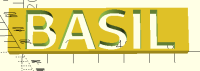
I want to create something like the attached image, which is for intersection with a garden stake. It's easy enough to do by trial and error, but I want to automate it, and thought I could use a bounding box to accommodate several different word lengths. I want the cube to be 1mm more than the text in the y direction, and say, 10mm more in the X direction. I get very funky results if I comment out the cuboid() in the txt module and call it with bounding_box() txt(); Am I missing something? Larry
L
larry
Tue, Jul 21, 2026 5:37 AM

On Mon, 2026-07-20 at 23:13 -0600, larry via Discuss wrote:

I want to create something like the attached image, which is for
intersection with a garden stake. It's easy enough to do by trial and
error, but I want to automate it, and thought I could use a bounding
box to accommodate several different word lengths.

I want the cube to be 1mm more than the text in the y direction, and
say, 10mm more in the X direction.

I get very funky results if I comment out the cuboid() in the txt
module and call it with

bounding_box() txt();

Am I missing something?

Yes, dumbass. You are missing the file you tried.

Here it is:

include <BOSL2/std.scad>

txt();

module txt() {
difference() {
right(30) back(7.75) up(3) cuboid([70,17,6]);
#down(1) linear_extrude(8) text("BASIL", size=16,
font="cantarell:style=bold");
}
}

Larry


OpenSCAD mailing list
To unsubscribe send an email to discuss-leave@lists.openscad.org

On Mon, 2026-07-20 at 23:13 -0600, larry via Discuss wrote: > I want to create something like the attached image, which is for > intersection with a garden stake. It's easy enough to do by trial and > error, but I want to automate it, and thought I could use a bounding > box to accommodate several different word lengths. > > I want the cube to be 1mm more than the text in the y direction, and > say, 10mm more in the X direction. > > I get very funky results if I comment out the cuboid() in the txt > module and call it with > > bounding_box() txt(); > > Am I missing something? Yes, dumbass. You are missing the file you tried. Here it is: include <BOSL2/std.scad> txt(); module txt() { difference() { right(30) back(7.75) up(3) cuboid([70,17,6]); #down(1) linear_extrude(8) text("BASIL", size=16, font="cantarell:style=bold"); } } > Larry > _______________________________________________ > OpenSCAD mailing list > To unsubscribe send an email to discuss-leave@lists.openscad.org
JB
Jordan Brown
Tue, Jul 21, 2026 12:45 PM

I would use the textmetrics() function to retrieve the dimensions of the
text.

See my name tag program, December 16 in the 2025 Advent Calendar:
https://files.openscad.org/advent-calendar-2025/Nametag/Nametag.scad

That's fancier than you seem to need, in that it handles multi-line
text, but it should get you on the right page.

Here's a really simple example.

tm = textmetrics("BASIL");
color("black") linear_extrude(2) text("BASIL");
translate(tm.position) cube([tm.size.x, tm.size.y, 1]);

Note that textmetrics() is experimental, so you have to enable it.  It's
been in the development snapshot for several years now.

I would use the textmetrics() function to retrieve the dimensions of the text. See my name tag program, December 16 in the 2025 Advent Calendar: https://files.openscad.org/advent-calendar-2025/Nametag/Nametag.scad That's fancier than you seem to need, in that it handles multi-line text, but it should get you on the right page. Here's a really simple example. tm = textmetrics("BASIL"); color("black") linear_extrude(2) text("BASIL"); translate(tm.position) cube([tm.size.x, tm.size.y, 1]); Note that textmetrics() is experimental, so you have to enable it.  It's been in the development snapshot for several years now.
L
larry
Tue, Jul 21, 2026 4:05 PM

On Tue, 2026-07-21 at 05:45 -0700, Jordan Brown wrote:

I would use the textmetrics() function to retrieve the dimensions of
the text.
See my name tag program, December 16 in the 2025 Advent Calendar: 
https://files.openscad.org/advent-calendar-2025/Nametag/Nametag.scad
That's fancier than you seem to need, in that it handles multi-line
text, but it should get you on the right page.
Here's a really simple example.

Thanks Jordan! Just what I wanted to do. I ended up with this:

module txt() {
difference() {
tm = textmetrics("LAVENDER",size=16,font="cantarell:style=bold");
linear_extrude(5) rect([tm.size.x +10, tm.size.y + 2]);

left(tm.size.x/2) fwd(tm.size.y/2) down(2) linear_extrude(8)

text("LAVENDER", size=16, font="cantarell:style=bold");
}
}

Tested with "BASIL", then confirmed with "LAVENDER", giving me the
attached...

tm = textmetrics("BASIL");
color("black") linear_extrude(2) text("BASIL");
translate(tm.position) cube([tm.size.x, tm.size.y, 1]);

Note that textmetrics() is experimental, so you have to enable it. 
It's been in the development snapshot for several years now.

Larry
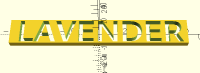
On Tue, 2026-07-21 at 05:45 -0700, Jordan Brown wrote: > I would use the textmetrics() function to retrieve the dimensions of > the text. > See my name tag program, December 16 in the 2025 Advent Calendar:  > https://files.openscad.org/advent-calendar-2025/Nametag/Nametag.scad > That's fancier than you seem to need, in that it handles multi-line > text, but it should get you on the right page. > Here's a really simple example. Thanks Jordan! Just what I wanted to do. I ended up with this: module txt() { difference() { tm = textmetrics("LAVENDER",size=16,font="cantarell:style=bold"); linear_extrude(5) rect([tm.size.x +10, tm.size.y + 2]); # left(tm.size.x/2) fwd(tm.size.y/2) down(2) linear_extrude(8) text("LAVENDER", size=16, font="cantarell:style=bold"); } } Tested with "BASIL", then confirmed with "LAVENDER", giving me the attached... > > tm = textmetrics("BASIL"); > > color("black") linear_extrude(2) text("BASIL"); > > translate(tm.position) cube([tm.size.x, tm.size.y, 1]); > Note that textmetrics() is experimental, so you have to enable it.  > It's been in the development snapshot for several years now. Larry
MM
Michael Marx (spintel)
Tue, Jul 21, 2026 10:56 PM

You do realise you have a problem with letters containing disconnected parts,
like the middle of 'O' falling out, and ABPQR46890%&@# abdopq presumably others.

I have previously put lines through the middle to connect the bits,
like they do with stencils (the type you spray paint through).

Or use a (proper) stencil font with a big enough gap:

-----Original Message-----

From: larry via Discuss [mailto:discuss@lists.openscad.org]

Sent: Wednesday, July 22, 2026 2:06 AM

To: Jordan Brown; OpenSCAD generaldiscussion Mailing-list

Cc: larry

Subject: [OpenSCAD] Re: Bounding box question.

On Tue, 2026-07-21 at 05:45 -0700, Jordan Brown wrote:

I would use the textmetrics() function to retrieve the dimensions of

the text.

See my name tag program, December 16 in the 2025 Advent Calendar:

That's fancier than you seem to need, in that it handles multi-line

text, but it should get you on the right page.

Here's a really simple example.

Thanks Jordan! Just what I wanted to do. I ended up with this:

module txt() {

difference() {

tm = textmetrics("LAVENDER",size=16,font="cantarell:style=bold");

linear_extrude(5) rect([tm.size.x +10, tm.size.y + 2]);

left(tm.size.x/2) fwd(tm.size.y/2) down(2) linear_extrude(8)

text("LAVENDER", size=16, font="cantarell:style=bold");

}

}

Tested with "BASIL", then confirmed with "LAVENDER", giving me the

attached...

tm = textmetrics("BASIL");

color("black") linear_extrude(2) text("BASIL");

translate(tm.position) cube([tm.size.x, tm.size.y, 1]);

Note that textmetrics() is experimental, so you have to enable it.

It's been in the development snapshot for several years now.

Larry

You do realise you have a problem with letters containing disconnected parts, like the middle of 'O' falling out, and ABPQR46890%&@# abdopq presumably others. I have previously put lines through the middle to connect the bits, like they do with stencils (the type you spray paint through). Or use a (proper) stencil font with a big enough gap: > -----Original Message----- > From: larry via Discuss [mailto:discuss@lists.openscad.org] > Sent: Wednesday, July 22, 2026 2:06 AM > To: Jordan Brown; OpenSCAD generaldiscussion Mailing-list > Cc: larry > Subject: [OpenSCAD] Re: Bounding box question. > > On Tue, 2026-07-21 at 05:45 -0700, Jordan Brown wrote: > > I would use the textmetrics() function to retrieve the dimensions of > > the text. > > See my name tag program, December 16 in the 2025 Advent Calendar: > > https://files.openscad.org/advent-calendar-2025/Nametag/Nametag.scad > > That's fancier than you seem to need, in that it handles multi-line > > text, but it should get you on the right page. > > Here's a really simple example. > > Thanks Jordan! Just what I wanted to do. I ended up with this: > > > module txt() { > difference() { > tm = textmetrics("LAVENDER",size=16,font="cantarell:style=bold"); > linear_extrude(5) rect([tm.size.x +10, tm.size.y + 2]); > # left(tm.size.x/2) fwd(tm.size.y/2) down(2) linear_extrude(8) > text("LAVENDER", size=16, font="cantarell:style=bold"); > } > } > > Tested with "BASIL", then confirmed with "LAVENDER", giving me the > attached... > > > > > tm = textmetrics("BASIL"); > > > color("black") linear_extrude(2) text("BASIL"); > > > translate(tm.position) cube([tm.size.x, tm.size.y, 1]); > > Note that textmetrics() is experimental, so you have to enable it. > > It's been in the development snapshot for several years now. > > Larry
L
larry
Wed, Jul 22, 2026 4:54 AM

On Wed, 2026-07-22 at 08:56 +1000, Michael Marx (spintel) via Discuss
wrote:

You do realise you have a problem with letters containing
disconnected parts, like the middle of 'O' falling out, and
ABPQR46890%&@# abdopq presumably others.
 
I have previously put lines through the middle to connect the bits,
like they do with stencils (the type you spray paint through).
Or use a (proper) stencil font with a big enough gap:

I did something a little different. It wasn't my idea, but someone
uploaded a .3mf to makerworld, and I thought I'd do it in OpenSCAD in
order to add 3 more herbs, and to make some with veggies instead of
herbs.

Thanks to Jordan, I was finally able to get it working with
textmetrics().

Here's the code, and attached is the stl for the base.

include <BOSL2/std.scad>
$fs = 0.5;
$fa = 3;

herb=["DILL", "MINT", "BASIL", "THYME", "TARRAGON", "OREGANO",
"CHIVES","LAVENDER", "ROSEMARY", "SAGE"];

for (i = [0:9]) {
back(25*i) {
tm = textmetrics(herb[i],size=16,font="cantarell:style=bold");

difference() {
base();

right(tm.size.x/2+7) back(tm.size.y/2+3.95) linear_extrude(5)

rect([tm.size.x +8, tm.size.y -1]);
}
txt(i);
}
}

module base() {
import("/media/larry/Modata/make/3d/OpenSCAD/household/garden/herb_stak

es/BLANK STAKE.stl");
}

module txt(i) {
right(5) back(3.95) up(0) linear_extrude(4)
text(herb[i], size=16, font="cantarell:style=bold");
}

-----Original Message-----
From: larry via Discuss [mailto:discuss@lists.openscad.org]
Sent: Wednesday, July 22, 2026 2:06 AM
To: Jordan Brown; OpenSCAD generaldiscussion Mailing-list
Cc: larry
Subject: [OpenSCAD] Re: Bounding box question.

On Tue, 2026-07-21 at 05:45 -0700, Jordan Brown wrote:

I would use the textmetrics() function to retrieve the dimensions
of
the text.
See my name tag program, December 16 in the 2025 Advent Calendar:
https://files.openscad.org/advent-calendar-2025/Nametag/Nametag.scad
That's fancier than you seem to need, in that it handles multi-
line
text, but it should get you on the right page.
Here's a really simple example.

Thanks Jordan! Just what I wanted to do. I ended up with this:

module txt() {
  difference() {
  tm = textmetrics("LAVENDER",size=16,font="cantarell:style=bold");
  linear_extrude(5) rect([tm.size.x +10, tm.size.y + 2]);
#  left(tm.size.x/2) fwd(tm.size.y/2) down(2) linear_extrude(8)
text("LAVENDER", size=16, font="cantarell:style=bold");
  }
}

Tested with "BASIL", then confirmed with "LAVENDER", giving me the
attached...

tm = textmetrics("BASIL");
color("black") linear_extrude(2) text("BASIL");
translate(tm.position) cube([tm.size.x, tm.size.y, 1]);

Note that textmetrics() is experimental, so you have to enable
it.
It's been in the development snapshot for several years now.

Larry



OpenSCAD mailing list
To unsubscribe send an email to discuss-leave@lists.openscad.org

On Wed, 2026-07-22 at 08:56 +1000, Michael Marx (spintel) via Discuss wrote: > You do realise you have a problem with letters containing > disconnected parts, like the middle of 'O' falling out, and > ABPQR46890%&@# abdopq presumably others. >   > I have previously put lines through the middle to connect the bits, > like they do with stencils (the type you spray paint through). > Or use a (proper) stencil font with a big enough gap: I did something a little different. It wasn't my idea, but someone uploaded a .3mf to makerworld, and I thought I'd do it in OpenSCAD in order to add 3 more herbs, and to make some with veggies instead of herbs. Thanks to Jordan, I was finally able to get it working with textmetrics(). Here's the code, and attached is the stl for the base. include <BOSL2/std.scad> $fs = 0.5; $fa = 3; herb=["DILL", "MINT", "BASIL", "THYME", "TARRAGON", "OREGANO", "CHIVES","LAVENDER", "ROSEMARY", "SAGE"]; for (i = [0:9]) { back(25*i) { tm = textmetrics(herb[i],size=16,font="cantarell:style=bold"); difference() { base(); # right(tm.size.x/2+7) back(tm.size.y/2+3.95) linear_extrude(5) rect([tm.size.x +8, tm.size.y -1]); } txt(i); } } module base() { import("/media/larry/Modata/make/3d/OpenSCAD/household/garden/herb_stak es/BLANK STAKE.stl"); } module txt(i) { right(5) back(3.95) up(0) linear_extrude(4) text(herb[i], size=16, font="cantarell:style=bold"); } > > -----Original Message----- > > From: larry via Discuss [mailto:discuss@lists.openscad.org] > > Sent: Wednesday, July 22, 2026 2:06 AM > > To: Jordan Brown; OpenSCAD generaldiscussion Mailing-list > > Cc: larry > > Subject: [OpenSCAD] Re: Bounding box question. > > > > On Tue, 2026-07-21 at 05:45 -0700, Jordan Brown wrote: > > > I would use the textmetrics() function to retrieve the dimensions > > > of > > > the text. > > > See my name tag program, December 16 in the 2025 Advent Calendar: > > > https://files.openscad.org/advent-calendar-2025/Nametag/Nametag.scad > > > That's fancier than you seem to need, in that it handles multi- > > > line > > > text, but it should get you on the right page. > > > Here's a really simple example. > > > > Thanks Jordan! Just what I wanted to do. I ended up with this: > > > > > > module txt() { > >   difference() { > >   tm = textmetrics("LAVENDER",size=16,font="cantarell:style=bold"); > >   linear_extrude(5) rect([tm.size.x +10, tm.size.y + 2]); > > #  left(tm.size.x/2) fwd(tm.size.y/2) down(2) linear_extrude(8) > > text("LAVENDER", size=16, font="cantarell:style=bold"); > >   } > > } > > > > Tested with "BASIL", then confirmed with "LAVENDER", giving me the > > attached... > > > > > > > > tm = textmetrics("BASIL"); > > > > color("black") linear_extrude(2) text("BASIL"); > > > > translate(tm.position) cube([tm.size.x, tm.size.y, 1]); > > > Note that textmetrics() is experimental, so you have to enable > > > it. > > > It's been in the development snapshot for several years now. > > > > Larry >   > _______________________________________________ > OpenSCAD mailing list > To unsubscribe send an email to discuss-leave@lists.openscad.org
L
larry
Wed, Jul 22, 2026 7:55 PM

On Wed, 2026-07-22 at 08:56 +1000, Michael Marx (spintel) via Discuss
wrote:

You do realise you have a problem with letters containing
disconnected parts, like the middle of 'O' falling out, and
ABPQR46890%&@# abdopq presumably others.
 
I have previously put lines through the middle to connect the bits,
like they do with stencils (the type you spray paint through).
Or use a (proper) stencil font with a big enough gap:

I did something a little different. It wasn't my idea, but someone
uploaded a .3mf to makerworld, and I thought I'd do it in OpenSCAD in
order to add 3 more herbs, and to make some with veggies instead of
herbs.

Thanks to Jordan, I was finally able to get it working with
textmetrics().

Here's the code, and attached is the stl for the base.

include <BOSL2/std.scad>
$fs = 0.5;
$fa = 3;

herb=["DILL", "MINT", "BASIL", "THYME", "TARRAGON", "OREGANO",
"CHIVES","LAVENDER", "ROSEMARY", "SAGE"];

for (i = [0:9]) {
  back(25*i) {
  tm = textmetrics(herb[i],size=16,font="cantarell:style=bold");
 
difference() {
    base();
  # right(tm.size.x/2+7) back(tm.size.y/2+3.95) linear_extrude(5)
rect([tm.size.x +8, tm.size.y -1]);
  }
  txt(i);
  }
}

module base() {
import("/media/larry/Modata/make/3d/OpenSCAD/household/garden/herb_stak

es/BLANK STAKE.stl");
}

module txt(i) {
right(5) back(3.95) up(0) linear_extrude(4)
text(herb[i], size=16, font="cantarell:style=bold");
}

-----Original Message-----
From: larry via Discuss [mailto:discuss@lists.openscad.org]
Sent: Wednesday, July 22, 2026 2:06 AM
To: Jordan Brown; OpenSCAD generaldiscussion Mailing-list
Cc: larry
Subject: [OpenSCAD] Re: Bounding box question.

On Tue, 2026-07-21 at 05:45 -0700, Jordan Brown wrote:

I would use the textmetrics() function to retrieve the dimensions
of
the text.
See my name tag program, December 16 in the 2025 Advent Calendar:
https://files.openscad.org/advent-calendar-2025/Nametag/Nametag.scad
That's fancier than you seem to need, in that it handles multi-
line
text, but it should get you on the right page.
Here's a really simple example.

Thanks Jordan! Just what I wanted to do. I ended up with this:

module txt() {
  difference() {
  tm = textmetrics("LAVENDER",size=16,font="cantarell:style=bold");
  linear_extrude(5) rect([tm.size.x +10, tm.size.y + 2]);
#  left(tm.size.x/2) fwd(tm.size.y/2) down(2) linear_extrude(8)
text("LAVENDER", size=16, font="cantarell:style=bold");
  }
}

Tested with "BASIL", then confirmed with "LAVENDER", giving me the
attached...

tm = textmetrics("BASIL");
color("black") linear_extrude(2) text("BASIL");
translate(tm.position) cube([tm.size.x, tm.size.y, 1]);

Note that textmetrics() is experimental, so you have to enable
it.
It's been in the development snapshot for several years now.

Larry


OpenSCAD mailing list
To unsubscribe send an email to discuss-leave@lists.openscad.org

On Wed, 2026-07-22 at 08:56 +1000, Michael Marx (spintel) via Discuss wrote: > You do realise you have a problem with letters containing > disconnected parts, like the middle of 'O' falling out, and > ABPQR46890%&@# abdopq presumably others. >   > I have previously put lines through the middle to connect the bits, > like they do with stencils (the type you spray paint through). > Or use a (proper) stencil font with a big enough gap: I did something a little different. It wasn't my idea, but someone uploaded a .3mf to makerworld, and I thought I'd do it in OpenSCAD in order to add 3 more herbs, and to make some with veggies instead of herbs. Thanks to Jordan, I was finally able to get it working with textmetrics(). Here's the code, and attached is the stl for the base. include <BOSL2/std.scad> $fs = 0.5; $fa = 3; herb=["DILL", "MINT", "BASIL", "THYME", "TARRAGON", "OREGANO", "CHIVES","LAVENDER", "ROSEMARY", "SAGE"]; for (i = [0:9]) {   back(25*i) {   tm = textmetrics(herb[i],size=16,font="cantarell:style=bold");   difference() {     base();   # right(tm.size.x/2+7) back(tm.size.y/2+3.95) linear_extrude(5) rect([tm.size.x +8, tm.size.y -1]);   }   txt(i);   } } module base() { import("/media/larry/Modata/make/3d/OpenSCAD/household/garden/herb_stak es/BLANK STAKE.stl"); } module txt(i) { right(5) back(3.95) up(0) linear_extrude(4) text(herb[i], size=16, font="cantarell:style=bold"); } > > -----Original Message----- > > From: larry via Discuss [mailto:discuss@lists.openscad.org] > > Sent: Wednesday, July 22, 2026 2:06 AM > > To: Jordan Brown; OpenSCAD generaldiscussion Mailing-list > > Cc: larry > > Subject: [OpenSCAD] Re: Bounding box question. > > > > On Tue, 2026-07-21 at 05:45 -0700, Jordan Brown wrote: > > > I would use the textmetrics() function to retrieve the dimensions > > > of > > > the text. > > > See my name tag program, December 16 in the 2025 Advent Calendar: > > > https://files.openscad.org/advent-calendar-2025/Nametag/Nametag.scad > > > That's fancier than you seem to need, in that it handles multi- > > > line > > > text, but it should get you on the right page. > > > Here's a really simple example. > > > > Thanks Jordan! Just what I wanted to do. I ended up with this: > > > > > > module txt() { > >   difference() { > >   tm = textmetrics("LAVENDER",size=16,font="cantarell:style=bold"); > >   linear_extrude(5) rect([tm.size.x +10, tm.size.y + 2]); > > #  left(tm.size.x/2) fwd(tm.size.y/2) down(2) linear_extrude(8) > > text("LAVENDER", size=16, font="cantarell:style=bold"); > >   } > > } > > > > Tested with "BASIL", then confirmed with "LAVENDER", giving me the > > attached... > > > > > > > > tm = textmetrics("BASIL"); > > > > color("black") linear_extrude(2) text("BASIL"); > > > > translate(tm.position) cube([tm.size.x, tm.size.y, 1]); > > > Note that textmetrics() is experimental, so you have to enable > > > it. > > > It's been in the development snapshot for several years now. > > > > Larry >   > _______________________________________________ > OpenSCAD mailing list > To unsubscribe send an email to discuss-leave@lists.openscad.org
JB
Jordan Brown
Wed, Jul 22, 2026 11:08 PM

I started out working on a private code review, cleaning this up with a
few tips.  Well, my OCD got out of hand, and I ended up doing the best I
could to not just tune it up but also take maximum advantage of BOSL2
features to minimize DIY calculations. I also replaced the imported STL
with a rounded_prism() call.  The result is in a sense crisper, but does
require an understanding of several BOSL2 concepts.

In the course of that, I ran into some interesting issues with trying to
do precise positioning of text - which turns out to be a lot trickier
than it appears, and the particular layout here turns out to not really
be possible in the general case.  However, if you avoid needing any Qs,
it's at least possible.  See the big comment block for information.

include <BOSL2/std.scad>
$fs = 1;
$fa = 1;

fontName = "cantarell:style=bold";
fontSize = 16;
baseZ = 4;
// baseY is derived from fontSize and marginY.
baseX = 218;
pointX = 63;

cutoutMarginX = 4;
cutoutMarginY = -0.5;
marginX = 3;
marginY = 4;

rounding = 2;

// Doing anything that involves precise positioning and sizing of
// text is fraught with peril, because the picture is not nearly
// as simple as it first appears.
//
// The largest issue is that "font size" does not directly relate
// to any particular dimension of the glyphs in the font, and that
// OpenSCAD's "size" is (because of a bug) not the same as the
// font designer's notion of size. But that's mostly easy to work
// around; OpenSCAD "size" is generally pretty close to the height
// of a capital letter, and you can use textmetrics() to get the
// actual dimensions of the glyphs.
//
// But textmetrics() does not solve all of the problems, because
// capital letters come in different heights.  Generally, the
// letters with round tops and bottoms (e.g. O, S) protrude a
// little bit outside the bounds of other letters, because they
// look more "right" that way.  If you measure the height of
// "BOX", and then try to put it in a box of that height, you
// will find that there's a little bit of space above and below
// the B and the X.  If you have a Q in your string, all bets are
// off because the Q often has a tail that protrudes well below
// the baseline.
//
// Here, we are trying to put the letters into a cutout that is
// slightly smaller than they are, so that they overlap the borders
// a little bit and so are solidly connected to the borders.
//
// As in tbe BOX example above, doing this in the obvious way using
// size.y will leave B and X with less connection than we want.
// A Q may totally mess things up.
//
// There really is no true answer to this problem.  If you have a
// string "QUICK", either the tail of the Q is embedded into the
// border, or the UICK is floating well above the bottom border.
//
// Our list of herbs thankfully does not involve any Qs.
//
// We work around the problem with round tops and bottoms by
// measuring the height of an X, a letter that usually has a nice
// simple top and bottom that align with other letters, and using
// that as the basis for the size of the cutout.  That makes most
// letters have our desired overlap with the borders, makes
// round-top and round-bottom letters overlap more, and Q...
// just don't use Q.

capHeight = textmetrics("X", font=fontName, size=fontSize).size.y;
baseY = capHeight + marginY*2;

herb=["DILL", "MINT", "BASIL", "THYME", "TARRAGON", "OREGANO",
"CHIVES","LAVENDER", "ROSEMARY", "SAGE"];

for (i = [0:len(herb)-1]) back((baseY+1)*i) {
stake(herb[i]);
}

module stake(name) {
tm = textmetrics(name,size=fontSize,font=fontName);

 diff() {
     base();
     right(marginX) {
         tag("remove") cuboid([
                 tm.size.x + cutoutMarginX*2,
                 capHeight + cutoutMarginY*2,
                 baseZ*3
             ],
             anchor=LEFT) {
             tag("keep") {
                 // Text is usually positioned slightly to
                 // the right of the origin, to make spacing
                 // correct when you draw one string after
                 // another.  We want to work with the actual
                 // dimensions of the "ink", so correct that
                 // out.  Do not correspondingly correct in Y,
                 // for the reasons in the big block above.
                 // In Y, we center based on our calculated
                 // nominal size, *not* based on the actual
                 // measured size.
                 left(tm.position.x) fwd(capHeight/2)
                     #text3d(name, h=baseZ, size=fontSize, font=fontName, anchor=CENTER);
             }
         }
     }
 }

}

module base() {
rounded_prism([
[ 0,-baseY/2 ],
[ 0, baseY/2 ],
[ baseX - pointX, baseY/2 ],
[ baseX, 0 ],
[ baseX - pointX, -baseY/2 ],
], h=baseZ, joint_top=rounding, joint_bot=rounding, joint_sides=rounding);
}

I started out working on a private code review, cleaning this up with a few tips.  Well, my OCD got out of hand, and I ended up doing the best I could to not just tune it up but also take maximum advantage of BOSL2 features to minimize DIY calculations. I also replaced the imported STL with a rounded_prism() call.  The result is in a sense crisper, but does require an understanding of several BOSL2 concepts. In the course of that, I ran into some interesting issues with trying to do precise positioning of text - which turns out to be a lot trickier than it appears, and the particular layout here turns out to not really be possible in the general case.  However, if you avoid needing any Qs, it's at least possible.  See the big comment block for information. include <BOSL2/std.scad> $fs = 1; $fa = 1; fontName = "cantarell:style=bold"; fontSize = 16; baseZ = 4; // baseY is derived from fontSize and marginY. baseX = 218; pointX = 63; cutoutMarginX = 4; cutoutMarginY = -0.5; marginX = 3; marginY = 4; rounding = 2; // Doing anything that involves precise positioning and sizing of // text is fraught with peril, because the picture is not nearly // as simple as it first appears. // // The largest issue is that "font size" does not directly relate // to any particular dimension of the glyphs in the font, and that // OpenSCAD's "size" is (because of a bug) not the same as the // font designer's notion of size. But that's mostly easy to work // around; OpenSCAD "size" is generally pretty close to the height // of a capital letter, and you can use textmetrics() to get the // actual dimensions of the glyphs. // // But textmetrics() does not solve all of the problems, because // capital letters come in different heights. Generally, the // letters with round tops and bottoms (e.g. O, S) protrude a // little bit outside the bounds of other letters, because they // look more "right" that way. If you measure the height of // "BOX", and then try to put it in a box of that height, you // will find that there's a little bit of space above and below // the B and the X. If you have a Q in your string, all bets are // off because the Q often has a tail that protrudes well below // the baseline. // // Here, we are trying to put the letters into a cutout that is // slightly smaller than they are, so that they overlap the borders // a little bit and so are solidly connected to the borders. // // As in tbe BOX example above, doing this in the obvious way using // size.y will leave B and X with less connection than we want. // A Q may totally mess things up. // // There really is no true answer to this problem. If you have a // string "QUICK", either the tail of the Q is embedded into the // border, or the UICK is floating well above the bottom border. // // Our list of herbs thankfully does not involve any Qs. // // We work around the problem with round tops and bottoms by // measuring the height of an X, a letter that usually has a nice // simple top and bottom that align with other letters, and using // that as the basis for the size of the cutout. That makes most // letters have our desired overlap with the borders, makes // round-top and round-bottom letters overlap more, and Q... // just don't use Q. capHeight = textmetrics("X", font=fontName, size=fontSize).size.y; baseY = capHeight + marginY*2; herb=["DILL", "MINT", "BASIL", "THYME", "TARRAGON", "OREGANO", "CHIVES","LAVENDER", "ROSEMARY", "SAGE"]; for (i = [0:len(herb)-1]) back((baseY+1)*i) { stake(herb[i]); } module stake(name) { tm = textmetrics(name,size=fontSize,font=fontName); diff() { base(); right(marginX) { tag("remove") cuboid([ tm.size.x + cutoutMarginX*2, capHeight + cutoutMarginY*2, baseZ*3 ], anchor=LEFT) { tag("keep") { // Text is usually positioned slightly to // the right of the origin, to make spacing // correct when you draw one string after // another. We want to work with the actual // dimensions of the "ink", so correct that // out. Do not correspondingly correct in Y, // for the reasons in the big block above. // In Y, we center based on our calculated // nominal size, *not* based on the actual // measured size. left(tm.position.x) fwd(capHeight/2) #text3d(name, h=baseZ, size=fontSize, font=fontName, anchor=CENTER); } } } } } module base() { rounded_prism([ [ 0,-baseY/2 ], [ 0, baseY/2 ], [ baseX - pointX, baseY/2 ], [ baseX, 0 ], [ baseX - pointX, -baseY/2 ], ], h=baseZ, joint_top=rounding, joint_bot=rounding, joint_sides=rounding); }
L
larry
Thu, Jul 23, 2026 4:51 AM

On Wed, 2026-07-22 at 16:08 -0700, Jordan Brown wrote:

I started out working on a private code review, cleaning this up with
a few tips.  Well, my OCD got out of hand, and I ended up doing the
best I could to not just tune it up but also take maximum advantage
of BOSL2 features to minimize DIY calculations.

Wow. I do appreciate the knowledge imparted, and will study it for
future reference.

I also replaced the imported STL with a rounded_prism() call.  The
result is in a sense crisper, but does require an understanding of
several BOSL2 concepts.

Interesting. I like rounded_prism, and will likely use it more in
future.

The STL I import was for reducing the size and speeding up the preview
and render. I figured I already made it, so it made sense to me to just
use it.

It was made using a hull() of 5 spheres, then using a hull() of it
twice, at two different heights. I then chopped a tad off the bottom to
make a sort of a teardrop. You can probably tell that I really like
hull because it's easy to understand.

In the course of that, I ran into some interesting issues with trying
to do precise positioning of text - which turns out to be a lot
trickier than it appears, and the particular layout here turns out to
not really be possible in the general case.  However, if you avoid
needing any Qs, it's at least possible.  See the big comment block
for information.

I had not thought about the Q. With this particular font, there's
enough of the bar left visible, but It's something to watch for in
other fonts.

Thanks again for the help and advice!

Larry

include <BOSL2/std.scad>
$fs = 1;
$fa = 1;

fontName = "cantarell:style=bold";
fontSize = 16;
baseZ = 4;
// baseY is derived from fontSize and marginY.
baseX = 218;
pointX = 63;

cutoutMarginX = 4;
cutoutMarginY = -0.5;
marginX = 3;
marginY = 4;

rounding = 2;

// Doing anything that involves precise positioning and sizing of
// text is fraught with peril, because the picture is not nearly
// as simple as it first appears.
//
// The largest issue is that "font size" does not directly relate
// to any particular dimension of the glyphs in the font, and that
// OpenSCAD's "size" is (because of a bug) not the same as the
// font designer's notion of size. But that's mostly easy to work
// around; OpenSCAD "size" is generally pretty close to the height
// of a capital letter, and you can use textmetrics() to get the
// actual dimensions of the glyphs.
//
// But textmetrics() does not solve all of the problems, because
// capital letters come in different heights.  Generally, the
// letters with round tops and bottoms (e.g. O, S) protrude a
// little bit outside the bounds of other letters, because they
// look more "right" that way.  If you measure the height of
// "BOX", and then try to put it in a box of that height, you
// will find that there's a little bit of space above and below
// the B and the X.  If you have a Q in your string, all bets are
// off because the Q often has a tail that protrudes well below
// the baseline.
//
// Here, we are trying to put the letters into a cutout that is
// slightly smaller than they are, so that they overlap the borders
// a little bit and so are solidly connected to the borders.
//
// As in tbe BOX example above, doing this in the obvious way using
// size.y will leave B and X with less connection than we want.
// A Q may totally mess things up.
//
// There really is no true answer to this problem.  If you have a
// string "QUICK", either the tail of the Q is embedded into the
// border, or the UICK is floating well above the bottom border.
//
// Our list of herbs thankfully does not involve any Qs.
//
// We work around the problem with round tops and bottoms by
// measuring the height of an X, a letter that usually has a nice
// simple top and bottom that align with other letters, and using
// that as the basis for the size of the cutout.  That makes most
// letters have our desired overlap with the borders, makes
// round-top and round-bottom letters overlap more, and Q...
// just don't use Q.

capHeight = textmetrics("X", font=fontName, size=fontSize).size.y;
baseY = capHeight + marginY*2;

herb=["DILL", "MINT", "BASIL", "THYME", "TARRAGON", "OREGANO",
    "CHIVES","LAVENDER", "ROSEMARY", "SAGE"];

for (i = [0:len(herb)-1]) back((baseY+1)*i) {
    stake(herb[i]);
}

module stake(name) {
    tm = textmetrics(name,size=fontSize,font=fontName);

    diff() {
        base();
        right(marginX) {
            tag("remove") cuboid([
                    tm.size.x + cutoutMarginX2,
                    capHeight + cutoutMarginY
2,
                    baseZ*3
                ],
                anchor=LEFT) {
                tag("keep") {
                    // Text is usually positioned slightly to
                    // the right of the origin, to make spacing
                    // correct when you draw one string after
                    // another.  We want to work with the actual
                    // dimensions of the "ink", so correct that
                    // out.  Do not correspondingly correct in Y,
                    // for the reasons in the big block above.
                    // In Y, we center based on our calculated
                    // nominal size, not based on the actual
                    // measured size.
                    left(tm.position.x) fwd(capHeight/2)
                        #text3d(name, h=baseZ, size=fontSize,
font=fontName, anchor=CENTER);
                }
            }
        }
    }
}

module base() {
    rounded_prism([
        [ 0,-baseY/2 ],
        [ 0, baseY/2 ],
        [ baseX - pointX, baseY/2 ],
        [ baseX, 0 ],
        [ baseX - pointX, -baseY/2 ],
    ], h=baseZ, joint_top=rounding, joint_bot=rounding,
joint_sides=rounding);
}

On Wed, 2026-07-22 at 16:08 -0700, Jordan Brown wrote: > I started out working on a private code review, cleaning this up with > a few tips.  Well, my OCD got out of hand, and I ended up doing the > best I could to not just tune it up but also take maximum advantage > of BOSL2 features to minimize DIY calculations. Wow. I do appreciate the knowledge imparted, and will study it for future reference. > I also replaced the imported STL with a rounded_prism() call.  The > result is in a sense crisper, but does require an understanding of > several BOSL2 concepts. Interesting. I like rounded_prism, and will likely use it more in future. The STL I import was for reducing the size and speeding up the preview and render. I figured I already made it, so it made sense to me to just use it. It was made using a hull() of 5 spheres, then using a hull() of it twice, at two different heights. I then chopped a tad off the bottom to make a sort of a teardrop. You can probably tell that I really like hull because it's easy to understand. > In the course of that, I ran into some interesting issues with trying > to do precise positioning of text - which turns out to be a lot > trickier than it appears, and the particular layout here turns out to > not really be possible in the general case.  However, if you avoid > needing any Qs, it's at least possible.  See the big comment block > for information. I had not thought about the Q. With this particular font, there's enough of the bar left visible, but It's something to watch for in other fonts. Thanks again for the help and advice! Larry > include <BOSL2/std.scad> > $fs = 1; > $fa = 1; > > fontName = "cantarell:style=bold"; > fontSize = 16; > baseZ = 4; > // baseY is derived from fontSize and marginY. > baseX = 218; > pointX = 63; > > cutoutMarginX = 4; > cutoutMarginY = -0.5; > marginX = 3; > marginY = 4; > > rounding = 2; > > // Doing anything that involves precise positioning and sizing of > // text is fraught with peril, because the picture is not nearly > // as simple as it first appears. > // > // The largest issue is that "font size" does not directly relate > // to any particular dimension of the glyphs in the font, and that > // OpenSCAD's "size" is (because of a bug) not the same as the > // font designer's notion of size. But that's mostly easy to work > // around; OpenSCAD "size" is generally pretty close to the height > // of a capital letter, and you can use textmetrics() to get the > // actual dimensions of the glyphs. > // > // But textmetrics() does not solve all of the problems, because > // capital letters come in different heights. Generally, the > // letters with round tops and bottoms (e.g. O, S) protrude a > // little bit outside the bounds of other letters, because they > // look more "right" that way. If you measure the height of > // "BOX", and then try to put it in a box of that height, you > // will find that there's a little bit of space above and below > // the B and the X. If you have a Q in your string, all bets are > // off because the Q often has a tail that protrudes well below > // the baseline. > // > // Here, we are trying to put the letters into a cutout that is > // slightly smaller than they are, so that they overlap the borders > // a little bit and so are solidly connected to the borders. > // > // As in tbe BOX example above, doing this in the obvious way using > // size.y will leave B and X with less connection than we want. > // A Q may totally mess things up. > // > // There really is no true answer to this problem. If you have a > // string "QUICK", either the tail of the Q is embedded into the > // border, or the UICK is floating well above the bottom border. > // > // Our list of herbs thankfully does not involve any Qs. > // > // We work around the problem with round tops and bottoms by > // measuring the height of an X, a letter that usually has a nice > // simple top and bottom that align with other letters, and using > // that as the basis for the size of the cutout. That makes most > // letters have our desired overlap with the borders, makes > // round-top and round-bottom letters overlap more, and Q... > // just don't use Q. > > capHeight = textmetrics("X", font=fontName, size=fontSize).size.y; > baseY = capHeight + marginY*2; > > herb=["DILL", "MINT", "BASIL", "THYME", "TARRAGON", "OREGANO", >     "CHIVES","LAVENDER", "ROSEMARY", "SAGE"]; > > for (i = [0:len(herb)-1]) back((baseY+1)*i) { >     stake(herb[i]); > } > > module stake(name) { >     tm = textmetrics(name,size=fontSize,font=fontName); > >     diff() { >         base(); >         right(marginX) { >             tag("remove") cuboid([ >                     tm.size.x + cutoutMarginX*2, >                     capHeight + cutoutMarginY*2, >                     baseZ*3 >                 ], >                 anchor=LEFT) { >                 tag("keep") { >                     // Text is usually positioned slightly to >                     // the right of the origin, to make spacing >                     // correct when you draw one string after >                     // another. We want to work with the actual >                     // dimensions of the "ink", so correct that >                     // out. Do not correspondingly correct in Y, >                     // for the reasons in the big block above. >                     // In Y, we center based on our calculated >                     // nominal size, *not* based on the actual >                     // measured size. >                     left(tm.position.x) fwd(capHeight/2) >                         #text3d(name, h=baseZ, size=fontSize, > font=fontName, anchor=CENTER); >                 } >             } >         } >     } > } > > module base() { >     rounded_prism([ >         [ 0,-baseY/2 ], >         [ 0, baseY/2 ], >         [ baseX - pointX, baseY/2 ], >         [ baseX, 0 ], >         [ baseX - pointX, -baseY/2 ], >     ], h=baseZ, joint_top=rounding, joint_bot=rounding, > joint_sides=rounding); > }