

discuss@lists.openscad.org

OpenSCAD general discussion Mailing-list

View all threads

Weird intersection results.

RW
Rogier Wolff
Sat, Jan 18, 2020 8:25 PM

Hi,

I have the following object:


// If you build/print this: credit should go to George Hart.
s=50;
t = s/2;
points = [[t,-t,t], [t,t,-t], [-t,t,t], [-t,-t,-t]];
intersection () {
polyhedron(points, [[0,2,1], [0,1,3], [1,2,3], [0,3,2]]);

translate ([0,0,-t]) 
  linear_extrude (height=s, slices = 160, twist = 450) 
  rotate (-45) translate ([0,25,0]) square ([100,50],center=true) ;

}

Two things. On my machine this renders as "mostly transparent". When you
drag the viewpoint, you see stuff appear where it is supposed to but most
is transparent and you can't see the object well.

Hitting "F6" renders the object.

However, now you can see that the object has all sorts of spikes along
the edges.

Any workarounds? I'm probably behind on the "latest and greatest", so
"you need to upgrade to make this better" is certainly possible.

Roger. 

--
** R.E.Wolff@BitWizard.nl ** https://www.BitWizard.nl/ ** +31-15-2049110 **
**    Delftechpark 11 2628 XJ  Delft, The Netherlands.  KVK: 27239233    **
The plan was simple, like my brother-in-law Phil. But unlike
Phil, this plan just might work.

Hi, I have the following object: ----------- // If you build/print this: credit should go to George Hart. s=50; t = s/2; points = [[t,-t,t], [t,t,-t], [-t,t,t], [-t,-t,-t]]; intersection () { polyhedron(points, [[0,2,1], [0,1,3], [1,2,3], [0,3,2]]); translate ([0,0,-t]) linear_extrude (height=s, slices = 160, twist = 450) rotate (-45) translate ([0,25,0]) square ([100,50],center=true) ; } ----------- Two things. On my machine this renders as "mostly transparent". When you drag the viewpoint, you see stuff appear where it is supposed to but most is transparent and you can't see the object well. Hitting "F6" renders the object. However, now you can see that the object has all sorts of spikes along the edges. Any workarounds? I'm probably behind on the "latest and greatest", so "you need to upgrade to make this better" is certainly possible. Roger. -- ** R.E.Wolff@BitWizard.nl ** https://www.BitWizard.nl/ ** +31-15-2049110 ** ** Delftechpark 11 2628 XJ Delft, The Netherlands. KVK: 27239233 ** The plan was simple, like my brother-in-law Phil. But unlike Phil, this plan just might work.
M
MichaelAtOz
Sat, Jan 18, 2020 10:55 PM

For 'transparent' add 'convexity=1' to linear_extrude.

Re spikes, that's what the geometry does, look at it with slices=10.


Admin - email* me if you need anything,  or if I've done something stupid...

  • click on my MichaelAtOz label, there is a link to email me.

Unless specifically shown otherwise above, my contribution is in the Public Domain; to the extent possible under law, I have waived all copyright and related or neighbouring rights to this work. Obviously inclusion of works of previous authors is not included in the above.

--
Sent from: http://forum.openscad.org/

For 'transparent' add 'convexity=1' to linear_extrude. Re spikes, that's what the geometry does, look at it with slices=10. ----- Admin - email* me if you need anything, or if I've done something stupid... * click on my MichaelAtOz label, there is a link to email me. Unless specifically shown otherwise above, my contribution is in the Public Domain; to the extent possible under law, I have waived all copyright and related or neighbouring rights to this work. Obviously inclusion of works of previous authors is not included in the above. -- Sent from: http://forum.openscad.org/
M
MichaelAtOz
Sat, Jan 18, 2020 10:57 PM

oops, typo, 'convexity=10'


Admin - email* me if you need anything,  or if I've done something stupid...

  • click on my MichaelAtOz label, there is a link to email me.

Unless specifically shown otherwise above, my contribution is in the Public Domain; to the extent possible under law, I have waived all copyright and related or neighbouring rights to this work. Obviously inclusion of works of previous authors is not included in the above.

--
Sent from: http://forum.openscad.org/

oops, typo, 'convexity=10' ----- Admin - email* me if you need anything, or if I've done something stupid... * click on my MichaelAtOz label, there is a link to email me. Unless specifically shown otherwise above, my contribution is in the Public Domain; to the extent possible under law, I have waived all copyright and related or neighbouring rights to this work. Obviously inclusion of works of previous authors is not included in the above. -- Sent from: http://forum.openscad.org/
RP
Ronaldo Persiano
Sun, Jan 19, 2020 4:40 AM

To create a helical surface with the parameter twist you will need to
circumvent some unpleasant behaviors of both linear_extrude and polygon. To
avoid the spikes you observed don't use slice. The result is terrible. I
get best results inserting a sequence of points in the border of the
rectangle to extrude. So, instead of the primitive square I use the
primitive polygon. However, polygon has the bad habit of removing
"unnecessary" points when they are colinear. To avoid the removal, the
points are made non-colinear and the rectangle have one side (the side that
will shape the helical surface) slightly curved.

I have used the following modules and functions to model the Hart's Cube
Puzzle, a cousin of your model, that I have published in Thingiverse:

module helicalVolume(r, h, turn, n, gap)

linear_extrude(height=turn*h, twist=-360*turn,$fn=n)

    // scale up the shape to avoid polygon point eliminations

    scale(1/100) polygon(100*shape(r, h/4, n, gap));

// horizontal planar shape for extruding

function shape(r, h, n=20, gap) =

concat(  [for (i=[n:-1:-n]) hlxpoint(h,gap/2,r*i/n)],

         [ [r,-r], [r,r]] );

// this computation is needed to have an uniform gap between pieces

// the intersection point of the the XY plane and the helix through

// point rotY(atan(y*PI/h), [x,y,0])

function hlxpoint(h,x,y) =

let( b  = atan(y*PI/h),

     cb = cos(b),

     sb = sin(b),

     a  = -x*sb*180/h,

     ca = cos(a),

     sa = sin(a) )

[ca*(x*cb) - sa*y, sa*(x*cb) + y*ca];

The module helicalVolume does what you intended with your linear_extrusion.
In fact, it calls linear_extrude but without slices. The function 'shape'
builds the vertices of the polygon to be extruded. Previewing polygon(shape
(r, h, n, 0.1) ) with Show Edges you will see that the "rectangle" has
2*n+1 vertices on the side nearest to the origin. That side is slightly
curved when the parameter gap>0. An extra measure to avoid vertex removal
is to scale up the polygon points and scale down the polygon itself. All
those extra vertices are discarded anyway by polygon() when gap=0.
Helpfully the parameter 'gap' is fundamental to have a workable puzzle: it
is the necessary gap between the two identical pieces that will be screwed
to solve the puzzle.

You will have to find the appropriate values for the helicalVolume()
parameters to model your tetrahedron puzzle. The following image is just a
test.

[image: tetrapuzzle.PNG]

Em sáb., 18 de jan. de 2020 às 20:26, Rogier Wolff R.E.Wolff@bitwizard.nl
escreveu:

Hi,

I have the following object:


// If you build/print this: credit should go to George Hart.
s=50;
t = s/2;
points = [[t,-t,t], [t,t,-t], [-t,t,t], [-t,-t,-t]];
intersection () {
polyhedron(points, [[0,2,1], [0,1,3], [1,2,3], [0,3,2]]);

 translate ([0,0,-t])
   linear_extrude (height=s, slices = 160, twist = 450)
   rotate (-45) translate ([0,25,0]) square ([100,50],center=true) ;

}

Two things. On my machine this renders as "mostly transparent". When you
drag the viewpoint, you see stuff appear where it is supposed to but most
is transparent and you can't see the object well.

Hitting "F6" renders the object.

However, now you can see that the object has all sorts of spikes along
the edges.

Any workarounds? I'm probably behind on the "latest and greatest", so
"you need to upgrade to make this better" is certainly possible.

     Roger.

--
** R.E.Wolff@BitWizard.nl ** https://www.BitWizard.nl/ ** +31-15-2049110
**
**    Delftechpark 11 2628 XJ  Delft, The Netherlands.  KVK: 27239233    **
The plan was simple, like my brother-in-law Phil. But unlike
Phil, this plan just might work.


OpenSCAD mailing list
Discuss@lists.openscad.org
http://lists.openscad.org/mailman/listinfo/discuss_lists.openscad.org
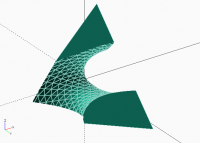
To create a helical surface with the parameter twist you will need to circumvent some unpleasant behaviors of both linear_extrude and polygon. To avoid the spikes you observed don't use slice. The result is terrible. I get best results inserting a sequence of points in the border of the rectangle to extrude. So, instead of the primitive square I use the primitive polygon. However, polygon has the bad habit of removing "unnecessary" points when they are colinear. To avoid the removal, the points are made non-colinear and the rectangle have one side (the side that will shape the helical surface) slightly curved. I have used the following modules and functions to model the Hart's Cube Puzzle, a cousin of your model, that I have published in Thingiverse: module helicalVolume(r, h, turn, n, gap) linear_extrude(height=turn*h, twist=-360*turn,$fn=n) // scale up the shape to avoid polygon point eliminations scale(1/100) polygon(100*shape(r, h/4, n, gap)); // horizontal planar shape for extruding function shape(r, h, n=20, gap) = concat( [for (i=[n:-1:-n]) hlxpoint(h,gap/2,r*i/n)], [ [r,-r], [r,r]] ); // this computation is needed to have an uniform gap between pieces // the intersection point of the the XY plane and the helix through // point rotY(atan(y*PI/h), [x,y,0]) function hlxpoint(h,x,y) = let( b = atan(y*PI/h), cb = cos(b), sb = sin(b), a = -x*sb*180/h, ca = cos(a), sa = sin(a) ) [ca*(x*cb) - sa*y, sa*(x*cb) + y*ca]; The module helicalVolume does what you intended with your linear_extrusion. In fact, it calls linear_extrude but without slices. The function 'shape' builds the vertices of the polygon to be extruded. Previewing polygon(shape (r, h, n, 0.1) ) with Show Edges you will see that the "rectangle" has 2*n+1 vertices on the side nearest to the origin. That side is slightly curved when the parameter gap>0. An extra measure to avoid vertex removal is to scale up the polygon points and scale down the polygon itself. All those extra vertices are discarded anyway by polygon() when gap=0. Helpfully the parameter 'gap' is fundamental to have a workable puzzle: it is the necessary gap between the two identical pieces that will be screwed to solve the puzzle. You will have to find the appropriate values for the helicalVolume() parameters to model your tetrahedron puzzle. The following image is just a test. [image: tetrapuzzle.PNG] Em sáb., 18 de jan. de 2020 às 20:26, Rogier Wolff <R.E.Wolff@bitwizard.nl> escreveu: > > Hi, > > I have the following object: > > ----------- > > // If you build/print this: credit should go to George Hart. > s=50; > t = s/2; > points = [[t,-t,t], [t,t,-t], [-t,t,t], [-t,-t,-t]]; > intersection () { > polyhedron(points, [[0,2,1], [0,1,3], [1,2,3], [0,3,2]]); > > translate ([0,0,-t]) > linear_extrude (height=s, slices = 160, twist = 450) > rotate (-45) translate ([0,25,0]) square ([100,50],center=true) ; > } > ----------- > > Two things. On my machine this renders as "mostly transparent". When you > drag the viewpoint, you see stuff appear where it is supposed to but most > is transparent and you can't see the object well. > > Hitting "F6" renders the object. > > However, now you can see that the object has all sorts of spikes along > the edges. > > Any workarounds? I'm probably behind on the "latest and greatest", so > "you need to upgrade to make this better" is certainly possible. > > Roger. > > -- > ** R.E.Wolff@BitWizard.nl ** https://www.BitWizard.nl/ ** +31-15-2049110 > ** > ** Delftechpark 11 2628 XJ Delft, The Netherlands. KVK: 27239233 ** > The plan was simple, like my brother-in-law Phil. But unlike > Phil, this plan just might work. > > _______________________________________________ > OpenSCAD mailing list > Discuss@lists.openscad.org > http://lists.openscad.org/mailman/listinfo/discuss_lists.openscad.org >
RW
Rogier Wolff
Sun, Jan 19, 2020 2:38 PM

On Sat, Jan 18, 2020 at 03:55:32PM -0700, MichaelAtOz wrote:

For 'transparent' add 'convexity=1' to linear_extrude.

Re spikes, that's what the geometry does, look at it with slices=10.

Continuing working with these forms, I figured this out by myself too.
Thanks for your suggestion.

This is due to there being a "twisted" (non-coplanar) surface in each
slice that gets rendered as just two triangles. One being completely
vertical with a slice-height base at the axis, and one being slanted
with the base on the helical trajectory around the axis.

If you add a few more triangles along the length of the side of the
extrusion, only the innermost will have to be perfectly vertical and
all the others are much "nicer", i.e. closer to the ideal surface.

Ah!!!! Now I'm starting to understand Ronaldo's post! I was thinking
it would be nice to add it into openscad, but Ronaldo manages to force
openscad to doing this unmodified....

For someone who might want to add this to openscad: The current
approximation is bad and looks ugly when the aspect ratio (longest
edge/shortest edge) of the triangles becomes large. So when I'm
extruding a 50mm edge across say 5mm worth of helix on the outside
edge and 1mm of slice heigth, the two triangles have an aspect ratio
of 50 and 10. If you limit the aspect ratio to 2 or 5 you'll get a
much better approximation of the "ideal" form that would be expected.

(circles/cylinders have a $fn that when you increase it the form
approximates the ideal form more accurately. This would be expected of
slices= parameter on the linear extrude as well).

Roger.

Admin - email* me if you need anything,  or if I've done something stupid...

  • click on my MichaelAtOz label, there is a link to email me.

Unless specifically shown otherwise above, my contribution is in the Public Domain; to the extent possible under law, I have waived all copyright and related or neighbouring rights to this work. Obviously inclusion of works of previous authors is not included in the above.

--
Sent from: http://forum.openscad.org/


OpenSCAD mailing list
Discuss@lists.openscad.org
http://lists.openscad.org/mailman/listinfo/discuss_lists.openscad.org
--
** R.E.Wolff@BitWizard.nl ** https://www.BitWizard.nl/ ** +31-15-2049110 **
**    Delftechpark 11 2628 XJ  Delft, The Netherlands.  KVK: 27239233    **
The plan was simple, like my brother-in-law Phil. But unlike
Phil, this plan just might work.

On Sat, Jan 18, 2020 at 03:55:32PM -0700, MichaelAtOz wrote: > For 'transparent' add 'convexity=1' to linear_extrude. > > Re spikes, that's what the geometry does, look at it with slices=10. Continuing working with these forms, I figured this out by myself too. Thanks for your suggestion. This is due to there being a "twisted" (non-coplanar) surface in each slice that gets rendered as just two triangles. One being completely vertical with a slice-height base at the axis, and one being slanted with the base on the helical trajectory around the axis. If you add a few more triangles along the length of the side of the extrusion, only the innermost will have to be perfectly vertical and all the others are much "nicer", i.e. closer to the ideal surface. Ah!!!! Now I'm starting to understand Ronaldo's post! I was thinking it would be nice to add it into openscad, but Ronaldo manages to force openscad to doing this unmodified.... For someone who might want to add this to openscad: The current approximation is bad and looks ugly when the aspect ratio (longest edge/shortest edge) of the triangles becomes large. So when I'm extruding a 50mm edge across say 5mm worth of helix on the outside edge and 1mm of slice heigth, the two triangles have an aspect ratio of 50 and 10. If you limit the aspect ratio to 2 or 5 you'll get a much better approximation of the "ideal" form that would be expected. (circles/cylinders have a $fn that when you increase it the form approximates the ideal form more accurately. This would be expected of slices= parameter on the linear extrude as well). Roger. > > > > ----- > Admin - email* me if you need anything, or if I've done something stupid... > > * click on my MichaelAtOz label, there is a link to email me. > > Unless specifically shown otherwise above, my contribution is in the Public Domain; to the extent possible under law, I have waived all copyright and related or neighbouring rights to this work. Obviously inclusion of works of previous authors is not included in the above. > > -- > Sent from: http://forum.openscad.org/ > > _______________________________________________ > OpenSCAD mailing list > Discuss@lists.openscad.org > http://lists.openscad.org/mailman/listinfo/discuss_lists.openscad.org > -- ** R.E.Wolff@BitWizard.nl ** https://www.BitWizard.nl/ ** +31-15-2049110 ** ** Delftechpark 11 2628 XJ Delft, The Netherlands. KVK: 27239233 ** The plan was simple, like my brother-in-law Phil. But unlike Phil, this plan just might work.
RP
Ronaldo Persiano
Tue, Jan 21, 2020 8:19 PM

Roger,

I did a little experiment coding linear_extrude in user space. It receives
as main parameter a polygon expressed by its vertex coordinates instead of
a polygon(). The module extrude_up(), code attached, computes the extrusion
sections according to the input parameters height, center, twist, scale and
slices besides the polygon vertex list. Those sections are input to another
module, also attached, I already had in my libraries: loft(), which wrap up
the sections in one polyhedron.

In order to get a better approximation for twisted extrusions, extrude_up()
refines the input polygon according to slices and height: all polygon edges
longer than height/slices are subdivide in segments smaller than that
value. On other hand, loft() triangulates the quads by taking the smallest
quad diagonal because the system default triangulation doesn't follow that
rule.

The results are good in my appreciation which suggests that linear_extrude
deserves a revision. I have found in addition that linear_extrude
transforms twisted scaled sections in a awkward way. When both scale and
twist are given, linear_extrude() applies the scale after the twist
rotation while extrude_up() applies the scale first. This produces weird
results in my opinion as seen bellow:

[image: comparison2.PNG][image: comparison.PNG]

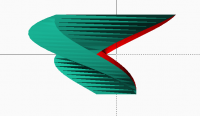
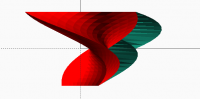
The red shape was produced by extrude_up() and the other by linear_extrude
with the same parameters scale=[2,1] and twist=180. The provided
extrude_up() code includes commented the transform that seems to be used by
linear_extrude() and the application example above.

Em dom., 19 de jan. de 2020 às 14:38, Rogier Wolff R.E.Wolff@bitwizard.nl
escreveu:

On Sat, Jan 18, 2020 at 03:55:32PM -0700, MichaelAtOz wrote:

For 'transparent' add 'convexity=1' to linear_extrude.

Re spikes, that's what the geometry does, look at it with slices=10.

Continuing working with these forms, I figured this out by myself too.
Thanks for your suggestion.

This is due to there being a "twisted" (non-coplanar) surface in each
slice that gets rendered as just two triangles. One being completely
vertical with a slice-height base at the axis, and one being slanted
with the base on the helical trajectory around the axis.

If you add a few more triangles along the length of the side of the
extrusion, only the innermost will have to be perfectly vertical and
all the others are much "nicer", i.e. closer to the ideal surface.

Ah!!!! Now I'm starting to understand Ronaldo's post! I was thinking
it would be nice to add it into openscad, but Ronaldo manages to force
openscad to doing this unmodified....

For someone who might want to add this to openscad: The current
approximation is bad and looks ugly when the aspect ratio (longest
edge/shortest edge) of the triangles becomes large. So when I'm
extruding a 50mm edge across say 5mm worth of helix on the outside
edge and 1mm of slice heigth, the two triangles have an aspect ratio
of 50 and 10. If you limit the aspect ratio to 2 or 5 you'll get a
much better approximation of the "ideal" form that would be expected.

(circles/cylinders have a $fn that when you increase it the form
approximates the ideal form more accurately. This would be expected of
slices= parameter on the linear extrude as well).

     Roger.

Admin - email* me if you need anything,  or if I've done something

stupid...

  • click on my MichaelAtOz label, there is a link to email me.

Unless specifically shown otherwise above, my contribution is in the

Public Domain; to the extent possible under law, I have waived all
copyright and related or neighbouring rights to this work. Obviously
inclusion of works of previous authors is not included in the above.

--
** R.E.Wolff@BitWizard.nl ** https://www.BitWizard.nl/ ** +31-15-2049110
**
**    Delftechpark 11 2628 XJ  Delft, The Netherlands.  KVK: 27239233    **
The plan was simple, like my brother-in-law Phil. But unlike
Phil, this plan just might work.


OpenSCAD mailing list
Discuss@lists.openscad.org
http://lists.openscad.org/mailman/listinfo/discuss_lists.openscad.org

Roger, I did a little experiment coding linear_extrude in user space. It receives as main parameter a polygon expressed by its vertex coordinates instead of a polygon(). The module extrude_up(), code attached, computes the extrusion sections according to the input parameters height, center, twist, scale and slices besides the polygon vertex list. Those sections are input to another module, also attached, I already had in my libraries: loft(), which wrap up the sections in one polyhedron. In order to get a better approximation for twisted extrusions, extrude_up() refines the input polygon according to slices and height: all polygon edges longer than height/slices are subdivide in segments smaller than that value. On other hand, loft() triangulates the quads by taking the smallest quad diagonal because the system default triangulation doesn't follow that rule. The results are good in my appreciation which suggests that linear_extrude deserves a revision. I have found in addition that linear_extrude transforms twisted scaled sections in a awkward way. When both scale and twist are given, linear_extrude() applies the scale after the twist rotation while extrude_up() applies the scale first. This produces weird results in my opinion as seen bellow: [image: comparison2.PNG][image: comparison.PNG] The red shape was produced by extrude_up() and the other by linear_extrude with the same parameters scale=[2,1] and twist=180. The provided extrude_up() code includes commented the transform that seems to be used by linear_extrude() and the application example above. Em dom., 19 de jan. de 2020 às 14:38, Rogier Wolff <R.E.Wolff@bitwizard.nl> escreveu: > On Sat, Jan 18, 2020 at 03:55:32PM -0700, MichaelAtOz wrote: > > For 'transparent' add 'convexity=1' to linear_extrude. > > > > Re spikes, that's what the geometry does, look at it with slices=10. > > Continuing working with these forms, I figured this out by myself too. > Thanks for your suggestion. > > This is due to there being a "twisted" (non-coplanar) surface in each > slice that gets rendered as just two triangles. One being completely > vertical with a slice-height base at the axis, and one being slanted > with the base on the helical trajectory around the axis. > > If you add a few more triangles along the length of the side of the > extrusion, only the innermost will have to be perfectly vertical and > all the others are much "nicer", i.e. closer to the ideal surface. > > Ah!!!! Now I'm starting to understand Ronaldo's post! I was thinking > it would be nice to add it into openscad, but Ronaldo manages to force > openscad to doing this unmodified.... > > For someone who might want to add this to openscad: The current > approximation is bad and looks ugly when the aspect ratio (longest > edge/shortest edge) of the triangles becomes large. So when I'm > extruding a 50mm edge across say 5mm worth of helix on the outside > edge and 1mm of slice heigth, the two triangles have an aspect ratio > of 50 and 10. If you limit the aspect ratio to 2 or 5 you'll get a > much better approximation of the "ideal" form that would be expected. > > (circles/cylinders have a $fn that when you increase it the form > approximates the ideal form more accurately. This would be expected of > slices= parameter on the linear extrude as well). > > Roger. > > > > > > > > > > > ----- > > Admin - email* me if you need anything, or if I've done something > stupid... > > > > * click on my MichaelAtOz label, there is a link to email me. > > > > Unless specifically shown otherwise above, my contribution is in the > Public Domain; to the extent possible under law, I have waived all > copyright and related or neighbouring rights to this work. Obviously > inclusion of works of previous authors is not included in the above. > > > > -- > > Sent from: http://forum.openscad.org/ > > > > _______________________________________________ > > OpenSCAD mailing list > > Discuss@lists.openscad.org > > http://lists.openscad.org/mailman/listinfo/discuss_lists.openscad.org > > > > -- > ** R.E.Wolff@BitWizard.nl ** https://www.BitWizard.nl/ ** +31-15-2049110 > ** > ** Delftechpark 11 2628 XJ Delft, The Netherlands. KVK: 27239233 ** > The plan was simple, like my brother-in-law Phil. But unlike > Phil, this plan just might work. > > _______________________________________________ > OpenSCAD mailing list > Discuss@lists.openscad.org > http://lists.openscad.org/mailman/listinfo/discuss_lists.openscad.org >