

discuss@lists.openscad.org

OpenSCAD general discussion Mailing-list

View all threads

Advice regards curve fitting - splines?

IO
Ian Oliver
Tue, May 30, 2017 10:32 AM

Hello all,

Following hot on the heels of my Thunderbird 1 design, I'm now wanting
to tackle a Fireflash.

http://gmart364.blogspot.co.uk/2012/07/fireflash-just-gorgeous-streamlined.html

Getting its curves right is going to be essential and I don't think I
can use distorted cones and ellipses this time.

I can get a number of points on the surface using drawings and calipers,
and I was then thinking of using splines through these to get me curved
lines running along the body. I could then use a closed spline through
points on these lines to create the geometry for the body.

Is this vaguely sensible?

Which spline or Bezier library is best?

I've had a very quick play with nSpline, which I like initially as I'm
happy with everything being in vectors with as many entries as I'm going
for facets for that particular preview/render.

https://www.thingiverse.com/thing:1208001

Thoughts?

Ian

(And yes, the end result will all be free and on Thingiverse!)

Hello all, Following hot on the heels of my Thunderbird 1 design, I'm now wanting to tackle a Fireflash. http://gmart364.blogspot.co.uk/2012/07/fireflash-just-gorgeous-streamlined.html Getting its curves right is going to be essential and I don't think I can use distorted cones and ellipses this time. I can get a number of points on the surface using drawings and calipers, and I was then thinking of using splines through these to get me curved lines running along the body. I could then use a closed spline through points on these lines to create the geometry for the body. Is this vaguely sensible? Which spline or Bezier library is best? I've had a *very* quick play with nSpline, which I like initially as I'm happy with everything being in vectors with as many entries as I'm going for facets for that particular preview/render. https://www.thingiverse.com/thing:1208001 Thoughts? Ian (And yes, the end result will all be free and on Thingiverse!)
IO
Ian Oliver
Tue, May 30, 2017 1:58 PM

On 2017-05-30 11:32, Ian Oliver wrote:

Getting its curves right is going to be essential and I don't think I
can use distorted cones and ellipses this time.

Ah, but I can use Super Ellipses and use splines to get dimensions,
locations and roundness/squareness parameters.

https://en.wikipedia.org/wiki/Superellipse

That should work.

On 2017-05-30 11:32, Ian Oliver wrote: > Getting its curves right is going to be essential and I don't think I > can use distorted cones and ellipses this time. Ah, but I can use Super Ellipses and use splines to get dimensions, locations and roundness/squareness parameters. https://en.wikipedia.org/wiki/Superellipse That should work.
EB
Eric Buijs
Tue, May 30, 2017 7:55 PM

The Bézier library of Caterpillar is well documented, so maybe that's an
alternative to nSpline. You can find it here:
https://openhome.cc/eGossip/OpenSCAD/BezierSurface.html

BTW: Your Thunderbird 1 looks nice.

--
View this message in context: http://forum.openscad.org/Advice-regards-curve-fitting-splines-tp21597p21601.html
Sent from the OpenSCAD mailing list archive at Nabble.com.

The Bézier library of Caterpillar is well documented, so maybe that's an alternative to nSpline. You can find it here: https://openhome.cc/eGossip/OpenSCAD/BezierSurface.html <https://openhome.cc/eGossip/OpenSCAD/BezierSurface.html> BTW: Your Thunderbird 1 looks nice. -- View this message in context: http://forum.openscad.org/Advice-regards-curve-fitting-splines-tp21597p21601.html Sent from the OpenSCAD mailing list archive at Nabble.com.
C
caterpillar
Wed, May 31, 2017 8:59 AM

My library is located at https://github.com/JustinSDK/dotSCAD

The bezier_surface function and examples are demonstrated here:
https://openhome.cc/eGossip/OpenSCAD/lib-bezier_surface.html

http://forum.openscad.org/file/n21607/lib-bezier_surface-1.jpg

I used it to create a wave base:
https://www.thingiverse.com/thing:2316887

http://forum.openscad.org/file/n21607/cde027e347e8be4f4eb0029b214f1a18_preview_featured.jpg

BTW, I used the bezier_curve function to create a face several days ago:
https://www.thingiverse.com/thing:2350992

http://forum.openscad.org/file/n21607/963ac418d63e1e7e6d16e6013b33d410_preview_featured.jpg

It's a proof of concept. Hope it can provide some ideas for how to design
your thing.


http://openhome.cc

View this message in context: http://forum.openscad.org/Advice-regards-curve-fitting-splines-tp21597p21607.html
Sent from the OpenSCAD mailing list archive at Nabble.com.

My library is located at https://github.com/JustinSDK/dotSCAD The bezier_surface function and examples are demonstrated here: https://openhome.cc/eGossip/OpenSCAD/lib-bezier_surface.html <http://forum.openscad.org/file/n21607/lib-bezier_surface-1.jpg> I used it to create a wave base: https://www.thingiverse.com/thing:2316887 <http://forum.openscad.org/file/n21607/cde027e347e8be4f4eb0029b214f1a18_preview_featured.jpg> BTW, I used the bezier_curve function to create a face several days ago: https://www.thingiverse.com/thing:2350992 <http://forum.openscad.org/file/n21607/963ac418d63e1e7e6d16e6013b33d410_preview_featured.jpg> It's a proof of concept. Hope it can provide some ideas for how to design your thing. ----- http://openhome.cc -- View this message in context: http://forum.openscad.org/Advice-regards-curve-fitting-splines-tp21597p21607.html Sent from the OpenSCAD mailing list archive at Nabble.com.
IO
Ian Oliver
Wed, May 31, 2017 9:04 AM

On 2017-05-30 20:55, Eric Buijs wrote:

The Bézier library of Caterpillar is well documented, so maybe that's an
alternative to nSpline. You can find it here:

Many thanks. I'll play with that and see where it takes me.

BTW: Your Thunderbird 1 looks nice.

Thanks, I'm very pleased with how the 3D model came out. I'm hoping
someone prints it and does a better finishing job than I did!

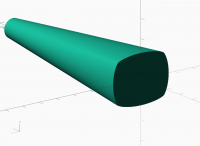
BTW I played with some linear sweeps of size and superellipse
roundness/squareness last night and got the attached out of some pretty
simple code. I should be able to use this to generate a vector
containing all of my body "slices", use a modified sweep function to
skin this as a polyhedron, but also then access the points data from
other code to generate spline control points for attaching tail/wings etc.

This one is going to be a long slog and I don't expect to have anything
close to printable for months!
On 2017-05-30 20:55, Eric Buijs wrote: > The Bézier library of Caterpillar is well documented, so maybe that's an > alternative to nSpline. You can find it here: Many thanks. I'll play with that and see where it takes me. > BTW: Your Thunderbird 1 looks nice. Thanks, I'm very pleased with how the 3D model came out. I'm hoping someone prints it and does a better finishing job than I did! BTW I played with some linear sweeps of size and superellipse roundness/squareness last night and got the attached out of some pretty simple code. I should be able to use this to generate a vector containing all of my body "slices", use a modified sweep function to skin this as a polyhedron, but also then access the points data from other code to generate spline control points for attaching tail/wings etc. This one is going to be a long slog and I don't expect to have anything close to printable for months!
IO
Ian Oliver
Wed, May 31, 2017 9:20 AM

On 2017-05-31 09:59, caterpillar wrote:

My library is located athttps://github.com/JustinSDK/dotSCAD

I've looked at that (in awe!) in the past but haven't yet had an excuse
to play with it. Now might be the time!

It's a proof of concept. Hope it can provide some ideas for how to design
your thing.

Great, thanks. I'm currently just after a "reading list" so I can work
through a few approaches and see what shows promise.

On 2017-05-31 09:59, caterpillar wrote: > My library is located athttps://github.com/JustinSDK/dotSCAD I've looked at that (in awe!) in the past but haven't yet had an excuse to play with it. Now might be the time! > It's a proof of concept. Hope it can provide some ideas for how to design > your thing. Great, thanks. I'm currently just after a "reading list" so I can work through a few approaches and see what shows promise.
IO
Ian Oliver
Wed, May 31, 2017 9:59 AM

On 2017-05-31 09:59, caterpillar wrote:

The bezier_surface function and examples are demonstrated here:
https://openhome.cc/eGossip/OpenSCAD/lib-bezier_surface.html

I mentioned splines because my understanding (vague/wrong/whatever) is
that these pass through the control points as they have multiple
polynomial components, which is what I think I want for my smooth
interpolation. My plan is to take coordinates from blueprints with
calipers and then use splines (or whatever) to let me generate nice
curves to feed into my supersellipse sweeper thingy.

On 2017-05-31 09:59, caterpillar wrote: > The bezier_surface function and examples are demonstrated here: > https://openhome.cc/eGossip/OpenSCAD/lib-bezier_surface.html > > I mentioned splines because my understanding (vague/wrong/whatever) is that these pass through the control points as they have multiple polynomial components, which is what I think I want for my smooth interpolation. My plan is to take coordinates from blueprints with calipers and then use splines (or whatever) to let me generate nice curves to feed into my supersellipse sweeper thingy.
P
Parkinbot
Wed, May 31, 2017 11:23 AM

Gadgetmind wrote

My plan is to take coordinates from blueprints with
calipers and then use splines (or whatever) to let me generate nice
curves to feed into my supersellipse sweeper thingy.

Good plan. It will work. The general method is:

  1. define a parametrized shape function like superellipse to generate an
    interpolable cross section
  2. find the exact parameters and locations for a couple of "slices" and
    stuff them properly sequenced into a matrix - one row per slice. It is
    obviously important to choose "good" slices.
  3. use nSpline() to interpolate the rows.
  4. define a generator function that interpretes the cross section
    (superellipse) and the trajectory (e.g. Z axis) from the interpolated data
    and generates a sequence of polygons in 3D from it.
  5. use sweep() from Naca_sweep.scad or skin() to extrude the full shape.
    skin() also lets you extrude along a series of shapes with an unequal number
    of points. This might be important for the caps.

reads more complicated than it is.

Here the sceleton as pseudo code:

A = [ ... ];            // define slices as rows of a matrix
IA = nSpline(A,N);  // interpolate between slices
E = gen_dat(IA, n); // generate skin data
sweep(E);  // or skin(E); // extrude the skin

function superellipse(n, ...) = // define a parameterized shape polygon
e.g. as [[x1,y1,0], ..., [xn,yn,0]]
function gen_dat(A, n) = // split the rows of A into a shape S_i and
trajectory T_i parameter portion. Call superellipse(n, S_i) and map the
returned polygons using T_i into 3D.

--
View this message in context: http://forum.openscad.org/Advice-regards-curve-fitting-splines-tp21597p21611.html
Sent from the OpenSCAD mailing list archive at Nabble.com.

Gadgetmind wrote > My plan is to take coordinates from blueprints with > calipers and then use splines (or whatever) to let me generate nice > curves to feed into my supersellipse sweeper thingy. Good plan. It will work. The general method is: 1. define a parametrized shape function like superellipse to generate an interpolable cross section 2. find the exact parameters and locations for a couple of "slices" and stuff them properly sequenced into a matrix - one row per slice. It is obviously important to choose "good" slices. 3. use nSpline() to interpolate the rows. 4. define a generator function that interpretes the cross section (superellipse) and the trajectory (e.g. Z axis) from the interpolated data and generates a sequence of polygons in 3D from it. 5. use sweep() from Naca_sweep.scad or skin() to extrude the full shape. skin() also lets you extrude along a series of shapes with an unequal number of points. This might be important for the caps. reads more complicated than it is. Here the sceleton as pseudo code: > A = [ ... ]; // define slices as rows of a matrix > IA = nSpline(A,N); // interpolate between slices > E = gen_dat(IA, n); // generate skin data > sweep(E); // or skin(E); // extrude the skin > > function superellipse(n, ...) = // define a parameterized shape polygon > e.g. as [[x1,y1,0], ..., [xn,yn,0]] > function gen_dat(A, n) = // split the rows of A into a shape S_i and > trajectory T_i parameter portion. Call superellipse(n, S_i) and map the > returned polygons using T_i into 3D. -- View this message in context: http://forum.openscad.org/Advice-regards-curve-fitting-splines-tp21597p21611.html Sent from the OpenSCAD mailing list archive at Nabble.com.
IO
Ian Oliver
Wed, May 31, 2017 11:58 AM

On 2017-05-31 12:23, Parkinbot wrote:

  1. use sweep() from Naca_sweep.scad or skin() to extrude the full shape.
    skin() also lets you extrude along a series of shapes with an unequal number
    of points. This might be important for the caps.

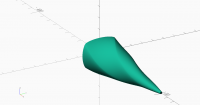
Here is what I have now as a proof of concept.

Rot45 = sin(45);
// Generate one slice of the body
function SESlice (SE=1, xs=1, ys=1) = [
for (t=[0: $fa : 359])
let (
x = pow(abs(cos(t)), 2/SE) * sign(cos(t)) ,
y = pow(abs(sin(t)), 2/SE) * sign(sin(t))
)
// Rotate 45 degrees so scaling works properly and then scale
[ xs * (x * Rot45 - y * Rot45), ys * (y * Rot45 + x * Rot45)]
];

BodySE=1.4;    // 1.4 is in the right ball park for centre
Steps = 100;

 skin([
     for (s=[0 : Steps-1])
         let (
             sf = s/(Steps-1),
             // Linear for now, needs a spline/lookup.
             SE = BodySE + sf*(2-BodySE),
             xs = 15 + sf*(1-15),
             ys = 19 + sf*(1-19)
         )
         transform(translation([0,0,s]) * rotation([0,0,s*2]), 

SESlice (SE=SE, xs=xs, ys=ys))
]);

Output attached and shows scaling working well and superellipse going
from slightly rounded rectangle to circle. That's a lot of flexibility
from some pretty simple code, but I'm glad I didn't have to write skin()
or the transform library!

I'm not sure I need the unequal number of points logic and currently
have it ripped out of my "cut and paste" version of skin (). Let's see.
On 2017-05-31 12:23, Parkinbot wrote: > 5. use sweep() from Naca_sweep.scad or skin() to extrude the full shape. > skin() also lets you extrude along a series of shapes with an unequal number > of points. This might be important for the caps. Here is what I have now as a proof of concept. Rot45 = sin(45); // Generate one slice of the body function SESlice (SE=1, xs=1, ys=1) = [ for (t=[0: $fa : 359]) let ( x = pow(abs(cos(t)), 2/SE) * sign(cos(t)) , y = pow(abs(sin(t)), 2/SE) * sign(sin(t)) ) // Rotate 45 degrees so scaling works properly and then scale [ xs * (x * Rot45 - y * Rot45), ys * (y * Rot45 + x * Rot45)] ]; BodySE=1.4; // 1.4 is in the right ball park for centre Steps = 100; skin([ for (s=[0 : Steps-1]) let ( sf = s/(Steps-1), // Linear for now, needs a spline/lookup. SE = BodySE + sf*(2-BodySE), xs = 15 + sf*(1-15), ys = 19 + sf*(1-19) ) transform(translation([0,0,s]) * rotation([0,0,s*2]), SESlice (SE=SE, xs=xs, ys=ys)) ]); Output attached and shows scaling working well and superellipse going from slightly rounded rectangle to circle. That's a lot of flexibility from some pretty simple code, but I'm glad I didn't have to write skin() or the transform library! I'm not sure I need the unequal number of points logic and currently have it ripped out of my "cut and paste" version of skin (). Let's see.
IO
Ian Oliver
Wed, May 31, 2017 12:02 PM

On 2017-05-31 12:58, Ian Oliver wrote:

Here is what I have now as a proof of concept.

Note that I think you were describing using superellipse to generate
some slices and then splines to interpolate (I think). I'm instead
looking to use splines to interpolate the various parameters that are
then used to generate a whole load of slices. I'll probably only need a
handful of spline control points for the whole body.

And then comes fun with wings etc., which I don't have much idea about
currently, but one problem at a time.

On 2017-05-31 12:58, Ian Oliver wrote: > Here is what I have now as a proof of concept. Note that I think you were describing using superellipse to generate some slices and then splines to interpolate (I think). I'm instead looking to use splines to interpolate the various parameters that are then used to generate a whole load of slices. I'll probably only need a handful of spline control points for the whole body. And then comes fun with wings etc., which I don't have much idea about currently, but one problem at a time.