As a side note in a previous thread, I said:
Strangely, the first time that I previewed this model, the
intersection ... didn't. It showed the original docks and the cubes
for the intersection, and the intersection acted like a union.
Subsequent previews, including after restarting, got it right. (Give
or take the convexity issue.) This is on 2021.01 on Windows.
I think I found the culprit for this strange behavior - pilot error, not
understanding the behavior of View/Thrown Together.
I have a trivial case now:
difference(){
    cube(100);
    cube(100,true);
}
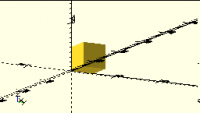
F5s as this:
But then I realized that I'd been using View/Thrown Together to look at
a polyhedron, and indeed when I switched to View/Preview I got the
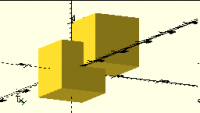
expected result:
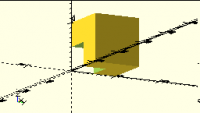
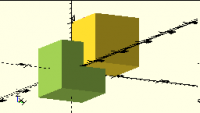
There's a similar behavior for intersection:
vs
This is consistent with the behavior I was experiencing: I'd load up a
model, it would display wrong, I'd mess with it and eventually F6 it
(which resets View/Thrown Together), and since I wasn't aware of the
View/Thrown Together tie-in it would stay fixed until the next time I
happened to look at a model with an intersection or difference while I
had View/Thrown Together set.
The documentation
https://en.wikibooks.org/wiki/OpenSCAD_User_Manual/First_Steps/Model_views#The_Thrown_Together_View
for View/Thrown Together describes this behavior for difference(), but
not for intersection().
As a side note in a previous thread, I said:
> Strangely, the first time that I previewed this model, the
> intersection ... didn't. It showed the original docks and the cubes
> for the intersection, and the intersection acted like a union.
> Subsequent previews, including after restarting, got it right. (Give
> or take the convexity issue.) This is on 2021.01 on Windows.
I think I found the culprit for this strange behavior - pilot error, not
understanding the behavior of View/Thrown Together.
I have a trivial case now:
difference(){
cube(100);
cube(100,true);
}
F5s as this:
But then I realized that I'd been using View/Thrown Together to look at
a polyhedron, and indeed when I switched to View/Preview I got the
expected result:
There's a similar behavior for intersection:
vs
This is consistent with the behavior I was experiencing: I'd load up a
model, it would display wrong, I'd mess with it and eventually F6 it
(which resets View/Thrown Together), and since I wasn't aware of the
View/Thrown Together tie-in it would stay fixed until the next time I
happened to look at a model with an intersection or difference while I
had View/Thrown Together set.
The documentation
<https://en.wikibooks.org/wiki/OpenSCAD_User_Manual/First_Steps/Model_views#The_Thrown_Together_View>
for View/Thrown Together describes this behavior for difference(), but
not for intersection().