

discuss@lists.openscad.org

OpenSCAD general discussion Mailing-list

View all threads

Textures

HC
Harry Cohen
Sun, Feb 22, 2015 3:47 PM

Hi
I am a second year architectural student and my project is to build a brick
house then 3d print it. Could you direct me to tutorial that would explain
how to texture the walls so that the model would have the look and feel of
real brick. Would texture stamping be the correct term for this technique?
Regard
Harry

Sent from my iPad

>> Hi >> I am a second year architectural student and my project is to build a brick >> house then 3d print it. Could you direct me to tutorial that would explain >> how to texture the walls so that the model would have the look and feel of >> real brick. Would texture stamping be the correct term for this technique? >> Regard >> Harry Sent from my iPad
TP
Torsten Paul
Sun, Feb 22, 2015 4:01 PM

On 02/22/2015 04:47 PM, Harry Cohen wrote:

Could you direct me to tutorial that would explain how to texture
the walls so that the model would have the look and feel of
real brick. Would texture stamping be the correct term for this
technique?

That's currently not possible with OpenSCAD, there is no color/
texture support for the final model (the preview does support
color).
A possible way is to export the model as STL and import into
Blender. There you have lots of options to finish the appearance
of the model and also generate high quality renderings.

In case you did not use Blender before, have a look at
Andrew Price: https://www.youtube.com/user/AndrewPPrice
Sardi Pax: https://www.youtube.com/user/srf123

Part 2 of "How to make an Airplane" tutorial has some good
examples of how to apply textures to a model:

Part 1: https://www.youtube.com/watch?v=mu9J0D6ebVw
Part 2: https://www.youtube.com/watch?v=p4lsgMw9uQc

ciao,
Torsten.

On 02/22/2015 04:47 PM, Harry Cohen wrote: > Could you direct me to tutorial that would explain how to texture > the walls so that the model would have the look and feel of > real brick. Would texture stamping be the correct term for this > technique? > That's currently not possible with OpenSCAD, there is no color/ texture support for the final model (the preview does support color). A possible way is to export the model as STL and import into Blender. There you have lots of options to finish the appearance of the model and also generate high quality renderings. In case you did not use Blender before, have a look at Andrew Price: https://www.youtube.com/user/AndrewPPrice Sardi Pax: https://www.youtube.com/user/srf123 Part 2 of "How to make an Airplane" tutorial has some good examples of how to apply textures to a model: Part 1: https://www.youtube.com/watch?v=mu9J0D6ebVw Part 2: https://www.youtube.com/watch?v=p4lsgMw9uQc ciao, Torsten.
PF
Peter Falke
Sun, Feb 22, 2015 4:56 PM

In OpenSCAD you'll have to do it the old fashioned way:

for (i=[0:10])

for (j=[0:10])

translate([i1.1+j/2,j1.1,0])cube();

2015-02-22 17:01 GMT+01:00 Torsten Paul Torsten.Paul@gmx.de:

On 02/22/2015 04:47 PM, Harry Cohen wrote:

Could you direct me to tutorial that would explain how to texture

the walls so that the model would have the look and feel of

real brick. Would texture stamping be the correct term for this

technique?

That's currently not possible with OpenSCAD, there is no color/
texture support for the final model (the preview does support
color).
A possible way is to export the model as STL and import into
Blender. There you have lots of options to finish the appearance
of the model and also generate high quality renderings.

In case you did not use Blender before, have a look at
Andrew Price: https://www.youtube.com/user/AndrewPPrice
Sardi Pax: https://www.youtube.com/user/srf123

Part 2 of "How to make an Airplane" tutorial has some good
examples of how to apply textures to a model:

Part 1: https://www.youtube.com/watch?v=mu9J0D6ebVw
Part 2: https://www.youtube.com/watch?v=p4lsgMw9uQc

ciao,
Torsten.


OpenSCAD mailing list
Discuss@lists.openscad.org
http://lists.openscad.org/mailman/listinfo/discuss_lists.openscad.org

--
stempeldergeschichte@googlemail.com karsten@rohrbach.de

P.S. Falls meine E-Mail kürzer ausfällt als Dir angenehm ist:
Ich probiere gerade aus kurze Antworten statt gar keine Antworten zu
schreiben.
Wenn Du gerne mehr lesen möchtest, dann lass es mich bitte wissen.

P.S. In case my e-mail is shorter than you enjoy:
I am currently trying short replies instead of no replies at all.
Please let me know, if you like to read more.

Enjoy!
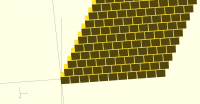
In OpenSCAD you'll have to do it the old fashioned way: for (i=[0:10]) for (j=[0:10]) translate([i*1.1+j/2,j*1.1,0])cube(); ​ 2015-02-22 17:01 GMT+01:00 Torsten Paul <Torsten.Paul@gmx.de>: > On 02/22/2015 04:47 PM, Harry Cohen wrote: > >> Could you direct me to tutorial that would explain how to texture >> > > the walls so that the model would have the look and feel of > >> real brick. Would texture stamping be the correct term for this >> > > technique? > > > That's currently not possible with OpenSCAD, there is no color/ > texture support for the final model (the preview does support > color). > A possible way is to export the model as STL and import into > Blender. There you have lots of options to finish the appearance > of the model and also generate high quality renderings. > > In case you did not use Blender before, have a look at > Andrew Price: https://www.youtube.com/user/AndrewPPrice > Sardi Pax: https://www.youtube.com/user/srf123 > > Part 2 of "How to make an Airplane" tutorial has some good > examples of how to apply textures to a model: > > Part 1: https://www.youtube.com/watch?v=mu9J0D6ebVw > Part 2: https://www.youtube.com/watch?v=p4lsgMw9uQc > > ciao, > Torsten. > > > _______________________________________________ > OpenSCAD mailing list > Discuss@lists.openscad.org > http://lists.openscad.org/mailman/listinfo/discuss_lists.openscad.org > -- stempeldergeschichte@googlemail.com <karsten@rohrbach.de> P.S. Falls meine E-Mail kürzer ausfällt als Dir angenehm ist: Ich probiere gerade aus kurze Antworten statt gar keine Antworten zu schreiben. Wenn Du gerne mehr lesen möchtest, dann lass es mich bitte wissen. P.S. In case my e-mail is shorter than you enjoy: I am currently trying short replies instead of no replies at all. Please let me know, if you like to read more. Enjoy!

M
MichaelAtOz
Sun, Feb 22, 2015 10:19 PM

Not bricks, but you may get some ideas from  this
http://www.thingiverse.com/thing:5299  or  this
http://www.thingiverse.com/thing:31832  .

You could think about using surface() to provide a brick texture (is a 3D
sense) , should be easy to script a repetitive pattern.


Unless specifically shown otherwise above, my contribution is in the Public Domain; To the extent possible under law, I have waived all copyright and related or neighbouring rights to this work. This work is published globally via the internet. :) Inclusion of works of previous authors is not included in the above.

The TPP is no simple “trade agreement.”  Fight it! http://www.ourfairdeal.org/

View this message in context: http://forum.openscad.org/Textures-tp11692p11719.html
Sent from the OpenSCAD mailing list archive at Nabble.com.

Not bricks, but you may get some ideas from this <http://www.thingiverse.com/thing:5299> or this <http://www.thingiverse.com/thing:31832> . You could think about using surface() to provide a brick texture (is a 3D sense) , should be easy to script a repetitive pattern. ----- Unless specifically shown otherwise above, my contribution is in the Public Domain; To the extent possible under law, I have waived all copyright and related or neighbouring rights to this work. This work is published globally via the internet. :) Inclusion of works of previous authors is not included in the above. The TPP is no simple “trade agreement.” Fight it! http://www.ourfairdeal.org/ -- View this message in context: http://forum.openscad.org/Textures-tp11692p11719.html Sent from the OpenSCAD mailing list archive at Nabble.com.
AC
Alan Cox
Mon, Feb 23, 2015 12:23 PM

On Sun, 22 Feb 2015 17:56:56 +0100
Peter Falke stempeldergeschichte@googlemail.com wrote:

In OpenSCAD you'll have to do it the old fashioned way:

for (i=[0:10])

for (j=[0:10])

translate([i1.1+j/2,j1.1,0])cube();

Not entirely true. You can import a DXF of the brick pattern and then
extrude it and difference it.

However, a word of caution. The difference between the surface of a brick
and the mortar is usually of the order of millimetres, it's almost always
the case that a correct scale down of bricks to a 3D printed model should
not have brick patterns scribed into it and you can do the brick patterns
far more accurately when colouring it (eg using vinyls).

Alan

On Sun, 22 Feb 2015 17:56:56 +0100 Peter Falke <stempeldergeschichte@googlemail.com> wrote: > In OpenSCAD you'll have to do it the old fashioned way: > > for (i=[0:10]) > > for (j=[0:10]) > > translate([i*1.1+j/2,j*1.1,0])cube(); Not entirely true. You can import a DXF of the brick pattern and then extrude it and difference it. However, a word of caution. The difference between the surface of a brick and the mortar is usually of the order of millimetres, it's almost always the case that a correct scale down of bricks to a 3D printed model should not have brick patterns scribed into it and you can do the brick patterns far more accurately when colouring it (eg using vinyls). Alan
MK
Marius Kintel
Mon, Feb 23, 2015 3:39 PM

..of course there is the option to use surface(“texture.png”).
This will create some sort of relief, assuming that intensities in the png are representative of elevation values.
Then, the resulting object can be treated like any other object in OpenSCAD.

Note: This will likely severely impact your rendering (F6) performance.

-Marius

..of course there is the option to use surface(“texture.png”). This will create some sort of relief, assuming that intensities in the png are representative of elevation values. Then, the resulting object can be treated like any other object in OpenSCAD. Note: This will likely severely impact your rendering (F6) performance. -Marius