

Extending OpenSCAD from assembler to C or Perlish language and adding standard library

On 2019-10-02 13:49, nop head wrote:
If you run multiple threads through code that is not threadsafe then
you get undefined results. Not surprising they are different on
different OSes.
Indeed, that's an example of a software design issue. The way to achieve
thread safe code is unrelated to the OS. Done correctly, it will run
anywhere, done incorrectly it will fail in different ways in different
environments.
Carsten Arnholm

On Wed, Oct 2, 2019, at 11:33 AM, Steven Dick wrote:
I've often dreamed of a GUI for OpenSCAD that would work seamlessly
with the OpenSCAD programming capability.
I've been afraid that adding mutable variables would make this difficult.
I love the idea of a direct manipulation GUI for making OpenSCAD models. But there's a basic philosophical question to settle first.
OpenSCAD works bottom up and in one direction, starting from the model parameters, applying arbitrary computation (using a Turing-complete language) to produce a CSG tree, which you can visualize.
On the other hand, there are constraint-based CAD programs that represent the connection between the model parameters and the shape using a constraint network, where information flows bidirectionally. You can tweak model parameters and the shape changes, or you can directly manipulate control points on the shape using the GUI, and those changes are back-propagated through the constraint network to update the model parameters.
With a constraint-based modelling system, you can't use a Turing complete language to map the parameters to the shape. Even supporting simple arithmetic equations becomes difficult: you end up using complex, ad-hoc, heuristic based algorithms to back -propagate shape changes back to the model parameters. And then you also create a difficulty for the user, in trying to understand what these opaque heuristic-based algorithms are doing when they back propagate changes.
Building a constraint-based GUI on top of OpenSCAD is a non-starter: what you end up with is not OpenSCAD. However the GUI works, it needs to abide by the rule that changes flow in one direction, from the parameters, to the model. And you can use the full power of a programming language to describe how the parameters generate the shape.
Once we establish that, then mutable variables don't create any additional difficulty. They don't add any expressive power to the language. You can accomplish the same computations by programming in a functional style with immutable variables.

doug.moen wrote
On Wed, Oct 2, 2019, at 11:33 AM, Steven Dick wrote:
I've often dreamed of a GUI for OpenSCAD that would work seamlessly
with the OpenSCAD programming capability.
I've been afraid that adding mutable variables would make this difficult.
I love the idea of a direct manipulation GUI for making OpenSCAD models.
But there's a basic philosophical question to settle first.
The sort of GUI I have in mind is relatively simple - just allowing the user
to select things like CUBE or TRANSLATE with the click of a mouse rather
than by typing the words and all the appropriate brackets and commas. That
would not interfere in any way with the philosophy of Openscad.
...R
--
Sent from: http://forum.openscad.org/

On 02.10.19 21:26, Robin2 wrote:
The sort of GUI I have in mind is relatively simple -
just allowing the user to select things like CUBE or
TRANSLATE with the click of a mouse rather than by
typing the words and all the appropriate brackets and
commas. That would not interfere in any way with the
philosophy of Openscad.
That sounds a bit like the library support I played
with long time ago.
http://files.openscad.org/video/screencast-library-window.webm
This is reading the parameters from the modules defined
in the library and presents those as list when the
library is included in the design.
When selecting a part it gives input fields to the user
for specialization of the part parameters.
It's only a simple one-way drag&drop into the text
editor though.
ciao,
Torsten.
tp3 wrote
That sounds a bit like the library support I played
with long time ago.
http://files.openscad.org/video/screencast-library-window.webm
Yes, quite like that. Do you consider that to be helpful for a novice?
The program I am working on is written in Python and the Python GUI part is
separate from Openscad. The Python program writes the Openscad file and
Openscad displays the preview - as far as Openscad is concerned it's like
using an external editor.
Either way the user does not have to worry about the syntax.
...R
--
Sent from: http://forum.openscad.org/

Changed the subject, since this has drifted way off the original topic.
On 10/2/2019 12:40 AM, Robin2 wrote:
JordanBrown wrote
In your user interface, how would you do this?
cylinder(h=10);
translate([0,0,10]) {
rotate([0,90,0]) cylinder(h=10,center=true);
rotate([90,0,0]) cylinder(h=10,center=true);
}
The end product will be essentially the same but rather than remembering the
syntax for (say) rotate() the user just CLICKS to select a ROTATE and
provides the numbers 0, 90, 0 and the then CLICKS to select the object (the
cylinder) it is to be applied to.
So for the translate (which affects both cylinders), you'd select a
range and then say "translate"?
All the text for the code then gets written by the Python program without
any typos.
What I'm wondering about - and maybe I'm just not imaginative enough -
is how I would apply this methodology to anything that I'd actually do.
Mostly, I consider it wrong if I ever put a number into the dimensions
of an object, or a non-zero number into the argument to translate. I
would never actually use the example above, because the intent is that
the cylinders are all the same size and the rotated cylinders are
translated to the top of the vertical cylinder, and using numbers
doesn't convey that intent. If I wanted to make it be 20 units tall,
I'd have to go change four instances of "10". That's not too hard, but
in real life often the values are fractions or multiples of each other,
or are sums of various components. My second example is how I'd really
create this figure, so that changing one parameter in one place creates
the new version of the object.
If I wanted to just draw boxes and spheres and place them in space, I'd
use Sketchup.
Yours is a useful example of something I have noticed with Openscad.
Developing a model involves a lot of re-tracing of steps.
For example, I create a cylinder.
Then I say "oops, I need to go back and rotate the cylinder".
Then "I now need to go back and translate the rotated cylinder".
Maybe your mind is capable of envisaging the entire process and writing it
directly from top to bottom, but mine certainly is not.
Indeed, the design process is often (but not always) "inside out". I
start with a primitive component, then position it with respect to other
primitive components to form a subassembly, then position that
subassembly with respect to others to form a larger subassembly, and so
on. Perhaps that would be more obvious if expressed in a reverse Polish
notation, e.g.
cylinder(h=10) rotate([0,90,0]) translate([0,0,10]);
But I don't think so.
Sometimes I'll design more top-down. Sometimes I'll say "I know I need
a thing <here>, applying an appropriate translation between a convenient
point on the intended "child" object and a convenient point on the
"parent" object, and I need it oriented <this> way, applying a rotation
from the convenient axis for designing the child to the orientation
needed in the parent, and then start designing the child. Depending on
the context, the child might then be split out into a separate module,
or as a child of the parent.
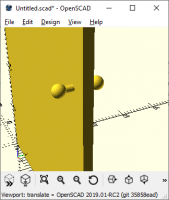
For instance:
$fs=0.2;

module door() {
    h = 78;
    w = 36;
    t = 1.5;
    handle_h = 30;
    handle_inset = 3;
    cube([w, t, h]);
    translate([w-handle_inset, 0, handle_h])
        rotate([90,0,0])
        handle();
    translate([w-handle_inset, t, handle_h])
        rotate([-90,0,0])
        handle();
}

module handle() {
    shaft_h = 2;
    cylinder(h=shaft_h, d=1);
    translate([0,0,shaft_h])
        sphere(d=2);
}

door();
Here's the process I used:
- I want to make a door. ("module door() {}")
- The door is a rectangle with certain dimensions ("h=... w=... t=...
cube(...)"); - And let's actually render something. ("door();")
- I need a handle on the front side. I'll design a handle so that the
base of the handle is at [0,0,0] and it extends up into +Z, so that
means that it needs to be translated up to the right place
("handle_h = ... handle_inset = ... translate(...)" and rotated into
the right orientation ("rotate(...)"). - But I don't want to design the handle now, because I'm going to want
to design it once and place it twice. ("handle( )") - Let's design the handle. ("module handle() { }")
- The only tricky part is the relationship between the cylinder and
the sphere. Let's measure from the face of the door to the center
of the sphere. (contents of the module) - OK, that's a handle on the front. Now for a handle on the back. It
needs to be translated to the same place, but on the other side
("translate([..., t, ...])"), - The back handle needs to be pointed the other direction.
("rotate([-90,...])".
More likely, I'd make the handle be a child of the door module, so that
I could have doors with different kinds of handles. A fully-fleshed out
example would have more complex rules for the handle, to allow for
asymmetric handles and positioning them on the left and right sides of
the door.
OK, in some ways that's wildly more complex than a "place boxes and
spheres in space" model. But when I realize that doors are actually 2"
thick rather than 1.5" thick, I change one parameter and it all still works.
FreeCAD claims to have this kind of parameterization, but so far (in
maybe a half hour of playing with it) it's defeated me. I can't even
figure out how to make two spheres that will stay next to each other.
In OpenSCAD that's:
$fn=100;
r1 = 5;
r2 = 10;
sphere(r1);
translate([0,0,r1+r2])
    sphere(r2);
I agree that OpenSCAD often forces you to write code "backwards".
In Curv, which is a new modelling language originally inspired by OpenSCAD, I introduced a "pipe forwards" operator, called ">>", similar to the "|" pipe operator in the Unix shell. This lets me a series of shape transformations where the data flows forwards, rather than backwards, through the pipeline.
cylinder(h=10)
rotate([0,90,0])
translate([0,0,10]);
Once I discovered this, it immediately felt like a more natural way of writing code.
Doug Moen
Yours is a useful example of something I have noticed with Openscad.
Developing a model involves a lot of re-tracing of steps.
For example, I create a cylinder.
Then I say "oops, I need to go back and rotate the cylinder".
Then "I now need to go back and translate the rotated cylinder".
Maybe your mind is capable of envisaging the entire process and writing it
directly from top to bottom, but mine certainly is not.
Indeed, the design process is often (but not always) "inside out". I start with a primitive component, then position it with respect to other primitive components to form a subassembly, then position that subassembly with respect to others to form a larger subassembly, and so on. Perhaps that would be more obvious if expressed in a reverse Polish notation, e.g.
cylinder(h=10) rotate([0,90,0]) translate([0,0,10]);
But I don't think so.
JordanBrown wrote
What I'm wondering about - and maybe I'm just not imaginative enough -
is how I would apply this methodology to anything that I'd actually do.
Mostly, I consider it wrong if I ever put a number into the dimensions
of an object,
In the project I'm working on you can create variables with values and
anywhere a number is used you can alternatively use a variable and/or a
formula - just like using Openscad directly.
...R
--
Sent from: http://forum.openscad.org/
On 10/3/2019 1:22 AM, Robin2 wrote:
JordanBrown wrote
What I'm wondering about - and maybe I'm just not imaginative enough -
is how I would apply this methodology to anything that I'd actually do.
Mostly, I consider it wrong if I ever put a number into the dimensions
of an object,
In the project I'm working on you can create variables with values and
anywhere a number is used you can alternatively use a variable and/or a
formula - just like using Openscad directly.
That certainly helps a lot.

Not that I advocate doing it, but you can get around that problem by nesting
use<>.
nophead wrote
That doesn't work because the definition of cube overrides the original so
that __cube() calls the new one and creates recursion.
On Tue, 17 Sep 2019 at 11:03, Rogier Wolff <
R.E.Wolff@
> wrote:
On Mon, Sep 16, 2019 at 11:20:57AM -0400, Doug Moen wrote:
OpenSCAD should add the flexibility to override built-in modules
with new modules of the same name. You should be able to define a
module called cube, and you should be able to reference the
builtin module cube while defining the new version of cube.
This isn't too difficult to implement, I'd think.
Just rename the current cube () primitive to __cube () and provide
a default module cube () definition that calls __cube()...
Roger.
--
Sent from: http://forum.openscad.org/