

Cutter pushing back on OpenScad DXF files due to "too many nodes"

On 17/02/2021 12:51, nbkhwjm wrote:
if I don't add a 3d Z parameter to any translates or use any 3d object
then it exports just fine.. Actually I think that OpenSCAD is quite
good at doing a 2D layout as I can programmatically layout multiple
objects mathematically quickly...
Thanks, I'll try that. Most of my cnc stuff is 2.5D, anyway. As dxf can
be 3d, I thought that openscad would cater for that. What
version/release of dxf does openscad export?

You can set the level of optimization and observe any severe changes. If anything, I'd suggest that the optimization improves the accuracy by removing the jaggies, putting the lines on the circle instead of creating chords.
On Wednesday, February 17, 2021, 7:21:34 AM EST, nbkhwjm <ke6rwj@gmail.com> wrote:
I downloaded LightBurn and used the Optimize function as recommended.. the number of nodes went from 6000+ to 260, then exported it as dxf. I sent a sample to the cutter for evaluation.
I do worry about losing accuracy with any kind of "optimization" process though... am I being paranoid?
Sent from the OpenSCAD mailing list archive at Nabble.com.
OpenSCAD mailing list
Discuss@lists.openscad.org
http://lists.openscad.org/mailman/listinfo/discuss_lists.openscad.org
Well, whatever version of dxf, my cam program can import it OK and
generate the required G-codes. Now, since it is mostly 2,5D (simple
pocketing/profiling on 3 axis mill) I basically need outlines and depths
of cut, the illustration shows a simple part. Using intersections on a
large cube, I can get the profiles, but is there a simple way to get
them into 2d, and perhaps combine them as one dxf export?
On 17/02/2021 13:30, Ray West wrote:
On 17/02/2021 12:51, nbkhwjm wrote:
if I don't add a 3d Z parameter to any translates or use any 3d
object then it exports just fine.. Actually I think that OpenSCAD is
quite good at doing a 2D layout as I can programmatically layout
multiple objects mathematically quickly...
Thanks, I'll try that. Most of my cnc stuff is 2.5D, anyway. As dxf
can be 3d, I thought that openscad would cater for that. What
version/release of dxf does openscad export?
OpenSCAD mailing list
Discuss@lists.openscad.org
http://lists.openscad.org/mailman/listinfo/discuss_lists.openscad.org
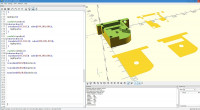

if you drop the Z parameter on the translates, and change Cube to Square it
will be 2D, im not sure how that works for you since you need depth of
cut... also when you render it, its distinctly different looking.. like
the attached picture...
http://forum.openscad.org/file/t3134/Screen_Shot_2021-02-17_at_10.png
--
Sent from: http://forum.openscad.org/

Use projection() to convert 3D to 2D.
On Wed, 17 Feb 2021 at 16:30, nbkhwjm ke6rwj@gmail.com wrote:
if you drop the Z parameter on the translates, and change Cube to Square
it will be 2D, im not sure how that works for you since you need depth of
cut... also when you render it, its distinctly different looking.. like
the attached picture...
Sent from the OpenSCAD mailing list archive http://forum.openscad.org/
at Nabble.com.
OpenSCAD mailing list
Discuss@lists.openscad.org
http://lists.openscad.org/mailman/listinfo/discuss_lists.openscad.org

OpenSCAD mailing list-2 wrote
As a test, I opened a file I have in OpenSCAD that creates a projection,
then exported the result to a DXF file. When I opened the file in
LightBurn, a laser cutting program, the "arcs" were short segments, as
described and as expected.
LightBurn has an optimize feature with sliders for magnitude. When I
pushed the slider even a small amount, the individual segments were turned
into Bezier curves and the number of nodes was reduced from 549 overall to
62.
The program is not free, but one can purchase a GRBL version for US$40.
It's one more post-processing step, but works fast and may provide a
solution.
I second that. LightBurn is the gold standard for laser cutters, there
really isn't anything even close to it. If you have spent the money on a
fiber laser, the cost for LightBurn is neglible.
--
Sent from: http://forum.openscad.org/
Thanks for your help. I can get the similar change of colour on
rendering, and a dxf file, if I draw in 2d. However, in the 3d example I
quoted, I can 'slice it' by using squares, by translating the 3d object
down, instead of increasing the square height, so to speak, However, if
I render it, it ignores the 2d parts. If I remove the 3d part (comment
out it's display line) then it will not render.
I've a simpler part below, that I can't get to export. How do I get a
dxf file for the two 'discs' ?
module test(){
cylinder(50,20,10);
}
test();
module bot(){
intersection(){
square(100,true);
translate([0,0,-1])test();
}
}
translate([50,50,0])bot();
module upper(){
intersection(){
square(100,true);
translate([0,0,-40])test();
}
}
translate([0,50,0])upper();
//Best wishes,
//Ray
On 17/02/2021 16:29, nbkhwjm wrote:
if you drop the Z parameter on the translates, and change Cube to
Square it will be 2D, im not sure how that works for you since you
need depth of cut... also when you render it, its distinctly
different looking.. like the attached picture...
Sent from the OpenSCAD mailing list archive
http://forum.openscad.org/ at Nabble.com.
OpenSCAD mailing list
Discuss@lists.openscad.org
http://lists.openscad.org/mailman/listinfo/discuss_lists.openscad.org

Even for a low cost laser cutter, Lightburn is well worth the $40, but
only provided your control board is one that's compatible with it.
On Wed, 2021-02-17 at 11:12 -0700, Troberg wrote:
OpenSCAD mailing list-2 wrote
As a test, I opened a file I have in OpenSCAD that creates a
projection, then exported the result to a DXF file. When I opened
the file in LightBurn, a laser cutting program, the "arcs" were
short segments, as described and as expected.
LightBurn has an optimize feature with sliders for magnitude. When
I pushed the slider even a small amount, the individual segments
were turned into Bezier curves and the number of nodes was reduced
from 549 overall to 62.
The program is not free, but one can purchase a GRBL version for
US$40. It's one more post-processing step, but works fast and may
provide a solution.
I second that. LightBurn is the gold standard for laser cutters,
there really isn't anything even close to it. If you have spent the
money on a fiber laser, the cost for LightBurn is neglible.
Sent from the OpenSCAD mailing list archive at Nabble.com.
OpenSCAD mailing list
Discuss@lists.openscad.org
http://lists.openscad.org/mailman/listinfo/discuss_lists.openscad.org