

discuss@lists.openscad.org

OpenSCAD general discussion Mailing-list

View all threads

Slice object into overlapping slices for laser cutter (like 123D Make but better)

J
Jago
Tue, May 17, 2016 12:45 PM

123D Make can slice objects and these slices can be cut on a laser cutter and
glued together to form an object. Great, only the slices don't overlap so
the resulting object is not so strong, especially if you are using slices
that lock together to form an object bigger than you can cut in your cutter.

Here's what I need:
http://forum.openscad.org/file/n17332/block_work.png

Would it be possible, appropriate to commission someone here to make a
function to take an object and slices it according to how thick the material
is we are cutting, and according the the size limit of the laser cutter?
This would be really useful to be able to do. What would be a fair price for
this programming? Perhaps I could release it to everyone as I'd imagine it
would be useful for a lot of people? Or maybe it's already out there and I
just need to know the right words to search for?

Just to be clear again, here's the program that does it imperfectly:
www.123dapp.com/make

and some screenshots:
http://forum.openscad.org/file/n17332/google_images.png

As I say, I just want to be able to make something with OVERLAPPING slices
that can form an object bigger than the laser cutter bed strongly. I don't
even mind a bit of excess material as I can trim that off manually

--
View this message in context: http://forum.openscad.org/Slice-object-into-overlapping-slices-for-laser-cutter-like-123D-Make-but-better-tp17332.html
Sent from the OpenSCAD mailing list archive at Nabble.com.

123D Make can slice objects and these slices can be cut on a laser cutter and glued together to form an object. Great, only the slices don't overlap so the resulting object is not so strong, especially if you are using slices that lock together to form an object bigger than you can cut in your cutter. Here's what I need: <http://forum.openscad.org/file/n17332/block_work.png> Would it be possible, appropriate to commission someone here to make a function to take an object and slices it according to how thick the material is we are cutting, and according the the size limit of the laser cutter? This would be really useful to be able to do. What would be a fair price for this programming? Perhaps I could release it to everyone as I'd imagine it would be useful for a lot of people? Or maybe it's already out there and I just need to know the right words to search for? Just to be clear again, here's the program that does it imperfectly: www.123dapp.com/make and some screenshots: <http://forum.openscad.org/file/n17332/google_images.png> As I say, I just want to be able to make something with OVERLAPPING slices that can form an object bigger than the laser cutter bed strongly. I don't even mind a bit of excess material as I can trim that off manually -- View this message in context: http://forum.openscad.org/Slice-object-into-overlapping-slices-for-laser-cutter-like-123D-Make-but-better-tp17332.html Sent from the OpenSCAD mailing list archive at Nabble.com.
PF
Peter Falke
Tue, May 17, 2016 9:26 PM

Is this what you need?


r=50;
dr=4;

module my_object(){
sphere(r);
cube(r);
}

module slice(dr=dr){
for(i=[-r:dr:r]){

translate([0,0,i])linear_extrude(1)translate([0,0,i*r])projection(cut=true)translate([0,0,-i])children();
}
}

slice()my_object();

translate([2.5*r,0,0])my_object();

2016-05-17 14:45 GMT+02:00 Jago Jago25_98@hotmail.com:

123D Make can slice objects and these slices can be cut on a laser cutter
and
glued together to form an object. Great, only the slices don't overlap so
the resulting object is not so strong, especially if you are using slices
that lock together to form an object bigger than you can cut in your
cutter.

Here's what I need:
http://forum.openscad.org/file/n17332/block_work.png

Would it be possible, appropriate to commission someone here to make a
function to take an object and slices it according to how thick the
material
is we are cutting, and according the the size limit of the laser cutter?
This would be really useful to be able to do. What would be a fair price
for
this programming? Perhaps I could release it to everyone as I'd imagine it
would be useful for a lot of people? Or maybe it's already out there and I
just need to know the right words to search for?

Just to be clear again, here's the program that does it imperfectly:
www.123dapp.com/make

and some screenshots:
http://forum.openscad.org/file/n17332/google_images.png

As I say, I just want to be able to make something with OVERLAPPING slices
that can form an object bigger than the laser cutter bed strongly. I don't
even mind a bit of excess material as I can trim that off manually

--
View this message in context:
http://forum.openscad.org/Slice-object-into-overlapping-slices-for-laser-cutter-like-123D-Make-but-better-tp17332.html
Sent from the OpenSCAD mailing list archive at Nabble.com.


OpenSCAD mailing list
Discuss@lists.openscad.org
http://lists.openscad.org/mailman/listinfo/discuss_lists.openscad.org
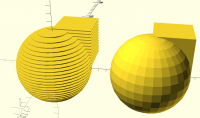
Is this what you need? ​ r=50; dr=4; module my_object(){ sphere(r); cube(r); } module slice(dr=dr){ for(i=[-r:dr:r]){ translate([0,0,i])linear_extrude(1)translate([0,0,i*r])projection(cut=true)translate([0,0,-i])children(); } } slice()my_object(); translate([2.5*r,0,0])my_object(); 2016-05-17 14:45 GMT+02:00 Jago <Jago25_98@hotmail.com>: > 123D Make can slice objects and these slices can be cut on a laser cutter > and > glued together to form an object. Great, only the slices don't overlap so > the resulting object is not so strong, especially if you are using slices > that lock together to form an object bigger than you can cut in your > cutter. > > Here's what I need: > <http://forum.openscad.org/file/n17332/block_work.png> > > Would it be possible, appropriate to commission someone here to make a > function to take an object and slices it according to how thick the > material > is we are cutting, and according the the size limit of the laser cutter? > This would be really useful to be able to do. What would be a fair price > for > this programming? Perhaps I could release it to everyone as I'd imagine it > would be useful for a lot of people? Or maybe it's already out there and I > just need to know the right words to search for? > > Just to be clear again, here's the program that does it imperfectly: > www.123dapp.com/make > > and some screenshots: > <http://forum.openscad.org/file/n17332/google_images.png> > > As I say, I just want to be able to make something with OVERLAPPING slices > that can form an object bigger than the laser cutter bed strongly. I don't > even mind a bit of excess material as I can trim that off manually > > > > -- > View this message in context: > http://forum.openscad.org/Slice-object-into-overlapping-slices-for-laser-cutter-like-123D-Make-but-better-tp17332.html > Sent from the OpenSCAD mailing list archive at Nabble.com. > > _______________________________________________ > OpenSCAD mailing list > Discuss@lists.openscad.org > http://lists.openscad.org/mailman/listinfo/discuss_lists.openscad.org >
PF
Peter Falke
Tue, May 17, 2016 9:36 PM

No, you want to have every slice cut into smaler pieces.
How do you want them labeled to put them together in the right order?
And you need alignment tabs?

There are already soltions for a similar problem on thingiverse: Cut stl's
into smaller pieces to print them on smaller print beds of 3d-printers.
Does someone remember this? I cant find it t the moment.

2016-05-17 23:26 GMT+02:00 Peter Falke stempeldergeschichte@googlemail.com
:

Is this what you need?


r=50;
dr=4;

module my_object(){
sphere(r);
cube(r);
}

module slice(dr=dr){
for(i=[-r:dr:r]){

translate([0,0,i])linear_extrude(1)translate([0,0,i*r])projection(cut=true)translate([0,0,-i])children();
}
}

slice()my_object();

translate([2.5*r,0,0])my_object();

2016-05-17 14:45 GMT+02:00 Jago Jago25_98@hotmail.com:

123D Make can slice objects and these slices can be cut on a laser cutter
and
glued together to form an object. Great, only the slices don't overlap so
the resulting object is not so strong, especially if you are using slices
that lock together to form an object bigger than you can cut in your
cutter.

Here's what I need:
http://forum.openscad.org/file/n17332/block_work.png

Would it be possible, appropriate to commission someone here to make a
function to take an object and slices it according to how thick the
material
is we are cutting, and according the the size limit of the laser cutter?
This would be really useful to be able to do. What would be a fair price
for
this programming? Perhaps I could release it to everyone as I'd imagine it
would be useful for a lot of people? Or maybe it's already out there and I
just need to know the right words to search for?

Just to be clear again, here's the program that does it imperfectly:
www.123dapp.com/make

and some screenshots:
http://forum.openscad.org/file/n17332/google_images.png

As I say, I just want to be able to make something with OVERLAPPING slices
that can form an object bigger than the laser cutter bed strongly. I don't
even mind a bit of excess material as I can trim that off manually

--
View this message in context:
http://forum.openscad.org/Slice-object-into-overlapping-slices-for-laser-cutter-like-123D-Make-but-better-tp17332.html
Sent from the OpenSCAD mailing list archive at Nabble.com.


OpenSCAD mailing list
Discuss@lists.openscad.org
http://lists.openscad.org/mailman/listinfo/discuss_lists.openscad.org
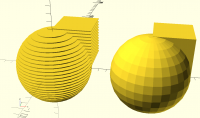
No, you want to have every slice cut into smaler pieces. How do you want them labeled to put them together in the right order? And you need alignment tabs? There are already soltions for a similar problem on thingiverse: Cut stl's into smaller pieces to print them on smaller print beds of 3d-printers. Does someone remember this? I cant find it t the moment. 2016-05-17 23:26 GMT+02:00 Peter Falke <stempeldergeschichte@googlemail.com> : > Is this what you need? > > > ​ > r=50; > dr=4; > > module my_object(){ > sphere(r); > cube(r); > } > > > module slice(dr=dr){ > for(i=[-r:dr:r]){ > > translate([0,0,i])linear_extrude(1)translate([0,0,i*r])projection(cut=true)translate([0,0,-i])children(); > } > } > > > slice()my_object(); > > translate([2.5*r,0,0])my_object(); > > > 2016-05-17 14:45 GMT+02:00 Jago <Jago25_98@hotmail.com>: > >> 123D Make can slice objects and these slices can be cut on a laser cutter >> and >> glued together to form an object. Great, only the slices don't overlap so >> the resulting object is not so strong, especially if you are using slices >> that lock together to form an object bigger than you can cut in your >> cutter. >> >> Here's what I need: >> <http://forum.openscad.org/file/n17332/block_work.png> >> >> Would it be possible, appropriate to commission someone here to make a >> function to take an object and slices it according to how thick the >> material >> is we are cutting, and according the the size limit of the laser cutter? >> This would be really useful to be able to do. What would be a fair price >> for >> this programming? Perhaps I could release it to everyone as I'd imagine it >> would be useful for a lot of people? Or maybe it's already out there and I >> just need to know the right words to search for? >> >> Just to be clear again, here's the program that does it imperfectly: >> www.123dapp.com/make >> >> and some screenshots: >> <http://forum.openscad.org/file/n17332/google_images.png> >> >> As I say, I just want to be able to make something with OVERLAPPING slices >> that can form an object bigger than the laser cutter bed strongly. I don't >> even mind a bit of excess material as I can trim that off manually >> >> >> >> -- >> View this message in context: >> http://forum.openscad.org/Slice-object-into-overlapping-slices-for-laser-cutter-like-123D-Make-but-better-tp17332.html >> Sent from the OpenSCAD mailing list archive at Nabble.com. >> >> _______________________________________________ >> OpenSCAD mailing list >> Discuss@lists.openscad.org >> http://lists.openscad.org/mailman/listinfo/discuss_lists.openscad.org >> > >
P
Parkinbot
Tue, May 17, 2016 11:02 PM

Jago,

slicing a 3D object into any pattern of pieces with free (or fixed) sizing
is a task OpenScad is equipped for. What about the data format and object
size you deliver and which formats can your laser cutter consume? OpenScad
can read STL and write DXF and SVG for this purpose.
If that is what you are seeking, a batch file with parametrized OpenScad
commandline calls generating a series of pieces with naming scheme would be
the preferable solution. So, what is your platform (Windows, Linux, MacOS)?

Rudolf

--
View this message in context: http://forum.openscad.org/Slice-object-into-overlapping-slices-for-laser-cutter-like-123D-Make-but-better-tp17332p17340.html
Sent from the OpenSCAD mailing list archive at Nabble.com.

Jago, slicing a 3D object into any pattern of pieces with free (or fixed) sizing is a task OpenScad is equipped for. What about the data format and object size you deliver and which formats can your laser cutter consume? OpenScad can read STL and write DXF and SVG for this purpose. If that is what you are seeking, a batch file with parametrized OpenScad commandline calls generating a series of pieces with naming scheme would be the preferable solution. So, what is your platform (Windows, Linux, MacOS)? Rudolf -- View this message in context: http://forum.openscad.org/Slice-object-into-overlapping-slices-for-laser-cutter-like-123D-Make-but-better-tp17332p17340.html Sent from the OpenSCAD mailing list archive at Nabble.com.
TG
Tony Godshall
Tue, May 17, 2016 11:53 PM

Also you can render OpenSCAD to STL and slice with Slic3r, which is
free/open source.

http://slic3r.org/

It can render to G-code or SVG.

On Tue, May 17, 2016 at 4:02 PM, Parkinbot rudolf@parkinbot.com wrote:

Jago,

slicing a 3D object into any pattern of pieces with free (or fixed) sizing
is a task OpenScad is equipped for. What about the data format and object
size you deliver and which formats can your laser cutter consume? OpenScad
can read STL and write DXF and SVG for this purpose.
If that is what you are seeking, a batch file with parametrized OpenScad
commandline calls generating a series of pieces with naming scheme would be
the preferable solution. So, what is your platform (Windows, Linux, MacOS)?

Rudolf

--
View this message in context: http://forum.openscad.org/Slice-object-into-overlapping-slices-for-laser-cutter-like-123D-Make-but-better-tp17332p17340.html
Sent from the OpenSCAD mailing list archive at Nabble.com.


OpenSCAD mailing list
Discuss@lists.openscad.org
http://lists.openscad.org/mailman/listinfo/discuss_lists.openscad.org
--

Best Regards.
This is unedited.
This message came out of me
via a suboptimal keyboard.

Also you can render OpenSCAD to STL and slice with Slic3r, which is free/open source. http://slic3r.org/ It can render to G-code or SVG. On Tue, May 17, 2016 at 4:02 PM, Parkinbot <rudolf@parkinbot.com> wrote: > Jago, > > slicing a 3D object into any pattern of pieces with free (or fixed) sizing > is a task OpenScad is equipped for. What about the data format and object > size you deliver and which formats can your laser cutter consume? OpenScad > can read STL and write DXF and SVG for this purpose. > If that is what you are seeking, a batch file with parametrized OpenScad > commandline calls generating a series of pieces with naming scheme would be > the preferable solution. So, what is your platform (Windows, Linux, MacOS)? > > Rudolf > > > > > -- > View this message in context: http://forum.openscad.org/Slice-object-into-overlapping-slices-for-laser-cutter-like-123D-Make-but-better-tp17332p17340.html > Sent from the OpenSCAD mailing list archive at Nabble.com. > > _______________________________________________ > OpenSCAD mailing list > Discuss@lists.openscad.org > http://lists.openscad.org/mailman/listinfo/discuss_lists.openscad.org -- -- Best Regards. This is unedited. This message came out of me via a suboptimal keyboard.
PF
Peter Falke
Wed, May 18, 2016 7:44 PM

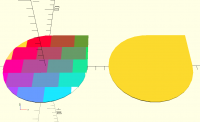
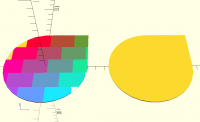
So here is one slice (z=0) tiled:

​r=50;
dr=4;
xmax=30;
ymax=20;

module my_object(){
sphere(r);
cube(r);
}

module slice(dr=dr){
for(i=[-r:dr:r]){

translate([0,0,i])linear_extrude(1)translate([0,0,i*r])projection(cut=true)translate([0,0,-i])children();
}
}

//slice()my_object();

//translate([2.5*r,0,0])my_object();

module tile(i=0){
for(iy=[-r:ymax:r]){
for(ix=[-r-xmax:xmax:r+xmax]){
color([.5-(ix)/r/2,1-(.5-(ix)/r/2),.5-(iy)/r/2])
render()intersection(){

translate([0,0,ir])projection(cut=true)translate([0,0,-i])children();
translate([ix+xmax/2
iy/ymax,iy])square([xmax,ymax]);
}
}
}
}

tile()my_object();
translate([2.5*r,0,0])projection(cut=true)my_object();

2016-05-18 1:53 GMT+02:00 Tony Godshall togo@of.net:

Also you can render OpenSCAD to STL and slice with Slic3r, which is
free/open source.

http://slic3r.org/

It can render to G-code or SVG.

On Tue, May 17, 2016 at 4:02 PM, Parkinbot rudolf@parkinbot.com wrote:

Jago,

slicing a 3D object into any pattern of pieces with free (or fixed)

sizing

is a task OpenScad is equipped for. What about the data format and object
size you deliver and which formats can your laser cutter consume?

OpenScad

can read STL and write DXF and SVG for this purpose.
If that is what you are seeking, a batch file with parametrized OpenScad
commandline calls generating a series of pieces with naming scheme would

be

the preferable solution. So, what is your platform (Windows, Linux,

MacOS)?

Rudolf

--
View this message in context:

Sent from the OpenSCAD mailing list archive at Nabble.com.


OpenSCAD mailing list
Discuss@lists.openscad.org
http://lists.openscad.org/mailman/listinfo/discuss_lists.openscad.org
--

Best Regards.
This is unedited.
This message came out of me
via a suboptimal keyboard.


OpenSCAD mailing list
Discuss@lists.openscad.org
http://lists.openscad.org/mailman/listinfo/discuss_lists.openscad.org

So here is one slice (z=0) tiled: ​r=50; dr=4; xmax=30; ymax=20; module my_object(){ sphere(r); cube(r); } module slice(dr=dr){ for(i=[-r:dr:r]){ translate([0,0,i])linear_extrude(1)translate([0,0,i*r])projection(cut=true)translate([0,0,-i])children(); } } //slice()my_object(); //translate([2.5*r,0,0])my_object(); module tile(i=0){ for(iy=[-r:ymax:r]){ for(ix=[-r-xmax:xmax:r+xmax]){ color([.5-(ix)/r/2,1-(.5-(ix)/r/2),.5-(iy)/r/2]) render()intersection(){ translate([0,0,i*r])projection(cut=true)translate([0,0,-i])children(); translate([ix+xmax/2*iy/ymax,iy])square([xmax,ymax]); } } } } tile()my_object(); translate([2.5*r,0,0])projection(cut=true)my_object(); 2016-05-18 1:53 GMT+02:00 Tony Godshall <togo@of.net>: > Also you can render OpenSCAD to STL and slice with Slic3r, which is > free/open source. > > http://slic3r.org/ > > It can render to G-code or SVG. > > > On Tue, May 17, 2016 at 4:02 PM, Parkinbot <rudolf@parkinbot.com> wrote: > > Jago, > > > > slicing a 3D object into any pattern of pieces with free (or fixed) > sizing > > is a task OpenScad is equipped for. What about the data format and object > > size you deliver and which formats can your laser cutter consume? > OpenScad > > can read STL and write DXF and SVG for this purpose. > > If that is what you are seeking, a batch file with parametrized OpenScad > > commandline calls generating a series of pieces with naming scheme would > be > > the preferable solution. So, what is your platform (Windows, Linux, > MacOS)? > > > > Rudolf > > > > > > > > > > -- > > View this message in context: > http://forum.openscad.org/Slice-object-into-overlapping-slices-for-laser-cutter-like-123D-Make-but-better-tp17332p17340.html > > Sent from the OpenSCAD mailing list archive at Nabble.com. > > > > _______________________________________________ > > OpenSCAD mailing list > > Discuss@lists.openscad.org > > http://lists.openscad.org/mailman/listinfo/discuss_lists.openscad.org > > > > -- > -- > Best Regards. > This is unedited. > This message came out of me > via a suboptimal keyboard. > > _______________________________________________ > OpenSCAD mailing list > Discuss@lists.openscad.org > http://lists.openscad.org/mailman/listinfo/discuss_lists.openscad.org >
RP
Ronaldo Persiano
Wed, May 18, 2016 8:35 PM

Almost there. The tiles of one slice should be offset relative to the
adjacent ones.

2016-05-18 16:44 GMT-03:00 Peter Falke stempeldergeschichte@googlemail.com
:

So here is one slice (z=0) tiled:

​r=50;
dr=4;
xmax=30;
ymax=20;

module my_object(){
sphere(r);
cube(r);
}

module slice(dr=dr){
for(i=[-r:dr:r]){

translate([0,0,i])linear_extrude(1)translate([0,0,i*r])projection(cut=true)translate([0,0,-i])children();
}
}

//slice()my_object();

//translate([2.5*r,0,0])my_object();

module tile(i=0){
for(iy=[-r:ymax:r]){
for(ix=[-r-xmax:xmax:r+xmax]){
color([.5-(ix)/r/2,1-(.5-(ix)/r/2),.5-(iy)/r/2])
render()intersection(){

translate([0,0,ir])projection(cut=true)translate([0,0,-i])children();
translate([ix+xmax/2
iy/ymax,iy])square([xmax,ymax]);
}
}
}
}

tile()my_object();
translate([2.5*r,0,0])projection(cut=true)my_object();

2016-05-18 1:53 GMT+02:00 Tony Godshall togo@of.net:

Also you can render OpenSCAD to STL and slice with Slic3r, which is
free/open source.

http://slic3r.org/

It can render to G-code or SVG.

On Tue, May 17, 2016 at 4:02 PM, Parkinbot rudolf@parkinbot.com wrote:

Jago,

slicing a 3D object into any pattern of pieces with free (or fixed)

sizing

is a task OpenScad is equipped for. What about the data format and

object

size you deliver and which formats can your laser cutter consume?

OpenScad

can read STL and write DXF and SVG for this purpose.
If that is what you are seeking, a batch file with parametrized OpenScad
commandline calls generating a series of pieces with naming scheme

would be

the preferable solution. So, what is your platform (Windows, Linux,

MacOS)?

Rudolf

--
View this message in context:

Sent from the OpenSCAD mailing list archive at Nabble.com.


OpenSCAD mailing list
Discuss@lists.openscad.org
http://lists.openscad.org/mailman/listinfo/discuss_lists.openscad.org

--

Best Regards.
This is unedited.
This message came out of me
via a suboptimal keyboard.


OpenSCAD mailing list
Discuss@lists.openscad.org
http://lists.openscad.org/mailman/listinfo/discuss_lists.openscad.org

Almost there. The tiles of one slice should be offset relative to the adjacent ones. 2016-05-18 16:44 GMT-03:00 Peter Falke <stempeldergeschichte@googlemail.com> : > So here is one slice (z=0) tiled: > > > ​r=50; > dr=4; > xmax=30; > ymax=20; > > > module my_object(){ > sphere(r); > cube(r); > } > > > module slice(dr=dr){ > for(i=[-r:dr:r]){ > > translate([0,0,i])linear_extrude(1)translate([0,0,i*r])projection(cut=true)translate([0,0,-i])children(); > } > } > > > //slice()my_object(); > > //translate([2.5*r,0,0])my_object(); > > > module tile(i=0){ > for(iy=[-r:ymax:r]){ > for(ix=[-r-xmax:xmax:r+xmax]){ > color([.5-(ix)/r/2,1-(.5-(ix)/r/2),.5-(iy)/r/2]) > render()intersection(){ > > translate([0,0,i*r])projection(cut=true)translate([0,0,-i])children(); > translate([ix+xmax/2*iy/ymax,iy])square([xmax,ymax]); > } > } > } > } > > > tile()my_object(); > translate([2.5*r,0,0])projection(cut=true)my_object(); > > 2016-05-18 1:53 GMT+02:00 Tony Godshall <togo@of.net>: > >> Also you can render OpenSCAD to STL and slice with Slic3r, which is >> free/open source. >> >> http://slic3r.org/ >> >> It can render to G-code or SVG. >> >> >> On Tue, May 17, 2016 at 4:02 PM, Parkinbot <rudolf@parkinbot.com> wrote: >> > Jago, >> > >> > slicing a 3D object into any pattern of pieces with free (or fixed) >> sizing >> > is a task OpenScad is equipped for. What about the data format and >> object >> > size you deliver and which formats can your laser cutter consume? >> OpenScad >> > can read STL and write DXF and SVG for this purpose. >> > If that is what you are seeking, a batch file with parametrized OpenScad >> > commandline calls generating a series of pieces with naming scheme >> would be >> > the preferable solution. So, what is your platform (Windows, Linux, >> MacOS)? >> > >> > Rudolf >> > >> > >> > >> > >> > -- >> > View this message in context: >> http://forum.openscad.org/Slice-object-into-overlapping-slices-for-laser-cutter-like-123D-Make-but-better-tp17332p17340.html >> > Sent from the OpenSCAD mailing list archive at Nabble.com. >> > >> > _______________________________________________ >> > OpenSCAD mailing list >> > Discuss@lists.openscad.org >> > http://lists.openscad.org/mailman/listinfo/discuss_lists.openscad.org >> >> >> >> -- >> -- >> Best Regards. >> This is unedited. >> This message came out of me >> via a suboptimal keyboard. >> >> _______________________________________________ >> OpenSCAD mailing list >> Discuss@lists.openscad.org >> http://lists.openscad.org/mailman/listinfo/discuss_lists.openscad.org >> > > > _______________________________________________ > OpenSCAD mailing list > Discuss@lists.openscad.org > http://lists.openscad.org/mailman/listinfo/discuss_lists.openscad.org > >
R
Ronaldo
Wed, May 18, 2016 9:25 PM

r=50;
dr=4;
xmax=30;
ymax=20;
sp = 1; // spacing between tiles in spreading

module my_object(){
sphere(r);
cube(r);
}

module slice(dr=dr){
for(i=[-r:dr:r]){

translate([0,0,i])linear_extrude(1)translate([0,0,i*r])projection(cut=true)translate([0,0,-i])children();
}
}

//slice()my_object();

//translate([2.5*r,0,0])my_object();

module tile(i=0,dx=0,dy=0){
for(iy=[-r-dyymax:ymax:r+dyymax]){
for(ix=[-r-xmax-dxxmax:xmax:r+xmax+dxxmax]){
translate([spix/xmax,spiy/ymax,0])
render()intersection(){

translate([0,0,i*r])projection(cut=true)translate([0,0,-i])children();

translate([ix+xmax/2*iy/ymax-(i%2)xmax3/4,iy-(i%2)*ymax/2])square([xmax,ymax]);
}
}
}
}

// three adjacent layers
tile(0)my_object();
translate([0,0,5]) tile(1) my_object();
translate([0,0,10]) tile(2) my_object();
translate([2.5*r,0,0])projection(cut=true)my_object();

The parameters dx and dy (between 0 and 1) of tile() allow for small tilling
displacement to avoid too small tilling pieces in a layer by layer basis.

--
View this message in context: http://forum.openscad.org/Slice-object-into-overlapping-slices-for-laser-cutter-like-123D-Make-but-better-tp17332p17345.html
Sent from the OpenSCAD mailing list archive at Nabble.com.

That is what I meant: <http://forum.openscad.org/file/n17345/OffsetTilling.png> > r=50; > dr=4; > xmax=30; > ymax=20; > sp = 1; // spacing between tiles in spreading > > > module my_object(){ > sphere(r); > cube(r); > } > > > module slice(dr=dr){ > for(i=[-r:dr:r]){ > > translate([0,0,i])linear_extrude(1)translate([0,0,i*r])projection(cut=true)translate([0,0,-i])children(); > } > } > > > //slice()my_object(); > > //translate([2.5*r,0,0])my_object(); > > > module tile(i=0,dx=0,dy=0){ > for(iy=[-r-dy*ymax:ymax:r+dy*ymax]){ > for(ix=[-r-xmax-dx*xmax:xmax:r+xmax+dx*xmax]){ > translate([sp*ix/xmax,sp*iy/ymax,0]) > render()intersection(){ > > translate([0,0,i*r])projection(cut=true)translate([0,0,-i])children(); > > translate([ix+xmax/2*iy/ymax-(i%2)*xmax*3/4,iy-(i%2)*ymax/2])square([xmax,ymax]); > } > } > } > } > > // three adjacent layers > tile(0)my_object(); > translate([0,0,5]) tile(1) my_object(); > translate([0,0,10]) tile(2) my_object(); > translate([2.5*r,0,0])projection(cut=true)my_object(); The parameters dx and dy (between 0 and 1) of tile() allow for small tilling displacement to avoid too small tilling pieces in a layer by layer basis. -- View this message in context: http://forum.openscad.org/Slice-object-into-overlapping-slices-for-laser-cutter-like-123D-Make-but-better-tp17332p17345.html Sent from the OpenSCAD mailing list archive at Nabble.com.
P
Parkinbot
Wed, May 18, 2016 9:56 PM

Yes almost,

I'd say, the task is to slice a 3D-object first into slices as Peter
startet. As those slices are laser cut, each one has to be cut into the
cells size of an ordinary grid, with each piece fitting into the cutter's
bed.
Adjacent slices will be glued together. So, second, the grid of every second
slice needs an xy-offset of half of the bed size, as shown in the initial
drawing.

The problem is not the slicing. It is the output of, say, some hundreds of
DXF, one for each piece.
and of course finding a good global grid offset.

So the scad programm itself will be more or less a function taking some
parameters (bed size, material thickness, piece number) and will be called
by some (outer) script/program enumerating the pieces.

Indeed, I'd implement the full cutting logic with some programming language
that offers more interactiveness (and can also query the STL for a bounding
box), and call out to a 'dumb' .SCAD, more or less a three liner, that loads
the STL, intersects it with a cube(bed_x, bed_y, material_z) translated to
the mask position and project that down for DXF export.

Rudolf

--
View this message in context: http://forum.openscad.org/Slice-object-into-overlapping-slices-for-laser-cutter-like-123D-Make-but-better-tp17332p17346.html
Sent from the OpenSCAD mailing list archive at Nabble.com.

Yes almost, I'd say, the task is to slice a 3D-object first into slices as Peter startet. As those slices are laser cut, each one has to be cut into the cells size of an ordinary grid, with each piece fitting into the cutter's bed. Adjacent slices will be glued together. So, second, the grid of every second slice needs an xy-offset of half of the bed size, as shown in the initial drawing. The problem is not the slicing. It is the output of, say, some hundreds of DXF, one for each piece. and of course finding a good global grid offset. So the scad programm itself will be more or less a function taking some parameters (bed size, material thickness, piece number) and will be called by some (outer) script/program enumerating the pieces. Indeed, I'd implement the full cutting logic with some programming language that offers more interactiveness (and can also query the STL for a bounding box), and call out to a 'dumb' .SCAD, more or less a three liner, that loads the STL, intersects it with a cube(bed_x, bed_y, material_z) translated to the mask position and project that down for DXF export. Rudolf -- View this message in context: http://forum.openscad.org/Slice-object-into-overlapping-slices-for-laser-cutter-like-123D-Make-but-better-tp17332p17346.html Sent from the OpenSCAD mailing list archive at Nabble.com.
J
Jago
Thu, May 19, 2016 10:34 AM

Well done everyone :-) Thank you Peter and others for writing this code.

Yes this is true Rudolf, that labelling the parts for them to glue together
is another aspect, as is getting all the output into the right lasercutter
bed size in DXF. To this end this Slic3r is a really good head start but I
can't see it can make lager parts from smaller ones. The OpenSCAD code is
also great though and I can see many people using and finding this useful.
It might be better to have this function in Slic3r. hmm

--
View this message in context: http://forum.openscad.org/Slice-object-into-overlapping-slices-for-laser-cutter-like-123D-Make-but-better-tp17332p17347.html
Sent from the OpenSCAD mailing list archive at Nabble.com.

Well done everyone :-) Thank you Peter and others for writing this code. Yes this is true Rudolf, that labelling the parts for them to glue together is another aspect, as is getting all the output into the right lasercutter bed size in DXF. To this end this Slic3r is a really good head start but I can't see it can make lager parts from smaller ones. The OpenSCAD code is also great though and I can see many people using and finding this useful. It might be better to have this function in Slic3r. hmm -- View this message in context: http://forum.openscad.org/Slice-object-into-overlapping-slices-for-laser-cutter-like-123D-Make-but-better-tp17332p17347.html Sent from the OpenSCAD mailing list archive at Nabble.com.