

Slow rendering performance and high memory consumption when exporting a 3D STL

Hi All,
I’m running some benchmark tests to predict the amount of time I need for the final design and ran into some performance problems.
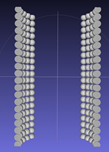
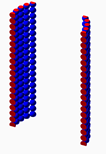
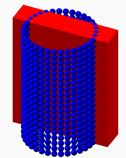
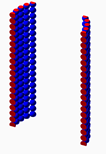
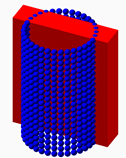
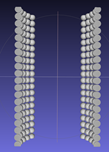
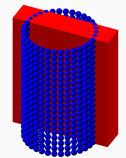
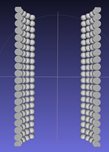
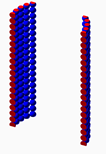
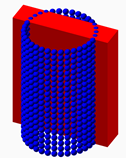
I calculate the intersection of a cuboid and a circular stack of 680 spheres. I included the script. Please don’t comment the messy setup or the purpose of the script. This is for benchmarking purposes only 😉. See below for the union and intersect within the GUI, as well as a view of the rendered STL in MeshLab.
While the GUI (F5) masters the intersection in less than 1 second, rendering it for STL export (F6) takes 44 minutes (on a Core i9 9900 3.1Ghz with 32GB RAM on an Asus ROG STRIX 8360F motherboard). Also, the memory consumption of OpenSCAD grows from 250 MB to more than 8 GB at the end of the rendering process.
Below is a screenshot of Sysinternals, showing that OpenSCAD uses up to 8 GB memory and 6.4% CPU for this script (the latter indicating that the script runs single threaded).
Why does the rendering process take so long and why does it take so much memory?
Pete.


http://forum.openscad.org/basic-questions-fn-td22360.html
Might help.
I am not sure what you are benchmarking against and what the equivalent
$fn and $fs values that you are using in the comparison software.
Try setting your $fn to a very low value - 5??? and see what affect that
has.
Ron
On 2020-08-13 6:43 a.m., peter_osc@xs4all.nl wrote:
Hi All,
I’m running some benchmark tests to predict the amount of time I need
for the final design and ran into some performance problems.
I calculate the intersection of a cuboid and a circular stack of 680
spheres. I included the script. Please don’t comment the messy setup
or the purpose of the script. This is for benchmarking purposes only
😉. See below for the union and intersect within the GUI, as well as a
view of the rendered STL in MeshLab.
While the GUI (F5) masters the intersection in less than 1 second,
rendering it for STL export (F6) takes 44 minutes (on a Core i9 9900
3.1Ghz with 32GB RAM on an Asus ROG STRIX 8360F motherboard). Also,
the memory consumption of OpenSCAD grows from 250 MB to more than 8 GB
at the end of the rendering process.
Below is a screenshot of Sysinternals, showing that OpenSCAD uses up
to 8 GB memory and 6.4% CPU for this script (the latter indicating
that the script runs single threaded).
Why does the rendering process take so long and why does it take so
much memory?
Pete.
OpenSCAD mailing list
Discuss@lists.openscad.org
http://lists.openscad.org/mailman/listinfo/discuss_lists.openscad.org
--
Ron Wheeler
Artifact Software
438-345-3369
rwheeler@artifact-software.com

Hi Ron,
Thanks for the advice.
$fn is related to the number of facets, so I cannot imagine that -5 is a legal value (although OpenSCAD seems to accept $fn=-5 without warning. Waiting on the results though…).
Setting $fn=25 is the minimum, otherwise the volume calculations of the spheres become too inaccurate. With a $fn=5 for example, your sphere volume calculations are almost a factor of 2 away from the analytical result.
$fn scales relatively linear to the calculation duration, by the way which sounds quite logical.
Regards,
Pete.
From: Discuss discuss-bounces@lists.openscad.org On Behalf Of Ron Wheeler via Discuss
Sent: Thursday, August 13, 2020 13:00
To: discuss@lists.openscad.org
Cc: Ron Wheeler rwheeler@artifact-software.com
Subject: Re: [OpenSCAD] Slow rendering performance and high memory consumption when exporting a 3D STL
http://forum.openscad.org/basic-questions-fn-td22360.html
Might help.
I am not sure what you are benchmarking against and what the equivalent $fn and $fs values that you are using in the comparison software.
Try setting your $fn to a very low value - 5??? and see what affect that has.
Ron
On 2020-08-13 6:43 a.m., peter_osc@xs4all.nl mailto:peter_osc@xs4all.nl wrote:
Hi All,
I’m running some benchmark tests to predict the amount of time I need for the final design and ran into some performance problems.
I calculate the intersection of a cuboid and a circular stack of 680 spheres. I included the script. Please don’t comment the messy setup or the purpose of the script. This is for benchmarking purposes only 😉. See below for the union and intersect within the GUI, as well as a view of the rendered STL in MeshLab.
While the GUI (F5) masters the intersection in less than 1 second, rendering it for STL export (F6) takes 44 minutes (on a Core i9 9900 3.1Ghz with 32GB RAM on an Asus ROG STRIX 8360F motherboard). Also, the memory consumption of OpenSCAD grows from 250 MB to more than 8 GB at the end of the rendering process.
Below is a screenshot of Sysinternals, showing that OpenSCAD uses up to 8 GB memory and 6.4% CPU for this script (the latter indicating that the script runs single threaded).
Why does the rendering process take so long and why does it take so much memory?
Pete.
OpenSCAD mailing list
Discuss@lists.openscad.org mailto:Discuss@lists.openscad.org
http://lists.openscad.org/mailman/listinfo/discuss_lists.openscad.org
--
Ron Wheeler
Artifact Software
438-345-3369
rwheeler@artifact-software.com mailto:rwheeler@artifact-software.com

Hi Ron,
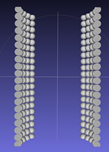
Results are here.
With $fn=-5, calculation duration decreases from 44 to 22 minutes. I don’t know why.
I cannot find any documentation about negative $fn values though, except that its minimum value is 0.01.
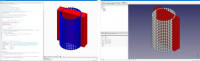
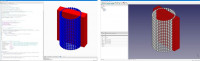
By the way, I am benchmarking OpenSCAD/CGAL against FreeCAD/Opencascade here.
FreeCAD/OpenCascade does this job in less than a second and I don’t see fundamental differences in the STL files that are produced, except some minor differences in the placement of facets, and the fact that FreeCAD produces a binary STL instead of ASCII.
So there is still a difference in performance of a factor of 1000 in this case which is worth considering for me.
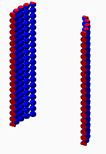
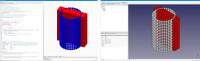
Below a screenshot of both designs in OpenSCAD and FreeCAD.
Pete.
From: Discuss discuss-bounces@lists.openscad.org On Behalf Of peter_osc@xs4all.nl
Sent: Thursday, August 13, 2020 13:32
To: 'OpenSCAD general discussion' discuss@lists.openscad.org
Subject: Re: [OpenSCAD] Slow rendering performance and high memory consumption when exporting a 3D STL
Hi Ron,
Thanks for the advice.
$fn is related to the number of facets, so I cannot imagine that -5 is a legal value (although OpenSCAD seems to accept $fn=-5 without warning. Waiting on the results though…).
Setting $fn=25 is the minimum, otherwise the volume calculations of the spheres become too inaccurate. With a $fn=5 for example, your sphere volume calculations are almost a factor of 2 away from the analytical result.
$fn scales relatively linear to the calculation duration, by the way which sounds quite logical.
Regards,
Pete.

I believe that was a dash not minus.
https://en.wikibooks.org/wiki/OpenSCAD_User_Manual/Other_Language_Features#$fa,$fs_and$fn
If $fn <=0 then the $fa/$fs calculation is used.
From: Discuss [mailto:discuss-bounces@lists.openscad.org] On Behalf Of peter_osc@xs4all.nl
Sent: Thu, 13 Aug 2020 22:11
To: 'OpenSCAD general discussion'
Subject: Re: [OpenSCAD] Slow rendering performance and high memory consumption when exporting a 3D
STL
Hi Ron,
Results are here.
With $fn=-5, calculation duration decreases from 44 to 22 minutes. I don't know why.
I cannot find any documentation about negative $fn values though, except that its minimum value is
0.01.
By the way, I am benchmarking OpenSCAD/CGAL against FreeCAD/Opencascade here.
FreeCAD/OpenCascade does this job in less than a second and I don't see fundamental differences in
the STL files that are produced, except some minor differences in the placement of facets, and the
fact that FreeCAD produces a binary STL instead of ASCII.
So there is still a difference in performance of a factor of 1000 in this case which is worth
considering for me.
Below a screenshot of both designs in OpenSCAD and FreeCAD.
Pete.
From: Discuss discuss-bounces@lists.openscad.org On Behalf Of peter_osc@xs4all.nl
Sent: Thursday, August 13, 2020 13:32
To: 'OpenSCAD general discussion' discuss@lists.openscad.org
Subject: Re: [OpenSCAD] Slow rendering performance and high memory consumption when exporting a 3D
STL
Hi Ron,
Thanks for the advice.
$fn is related to the number of facets, so I cannot imagine that -5 is a legal value (although
OpenSCAD seems to accept $fn=-5 without warning. Waiting on the results though.).
Setting $fn=25 is the minimum, otherwise the volume calculations of the spheres become too
inaccurate. With a $fn=5 for example, your sphere volume calculations are almost a factor of 2 away
from the analytical result.
$fn scales relatively linear to the calculation duration, by the way which sounds quite logical.
Regards,
Pete.
--
This email has been checked for viruses by AVG.
https://www.avg.com
Sorry that was a dash not a mathematical notation.
Never thought of how easy it would be to mistake my punctuation.
I should have been more thoughtful.
The fact that it scales should make it easier to compare performance
with other alternatives.
Ron
On 2020-08-13 7:31 a.m., peter_osc@xs4all.nl wrote:
Hi Ron,
Thanks for the advice.
$fn is related to the number of facets, so I cannot imagine that -5 is
a legal value (although OpenSCAD seems to accept $fn=-5 without
warning. Waiting on the results though…).
Setting $fn=25 is the minimum, otherwise the volume calculations of
the spheres become too inaccurate. With a $fn=5 for example, your
sphere volume calculations are almost a factor of 2 away from the
analytical result.
$fn scales relatively linear to the calculation duration, by the way
which sounds quite logical.
Regards,
Pete.
From: Discuss discuss-bounces@lists.openscad.org *On Behalf Of
*Ron Wheeler via Discuss
Sent: Thursday, August 13, 2020 13:00
To: discuss@lists.openscad.org
Cc: Ron Wheeler rwheeler@artifact-software.com
Subject: Re: [OpenSCAD] Slow rendering performance and high memory
consumption when exporting a 3D STL
http://forum.openscad.org/basic-questions-fn-td22360.html
Might help.
I am not sure what you are benchmarking against and what the
equivalent $fn and $fs values that you are using in the comparison
software.
Try setting your $fn to a very low value - 5??? and see what affect
that has.
Ron
On 2020-08-13 6:43 a.m., peter_osc@xs4all.nl
mailto:peter_osc@xs4all.nl wrote:
 Hi All,

 I’m running some benchmark tests to predict the amount of time I
 need for the final design and ran into some performance problems.

 I calculate the intersection of a cuboid and a circular stack of
 680 spheres. I included the script. Please don’t comment the messy
 setup or the purpose of the script. This is for benchmarking
 purposes only 😉. See below for the union and intersect within the
 GUI, as well as a view of the rendered STL in MeshLab.

 While the GUI (F5) masters the intersection in less than 1 second,
 rendering it for STL export (F6) takes 44 minutes (on a Core i9
 9900 3.1Ghz with 32GB RAM on an Asus ROG STRIX 8360F motherboard).
 Also, the memory consumption of OpenSCAD grows from 250 MB to more
 than 8 GB at the end of the rendering process.

 Below is a screenshot of Sysinternals, showing that OpenSCAD uses
 up to 8 GB memory and 6.4% CPU for this script (the latter
 indicating that the script runs single threaded).

 Why does the rendering process take so long and why does it take
 so much memory?

 Pete.


 _______________________________________________

 OpenSCAD mailing list

 Discuss@lists.openscad.org  <mailto:Discuss@lists.openscad.org>

 http://lists.openscad.org/mailman/listinfo/discuss_lists.openscad.org
--
Ron Wheeler
Artifact Software
438-345-3369
rwheeler@artifact-software.com mailto:rwheeler@artifact-software.com
OpenSCAD mailing list
Discuss@lists.openscad.org
http://lists.openscad.org/mailman/listinfo/discuss_lists.openscad.org
--
Ron Wheeler
Artifact Software
438-345-3369
rwheeler@artifact-software.com

except that its minimum value is 0.01.
3
See the link in previous email.
indicating that the script runs single threaded
yep.
Multi-threaded Geometry https://github.com/openscad/openscad/issues/391 rendering [$1,060] #391
Why does the rendering process take so long and why does it take so much memory?
From: Discuss [mailto:discuss-bounces@lists.openscad.org] On Behalf Of peter_osc@xs4all.nl
Sent: Thu, 13 Aug 2020 22:11
To: 'OpenSCAD general discussion'
Subject: Re: [OpenSCAD] Slow rendering performance and high memory consumption when exporting a 3D
STL
Hi Ron,
Results are here.
With $fn=-5, calculation duration decreases from 44 to 22 minutes. I don't know why.
I cannot find any documentation about negative $fn values though, except that its minimum value is
0.01.
By the way, I am benchmarking OpenSCAD/CGAL against FreeCAD/Opencascade here.
FreeCAD/OpenCascade does this job in less than a second and I don't see fundamental differences in
the STL files that are produced, except some minor differences in the placement of facets, and the
fact that FreeCAD produces a binary STL instead of ASCII.
So there is still a difference in performance of a factor of 1000 in this case which is worth
considering for me.
Below a screenshot of both designs in OpenSCAD and FreeCAD.
Pete.
From: Discuss discuss-bounces@lists.openscad.org On Behalf Of peter_osc@xs4all.nl
Sent: Thursday, August 13, 2020 13:32
To: 'OpenSCAD general discussion' discuss@lists.openscad.org
Subject: Re: [OpenSCAD] Slow rendering performance and high memory consumption when exporting a 3D
STL
Hi Ron,
Thanks for the advice.
$fn is related to the number of facets, so I cannot imagine that -5 is a legal value (although
OpenSCAD seems to accept $fn=-5 without warning. Waiting on the results though.).
Setting $fn=25 is the minimum, otherwise the volume calculations of the spheres become too
inaccurate. With a $fn=5 for example, your sphere volume calculations are almost a factor of 2 away
from the analytical result.
$fn scales relatively linear to the calculation duration, by the way which sounds quite logical.
Regards,
Pete.
--
This email has been checked for viruses by AVG.
https://www.avg.com

On 13.08.2020 12:43, peter_osc@xs4all.nl wrote:
Hi All,
I’m running some benchmark tests to predict the amount of time I need
for the final design and ran into some performance problems.
I calculate the intersection of a cuboid and a circular stack of 680
spheres. I included the script. Please don’t comment the messy setup or
the purpose of the script. This is for benchmarking purposes only 😉.
See below for the union and intersect within the GUI, as well as a view
of the rendered STL in MeshLab.
While the GUI (F5) masters the intersection in less than 1 second,
rendering it for STL export (F6) takes 44 minutes (on a Core i9 9900
3.1Ghz with 32GB RAM on an Asus ROG STRIX 8360F motherboard). Also, the
memory consumption of OpenSCAD grows from 250 MB to more than 8 GB at
the end of the rendering process.
i, I can't really answer why OpenSCAD uses so much resources on this
example, but in general we know that CGAL is very slow indeed when the
problem size grows. You should not believe a few hundred balls would be
an issue, but with CGAL it is because of the faceting of the balls and
because of the number representation in CGAL. I tried to run the example
and I see similar behaviour as you report (it has not finished on my
machine yet).
I took the liberty of a quick and dirty translation of your example to
AngelCAD, it completed successfully in less than 10 seconds. You can see
the translation and result at
https://gist.github.com/arnholm/d47f9ed0b9a0852593ceb433163b1c64
So I guess 10 seconds should be a reasonable benchmark number.
The main difference is using carve instead of CGAL and also
multi-threaded processing of booleans vs. single threading (OpenSCAD).
Regards
Carsten Arnholm
Hi Carsten,
Thanks for your work so far.
I was - indeed - mislead by the dash. Thanks MichaelAtOZ to point me on that one and sorry about that to everyone 😉
And yes, I also didn't consider that the intersection of a cuboid and about 100 spheres should take almost an hour (or more). It's a complex problem of raytracing but then again no so complex that it should take so many resources. In the final stage the problem could grow a factor of 10 to 100 larger and what happens then? A day? A Week?
What I still don't understand too is why this relatively simple problem peaks at 5 gigabytes.
Your compared it with AngelCAD. I also did a comparison with FreeCAD (OpenCascade) where this problem was also solved in a matter of seconds instead of hours. I even compared both resulting STLs but couldn't find any fundamental differences, except that the faceting in FreeCAD looks a bit different and has more faces. I included the FreeCAD Script.
For so far now the rendering for an STL benchmark results are:
FreeCAD: 1 second
AngelCAD: < 10 seconds
OpenSCAD: about 1 hour (depending on computer speed)
So the only thing that I can prove is that this specific problem can be solved 100 to 1000 times faster by two(?) other engines. But this is also fundamental to me because making cuboid intersections with complex bodies will one of the main applications.
Maybe one of the experts can clear out what's happening here and if there are any workarounds? A performance difference in the order of magnitude of a factor of 100-1000 is too large to neglect.
And although the GUI rendering (F5, 1 second) is still very fast, the final rendering (F6, 42 minutes) doesn’t look very different to me on the screen.
And finally: As MichaelAtOz suggests, CGAL is the engine and also the cause of the behavior. CGAL contains an enormous and complex set of interoperable routines that cover a wide range of 2D and 3D problems. But might this complexity and versatility also cause overhead on basic functionality like raytracing to calculate CSG intersections, effectively slowing it down? Maybe I should (also) post this problem on the CGAL forum?
Pete.
On 2020-08-14 10:13, peter_osc@xs4all.nl wrote:
What I still don't understand too is why this relatively simple
problem peaks at 5 gigabytes.
Your compared it with AngelCAD. I also did a comparison with FreeCAD
(OpenCascade) where this problem was also solved in a matter of
seconds instead of hours. I even compared both resulting STLs but
couldn't find any fundamental differences, except that the faceting in
FreeCAD looks a bit different and has more faces. I included the
FreeCAD Script.
For so far now the rendering for an STL benchmark results are:
FreeCAD: 1 second
AngelCAD: < 10 seconds
OpenSCAD: about 1 hour (depending on computer speed)
I don't know FreeCAD to any detail, but I know it is based on
OpenCascade. I happened to work for a while using CAS.CADE many moons
ago, well before it became OpenCascade. OpenCascade is a totally
different data model compared to CGAL, or at least how CGAL is used in
OpenSCAD.
In OpenCascade you have geometry decoupled from topology and faces and
edges can have complex geometries. A sphere is not a collection of
facets, but most likely a few faces with a shared, explicit spherical
geometry specification. Only when exporting to STL you get flat
triangular facets. Computing intersections between planes and spheres in
OpenCascade is much more exact and fast compared to surface mesh based
systems like OpenSCAD and AngelCAD. But this comes at the cost of a much
larger and complex library and data structure.
FreeCAD/OpenCascade is based on a BREP data structure, like most
traditional CAD systems. Other libraries like ACIS fall in the same
category (I used to work a lot with ACIS). These are not based on
surface mesh data structures. Coordinates are ordinary floating point
values. I don't know if FreeCAD uses multi-treading for calculations.
OpenSCAD is based on a surface mesh data structure, implemented using
the CGAL library and using "fractional numbers" for coordinate
representation and calculations. The CGAL data structure and fractional
number representation come at a huge cost in performance and memory
requirements for non-trivial models, but promises high precision in
calculations. Given that input is floating point numbers and an
imprecise mesh representation is used anyway, it could be argued that
the return on the "memory/processor investment" is at best low. I
believe the official version of OpenSCAD is single threaded (I could be
wrong), but I know experiments have been done on multi-treading for
boolean operations in order to speed things up.
AngelCAD/xcsg is based on a surface mesh data structure, xcsg is
implemented using the CARVE library and using ordinary floating point
numbers for coordinates. CARVE has a much more light-weight mesh data
structure and is very fast, but has some rough edges sometimes. xcsg
uses multi-threading for all boolean operations, which speeds up things
a lot.
So the timings you are seeing is very much functions of the data
structures, number representation and libraries used, plus whether
multi-threading is applied. The use of fractional numbers in OpenSCAD
slows things down and is probably the main reason for the very high
memory footprint observed, and the high memory footprint is itself a
reason for slower performance.
Regards
Carsten Arnholm