discuss@lists.openscad.org

OpenSCAD general discussion Mailing-list

View all threads

Re: [OpenSCAD] SVG import questions.

D
dpa
Thu, Jun 18, 2020 3:51 PM

Hi nop.head,

first question:

I don't have an answer but importing the SVG into Inkscape and

looking for  "Document Properties.." looks like this (what is strange):

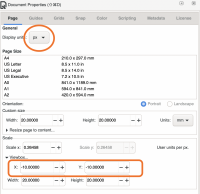
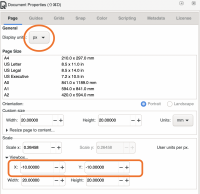
[image: Bildschirmfoto 2020-06-18 um 17.01.16.png]

In the Scale/Viewbox section is set X and Y = -10 what should be both =0

That is the reason for the offset. I think that's a bug in OpenSCAD export.

And a minor thing: I have the Display Units always set to "mm". The

SVG-export from OpenSCAD should do that too.

About your second question:

I don't know what caused the form you showed but if I read "PDF".. well..

I think that's complicated and pretty error-like.

Maybe there are several equal forms on top of each other?
> Hi nop.head, > first question: > I don't have an answer but importing the SVG into Inkscape and looking for "Document Properties.." looks like this (what is strange): > [image: Bildschirmfoto 2020-06-18 um 17.01.16.png] > In the Scale/Viewbox section is set X and Y = -10 what should be both =0 > That is the reason for the offset. I think that's a bug in OpenSCAD export. > And a minor thing: I have the Display Units always set to "mm". The SVG-export from OpenSCAD should do that too. > About your second question: > I don't know what caused the form you showed but if I read "PDF".. well.. I think that's complicated and pretty error-like. > Maybe there are several equal forms on top of each other? > >
NH
nop head
Thu, Jun 18, 2020 3:59 PM

I found this definition of viewBox:

The viewBox attribute defines the position and dimension, in user space,

of an SVG viewport.
The value of the viewBox attribute is a list of four numbers: min-x, min-y
, width and height. The numbers separated by whitespace and/or a comma,
which specify a rectangle in user space which is mapped to the bounds of
the viewport established for the associated SVG element

That seems to be correct because the object starts and -10,-10 and is 20
wide. So it looks more like InkScape and the SVG import are both wrong.

Perhaps the PDF is not simply a line drawing, i.e. the lines are actually
thin filled rectangles rather than a line with stroke.

On Thu, 18 Jun 2020 at 16:51, dpa sc@pankd.de wrote:

Hi nop.head,

first question:

I don't have an answer but importing the SVG into Inkscape and

looking for  "Document Properties.." looks like this (what is strange):

[image: Bildschirmfoto 2020-06-18 um 17.01.16.png]

In the Scale/Viewbox section is set X and Y = -10 what should be both =0

That is the reason for the offset. I think that's a bug in OpenSCAD

export.

And a minor thing: I have the Display Units always set to "mm". The

SVG-export from OpenSCAD should do that too.

About your second question:

I don't know what caused the form you showed but if I read "PDF".. well..

I think that's complicated and pretty error-like.

Maybe there are several equal forms on top of each other?


I found this definition of viewBox: The *viewBox* attribute defines the position and dimension, in user space, > of an SVG viewport. > The value of the viewBox attribute is a list of four numbers: min-x, min-y > , width and height. The numbers separated by whitespace and/or a comma, > which specify a rectangle in user space which is mapped to the bounds of > the viewport established for the associated SVG element That seems to be correct because the object starts and -10,-10 and is 20 wide. So it looks more like InkScape and the SVG import are both wrong. Perhaps the PDF is not simply a line drawing, i.e. the lines are actually thin filled rectangles rather than a line with stroke. On Thu, 18 Jun 2020 at 16:51, dpa <sc@pankd.de> wrote: > > Hi nop.head, > >> first question: > >> I don't have an answer but importing the SVG into Inkscape and > looking for "Document Properties.." looks like this (what is strange): > >> [image: Bildschirmfoto 2020-06-18 um 17.01.16.png] > >> In the Scale/Viewbox section is set X and Y = -10 what should be both =0 > >> That is the reason for the offset. I think that's a bug in OpenSCAD > export. > >> And a minor thing: I have the Display Units always set to "mm". The > SVG-export from OpenSCAD should do that too. > >> > > About your second question: > >> I don't know what caused the form you showed but if I read "PDF".. well.. > I think that's complicated and pretty error-like. > >> Maybe there are several equal forms on top of each other? >> >> _______________________________________________ > OpenSCAD mailing list > Discuss@lists.openscad.org > http://lists.openscad.org/mailman/listinfo/discuss_lists.openscad.org >